

Unclaimed: Are you working at Gist?
Gist Reviews: 4.6/5 — Highly Rated
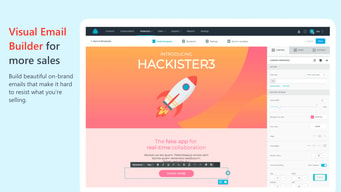
Gist is an all-in-one, feature-rich email marketing platform that empowers site owners to bridge the communication gap between them and their audience. The platform offers an email builder that lets users create and broadcast automated emails, upsell and cross-sell emails, consolidate multiple communication channels and provide access to live chat and chatbot widgets. The advanced cross-channel messaging features boost audience engagement and interaction and Gist’s free plan is quite comprehensive.

| Capabilities |
AI
API
|
|---|---|
| Segment |
Small Business
Mid Market
Enterprise
|
| Deployment | Cloud / SaaS / Web-Based, Mobile Android, Mobile iPad, Mobile iPhone |
| Support | 24/7 (Live rep), Chat, Email/Help Desk, FAQs/Forum, Knowledge Base, Phone Support |
| Training | Documentation |
| Languages | English |
Gist Pros and Cons
- Free plan is quite comprehensive
- Supports advanced cross-channel messaging
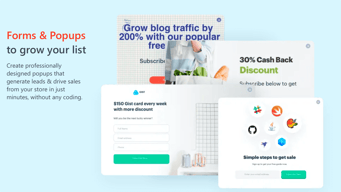
- Offers buildable forms and popups
- Clunky chat history functionality
- Limited integrations






Gist sells Support and Marketing separately, or together as an “All-in-One Bundle”. At 1,000 contacts the bundle is $128 a month. Support Premium is $99 and Marketing Premium is $29. Ninety-nine plus twenty-nine is one hundred and twenty-eight — the bundle is the sum, to the dollar, and the same holds on Professional ($29 + $19 = $48) and on the struck-through list prices ($499 + $49 = $548). Whatever “go all in” means here, it does not mean a discount.
- What it is: An all-in-one live chat, help desk and email marketing platform.
- Best for: Small teams wanting chat and email marketing from one vendor, at a genuinely low entry price.
- Pricing: Support Free/$29/$99; Marketing from $0/$19/$29 at 1,000 contacts. Verified July 2026.
- The honest catch: Premium’s headline price is a promotion against a $499 list, badged “ENDING SOON”.
What Is Gist?
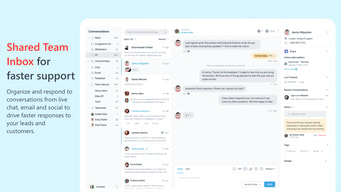
Gist bundles the tools a small business usually buys from three vendors: live chat and a team inbox, a help desk with a public knowledge base, and email marketing with automation, forms and event tracking. Its own comparison frames it as replacing ActiveCampaign, Olark and Zendesk together. It holds a 4.5-star average across more than 200 Findstack reviews.

The pricing page splits into three tabs — Support, Marketing and All-in-One Bundle — with Marketing metered by contact count.
How Gist Works
- Two products, sold separately or together.
- Support meters seats — 2, 5, then unlimited.
- Marketing meters contacts, from 200 free.
- The bundle is the sum of the two.
- Premium prices are promotional, against a struck-through list.
- A full no-questions refund is offered.
Gist Pricing
Captured from Gist’s pricing page in July 2026 in US dollars, reading all three tabs at the 1,000-contact slider position.
| Gist Support | Price | Seats |
|---|---|---|
| Free Forever | $0 | 2 support seats |
| Professional | $29/mo | 5 support seats |
| Premium | $99/mo (list $499) | Unlimited |
| Gist Marketing | Professional | Premium | Premium list | Per 1,000 contacts |
|---|---|---|---|---|
| 1,000 contacts | $19 | $29 | $49 | $29.00 |
| 5,000 | $59 | $79 | $149 | $15.80 |
| 10,000 | $99 | $139 | $249 | $13.90 |
| 25,000 | $219 | $299 | $549 | $11.96 |
| 50,000 | $399 | $549 | $999 | $10.98 |
| All-in-One Bundle | Support | + Marketing | = Bundle | Discount |
|---|---|---|---|---|
| Professional | $29 | $19 | $48 | $0 |
| Premium | $99 | $29 | $128 | $0 |
| Premium list | $499 | $49 | $548 | $0 |

What actually decides your cost:
- The bundle saves nothing, and the arithmetic is exact. At the 1,000-contact setting, Support Professional ($29) plus Marketing Professional ($19) is $48 — the bundle price. Support Premium ($99) plus Marketing Premium ($29) is $128 — the bundle price. Even the struck-through figures add up: $499 plus $49 is $548. The page invites you to “go all in for a complete view of your user’s needs”, and the reason to do that is integration, not price.
- Premium’s headline is a promotion against a much higher list. Support Premium shows $99 with $499 struck through and an “ENDING SOON” badge — an 80% reduction. Marketing Premium is discounted far less, at roughly 41% to 47% depending on contact tier. So the two halves of the same “Premium” tier are being discounted on completely different scales, which is worth knowing if you are budgeting for a renewal at list price.
- Marketing’s volume curve is clean. Cost per thousand contacts falls from $29.00 at 1,000 to $10.98 at 50,000, improving at every step without reversing — unusual in this survey, where non-monotonic curves are common. If email volume is what you are buying, scale genuinely helps.
- Support meters seats, not conversations. Free gives two support seats, Professional five, and Premium is unlimited — so for a support team of any size, the jump from Professional to Premium is a step change rather than an increment. At $99 that is cheap per agent beyond about four people.
- The free tier is a real product on both sides. Live chat, team inbox, unlimited conversation history, saved replies, office hours, meetings and mobile apps on the Support side; 200 contacts, forms, popups, segments, event tracking and broadcast emails on the Marketing side. No time limit.
- There is a startup discount worth asking about. Gist offers companies with fewer than ten employees a 93% discount off Premium, by application. That is a much larger reduction than anything on the public page, and it is easy to miss.
Who Should Use Gist
- Small businesses replacing three tools. The clearest case — chat, help desk and email marketing in one place.
- Support teams above four agents. Premium’s unlimited seats at $99 is the value point.
- Early-stage startups. The under-ten-employee plan offers 93% off Premium.
- Anyone wanting a real free tier. Both products work permanently at $0.
It fits poorly for buyers expecting a bundle discount, since there is none; for teams needing only one of the two products at scale, where specialists may be stronger; and for anyone uncomfortable buying at a promotional price with an undisclosed renewal.
Honest Pros and Cons
Strengths
- A genuinely free tier on both products, permanently.
- Unlimited support seats at $99 a month.
- A clean, monotonic volume curve on Marketing contacts.
- A 100% no-questions refund guarantee.
- 93% off Premium for companies under ten employees.
- One vendor for chat, help desk and email marketing.
Limitations
- The All-in-One Bundle carries no discount at all.
- Premium is priced against a struck-through $499.
- “ENDING SOON” on a promotion with no stated end date.
- Support and Marketing are discounted on very different scales.
- Free Support is limited to two seats.
- Renewal pricing is not published.
Gist Alternatives and How It Compares
- ActiveCampaign is the email marketing half of what Gist replaces, and stronger at it.
- Tidio covers live chat and chatbots at a similar entry price.
- HubSpot is the enterprise-scale all-in-one, at many times the cost.
- Zendesk and Olark are the help desk and live chat specialists Gist names directly.
- Intercom and Drift target the same combined chat-and-marketing space.
For a broader survey, browse our live chat software directory.
The Verdict
Gist’s proposition is consolidation, and at the entry price it is a strong one. Live chat, a team inbox and a public knowledge base, plus email marketing with automation, forms and event tracking, for $128 a month at 1,000 contacts — with a free tier on both halves that is a working product rather than a demo. Premium’s unlimited support seats at $99 is the single best value on the page: beyond about four agents it undercuts almost any per-seat help desk.
The bundle framing, though, does not survive arithmetic. At the same contact setting, Support Premium is $99 and Marketing Premium is $29, and the All-in-One Bundle is $128 — the sum, exactly. Professional behaves identically ($29 + $19 = $48), as do the struck-through list prices ($499 + $49 = $548). Buying the bundle costs precisely what buying both products costs, so the reason to take it is that the two halves share data, not that it is cheaper. That is a perfectly good reason; it is just not the one “Save big with Gist” implies.
The other thing to settle before subscribing is what you will pay in year two. Support Premium’s $99 is shown against a struck-through $499, an 80% reduction badged “ENDING SOON” with no date attached — while Marketing Premium is discounted by roughly 45%. Two halves of the same tier discounted on entirely different scales is unusual, and neither renewal price is published. In Gist’s favour, it offers a 100% no-questions refund and a 93% discount off Premium for companies with fewer than ten employees — the latter by application, and far larger than anything on the public page. If you qualify, ask about it before paying the advertised rate.
FAQ
How much does Gist cost?
In US dollars captured July 2026: Gist Support is $0 (2 seats), $29 (5 seats) or $99 a month (unlimited seats). Gist Marketing is metered by contacts — free to 200, then $19 Professional or $29 Premium at 1,000 contacts, rising to $399 and $549 at 50,000. The All-in-One Bundle is $48 or $128 a month at 1,000 contacts.
Does Gist’s All-in-One Bundle save money?
No. At 1,000 contacts, Support Premium ($99) plus Marketing Premium ($29) equals $128 — exactly the bundle price. The same holds on Professional ($29 + $19 = $48) and on the struck-through list prices ($499 + $49 = $548). The bundle’s advantage is that the two products share data, not that it costs less than buying them separately.
Is Gist’s $99 Premium price permanent?
It is presented as a promotion. The Support Premium card shows $99 against a struck-through $499 with an “ENDING SOON” badge, but no end date is given and no renewal price is published. Marketing Premium is discounted on a different scale — roughly 41% to 47% depending on contact tier, against Support’s 80%. Confirm renewal terms before committing.
Does Gist have a free plan?
Yes, on both products and with no time limit. Gist Support Free includes live chat, a team inbox, unlimited conversation history, saved replies, office hours, meetings and mobile apps, for two support seats. Gist Marketing Free covers 200 contacts with segments, tags, website and event tracking, signup forms, popups and broadcast emails.
Is there a Gist discount for startups?
Yes, and it is substantial. Gist offers companies with fewer than ten employees a 93% discount off its Premium plan, available by application rather than automatically. Since that is far larger than any reduction shown on the public pricing page, it is worth applying before paying the advertised rate if you qualify.

Compare Gist with other popular tools in the same category.
All-in-one functionality for ticketing, live chat, help desk, AI assistant for internal team and customers. Onboarding was simple and intuitive. Customer support especially Ruchi is responsive and helpful.
some limits in usage, but have not affected as a medium size business. Missing AI option on mobile device
It combines all in one solution for our team for email ticketing/support, live chat, emails and help desk
I really love how easy it is to add chat to my site and other sites. The knowledge base is a major plus. They just launched drip campaigns. My customers are now engaging constantly with me and getting the info they need. I can immediately get a notification in my phone and chat with customers on a mobile app. Now with automations, merge tags, filters, etc I can always see where my customers lie. It’s fantastic!
The mobile app needs serious attention. It's pretty poor. When you get notified about a chat, you can click on the notification to open the app. Then you type your response to the customer/client … click enter to send … and it says it sends and then clears your entire response. So, you have to force quit the app, open it up and find the message you want to reply to … to be able to chat with the customer / client. That's it. There's only the option to chat or close the conversation. So, if you need to use a mobile app for chat, Gist is not your app. Beyond that, there aren’t too many downsides to this application. I wouldn’t say that developers are fairly quick at implementing new teachers and I really enjoy the use of this app. I do wish deliverability % was slightly higher, but that’s just a matter of time.
Currently have issues where customer interest drops off because there was no live chat.

Gist brings together all the pieces to create a marketing automation funnel, customer support and CRM for businesses that sell their products or services.
Not much to dislike here. My minor gripe would be the UI of the calendar for scheduling meetings. But that is probably just personal preference.
Gist allows business owners to access features for a fraction of the price charged by competitors like Salesforce & Hubspot.
Few things which I liked about Gist - 1 - Dashboard 2 - Custom Fields for sorting contacts and data acquired through various channels and websites 3 - Live chat support team 4 - Integrations with leading softwares and tools 5 - Easy to use for newbie (first email marketing tool I'm using and I'm loving it)
Lacks email drag and drop design tool, they need to add more widgets to design emails.
Gist is helping us getting leads from various social media channels and websites, which in turn helps us stay connected with the customers and leads
Simplicity of use, great tutorials (we learned so much about emails) and top-notch deliverability. Anyone on our team can utilize it without extensive training
i would say it was a lack of sales pipeline, but that has now been added and is in beta, so we have brought that into our system. It now does everything we wanted.
We have Infusionsoft but we were getting bogged down in basic bulk email communications and prospecting - and the larger CRM is so complicated. GIst makes it easy
The chat bot is so easy to use. Also, avaialbe to all on all packages.
GIST menus are a little bit difficult to navigate, especially the bot menus. Sometimes I get a little lost when trying to find the BOT that I created.
Prior to using GIST, customers wouldnt be able to quickly leave their email address with us. Instead, they would have to fill out a form on our contact us page. Now, our potential clients can leave their email address with our chatBot, and then we can organise a meeting at our clients convenience to go over the project.
I have had this tool for several years now and can say that it is now becoming a mature product, its feature rich, works exceedingly well, and the support has always been responsive. They have recently gone above and beyond to investigate an issue with some html code that originated in a different company so a big thanks to the dev team there too I'm very happy with Gist and it's visual workflow feature and as a small business owner i'm more than happy with this product
The only frustration I care to voice has been the learning curve. There's room for improvement on the intuitiveness, but once you are over the learning hurdle it becomes significantly easier to navigate and understand
I am a solopreneur so Gist is an important force multiplier for communicating with potential customers and enabling them to communicate with me through live chat

Gist has a lot of great features and a great user experience for both site visitors and support agents. The onboarding was very intuitive, also thanks to their detailed knowledge base. So far we have only used the live chat and bots, but we are already working on migrating the custom knowledge base of our SaaS to Gist.
We would like to see a few more integrations, especially with Frill, SureCart, SureMembers and BuddyBoss.
Gist provides an easy way for our users and other interested parties to get in touch with us.

It's all in one, I don't have to subscribe to many services
Nothing so far, it has all I need in one tool
Help center and live chat for my website
Easy setup, extremely professional interface (UI) and UX. Love the live chat customer service they have to solve issues.
The software is amazing, I just wished they offer no branding for the professional plan.
Almost no other software makes it easier to convert visitors into leads or even clients than a live chat. And Gist is one of the most reliable ones around. Seamless integration
Easy to use, really powerfull tools to offer support to all my visitors. It solves my problems to offer support to my visitors when they on my site and blog and I help them to find the content they need. For me has been a life changer because is easy to be in contact and the messenger is compatible for desktop, tablets and mobile devices.
Some features are difficult to find and sometimes tkes some time to undersantad where the function is. But they have a comprehensive and well documented knowledge base so it's easier to find what I need, everythign is organized by topics and with clear instructions. They also an amazing support team ready to help, they answer fast and ahve the solution ready for you, they even will do the procees for you if its possible so you just have to seat and wait while they fix it for you.
Offering support in my blogs. My visitors have the chance to contact directly with messenger and when I'm not available they can leave me a message or search in my knoledge base. Before Gist I received a lot of emails asking quick questions or let me know that they didn't find an information, the time between emails was really long and my visitors ended goign to another website, now I have the solution fast and ready, so they are happy and keep retuning for more content.
I was able to eliminate multiple other software I used to run my business by switching to Gist. I'm very happy that I have everything I need in one easy to use dashboard. It's perfect.
Not much to be honest. There are a few other features I'd love to see such as project management features.
It's giving me easy access to communication with my customers. The live chat and emails that show up in the same inbox is exactly what I needed.
Easy to use and the integrations with other plaforms via zapier or webhooks make syncing between different stacks and absolutely breeze
Managing multiple domains under one account has been a bit tricky but the dev team are working on this.
Live chat with my users has been difficult to crack in the past. Gist has helped to cure all of the issues and has helped open a communications channel with sales prospects and customers in a new way. The mobile app is amazing and easy to use.

Gist has a complete marketing solution that provides a live chat, email marketing solution and chatbot solution that engages customers more with us.
I can only place the chat widget on 1 site unless I upgrade. That's ridiculous.
Their email marketing solution helps me to save money as I don't need to engage another email marketing platform for the same purpose. I hope the limit could be higher.

free, simple to install with one coding line to copy and past
dashboard is a little complicated, Arabic language support need to be much sharpened
Some visitors don't like to hit WhatsApp button or any other cta. So, the chat is more friendly
8 powerful tools to increase my business. GIST is the perfect tool to handle automation: marketing, support, knowledge base, forms, bots, tracking and much more. Your perfect ally!
I do not dislike anything. GIST has a LOT of functions and it's not always so easy to understand which tool to use for a specific goal. They have many article and videos, but I would suggest to add more documentation for advanced functions and scenarios. The support team is always available and ready to help though.
I was able to automatize the marketing for my business. One platform to handle marketing and support.
I list my favorites: It provides cool features Its friendly and responsible team members Easy to integrate with our project
It is not a dislike and just a suggestion. Maybe it is active now, but I didn't find them. It is excellent and helpful that there were some tutorials about configuring it in different projects.
I used it for live chat
Trial emails and customer support messenger with behavioral targeted emails and messages.
Occasional bugs, but they are usually fixed fast by customer support.
help desk, targeted emails, customer support

La comodidad de tener todas la sherramientas para poder hacer un buen uso del emailmarketing y la facilidad de poder optimizar el trabajo
hasta el momento las funciones me son muy bentajosas y no encuentro un punto negativo
La automatizacion y control de lista de mis leads es mucho mas sencillo y hace que ahorre mucho timepo y trabajo.

Advanced marketing and automation tools make onboarding and customer success flows incredibly simple and intuitive.
None of it so far! Gist seem to have it pretty much nailed! The 'form' functionality seems a little basic. Currently this works for newsletter type forms, whereas it would be great to have an embeddable form, which has custom fields and info (basically, a contact type form) - this could then come through as a message / chat. The outbound email facility is handy, but it would be good to see replies just come directly to the message list, rather than a direct reply to the mailbox (outside of gist)
Marketing automation, onboarding and customer success flows / development for better customer retention and growth.
I've been an Intercom user for 3 years and finally got tired of their slow support and ridiculously high prices. I found one of my vendors using Gist and made the switch. I have been very pleased with the platform. The features are very comparable to Intercom and some even better. I love how easy it is to add custom fields and create contact segments. Plus it does a great job of tracking page views of my users so I can see where they have been in my app. Moving from Intercom was easy - I was able to export all my contacts, import and remap to Gist fields. The customer service has been great - they usually reply in a couple of hours and have been very helpful.
Some of the documentation is not very clear and seems to be missing some key elements for implementation. But, there is a ton of support docs, which is great. Not much else I have run into.
We use Gist for our support chat - which gets used a lot. We also use it to send marketing emails to our users based on user types and permissions.

It helped me help my customers when I'm not on my desk. Their mobile app is amazing. I think it would be great if they add more features like email scheduling etc in the mobile app
Limitations on contacts, emails etc. I believe to stand out from the crowd these guys should offer everything unlimited. Trust me only 0.5% people will truly use your unlimited resources. Others will not even go over 10k contacts but they are stratified with that unlimited plan.
Helping customers on the go. Nurturing my digital marketing customers. I don't like to leave them alone after the invoice has been paid.

For sure the Live Chat, Knowledge Base, Scheduling the meeting, Email Marketing and the UI of the Live Chat is amazing. The Dashboard is so easy to use. I also do like that Gist is always bringing new features to the platform and I really don't regret my purchase.
Absolutely nothing. They are working very hard to bring new features and I'm in love with it.
As a company we are closer to the client's problem, it really does benefit in the reputation of the company and it also benefits in the company finances, because the user satisfaction is very important to us.
The UI and UX of Gist makes it one of the better helpdesk platforms I've used. I've found that there is usually a trade-off or compromise when it comes to features and ease of use, but Gist marries the two wonderfully. It integrates wonderfully with the rest of my stack and is extremely easy to deploy to sites. There are a ton of great features backed by a great support team.
The only thing I dislike is that without spending more on the product, I miss out on features like Webhooks. Fortunately there is still access to the API, but many tools I use rely on Webhooks, so that missing functionality (for me - given my plan) is a bit of a downer, but I would say that's the only gripe I have with the system.
We have integrated Gist for our WordPress site which runs on BuddyBoss, LearnDash, and WP Fusion. We are able to use Gist not only as a support tool, but also as a CRM for WP Fusion to tag products and gate access to content.
How easy it is to start, and use. I didn't know how much a website chat was needed, I've closed so many sales using GIST.
I love it. This is the perfect tool, everything you need is included: chat, calendar, crm, marketing, chat bots, just to mention a few.
Going through all the Marketing Funnel, from Sales, Customer Services, Automation, Email Marketing.

I DEEPLY have appreciated Gist's timely support. Their tools and the platform are always improving. You're definitely in good hands with the Gist team!
I wish that Gist had more integrations with other tools like Thrivecart, which I use. But, I'm VERY grateful that I can get by using Gist's HTML codes to integrate with other tools. It is how I'm able to connect with Thrivecart.
I have a reliable email automation service. Thankfully, I heard about Gist in the early days and got a lifetime plan. Super grateful to have this. It also gives me a wonderful chat box for my website. It helps me automate much of my customer onboarding experience through emails after they purchase.
GIST automation capabilities are excellent, even at the lower price points. These features immensely helped me as a more recent business with not lots of upfront capital. I also benefit from the smooth integration with WordPress. I am recommending GIST for being a professional chat, email marketing, and CRM option. Chat is handy and valuable.
Windows and MAC applications should have the option to start automatically when the computer starts.
After I started using the GIST chat, I noticed an increase in sales and more significant interaction between the site and visitors
The live chat works well. Booking meetings is easy and efficient. I love the integrated knowledge base site you can create. I love seeing where leads go on my website. Their intent and the pages that convert. Auto emails depending on filters is also great. Android app for live chats Zapper integrations
There is no mobile site or app for managing the backend. There is a mobile app for backend administration. You have to use the website.
Easy communication and connection with leads
My questions and concerns quickly answered either immediately or within 2 business days. I was in the beta group so was able to acquire a lifetime license for one low cost. They are continually improving their product. It is an all in one product and right now is providing me with more features than I am currently using but inspires me to explore more ways I can reach my audience.
My biggest complaint is that as a lifetime member there are new features for which I am denied access. As a bera member I would have hoped I'd continue to receive full access to all new features. That being said, I am able to do everything I need to do to segment and otherwise reach and communicate with my audience.
I am getting the hang of this platform. I have been able to substantially increase my mailing list through opt-in offers. I use Convertful forms which I can link to Gist. Its email options are easier to work out and I use both broadcast email to regularly attend to my list members as well as drip campaigns that send out emails automatically to list members.