

Unclaimed: Are you working at LiveChat?
LiveChat Reviews: 4.5/5 — Highly Rated
LiveChat is a premium live chat and help desk software for business. The platform is designed and built specifically for amazing customer service and is used in over 150 countries by over 31,000 organizations, including small, medium and enterprise organizations who want to improve customer satisfaction and boost online sales results.

| Capabilities |
AI
API
|
|---|---|
| Segment |
Small Business
Mid Market
Enterprise
|
| Deployment | Cloud / SaaS / Web-Based, Desktop Mac, Desktop Windows, Mobile Android, Mobile iPad, Mobile iPhone |
| Support | 24/7 (Live rep), Chat, Email/Help Desk, FAQs/Forum, Knowledge Base, Phone Support |
| Training | Documentation |
| Languages | English |







LiveChat prices by agent, but the limit you hit first is visitors. Starter tracks 100, Team 400, and Business 1,000 — and that is site visitors, not conversations. A modestly busy website exceeds the entry allowance without a single person clicking the chat widget. Work out your traffic before your headcount, because that is the number that picks your tier.
- What it is: A live chat platform for websites, with proactive messaging, routing, reporting, and an AI layer.
- Best for: Established support teams on sites with real traffic, where chat is a staffed channel rather than an experiment.
- Pricing: Starter $19, Team $49, Business $79 per person billed annually. Monthly is $25, $59, $89. Enterprise quoted. Verified July 2026.
- The honest catch: Starter is a single-user plan despite being priced per person, so any actual team starts at $49 each.
What Is LiveChat?
LiveChat is one of the longest-established dedicated live chat products, now sold alongside a broader family that includes ChatBot and HelpDesk under the Text brand. It is chat-first rather than a support suite with chat attached, and that focus shows in the depth of the agent experience: canned responses, routing, transfers, visitor context, and real-time typing previews are all mature.
The 2026 positioning leans on AI, with the site advertising “LiveChat 2.0” as an inbox with a revenue counter spanning human and AI agents. Underneath, the differentiator remains proactive engagement — tracking who is on your site, what they are looking at, and triggering targeted invitations rather than waiting for someone to open the widget.
That proactive capability is exactly why visitor tracking is metered, and why the limits deserve more attention than the per-agent headline.
How LiveChat Works
- Priced per agent, gated by visitors. Two separate dimensions, and the second is the one most buyers overlook.
- Proactive chat invitations. Trigger messages based on behaviour, which is the core of the product’s value.
- Routing and transfers. Mature queueing, assignment, and escalation between agents.
- Chat history retention. 60 days on Starter, unlimited from Team.
- Reporting. Basic on Team, with agent performance metrics and staffing prediction on Business.
- Multi-channel. SMS and Apple Messages for Business arrive at the Business tier.
LiveChat Pricing
Captured from LiveChat’s pricing page in July 2026. A 14-day free trial requires no credit card.

| Plan | Annual | Monthly | Users | Visitors tracked | Chat history |
|---|---|---|---|---|---|
| Starter | $19/person | $25 | 1 | 100 | 60 days |
| Team | $49/person | $59 | Unlimited | 400 | Unlimited |
| Business | $79/person | $89 | Unlimited | 1,000 | Unlimited |
| Enterprise | Quoted | — | Unlimited | Custom | Unlimited |

What actually decides your bill:
- Visitor tracking is the constraint that arrives first. 100 visitors on Starter is a very small allowance for any site doing real traffic, and it governs how many people LiveChat can see and proactively engage. Since proactive invitation is the main reason to choose this product over a basic widget, hitting the ceiling undermines what you bought.
- Starter is a one-person plan. It is quoted per person, which implies you could add people, but the plan supports a single user. Any genuine support team starts at Team, meaning the real entry price is $49 per agent — 2.6 times the advertised figure.
- Per-agent pricing compounds quickly. Five agents on Team is $245 a month; on Business, $395. Ten agents on Business is $790. This is a significant line item, and it scales linearly with the team.
- Annual billing saves 17% to 24%. $19 against $25 on Starter, $49 against $59 on Team, $79 against $89 on Business.
- 60-day chat history on Starter is a real limitation. Transcripts matter for quality review, disputes, and training, and two months is short if you ever need to look back.
- Business is where workforce management lives. Work scheduler, staffing prediction, and agent performance metrics only appear at $79, which is the practical reason larger teams upgrade.
Who Should Use LiveChat
- Established support teams. The clearest case. If chat is staffed during business hours by people whose job it is, the agent experience justifies the price.
- Sites using proactive engagement. Behaviour-triggered invitations are genuinely good here, and it is the strongest differentiator.
- Ecommerce with sales-oriented chat. The revenue tracking angle fits stores where chat converts rather than just deflects tickets.
- Teams needing shift management. Business’s scheduler and staffing prediction are real workforce tooling that lighter competitors lack.
It fits poorly for small businesses testing chat, where Tidio offers a free tier and far lower entry cost; for teams wanting an integrated help desk, where HubSpot Service Hub or Zendesk bundle chat into ticketing; and for very high-traffic sites, where visitor limits push you toward an Enterprise quote quickly.
Honest Pros and Cons
Strengths
- Excellent agent experience. Canned responses, routing, transfers, and visitor context are all mature and fast.
- Strong proactive engagement. Behaviour-triggered invitations are the product’s best feature.
- Reliable and well established. Many years of refinement show in the details.
- Good reporting at Business. Agent metrics and staffing prediction are genuine workforce tools.
- A real free trial. Fourteen days without a credit card.
- Broad integrations. Connects to most major ecommerce and CRM platforms.
Limitations
- Visitor tracking limits are restrictive. 100 on Starter and 400 on Team constrain sites with real traffic.
- Starter supports one user. Despite per-person pricing, so teams start at $49 each.
- Expensive at scale. Ten agents on Business is $790 a month before any add-ons.
- 60-day history on Starter. Short for quality review or disputes.
- No free tier. Competitors offer one, which makes low-commitment evaluation harder.
- Chat only. Ticketing and help desk are separate products in the Text family, at separate cost.
LiveChat Alternatives and How It Compares
- Tidio is the obvious lower-cost comparison, with a free tier and chatbot automation aimed at smaller businesses.
- Freshchat offers similar capability inside the wider Freshworks suite, often at lower cost.
- HubSpot Service Hub bundles chat with ticketing and CRM, which is better value if you need more than chat.
- Zendesk Support Suite is the enterprise support platform where chat is one channel among several.
- Intercom is the closest premium competitor, stronger on product-led and in-app messaging. Crisp is the budget all-in-one option.
For related tools, browse our live chat, help desk, and chatbots directories.
The Verdict
LiveChat is a good product that knows exactly what it is. It does not try to be a help desk, a CRM, or a marketing suite — it is chat, done properly, with an agent experience refined over many years and proactive engagement that genuinely outperforms a passive widget. For a team where someone is staffing chat during business hours and conversions or resolutions are being measured, that focus is worth paying for.
Price it on traffic, not headcount. The per-agent figures are what everyone compares, but visitor tracking is the limit most sites reach first: 100 on Starter, 400 on Team, 1,000 on Business. Those are visitors on your site, not conversations, and since proactive invitation is the main reason to buy LiveChat rather than something cheaper, running into the ceiling degrades the specific thing you paid for. Check your monthly sessions against those numbers before choosing.
Then be clear-eyed about the entry point. Starter’s $19 is a single-user plan, so it is a solo-operator price rather than a small-team one, and any real support function starts at Team’s $49 per agent. Five agents is $245 a month, ten on Business is $790 — meaningful money that scales linearly. If chat is a core, staffed channel, that is defensible and the tooling supports it. If you are testing whether chat works for your business at all, Tidio’s free tier answers that question for nothing, and you can move here once the answer is yes.
FAQ
How much does LiveChat cost?
Billed annually, Starter is $19 per person per month, Team $49, and Business $79, with Enterprise quoted. Monthly billing raises these to $25, $59, and $89, so annual saves between 17% and 24%. A 14-day free trial is available with no credit card required. Note that Starter supports only one user, so teams effectively start at $49 per agent.
What is the visitor tracking limit?
Each plan caps how many site visitors LiveChat can track: 100 on Starter, 400 on Team, and 1,000 on Business, with custom limits on Enterprise. This counts visitors on your website rather than conversations, and it governs how many people the system can monitor and proactively invite to chat. Because proactive engagement is LiveChat’s main differentiator, this limit often matters more than the per-agent price.
Does LiveChat have a free plan?
No. There is a 14-day free trial requiring no credit card, but no permanent free tier. Competitors including Tidio and Crisp do offer free plans, which makes them a cheaper way to test whether live chat suits your business before committing to a paid platform.
Is LiveChat worth it compared to Tidio?
It depends on whether chat is staffed. LiveChat’s agent experience, routing, and workforce management at the Business tier are stronger, and it suits teams where people work chat as a job. Tidio is markedly cheaper, has a free tier, and leans harder on chatbot automation, which fits smaller businesses that cannot staff chat continuously. For a support department, LiveChat; for a small business testing the channel, Tidio.
What is LiveChat best for?
Established support and sales teams on websites with meaningful traffic, particularly those using proactive chat invitations to engage visitors rather than waiting for inbound questions. Its scheduler and staffing prediction at the Business tier suit teams managing shifts. It is a weaker fit for businesses testing chat casually, and for anyone wanting ticketing bundled in.

Compare LiveChat with other popular tools in the same category.

Livechats ability to store all chat messages between our customer service agents and customers, is what I find most impressive as a user. The above ensures that we can still reply to our customers, even when no agent was online when they dropped us a message, thereby ensuring that we do not unnecessarily lose potential sales leads.
There isn't anything I think I dislike about Livechat. I rate it as the best helpdesk software program for a reason.
Ability to have real-time chat discussions with visitors to our website , is the problem we solved through Livechat. Livechat has helped us improve the level of customer satisfaction, by making it easier to attend to customer queries faster, than we did before Livechat.

Customer Engagement- This is the standout aspect of Livechat for me. Important Livechat features such as eye-catchers, chat assignment, chat transcripting, chat assignment etc makes it so easy for us, to engage with our customers via our website or through our mobile application.
Nothing really to dislike about Livechat from my experience. I was involved in my organizations deployment of Livechat , and I was impressed every step of the way. From the speed of response, and how quickly it was to get support as regards integrating Livechat with 3rd party software, very few software vendors have impressed me more than Livechat.
Livechat is the major tool with which we interact with our customers, live from our website and mobile application. Faster engagement with customers is a major benefit of our deploying Livechat, and this had obviously led to an higher customer satisfaction rate, for my company.

Chat archiving - Livechat was the first helpdesk solution I encountered , with this feature. For me and my colleagues in the sales and marketing department, this feature is a life saver and actually does make our work easier. By archiving our chats with customers, it is always so easy to locate recurrent issues faced by a particular customer by simply looking through their previous chat archives with our agents, thus providing us with more depth to resolve such issues.
Absolutely nothing. I have used Livechat for at least a three year period and it is on the top of my list , of most helpful software products at work.
Livechat solves all problems related to prompt response to queries made by customers or random visitors, via our website or mobile application. Livechat has helped improve our overall response time to customer questions,and in so doing has helped us grow our sales numbers.
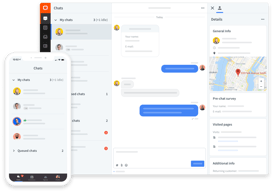
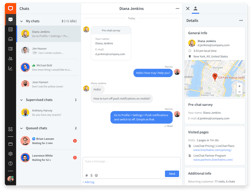
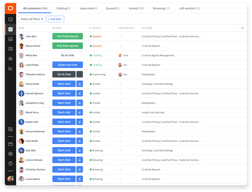
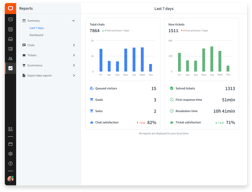
LiveChat provides instant feedback when your organization's website has a visitor. Upon examining the visitor in LiveChat's queue, you are given extremely detailed information about the visitor in question. Users of LiveChat are able to see a visitor's location, local time zone, time spent on the website, and when they depart. Chat messages are given their own notification windows, which allow users to return to other duties while they wait for visitors to initiate conversation or reply to messages. Users are able to see what visitors are typing as they are crafting their messages, though the visitors are unable to see what users are typing on their end. LiveChat's messaging feature, its primary function, works almost flawlessly. Furthermore, LiveChat provides users with several options regarding how they want to customize their experience. Users are able to create chat tickets for visitors, monitor multiple chat threads simultaneously, craft pre-written greetings and responses to frequently asked questions, and create profiles for multiple agents who can monitor LiveChat in rotating shifts. Overall, LiveChat has the features and flexibility to make it a necessity for any organization that takes real-time engagement with visitors to their website seriously.
The only recurring issue with LiveChat is that its notifications are sometimes inconsistent. When users of LiveChat log in and begin monitoring their website's visitors, chat messages will sometimes not appear. While LiveChat does provide an option for users to begin accepting chats as soon as they log into the service, this does not seem to always work. While LiveChat will prompt users to let them know that they are not able to accept messages until confirming their consent to do so, this should not happen if users have already predetermined their preferences. Why this occurs is unknown, and it can sometimes cause us to miss out on chats with visitors who have questions. If LiveChat could iron this kink out, their software would be almost flawless.
LiveChat has allowed us to discuss the aspects of our company with visitors to our website in real-time. This is a boon for a company with as unique of a business model as Indoff, Inc. It has also allowed us to find new prospects who we otherwise would not have, giving us another avenue by which we can source potential new hires. It even allows us to weed out those who are interested but not qualified at this time. Overall, LiveChat proves extremely useful as both customer service and prospect sourcing tool.

User-friendly. Canned replies can include a photo, so your customers know they are speaking to an actual person
It's only one flaw that I dislike: there is no Dark Mode, which would reduce eye strain when chatting repeatedly.
Our company's LiveChat feature allows our customers to contact a customer service representative for questions and concerns about their swing set, as well as for potential new customers to speak with a sales representative about what they are looking for.
Very helpful feature to add to a website, especially for a business that is patient-based or client--based.
I wouldn't say there is anything I dislike about Live Chat.
Having questions outside of regular business hours that can be answered through this, rather than hire round the clock customer service.

Livechat social media integration - This has allowed our customers to send live chat messages to the customer service department in my organization, without leaving our social media pages on Facebook or Instagram. This has greatly improved engage with our users.
Nothing to dislike. Livechat has been the helpdesk tool of choice in my last two company's for a reason - it does its job well.
Real-time chat communication with our customers and interested sales leads from our website, mobile app. And even right from our social media pages.

Chatbot - Livechat Chatbot helps respond to simple , regular questions asked by our website and mobile application users. This has reduced the number of customer query, which human personnels in our customer service department need respond to. Analytics - Livechat provides us with much needed metric data around things like the number of people on our website, sources of our website traffic, the device being used by website visitors etc Chat history - Livechat saves every chat engagement with customers , by using devices of access and IP address as a tally. This ensures that whenever a returning visitor makes an enquiry, we are able to pull out their previous correspondence with the customer service department, as long as they are using the same device and same internet IP address.
Absolutely nothing. Livechat has everything I expect to get from an helpdesk software program.
The problem of real-time communication with our customers, while they are on our website and mobile app. Is. Solved using Livechat. Livechat has made customer support available to our customers at all times, as long as they are within reach of our mobile app. Or website.
It provides fast and friendly support for clients
Sometimes there are intermittent issues with the product
We are providing quick and easy customer support with a user-friendly support channel.

I like Livechats customer sneak-peak functionality the most. This feature allow me see what the customers are typing before their messages are sent. This has allowed me extra seconds and minutes to prepare my responses to a customers question.
I have used Livechat for over two year, and I see nothing wrong with this software program. It works just fine to meet my needs,
We serve all helpdesk related needs using Livechat. Livechat makes it so easy to communicate with our customers , not only on our website and mobile applications but across multiple social media platforms.

Canned responses - These are saved responses to some of the most commonly asked questions , posed to our customer service agents by our users. By saving these responses, we are able to send them to users as responses whenever they ask us a commonly asked question, thus saving us time. Chatbot - Livechats chatbot acts as an assistant to our customer service team, by engaging visitors and users of our apps. Who need the help of a customer service agent. Our use of Chatbot has reduced the workload on our customer service agents. Analytics and metrics - Livechat provides us with analytics and metrics around visits to our websites and user activity on our mobile app. This has enabled members of my organizations growth team to better understand important marketing strong pointers such as geographical location of website visitors, and their device of choice.
I am completely fine with our overall experience on Livechat. I do not think an alternative app. Can provide better quality.
Livechat makes customer engagement very quick, scientific and efficient. Livechat provides us with a cheap way to engage customers and address all issues they have with our products.
The ease of use makes it ideal for almost any business.
Notifications can be glitchy at times but if you refresh it, they will come through.
Being able to answer questions from on app.

Livechat provides advanced data and analytics regarding how users of our app. Interact with my company's customer service agents. Some of the vital data commonly provided by Livechat includes how long it took the sales and marketing team to resolve tickets opened by customers, the average rating given by customers after a case was resolved, and of course the percentage of customer chats missed by our agents.
At the moment, I cannot think of any time where-in I have had any displeasure using the Livechat customer engagement program.
Livechat is the major tool we use to communicate with customers when they encounter issues while using our products. By adapting Livechat, my company has improved customer ticket response time.
Easy to navigate and use this chat feature.
Nothing so far. The chat meets my standards.
Communucation/support for 600+ members during a virtual legislative session over zoom.
The simplicity of the admin user experience. With a complex and large tool being able to simply set it up it makes the world a difference.
Nothing that we dislike so far and we have been using the program for just over two years now
We have solved our communication issue with our prospects, email is not the go to way of communicating anymore so to have this to instantly get back to our prospects its been a game changer. Also having the automation option for when we are offline to still help out our customers is amazing.
I love everything about livechat.com. The interface, the app and support.
It's too expensive for small businesses and a constant barrier to entry especially if you live in a country that has a weak currency against the $. They should allow more users per account. Paying for every user is just not affordable for countries that don't' fall in the USA, Canada, Europe and the UK.
It's great to be able to get my clients to communicate with their customers live on their websites. There is a lot of good to be said to have an actual person to talk to instead of an email or form that might fall through the cracks. Clients are making bookings, selling products and getting leads plus a database for retargeting.
The ability to quickly and easily communicate online with customer service representatives.
Love everything about LiveChat! Beats having to call and chat with a customer service rep!
The ability to chat online as opposed to calling and talking to an agent on the phone.

Absolutely easy to use! Nice UX/UI rounds everything up!
I wish that the chat widget has more variable settings like a different sound or effect.
We are absolutely suprised by Live Chat. We could generate some leads in a short time. We will still work with Live Chat in the future.
Livechat provides real-time data better than any other website or in-app customer engagement product. The Livechat team is active and ever available to respond to our queries whenever we had a reason to reach out to them. Since the release and adoption of “Botengine” , we have greatly improved our chat response time ,all thanks to this Livechat instant messenger Bot.
I join the customer service department once a month, and that means I have used Livechat once every month for the past two year. Simply put, there is no weakness I know about.
Livechat offers us a cheap and quick way to answer our customers questions. My company has simply saved money by adopting Livechat as a major form of customer interaction.

Control number of chats per agent, Eay pluggins for WordPress sites and integrates with CRM like Salesforce, Leadsquare
Admin console and user console is not different , If you have bought 2 users one of them will be admin. U will have to buy a seperate license for admin
Handle chat queries , and customer satisfaction
I loved the very fast and helpful support team, I liked the way they introduced me and my colleagues to the product and how they showing you step by step on how to use it! its an easy and user-friendly Live chat. Big Up for the Polish Team there !!!! honestly one of the best support I worked with even im a support agent :)
The only thing that I was missing in the Live chat as a client support agent was that I wish they had a translation inside of the chat window.
Client issues in general, anything related with our services
Chat iO is super easy to implement and has a really beautiful interface. The real-time monitoring is really helpful with shopify and the canned responses make it easy to deal with large influx of visitors. Having canned responses made it really easy for our available agents to help more customers and save us from responding later with an email. Having chat history was really helpful with training new team members and creating handbooks for clients.
A little expensive if you have a smaller team but not unaffordable. A lot of the features aren't available in the basic package. It would be nice if some of the reports were available.
Interacting with customers immediately rather than them having to search for a way to contact us. Especially for Shopify customers, easily remedying shipping concerns has saved us from abandon carts. These chats also helped us improve our websites and user experiences. Interacting with customers helped us retain to their business as well.
Its interface is easy to use and can be customized adapting to your needs as well as intuitive. The tool gives us advice on its use regularly. Online 24/7 Simple, value for money product which meets requirements for Small Medium Business - if you need easy to use but still powerful tool - it is for you.
No Linux desktop app yet. But this is first product which allows me to fix it myself by using their API!
As a developer I love it's flexibility and real time feel. The API is very clear and well documented. It is great engineering work.
Sound, clarity and using methods are imcredible
I have nothing to dislike about it. Everything is ok
I am saving lots of money that I needed to recharge my telecom sim in order to call.
chat.io is basic and easy to use for both clients and customers. It's a complete solution recommended for any startup organization. Chat.io is also affordable.
I'm that of a tech person but I from usage, I have not been able to pinpoint and downside to using chat.io
customer communication
I like that it has ever chat right there that was had and it keeps the history
I do not like that the agents have to review every conversation every time they are closing the window.
being able to have multiple different people log into the chat for the website and having the chats go to the correct departments rather then one person that pushes the conversations.

Its convenience of use and support team is the best to admire about.
Chat backup is not available. Chat archives are not available.
Live customer support is the main solution i got.
Live chat is an amazing product. It helps to customers to contact the companies with questions and inquiries and get their doubts old I use this product in a university to talk to potential students their concerns and provide them help needed in that application. Mostly to my customers are international students who had questions about universities application and their exam scores a d this product really helped Solving all the concerns. I like how multiple agents can chat with multiple customers and solve their problems.
I don’t like how if you forget logging out of the app people still can post questions and you get keep getting notifications. And sometimes customer wait for hours hoping for some response and this gives a really bad reputation about the companies because they don’t have any agent controlling the app.
Where is a sewing time zone difference between customers and the company providing service. And lotta people cancel all the questions over the live chat rather than calling the customer service.
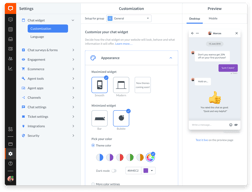
First, the installation of LiveChat on our site was very simple. Because we use Wordpress for our customer support website, it was as simple as downloading the LiveChat plugin and signing in with our account information. Also, LiveChat customer support is very good. For the questions that we have had, they are very helpful and responsive and we were able to solve our questions quickly. The app interface is also very easy to use, with clearly labeled options and a sample or test view of the chat as you make changes so that you can see what customers will see. Also, you can see in realtime what a customer is typing, so it is easy to prepare an answer and give quicker responses. Overall, our experience with LiveChat has been excellent.
I cannot think of much to dislike about LiveChat. The internal ticketing system is a bit lacking, so we send our finished conversations into Jira.
We are also trying to find better and faster ways to provide customer support. Because most of our support is related to computers and technology, the chat feature is great because we can send screenshots or links back and forth. Also with LiveChat, you get information about the user such as their location, their operating system, and their browser. This can make troubleshooting fast.