

Unclaimed: Are you working at LiveChat?
LiveChat Reviews: 4.5/5 — Highly Rated
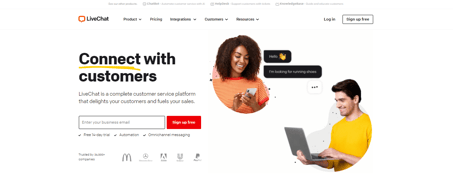
LiveChat is a premium live chat and help desk software for business. The platform is designed and built specifically for amazing customer service and is used in over 150 countries by over 31,000 organizations, including small, medium and enterprise organizations who want to improve customer satisfaction and boost online sales results.

| Capabilities |
AI
API
|
|---|---|
| Segment |
Small Business
Mid Market
Enterprise
|
| Deployment | Cloud / SaaS / Web-Based, Desktop Mac, Desktop Windows, Mobile Android, Mobile iPad, Mobile iPhone |
| Support | 24/7 (Live rep), Chat, Email/Help Desk, FAQs/Forum, Knowledge Base, Phone Support |
| Training | Documentation |
| Languages | English |

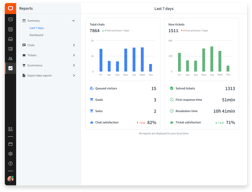
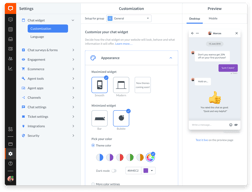






LiveChat prices by agent, but the limit you hit first is visitors. Starter tracks 100, Team 400, and Business 1,000 — and that is site visitors, not conversations. A modestly busy website exceeds the entry allowance without a single person clicking the chat widget. Work out your traffic before your headcount, because that is the number that picks your tier.
- What it is: A live chat platform for websites, with proactive messaging, routing, reporting, and an AI layer.
- Best for: Established support teams on sites with real traffic, where chat is a staffed channel rather than an experiment.
- Pricing: Starter $19, Team $49, Business $79 per person billed annually. Monthly is $25, $59, $89. Enterprise quoted. Verified July 2026.
- The honest catch: Starter is a single-user plan despite being priced per person, so any actual team starts at $49 each.
What Is LiveChat?
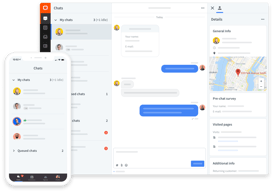
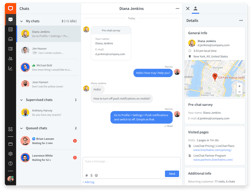
LiveChat is one of the longest-established dedicated live chat products, now sold alongside a broader family that includes ChatBot and HelpDesk under the Text brand. It is chat-first rather than a support suite with chat attached, and that focus shows in the depth of the agent experience: canned responses, routing, transfers, visitor context, and real-time typing previews are all mature.
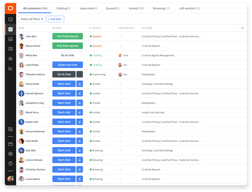
The 2026 positioning leans on AI, with the site advertising “LiveChat 2.0” as an inbox with a revenue counter spanning human and AI agents. Underneath, the differentiator remains proactive engagement — tracking who is on your site, what they are looking at, and triggering targeted invitations rather than waiting for someone to open the widget.
That proactive capability is exactly why visitor tracking is metered, and why the limits deserve more attention than the per-agent headline.
How LiveChat Works
- Priced per agent, gated by visitors. Two separate dimensions, and the second is the one most buyers overlook.
- Proactive chat invitations. Trigger messages based on behaviour, which is the core of the product’s value.
- Routing and transfers. Mature queueing, assignment, and escalation between agents.
- Chat history retention. 60 days on Starter, unlimited from Team.
- Reporting. Basic on Team, with agent performance metrics and staffing prediction on Business.
- Multi-channel. SMS and Apple Messages for Business arrive at the Business tier.
LiveChat Pricing
Captured from LiveChat’s pricing page in July 2026. A 14-day free trial requires no credit card.

| Plan | Annual | Monthly | Users | Visitors tracked | Chat history |
|---|---|---|---|---|---|
| Starter | $19/person | $25 | 1 | 100 | 60 days |
| Team | $49/person | $59 | Unlimited | 400 | Unlimited |
| Business | $79/person | $89 | Unlimited | 1,000 | Unlimited |
| Enterprise | Quoted | — | Unlimited | Custom | Unlimited |

What actually decides your bill:
- Visitor tracking is the constraint that arrives first. 100 visitors on Starter is a very small allowance for any site doing real traffic, and it governs how many people LiveChat can see and proactively engage. Since proactive invitation is the main reason to choose this product over a basic widget, hitting the ceiling undermines what you bought.
- Starter is a one-person plan. It is quoted per person, which implies you could add people, but the plan supports a single user. Any genuine support team starts at Team, meaning the real entry price is $49 per agent — 2.6 times the advertised figure.
- Per-agent pricing compounds quickly. Five agents on Team is $245 a month; on Business, $395. Ten agents on Business is $790. This is a significant line item, and it scales linearly with the team.
- Annual billing saves 17% to 24%. $19 against $25 on Starter, $49 against $59 on Team, $79 against $89 on Business.
- 60-day chat history on Starter is a real limitation. Transcripts matter for quality review, disputes, and training, and two months is short if you ever need to look back.
- Business is where workforce management lives. Work scheduler, staffing prediction, and agent performance metrics only appear at $79, which is the practical reason larger teams upgrade.
Who Should Use LiveChat
- Established support teams. The clearest case. If chat is staffed during business hours by people whose job it is, the agent experience justifies the price.
- Sites using proactive engagement. Behaviour-triggered invitations are genuinely good here, and it is the strongest differentiator.
- Ecommerce with sales-oriented chat. The revenue tracking angle fits stores where chat converts rather than just deflects tickets.
- Teams needing shift management. Business’s scheduler and staffing prediction are real workforce tooling that lighter competitors lack.
It fits poorly for small businesses testing chat, where Tidio offers a free tier and far lower entry cost; for teams wanting an integrated help desk, where HubSpot Service Hub or Zendesk bundle chat into ticketing; and for very high-traffic sites, where visitor limits push you toward an Enterprise quote quickly.
Honest Pros and Cons
Strengths
- Excellent agent experience. Canned responses, routing, transfers, and visitor context are all mature and fast.
- Strong proactive engagement. Behaviour-triggered invitations are the product’s best feature.
- Reliable and well established. Many years of refinement show in the details.
- Good reporting at Business. Agent metrics and staffing prediction are genuine workforce tools.
- A real free trial. Fourteen days without a credit card.
- Broad integrations. Connects to most major ecommerce and CRM platforms.
Limitations
- Visitor tracking limits are restrictive. 100 on Starter and 400 on Team constrain sites with real traffic.
- Starter supports one user. Despite per-person pricing, so teams start at $49 each.
- Expensive at scale. Ten agents on Business is $790 a month before any add-ons.
- 60-day history on Starter. Short for quality review or disputes.
- No free tier. Competitors offer one, which makes low-commitment evaluation harder.
- Chat only. Ticketing and help desk are separate products in the Text family, at separate cost.
LiveChat Alternatives and How It Compares
- Tidio is the obvious lower-cost comparison, with a free tier and chatbot automation aimed at smaller businesses.
- Freshchat offers similar capability inside the wider Freshworks suite, often at lower cost.
- HubSpot Service Hub bundles chat with ticketing and CRM, which is better value if you need more than chat.
- Zendesk Support Suite is the enterprise support platform where chat is one channel among several.
- Intercom is the closest premium competitor, stronger on product-led and in-app messaging. Crisp is the budget all-in-one option.
For related tools, browse our live chat, help desk, and chatbots directories.
The Verdict
LiveChat is a good product that knows exactly what it is. It does not try to be a help desk, a CRM, or a marketing suite — it is chat, done properly, with an agent experience refined over many years and proactive engagement that genuinely outperforms a passive widget. For a team where someone is staffing chat during business hours and conversions or resolutions are being measured, that focus is worth paying for.
Price it on traffic, not headcount. The per-agent figures are what everyone compares, but visitor tracking is the limit most sites reach first: 100 on Starter, 400 on Team, 1,000 on Business. Those are visitors on your site, not conversations, and since proactive invitation is the main reason to buy LiveChat rather than something cheaper, running into the ceiling degrades the specific thing you paid for. Check your monthly sessions against those numbers before choosing.
Then be clear-eyed about the entry point. Starter’s $19 is a single-user plan, so it is a solo-operator price rather than a small-team one, and any real support function starts at Team’s $49 per agent. Five agents is $245 a month, ten on Business is $790 — meaningful money that scales linearly. If chat is a core, staffed channel, that is defensible and the tooling supports it. If you are testing whether chat works for your business at all, Tidio’s free tier answers that question for nothing, and you can move here once the answer is yes.
FAQ
How much does LiveChat cost?
Billed annually, Starter is $19 per person per month, Team $49, and Business $79, with Enterprise quoted. Monthly billing raises these to $25, $59, and $89, so annual saves between 17% and 24%. A 14-day free trial is available with no credit card required. Note that Starter supports only one user, so teams effectively start at $49 per agent.
What is the visitor tracking limit?
Each plan caps how many site visitors LiveChat can track: 100 on Starter, 400 on Team, and 1,000 on Business, with custom limits on Enterprise. This counts visitors on your website rather than conversations, and it governs how many people the system can monitor and proactively invite to chat. Because proactive engagement is LiveChat’s main differentiator, this limit often matters more than the per-agent price.
Does LiveChat have a free plan?
No. There is a 14-day free trial requiring no credit card, but no permanent free tier. Competitors including Tidio and Crisp do offer free plans, which makes them a cheaper way to test whether live chat suits your business before committing to a paid platform.
Is LiveChat worth it compared to Tidio?
It depends on whether chat is staffed. LiveChat’s agent experience, routing, and workforce management at the Business tier are stronger, and it suits teams where people work chat as a job. Tidio is markedly cheaper, has a free tier, and leans harder on chatbot automation, which fits smaller businesses that cannot staff chat continuously. For a support department, LiveChat; for a small business testing the channel, Tidio.
What is LiveChat best for?
Established support and sales teams on websites with meaningful traffic, particularly those using proactive chat invitations to engage visitors rather than waiting for inbound questions. Its scheduler and staffing prediction at the Business tier suit teams managing shifts. It is a weaker fit for businesses testing chat casually, and for anyone wanting ticketing bundled in.

Compare LiveChat with other popular tools in the same category.

I enjoy the fact that we're able to 1) see what the customers are typing and 2) see the history of a customer's browsing experience to gain a better idea as to their knowledge of the product.
Certain number of chats/users at a time (though I may be missing something).
We're able to answer customers' quick questions in a timely and efficient manner instead of having them send us a direct email which can take longer to respond to.
Everything you would expect from a live chat module. The most helpful part of this program, and what I like best, is that you may view what a customer is writing before they even submit their question. It really helps answer our customers questions quicker.
For the use we require, there is not much I can say about dislikes. It has all the right functions of an online chat module. The only thing is when others are on the site, if there was a way turn have the chime only go off the first time you visit the site, and then never go off again since you know it is already there. That might a little more professional.
Quick client services care and because it's in real time our customers tend to have a similar experience as if they were on the phone. Also, if we do miss their chat, we can easily follow-up via email with the information provided by the customer.
People are pleasantly surprised in smaller companies when this is available and it helps drive sales and upgrades.
So far, I haven't found any features that are disliked.
I have to attend to queries everyday and LiveChat is the only way I can do that.
The Live Chat box pops up automatically, always making it convenient for me to access an agent to interact with regarding my questions, comments, and concerns with a product.
Sometimes the LiveChat box pops up an annoying amount of times. It can sometimes hinder the customer's shopping experience.
I have only interacted with LiveChat as an online shopping customer.

LiveChat without a doubt is the best live chat software there is and that's why we use it on our website. It has a comfortable interface, both its web version and its mobile version, which makes the work faster and easier. It has a good ticket system that is essential to keep track of requests from our asuarios, plus they also serve to provide support and address concerns. And you can even integrate it with a ChatBot to speed up the work and it's LiveChat is very well coupled.
We do not have many negative things to say about LiveChat, the truth is that this program fulfills what it promises. However we can mention that when program updates are made, there are usually problems in the configuration.
Our company offers design services and technical solutions (https://www.cdillc.com), and we needed to use a program that would allow us to provide support, technical assistance, answer questions and attract new customers who visit our website and LiveChat was the perfect program that allowed us to apply all those needs.
I like how easy it is to connect with people.
There is nothing that I really dislike about Live Chat.
One problem I am solving is barriers within communication. This app is great for breaking those barriers.
It was a lot easier to get in touch with certain coworkers that are In different parts of the building.
not much to dislike worked very well. Resembled aim from aol.
communication between departments.
I like the instant chat capabilities when in need at short notice.
If a customer support person chatting with you may come across as rude if using the improper verbiage.
I have used LiveChat with my banking issues and have been able to successfully complete my concern utilizing the LiveChat.
The product's capability is outstanding but what really puts it over the top is support. Having a chat link direct to their experts from within the Dashboard is just plain amazing. Some of the products I tested had email support where I saw 24 hour turnaround. With LiveChat, the resolution was literally minutes. The UI is very well constructed on desktops and mobile devices, offering visitors an elegant tool for interacting with our agents. The Ticket System is a nice feature for making sure that visitor requests are not overlooked. We're using LiveChat together with ChatBot and the integration is very powerful. There is a seamless transfer of visitors from a bot to an agent, and the ticket process captures any requested transfers outside of agent hours.
I wish the metrics offered a more comprehensive view of visitors and chats. I'd like to be able measure our improvement in visitor engagement as a percentage of visitors not just in chats. I also wish I could clean out the chat archive, getting rid of those that are from our testing.
We are a representative for industrial CNC Nesting Software. Our website, https://pepnesting.com needed to have the ability to interact with visitors and lead them through the complex set of features and capabilities the product offers.
What I like most about LiveChat is it's reliability. LiveChat offers tons of customization, professional looking interfaces, and robust reporting. I can easily use it on my desktop computer, my notebook, my tablet, or my phone.
Visitor view options need to be changed to allow it to be more customizable for customers.
The ability to stay in connection to my customers.
I like the LiveChat because it makes it easy for our customers to reach us. I think it is simple and easy to use, which our customers need. Plus they have great support if you need help.
I feel like this tool costs a little more then other companies I have used.
LiveChat helps with quick questions like Navigation. You can guide the customer around the website without them calling in and waiting on hold.
It looks profeshional and very easy to use!
Nothing everything is just purfect
Consultashions about the projects
The ease of use. I can't explain it any better than that - it's just simple to use.
I haven't come across anything that I do not like, yet
We are able to offer quick access to our support agents with our busy contractors when they need help. They can use their phones or desktops to reach us immediately, no phone trees and wait times.

What I like most is the ease of live chat, the interconnection of people to deal with various work issues, without being present, from anywhere in the world as being in the same space with the highest technology, quality of service and with the best optimization of the time invested
There is no detail that I dislike. However, it is a path that still needs to be explored and strengthened in order to continue using this valuable tool in the individual and work connection, along with practicality and high quality communication service. It could improve the stability of the connection according to the internet.
Communication that crosses the borders. Allowing from an interview, meeting, videoconference, expansion of communication with high range of functions and cutting edge service in the shortest time and with the best quality.

It's a fabulous software. I really liked it . I would 100% recommend this chat software to all my colleagues and friends who would get in touch with me . Keep on your great work. All the Best! . I did not touch base with you since, I know how it works. I have worked with ticketing systems like BMC Remedy for quite sometime .
No I do not have any negative points for this as of now. So would not venture into that for now.
All my users who wish to get their website made require an interface where they can get offline or online messages from their customers while they interact with their website, this software comes very handy for the same. It's easy to install and simple to use.
Definitely great for easier communication between employees
Parts of it are a little hard to grasp for newer employees
Easier communication between colleagues
It was very easy to use in able to understand the screens flip quickly
Amount it time to take to have a customer injured in amount of time it takes for you to be able to respond
Enrollment for veterans
I love being able to walk through the website with the Client and help them make the best decision during their research and purchase. It is almost if you were shopping live with them
Sometimes the connectivity is low and you loose that chat. Sometimes the client leaves you hanging .
Client Indecision
The response time is instantaneous. You can work almost side by side with the other person you are hosting and can walk through the steps with them. Its better than a real telephone call... you can work on the computer while chatting with the other person, attempting to correct or amend their situation. It is a virtual help desk. I like also like that you can print and copy a complete copy of your chat for your file or for follow up or reference in the future. It documents your work and file for practical purposes. Some offices require that as well.
If the internet is down or our server is down or lagging, then response time is slow or non existent. Also, it is unfortunate that you cannot put a face to the person you are chatting with. Other than that, I don't have any complaints.
Setting up medical independent examinations and interviews. We can take a statement immediately after an occurrence of an incident or accident. It is quick, efficient and you can take the statement in real time. There is no need for endless phone calls or follow up emails to try to get in touch with someone.
The best thing about LiveChat is the fact it is one of the most reliable and advanced customer service software I’ve used. It has everything we need at the customer service department and expect from an online chat. Customization options allow creating different agent groups based on departments.
Livechat does not pose any serious issue that warrants a complain.
It has increased the number of leads and helps to close additional sales too.
Stable platform - Ease of separation of groups - Ease of integration , customer Support team is prompt and helpful
Some updates cause issues with set up and updates aren't announced very well
Still evaluating
Very easy to connect with customers and others in need of help
Nothing to dislike about this product at all!
Help with customers, general information etc
It's easy to use program. Can be logged in whenever needed. Can setup quick.
There's nothing I dislike. We use it to help people find things within our website. Any billing problems or quotes we do on the phone or by email since it takes more time to resolve.
Anwersing website fuctions, or looking up products for customers.
LiveChat is very easy to navigate and helps our clients be able to speak with us without having to take the time out to call
The only thing I would recommend is to make the alerts more consistent. Some alerts come to my desktop and some do not
Being able to have multiple points of contact for clients and not only have one way to communicate
I really like to implement Livechat in WooCommerce stores, the integration is excellent, the installation is fast and the configuration is simple, I can customize the window, add the logo or choose a default style. It allows me to interact with the client in a real and active way and, when the chat is disconnected, it takes me to a ticket form so that the communication is always maintained. All this is done very easily and adds value to the online store.
I have no complaints It works quite well and the customer service has always been there to help.
I design online stores for e-commerce and this pluggins helps my clients to maintain direct contact with their own clients, increasing the conversion rate, satisfaction and loyalty. I've tried several live chat pluggins, but this is the best one so far.
I like that it is an embedded live chat solution for my normal educational website and mobile platform. LiveChat can let you and your team connect to the people visiting your web properties, in real time. Most software does not allow you to communicate with subordinates and supervisors in your organization with the speed that I have witnessed with LiveChat.
Sometimes the LiveChat toggles & seems to slow down at certain parts of the work day. This however, could be due to the One System software that I was using to grade tests and not due to LiveChat itself.
LiveChat allows the employee/employer to quickly in real time conversation(s) contact each other. Saving the company time & money. Employee/customer issues/inquiries/concerns are presented right away. Since, LiveChat is an online customer service software with live support, help desk software, and web analytics capabilities, it really can help an organization come into the 21st century with ease.
Instant chatting so I cold help the customer at that moment. Livechat is easy to use, customize, set and navigate through it.It doesn't take long to learn the software, you can probably teach your self how to use it. I respond to multiple messages faster because of the canned answers to the most asked questions. It also has a mobile app.
The mobile app has limited capabilities and sometimes the android app acts up. Sometimes it knocks me offline, in the middle of a chat and the screen freezes, then I would power off and the on and I have lost the chat.
People want instant answers to their problems and this allows me to get the answer to them quickly. We have a team overseas and this allows us to chat with them.
Livechat is a very good communication tool that should have each company because it is very useful for business
Overall it's a very good company but can improve on your customer service
It has served us a lot to organize sales and offer services to our consumers or customers Besides being very easy to use
It is user friendly for me and every new agent I have on-boarded to Livechat,has found Livechat intuitive. It is feature packed and integrates with other tools we use at Paystack such as Mailchimp and Dropbox. While the Mailchimp integration has grown our email marketing list at a steady rate,its integration with Dropbox has made it easier to share files with website visitors.
Perfect software for the customer support team.
Livechat helps address customer concerns promptly.
I like how I can have access and chat employees with no problems.
Some times i type too fast and it dont process what I typed.
I can talk to employees faster to assist customers. It's quick and easy.