

Unclaimed: Are you working at monday CRM?
monday CRM Reviews: 4.6/5 — Highly Rated
Monday CRM is a cloud-based customer relationship management platform designed specifically for sales teams. Being known for the platform's ease of use and its focus on automating repetitive tasks, it lets sales teams focus on building relationships with their customers. With features like lead scoring, email tracking, and call logging, Monday CRM is a great solution for any sales team looking to increase their productivity and close more deals.
| Company | monday.com |
|---|---|
| Year founded | 2012 |
| Company size | 5001-10,000 employees |
| Headquarters | Tel Aviv, Israel |
| Social Media |

| Capabilities |
API
|
|---|---|
| Segment |
Small Business
Mid Market
Enterprise
|
| Ease of use |
Beginner
Intermediate
|
| Deployment | Cloud / SaaS / Web-Based, Mobile Android, Mobile iPad, Mobile iPhone |
| Support | 24/7 (Live rep), Chat, Email/Help Desk, FAQs/Forum, Knowledge Base, Phone Support |
| Training | Documentation, Videos, Webinars |
| Languages | Chinese, Dutch, English, French, German, Japanese, Korean, Polish, Portuguese, Russian, Spanish, Turkish |


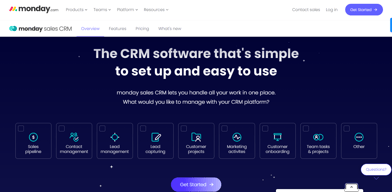
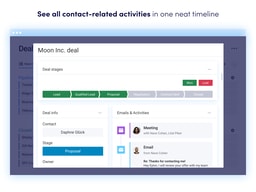




monday CRM is a sales CRM built on top of monday.com’s Work OS, which means you get an unusually flexible, visual pipeline that you configure like a spreadsheet rather than a rigid sales system you have to adapt to. That flexibility is the whole pitch, and it is genuinely good. The catch is that the configuration work is real, and the entry price is higher than the $12 headline suggests.
- What it is: A CRM platform built on monday.com’s board-and-column model, aimed at sales teams that want to shape the pipeline around their process.
- Best for: Teams of roughly 3 to 50 who value customization and visual pipeline management, and especially teams already using monday.com for project work.
- Pricing: Basic $12, Standard $17, Pro $28 per seat per month on annual billing, Ultimate is custom. A 14-day free trial, no permanent free plan. Verified on monday.com’s pricing page in July 2026.
- The honest catch: Every paid plan has a three-seat minimum, so the real floor is $36/month, not $12. And the Basic tier includes zero custom automations, which removes the main reason most teams buy a CRM.
What Is monday CRM?

monday CRM is the sales-focused product in monday.com’s family of tools, sitting alongside monday work management, monday dev, and monday service. It launched as a dedicated CRM in 2022, built on the same underlying Work OS that powers the company’s project management product.
That lineage explains most of what monday CRM is. Instead of the fixed object model that a traditional CRM ships with, you get boards, columns, and views. A deal pipeline is a board. A stage is a status column. A custom field is just another column. If your sales process does not look like the industry default, you reshape the board instead of filing a feature request or paying for a consultant.
In 2026 the marketing has shifted hard toward AI. The homepage leads with “AI revenue execution” and promotes an AI Lead Agent, and monday now ships AI credits bundled into each tier. These are real features, but they are also the newest part of the product, so weigh them less heavily than the pipeline fundamentals when you evaluate.
The independently verifiable quality signal is solid: monday CRM holds a 4.7 out of 5 on Capterra across 463 reviews. Note that this is the CRM product specifically. monday.com’s much larger review counts elsewhere usually refer to the work management product, which is a different tool.
How monday CRM Works
The mental model is worth understanding before you look at pricing, because it explains both the strengths and the limits.
- Everything is a board. Leads, contacts, accounts, and deals each live on a board, and the relationships between them are link columns. This is why customization is so easy and also why the structure can drift if nobody owns it.
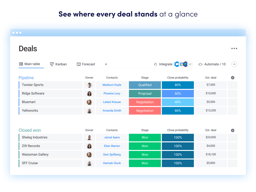
- Views sit on top of the data. The same deal board renders as a Kanban pipeline, a table, a timeline, a calendar, or a chart. Sales reps tend to live in the Kanban view while managers work from dashboards.
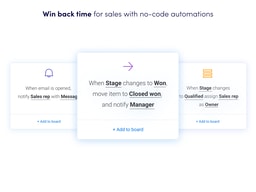
- Automations are recipe-based. You build rules in plain language: when a deal moves to Won, notify the channel and create an onboarding task. There is no scripting required, which is a real advantage over CRMs where equivalent logic needs an admin.
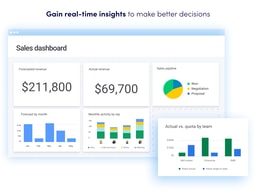
- Dashboards aggregate across boards. Pipeline value, win rates, and forecast roll up into widgets. The number of dashboards you get is one of the sharpest limits between tiers, which matters more than it first appears.
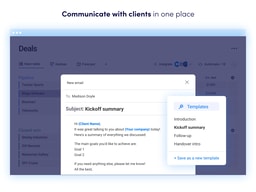
Email is where the model shows its seams. monday CRM offers two-way Gmail and Outlook sync, activity logging, and email templates, and Pro adds mass email and multi-step sequences. It works, but it is not the reason anyone picks this tool, and reviewers who came from a sales-engagement-first CRM tend to notice the difference.
monday CRM Pricing
monday CRM prices per seat, and the annual and monthly numbers diverge sharply. The figures below were verified on monday CRM’s pricing page in July 2026.

| Plan | Annual (per seat/mo) | Monthly (per seat/mo) | Contacts & deals | Custom automations | Dashboards |
|---|---|---|---|---|---|
| Basic | $12 | $18 | 1,000 | None | 1 |
| Standard | $17 | $25 | 10,000 | 250/month | 5 |
| Pro | $28 | $41 | 100,000 | 25,000/month | 50 |
| Ultimate | Custom | Custom | Unlimited | Enterprise-scale | Unlimited |
Four things about this pricing deserve more attention than they usually get:
- The three-seat minimum changes the entry price. Every paid plan requires at least three seats, so a solo founder or a two-person team pays $36/month on Basic, not $12. If you are shopping as a very small team, compare that real floor against per-user CRMs with no minimum.
- Basic includes no custom automations at all. Workflow automation is the main reason most teams adopt a CRM, and it does not appear until Standard. Treat Standard at $17 as the practical entry tier, which puts a three-seat team at $51/month.
- Annual billing is a 33% discount, which is steep. Paying monthly costs roughly half again as much. That is a meaningful saving, but it also means committing a year to a tool whose fit you may still be testing.
- Mass email and sequences are gated to Pro. If outbound email volume is central to your process, your real price is $28 per seat, not $12 or $17. Model that before comparing against alternatives.
There is a 14-day free trial with no credit card required, and no permanent free plan for the CRM product. Nonprofits may qualify for discounted or free access. Verify current numbers directly before budgeting, since monday adjusts plan limits fairly often.
Who Should Use monday CRM
monday CRM is a strong fit if you recognize your team here:
- Teams that already run on monday.com. This is the clearest case. Sales data and delivery work live on one platform with shared boards and one bill, and your team already knows the interface.
- Sales processes that do not match the default. Agencies, consultancies, recruiters, and anyone with a multi-stage, multi-owner pipeline benefit most from board-level flexibility.
- Visual, manager-led teams. If pipeline reviews happen around a Kanban board and a dashboard, the interface does real work for you.
It is a weaker fit in three situations. High-volume outbound teams that live in a sequencer will find the email tooling thinner than a purpose-built sales engagement platform. Solo operators and two-person teams pay the three-seat minimum for capacity they will not use. And teams that want a CRM to arrive opinionated and ready will find the blank-canvas flexibility to be work rather than freedom, because someone has to design the boards and then maintain them.
Honest Pros and Cons
Strengths
- Customization without an admin. Reshaping a pipeline, adding a field, or building an automation is a drag-and-drop task, not a project. Reviewers consistently rate adaptability as the platform’s best quality.
- Genuinely good visual pipeline management. Colour-coded Kanban boards, timelines, and dashboards make pipeline state legible at a glance, which is why it lands well with sales managers.
- One platform for sales and delivery. For teams already on monday.com, the handoff from closed deal to delivered project happens without an integration in between.
- Automation is approachable. The recipe builder puts useful workflow logic in the hands of non-technical users, once you are on Standard or above.
- Strong independent ratings. 4.7/5 across 463 Capterra reviews is a solid score for a CRM that has only existed as a standalone product since 2022.
Limitations
- The three-seat minimum is a real cost floor. It disproportionately penalizes the smallest teams, and it is the single most common pricing complaint.
- Basic is too limited for most buyers. No custom automations, one dashboard, five columns per board, and 1,000 contacts means most teams will need Standard, so budget accordingly.
- Email tooling is adequate, not excellent. Reviewers who rely heavily on in-CRM email report friction, and mass email and sequences only arrive at Pro.
- Flexibility requires ownership. A blank canvas means someone has to design it and keep it tidy. Without that owner, boards proliferate and reporting degrades.
- Performance on large datasets. Capterra reviewers note slowdowns on very large contact tables, which is worth testing during the trial if your database is big.
- Cost scales quickly. Per-seat pricing plus tier gating means the bill grows faster than headcount when you need Pro features.
monday CRM Alternatives and How It Compares
No CRM wins on every axis, and the right pick usually comes down to which trade-off you can live with.
- Pipedrive is the closest comparison for pipeline-first sales teams. It is more opinionated and faster to set up, with no seat minimum, but far less flexible outside sales.
- HubSpot Sales Hub has a genuinely useful free tier and much stronger native marketing and email tooling. It gets expensive quickly as contacts and paid seats grow.
- Zoho CRM typically undercuts monday on price and offers deep functionality, at the cost of a more dated interface and a steeper configuration curve.
- Salesflare and Close are the picks for small outbound teams that want automatic activity capture and strong calling and sequencing, and both are narrower in scope.
- Airtable is the honest comparison if what you actually want is a flexible database with views. It is cheaper and more flexible, and it is not a CRM.
If you want a broader survey rather than a head-to-head, our guides to the best CRM software and the best free CRM software cover where each of these fits.
The Verdict
monday CRM is a very good CRM for teams that want to shape the tool around their process instead of the other way around, and an excellent one for teams already running on monday.com. The visual pipeline, the approachable automation builder, and the 4.7/5 Capterra rating are all earned.
Price it honestly, though. The advertised $12 is a three-seat, annually billed, automation-free tier that most buyers will outgrow immediately. The realistic starting point is Standard at $17 per seat on annual billing, which is $51/month for a three-person team, and $28 per seat if you need mass email or sequences. That is competitive but not cheap, and it is a different number from the one on the pricing page.
Use the 14-day trial to test two specific things: whether your team will actually maintain the board structure once the initial enthusiasm fades, and how the interface handles your real contact volume rather than a demo dataset. If both hold up, monday CRM is one of the more capable and pleasant CRMs available. If your process is conventional and you want something that works on day one, a more opinionated tool like Pipedrive will get you there faster.
FAQ
Is monday CRM free?
No. monday CRM has a 14-day free trial with no credit card required, but there is no permanent free plan for the CRM product. Paid plans start at $12 per seat per month on annual billing with a three-seat minimum, so $36/month is the actual entry cost. If a genuinely free tier is a requirement, HubSpot’s free CRM is the usual alternative.
What is the minimum number of seats for monday CRM?
Three. Every paid monday CRM plan requires a minimum of three seats, regardless of team size. This is the most frequently cited pricing complaint from solo users and two-person teams, and it is worth factoring in before comparing per-seat prices against CRMs with no minimum.
Does monday CRM include automations on the Basic plan?
No. The Basic plan at $12 per seat includes no custom automations. Standard includes 250 automation actions per month, Pro includes 25,000, and Ultimate is enterprise-scale. Since workflow automation is the main reason most teams adopt a CRM, Standard is the practical entry tier for most buyers.
What is the difference between monday CRM and monday.com work management?
They are separate products built on the same Work OS. monday work management is a general project and task platform; monday CRM adds sales-specific objects and features such as lead, contact, account, and deal boards, email sync and templates, quotes and invoices, and sales dashboards. Review scores and pricing differ between the two, so make sure any comparison you read is about the CRM specifically.
What are the best monday CRM alternatives?
Pipedrive for pipeline-first teams that want faster setup and no seat minimum, HubSpot Sales Hub for a strong free tier and better native marketing tools, Zoho CRM for lower cost at depth, and Salesflare or Close for small outbound teams that need strong calling and email sequencing. Airtable is worth a look if a flexible database, rather than a CRM, is what you actually need.

Compare monday CRM with other popular tools in the same category.
So easy to use and versatile. We can change filters and progress for our learners which has meant that we can dispense with our old trackers
Nothing. It's superb. We keep finding new things that we can do with it
Heps us keep track of potential recruits and employers and whether they are interested in what we do
The CRM is easy to use and quick to get started with
Not really a dislike as such. We are early in using the system and find some of the dashboards don't quite reflect what we'd like to see. We are working with it though to see if we can display the information in other ways
It is giving us a better insight into our pipeline and helping us forecast the business we expect to win. This will also help highlight training needs and identify where team development and marketing activity can help us continue our growth story as a business
Monday.com is the most efficient CRM program I have used in the last two years. It is easy to use and better than keeping a Google Drive or Excel Spreadsheet.
There is nothing that I dislike about monday.com. It is so easy to use.
Monday.com has been solving my sales problems, and it helps me keep everything organized. I love how you can customize the different boards.
You can be working on a document, and not have to worry about saving the document, and when someone else goes in and contributes to the same document, you can see who did it and what their comment was. It's super easy to use, I can make old-fashioned check-off lists, and it keeps track of what I did before and down to the last click I made.
You have to wait to open it 😂. It's not as easy to implement as Teams, for example
tracking. Tracking clients and tracking my own "to-do" list
With 3 different businesses, monday keeps me focused and organized and doesn't let me forget important tasks that would otherwise be missed.
It should enter items on the boards when I think about them instead of me having to actually type the items out......mind reading would be a nice upgrade.
Keeps me from missing steps or shortcutting processes

The most helpful part of Monday is that I can use it for all my project management needs. Monday is so simple and "Excel-like" that it's really easy to explain for those that I partner with that are a little older & technology is a struggle. For almost 3 years now, Monday has helped me bridge the gap between the "technological generational gap".
I've come across a few things that I "dis-liked" but after taking the time to watch a video and read the tutorials they have available, I've yet to find something that I couldn't figure out with tutorials & online help.
The fact that Monday is constantly growing their integrations and implementing new features is a HUGE benefit for me. I'm a small start-up and their constant growth allows me to do the same!

One place to store all of my lists and project components. The ability to attach pertinent Files to my entries. The ability to assign a task to others inside your organization. The ability to @ mention and send email to others. Being able to copy a project list, so no recreating the wheel for the recurrence of that project.
Doesn't intersect/talk to our CRM. sometimes a little difficult to understand how to do something new.
Helps me keep track of my tasks by project. This helps me stay organized. Also, allows my successor a good map to follow.

I like how well you can organize all the different tasks. I also like how the app on the phone allows you to organize everything without having to go to a computer and update stuff. Our team has implemented Monday.com as one of our go-to's for reminders and updates with our clients orders. It has become a tool we use all the time for us to keep track of our constant client changes.
The downside might be the amount of templates the system has. For example, we don't use Monday.com as a traditional marketing company would, but we use it as a system that helps us stay organized with our client orders, so if we had some templates that relates more to organization then it would be even better
It has helped our company a lot because as a team we are able to see immediate updates to our client orders and changes we need to make.

I like that Monday is very versatile and allows you to create anything from a simple dashboard for your activities to a CRM for your company in just a few minutes.
Automations are sometimes a bit complex to customize or are misconfigured later
Keep track of clients and all information in one system
Monday Sales CRM has allowed our company to organize our many clients between each of our employees. After that we can access these clients as the workflow continues through different stages and diferent departments.
There really is not a downside, other than after you get used to using it, you want to organize every item in your life in an orderly and managed workflow with information at your fingertips.
Our client workflow is detailed and accesed by many people at various stages. Monday has helped us create a unique platform that each person can add to, can access, and allows us to literally look at a client and know exactly where they are and what the next step for them is.

I can create my own pipeline and automatize
nothing, it is perfect. It is constantly improving
I have my sales team pipeline and also my laboratory pipeline of results
The flexibility to easily customize and scale according to the size of the business makes monday.com a class leader. Our team can complete all their work in one place making our workflow simple and easy to use.
Some of the built-in automation is limited. Admin permission options are limited and could be improved for accounts that do not have the Enterprise licance.
Tracking communication with customers. Keeping up with sales-related tasks. Handing over sales data to project management.
It allows me to maintain a schedule and consistent task list for myself so I can plan out my day.
I wish it could be connected directly to my loan point of sale application
It is ensuring that our client database is being serviced fully and regularly, while keep our sales team on task every day by using it as a task list as well.
The versatility, and customizability - there's something you can use it for for almost any client we work with.
It is so customizeable that to do a very specialized solution for a business can often require a lot of set-up time in our experience. There are a lot of different types of templates to start with.
Many clients come to us with no CRM at all, and this is a great product to use that isn't as expensive as others that are only CRMs, and we can expand this as they grow.
Monday.com is intuitive, customizeable, and user-friendly. I've thoroughly enjoyed finding the best ways to customize boards to ensure the best workflow tracking. As a company, we utilize Monday.com daily to track where we stand with such a large number of clients. Whenever we have questions, the team at Monday is always happy to jump in to help troubleshoot. Training is a breeze with live tracking and cloud integration.
In true honestly, I don't have much to dislike about it. The ability for our whole team to update in realtime, ability to customize, etc... it's truly an organizational dream.
With working on a variety of sales accounts, monday is helpful in tracking where things stand from client to client and project to project. It keeps the whole team in the loop with where we're tracking.
Ability to keep projects straight. Integrations with third party services using Make.com.
Access controls (view permissions) locked down to only enterprise plans
Creating invoices using quickbooks intergration through Make.com
Nice and easy design, so it's more fun to use at work
Sometimes it's a bit slow, it's loading long for example
Reminders, Customer Data
Quick and easy to navigate and use. works for everyone in different roles at our company.
I dont dislike anything. This is one of the best sites to use for leadsing.
It works great but we use a different CRM for leads.
Easy to organize and use. Able to separate what I need and don't need to see.
Storage space fills up quickly. Have to create a new board at times because of space.
Organizing the sales

Finally a CRM and Project Management in one software. Easy to use and implement with our sales and marketing team. Customer Support is the best and is able to help to streamline the process. Great for everyday use, highly recommend you give it a try.
I dont have any dislikes at the moment, but will update once I do run into a snag.
CRM for our sales team

Monday.com is an excellent tool for organizing processes and workflow. The feature I appreciate the most on the platform is automation. The ability to create actions through triggers allows me to organize and save time for my work team.
I miss having a calendar tool within Monday, similar to Calendly. Additionally, I think the form functionality could be enhanced, allowing the use of linked boards as questions.
Monday.com's CRM organizes our lead list and enables us to manage our sales funnel efficiently.
Monday helps me stay organised and is highly customisable. It was really easy to get started with and I now use it every day. It's also smoothly integrated into several other services that we use.
There are a few different pricing levels, and I feel that some features they hold back on the lower tiers should be available to all paying users.
It helps us keep track of potential clients, existing clients, project progress, invoicing status and project completion.
It's just so easy to use. The more you use it the more uses you find for it. I find it helps to remove some of my work related stress at the end of the day as all my actions are in order.
Image Library service could be a little better.
Helping organise and keep track of many, many tasks.
so easy to use, and its easy to set up integrations and automations for streamlined workflow
the calendar view. It would be better if you could see a bigger snapshot of dates.. ie similar to Teamup calendar program.
n/a
Monday,com allows you to work and collect the data you want. The mobile app allows me to contact customers when out and still records the call or sms. i like the integration into Mail Chimp so that I have all the mail chimp data within Monday.com
I would like the search to be more global across various databases we have, this could be a setting I have not found yet however.
I wanted a single easy to setup customer database while I was acquiring customers for our startup.
This program is SO user friendly. If there is anything you have questions about, they have so many ways to help answer your questions. There are tons of videos available that are easily accessable for any help you need. The boards are very customizeable and there are so many things that can be done with just a single board. It is perfect for our small office to keep everyone connected and updated on projects.
I hate that there is not an undo button so if you accidently remove data or change the wrong line item it is difficult to get the old information back. My company utalizes mirror columns and connected boards a good bit, I wish that Monday would work on updates for that process to simplify how you make everything connect and work through multiple boards.
Monday has monthly webinars that I really enjoy. They tell you all about the new things that they are adding to Monday and what items they are activily updating etc. This webinar has been super helpful to me because I learn things that I was not aware were possible with Monday.com. It allows me to utalize the system to it fullest potential.
Monday.com visual and collaborative nature and the ease of use allow me to assign work to my team easily. The automations helps me notify my team of works I need them to pay more attention to. I was able to easily integrate Monday.com with our other systems, such as but not limited to, HubSpots, Microsoft Teams, and SalesForce etc... The implemetation to those services were like a breeze. Customer service is easy to reach with the blue help button on the bottom of every workspace. I use Monday.com everyday to ensure my team is constantly communicating with our customers and provide a complete customer satisfaction.
The only thing I don't like is that the automation is limited. I wish I could create my own automations.
Having sales and customer relations coordinate to give a better customer experience.
Flexibility and familiarity of working within spreadsheets, but with a more powerful back end
Some of the pre-built template options can be overwhelming
Helps our small business stay organized, and gives enough flexibility that we can store all the data we want for our business without hitting roadblocks
I had the opportunity to dive into the world of project management with Monday, and I must say it has been a transformative experience. As someone who juggles multiple tasks and projects simultaneously, finding reliable and intuitive project management software was crucial for optimizing my workflow. Monday not only met but exceeded my expectations in several key areas. User-Friendly Interface: One of the standout features of Monday is its user-friendly interface. Navigating through the platform is a breeze, and the intuitive design makes it easy for team members to quickly grasp the system. The customizable dashboards allow for a personalized view of tasks and projects, creating a seamless and efficient user experience. Versatile Project Tracking: Monday offers a robust set of tools for project tracking. The ability to create custom workflows, set priorities, and assign tasks has significantly enhanced our team's collaboration and coordination. The visual timeline view provides a clear overview of project timelines, helping to identify potential bottlenecks and ensuring that deadlines are met. Effective Communication: Communication is key in any collaborative environment, and Monday understands this well. The platform provides a centralized space for team members to communicate, share updates, and attach files directly to tasks. The real-time collaboration features have streamlined our communication processes, reducing the need for endless email threads and improving overall transparency. Integration Capabilities: Monday's integration capabilities are a game-changer. The software seamlessly integrates with popular third-party tools, such as Google Workspace, Slack, and Zoom. This integration has eliminated the need to switch between multiple platforms, saving us valuable time and ensuring that all our project data is in one centralized location. Customization and Flexibility: One size does not fit all, and Monday understands that. The platform's high level of customization allows us to tailor our workflows to suit the specific needs of our projects. From custom fields to automations, Monday provides the flexibility required to adapt to the dynamic nature of our work. Customer Support: Should any questions or issues arise, Monday's customer support team is readily available and responsive. Their helpful documentation and tutorials make onboarding a breeze, ensuring that our team can quickly harness the full power of the platform. In conclusion, Monday has proven to be a powerful ally in our quest for efficient project management. Its user-friendly interface, versatile project tracking, effective communication tools, integration capabilities, customization options, and excellent customer support make it a standout choice for teams looking to boost productivity and collaboration. Monday has truly transformed the way we work, and I wholeheartedly recommend it to anyone seeking a comprehensive project management solution.
Costly Pricing Tiers: While Monday offers a variety of plans to cater to different needs, the pricing can be on the higher side, particularly for smaller teams or startups with limited budgets. As our team expanded, so did our subscription costs, making it a less cost-effective option for organizations in the early stages of growth. Limited Reporting and Analytics: For users who heavily rely on in-depth reporting and analytics, Monday may fall short of expectations. While it provides some basic reporting features, the platform lacks the robust analytics capabilities offered by some of its competitors. This limitation can be a drawback for teams that require more advanced insights into project performance. Overwhelming Customization:
Monday Sales CRM addresses several key challenges commonly faced by sales teams, offering solutions that have tangible benefits for businesses. Here are some common problems that it helps solve, along with the corresponding benefits: Disorganized Data: Problem: Managing sales data across various spreadsheets, emails, and documents can lead to disorganization and inefficiency. Solution: Monday Sales CRM provides a centralized hub for all sales-related information, ensuring that contacts, deals, and communication history are easily accessible and well-organized. Lack of Collaboration: Problem: Collaboration issues arise when sales teams struggle to share information and updates in real time. Solution: Monday promotes collaboration by offering a platform where team members can communicate, share updates, and collaborate seamlessly within the CRM. This fosters a more cohesive and informed sales team. Inefficient Workflows: Problem: Manual and time-consuming processes can slow down sales workflows and hinder productivity. Solution: Monday automates routine tasks, streamlining workflows and saving time. Customizable workflows ensure that the CRM adapts to the specific needs and processes of your sales team, enhancing efficiency. Poor Pipeline Visibility: Problem: Without a clear view of the sales pipeline, it's challenging to track deals, identify bottlenecks, and forecast accurately. Solution: Monday provides a visual representation of the sales pipeline, making it easy to track the progress of deals at every stage. This visibility enables better decision-making and forecasting for sales managers. Communication Gaps: Problem: Important communication and interactions with leads or clients can be missed or lost in the shuffle. Solution: The CRM ensures that all communication is logged and easily accessible within the platform. This eliminates the risk of missing crucial information, leading to more effective communication with clients and prospects. Limited Insights and Analytics: Problem: Without robust reporting and analytics, it's challenging to gain actionable insights into sales performance. Solution: Monday provides reporting tools that offer insights into key sales metrics. Analyzing this data helps sales teams identify trends, assess performance, and make data-driven decisions to improve overall effectiveness. Adapting to Customer Needs: Problem: Sales teams may struggle to adapt to changing customer needs and preferences. Solution: Monday's flexibility and customization options allow sales teams to tailor their CRM to specific customer engagement strategies. This adaptability ensures that the CRM aligns with evolving customer demands. Difficulty in Onboarding: Problem: Training new team members on complex sales tools can be time-consuming and challenging. Solution: Monday offers a user-friendly interface and provides onboarding resources, reducing the learning curve for new team members and accelerating their integration into the sales processes. In summary, Monday Sales CRM addresses common challenges in sales, offering solutions that enhance organization, collaboration, efficiency, visibility, communication, analytics, adaptability, and onboarding. These benefits contribute to a more streamlined and effective sales process, ultimately improving the overall performance of the sales team.
The ability to customize this program is AWESOME! We use it to track new business, and also for renewal business. It make things so much easier to operate the agency. My staff can see exacly where we are with an account, and once its written or not, we now know. Nobody is left in the dark. We put contact info, policy type, carrier name, premium amount, etc. I belive that we have been using it for 4-5 years now. It is just so easy to use compared top any other program that we have ever tried. I would be lost without it!
Price is the only thing I can think of. While it is worth it, it would be nice to have some loyalty credit given, or something of that nature.
NOT APPLICABLE