
Unclaimed: Are you working at ProjectManager?






ProjectManager Reviews: 4.4/5 — Solid Choice
ProjectManager is a project management software solution designed to help you navigate your project with ease. It efficiently manages project planning, budgeting, time tracking, task and document management, risk management, reporting, and more. The platform integrates with MS Project, Excel, Word, Project Server, and Google Docs, allowing users to import MS Project plans and customize security settings. Users can create multiple dashboards and use a portfolio view to monitor project success easily.





| Capabilities |
API
|
|---|---|
| Segment |
Small Business
Mid Market
Enterprise
|
| Deployment | Cloud / SaaS / Web-Based, Mobile Android, Mobile iPad, Mobile iPhone |
| Support | 24/7 (Live rep), Chat, Email/Help Desk, FAQs/Forum, Knowledge Base, Phone Support |
| Training | Documentation |
| Languages | English |

Compare ProjectManager with other popular tools in the same category.
Not only does it offer an amazing way to visualise projects, but also helps us in scheduling tasks efficiently. It enables me to make micro adjustments and offers different tupes of views also like list view, dashboards, charts etc
As such there is nothing major to dislike about ProjectManager but following things can be improved: Experience for a first time user Optimising the search engine
It rnables me to visualise milestones for everyone involved It also enables me to visualise gantt charts
Having the full scope of avtivities and who is responsible to do ite, plus the time tracking is excellent
The language, it we can get it in spanish it would be great
Time asigned to avtivities, and setting milestones
Visualising milestones clearly for everyone involved from coordinators to stakeholders. The ability to make micro-adjustments on the fly for projects, sending and receiving notifications and generally improving my flow.
I would prefer some more customisations, e.g. custom profiles for my team with custom dashboards and styles so we can get to exactly what we need and feel like we own the platform we are using.
Visually managing our projects end to end with clear milestones and fully tracking project data that can be exported and used elsewhere.
Using PM, helps in managing and thinking strategically, and executing.
It lacks authority when dealing with uncertain projects.
Helps apply problem-solving techniques and achieve milestones with ease and manage tasks.
What I like the most about ProjectManager is to be able to work in teams and have a lot of resources available.
For the moment everything is working and i didn't experienced something wrong.
ProjectManagement help me to understand issues in Information Technology Management

The UI of the application is user-friendly, and it helps to identify what we are looking for with minimal effort. Also, the application helps us to find the right person for the relative project is a comparatively good time
There is nothing much to dislike about the application. It's just that the search engine has to be a bit more optimised with filter options while searching for the project or the manager
Allocating the project to resources and getting the status for the given project from the employees. It is helping us in tracking the progress of the project without even bothering to ask for the status of Employees
I like it because it project any down fall and how the project is progressing
well, the downside there is no interaction with the company or sale person I can never get a hold of a live person
well it makes me look great here at the office. No one as this feature but me I stand out
The Kanban feature which allows to add tags and comments
It only sends notifications to the logged in email
Followup projects to completion and identify any blockers

The interface is clean and friendly, helping to work with pace and quality.
Some bugs in the workload area, when have to calculate some time with more than 1 number after comma.
Planning projects with more accuracy and demand team forecasting.

Collaborative environment based on the cloud. Friendly and easy-to-use interface. Constant development and continuous improvement of the application. Multiple task views. Reports. dashboard.
-Need to continue refining the customization of statistical information. -The summary and Dashboard screen should be able to filter customized information according to the defined status of the projects. -No WBS graphical view.
-Better communication and collaboration with project team members, no call needed to know what about their task. -Real-time tracking of tasks and projects assigned to team members. -Integration and more collaboration with the team.
ProjectManager is a project management tool that's simple to use and understand. The project control panel, which can be freely modified, makes it simple to monitor ongoing projects in real-time. This is a one-of-a-kind tool.
This software has a lot of features that I appreciate, and new ones are updated on a regular basis.
The most significant advantage I've noticed is having everything listed and arranged on my mobile device. It's a great bonus to be able to simply share projects and track timeframes with team members.
project manager is great for long or short running programs that have many locations to be completed within a certain time period. It is useful to download store/job-specific files like pdf, docs, daily reports etc. overall it has made workload easy and creative
I personally did not find any difficulty while using it, it is working efficiently as expected and has saved a lot of time form work and make life very easy and work to run.
Creating job schedule and milestone, which provides as well as ease the work, It is a one-stop for downloading/uploading any job/site-specific, documents. Reak time communication as soon as an issue has been raised within
It is a very good platform with clear instructions to implement it easily, we liked the fact that you can easily invite colleagues with just the email, I also liked the plans it offers that show clear details to see if it is worth it, this software it's great for managing projects and collaborating at the same time, I liked the dashboard because it gives an overview of projects and can be easily shared, we can view and forecast project deliverables and view expenses and resources while monitoring project schedules team members.
It's good but I feel that the interface part needs to be improved a bit, remove the themes because sometimes it feels slow.
It is a platform that runs easily and can manage multiple projects improving workflow, it was a good solution for scheduling and organizing tasks at work, collaborating and saving costs.
I like this tool, it has very good functions to manage projects in a simple way, I liked the user interface and that it shows clear options to optimally monitor the projects that are being worked on. I also liked how fast it is and that it greatly simplified the job.
It is a tool that has not given us any problems so far and that is good.
The solution was the monitoring and management of projects, and it also helped us with the execution of projects we can identify existing problems, for the moment it improves workflow and increases collaboration.
I like it because it is a great project management tool with a good customizable user interface, all the features are in view, I liked being able to categorize the tasks and have an overview of them, it is also good to collaborate with the team and monitor projects and view hours and expenses.
It's good solid software and I haven't noticed any serious shortcomings, just minor glitches at first, but after a few updates, everything got better.
Improve project management and completion times and change the way of delivering financial reports, through this software we were able to manage most of the processes.
I like that it shows clear instructions for each of its functions, which makes it much easier to use and that we like it more every day. I also like being able to manage and categorize tasks, collaborate and manage system projects and share them. ProjectManager keeps us happy with its effectiveness.
For a few months, its constant updates were for the better, but it still has a slightly outdated interface. I would like them to remove the customization and leave a white background without color, I think it would attract more attention from users.
It is used to evaluate and manage projects, which shortens management time and increases progress, those are the benefits.
ProjectManager is a fairly correct software when it comes to carrying out all kinds of projects and having extensive monitoring of the tasks and assignments that are carried out every day in a company or labor sector. During my experience with ProjectManager, the things that positively caught my attention were: 1. ProjectManager has an excellent reporting system, a system where you can see the statistics in the separate grid, in addition, you can know exactly the number of elaborated tasks, completed and incompleted tasks on a specific date, you can know exactly the production and the number of tasks that have been developed in a specific sector, it is impressive to be able to access such detailed statistics, in addition, in this section you can see graphs that better explain the behavior of all the members of a sector. 2. It has an excellent timer system capable of correctly measuring how much time a person invests in completing one of the assignments, in addition, within this section the assignments can be dragged and set a time limit for each one, the employees will not be able to complete that allocation after the delivery time has already expired. This feature helps keep accountability intact so assignments are turned in on time. 3. Obtaining reports is one of the most perfect things about ProjectManager since the reports can be obtained in PDF o Excel document, this helps the information obtained from the reports to be ordered in various ways so that we can analyze and understand much more easily, I love this way of obtaining reports, I have never seen a system like this before. 4. The task system and the notification system are things that go hand in hand with this software and they have a key function so that you can have a complete experience. Tasks can be closely monitored, it is possible to know how many people are participating in a task in real-time, in addition, instant notifications are received when a task has already been completed.
To be honest, I have not had any problems using the ProjectManager service, I have had a very positive experience which has helped us achieve our goals and complete projects in less time, I'm very happy to be using ProjectManager and to be able to use of a versatile system to control tasks, projects and have timers in one place, it is really impressive the number of various benefits that you can have in one place. I have no complaints about ProjectManager and I hope this continues, the software is doing its job very well and has delivered results that exceeded our expectations.
The main benefit that we have obtained in our company and especially in our Marketing sector is that our campaigns have had a much more positive impact on customers. ProjectManager has helped us to have complete planning in our marketing system, we can start planning the campaigns, adding assignments to some of our colleagues so that they are gradually building the campaigns and we can also follow up with the employees who have not collaborated yet in the marketing of our company. In our Real Estate company, we must have perfect planning so that the properties have a very successful sale and that the advertising reaches the appropriate clients. In our Marketing sector, the use of this software is very important, we can have complete monitoring of the participation that our employees are having in the construction of the campaigns until a campaign has already been completed, all this process has helped us to simplify it and we are very grateful for that, we will continue to use it.
It is an easy-to-use product that does not require training for its use, everything is very easy to use, I like being able to collaborate with my work team virtually, it can be accessed from anywhere and observe the tasks projected on the board, it is very intuitive and complete, I liked being able to integrate it with another tool and carry out a good organization of the projects.
I like everything when it comes to project management, the only thing is that I would like to see improvements in customization and a bit in its interface, it seems a bit old to me and its themes are outdated.
It will be used to manage a variety of projects in different areas to keep track of and avoid clutter and mistakes.
I liked that it is a low-cost software with functions to manage projects effectively, it ends up being very useful at work every day because we can collaborate between our work team effectively and without interruption. I liked that they update the user interface and noticed that they streamlined it and the navigation is very fast.
So far it has not presented any problems and continues to work efficiently.
It is great to have this software because we can control work management time and manage multiple projects in a group and monitor reports in real-time.

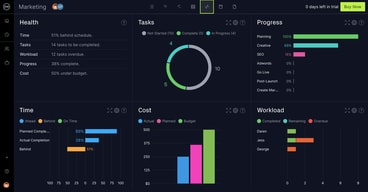
Each project that is implemented across our company is prepared by ProjectManager. We have been successful in fulfilling our customer demands. My engineering career has been promoted by the great performance to our applications. The user dashboard shows planning progress and cost that can be deployed to implement a given project or a task.
The mechanism that monitors the performance of our progress in implementing different projects has never failed. It has all tools and the capacity to control all our systems without breakdown.
It helps us to map and give estimated cost for implementing a given project or a task. Time and resources that have to be used for full implementation are also calculated. We have saved a lof of resources from mismanagement and created transparent infrastructure for running our projects.
Since it was implemented it has been excellent for us, it is very good for project management, I liked the tasks reminder and how easy it is to use due to its interface, I really liked the constant updates that it has been making during these months, I liked that it became a bit light and became a bit more familiar to me due to the similarities it has with other management software.
We had problems before, but they were solved so far everything is going very well.
It's great for reviewing tasks and making updates, managing time, and monitoring projects progress.

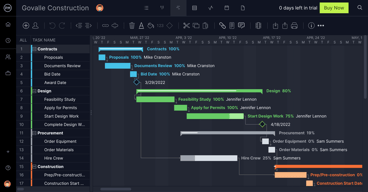
ProjectManager enables us to connect multiple projects and assignments at different sites with one another to reach the optimum level of service for the day. It provides remote work management and supervision with Gantt charts that depict productivity of staffs on real time basis. Reports generated with ProjectManager helps us to ascertain whether the project undertaken was profitable or not.
Internet fluctuations can cause errorenous reporting, else the software doesn't have any major issues.
ProjectManager is used for hybrid work environments and different sites accross several cities where it's necessary for the project assignment to be in sync always.
I like ProjectManager because it has the ability to easily manage projects and collaborate effectively, it's easy to use and understand, I like that the reports are real-time and it integrates easily with Excel, its great to be able to monitor and share different projects with the team, we love this online technology. It is a great web-based product that really saves working time and we noticed how efficient and effective it is.
I would like to see more functions and the ability to automate processes and thus simplify the work a bit.
Solved our problems, we can manage our projects and analyze reports in real-time, we can maintain multiple projects and collaborate together with the working group effectively.
It is a good software very easy to use with a friendly user interface, I like that it is customizable, its interface has many themes so that it can be adapted to users, I like being able to monitor projects and it offers integration with other third-party tools. This tool is very intuitive and easy to use for anyone who wants to implement it in their company, it will be very useful.
We only had minor issues like slowness in some sections and common bugs.
It is good and it helped us a lot in the management and monitoring of the projects at the same time, it has been a good tool that solved our problems.
I like being able to manage projects and some other task and its great to see how everything flow and to be able to collaborate with our team it allowed us to follow up to see if the performance is optimal, we see the tasks in progress and the ones that have already been completed. It was easy to use and it has been a pleasant experience.
Everything is going very well but I would like them to add a little more functions, especially to automate.
It is being used to manage projects and observe the performance of each task and improve day by day, that was our benefit.

It allows to make schedule for all new development projects, change management (ECR/ECN). Project Tracking feature is very useful as it give alert and reminder in order to meet timeline. Follow up with CFT (Cross Functional team) is very facile.
Project status update is very slow even at high internet speed. Integration with MS excel is not effecive. Price fot enterprise plan is lil bit high as compared to other project management tools.
Easy to make project schedule as all projects related task already considered in this tool. Auto generated open task list for task. Project success tracking is very useful to explain progress of same to management.
The aid offered by Project Management facilitates and kind of project. The upside of Project Management is swiftness of ifs operation.
It will be an act of ingratitude for me to say I have any dislike or downside of Project Management software.
Project Management help me in the building Project of my Church. The benefit I get is that it help me conserved money.
The ease of use is awesome. I like how we can highlight sections of the plan. It is great that you can have multiple projects going at once and easily go between them. I like the fact that the training provided was easily understood by all levels of users. The updates that they have put in have been nice and have not introduced any bugs. There are many features in the product that become very useful as you become more experienced with the product. With so many views of the projects, it is great for all different types of users. The Gantt view is an awesome and very useful overview of the tasks and dates. I also find the dashboard very useful when needing a high level overview of the project and something to share with other stakeholders.
It would be nice to have different views for different projects. Depending on the project sometimes you may want to have custom fields and have those show up in your view differently than other projects. There really is not much lacking from the product. It is nice that they are always updating it as well.
We are running a large project with multiple workstreams and have been able to split those into smaller projects but still have great visibility into all. With so many participants and tasks, it is wonderful to have the dashboards that are available.

I like how you can categorize your tasks and see the entire timeline.
Nothing really; the tool works great and is simple to use.
I'm using a ProjectManager to launch a new business where I'm serving as a consultant. The benefit is that everyone can log in, review tasks, and make updates.
It is easy to work with and very helpful in maintaining a job schedule
Sometimes the way you were able to print is not always convenient
I'm able to see where I have tasks overlapped and where I need additional help