
Unclaimed: Are you working at Taskworld?





Taskworld Reviews: 4.4/5 — Solid Choice
Known as a pioneer in integrated project management, Taskworld is a project management platform that makes it easy from companies to scale up by facilitating better team collaboration. With Taskworld, teams can work together remotely with better efficiency and improve internal capabilities to boost productivity, engagement, and overall customer satisfaction.





| Capabilities |
API
|
|---|---|
| Segment |
Small Business
Mid Market
Enterprise
|
| Deployment | Cloud / SaaS / Web-Based, Mobile Android, Mobile iPad, Mobile iPhone |
| Support | 24/7 (Live rep), Chat, Email/Help Desk, FAQs/Forum, Knowledge Base, Phone Support |
| Training | Documentation |
| Languages | English |
Compare Taskworld with other popular tools in the same category.
I like the support i got from the Taskworld customer service whenever I needed.They are really prompt and efficient to solve any service related queries within few minutes.
Nothing much about to dislike about Taskworld
I am very much benefited by their customer support as they are ready to accept any problem and solve them promptly also the quality of their service is out of my word.
TaskWorld is an all-in-one solution for marketing agencies that want to bring together all project needs into one platform. Very nice!
n/a - At first, I was a bit confused by the layout but after some training and a tutorial, I quickly learned the system and was able to stremline projects with ease.
Project, marketing, advertising, and task management for distributed and remote teams.

Easy to use, friendly UX/UI. It's helping us manage our projects in the most simple way
The design is quite bland. It's not as vibrant or fun as other websites.
Ultimately, knowing who's in charge of what and what their timeline is solved using Taskworld. It allowed us to keep in track of the individual's and the team's progress.
simplicity and drag/drop features - highly intuitive
dashboard could be a bit more visible - had to hunt for it
Giving our clients a full progress view on their software implementation stages
Taskworld is a job management software that is mainly based on visual panels giving as a benefit to all companies that want to implement them an easy visual communication of up to 60 participants either to designate functions or simply to train them in any type of function, it is also important to highlight that this tool has an easy integration of different applications such as the use of the calendar which allows you to be planned and notified of any type of project that is going to be executed in an automatic way since it is that this tool is based on everything that has to do with the planning, execution and follow-up of tasks and projects in a visual way.
It is very important to emphasize that the software is quite intuitive and very easy to handle since it fulfills basic functions of extreme importance but nevertheless there are functions that play against him one of her is that very complex to obtain the files of an individual way another one is also that the support via web has a late answer to solve different problems that can be presented inside the companies.
Taskworld is the tool that our company was looking for for everything that has to do with task management and it came to solve problems such as virtual training in a visual way to a maximum of 60 participants with a registration facility for those who are visualizing the activities to be trained, it also solved a problem we had with the integration of notifications through the calendar.
L'outil se prend rapidement en biens, les FAQ sont bien faites et le support très réactif. L'ergonomie est la bonne ! L'outil se révèle être vite addict ! il est possible de créer un gabarit pour les projets récurrents.
Rien ! tout est correct ! Nos projets ne sont pas très compliqués,
Une création d'entreprise, un projet de mise en place de plateforme web, une soirée
easy to use, complete and functional. The application works perfectly, I can access any document and request information from my assistant, make corrections anywhere and any time through the cell phone. Taskworld accelerated our project deliveries and increased our quality control.
This is not a complaint it is just a suggestion. The task comes with a fixed format, such as location, set date and etc, I think it would be better if we could edit this information, change the names. In my work it would make more sense to change location by the name of the federal institution that I depend on for each type of project.
My projects depend on reports issued by federal and state institutions, these reports are not sent by email are delivered personally, for this reason we lost a lot of time in having access to information, often these institutions are out of town. With the taskworld app we were able to photograph the reports and directly attach the task of each collaborator, creating a deadline alert. With this new form of management we are able to deliver our projects with at least 3 days in advance. The ability to create alerts and ease of communication made our work easier. Project management now works in sync. Simply perfect
I can change the format of the projects to suit each individually. It is far more flexible than the other solutions I tried.
Perhaps a fresher format, rounded boxes for example.
Time recording without the hassle.
A plataforma é direta no assunto! Preciso apenas gerir as minhas tasks!
O gantt nao é bom! Muito confuso e estranho para se trabalhar
Gestao de projetos
simple, quick, easy communicate, with customizable notification
I actually really like your system and do not have anything to complain at the moment.
We have employees all over the world with different time zones and the Taskworld keeps everybody in the loop.
I find Taskworld extremely user friendly and easy to understand/use. I love that all my tasks and projects are organized and sorted for me, and I can easily move them around, change dates, assign them to colleagues, and click a little check mark when they're complete (which is so satisfying). I find it very helpful that I can use a timer to track the amount of time I spend on projects, rather than just relying on my memory. Sometimes we lose track of time when we're busy working. It's also great that I can access Taskworld from anywhere via the app. This has proven to be especially helpful to my colleagues and I when we are out at video/photoshoots or when we're working from home. I also like that I can peek at my tasks from my phone when I'm at the gym in the evening, to get an expectation of what the following day will look like for me at work. Further, I love that my colleagues and I are able to access everyone's tasks and schedules to see how heavy everyone's workloads are and assess if projects can or need to be moved around. All around, Taskworld has improved organization, accessibility to the database, and efficiency within our company substantially.
I dislike that when I click into a project task, then click back, it takes me to the screen where I see all of the current projects. This is a pain for the way my company has set up Taskworld as our project database. I'm also not a huge fan of the updated look of the Projects page, as I found the previous layout much easier to work with. Our company uses Taskworld to go over all current projects with each client in alphabetical order during our internal meetings and the updated design makes this difficult in comparison to the old look--but maybe I just need to better adjust to change.
We all have a better understanding of the time it takes to complete projects, since we can use the timer. This lets me know areas I can improve my time in and have a greater understanding of how much time I require to complete specific tasks and projects.
I like the filtering and tagging feature. I'm able to tag certain tasks across projects that are related, i.e., graphic design tasks, and filter them out when I'm speaking to our design contractor. I am then able to run through the list of all the tasks on their plate, even though they are categorized within different projects. I also like being able to filter completed tasks so I know how all my time has been spent.
I wish I could edit completion dates of tasks. I don't always have the opportunity to access Taskworld in real time, so when I'm updating my to do list and checking things off, I'd like to include the actual completion date rather than the date automatically populating. It would give me a more accurate account of how my work it getting done.
Being able to get a more holistic view of everything everyone is working on. Breaking down silos.
My co-owner and I are able to assign each other tasks, see what's in progress, what needs to get done, order things by priority, and sort things by project/area.
Nothing so far. We've still got some optimizing to do, but that's on our end.
Specifically, this has helped us communicate effectively and be more productive without a formal office setting.
Taskworld is very easy to use. When onboarding new clients, there are hundreds of tasks our team works on simultaneously. We each have a column in TW and can easily drag and drop items into each other's columns. We also use the project chat feature and individual chat features, which replaces Skype chat and Hangouts
Comparing Taskworld to our previous project management systems - Slack, Trello, and Basecamp, there is nothing I dislike on Taskworld. I will say that it looks a like more cumbersome at first glance than Basecamp and the switch was a bit rough, but I would never switch back.
Taskworld gives our entire telecommuting team real-time information of who's working on what and when. It connects the dots and save a lot of emails and checking in.
I love the screenshots that Taskworld takes.
Sometimes the program slows my computer startup process.
Taskworld brought accountability to the people who work for me away from the office. Because of the screenshots and the measurements of activity I can feel confident that what i pay my employees is for actual time worked. Taskworld has made it easier to manage interns, contract laborers and more. It was a game changer for our business. HIGHLY Recommend them!
I really like how each project, or card, can have individual deadlines, progress, and comments. Assigning users to each project, or card, is easy and it makes sense. The ability to measure the completion of tasks based on difficulty is a great tool as well!
Users have to be assigned to the project in order to be assigned a card inside the project. Can't have multiple deadlines per card.
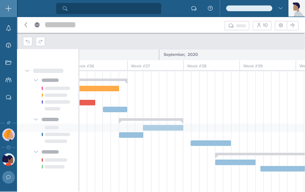
We have been able successfully keep our various departments in sync through Project status, deadlines, etc, as well as seeing a visual timeline schedule with them Taskworld Gantt Chart view.
日々使うものなので動作が軽快なところが素晴らしい。 乗り換え前のシステムが鈍重だっただけに便利。 タスク管理としてつかうのに充分な機能をもち更に、かゆいところに手が届くタイマー機能やラベル機能など視覚的に捉えやすい チェックリストやコメント・ファイルの添付などタスクごとにステータスが多く情報が多いタスクなどもスムーズにまとめられ非常に便利。 アナライズ画面が非常に使いやすくこのインターフェイスがあるないで運用決めたと言っても過言では無いほどの利便性がある
運用における自由度は高いが細かいカスタマイズが効かない。 一部インターフェイスの配置が不便なところがある。我慢できなくはないが、もう少しのカスタマイズ性はあったほうがいい。 タスクリスト間のタスクの移動にマウスの移動量が多く大変な部分も。 リスト表示のタスクリスト作成ボタンなどはタスクリスト一番下にくるとタスク数が多い場合の運用時にボタンが下端までスクロール刷る必要があり不便。 機能がおおいがその兼ね合いが良くないことや仕様を限定しすぎているところがあり工夫を要されるところがある アナライズのリスト表示時にタグが1個までしか表示されないのが難点 管理タスク数が多いときに通知を見逃しがちだが、一般的な運用では問題はないと思う。
小規模デザイン製作における生産と進行管理。請求への科目をわかりやすくまとめること。 DTP/印刷/映像の3部門におけるそれぞれ粒度のちがうタスクの一括管理。
I have used Taskworld in my last 2 jobs and just LOVE it! I've never been so organized and I owe it all to Taskworld. The platform is super user friendly and easily notifies me when something is "past due". I highly recommend this work tool to all organizations of any size!
Nothing really...it's perfect for my line of work, which is non-profit funding.
It has made me SUPER organized and relieved me of a lot of stress and worry with work.
Work fluidly and dynamically,100% intuitive
Improve the integration of the platform with the android app
Taskworld allows me to create a better workflow, simple and effective, which allows me to focus on other areas of the company.

Integrated timeline (that automatically generates from tasks) and combined dashboard were the two major features that drew me away from Trello. Once I was in though, lots of little features really impressed me such as seeing subtasks within a main task on the column view, ability to assign start and end dates and built in analytics to name a few. Taskworld is also really reasonably priced compared to some of the other enterprise options.
Really nitpicking here, but I wish there was an integration with Harvest for time tracking. Also I wish there was a way to reduce the width of the columns or a collapsed view. The horizontal list view doesn't quite do the trick. Also I wish the comments were just at the bottom of the task and not a separate tab. That would make it easier to scan for updates.
Managing larger on-going projects that have varying durations and team members.
All my project have very complex timeline and tracking it in excel is very painful. With Task world it's very easy without any formula .
It would be great if it can have calculation field or mini excel in it
- Breakdown the process - Increase communication efficiency - Easier to follow up something you have forgotten
Taskworld allows me to keep organized!!!!
Nothing - I really adore Taskworld!!!!!!
Taskworld lets me stay organized in a visual way, which really works for me. Reminders about overdue projects are also amazing!
FIRST, I love that Taskworld has a membership for a small business at a reasonable price that allows full access to all of its features!! I am a freelancer. so have no other team members and one of my largest frustrations with many of the other task programs out there is they only offer entry at 5 members, otherwise you only have access to a small number of features. So frustrating!! I do love the functionality of Taskworld, i can track dates, comments, add files, sort by different criteria and the interface is simple and clean so it's not too distracting.
There are some features i would add, more control over the "project folder" / features and more features in the sub projects. But i haven't come across too many issues with use.
I juggle about 15-20 active projects at a time, Taskworld helps me keep all large and small tasks organized and delivered on time.
Taskworld has an easy to use interface where you don't have to be a Project Manager by profession to be able to use it. This helps when you're working in a team with multiple disciplines and various experience levels. The dash board is very well thought out and helps give an indication of the health of your projects & tasks, There are constant updates being done to the platform which shows that the team is working hard to improve it's functionality and adding new features.
I would like to see the Gantt chart become more detailed with milestones and dependencies. Also some customization in the dashboard charts would be beneficial. And I would like to see a budget tracker implemented into the projects settings
As a project manager, TW helped me a lot in organizing my projects and help me keep track of my daily tasks,
I love that I can break down larger projects into small tasks and then have a checklist to further breakdown that task.
The only thing I'd like to see is 'deadlines' for the individual items on the checklist. Otherwise, I love it!
I've formally opened my business this year, and as any start-up person can tell you, it's like fighting a Hydra. Every task I crossed off created two more, and a plain To-Do list was insufficient to what I needed. TaskWorld let me organize my items into tasks and projects, which made it much easier to see what I had to do and when.
Easy access to review and control works from anywhere, visibility to all related details at one stop
Time spent on loading files, fee quite high
Multi-tasks management solution, Staff Performance and Lead time control, Visibility to all task details together at one place
Taskworld has allowed us to automate communications among projects.
Taskworld has been great. Nothing to complain about.
Manage multiple projects among many teams and automate communications.
Taskworld has an intuitive interface with tasks that can be organized by projects, tasklists and individual tasks. I love that it sends me daily email reminders and that I also can send emails directly to Taskworld. It works across devices and has just about every feature I need without cluttering the work space or making everything too small. I am a big fan of this program.
So far, I have found nothing to dislike about the program. I have on several occasions sent them suggestions for additional features, which then have been added a couple of months later.
As a registrar at a school, I have many different projects and tasks that need to be completed throughout the year. Taskworld helps me stay on top of everything I need to do. It has truly made me more efficient.

Impressive for creating subtasks out of big tasks which are my daily assignment. Reliable for tracking tasks deliverables in real time. Access of tasks and account from different devices for efficient management. Chats capabilities have made collaboration easy.
The chats capabilities have made it easy for team communication.
Support of chats makes it easy for teams to communicate and collaborate. Creating subtasks from tasks helps a lot with to do lists done on a daily basis. Well designed with Gantt charts to visualize on how to go with tasks performance.
Taskworld tool is great option for multiple task tracking and team collaboration at larger scale. The home screen of this application is tool user friendly and making the experience for users also outstanding and seamless. Keeping all the data structure and documentation well and fully organised. Daya by day communcation and collaboration with team has become so easy and intuitive. Assessment assigning and tracking from any where. For digital marketing and communication work, Taskworld is a great choice and option which everything tracked and viewed at one place. Task managing in larger batches and structuring the processing for the completion of the project. Offering good variety of features in just this one application, like assigning tasks, tracking the employees task status, integrating with multiple tools to collect and unify data and many more in this.
The interface is no doubt well arranged, but just the thing is that there are various large number of icons and tools all present on the home ages of the software, which make it confusing for users which software to select. Other then this there is nothing to worry about this.
The unlimited and helpful tools and features on this are helping to manage our difficult and complex task even so easily. The process structuring features had made it possible for us to properly allign the working steps. Also there is a feature to generate a detailed report. And keeping track over all our team members and managing our multiple ongoing rojects through this software.