

Unclaimed: Are are working at Trello ?
Trello Reviews: 4.4/5 — Solid Choice
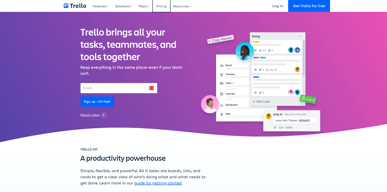
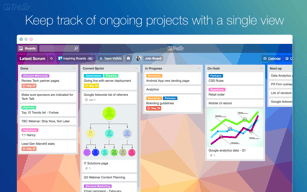
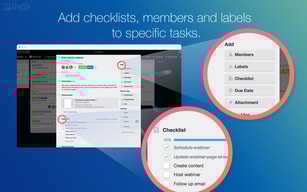
As one of the pioneering Kanban web-based project management platforms, more than 2 million teams are now using Trello worldwide since its launch in 2011. Trello is best known for its simple visual interface, with cards that can be moved across different columns. Each card holds all the information teams and assignees need to deliver on projects and execute tasks efficiently. Over the years, Trello has introduced robust improvements to its systems, which include a proprietary built-in and no-code automation feature called Butler. There are also add-ons called Power-Ups that allow teams to link your most-used productivity and business tools with Trello plugins.

| Capabilities |
API
|
|---|---|
| Segment |
Small Business
Mid Market
Enterprise
|
| Deployment | Cloud / SaaS / Web-Based, Mobile Android, Mobile iPad, Mobile iPhone |
| Support | 24/7 (Live rep), Chat, Email/Help Desk, FAQs/Forum, Knowledge Base, Phone Support |
| Training | Documentation |
| Languages | English |
Trello Pros and Cons
- Timelines and productivity metrics in one place
- Convenient Kanban-based boards for ease of use
- No-code automation features
- Lots of integrations with leading tools
- Convenient pricing packages for all companies
- No inventory and budget tracking
- No invoicing features
- Not suitable for more complex task planning that involves multiple segments and moving parts
- No Gantt chart feature
- May be too basic for complex task tracking for enterprise teams







Compare Trello with other popular tools in the same category.

The user interface is intuitive and easy to use. The visual approach to project management keeps me organized and focused without feeling overwhelmed. I also love the way they use boards, lists, and cards to break down projects into smaller, more manageable tasks
The platform recently presented some challenges for me when attempting to log in. I experienced frustration and felt stuck as I could not access my boards and tasks.
We used Trello to manage our ongoing, completed, and upcoming projects. We shared boards, assigned tasks, remarked, and left comments as needed using each participant's account.
Easy to curate and content to share with my team with options for editing and reviewing.
Some features are paid only, like integrating the calendar or allowing certain users to edit or access.
The ability to create a shared platform for directors to review and give feedback on content.
Great for productivity and to-do lists, and managing tasks on teams with others. Good for when your role incorporates many workstreams.
It could have more detail in the way it helps you figure out how to allocate time, not sure if that is in the premium version though.
It's helping employees and users stay organized. If you've ever had a manager who comes to your desk every 30 min with a new task and/or is emailing you / texting you with to-do items, it helps put all that in one place and keep you from feeling overwhelmed.
There are many platforms out there now but none of them come close to the level of specific automation you can do with Trello's automation
Trello is intended to be one board per project, but we use multiple. It still works fine, but some specific nuances annoy me about our situation.
Transparency across the team. Removing internal email most of the time. High level scalability
It's a robust PM tool that allows anyone to keep track of multiple projects at once, record status updates, project notes, assign tasks, and more. It's a great tool for keeping things running smoothly as a team.
I really can't think of anything major that is missing. It might be nice to be able to have full pages instead of just boards, but the boards still work.
Trello allows me to easily track a project and keep all of the related information in one place that anyone on my team can access it. It is super helpful for promoting collaboration.
Ease of use even for people who don't usually like this kind of thing.
Nothing to dislike - it's a very good tool.
Working together and keeping everyone on track.
In trello, it is possible to organize the demands and understand the deadlines and specifications of each job.
Notifications that come in all the time.
Usually the platform goes out of the air a lot, but it's something that has changed a lot recently.
The app is brilliant for small and medium size business. It able to manage from simple to complex projects very well. Trello aslo enables our team to collaborate on various projects and aslo creating and assigning of tasks is easy. I like how Trello integrates with google drive making file sharing to be easy. Trello templates are easy to customize and it offers a wide variety of them.
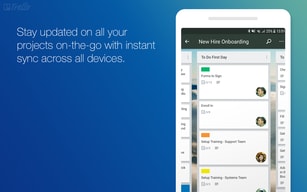
The mobile app of this application can be difficult to use.
Trello is one of the most affordable project management application. It easy to use with very attractive user interface. It able to manage simple and complex projects. Collaboration among team members is easy and it able to intergate with other application.
It is great for note taking, reminders and creating lists
The layout can be a little confusing, but overall it is great
It is a great platform for task/event management, I use it to put in notes, reminders, to-do list and more!

I love how easy it is to see where different parts of the project are at. I just started a small software business, which helps my business partner and me keep track of all the feature updates for the new software. This is a great communication tool for us to ask questions back and forth and keep it all captured within Trello.
I have not found anything that I dislike about Trello yet. It works really well for what we use it for.
In building new software, there are many ideas that we have for feature updates. I like that I can create a separate post for each feature update and dialogue about each feature request with the programmer right in that post it. It keeps us organized.


