

WebWave Reviews: 4.6/5 — Highly Rated
WebWave is a freehand, true drag and drop website builder. It means that you can position elements anywhere on the canvas, and work with layers. It is a free web design software that’s lauded for being a professional white-label website builder and a responsive web design tool with CMS built into every created website.
WebWave is ideally suited for small online stores. If you want a website with your own domain name (without ads or WebWave branding), you need to choose the (inexpensive) Premium Plan. WebWave is a tool in which you can create a complete and well-optimized website.

| Segment |
Small Business
Mid Market
Enterprise
|
|---|---|
| Deployment | Cloud / SaaS / Web-Based |
| Support | 24/7 (Live rep), Chat, Email/Help Desk, FAQs/Forum, Knowledge Base, Phone Support |
| Training | Documentation |
| Languages | English |
WebWave Pros and Cons
- drag and drop feature
- custom website and mailing domain
- free hosting
- automatic SEO audit
- free templates
- 'template library could be better,
- steep learning curve for those inexperienced with graphic design
- lack of two-factor authentication (2FA)

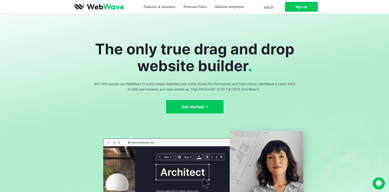
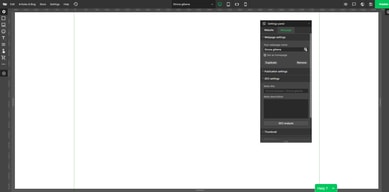
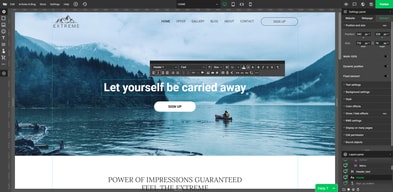
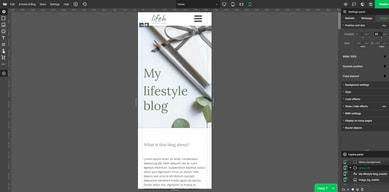






WebWave Review: Create websites like you design graphics
There’s a new addition in the website builder scene that claims to operate like a graphic design tool.
WebWave is a comprehensive website builder that lets users create professionally-designed websites even without a technical background or a hefty budget. But as with any tool, it’s not completely flawless. In this WebWave review, we’re taking a closer look at how the platform works, its features, and its capabilities.
Let’s check it all out in this WebWave review.
What is WebWave?
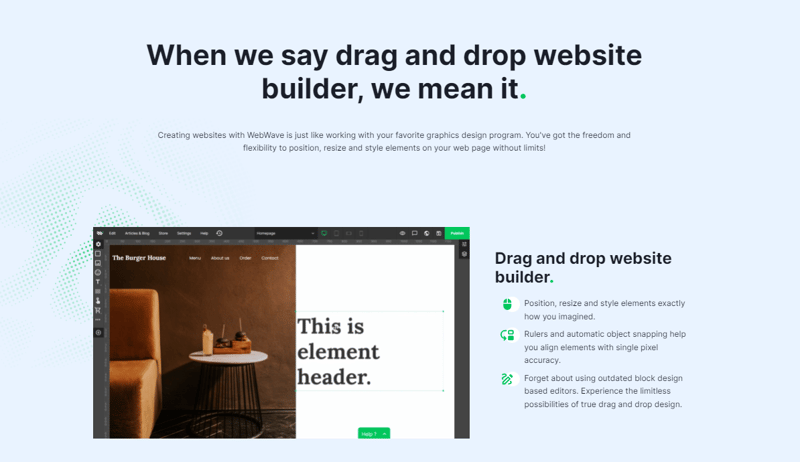
WebWave is a true drag-and-drop website builder that offers an intuitive and straightforward interface, making it easy to create a website without any coding knowledge. WebWave’s interface more closely resembles a graphic design tool than any other website builder, which makes WebWave stand out from the myriad of options available in the market today. With its range of features and tools, including the ability to create online stores, blogs, templates, HTML input, e-commerce, domain names, and permissions, WebWave is a website builder that could certainly be worth considering. Additionally, WebWave places great emphasis on development, with updates released twice a week to enhance its website builder capabilities.
How WebWave Works
Because WebWave’s interface is built to offer a distinct departure from traditional grid-based editors, it provides users with the flexibility to move and position objects anywhere on the canvas. This layered approach, not unlike most graphic design platforms, allows for easier customization of elements, aided by rules, and automatic object snapping to ensure alignment.
Additionally, WebWave offers a range of features and tools that make it easy for users to create websites, including SEO, hosting, templates, HTML input, e-commerce, domain names, and permissions. Those interested in trying out the users can sign up for a free account on the WebWave website and begin building their website immediately. WebWave offers a free account option, enabling users to build and publish a functional website at no cost. This trial experience allows potential users to assess whether the platform suits their requirements before considering any paid plans.
WebWave Key Features
Interface
WebWave’s entire interface is built on the idea that web building can be easier. To that end, WebWave’s distinct dashboard and functionality ensure users access an easy-to-navigate settings panel that is customizable specifically to fit their preferences and needs.
Responsive websites
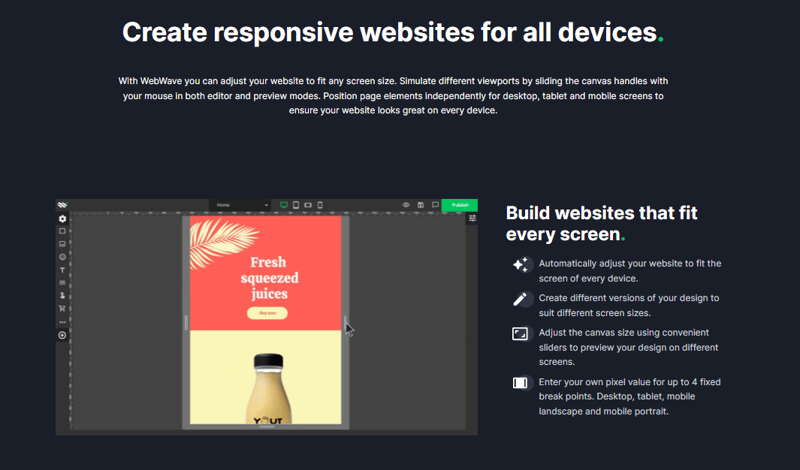
WebWave enables users to optimize their websites for various screen sizes by simulating different viewports through the adjustment of canvas handles in both the editor and preview modes. This feature allows for independent positioning of page elements, ensuring that the website appears visually appealing on a desktop, tablet, and mobile devices alike.
Interactions
With WebWave you can create an interactive website with which your visitors can interact.
You can choose from a range of interactions:
- Show elements while scrolling.
- Show and hide elements on click.
- Hover effects.
To create innovative object behaviors and visuals that prolong your visitor’s interest and communicate your message in a more memorable way.
Animations
WebWave offers a selection of design choices, incorporating animation capabilities like the Parallax effect and Ken Burns. This allows for the development of visually appealing effects, without necessitating additional CSS or JavaScript resources.
E-commerce
WebWave enables the selling of digital products in various markets, ranging from local to global. The platform makes the process of creating and selling these products multiple times quite manageable, thanks to the automation features it incorporates. This aspect contributes to a user-friendly experience overall.
The platform allows users to establish personalized email inboxes tailored to their businesses, such as office@mydomain.com. This functionality enhances the professionalism and credibility of an online store, offering a significant advantage.
Blog
With WebWave, you can create a blog where businesses can easily self-publish posts with graphics and videos, tailored for your customers/users.
SEO
Multiple tests have shown that websites created using WebWave tend to rank higher in Google search results than those built with other, more well-known website builders. WebWave’s integrated SEO checker and suggestion tool can help users enhance their page SEO scores, allowing them to surpass their competitors and boost their site’s organic ranking in search results.
Security
Hosting and maintaining hundreds of thousands of user-created websites from around the world is a significant responsibility for WebWave. To ensure that these websites remain online 99.9% of the time, WebWave’s servers are closely monitored on a 24/7 basis, which helps to provide a reliable online presence for the websites hosted on their platform.
What Makes WebWave Stand Out From Other Platforms?
WebWave’s true drag-and-drop website builder offers a unique and easy website-building experience by giving users the liberty and versatility to place, resize, and style elements on their web pages. Such functionality allows for the creation of custom designs and layouts with ease. Additionally, WebWave supplies an array of design elements, including pre-built sections and widgets, which can be effortlessly incorporated into a website with just a few mouse clicks. WebWave’s user-friendly design interface, extensive features, and distinctive design approach set it apart from competing website builders. For those seeking a website builder with an accessible design interface and abundant customization choices, WebWave is worth considering.
Pros & Cons
Pros:
- Works like a graphic design program
- Drag and drop feature
- Free plan available
- SEO analyzer – automatic SEO audit
- Free templates
- Ability to create your own site from scratch
- SSL certificate
- eCommerce features
- Easy change and customization of templates
- Ability to create responsive websites
- Extendable with plugins
Cons:
- The template library could be wider
- There is a steep learning curve for those inexperienced with graphic design
- Lack of two-factor authentication (2FA)
Verdict
If you’re looking for a website builder that strikes a balance between ease of use and customization options and has a graphical interface, WebWave may be worth considering. WebWave is a comprehensive website builder that offers a range of features and tools that will work well for you if you have some previous experience building websites or using a graphics editor. One of the most significant benefits of WebWave is that it is an excellent option for both beginner and expert online store or blog owners who don’t need any coding knowledge. With WebWave, anyone with no coding knowledge can easily design a website. We recently tested WebWave and were surprised by its significant differences from other builders, making it a unique and noteworthy option for those looking to build a website.
In summary, if you’re looking for a website builder that offers a familiar interface, with extensive customization options without needing coding knowledge, WebWave should definitely be on your radar.

Compare WebWave with other popular tools in the same category.

1. Drag & drop features, easy to design for non-programmers.Very friendly UI. 2. Manage multiple client websites in one dashboard. 3. SEO Ranker and Analytics 4. Get business email, domain and SSL all in one place 5. Easy migration of WordPress sites to webwave 6. Custom code features available for coders.
1. There's no AI content generator at the moment 2. The developer should create plugins for web portals that users can plug and play inside webwave. 3. Social Media integrations of blogpost and e-commerce will be an added value.
It solved the management o f multiple websites It solved easy drag and drop design just like fig ma It solved dom ain and business e mail registration It solved team work collaboratio n o n website projects.
You can create blogs, stores, logins, and almost anything required to build a professional website.
Didn't find any Local SEO options, like JSON-LD structured data.
Building quick, professional websites.
WebWave has all the features anyone would need to build a modern website. It has a robust set of tools that at first may seem overwhelming, but as you start using the builder, it becomes easier and more intuitive to do so. - If stuck, their support is very good - The well-thought-out templates make it a breeze to set up a nice looking website in a couple of hours if needed. The canvas feel of the interface and the ability to work with layers is awesome and gives great control over the website's final look. Also, having the hosting and email included is very convenient. I have found it to be a true drag a drop, relatively easy to use website editor with very powerful features.
The UI could use a more modern feel, but as is, the functionality is good - Once you have picked a template it cannot be changed. More manual adjustment has to be done than I'd prefer to accommodate responsive screen sizes. (on the other hand, there is a lot of control over the final look) - It'd be nice if they had their own audio player and even though the templates available are great looking, adding a lot more would be a big plus.
Due to the design freedom offered by the platform, I can be a lot more precise as to the look and feel of my website. Other programs tended to box me into their own limitations.
I love how easy it is to use and how helpful the team is. Every question and every problem is solved in minutes. My pages are beautiful :)
Nothing. Everything is perfect. Test it.
WordPress is not for me. Too complicated and too limiting. I had to use a webmaster and now I can do changes on my websites on my own in a short time.

Webwave provided everything necessary for me to create a website for my fledgling micro-publishing endeavor quickly and easily. Before using Webwave, I thought their claims of "drag and drop" might be hype. Not so. Webwave really is as easy to use as they advertise.
I had only one problem using WebWave. A short, looping video (MP4) on my site looked fine on Windows and Android but was missing on iOS. I swapped the video for an animated graphic (GIF) and it worked fine everywhere.
I need a web presence but don't want to spend a lot of time on site design. Webwave solved that problem for me.

I recently started using WebWave and I am blown away by its features and ease of use. The drag-and-drop website builder makes it simple for even a beginner to create a professional-looking website. The wide range of templates and design options allows for endless creativity and customization. The platform also offers responsive design, ensuring that the website looks great on all devices and various integrations with popular payment gateways. I am extremely satisfied with my experience with WebWave and would highly recommend it to anyone looking for a high-quality website builder. Five stars!
Highly Customized Websites: WebWave may not be the best choice for users who need a highly customized website with advanced features and functionality. The platform's customization options may be limited for users who need more control over their website's design and functionality.
WebWave is designed to solve the problem of creating a professional-looking website without requiring technical knowledge or expertise. It provides a simple and intuitive drag-and-drop interface that makes it easy for users to design and build a website, even if they have no prior experience. The benefits of using WebWave include: Ease of Use: The drag-and-drop interface is user-friendly and requires no coding knowledge. Customization: A wide range of templates and design options allow for unlimited creativity and customization. Responsive Design: The platform ensures that the website looks great on all devices. Affordable: WebWave offers an affordable solution for creating a professional website. In summary, WebWave is solving the problem of website creation by offering a user-friendly and affordable platform for designing and building a professional website.
It was very simple to get started, and it was extremely easy to use.
I would like to see more tutorials. I think that would help for faster learning.
It's a very inexpensive way to get content on the web.
Astounding program. It has all the capabilities you would require in a site CMS. The customizability is astonishing. What's more, in particular, they give you access to your root, custom urls for websites and pages, and natural dashboard to get to everything with a solitary mouse click. I haven't seen that multitude of highlights in a single no code site builder. In the event that you are searching for an extraordinary CMS that assists you with building a straightforward site or Web based business WebWave is a great decision. It accompanies capacity, email and a free SSL cert. What's more, each month there are new features.
Nothing I can think of, everything seems to work just fine
Entry level to advanced web design for non coders
What I like best about WebWave are the ease of use and clear guidance. I am new to web design and could not believe how quickly I was able to begin designing a new website.
There was nothing to dislike about WebWave. As a matter of fact, it set a new standard for me. The clear instructions and guidance made it a comfortable and fun experience as a beginner.
The problem that WebWave solves for me is having a place to start and to grow in web design, creating templates, and using features I never imagined learning to use with such ease.

The team behind WebWave is always at work making positive changes to their service. It’s, without a doubt, one of the best services for creating and managing client websites today. These are some of the features that I like the best: You can customize the back-end panel with your agency branding. You can set up your clients to access only specific projects. You can bill your clients. You can easily duplicate your websites as templates, export the code, etc.
There’s a bit of a learning curve because of how the visual builder works, and it’s not perfect yet–but it’s getting there. Also, some templates require adjustments to align objects within the design properly. WebWave also had some speed issues that are now being fixed via the inclusion of CDN technology.
You’ll be able to create just about any webpage, and the focus on client management is helpful for freelancers and design agencies. I specifically like the client management features because these features help me run my business better as a freelancer.
Drag and drop web builder, plenty of templates to start from. Has ecommerce builtin.
A bit of a learning curve, like most new things. But nothing I wasn't able to achieve after several hours on a weekend learning to use.
Develop and host a website without needing the constant maintenance like with WordPress.
WebWave is easy, the sites are stunning, and I don't have to pay an arm and a leg for it. For that reason, I'm leaving a great platform in Wordpress and jumping onto an elite one in WebWave.
Honestly there's not that much to dislike about WebWave. I have, however, noticed that loading times can slow down every now and then. In jumping over from Wordpress, I was hoping to find something with a faster load time.
I don't have the skills to code but I expect my brand to look clean and professional. So if I wanted to change something with my website, I'd have to contact my web developer. It also would cost a certain amount to work with my developer. I can keep my costs low, without moving away from my brand.

If you know, the basics of web designing or familiar to drag and drop site-builders Webwave helps you to understand things better. It functions more like UI design tools like Figma but focuses on web designing. It gives you great flexibility in creativity. And how they thought about many details in the agency panel is impressive.
So far, I can't think of any solid con to consider something I dislike about this service.
I offered a new web design for my friend's veterinary clinic business, and I had a couple of web design tool options to go with. One option was Wordpress (which used to be very Google-friendly some years ago but now I hear that it's not very good for Google), and the other was the drag-and-drop design tool called Mobirise (a great tool but very repetitive design-wise). I was aware of the Webwave but never gave it a chance to try before. And it was a good opportunity to give it a run. So I started working on this new veterinary clinic website project and learned a lot about what Webwave offers while working. Now I'm considering using Webwave only for all my future projects.

I am a graphic designer, and I really enjoyed continuing to create a website as I create a design for my clients. The interface is ergonomic and easy to understand! In addition, the video tutorials are very explicit. I recommend this software
Nothing in particular, Everything is OK!
The advantage with this software is the ease of use, the very professional rendering and the pro templates already at our disposal! In addition, short but explicit video tutorials are also available!

I recently started using WebWave as a website builder, and I'm very impressed! It's incredibly easy to use, and the drag-and-drop feature is great - I can quickly move any site element to exactly where I want it. The interface is super intuitive, and the tutorials make it simple to learn how to navigate the software. It is so much more versatile than other website builders I have tried in the past - I can position the elements anywhere I want! This huge advantage has allowed me to create websites exactly how I envisioned. The ease of use combined with this level of control has made WebWave a clear winner for me. It's easy to use and offers many features to help me create a website quickly and without needing any coding knowledge. Also, as I use Photoshop and Affinity Photo, this very much aligns with layouts and several functions.
I specifically don't have any dislikes. The tutorials and documentations are vast and extensive. I had but a contact form on my website and am used to adding google re-captcha to weed out any robots submitting on the conditions. There was no option for it here, so I was slightly disappointed. So I contacted support via email, and they said that this is being taken care of on the server side, so I don't have to worry about it and don't need a re-captcha added to the form. That was a significant relief.
1. No need to code, what a relief! 2. Easy to navigate, elements placed in the right place. 3. Extensive tutorials and documentation for the doubtful. 4. Great pricing! 5. Access to stock photos too! 6. One-click fix to get the site optimized for different screen sizes. 7. Saving time!
It is a fully customizable website builder!
Takes a little bit of learning to get used to it, but once you do that it works like a champ!
It solves the problem of having to create a beautiful website. It's premade templates are super helpful!

WebWave has many incredible features to help you build your website and manage your online business. Here are my favourites: 1. The website builder is one of the best I've ever used. The layer-based system differs from other grid-based website builders because WebWave feels like a graphic design tool akin to Figma, Photoshop and Affinity Photo. It is, therefore, more intuitive than other builders, easily allowing you to create landing pages, web pages, pop-ups and forms. 2. WebWave has excellent animation capabilities for interactive web elements. 3. It is easy to create and share Blog posts with WebWave. 4. WebWave has fantastic business features, such as an online store, multiple payment gateways and email hosting included with the plan. 5. There are brilliant security features for your website, such as free SSL Certificates and automatic daily backups. 6. The SEO capabilities are easy to understand, giving you the tools you need to rank higher on Google.
I don't have anything that I actively dislike about WebWave, and there isn't anything I would change about the current implementation. I would like them to keep innovating the builder. The layer-based, drag-and-drop functionalities are excellent, but I feel they need to continue developing more features to make it stand out from other builders. I would like to see a WebWave iPad app so that I can design and manage my website on the go. I would also like more animation features to rival that of Webflow and the possibility of turning our designs into apps that can be featured in the Apple and Google app stores.
The WebWave builder is the most intuitive I've used. This has allowed me to turn my ideas into a functional, responsive website faster than any other platform I've used. Working with WebWave is a breeze, and I think the builder is worth the price alone. The fact that WebWave includes a host of other tools to enhance your online business makes this an incredibly valuable service that I recommend unreservedly.

WebWave is great website builder. For me it is very easy to build and manage the site. I like this rael drag and drop option that allow me to move any elements of the site where I want it to only with drag and drop. I try many websites builders that have drag and drop, but its limited by elements positions in the grid. In WebWave i can position the elements everywhere. This i big deal. Also their hosting is very stable. I also like the enabled options and elements available for website building and also custom code inserts allowances. The limits is little bit low but that is reasonable and fair. I will love to see in the feature some built in music player element so we can have an option to add music player for background continuous music playing for our websites.
So far i don't have any dislike features about this website building platform. I like it very much and i am still learning it, but so far is very good and impressive.
It is helping me to build websites fast and easy. Also it will helping me to provide my customers easy access and change or add content fast without any problems.

I have developed homepages since 1998 and have for a long time thinking about why nobdy would create a layered CMS-system like photoshop, but now it´s here!! I really love WebWave, nice designs, functionalities are great and support is quick. I will leave WordPress for sure (and II will not miss all the constant issues with WordPRess updates, login attempts etc etc) Now I can focus on production even more!!
Actually nothing so far, have been developing first site and it´s best stie I ever built!
It´s a one-stop-shop for designing websites and I will not need keep constant updating WordPress sites etc.

I like the drag and drop. Aligning things is easy with the guides.,
Creating a square/rectangle is easy. BUT, to make a circle, you have to modify the square. (extra step)
Creating a good looking site quick and easy. I like the white label feature as well.

I like the ease of usage, excellent support from the developer, lightweight platform, and hosting included. This page builder has great potential as the developer listens to their user. I saw a lot of improvements during the time
Do not support AMP standards; lack features as a newcomer in page builders, lack analytics and customer tracking functionality, some words still not fully translated to my preferred language English
I can build landing pages with WebWave, but that's not all; Webwave excels at building business websites with 3-10 pages. I can also develop blogs and small eCommerce.
Webwave is incredibly intuitive and comprehensive - it doesn't matter what your business is, you can use WebWave's amazing platform to make your dream website come to life! It has all the features you need, and it's not restrictive at all. You can truly make your website yours.
Honestly, there's barely anything I dislike, it's almost perfect. One slight thing, I do wish mobile designs could be optimised automatically instead of having to do it manually. It's not a huge issue, but it's just something to point out.
WebWave solves the dilemma of today's website builders of either being too restrictive or too complicated. Webwave has an easy to use and easy to learn controls that are usable for everyone, but it gives you a lot of freedom with your design too. I can't think of one feature common in todays websites that Webwave doesn't have!

I love the layout of the editing features, it works a lot like a graphic design app. This makes it very easy to navigate and figure things out. The templates are great too! What an easy way to create a beautiful website.
Nothing I've found yet! Someone not familiar with graphic design might have a bit of trouble adding items, but the tutorials are very helpful.
I wanted to move away from my current website platform and WebWave is the perfect solution. I love that I can create any look I want.

WebWave has an easy-to-use website builder. The interface is simple and straightforward and the tools are very intuitive. It's a great tool to create a professional-looking site in just minutes (literally). A bunch of templates is ready to use in an instant.
Though I love that the UI?UX is simple to use, it would be better if the design will be improved especially on the editor. If it is more modern it will be more attractive and fun to work with. Also, there are limited fonts natively, it would be awesome if it can have more choices for design flexibility.
It gives me a fast output, subsequently increasing productivity volume-wise. The time that I save from the design process can be utilized for other tasks. That said, more production means more sales.

No coding skills Customer Support Functions
Need more Templates More Modern Designs Payment Integrations Better UI
I have multiple pagemakers but this seems more easy to use as most of the landing pages sometimes tends to forget main feature is that ease of usage for the user.
WebWave is easy to use and allows me to zero in on every single detail just like I would as a designer in Photoshop, all while remaining within a drag and drop editor. Objects can be moved anywhere on the canvas. A website can be designed exactly how you wanted it to be by positioning and overlapping elements precisely. I can create animations using animated themes such as fly, fade, expand, fold, and reveal.
Hopefully they can include more Wix like features in the roadmap
I save a lot of time with WebWave with so many choices of templates that I can start with easily, and provide my clients with professionally custom-designed websites.

5* it's true dag and drop 5* builder layout is well thought out and easy enough 5* love the fact it's has grouping so on different views it stays put then having to manually rearrange. Shows that the team have really looked at all the problems that exist compared to its other competitors 5* the animations they are modern not that dated kind. Wow! Some of the animations with static images you would think u can only get if u created and uploaded a Giff but not on here! 5* page alters to monitor size and still places things in proportion without looking odd. Very intuitive! 5* lovely/ perfect onboarding videos that shows all the awesome features with a demo walk throughlittle under 4 mins! Perfect Demo to get u exited and get right in and testing 5* the online store building features does physical and digital products and it's very very easy in terms of steps. U don't have to navigate far at all. U can look like a wizard everything is just there Every new page /blog u create u can create and as u do it simply has u secelct where it shows , so it not something u have to go back and set up, thus keeping u very tidy and organised so u don't have broken links or missing pages. Very well thought out. I think I love the team behind this. They have a brain!
I really can't think of anything to fault... It's definitely the best one I've seen to date!
True drag and drop website builder with modern , well thought out solutions to problems other sites have and love that though it looks like a expert builder it's still got awesom onboarding videos that makes an anxious person like me to learn new apps, really excited to use it. I get all the awesome features and well looked after without the overwhelm.

WebWave is a very good and functional Drag 'n' Drop website builder. I mostly like its user-friendly interface, drag-and-drop design, and variety of templates. It has all the necessary features like a shopping cart, form, login option, easy CNAME adding process, and some other necessary features. Store setting and article manager are other excellent features of WebWave. Customer support of WebWave is great.
I think WebWave should develop an easier work process for AMP. Besides this downside, WebWave has no other mentionable downsides. There should be more themes for the website builder's interface.
WebWave is solving my webpage designing problem. It is so easy that I can develop my webpage by myself without any coding knowledge. As it has all the necessary features I can make any type of webpages like a blog, store and so..om.
I like the diversity of templates they offer to start with. It´s a great help if you are not very inspired or don´t have experience in creating a webpage. I very much appreciate the store option.
There in nothing I dislike about WebWave for now.
Building a quick and beautiful website with a nice store with no stress and less effort.

The ease of use is unmatched! I'm easily able to adjust every option possible and the learning curve isn't high at all. A kid can do it!
So far there's very little that I don't like. I can't even find one thing to be honest!
Right now it's hard for our team to turn websites quick. We hand-code so it takes time. This allows us to be more productive and inhance performance of the team