

WebWave Reviews & Product Details
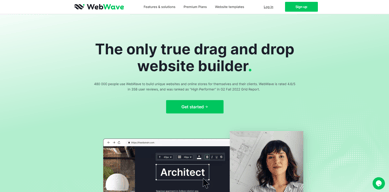
WebWave is a freehand, true drag and drop website builder. It means that you can position elements anywhere on the canvas, and work with layers. It is a free web design software that’s lauded for being a professional white-label website builder and a responsive web design tool with CMS built into every created website.
WebWave is ideally suited for small online stores. If you want a website with your own domain name (without ads or WebWave branding), you need to choose the (inexpensive) Premium Plan. WebWave is a tool in which you can create a complete and well-optimized website.

| Segment |
Small Business
Mid Market
Enterprise
|
|---|---|
| Deployment | Cloud / SaaS / Web-Based |
| Support | 24/7 (Live rep), Chat, Email/Help Desk, FAQs/Forum, Knowledge Base, Phone Support |
| Training | Documentation |
| Languages | English |
WebWave Pros and Cons
- drag and drop feature
- custom website and mailing domain
- free hosting
- automatic SEO audit
- free templates
- 'template library could be better,
- steep learning curve for those inexperienced with graphic design
- lack of two-factor authentication (2FA)







WebWave Review: Create websites like you design graphics
There’s a new addition in the website builder scene that claims to operate like a graphic design tool.
WebWave is a comprehensive website builder that lets users create professionally-designed websites even without a technical background or a hefty budget. But as with any tool, it’s not completely flawless. In this WebWave review, we’re taking a closer look at how the platform works, its features, and its capabilities.
Let’s check it all out in this WebWave review.

What is WebWave?
WebWave is a true drag-and-drop website builder that offers an intuitive and straightforward interface, making it easy to create a website without any coding knowledge. WebWave’s interface more closely resembles a graphic design tool than any other website builder, which makes WebWave stand out from the myriad of options available in the market today. With its range of features and tools, including the ability to create online stores, blogs, templates, HTML input, e-commerce, domain names, and permissions, WebWave is a website builder that could certainly be worth considering. Additionally, WebWave places great emphasis on development, with updates released twice a week to enhance its website builder capabilities.

How WebWave Works
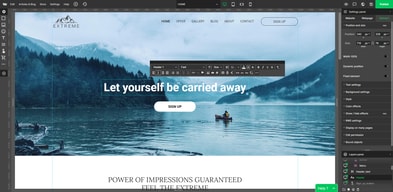
Because WebWave’s interface is built to offer a distinct departure from traditional grid-based editors, it provides users with the flexibility to move and position objects anywhere on the canvas. This layered approach, not unlike most graphic design platforms, allows for easier customization of elements, aided by rules, and automatic object snapping to ensure alignment.
Additionally, WebWave offers a range of features and tools that make it easy for users to create websites, including SEO, hosting, templates, HTML input, e-commerce, domain names, and permissions. Those interested in trying out the users can sign up for a free account on the WebWave website and begin building their website immediately. WebWave offers a free account option, enabling users to build and publish a functional website at no cost. This trial experience allows potential users to assess whether the platform suits their requirements before considering any paid plans.

WebWave Key Features
Interface
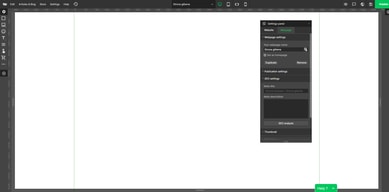
WebWave’s entire interface is built on the idea that web building can be easier. To that end, WebWave’s distinct dashboard and functionality ensure users access an easy-to-navigate settings panel that is customizable specifically to fit their preferences and needs.
Responsive websites
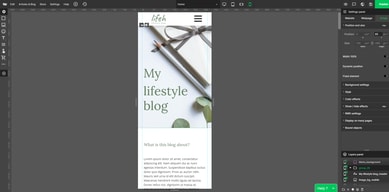
WebWave enables users to optimize their websites for various screen sizes by simulating different viewports through the adjustment of canvas handles in both the editor and preview modes. This feature allows for independent positioning of page elements, ensuring that the website appears visually appealing on a desktop, tablet, and mobile devices alike.
Interactions
With WebWave you can create an interactive website with which your visitors can interact.
You can choose from a range of interactions:
- Show elements while scrolling.
- Show and hide elements on click.
- Hover effects.
To create innovative object behaviors and visuals that prolong your visitor’s interest and communicate your message in a more memorable way.
Animations
WebWave offers a selection of design choices, incorporating animation capabilities like the Parallax effect and Ken Burns. This allows for the development of visually appealing effects, without necessitating additional CSS or JavaScript resources.
E-commerce
WebWave enables the selling of digital products in various markets, ranging from local to global. The platform makes the process of creating and selling these products multiple times quite manageable, thanks to the automation features it incorporates. This aspect contributes to a user-friendly experience overall.
The platform allows users to establish personalized email inboxes tailored to their businesses, such as office@mydomain.com. This functionality enhances the professionalism and credibility of an online store, offering a significant advantage.
Blog
With WebWave, you can create a blog where businesses can easily self-publish posts with graphics and videos, tailored for your customers/users.
SEO
Multiple tests have shown that websites created using WebWave tend to rank higher in Google search results than those built with other, more well-known website builders. WebWave’s integrated SEO checker and suggestion tool can help users enhance their page SEO scores, allowing them to surpass their competitors and boost their site’s organic ranking in search results.
Security
Hosting and maintaining hundreds of thousands of user-created websites from around the world is a significant responsibility for WebWave. To ensure that these websites remain online 99.9% of the time, WebWave’s servers are closely monitored on a 24/7 basis, which helps to provide a reliable online presence for the websites hosted on their platform.
What Makes WebWave Stand Out From Other Platforms?
WebWave’s true drag-and-drop website builder offers a unique and easy website-building experience by giving users the liberty and versatility to place, resize, and style elements on their web pages. Such functionality allows for the creation of custom designs and layouts with ease. Additionally, WebWave supplies an array of design elements, including pre-built sections and widgets, which can be effortlessly incorporated into a website with just a few mouse clicks. WebWave’s user-friendly design interface, extensive features, and distinctive design approach set it apart from competing website builders. For those seeking a website builder with an accessible design interface and abundant customization choices, WebWave is worth considering.

Pros & Cons
Pros:
- Works like a graphic design program
- Drag and drop feature
- Free plan available
- SEO analyzer – automatic SEO audit
- Free templates
- Ability to create your own site from scratch
- SSL certificate
- eCommerce features
- Easy change and customization of templates
- Ability to create responsive websites
- Extendable with plugins
Cons:
- The template library could be wider
- There is a steep learning curve for those inexperienced with graphic design
- Lack of two-factor authentication (2FA)
Verdict
If you’re looking for a website builder that strikes a balance between ease of use and customization options and has a graphical interface, WebWave may be worth considering. WebWave is a comprehensive website builder that offers a range of features and tools that will work well for you if you have some previous experience building websites or using a graphics editor. One of the most significant benefits of WebWave is that it is an excellent option for both beginner and expert online store or blog owners who don’t need any coding knowledge. With WebWave, anyone with no coding knowledge can easily design a website. We recently tested WebWave and were surprised by its significant differences from other builders, making it a unique and noteworthy option for those looking to build a website.
In summary, if you’re looking for a website builder that offers a familiar interface, with extensive customization options without needing coding knowledge, WebWave should definitely be on your radar.

Compare WebWave with other popular tools in the same category.
The intuitive editor is such a breath of fresh air after trying to edit nice or even simple pages with Wordpress editor plugins
Nothing so far.. Its looking well laid out and thought out
I'm excited to be editing and creating websites again.. with Wordpress id grown to pretty much hate it
Honestly, I wasn't sure what to expect, but I think I may have just found my new permanent website builder/host. The strengths are two-fold: * It's feature rich, and * It's very price-competitive Pretty good combination, if you ask me. Best features: * A true drag/drop interface with pixel-level specificity. You can literally put anything, anywhere - not common for no-code builders. * The ability to create layers, as you would in a graphics program. Sure, working in Figma, and then exporting to your hosting service, may offer even more power and flexibility - but Webwave offers it all under one roof (and for one very low cost). * Full hosting service complete with 20gb email domains. This is HUGE for anyone not interested in shelling out $7.00-$12.00/month/user for a 365 or Google workspace account. * Low cost. Monthly fees are more than competitive, and with the AppSumo deal, the price is impossible to refuse.
Only small concerns: * The drag/drop interface is great, but working with each element, getting all the options exactly as you want, does take a bit of work. The controls are good, and the software does a nice job of bringing you to menus you want at the right time. But there are still a good number of settings and controls to wade through. The price you pay for pixel-level control, I imagine. And honestly...it's strengths outweigh it's weaknesses. Just a bit finicky at times. * Server speed may be a bit slow - possibly due to the underlying drag/drop code, possibly due to their servers being only in Europe. My understanding is they are activating US servers shortly, so hopefully that fixes some of the issue. Again, it's not a huge problem - but if you're looking for blazing fast load times of a very high-level site, you may want to test speeds first to make sure they work for you. * Low cost. Hardly a concern - just want to make sure they're making enough profit to be around awhile. * Biggest concern: no API. Yes, they offer certain extras in-house - email marketing, and SEO, for instance. But the inability to integrate with the other tools you use will be an absolute non-starter for many. So hopefully management is listening to this, develops out their APIs soon. Slight concerns aside, this is a solid product. 9/10 recommendation.
Website building and hosting. Domain-branded email hosting.

the service is very simple to use. moreover, the editor is very functional. the ability to have users is useful for giving a site to anyone and managing it
Switch from desktop and mobile can lost more setting of view
Easy to made a website
- Easy to use Templates - Intuitive drag and drop solution - Custom creations of features to some extent
- One needs to have good understanding about paddings , margins etc. If you are first time using it, Its necessary to go through their tutorials, before starting to build your site. - Onboarding time for users who has never developed a website is a little longer
- I am building static websites for my businesses which is perfect.
webwave has a UI and UX that is easy to understand, making websites faster because we just need to drag and drop. There are also various kinds of templates with different types of niches. I think webwave is perfect for non-techy people who want to create a weblog or even e-commerce. The price is very affordable, for only less than $10 we have chosen a reliable CMS + Hosting. I did a speed test using pagespeed insight (from google) the results were quite good, the score is 92 for the desktop view and 59 for the mobile view.
I hope there will be an increase in speed for mobile and the addition of plugins to support the functionality of this cms.
Creating a website is not essy and chalengging for some people, and I Think this product can solve that problem with an affordable price

- The builder interface is better than most builders I have worked with. - Easy to add another language for your website. You will need to translate it yourself, but they include a language switcher menu. I have not seen this feature in other web builders before. However, I wish the language switcher could be locked in the menu bar. - Good help articles - Custom 404 error page - Decent store options Can add discount codes and item variations Shipping via Inpost Easypak and Payment via Stripe - Easy Blog/Article creation Each entry has it’s own editor Simple, clean and easy to use; however wished it was more customizable, like the position of the picture (always on the right of the text)
Loading was a bit slow while using the web builder. More features are needed to make it stand out from the other web builders.
Building websites for clients.

WebWave is a powerful drag-and-drop website builder and CMS (content management system). It comes with a great many useful and extremely easy-to-work-with tools. It is great for building any kind of websites, especially when you are planning to build a website in an easy-and-fast way and without writing a single line of code.
I think the left-hand side menu that contains menus such as Dashboard and Trash could be more user-friendly. It should contain a few words under those icons so that first-time users can easily get to know the usage of each icon. However, I do not think it is necessary for those words to be persistent since it can be distractive. I suggest the word description to be only shown when the mouse moves on it. When some users have become more familiar and experienced with the UI, they can choose to let it be as only icons.
WebWave is an intuitive platform that helps me to easily create responsive, impressive websites on without the need of a full development team and the best part, No code required! This software is perfect for businesses that don't want to spend a fortune hiring a specific web developer. It also allows businesses to manage and edit their websites themselves, ensuring that the website is always up-to-date with changes in the business. Adding new pages or products has never been so simple. For those that do have web development experience, they'll love the exciting new tools WebWave has to offer.

the limits of this web builder is so good and it is fast to make a lot of websites with blog and contact forms builders
it could take some time to learn new features and how to use them
Making websites easily without using wordpress for example or coding

What I like about WebWave is the drag-and-drop feature that has a similar experience to Photoshop, built-in image stock, and image editor that helps to make simple edits. Also, there are nice templates that will speed up the development process. As a designer, I think this is a great solution.
There are some downsides that I hope they can resolve which is the page load speed. It's a bit slow on the front end and back end. Besides the speed, there is no visual preview when we place a custom HTML element if you like to work with code.
I can make nice websites without too much effort on programming and focus on visuals. The website production would be faster than conventional development since it's easy to use. I think would be appealing to non-tech users. Please note that this is an integrated web builder with hosting which has email and eCommerce features. I don't need to juggle around because everything is within one platform.

If you have been working with some kind of CMS you would love it. It's a very simple straightforward CMS. It also comes with an email, SSL certificate and custom domain for a price that you won't find on the market. They also usually provide such a big discount over a year. So just wait...
Templates. It would be much better if they have a library of templates. It's very limited. Nobody wants to start building a website from scratch. Why? Because it saves a lot of time. If I'm looking at some competitors in this space most of them like 90% provide a lot of templates.
We have been using WebWave for small websites with our clients who do not want to spend a fortune on development. You can build a simple website with WebWave in 2-3 days and the result is great.