

Unclaimed: Are you working at Zoho Desk?
Zoho Desk Reviews: 4.4/5 — Solid Choice
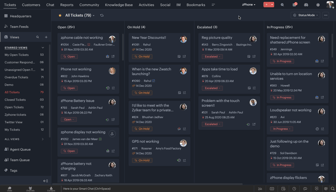
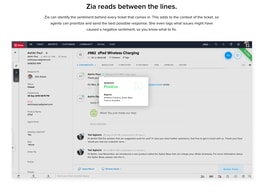
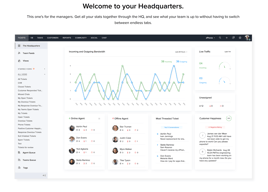
Zoho Desk is a longstanding name in its category that offers feature rich automation tools that help make your agents job easier and more efficient. One of their most lauded features includes an AI assistant that can identity repeated keywords and opinions in customers’ text to analyze customer mood and sentiment. Such smart solutions are coupled with auto-tags for tickets. You can also send automated notifications concerning ticket progress, assign tickets to specific agents, and update records via the platform.
| Company | Zoho Corporation |
|---|---|
| Year founded | 2000 |
| Company size | 10,001+ employees |
| Headquarters | Chennai, Tamil Nadu |
| Social Media |

| Capabilities |
AI
API
|
|---|---|
| Segment |
Small Business
Mid Market
Enterprise
|
| Deployment | Cloud / SaaS / Web-Based, Mobile Android, Mobile iPad, Mobile iPhone |
| Support | 24/7 (Live rep), Chat, Email/Help Desk, FAQs/Forum, Knowledge Base, Phone Support |
| Training | Documentation |
| Languages | English |
Zoho Desk Pros and Cons
- There are plenty of reporting features that provide customer insights and agent performance data
- A range of templates are available to help you respond to customers quickly and effectively
- You get real-time insights into support operations
- There’s a good free plan for new users
- The wealth of features on offer can make it harder for beginners to pick up the software.







Compare Zoho Desk with other popular tools in the same category.

I like the easy operation for both the agent that operates it and the user who generates their tickets
It is difficult to make certain configurations because it is hard to find where the options are
Centralize all tickets in the same help desk
The consolidation of multiple communications about the same issue in one ticket.
Still new to the product. Most of our "dislikes" are cosmetic in nature that I suspect we will be able to resolve with a small amount of "help" searching.
We will now be able to track issue turn around time and customer satisfaction based on data.

Cool integration, very useful and simple API. A lot of settings could be done in Zoho Admin, so I do not need to rebuild me SalesIQ Chat app. Tickets are automatically created form Chats, could be assigned and reassigned. Also I plan to connect Zoho Desk with team Jira to escalate fixing tasks directly to developers.
Poor documentation on additional info I can bring to Desk from SalesIQ. I can send a lot custom things, but I still can't find how to extract these things in Desk.
As I mentioned in title, I am building Customer Service decision for my company. Having just phone support was fine, but now we grew bigger and got much more reports and questions. So, Zoho Desk+SalesIQ solution seems to let my team work smarter without hiring additional operators.
It is extremely easy to setup and use right away. I had my team creating and answering tickets within the hour of getting the trial version. Also, very simple for our end users to email and create their own tickets.
That you can only have 3 "Agents" in the trial version.
The day to day "break/fix" issues we get. We currently do not have visablity to the number of these type of issues and we have a very small team. So having the numbers will help analyze the staffing level we need to meet our users expectations.
The ability to assign the tickets and schedule tasks are the best part about ZoHo desk. It is affordable and had always been reliable for us, in the 2 years I have used it I haven't had any issues!
Honestly, very few downsides. We don't use the chat feature in ZoHo but I would like to begin to integrate that!
We are able to keep track of all customer inquiries extremely easily. The integration with all of our other systems relieves a lot of stress.

Multiple sources to receive ticket and Contract Management system, I liked the Chat feature, I loved the way they do branding for the customer.
Need to Explore to find out some. i have not used all the features so far. So far i liked the complete solution.
My Helpdesk operation will run smooth and my customers and users will see us as an organized company

Zoho Desk works really well as we support teachers having problems submitting abstracts and registrations for our VietTESOL International Convention. It accepts tickets from multiple channels. It has friendly interface and mobile applications and runs smoothly. We used an open source software but encountered problems with creating tickets from emails and also with email notifications.
Zoho Desk is too pricey for our organization so we plan to stay with the free plan and limit our number of support staff. Also, the configurations are a bit more complicated than other open source software we have reviewed.
As mentioned above, Zoho Desk does a perfect job of support VietTESOL International Convention, a major annual event of VietTESOL Association, a newly established not for profit association of Vietnamese English language teachers. We have been able to receive requests for support from teachers easier, to respond to those more efficiently. Also, it is suitable for an organization like VietTESOL whose staff are volunteers working from all over Vietnam and the world.
It's not expensive and it has a lot of features included.
There are som translations in spanish missing.
Help desk functionallity
I like the easy to view layout and ease of navigation. It syncs with the Zoho CRM which is great and the live chat can alo be integrated.
I think it will take a while to take full advantage of the functionality as there is a lot to learn however over time i am sure it will be worth it.
As a new ecommerce business I feel confident we can manage any amount of customers and their needs as we grow over time. It's also easy to add integrations, add users and the support is far superior of any other company we have tested .
My favorite attribute about this system is that it is completely customizable. Everything about the system can be updated to better meet your needs.
The design it self is very basic. There is not much that stands out from one page to another and it makes it confusing for the user to understand which page I'm using.
The fact that I can customize my desk top is a great benefit to our organization. Also the added project deadline helps us keep track of when one of our techs has been working on a project for too long.

The easy interface and smooth transition, it's very easy to understand and monitor all our queries at one place. It also has an option of creating a knowledge base which is AMAZING.
OUR USERS HAVE TO LOGIN SEPARATELY TO ZOHO DESK TO BE ABLE TO SEE OUR MESSAGES. As we are a brand that is mostly active on Instagram, and recieve most of our queries on Insta gram, we are facing a huge issue as zoho desk is not connected to instagram and it is still a challenge to manage our customer support - all of it at one place. Because of multiple features, it takes time to understand. we are learning to use it currently so can't really say what we dislike.
- Customer support - Help Desk/Knowledge Base - Self-support system for consumers to help each other out - build a forum for discussion
Zoho is a very cost effective solution at a good pricing. Easy to use
some features are not avaible in zoho desk.
Ticket creation in my department
All information in one desk, Can get the information very quickly
Nothing all are accepted very interesting
Visibility is better than before
The platform is very clean and clear and also offers me mre tools than anothers platforms that I have tested. I can easily get tickets from my customers.
The lack of notifications (Maybe I have setted very well). And I have not very clearly how to setup different departments
I want to increase the customer service satisfaction and also I was looking for a tool who allows me to track the response time of my team.

Extensive customization options. Adaptation to existing business processes of the enterprise. Relative easy to administer.
It is rather difficult to understand all the capabilities of the system from the start. Support could be more responsive.
Implementation of customer support system. Complete solution with rich features.
user friendly dashboard, able to create customizable roles
limited account creation, Limitations to features as the software variant
email automation & timely response
i lover the quick of the response from the customer support team, their assist in customizing the system as possible, the ui and ux are amazing, everything is easy to use so i didn't find any difficulty in using the software, i hope they could integrate directly with another software hope they could do that as soon as possi
i don't think that i found anything annoying me, everything is perfect, but if they could improve the integration part that will be amazing
automation in the ticketing systems

The learning curve is very flat - even for low tech agents it is very easy to learn how to use the platform. The mobile apps work perfectly The easiness of creating customized reports on the fly is a plus
During our trial there was not any major issue detected by the team. The only remark was about the Portuguese - Portugal language was not availuable
Major problem was related in having problems reported by clients being handled by different persons in different systems without a common integrated tool. Its now easy to provide feedback to customers and for management level to have a clear picture of customer services
The multichannel option which allows customer users to contact via different sorts of channels (email, webform, live chat, etc.). And, the possibility to generate tickets through multiple channels.
Downside of Zoho Desk, as with any automated process tool, is that it is possible to record a lot of information. This forces one to record a lot of information to get the most out of any tool (not only Zoho Desk) which is not always useful afterwards and as a result dahsboard look complex. It would be nice to choose for simple dashboards, expert dashboards or customizable dashboards.
We are a company with limited staff available behind the desk at any given time. Through Zoho Desk we are able to receive support requests independent of time and place, to start handling them at any time and to track progress.
The customization is easy and intuitive. You can create custome forms and create macros with ease.
Only 10 commands maximum for a macro. A macro can't call another macro. Would like to see more options for macro commands.
Keeping track of all service requests and being able to determine where most of our time is spent.

It's simple to manage tickets, contacts and source of origin, Contains several tools to generate reports and statistics of support.
it can improve their task to view in some methodology like kanban.
I reduce bottle necks in chanels like email, and give more control about time, and agents.
Easy set up and use. Using other zoho products too so great to have everything in one place.
I don't really dislike anything about it.
Receive customer queries in a centralised location that can be accessed by the team.
Customizable and simple to use, logical workflow
interface is not modern, needs a refresh
Contact centre and customer support
Easy to use and navigate and integrates well with our CRM
No direct ebay and amazon messaging integration like zendesk has
Answering support emails and messages from ebay and amazon store
Helpful, they have everything a ticketing software needs
Overall the ecosystem is good but the only problem with it their pre-sales support number is always busy, it takes me around a month to schedule the demo for me.
Trying to automate the customer support system

has the features of a much more expensive saas. Very easy to transfer tickets
Can't CC on tickets. This is a small inconvenience as one of our clients likes everything to be CC'd
manage support requests from our clients
The numerous options for clients to contact the help desk for support.
There should be a way to integrate Whatsapp, Telegram, Skype etc into the contact options.
Rather than having to keep track of emails, texts etc. All the queries now have reference numbers and are located in one place.

What I like most about Zoho Desk is the system that allows us to generate tickets to attend our customers one by one. Thanks to this application we guarantee quality attention to our client portfolio without leaving anyone out. The analytics of this software is very good and detailed which allows us to know the workflow and how many people we are attending. The user interface is very simple and intuitive. The prices in the same way are competitive.
In general terms, I think that Zoho Desk has covered our expectations as a company. I would like it to have more updates and improve its appearance a bit. At some time we had a simple problem and the technical support service took several days to respond and when it did it was not very helpful.
The biggest benefit that you have not given Zoho Desk is to guarantee an excellent treatment and service to our customers. Before we ran the risk of leaving out some customers who needed our help. Now that is impossible because we have an application that organizes and guarantees the attention to each of our users. Once they recommended Zoho Desk and today we confirm that the best decision was to try this application.
Seamless integrations across apps - very useable without guidance on how to navigate each of them. Pricing is competitive.
ServiceDesk Plus looks like a good tool but it doesnt load when clicking on the links on Zoho.
Track and trace of interactions across clients. Realised benefit that customers feel more accepting of a tickting system they have control over.
I like the customization and the ability to change or manipulate the menu. I like the ability to add products and product codes that are easy to find.
The customer support for the free versions can take a minute if you have questions. I used Freshdesk for awhile and their live chat option is great.
We are a small team of designers that prepare quotes and drawings for heating contractors. We get quotes from phone, email, walk ins and soon the customer help portal. We also assist with technical support issues that outside contractors may have. The help desk allows us to easily keep incoming, pending and on hold jobs in front of us and doesn't get lost in an inbox. It also allows us to easily attach any documents pertaining to the job/quote that we may need to reference in the future such as blue prints, quotes or general correspondence.