

Unclaimed: Are you working at Zoho Desk?
Zoho Desk Reviews: 4.4/5 — Solid Choice
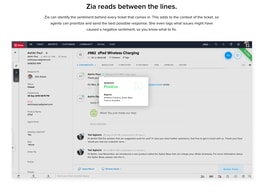
Zoho Desk is a longstanding name in its category that offers feature rich automation tools that help make your agents job easier and more efficient. One of their most lauded features includes an AI assistant that can identity repeated keywords and opinions in customers’ text to analyze customer mood and sentiment. Such smart solutions are coupled with auto-tags for tickets. You can also send automated notifications concerning ticket progress, assign tickets to specific agents, and update records via the platform.
| Company | Zoho Corporation |
|---|---|
| Year founded | 2000 |
| Company size | 10,001+ employees |
| Headquarters | Chennai, Tamil Nadu |
| Social Media |

| Capabilities |
AI
API
|
|---|---|
| Segment |
Small Business
Mid Market
Enterprise
|
| Deployment | Cloud / SaaS / Web-Based, Mobile Android, Mobile iPad, Mobile iPhone |
| Support | 24/7 (Live rep), Chat, Email/Help Desk, FAQs/Forum, Knowledge Base, Phone Support |
| Training | Documentation |
| Languages | English |
Zoho Desk Pros and Cons
- There are plenty of reporting features that provide customer insights and agent performance data
- A range of templates are available to help you respond to customers quickly and effectively
- You get real-time insights into support operations
- There’s a good free plan for new users
- The wealth of features on offer can make it harder for beginners to pick up the software.






Compare Zoho Desk with other popular tools in the same category.
How the HelpDesk help us to maintain our customers
Nothing to report as all features are best for us
Our telecoms customers
ZoHo Desk is very simple to use and admin friendly
The trial period is less for a company to check the features and no of user login is also restricted
We have a support ticketing system running in our on-premises server, and we want to move out to cloud-based ZoHo Desk is one of our choices

Instant Messaging service at zoho.com is amazing service
I think there's nothing I don't like ar zoho.com
Managing all our customer conversation either to support or sales
Community is a good feature we used We created announcements, Created new articles, also raised tickets as an end-user via email & from the community feature, Thank You.
It's a little bit difficult to understand for beginners, & there are some confusing words & terms.
It reduces client time to reach our technical support team, But the interface is not easy to understand
ticketing systems are very useful and also the automatic assigning
there isn't anything I don't like, could be a little bit more user friendly
having a ticketing system that is fit for purpose
It has features that suit almost all use cases. It is very great at centralizing everything in one place.
I think it can be a bit costly when you start growing or if you already have a lot of agents.
We need to mange emails from many OTA and websites and that is hard logging into many different email accounts to do this. There is also the security aspect of this where everyone has password to many different emails that will be hard to change if someone should leave the team.
Easy to get started immediately, with no complex setting or configuration required. As an early-stage startup, it helped us move forward quickly in setting up a support process for our users. Channel integration is fluid.
Easier styling for custom forms integration would be great
Starting right away with a support process while keeping chatter organized. This is very essential to our company knowing that we rely a lot on automation during this early stage of our business.
simple solution with rich features to manage support tickets
User interface can be enhanced for better user experience
easily capture data from users and push it to system, saving effort and time
A quick and easy ticketing system for IT to setup and use. Users also find it easy to use and put tickets in.
Would like a better category view for users to select their issues putting in tickets.
Tracking our orgs tickets and documenting all those steps and processes.
How easy it is to setup and the amount of features within the Zoho ecosystem.
Some useras had some issues in the beginning but, they got used really fast.
The main one, avoiding using multiple tools at the same time, having all of our contact options in just one tool, solving multiple "tickets" faster.
its helpful to developer testing all senario
Some ui level change required,functionality wise is good
i am using for testing purpose, in feature we will integrate your product
Its really convenient and easy to figure out the system to customize into our requirement
At this point of time , we have not came across any thing we dislike
Zoho is actually streamlining our process so that we get all information required for analyzing our business strategies
Plenty of options for a product that is agent based. robust features to boot.
Nothing i can think of yet until we use the product for a while.
Help Desk organization, reporting on trends and the ability to report on a particular product or software category
Facilidad de crear casos desde distintas fuentes de origen, además de la colaboración, control de tiempos manuales y automaticos para poder realizar control de horas.
Por ahora el manejo de los SLA, acuerdos de niveles de servicio. No he podido validar como se utilizan, a pesar de configurarlos para las distintas prioridades de los ticket
La facilidad de estar disponible para el cliente 24/7, además de la interacción que se puede lograr con él en las distintas plataformas. Igual el apoyo con la base de conocimiento
the ability'to have a form and auto-fill the information & receive an email when someone is sending a request
it's not really simple to setup without experiance
Monitor IT service request & data
Ease of use. We have been doing few tests along few days and it just worked perfect to our team.
We haven't found anything we would define as dislike for the moment.
Customer's system/equipment failure report and attention
intuitive, easy to use and have built an entire ecosystem that can manage your entire business. We are currently evaluating the product to replace our ticketing system and support management tools so the integrated telephony and connectors with Telegram are especially of interest
nothing so far -although the key for me will be how well the chat and telephony integrations work with the rest of the tools. We use Pipedrive as well and going to test that integration side which looks a little limited but will most likely suffice for our needs.
we need a ticketing system that works in real time with our live chat setup and can also work with our existing software suite. zoho looks like a great tool as well for growing and allowing custom development and connectivity with the tools that we use as well.
Zoho suits us well, especially regarding the Knowledge base maintenance. We use it to keep our team updated on best practices and procedures. Functionalities include CRM, document management and also automation through platforms.
It could work a bit faster as sometimes the interface doesn't respond as quickly as we would expect.
Zoho is helping us with knowledge transfer and standardizing our procedures, helping peers deliver a more consistent service to our customers and our business areas.
Very complete tool with all the necessary features. Very easy task and ticket management.
A screen with a lot of information can make interpretation more difficult for the user. The interface can be revised.
A lot of time and money can be saved by using this tool.
It is easy to use, convenient and can help you give better customer service.
that lately I have been having issues with help center
Mostly to facilitate and take advantage of the use of technology.
I found the setup process very straightforward, and if there was any issue Zoho support team answered our questions promptly. We have used a few ticketing systems, which may offer other features but with Zoho it integrated with our company seamlessly, and our clients also found it easy to use.
There is no dislike as everything is Woking well as expected, fulfilling all the needs within our company allowing us to be on top of everything both fast and efficiently
Zoho has helped us manage all calls promptly and solved our out-of-hours clients contacting us
its super easy to use and it helps my sales and marketing team coordinate
Its best if you integrate the most products of Zoho family so you really appreciate how good zoho is
Controlling the customer experience
Zoho has been a gamechanger for us when it comes to handling customer support issues. We have the ability to add categories and classify customer reachouts and manage the timeline for the same
The UI can be better- it has been a little buggy at times but not in a way that affects performance so all good
Zoho has helped us streamline our customer support processes and it allows synergy across teams ultimately leading to faster resolution for customers which has really improved our customer satisfaction
Modern, intuitive and straightforward user interface. Possibility to run Service Desk with the customer portal and knowledge base. API integration with external services.
Na pierwszy rzut oka nie ma takich elementów ale najmniej korzystamy Analytics, Zia, Blueprints. Maybe it's just not our target right now. Will see in the future if such an idea appear.
Customer portal and knowledge base (internal and external) with Service Desk and the ability to manage access to them using CRM integration. One place to initiate processes.
Ticketing system plus the task management
Not much, but it needs to improve the interface
Organizing request and issues plus the KB

Found the software easy to use and simple to learn. There were lots of features and add-ins for the products we use. I highly recommend giving the product a try and see how it will work for your company.
I haven't experienced much that I dislike.
IT Ticketing / Service Desk solution
I haven't used the service too long, but any questions or issues I have encountered have been promptly addressed.
I haven't run into any major issues so far.
Managing customer communications.
SLA Module is very useful for us. Although our company is System Integrator type, we can handle our tickets very well.
We like the features very much but the pricing is a little high
It solve our ticketing report problem

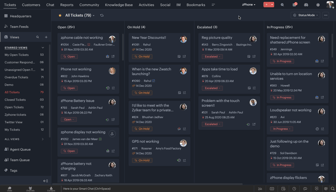
The user-friendly android and IOS apps are one of the best features of Zoho Desk, which I like the most. Other features which I also admire are- It provides a simple widget code with a few clicks once you decide to integrate it with your website or application; you can easily track all of your tickets and agents from the dashboard interface; you can insert tags with each ticket to group them into specific categories for analysis and troubleshooting.
There is no Desktop application for Zoho Desk, a crucial missing feature. The shortcut icon for Recent items could have been placed better, maybe in the top header menu instead of in the footer. The footer menu needs to be more prominent, as it is unrecognisable on smaller-size monitors.
We have integrated Zoho Desk with our web application and website to have new and existing customers submit tickets with screenshots and descriptions of the query of our applications or features or problems faced. Zoho Desk is being used by the customer success and development teams currently. Through Zoho Desk, we have tracked all requests and issues escalated by existing customers, and the escalated problems/queries have been resolved or answered in the shortest possible time.
I really like the ticket sorting and everything is clear, easy to understand and navigate.
For now, I haven't tried it enough to dislike anything.
My current tickets software isn't really good and desk does a better job at sorting tickets and showing up what is waiting.