

Unclaimed: Are you working at Airtable?
Airtable Reviews: 4.6/5 — Highly Rated
Airtable is a powerful visual project management platform that synergizes data, workflows, and execution teams on a unified dashboard. Streamlining work streams, the platform provides a synced and up-to-date information database that can be accessed by all stakeholders across different departments. Customization is at the heart of Airtable, allowing teams to create personalized apps and a tailored interface allowing easy access to relevant information and giving clear sightlines to the next steps. While customization is a key benefit, it also offers ready-to-use and pre-loaded industry-agnostic templates while extensive integrations and expandability make it scalable and agile.

| Capabilities |
API
|
|---|---|
| Segment |
Small Business
Mid Market
Enterprise
|
| Deployment | Cloud / SaaS / Web-Based, Mobile Android, Mobile iPad, Mobile iPhone |
| Support | 24/7 (Live rep), Chat, Email/Help Desk, FAQs/Forum, Knowledge Base, Phone Support |
| Training | Documentation |
| Languages | English |






Workflow management is a critical part of any job. It’s what keeps a project moving, and a team motivated to see it through. But, how do you support effective workflow management?
You start with understanding better what tools, platforms, and software are out there that can support your team’s ability to effectively manage workflow and collaborate within their teams and beyond.
To that end, we’ve identified Airtable as a strong market leader in workflow management software. So, let’s dive into Airtable’s features, capabilities, and price points to help you better understand your options.
What Is Airtable?
Airtable is a workflow management application with highly customizable database management tools used predominantly for collaborative project management.
The focus on having accessible, easy-to-use software to help with project management is increasing, and Airtable is a top choice. It features a familiar spreadsheet interface, but unlike traditional spreadsheet software that only records data, Airtable can also help you organize, sync, and manage your data and customize exactly how you need it.
For example, let’s say you’re using Airtable to manage vendor management workflow for an event. This would entail designing the database to include fields for:
- Vendors’ contact details
- Links to their websites
- Inputting key information, such as lead times, product availabilities, and prices
- Uploading order confirmations
- Uploading invoices
- Important notes and comments about the vendor
The option to invite collaborators to this database is also critical so individual users can easily update data in real-time. Having all these features in a single platform means users can clearly follow the progression of a particular project and keep everyone in the team up-to-date on their tasks and next steps.
How Much is Airtable
Airtable’s interface is very flexible and is ideal for numerous industries. While it has been marketed to larger corporations, most users who have had hands-on experience with the platform say that it is just as useful for smaller businesses.
This is reflected in Airtable’s pricing, which follows a monthly subscription model. This subscription cost increases depending on the number of features and ‘seats’ you choose to purchase, making it highly scalable depending on your organization’s needs.
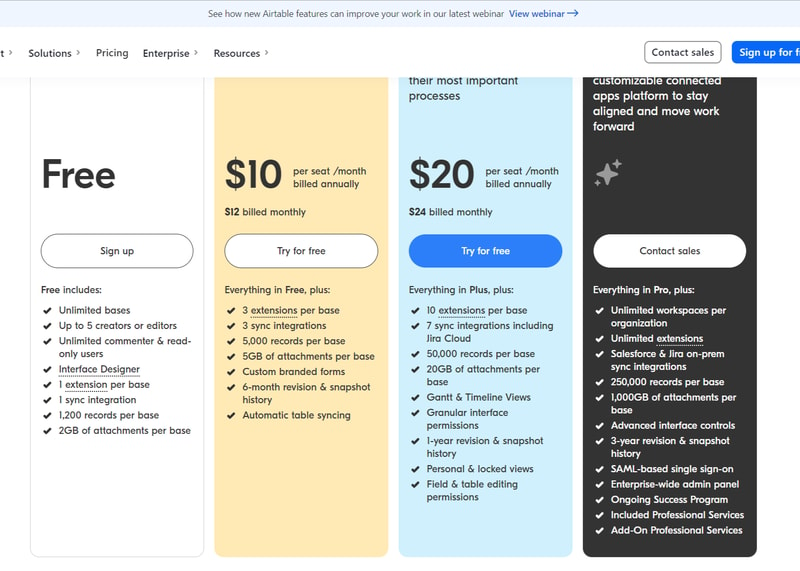
Airtable’s features are grouped into four levels, and the price per seat rises accordingly. A breakdown of each level can be found below:
Note: Airtable has restructured its plans — current tiers are Free, Team, Business, and Enterprise Scale.
Free
- Designed for very small teams or individuals
- Up to 5 editors and unlimited ‘read-only’ users
- Record limits vary by plan
- 2GB of attachments
Team
- For small to medium-sized organizations
- Eliminates information silos within a team by connecting applications
- More advanced collaboration features
- Higher record limits per base
- 5GB of attachments
Business
- For medium to large organizations who need to streamline and collaborate on top-priority data
- More advanced features
- Higher record limits per base
- 20 GB of attachments
Enterprise Scale
- Price is customized to your organization’s needs
- Enterprise-wide admin panel
- For organizations who need a scalable product to keep up with workloads
- Unlimited workspaces per organization
- Highest record limits per base
- 1,000 GB of attachments
See Airtable pricing for current rates.
How Airtable Works
Airtable was built to be as customizable as possible, giving users the ability to display their data in a way that meets their specific needs—whether that means a simple presentation or a more complex one.
Getting started is simple.
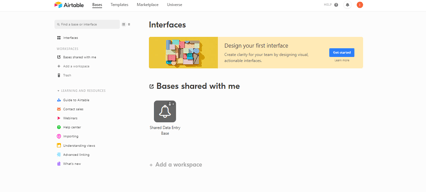
You start with an empty Airtable, which is essentially your ‘base.’ From here, you just fill it with your data. You can either use a template and bring in data from another source or construct a database from scratch. Whatever the case, you can leverage Airtable’s features to tailor the platform to meet your needs. For example, you can use the Interface Design feature to visually present data in a way that makes the most sense to you and your team.
Familiarizing and understanding all of Airtable’s features and capabilities may require some effort, but the payoff is worth it. Taking the time to learn the platform will ensure users have full control over their data and workflow management.
Features
Access to Airtable’s numerous features will depend on your subscription and, subsequently, the scalability of your projects. However, all subscription options should include:
- Unlimited bases
- Sync integrations
- The ability to add attachments
- Revision and snapshot history reporting
- Field and editing permissions
- Extension add-ons (e.g., data visualization or reporting extensions)
Airtable also provides:
Customizable Views
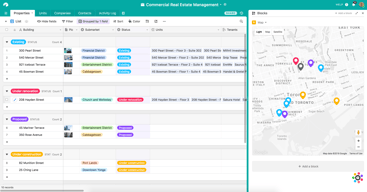
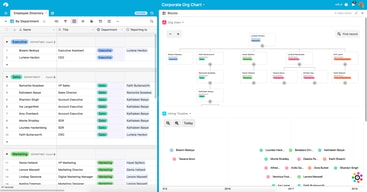
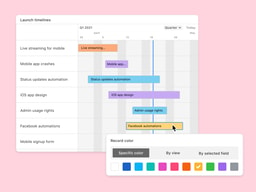
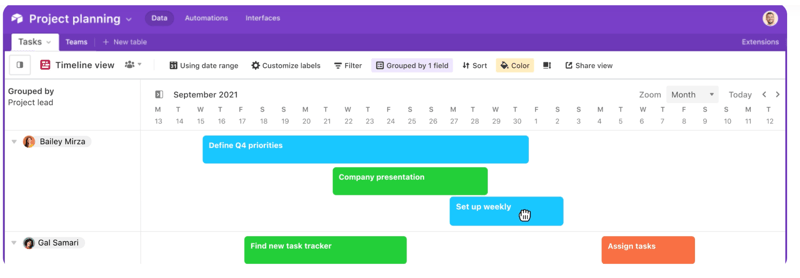
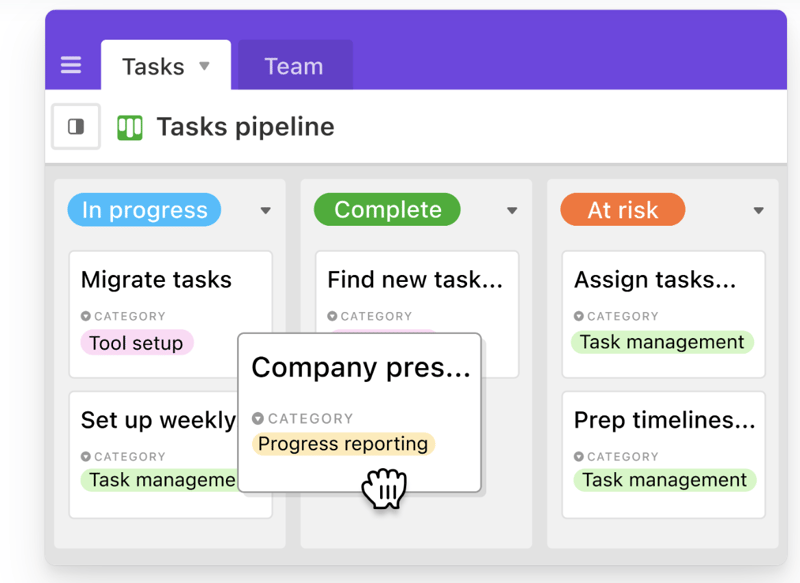
With a click of a button, this feature gives users the flexibility to switch between different data views. Users can view project timelines via the Timeline View, and easily switch to managing team tasks on the collaborative Kanban View. Other viewing options are also available ensuring that you can customize your viewing experience so you can maximize the platform.
The Timeline View
The Kanban View
Automations
Airtable Automations lets users streamline their work processes and boost team efficiency by providing customization options for notifications and creating multi-step workflows. The feature is helpful in terms of tracking project timelines and helping eliminate manual, repetitive tasks. Additionally, it can also minimize the risk of user error.
Syncing
Airtable’s ability to synchronize data means users have a central repository of information that is updated in real-time across all users and departments. It’s a useful tool that promotes seamless collaboration and data integrations, allowing everyone to enjoy a comprehensive understanding of project status or workflows at the speed of need.
Reporting
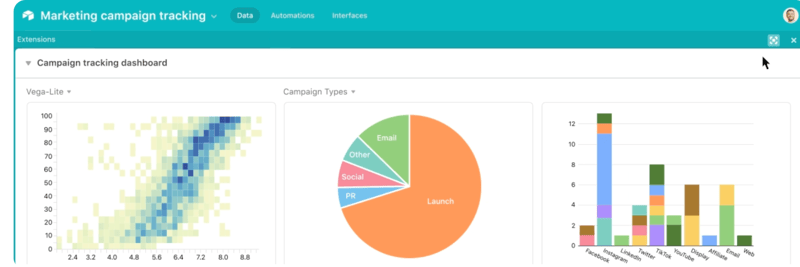
To enhance your project’s reporting capabilities, Airtable’s powerful reporting tools and extensions let users create highly customized reports that visualize your data in a simple understandable way. You can choose from a variety of charts, graphs, and tables to ensure that information is presented in a way that is easy to understand.
Integrations
Airtable offers robust integration that lets you connect the platform to a wide range of software; ensuring that all the project management tools that you use operate seamlessly. Airtable’s integrations mean multiple applications can be streamlined to automatically sync data, share information between different platforms, and automate tasks so workflows can be further improved.
Templates
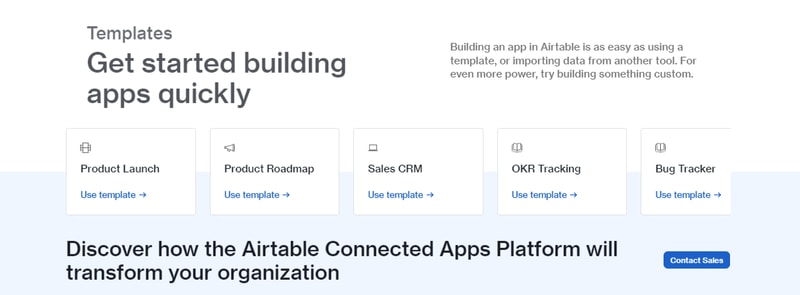
Airtable’s templates can be used to effectively organize every aspect of your project’s workflows. Their pre-designed databases can be used as a great starting point for your projects. Conveniently, Airtable templates are also organized into several categories and industries, which helps you save time and effort from creating a new one from scratch. As always, these pre-populated grids are highly customizable.
Airtable Pros and Cons
Pros
- Facilitates easy collaboration between teams with company-wide visibility of plans, calendars, and workflows.
- Both Google and non-Google users can take advantage of all the features and integrations to support workflow management and collaboration
- Highly customizable bases and effective reporting features
Cons
- The platform’s user interface can be complicated for beginners
- Requires a significant learning curve
AI Features
Airtable has also introduced AI features, including an AI field type for summarization, categorization, and text generation directly within your bases.
Airtable Alternatives
A great way to decide whether Airtable is the right software for you is to compare it to other options in the workflow management space.
Eliminate the hassle of comparing options by choosing from your top choices below. With the ability to review features and relevant information in one place, you can utilize our comprehensive product reviews to gather the necessary data you need to make well-informed decisions.
ClickUp
An all-in-one project management application, Clickup is designed to be used across any industry. From solo users to larger organizations, Clickup focuses on task management to help teams streamline their workflow.
ClickUp offers numerous workflow features and data views, including a built-in Table View to ensure your team always has access to a condensed, actionable snapshot of your projects.
Notion
Designed for smaller teams or individuals, Notion is an all-in-one SaaS note-taking app and database for streamlined project management. Some features include:
- A web clipper so you can easily save images and sites
- A real-time messenger feature
- Allows for category and page hierarchy organization
Hive
With a focus on automation tools, Hive aims to simplify overly complicated work processes through email and task automation. Boasting a user-friendly dashboard, Hive aims to help teams of all sizes automate time-consuming work tasks to give time back to a project’s creation and growth.
A Final Findstack Opinion
Overall, Airtable is a highly comprehensive and customizable workflow management application.
Airtable’s app offers flexibility by allowing you to switch views and integrate reporting extensions, ensuring your data is suitable for various applications. Additionally, its extensive list of integrations enables you to consolidate all your preferred tools and their data in one convenient location.
It’s important to keep in mind, however, that these features are only useful for those willing to take the time to learn them. Airtable’s interface can be quite overwhelming for new users so our advice is to scale to higher subscription packages only after you’ve taken the time to learn the app’s features and familiarize yourself with them.

Compare Airtable with other popular tools in the same category.

Most helpful things and upsides of using Airtable are as such:- 1) Visual Database. 2) Multiple Views like - board, kanban etc. 3) Premade templates that helps in getting started for almost any industry. 4) Great Community support and resources to get started wirh Airtable. 5) Best tool to automate a business.
This is hardly anything which I can say I dislike about Airtable. It is really one of the amazing tool, database, project management, team management app, which I hace discovered.
Problems which I am solving for myself as well my clients are as such:- 1) Database Management for leads and online orders. 2) Automation between subsheets/worksheets. 3) Task management/assigning to teams. 4) Rich reports creation. Airtable is beneficial in all the senses, as it used as a database, Project Management tool, Task Management tool, Team Management tool etc. one platform that replaces multiple platforms.
test test test test test test test test test
test test test test test test test test test
test test test test test test test test test
Airtable is one the best tools out there for displaying, and visualizing data. The best part of Airtable is it has different views and reporting tools that allow the user to digest the data in a better manner. Different kinds of reports can be generated seamlessly using various tools. The ability to see only the required fields and filter/sort data is one of the things that makes it easier and worthwhile to use. Another most important feature is trigger-based automation, which can be used to achieve almost any kind of results. These can be easily integrated with other plugins or even internal systems to create seamless experience. Also, Airtable APIs can be used from server-side systems to read or update into Airtable easily.
The only thing that I dislike about Airtable is that all the data or system grows, it gets harder to use. In event of large data set with a large number of columns, it becomes cumbersome to visualize the whole data. Also, the cap on the number of automations is an additional hiccup.
The most important benefit of using Airtable is how easy it is to use and visualize data. The automation surely makes life easier by not only modifying the data with the table but also connecting to other services like Slack, email etc. With the combination of various tools and features, there is almost nothing that can be achieved.

Coustoumaziation of any details inputs required & outputs in excel is the best thing that i like the most
Nothing much to dislike, but can improve the project management tools which can help to track the work resources from the reports
Collection of reviews, training management, saving times in formating reports

Creating and Sharing Relational databases.
Pricing could have been improved yearly.
It's quite better than Excel and easy to use. We can have different datasets in a single grid.
The flexibility to mnipulate the cells in it
I wish I could add even more text sometimes
Product roadmapping. I've realized that I could fit a ton of information into the cells easily. More then Excel

How customizable and malleable the platform is. I use it to keep track of nearly all of my marketing reports and plan development, the ability to link records on different sheets was a game-changer in my SEO and content marketing planning.
The limits on the number of records in the free plan. As an individual who needs to document hundreds of records with a decent number of data points and link those across other sheets, it takes a lot of records. When I have to share this with team members the cost increases pretty significantly for how little they use their account for this. Exporting is not a simple process for this table either due to the interlinking.
As a marketer who wears a lot of hats and has a lot of tasks, it's important that I keep my records up to date and in an easy to find location. Cue Airtable. On Airtable...I keep track of our content marketing plan, updating a list of all topics that have been pitched, the copywriters assigned to each, and each piece's status. In addition, I schedule out the editorial calendar on the same sheet, which provides me with a reference. I keep track of our website sitemap as we plan to relaunch our website, this allows me to assign SEO keywords to each page and determine which pages to combine, delete or optimize next, and I heavily link records across sheets. We moved our weekly departmental meetings to Zoom, replacing our in-person meetings that used a printed document. Now I use Airtable to update our projects as we discuss them, and have integrated Slack so we get real-time updates if these records are updated outside of our departmental calls.

Very user friendly and can be useful for so many things
Nothing to dislike about it so far. I'm happy using it
Organization and keeping lists in a neat and easily shareable way
I enjoy how visual the platform is and all the ways that I can customize the schedule to cater it to my workflow and help my team get projects completed in time.
Sometimes it feels like there are too many options and there is a bit of a learning curve to get the hang of it, it has proven trickier to some employees to uptake.
Airtable is helping us with a collaborative schedule that we can all update. Previously Google Sheets was our best bet but now we have a dedicated tool with Airtable.
Love being able to create a content library with links, titles, and info about where I've used it and how I've tweaked SEO, titles, and so on. Super easy to share each base as well!
There are so many things that you can do, it can be easy to get a little "lost" in the system and lose track of everything that is possible. Provide your team members training for sure!
I've been able to organize content for repurposing needs, and it is so helpful. Also have organized information I want team members to have access to, and have public and private bases.

Ability to link tables and grouping by variables
Sometimes tables can get a little unwieldy
Great for setting up intuitive databases, project management, and even hacking together POCs

It's user interface and Tools, it's actually gives feels like I'm using excel and easily usable.
It's auto correction some time wrong i thing it's not major problem but silly problem for lots for user.
The best benefit was I'm using kodular makeroid sites i need data base for applications and i use airtable for data base which i love most.
Airtable has made managing requests so much easier for our team! We have forms that other teams can use to request services from us among other things. Adding tasks and projects are easy to do and having a variety of views for each base is super helpful.
The only downside is that it can be difficult to teach someone during onboarding. It's a fantastic tool, but it can be confusing at first because it does so many awesome things.
As a team, we've been able to implement varying tasks, projects, bases, forms and views for each line of business. We love having everything in one place in Airtable.

What I like most about Airtable, is it’s ease of use, the ability to quickly design a database specifically to the needs of the moment, and the multi platform accessibility.
Cost for multiple collaborators seems a little high.
Tracking of employees, flight instructor’s, aircraft, etc. The ability to isolate and just view the data I need at that moment is a huge benefit.
It is so powerful to the level of making complex processes very easy!
Nothing to be honest. Airtable delivers what they promise.
I have a project tracker interface
Airtable is incredibly versatile. I started using it at work to consolidate a large number of separate Google Sheets my team was using to track information we used on a daily basis. Once I got familiar with the platform and started to experiment with its more advanced features, I found that it was even more useful than I had originally expected. I was so delighted with it that I created a personal account, so I could use it for projects at home, as well!
The two things I want to do with Airtable that I am unable to do are 1: use forms to create records and 2: access data across bases. 1. I use Airtable to keep track of all the events and assets my marketing team promotes, and we really want to use the Form view to allow members of other teams to submit requests for new events and assets they want us to add to the rotation. However, since there is no way for them to see a list of events that are already in the system and then add a new one if their event is not listed, we have to do a complicated multi-table flip-flop process where people start filling out a request form, and if the item they want is not in the dropdown menu, they have to click on a link to a separate form to add it, and then return to the form they're on. Then to get everything in its proper place, someone on my team has to go through and transfer data from one table to another. It's unnecessarily complicated. 2. We have multiple teams using Airtable, and it would be so helpful to be able to share data across teams. For example, our Organizational Development team has an Airtable in their Workspace that keeps track of team members, and the Marketing Department has an Airtable in our Workspace to keep track of events team members attend. It would be incredibly helpful to be able to link our table to theirs, so we have access to their headshots and bios and can also keep a running log of which events team members speak at without having to copy and paste information from one table to another and remember to check to make sure it's current. With the number of people using the platform, the cost to upgrade to an account that syncs data across table is prohibitive.
We use Airtable to keep track of all the events and assets our Marketing department promotes. We are able to use separate views to keep track of event details (webinars, conferences, Meetups, and training courses all have a different set of details and URLs we need to have handy when we create web pages and social media posts). We also use it to keep track of our email calendar and what events and assets are promoted in each email. And we have a record of all the content available for promotional use (case studies, solution fliers, videos, etc.). We also keep track of holiday card recipients. The primary benefit for us is being able to keep all of this information in one place, so we don't have to keep a huge pile of separate spreadsheets updated.

Provides internal tools and a client project portal to create an admirable collaboration apllication for business as well as easily integrate with other business solutions.
There is nothing to dislike in this cloud collaboration solution as it provides the best low-code platform to build a useful collabirative app for businesses to increase business productivity.
Oir organization builds a database with this cloud collaboration solution to hold business-critical information as well as improve oir integrations and visualizations for business development.
I love how Airtable is full-featured yet easy to use. I love that you can customize it in a manner that makes data handling so much easier and visually attractive.
Moving data between sheets or tables and bases could be a little problematic, especially if you added a field that isn't in the other table. Maybe I need to find out how to do it, but for the moment, I'm having trouble with that.
I've been able to use Airtable to gather and present data in a more visually stunning manner. Benefits: The Single Select, Checkbox, and Multiple Select fields have been SUPER helpful.

Best place to get airtable advice for a particular workflow
The pricing is one of the issues, subscription could be little cheaper
It's the best place to showcase the intersting bases which are made

When it comes to the critical project and task information data we need to complete projects and tasks, Airtable covers all the bases. Most collaboration components' grid layout makes setting up and evaluating work material more natural for our users. Airtable links our team during the project development phase and allows us to work together. It has substantial project management tools and meets all of our requirements during the development process. One of my favorite aspects of utilizing AirTable as an asset management tool is the ability to create collections to share with colleagues based on tags or categories.
There are no different themes that can be used to add a personal touch to a particular project. Not all projects are created the same, but Airtable's design and flow is a bit general and not always ideal for all projects. Airtable can be improved with some better mathematical functions. For example, it is very difficult to calculate a formula based on some kind of filter, such as an aggregate function.
By using Airtable, you can improve communication with customers based on the "calendar". You can show your customers what they are doing throughout the month. Staying transparent with them, viewing reports and adding creativity in this cool interactive calendar brings a whole new level to their eyes. Airtable is the primary platform used by workgroups to post and receive information about projects and tasks. New users in our group can quickly collect all the details of the project without having to contact anyone or receive information by email. With Airtable, you can quickly get information about your new job online. You can work on your project goals 24 hours a day, 7 days a week. You don't have to wait until business hours to meet people or get related files.

I like Airtable to pull out reports as per the requirement and can set a reminders / notifications when and where required.
I dont find any dislikes for Airtable. I will try to re-review again when i find it
Airtable helps us to maintain a database online... It is user friendly and easy accessable

Airtable gives me immense power to organize my workflows, automation and integrations. They have best in class integrations and addons for Data and API Fetching. It has helped me immensly in Automating my workflows and lead to simple analytics and Program management.
They should provide an end-to-end video demonstration on the overlay of how to use Airtable. As it contains advanced features that are difficult to understand by a normal person in one go. Also they can add a few more features to the present stack to make it more reusable
I am trying to make our MRM project using project management, API integrations, Data fetching process setup. Airtable helps me integrate with all our stakeholders and make a seamless automotive workflow to run our project management. It has immensely increased our productivity
The custom tables on Airtable are the best. I manage lot of writers and really helps with the workflow along with followups. Nothing like this in the market to manage content from multiple people.
Some limitations to other systems. If it can be mixed with other team chats, it would be just perfect. Right now, we sre using airtable and slack for chat management.
I have content writing clients and to deliver the content + getting writers content is really fast. It helps a lot with the overall workflow and yes our business performance has increased drastically

Most attractive features are connecting with team in a different way, and made campaign smoothly and scalable
Documents format converting features is not working and not easy for new user need some guide 1st tume
Team collaboration
Airtable is an incredible asset, and there are multiple ways of tweaking it to your inclinations and the necessities of your group. I truly like how we can adjust and oversee different Airtable information bases. Indeed, even the free form provides you with a great deal of redoing decisions Another thing that I appreciate is the few view decisions This usefulness permits us to see information in an assortment of ways.
I loathe nothing yet. I'm currently changing my present schedule framework to Airtable, so it is a bit of a cycle; however, that would not benefit from outside intervention much.
I have had the option to have a fantastic hierarchical information on account of airtable, there were things I didn't realize I could do until I attempted airtable, the weirdest apparatuses and the ones I thought less valuable wound up making life more straightforward for myself and the majority of my associates who attempted airtable.
I revel in how easy the consumer interface is. The software's smooth layout makes it easy and fun to apply. It is much less daunting for humans new to Airtable while it's miles shared among customers. I genuinely like how we can alter and manipulate diverse Airtable databases. Even the unfastened version offers you numerous customizing selections. Another thing that I revel in is the multiple view selections. This functionality permits us to view statistics in a ramification of methods.
Airtable is a device that is specially designed for large agencies with profound and complex tasks which requires a big amount of assistance from on-line gear together with Airtable, for small builders with mini-projects is not so possible
I had been able to have excellent organizational expertise thanks to Airtabl. There have been matters I failed to realize I ought to do until I attempted Airtable; the strangest tools and the ones I thought much less proper ended up making lifestyles easier for me and most of my colleagues who tried Airtable.
I like how teammates can all login and view the status of files, and update them in real time.
So far I have not found a lot to dislike. Navigating the site was a bit of a learning experience, but overall good interface.
We are collaborating to review ongoing file updates, sharing links and differentiating status updates.
Air table helps me to schedule project timeline
There is really nothing that i dislike about airtable
Scheduling project timelines ready templates for projects
Airtable, in many ways, is like a simplified Excel. However, the interface is intuitive and easy-to-use, so gleaning information out of raw data is simple. I'm impressed by it's versatility, as well. We use if for everything from basic office metrics and tracking and reporting survey information.
As I mentioned above, it's a bit like a simplified Excel. To that end, it is somewhat "too simple", not providing some of the flexibility and power of some advanced calculations.
We are solving two primary issues: (1) we are centralizing reporting for the entire office, so everyone can get access to reports, and (2) we are providing a cloud-based solution, so access is from "wherever we are" rather than just in the office.
Airtable permits a gathering of associates to store, share, and work together with data and append records. The data may be thoughts, stock, errands, or something different. Likewise, the onboarding and preparing are so straightforward and not time concentrated.
Hard to make more modest, more granular subtasks for each mission, project, task, and so forth. You can check out a mission from a significant level outline.
My group fundamentally involves Airtable for a project on the board and arranging. It's useful for arranging out all viewpoints/projects that are needed for each mission so we can prepare.