

Unclaimed: Are you working at Airtable?
Airtable Reviews: 4.6/5 — Highly Rated
Airtable is a powerful visual project management platform that synergizes data, workflows, and execution teams on a unified dashboard. Streamlining work streams, the platform provides a synced and up-to-date information database that can be accessed by all stakeholders across different departments. Customization is at the heart of Airtable, allowing teams to create personalized apps and a tailored interface allowing easy access to relevant information and giving clear sightlines to the next steps. While customization is a key benefit, it also offers ready-to-use and pre-loaded industry-agnostic templates while extensive integrations and expandability make it scalable and agile.

| Capabilities |
API
|
|---|---|
| Segment |
Small Business
Mid Market
Enterprise
|
| Deployment | Cloud / SaaS / Web-Based, Mobile Android, Mobile iPad, Mobile iPhone |
| Support | 24/7 (Live rep), Chat, Email/Help Desk, FAQs/Forum, Knowledge Base, Phone Support |
| Training | Documentation |
| Languages | English |







Workflow management is a critical part of any job. It’s what keeps a project moving, and a team motivated to see it through. But, how do you support effective workflow management?
You start with understanding better what tools, platforms, and software are out there that can support your team’s ability to effectively manage workflow and collaborate within their teams and beyond.
To that end, we’ve identified Airtable as a strong market leader in workflow management software. So, let’s dive into Airtable’s features, capabilities, and price points to help you better understand your options.
What Is Airtable?
Airtable is a workflow management application with highly customizable database management tools used predominantly for collaborative project management.
The focus on having accessible, easy-to-use software to help with project management is increasing, and Airtable is a top choice. It features a familiar spreadsheet interface, but unlike traditional spreadsheet software that only records data, Airtable can also help you organize, sync, and manage your data and customize exactly how you need it.
For example, let’s say you’re using Airtable to manage vendor management workflow for an event. This would entail designing the database to include fields for:
- Vendors’ contact details
- Links to their websites
- Inputting key information, such as lead times, product availabilities, and prices
- Uploading order confirmations
- Uploading invoices
- Important notes and comments about the vendor
The option to invite collaborators to this database is also critical so individual users can easily update data in real-time. Having all these features in a single platform means users can clearly follow the progression of a particular project and keep everyone in the team up-to-date on their tasks and next steps.
How Much is Airtable
Airtable’s interface is very flexible and is ideal for numerous industries. While it has been marketed to larger corporations, most users who have had hands-on experience with the platform say that it is just as useful for smaller businesses.
This is reflected in Airtable’s pricing, which follows a monthly subscription model. This subscription cost increases depending on the number of features and ‘seats’ you choose to purchase, making it highly scalable depending on your organization’s needs.
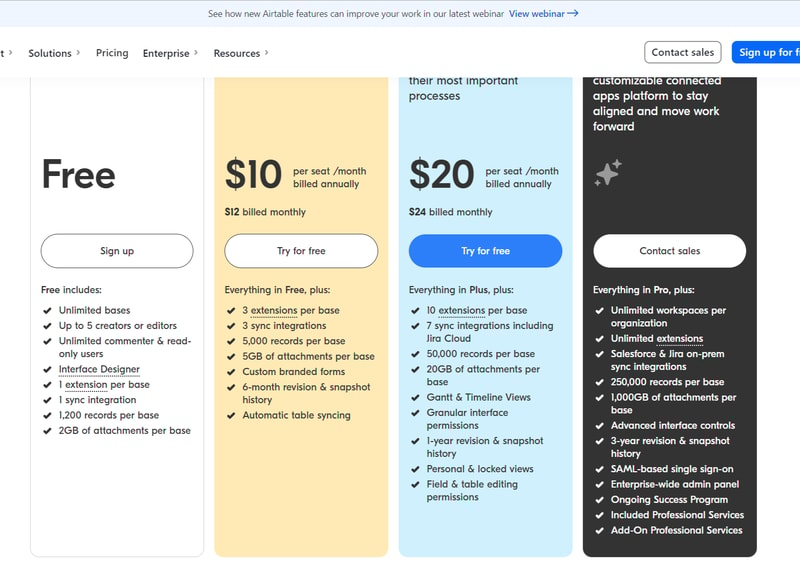
Airtable’s features are grouped into four levels, and the price per seat rises accordingly. A breakdown of each level can be found below:
Note: Airtable has restructured its plans — current tiers are Free, Team, Business, and Enterprise Scale.
Free
- Designed for very small teams or individuals
- Up to 5 editors and unlimited ‘read-only’ users
- Record limits vary by plan
- 2GB of attachments
Team
- For small to medium-sized organizations
- Eliminates information silos within a team by connecting applications
- More advanced collaboration features
- Higher record limits per base
- 5GB of attachments
Business
- For medium to large organizations who need to streamline and collaborate on top-priority data
- More advanced features
- Higher record limits per base
- 20 GB of attachments
Enterprise Scale
- Price is customized to your organization’s needs
- Enterprise-wide admin panel
- For organizations who need a scalable product to keep up with workloads
- Unlimited workspaces per organization
- Highest record limits per base
- 1,000 GB of attachments
See Airtable pricing for current rates.
How Airtable Works
Airtable was built to be as customizable as possible, giving users the ability to display their data in a way that meets their specific needs—whether that means a simple presentation or a more complex one.
Getting started is simple.
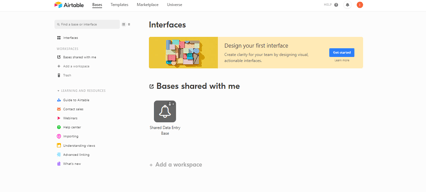
You start with an empty Airtable, which is essentially your ‘base.’ From here, you just fill it with your data. You can either use a template and bring in data from another source or construct a database from scratch. Whatever the case, you can leverage Airtable’s features to tailor the platform to meet your needs. For example, you can use the Interface Design feature to visually present data in a way that makes the most sense to you and your team.
Familiarizing and understanding all of Airtable’s features and capabilities may require some effort, but the payoff is worth it. Taking the time to learn the platform will ensure users have full control over their data and workflow management.
Features
Access to Airtable’s numerous features will depend on your subscription and, subsequently, the scalability of your projects. However, all subscription options should include:
- Unlimited bases
- Sync integrations
- The ability to add attachments
- Revision and snapshot history reporting
- Field and editing permissions
- Extension add-ons (e.g., data visualization or reporting extensions)
Airtable also provides:
Customizable Views
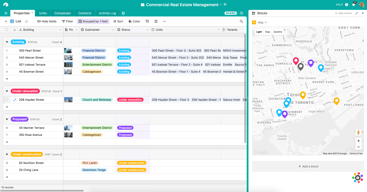
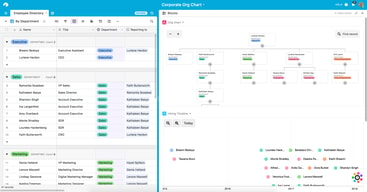
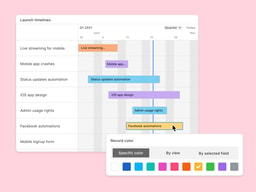
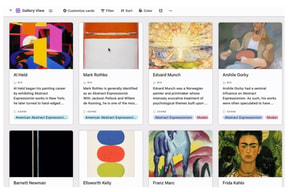
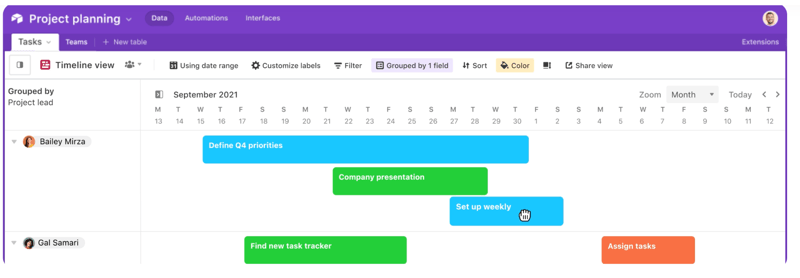
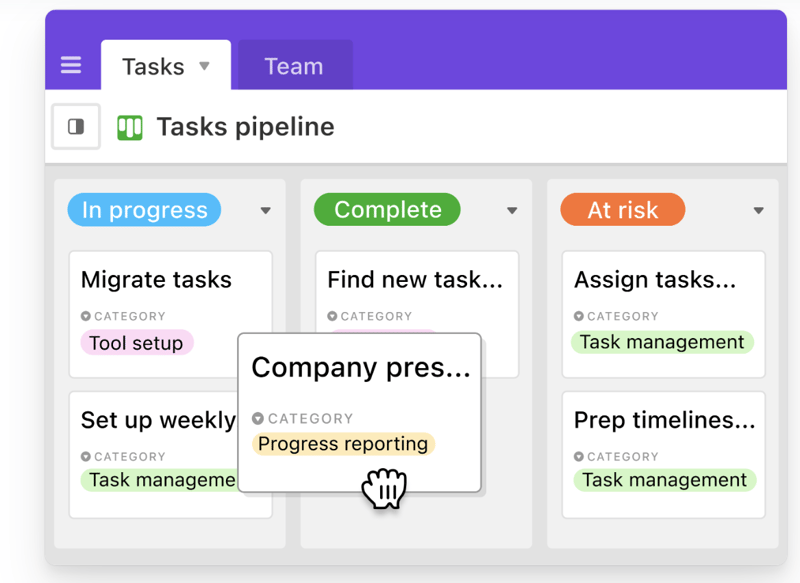
With a click of a button, this feature gives users the flexibility to switch between different data views. Users can view project timelines via the Timeline View, and easily switch to managing team tasks on the collaborative Kanban View. Other viewing options are also available ensuring that you can customize your viewing experience so you can maximize the platform.
The Timeline View
The Kanban View
Automations
Airtable Automations lets users streamline their work processes and boost team efficiency by providing customization options for notifications and creating multi-step workflows. The feature is helpful in terms of tracking project timelines and helping eliminate manual, repetitive tasks. Additionally, it can also minimize the risk of user error.
Syncing
Airtable’s ability to synchronize data means users have a central repository of information that is updated in real-time across all users and departments. It’s a useful tool that promotes seamless collaboration and data integrations, allowing everyone to enjoy a comprehensive understanding of project status or workflows at the speed of need.
Reporting
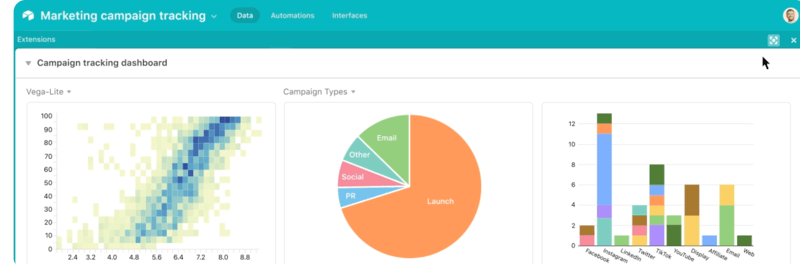
To enhance your project’s reporting capabilities, Airtable’s powerful reporting tools and extensions let users create highly customized reports that visualize your data in a simple understandable way. You can choose from a variety of charts, graphs, and tables to ensure that information is presented in a way that is easy to understand.
Integrations
Airtable offers robust integration that lets you connect the platform to a wide range of software; ensuring that all the project management tools that you use operate seamlessly. Airtable’s integrations mean multiple applications can be streamlined to automatically sync data, share information between different platforms, and automate tasks so workflows can be further improved.
Templates
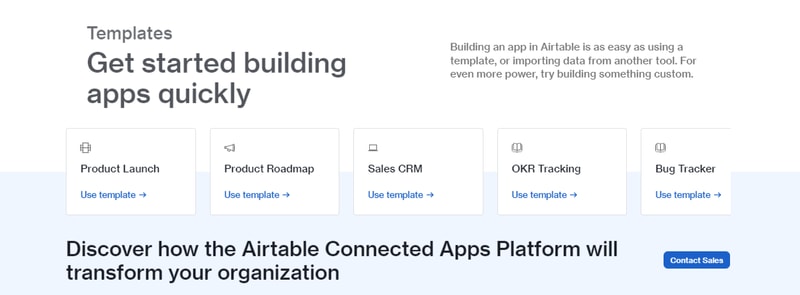
Airtable’s templates can be used to effectively organize every aspect of your project’s workflows. Their pre-designed databases can be used as a great starting point for your projects. Conveniently, Airtable templates are also organized into several categories and industries, which helps you save time and effort from creating a new one from scratch. As always, these pre-populated grids are highly customizable.
Airtable Pros and Cons
Pros
- Facilitates easy collaboration between teams with company-wide visibility of plans, calendars, and workflows.
- Both Google and non-Google users can take advantage of all the features and integrations to support workflow management and collaboration
- Highly customizable bases and effective reporting features
Cons
- The platform’s user interface can be complicated for beginners
- Requires a significant learning curve
AI Features
Airtable has also introduced AI features, including an AI field type for summarization, categorization, and text generation directly within your bases.
Airtable Alternatives
A great way to decide whether Airtable is the right software for you is to compare it to other options in the workflow management space.
Eliminate the hassle of comparing options by choosing from your top choices below. With the ability to review features and relevant information in one place, you can utilize our comprehensive product reviews to gather the necessary data you need to make well-informed decisions.
ClickUp
An all-in-one project management application, Clickup is designed to be used across any industry. From solo users to larger organizations, Clickup focuses on task management to help teams streamline their workflow.
ClickUp offers numerous workflow features and data views, including a built-in Table View to ensure your team always has access to a condensed, actionable snapshot of your projects.
Notion
Designed for smaller teams or individuals, Notion is an all-in-one SaaS note-taking app and database for streamlined project management. Some features include:
- A web clipper so you can easily save images and sites
- A real-time messenger feature
- Allows for category and page hierarchy organization
Hive
With a focus on automation tools, Hive aims to simplify overly complicated work processes through email and task automation. Boasting a user-friendly dashboard, Hive aims to help teams of all sizes automate time-consuming work tasks to give time back to a project’s creation and growth.
A Final Findstack Opinion
Overall, Airtable is a highly comprehensive and customizable workflow management application.
Airtable’s app offers flexibility by allowing you to switch views and integrate reporting extensions, ensuring your data is suitable for various applications. Additionally, its extensive list of integrations enables you to consolidate all your preferred tools and their data in one convenient location.
It’s important to keep in mind, however, that these features are only useful for those willing to take the time to learn them. Airtable’s interface can be quite overwhelming for new users so our advice is to scale to higher subscription packages only after you’ve taken the time to learn the app’s features and familiarize yourself with them.

Compare Airtable with other popular tools in the same category.
I love how easy AirTable is to use - from it's simple onboarding, color coding, and adaptability. I have used AirTable at my past two jobs, and it has made my team's work 10,000x more efficient. My large team of approx. 300 individuals use AirTable every single day to manage a variety of projects from small social spots to large scale events across the country. My favorite aspect of AirTable is the ability to use filters to quickly get a snapshot of data as needed. For example, I can filter and search by platform, intellectual property, and assigned project manager. This is an incredible resource to not only view and determine project health, but also it can be used to verify team bandwidth and help make future assignments. AirTable is flexible for use at an entry-level to manage individual assignments, but also at a supervisor level to quickly gather insights into team performance and project delegation. As a company, we have looked into various project management tools over the past few years and we have also confidently settled on AirTable as our top contender.
I wish AirTable would sync with more apps. While it does have many app integrations, such as Slack, I wish it would integrate with other media planning services like ShowMgr for those who work in the production space. We unfortunately have not been able to work entirely in AirTable as we need to have a secondary platform that can hepl create work reels for our on-air spots. I also wish AirTable had an easier way to assign an assignee or expand conversations into a larger screen or space for legibility purposes. This is something that Jira is very strong in.
AirTable is solving the need for one central database to store, update, and share information amongst my large corporate company. It always allows me to see all my projects in one simple place. AirTable also replaces many emails our company once had to send. For example, we no longer need to send brief updates across the company or worry about tracking a million different PDFs, word docs, or Good sheets. Instead, all information can be quickly and easily accessible in our database. The ability to share views through read-only views is very helpful as well as we often work with external stakeholders who do not have access to their own AirTable accounts.

I like that it is straightforward to use and visualize data in multiple ways. I can create tables, forms, and dashboards. I can view data as a table but also in a grid, in a kanban board, calendar, and many other ways. It is very flexible and customizable. I like it because you can create freely and build pretty much anything. I use it to store and organize information and build internal applications inside my company. I also love to use it as a database for my no-code builds.
Forms could be more customizable (design), and data charts could be better for visualizing information; sometimes, the existing charts don't have multiple view options, and it is hard to visualize data in a dashboard.
Building internal tools, crms, collecting leads and users information, centralizing information about the company and storing information in a database while building solutions with no-code tools.
The thing I like best about airtable is how versatile the product is. I use it instead of spreadsheets (in some cases). I use it as project management tool. I also use it to communicate with team members.
I dislike that Airtable doesn't have built-in reminders for tasks assigned to team members when it is used as a project management tool. If it had that simple feature, it'd be a game changer.
Airtable is helping me to manage project that contain teams with various levels of skills, from different departments. For example, I use it to oversee the design and development of products from beginning to end. Designers, developers, copywriters and other stakeholders can all be on the same page.
Airtable's flexibility meets all of our needs. We use it as a CRM, organize our work orders with it, maintain our operating budget, push info out to our field team and much more.
The only downside to Airtable that I can think of is there's a little learning curve to get it set up initially. You'll need a clear idea of how you want your system to function because there's so much functionality it can be set up infinite ways.
Before Airtable our business was run with a legal pad and pen. It was all but impossible to maintain. With Airtable we've been able to scale our business and the platform continues to grow with us.
Airtable provides enough structure to make it easy to start building a tool that supports almost any workflow, including automations, while also providing the flexibility to change/adapt/improve those workflows as your company or department grows. Once you've populated enough information your tables, Airtable provides interfaces to start gaining insights from data as well.
I wish Airtable allowed the ability to archive tables and records. There are times when they are no longer directly relevant to your workfow, but you don't want to lose the information - an "archive" capability would be great.
Airtable is my "command center" to manage multiple clients and projects spanning multiple countries. It helps me keep projects on track while also giving me accurate data to report to the c-suite.
Free, easy to connect, vibrant! Airtbable helps me be productive and keep up with all aspects of my business.
Always needing to be connected to the internet.
Keeping up with my merchandise. Having all information in one place.
I use Airtable for data and project management across various teams. I love that it is very easy to use so onboarding a new person takes minutes not days.
I wish you could archive bases. I also wish there were more options for organizing bases.
Data management in one place is a huge time-saver.
I love how easily I can put my tables in mulitple views.
I don't really dislike anything about airtable. I truly enjoy all the features I use.
Airtable is helping me to plan my content and manage my sales leads. It is benefiting me by allowing me to make sales from my content and following up with leads
Everything is organized and easy to find, it is pretty easy to work with and you can pretty much know the trajectory of your work on a daily basis. It's a great experience on a daily basis.
There is nothing I dislike about airtable. Maybe the colors here and there but aside from that it's pretty ok with me.
Getting one job to another, identifying which tasks are available and which people can you put down on their designated process. It benefits us cause it gives a good view of our daily progress.
I love that Airtable is so user-friendly. I don't have to repeatedly use "help" to find the functions/options I want, but the help is helpful! I spend less time on admin and more time on organizing my data (which is synced with Zapier) for whatever query I need. The free account does 99% of what I want.
I wish there was a little more allowed monthly internal automation on the free account.
It allowed me to build custom-linked CRM and client session databases without having to source out to an expensive service.
It is an awesome tool. It lets you organize your information, align teams, set limits, and change the views to whatever fits your needs best. It has all kinds of integrations and automatizations, which I love.
It is an awesome free tool, the paid plan is totally worth it for the first tier. But it is too expensive to work with teams, so our whole team uses the same profile.
And sols the data storage issue, the automatization issue, the funnel and draft order issue. I have over 30 automatic sessions, with more than 300 steps. I have around six external apps connected to it. It is the core of my business operations.
Airtbale is feature-rich, but highly customizable. You can do anything that just about any other productivity platform can do in Airtable, but you can shape it around your specefic workflow. I have a background in computer science but have moved to a more creative, less technical career. Even though my new work is less technical, I often found myself wishing I had the time to spin up a database and write some apps so we could have a CRM and automation perfectly customized to our needs. And then, my nerdy friend showed me how he used Airtable (I think to organize his movie collection), which literally changed my life.
I don't have a whole lot of complaints! It can get a bit messy with larger processes and more complicated workflows, but most of my complaints are being addressed with the new Airtable Connected Apps platform. The 2-way sync feature coming in 2023 will simplify our processes significantly and, depending on the implementation, fix most of the issues I currently have with AT.
Airtable solves a lot of problems in regard to planning, scheduling, communication, and organization. Keeping track of our leads in all lead generators would be next to impossible without a solution like Airtable. We've also been able to use it to keep track of our project and customer information, so our whole team can be informed and leave a great impression on all our clients.
Airtable is very intuitive to use, fast and a great way to manage data. I often use their forms to collect data and then slice and dice, filter, alter it as needed. The colourful labels are a nice plus as well. And auto-generated, self-updating dashboards.
I wish there would be a better way to customise the background design of their forms - adjust the colours and the intro text style override, but it is not that big of an issue.
I like that I can collect all kinds of data - the usual text entries and also uploaded files, all in the same place. Also, easy access with team or clients. And it works much better / smoother than Google Sheets or MS Excel.
I found Airtable back in 2016 as a volunteer for a local civic institution. I learned to use Airtable in very short order and was able to create complicated solutions (bases) to manage our business processes. We used Airtable to completely transform the way we tracked payments and advertising submissions, reducing our error rate to almost zero and increasing our receipts.
Airtable is great if you like exactly what Airtable offers. Its lack of UI customization is a minor hindrance but does mean that some of the processes are more cumbersome than I'd like. Additionally, the inability to easily and automatically look up data from other tables without manual intervention is challenging for infrequent and sporadic users. Finally it is just a bit too easy for users to change parent information; it is not clear to them when they are in a different table and need to change the attached record, rather than change the value in the parent record.
I run the technology portfolio for a municiple drama program for 5th-8th grade youth. We need to manage the names of the actors and their parents, track their financial contributions, as well as all submissions to our playbill, then use Airtable to ensure that all the advertisements and "good luck messages" purchased by the community, friends, and family actually get printed.
Airtable is like Excel on steroids, but with much more built-in, intuitive functionality. It's VERY easy to learn and to teach others to learn, even those who are not very tech-savvy
Some features that would make it a little more convenient to truly integrate Airtable into our workflow are not available on the free plan. Working for a non-profit, we don't have the budget to pay for Airtable
The ability to quickly group (or ungroup) records to track the data we need in various ways has been invaluable and absolutely saves our team time because we don't need several different reports or spreadsheets to accomplish this.
I love being able to build whatever I need to do for so many different use cases. The flexibility of the fields is excellent! I love the ability to automate most of our tasks saves time and resources.
The restoration options create issues since we have many team members working in our base simultaneously. We also have issues with the interconnectivity of the base because one change can affect the entire ecosystem of the platform for us. The new dependencies feature is great, but I'd like to see a list of all changes made in the last 48 hours.
Airtable is the BEST way for us to traffic assets from one media partner to another. Through the customizable fields we are able to keep clean records and create consistency among marketing campaigns.

Accessible, ultimately portable and highly user friendly
Nothing! Even the free version works exceptionally well
Managing material, connections and clients
Extensions : Pages, Charts Automation, and data relations model
Impossibility to use European number format ("," instead of "." for decimal separators, and " " instead ot "," for thousand separators. More columns in bases More colors in listing fields
Almost all my activity (private equity funds management)
Flexibility - you can literally do anything. Extremely useful features that combine the best of what a spreadsheet and a database can do.
It's essential that AT starts allowing non-licensed users to edit limited data fields. This is important for user interaction.
AT helped us scale our business.
The ability to shape any Airtable base so that it exactly fits your needs
Interfaces is still limited in terms of UI options but evolving fast
Airtable helps me build custom internal tools in a matter of hours
We can keep and track records of all reports issues (nearly 100 reports) each quarter, and it is accessible easily to input issues in entry forms.
When a couple of users access the filter function by report code, it disturbs others and is needed to re-filter the report code each time.
If the problem above is solved, it would be much more efficient for multiple users simultaneously.
A lot more flexible than using any type of spreadsheets, Airtable allows to organize my thoughts, projects super easily. The automations that the platform allows the team to leverage our database easily!
The reporting capabilities are not state-of-the-art, which makes analysis harder for me. I know the learning curve can be difficult if you want to personalize and make the most of the platform - maybe I'm still too new to this!
Airtable helps my team organize our Loyalty program - connecting parts of our database with an external vendor who leverages the data sent in Airtable to trigger email & reward sending.
Airtable is very customizable, which allows us to build the exact database and components we need to track out unique KPIs and information.
Airtable is an open box, so it's easy to get caught up in all the possibilities and not know where to start.
Airtable is constantly updating its templates and systems, which helps us figure out new ways to capitalize on its capabilities.
EXTENSION TOOL. EASY TO MOVE AND CREATE OR REMOVE NEW FIELDS AS YOU NEED THEM
THE SHARE BUTTON COULD BE MORE ACCURATE WHEN SHARING FILES
EVERYTHING SEEMS EASY ON airtable I BENEFIT OF IT
Great database for connecting different data sets. I'm able to track my entire client database in this tool.
This is less of an issue with Airtable and more just database management in general -- it requires upkeep!
Allows me to keep my clients in one place and I'm able to see historical information easily.
The ability to develop workflows, multiple views in kanban, gallery, forms is a game changer, nothing out there tackles all of these elements with the level of detail that Airtable sees.
Pricing can be a bit high for larger teams, it would be great to get bulk discounts as you go up in team numbers. And also an option to have one person have pro with invited people but they can't access the rest of the pro services.
This service takes excel into the 21st century. It makes data directly actionable, filterable and usable by multiple people in multiple formats. The external views then make this a total game changer.
The possibility to use filters and the automatic sum function.
I miss a proper mobile application - the one available now is not well designed and is really not functional
I work as a freelance and Airtable helps me managing my invoices and all my projects
I love all the user-friendly, clean, and simple yet effective ways Airtable allows you to manage just about everything.
I have no dislikes. We're using Airtable internally and with our clients.
We use Airtable as a CRM, for content management, for process and organization internally and for our clients. We use Airtable to manage and track outreach, comp plans, hours, etc.
As someone who loves spreadsheets, by favorite thing about Airtable is the ability to connect the data fields across tables.
The formatting of decimals and large numbers is tricky. I've switched to using currency and removing the $ sign to get my commas to appear.
We don't have an internal CRM database. I've been able to build out something that fits my needs for the time being in Airtable!

Easy to learn, and has lots of useful features. Intuitive interface. Regularly updating and improving.
I don't really have things I dislike. It just works
Airtable tracks my leads, portfolio, and contacts,