

Unclaimed: Are you working at Basecamp?






Basecamp Reviews: 4.1/5 — Solid Choice
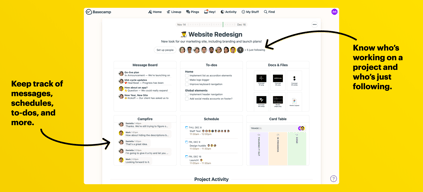
Basecamp has evolved as a project management platform since its launch in 2004 but its mission to help remote teams stay organized, productive, and efficient remains. One new feature that Basecamp recently added is called Basecamp Hill – a visual representation that divides the component of a project into a phase of uncertainty, unknowns, and problem-solving (uphill) and a phase of certainty, confidence, and execution (downhill). This is on top of Basecamp’s core features which include a Message Board, To-dos, Calendar, Documents and Files, Group Chat, and Automated Check-ins. It’s a top-down and bottom-up platform for everyone in a business or organization – from proprietors and C-level executives to project managers and individual team members.





| Capabilities |
API
|
|---|---|
| Segment |
Small Business
Mid Market
Enterprise
|
| Deployment | Cloud / SaaS / Web-Based, Mobile Android, Mobile iPad, Mobile iPhone |
| Support | 24/7 (Live rep), Chat, Email/Help Desk, FAQs/Forum, Knowledge Base, Phone Support |
| Training | Documentation |
| Languages | English |
Basecamp Pros and Cons
- Excellent for schedule and to-do list management
- Automatic check-ins and group chat for remote work
- Helpful message board
- Useful for finding crucial documents
- Easy and customizable environment
- Requires third-party integration for time tracking
- Features need to be a bit more flexible to achieve better functionality

Compare Basecamp with other popular tools in the same category.
It helps keep things organized with the to-do lists, due dates and assigning it to specific people.
I don't like that you can't create an editable excel sheet or export a word document that is created on the website. And small thing but once all the to-dos are checked off the Title automatically deletes. Sometimes we have ongoing to dos.
In my position we have a lot of appointments that requires research and paperwork from multiple people so it makes it easy to keep everyone on the same track so we don't forget about due dates and who needs to get what done.

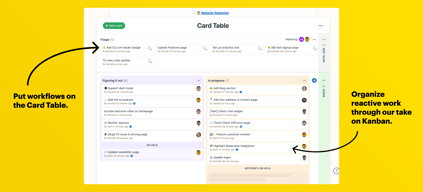
The best thing about Basecamp is that you can create a unique "spreadsheet" with various columns with headers, but you create "cards" that have details about the work being done and in what stage they are in, compared to other tasks and persons working on those tasks.
Nothing really. It's a very visual centered application that accepts drag and drop functionality.
While working on a large migration project from various CMS to SharePoint sites Basecamp was perfect for our needs. We were a team of four so it allowed us to tightly follow each other's works and keep track of the progress of the project.
I love being able to assign tasks to myself and others as well as getting to keep track of those tasks.
Getting so many notifications that aren't that organized. I get lost on where to find some information.
We are working as a team for a research lab. I love the chat and boosts feature that foster team building culture.
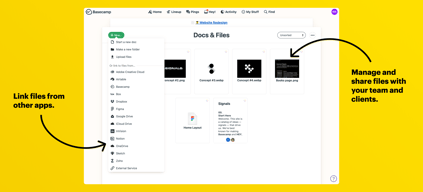
I like that all components of a project can be contained in a single spot, accessible to people not only in your company but anyone else you are collaborating with externally. It’s also helpful to be able to upload larger graphic files (in stead of emailing and wasting valuable email space), also helpful for accessing drafts and finals all in one spot
I haven’t encountered many difficulties do I don’t really have an answer. I would say it would be nice if there was a customizable project request/submission form that could then be tracked internally. Basically to take on incoming marketing requests and manage a team work load.
Saving email space by being able to upload graphic files to projects that everyone can access. Having one spot that multiple teams and even external companies can communicate and dump files and collaborate easily.

We use Basecamp software as a communication tool between our own employees and with other firms we partnered to work on the same project. By using the Basecamp platform, it eliminates the needs of multiple emails that will occur if not using the Basecamp platform.
I found that the Basecamp automatically sends out the communication regularly at a regular frequency. Sometimes, when the project is at a slow time, and we do not need the communication for so frequent, we still receive the automatic notification regularly. Sometime, we found there is no update information in them.
Basecamp helped to reduce many phone calls, conference calls, or emails that is necessary if not using it. The benefits is that through Basecamp we can upload multiple and large files, to allow participants to review.

Easy to navigate. Easy to find folks to review. Great to link folks - an unlink folks if needed. I really like the layout.
There actually isn't all that much that I disliked. I'm not a fan of getting an e-mail EVERY TIME there's communication, but that's a fault on our end. In short - if you are allowed - know how to turn off communication for your folks.
Communication between departments to get artwork approved in all steps.
I find the features easy to use and helpful
I don’t love the graphics that the app has
Basecamp has made projects much easier for our organization
How simple it is to send and receive messages in real time.
Can't think of anything I didn't really like. Everything just worked as it should.
Staying connected with small teams on the go.
Basecamp is a viable platform for sharing ideas between teams at different companies. Being able to have a single place to upload and share files with people going to that site to check on the work at a time that suits their daily work flow is beneficial. Emails can also be sent that tie directly to your work email portal, so overall it can be a productive software.
If you are working in a group that has a lot of members, it can be easy for some information to get lost in the shuffle.
Streamlining work flows so peoples inbox are not flooded with unnecessary info.
It's gotten alot better. I initially used it 6-7 years ago and the UI and functionality was clunky. Kind of like Skype for Business. However, it's got a great UI that makes the experience more smooth.
Basecamp has been easy to use and does the job, but there isn't a great way to integrate the more advanced features in my normal workflow
collaborating with external
Basecamp provides a great way for our Public Relations agency and our in-house marketing team to share documents and stay up to date with pending items. I was able to log in with my Google account which made things so much easier in terms of notifications and logging in.
The only thing so far that I dislike is the way our boards are organized. That's more of an internal issue than a Basecamp issue, it's confusing to find things. I wish we had the ability to search. I wish Basecamp was utilized throughout our whole company so it wouldn't feel like a one-off tool.
Basecamp is helping us with our communication issues. Basecamp allows collaboration and communication more efficiently than email or texting allows for.
I love the user friendliness of Basecamp.
It's limited on how to incorporate it into other platforms.
It's a great project tool, having to do lists and time stamping everything.
Base amp is great for keeping projects organized and assigning tasks and management. We have a lot of projects for dental associations and this is a life saver
Not very much to dislike although the learning curve can be quite large, that is my only complaint because with each new addition a new explanatory session is involved
Project management for dentistry
Easy to use. Very interactive. Kept on top of all tasks and open issues.
Can’t think of something I didn’t like. It was full of features, some used, some not.
We were revamping our website and working with numerous people on that effort. Needed to stay in touch with every member involved both with out team and the vendor. That was accomplished.Here to Serve
The ability to share files with other employees easily
Some of the icons and tiles within the website could be bigger
Not having to send a ton of emails
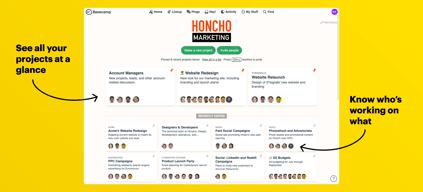
Organize projects by team/category/type, Good integration with other tools/calendars, Clean and simple to use, Great search functionality, Easily track interactions by project
Easy to loose projects if you don't have deadlines attached to them, Not as useful as it could be if half the office isn't forced into using it
Project management, team management, process planning
The best feature was the ability to easily track and provide updates to the notes and projects
The ability the manage it for an MSP was not great.
The problem we are solving with it is tracking projects. The benefits are having everyone on the same page.

I do like that Basecamp messages appear in order, so it's very easy to follow along the process of any project. Everything is simple and intuitive.
It would be great to have the option to annotate attachments without down- and uploading them again.
We managed our graphic design projects with BaseCamp, and it made the entire process much easier.
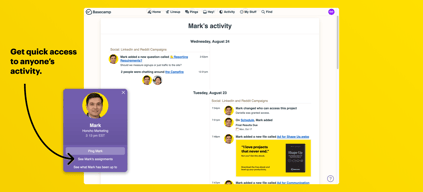
I enjoyed how easy Basecamp made asking questions. I like how everyone is involved on a project but you can message people individually. Makes keeping up with work easy because you can clearly see what you have to do and what has been done. I like that you can assign things to people and they will immediately get a notification.
If someone invited you to Basecamp and made you apart of their project then you cant make new projects yourself. This is literally the only thing that I didn't like about the application. Also its not very colorful and I'm a very colorful person however, this does not take away from the application at all.
Time management and communication Project management Accountability

I liked that comments can be tracked in the history, and you can get notified by email if someone has commented on your project tasks. I also like the tight Google drive integration.
I think the ability to tag someone on the comments is missing and should be added. Also, its UI not as intuitive or beautiful as some other apps. On the other hand, I've only used Basecamp 2. The newer version might be better.
My client and I collaborate over tasks which she assigns me and I update any progress. It makes it easier to see what happened, when it happened later. Rather than going through a bunch of emails.

I really like how Basecamp helps us schedule tasks for our development and design teams, track those tasks and provide relevant inputs on it's completion.
We have been using Basecamp for just under a year now, and so far everything looks good. Nothing to dislike about it
Before basecamp we used to have a lot of back and forth between various teams in our office. Tasks and updates were all over the place, and getting anything done was a big issue for us. Basecamp helps us schedule tasks, track them, see what all team members have to say, and everything is in one dashboard, which makes the tool a blessing for our organisation.
The most helpful part of Basecamp is its affordability and what it provides. It can be helpful if your a freelance worker trying to keep up with your projects.
I do not typically like team collaboration tools unless it is a Google product (i.e. Google sheets). However, this is pretty good. It does not cause people to try to compete with each other using a per license agreement. Other companies use per user license agreements causing the sales people to compete.
The customer support is good. If you need help, you get help quickly.
The notifications when someone on your team does a task for a project.
Sometimes projects are confusing if not properly organized.
Project management and assigning team members tasks.
You have every single task from each coworker there. Easy to use and access documents.
The app is not as efficient as the webpage
Order in the workplace
I like the fact that I can respond to posts through my email instead of having to log into it. It's intuitive and easy to use.
The user face is a bit antiquated and I wish there was an ability to edit messages for a longer period of time after its submitted.
Collaborating between others and sharing documents. Discussing a paper online without having to constantly call the other person.
I love that you can have many projects, but you only have to invite key people to each project. Not everyone needs to see everything, reducing clutter and notifications. The calendar integrates all the to-dos, which I also really like. The app makes it easier to pull up to-dos and calendars when away from my desk. It's a simple solution that keeps everyone accountable. Managing the tasks and to-dos for everyone is easy.
It doesn't function as a good standalone project management system for our uses. We handle a lot of complex projects for various clients and it just isn't robust enough for that.
We work with a lot of graphics and creative elements that are shared throughout our team. Being able to send those back and forth using Basecamp pings is huge for us.
Seamless workflow and communication within the office
That there is no time tracking or reporting.
Keep open communication from start to finish on projects
- Easy to collaborate - Easy to attach files and write long-form comments
There are a lot of features and sometimes it's confusing to figure out how to navigate it
Collaborating with multiple people on long-term (several month long) projects
I love that everything is in one place, rather than having to search emails and other places where documents and resources may exist.
The emails basecamp generates--this is probably a setting that can be changed but we receive a lot, sometimes with redundant information.
Decentralized business practices that still don't have official workflows are aligned easily using Basecamp.
Basecamp makes it easy to view all of my tasks and others' tasks, group them into projects and to-dos and sub-tasks.
It would be nice if the notifications grouped with the project cards. When a lot is going on, the notifications can get lost in the hey stack.
Basecamp helps organize projects with a lot of moving pieces and helps keep smaller parts of the overall project on schedule.