

Unclaimed: Are you working at Basecamp?






Basecamp Reviews: 4.1/5 — Solid Choice
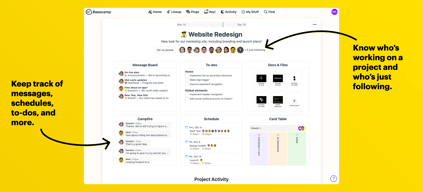
Basecamp has evolved as a project management platform since its launch in 2004 but its mission to help remote teams stay organized, productive, and efficient remains. One new feature that Basecamp recently added is called Basecamp Hill – a visual representation that divides the component of a project into a phase of uncertainty, unknowns, and problem-solving (uphill) and a phase of certainty, confidence, and execution (downhill). This is on top of Basecamp’s core features which include a Message Board, To-dos, Calendar, Documents and Files, Group Chat, and Automated Check-ins. It’s a top-down and bottom-up platform for everyone in a business or organization – from proprietors and C-level executives to project managers and individual team members.





| Capabilities |
API
|
|---|---|
| Segment |
Small Business
Mid Market
Enterprise
|
| Deployment | Cloud / SaaS / Web-Based, Mobile Android, Mobile iPad, Mobile iPhone |
| Support | 24/7 (Live rep), Chat, Email/Help Desk, FAQs/Forum, Knowledge Base, Phone Support |
| Training | Documentation |
| Languages | English |
Basecamp Pros and Cons
- Excellent for schedule and to-do list management
- Automatic check-ins and group chat for remote work
- Helpful message board
- Useful for finding crucial documents
- Easy and customizable environment
- Requires third-party integration for time tracking
- Features need to be a bit more flexible to achieve better functionality

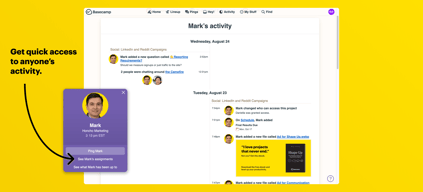
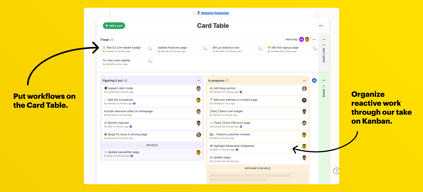
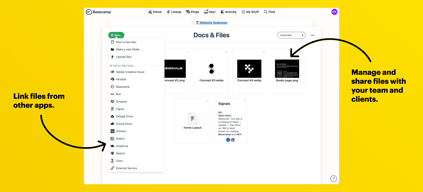
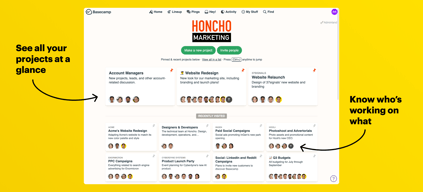
Compare Basecamp with other popular tools in the same category.
Basecamp allows us to keep our clients and their projects organized. Communication is available and transparent for all parties. It prevents doubling-up or missing communications.
It doesn't have all the bells and whistles of a full project management software (dependencies, recurring, different views, etc) but that's ok, because we don't use it for that.
transparent communication with clients and team members, file sharing between organizations
The thing about basecamp is that when you start using it you don't need any guidance on how to use it, basecamp provides the best UI/UX. it's very useful to organize my work while I am working on different projects. also very useful to communicate with your colleagues.
The only thing that I dislike about basecamp is that in the android basecamp application sometimes it doesn't give me a notification everything except that is top-notch for me.
Every day it helps me to keep track of what I have to do and also helped a lot with managing my work-related data it makes my whole team more productive and boosted my efficiency.
Chat feature makes adding colleagues to a discussion easy
Finding files from a past conversation can sometimes be hard
Share files with the whole team fast. You only need to upload the file once. A production manager can get info to new people without needing designers to resend
It is easy to use and flexible - I can cooperate with my clients in one app.
Lack of polish language. It would be easier for my clients to switch language.
Basecamp is the proper managament tool for several projects, it can be a messenger, todo list, knowledge base in one.
I absolutely love how user-friendly the software is. It’s been a great asset as a communication and collaboration tool.Our company likes the ability to share content with the entire team no matter where anyone is in the world.
At times it can get confusing and files seem to get lost in the shuffle.Rest all are fine.
It allows us to communicate seamlessly with the development team and assign tasks as needed.Basecamp is in charge of collaboration; we now utilize it to communicate, make rapid choices, share files, and brainstorm project ideas. Everything has become better, and it's all because to this fantastic platform.

Basecamp is everything I needed to make my work experience much more enjoyable, it simplifies various procedures through its simple functions, I have tried similar tools and they do not make the workflow easier, but much more complicated. I like its interface, it's intuitive, simple, safe, and easy to use. Configuring and adapting the functions of the right tools to what I need for my work is essential and Basecamp certainly offers me this. It is totally flexible, and I can access it from wherever I want with easy access. It allows me to classify the tasks and build a guide with various details, which offers me the possibility of being bold enough in labor management and facilitating the entire process of projects and teamwork.
So far Basecamp is a tool that flows perfectly and has served us as I have needed it, if there is something that I cannot solve, customer support is there to help solve it.
One of the best benefits that we have obtained from Basecamp has been the best teamwork and optimization in the workflow, where labor productivity has increased and has helped us to better converge in the projects and increase our success rate always from a collaborative perspective. Basecamp is the perfect guide that we use every day to follow our commercial objectives and follow commercial tasks to the letter.

Basecamp is one of the best tools for Project Management. It help is managing the tasks inside each project and assign the task to all my team members along with the due date.
Due to some technical reason, the basecamp will down without any notice, which will be difficult for us to manage the tasks which are in pipeline.
It helps in tracking the tasks inside the projects with all my team members along with the due date. We can even get daily emails on the task which we need to perform today along with due dates. Even it shows the due date for some of the tasks before the deadline which helps us to align the deadlines inside the Projects.

It is easy to use and getting every notification in mail.
Overall it is a good platform but we can't open the document or excel file.
Easy to manage to take a task and due date remainder is a best feature.
I like the listing of Activities it is very helpful to check the task status at the end of the.
Everything is fine but the membership plan is high.
While working on multiple projects keeping track of everything is difficult, basecamp is very helpful to track.

Basecamp is easy to navigate, I have had no problems managing this platform as it is very inclusive, making it easy for anyone without training to start managing tasks and projects. The API is very useful since it helps a lot with the extension and integration with internal and external systems that improve the capabilities that Basecamp has, such as viewing the status of assigned tasks without entering Basecamp directly. It is easy to be able to manage the deadlines of the tasks, in general, scheduling a task is very simple, it is enough to do, and delivery date. Files such as videos and images can also be attached to the assignment in case more information is required. Finally, I like that you can count on a search with a keyword, without complications.
To be honest, the price seems a bit expensive for the few features it has, plus it takes a long time to include new features. The management of multiple projects is overwhelming, it is not very easy to say to be able to manage several projects without having everything in a single panel. I wish I could have the feature to produce Gantt charts. Basecamp needs to listen more to its clients, I feel that it pays us very little or almost no attention when we recommend that they include necessary features for project management.
This platform was chosen because of how simple it was to open an account and start creating a project and assigning tasks without any problem, this helped a lot in improving productivity since its learning curve was very short. In addition, a space was needed where the company's employees could have a conversation about the project they were involved in without losing the thread of the conversation, and Basecamp was the best option for maintaining the integration of both needs.


