

Unclaimed: Are you working at Basecamp?






Basecamp Reviews: 4.1/5 — Solid Choice
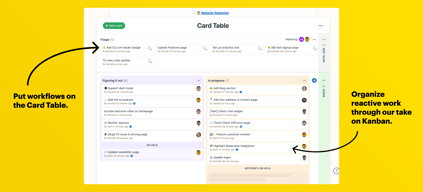
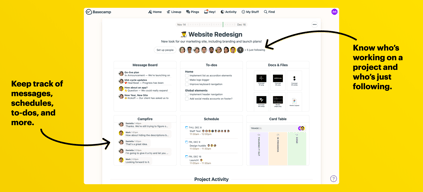
Basecamp has evolved as a project management platform since its launch in 2004 but its mission to help remote teams stay organized, productive, and efficient remains. One new feature that Basecamp recently added is called Basecamp Hill – a visual representation that divides the component of a project into a phase of uncertainty, unknowns, and problem-solving (uphill) and a phase of certainty, confidence, and execution (downhill). This is on top of Basecamp’s core features which include a Message Board, To-dos, Calendar, Documents and Files, Group Chat, and Automated Check-ins. It’s a top-down and bottom-up platform for everyone in a business or organization – from proprietors and C-level executives to project managers and individual team members.





| Capabilities |
API
|
|---|---|
| Segment |
Small Business
Mid Market
Enterprise
|
| Deployment | Cloud / SaaS / Web-Based, Mobile Android, Mobile iPad, Mobile iPhone |
| Support | 24/7 (Live rep), Chat, Email/Help Desk, FAQs/Forum, Knowledge Base, Phone Support |
| Training | Documentation |
| Languages | English |
Basecamp Pros and Cons
- Excellent for schedule and to-do list management
- Automatic check-ins and group chat for remote work
- Helpful message board
- Useful for finding crucial documents
- Easy and customizable environment
- Requires third-party integration for time tracking
- Features need to be a bit more flexible to achieve better functionality

Compare Basecamp with other popular tools in the same category.
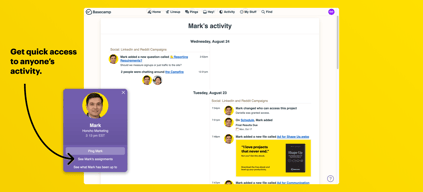
It's nice to see what everyone is doing all in one place.
It's a little complicated to learn. I don''t really like all the features.
Project management among various offices.
Basecamp has categories that are easily marked: To do list; pings, etc. That make it easy to know where you want to go in the site.
Is dislike the inaccessible amenities in the app. There are certain options that are only available for viewing on a desktop and that is not helpful at times.
Communication. Basecamp is great for communication throughout an organization.
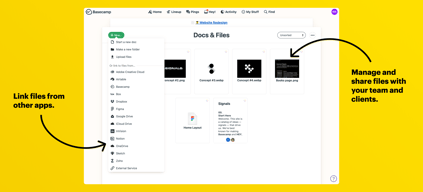
I like that we were able to upload the documents for different projects and keep them separated.
so Many notifications and it was challenging to figure out how to unsubscribe from irrelevant notifications.
We stay more up to date on the status of our projects. Less intentional communication is required because because can see when you've made updates.
Jobs can be kept separate. Feedback can lead to being to much to sift thru though.
Feedback can lead to being to much to sift thru though. Hard to find documents doesn't keep them tidy. You have to download and uploadd rather than just being able to view in real time.
Reduced the carbon footprint
I like not having to give coworkers my number or social media, but still having a quick way to chat in real time.
It’s sometimes annoying to go through and check a bunch of things as read so I don’t have to keep seeing the alerts
Basecamp helps keep people accountable. It’s harder to say “I didn’t get that message” when everyone knows you did. Also, it’s easier to turn off Basecamp for a day off and still be available by email for emergencies.
I do like that Basecamp has the ability for individuals to invite members from outside their team. It's a great feature!
I don't like basecamp's app and I think it's webplatform could use better functionality around teams/topics, etc.
We used basecamp to better serve projects and shows. It's great for assigning tasks, but it's ineffective when individuals turn off email notifications.
The best feature is the singular chain for a project. You can track the entire project history in one space.
There is a lot I would change. The biggest issue is lack of being able to tag/notify people. If you're not always watching a thread, you miss major updates or projects sit waiting for you until someone gets your attention in another platform. I also don't like that the most current status is at the bottom of the thread. Everyone works first to last, so why is the first thing I see in a thread the oldest?
We're using it for project management. Smoother place to store everything than tracking through email and file servers, better for asset sharing and revisions.
low cost, easy to use. The interface is intuitive and it is easy to learn, understand and follow.
limited features give it a very bare-bones feel. Lacks the abillity to categorize tasks.
project management, cross-functional team communication and coordination.
Clean User interface and project overview
Lack of smart integrations with other services
Keeping track of all clients and their projects
It's easy for everyone to get on the same page with projects, especially with contractors.
The UI can be pretty confusing, especially when it's a longer thread. It's pretty easy to get lost.
Working with 3rd parties - pretty easy to get in sync quickly.
This is a good tool to use when you have Multiple groups/projects
It’s all discussions - just not what we are looking for
A communication platform for members
I really like the calendar feature in basecamp
It’s not very intuitive. Can be difficult to navigate
Project Management and scheduling

Intuitive. Interface was really cute and fun.
At first, the interface was really cute and fun. Turns out it wasn't very engaging though, and people ended up ignoring the scheduling aspect. Which is what we were using it for. The interface was strange because you had to have it up all the time. An app would probably help this out a lot.
We were using it for scheduling and general shared to-do lists.
We use BC with one of our partner firms.
To me it does not allow for indepth task management
Actually none. They assign us tasks but my boss pushes them to Slack with a script he wrote.
It was a centralized place for reminders and notes
It was an additional platform to have to learn
Reminders about events, centralized place to refer to notes, calendar, etc.
It's cheap, easy to follow along, and user friendly
It lacks the features to be called project management software
Project management issues, timing and collaboration, did not find this was a very good project

We used Basecamp as a way to manage our Creative team's tasks and assets as they corresponded to different campaigns. The UX was great, and it was nice to be able to give permission to certain assets and campaigns to particular people in the organization.
We were able to replicate the essential capabilities of Basecamp with Box and Trello (which is free). I think Basecamp might have been more useful to a larger team, though we also had to delete files pretty regularly because we kept hitting our storage limit.
It kept our Creative assets and tasks organized, reducing the number of back-and-forth emails.
I liked being able to segment projects and invite outside users to those projects. I liked the task lists and having the ability to sort them by different criteria.
I wish that there was one overall calendar that showed all current and ongoing projects at once.
We no longer user Basecamp as it was unable to solve some organizational issues.
All in one system allowing for tracking of projects
seems redundant to systems already available
nothing solved. not seeing any added benefit
The pricing can be reasonable, but I think you can do better for a similar or even lesser price. It's fairly ubiquitous amongst a certain set, so there's that, if you have personnel resistant to learning new things.
Clunky. I, and many others, ignore Basecamp notices because it feels like just another mailing list, and not an interactive useful tool that will provide assistance with getting things done.
If you have a good manager you can use it to keep people in contact with each other, and that's nice.
Templates for projects. Makes it easy to work on recurring projects and ensure everyone knows their to-dos
Typing in the documents - no ability to hyperlink, no ability to comment, no ability, to indent bullet points
Collaborative work on recurring projects
The ability to chat to anyone in the company at any time and creating different groups for different projects. For example, we have different groups with different staff. Each group is representative of a project being worked on and the staff in that group can then talk about it without interrupting other peoples work. Its also nice how you can upload files to share with everyone instead of needing to make big email chains.
I dislike how its just more inconvenience to use then other social media apps. I would rather contact fellow employees over Facebook or email then on base camp. Base camp feels slow and its just makes a simple task such as sending an individual message much more difficult then other platforms.
We are using this as our main base for all projects on the go and all communication within the company. It is very easy to share progress updates automatically with everyone as well.
All group members can be added and participate on different platforms to communicate and assign tasks. The tasks part was the easiest and the wheel of progress made you aware of where you were in terms of successfully completing everything.
I got a notification that anytime anyone did anything on basecamp and it was so frustrating. My inbox would be plagued daily by someone commenting or completing a task. The worst part was there was not way for me to turn it off or change it to one update a day. That is what I would have liked to have been able to do most.
Group communication and task assignment. Sharing documents and information; collaboration. Gets rid of messy email chains.
It had an easy check list feature that was great for creating to do lists. Also you could assign items to others to help keep everyone on the same page
It sends you lots of emails that are hard to unsubscribe from. Also to use several of the features you had to get the paid version. I have found many other apps that do similar things that are free.
We used it as a task management system.
Our workspace has two locations, and few employees, which means we rarely meet as a large group, and often don't see each other during the day. Basecamp allows us to stay in communication about various events and topics.
It's easy to "loose" things in the shuffle.
We are able to communicate through a very spread out team - and stay in touch about important issues!
I would receive email alerts about activity needed in Basecamp
It was so confusing to use especially among a large organization. There are other much easier project management and project tracking tools available. This makes it unnecessarily difficult.
we purchased it for project management but ended up discarding this for other much more modern tools.
Base camp has many different features, and is good for using as a team.
No preview viewer of uploaded files. You have to download to view each file. Too many areas to save stuff so keeping track of where everything is annoying, and makes things tough to find.
It provides us the ability to save things to a shared drive.
The emails from the notifications system are reliable.
This does not seem to add value for my teams with the things it does.
We use Basecamp to house documents in team-specific division. I have not seen it used for more than what could be done with Dropbox or Google Docs.
I like the fact that I can communicate with the project originator and have a conversation with any questions that can be addressed, and also that its open to anyone on that specific project. That is a very powerful tool for communication and how a projects information can be shared between colleagues. If the entire team commits to use this solution, and uses the product intended there are some really great tools everyone can utilize to be more efficient as a team.
I really dislike the interface, there is a learning curve for anyone who uses almost any other program, the navigation isn't a natural or very simplified process, there are too many ways to get to every area, and the timelines on things can be very confusing. There are too many colors and checkboxes and other distracting elements that in my opinion should be simplified to look and feel cleaner and more organized. The level of customization could also use some work, I think that could help more team members to make this a more comfortable part of their workflow.
We currently use this software to manage projects between Account Executives, our production department, creative department, project traffic, and management. The benefits have been the level of communication that can happen in the program concerning each project without having to go back and forth with each project member.
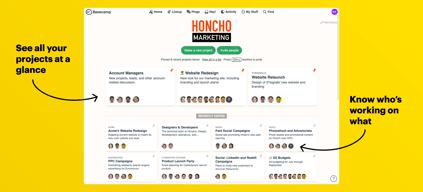
I like the visibility it provides across the entire company.
It's super inconvenient to have to revert back to Basecamp 2 solely to use the calendar.
None currently.