

Unclaimed: Are you working at Basecamp?






Basecamp Reviews: 4.1/5 — Solid Choice
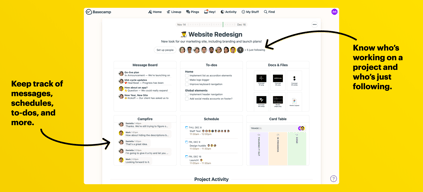
Basecamp has evolved as a project management platform since its launch in 2004 but its mission to help remote teams stay organized, productive, and efficient remains. One new feature that Basecamp recently added is called Basecamp Hill – a visual representation that divides the component of a project into a phase of uncertainty, unknowns, and problem-solving (uphill) and a phase of certainty, confidence, and execution (downhill). This is on top of Basecamp’s core features which include a Message Board, To-dos, Calendar, Documents and Files, Group Chat, and Automated Check-ins. It’s a top-down and bottom-up platform for everyone in a business or organization – from proprietors and C-level executives to project managers and individual team members.





| Capabilities |
API
|
|---|---|
| Segment |
Small Business
Mid Market
Enterprise
|
| Deployment | Cloud / SaaS / Web-Based, Mobile Android, Mobile iPad, Mobile iPhone |
| Support | 24/7 (Live rep), Chat, Email/Help Desk, FAQs/Forum, Knowledge Base, Phone Support |
| Training | Documentation |
| Languages | English |
Basecamp Pros and Cons
- Excellent for schedule and to-do list management
- Automatic check-ins and group chat for remote work
- Helpful message board
- Useful for finding crucial documents
- Easy and customizable environment
- Requires third-party integration for time tracking
- Features need to be a bit more flexible to achieve better functionality

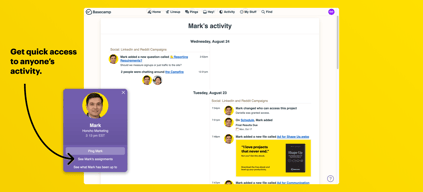
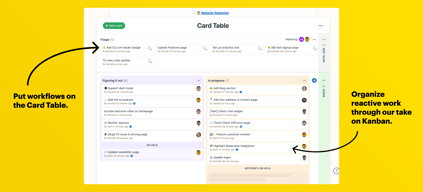
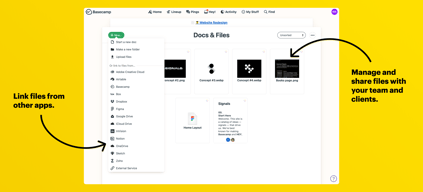
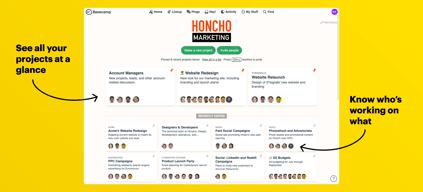
Compare Basecamp with other popular tools in the same category.
Is has a robust base and a lot of useful functionality!
I dislike the UI, from the colors to the layouts. It feels amateurish and does not have a good flow.
We use Basecamp as a PM tool for some clients, as well as for internal organization.
Easy for communication between parties and for having a visual for project workflow.
Sometimes there can be communication slippages due to poor notifications.
Project Management where parties are not able to often meet in the same space.

It functions well as a team-oriented checklist.
It does very little beyond what is provided by free services like Asana. It lacks time-management features and tracking, and it quickly becomes a mess to explore.
It keeps all of my tasks in one place and gives the opportunity for direction and internal communication.
The calendar functionality is pretty decent. It's easy to see when your projects are due and when others on your team have projects due too.
The messaging interface is hard to follow and find what conversation you need.
We've solve some of our project management issues with Basecamp and have streamlined some communication.
In my opinion, Basecamp is Not a very good Project Management Tool. It's quick and easy but does not have the functionality that MS Project has nor the tools. It is a good communicating tool however.
Hard to learn...and once you learn it was not very powerful. Was not as intuitive as you would think a Program like this should be.
We were sharing Project status with different groups within our organization but found no one was replying with their status even after they received the email notification.
You are able to store a lot of training information on here. We used Basecamp to coordinate our volunteer sign up and training and it acted as the main hub that volunteers came to for training and information.
Almost everything in a sense. Confusing to parse out to other users. We were sharing the log in instructions with about 500 people and there was a lot of confusion about creating an account and navigating the site. They didn't even have an app, maybe one is developed now. It's supposed to be "project management" but it was just a juimbled information overload that confused a lot of users.
Training our volunteer tax preparer base. It was good for storing a lot of materials so that has been nice to have one central base of operations. We needed a main hub to manage the information from all of our different sites, so this solved that.

It's super easy to just jump right in and use right away.
It's NOT for complicated, contingency-based workflows.
It's great that everyone on Basecamp can see where things are at, yet there's also functionality to restrict view access to just those that need it.

I liked that everyone in the office could see how much work I had gotten done
I did not dislike anything about basecamp
It made it easy to know who is doing what and when they got it done
I like the fact that we can have our whole team view projects and updates on the same platform without having to email them around
It’s very hard to use and slow to respond it’s not very intuitive or easy to navigate around
It saves us having to email files around and also for everyone to be kept in the loop on all projects

I've been using Basecamp for a few years now and I think the best quality it has, is that it does what it is made for an helps organize and manage projects. It's easy to assign and set up deadlines.
I dislike that it is easy to disorganize projects and make them reappear even after you mark that the task is complete. This might have to do with people on your team not being trained properly.
A benefit is that is keeps all the projects in one place. It helps you mark off what is done and is better than having colleagues email you about tasks.
It does a competent job of providing a shared meeting space for tracking project milestones and deliverables.
From an untrained customer perspective, the interface is not particularly intuitive.
We were required to use Basecamp during the implementation of a Saleforce CRM. It wasn't a choice we made, but it gave us the ability to see the product as a customer rather than as the decision-maker for the product.
How you can communicate and complete projects with notifications.
The look is not pretty or user friendly. Project organization is not clear or easily viewed.
Communicating when projects are completed.

I like the mention feature because it allows me to pay attention to what matters and collaborate better.
Doesn’t have some of the power features like Teamwork where you can batch add tasks from a text document.
Trying to use to keep PMs in the loop with an agency. Helps keep our CEO in the loop since he’s rarely in the office.
Has a very good UI for adding information
Not good for versioning or task management
Project management
Perfect for team who wants a single space to collaborate
Basic reporting tools lack of in depth features
Team work
I do find that this program is easy to adapt into your business and train employees on.
I don’t find it to be the best program out there. I think there is a lot more options that are more forward in design and functionality.
Base camp helps teams and stay on track without having to search through old emails.
The user interface was very straight forward.
Basecamp was really lacking in terms of their capabilities. They notification system was weak to put it lightly- my coworkers and my self were constantly missing messages as things could easily get overlooked. But file management was really the biggest issue here. Over the years we became too dependent on basecamp and when we were trying to switch over to another software exporting our files was a gigantic pain.
Basecamp was the go-to resource we used to organize and manage our client projects.
It is easy for me to invite team members
The integration with email service provides is limited
to share files with team members
In Basecamp you can share your files and have documents for specific users.
Basecamp has a bad layout and unfortunately even after many updates they still use that bad thing.
Documents sharing
Ease of use although there is a steep learning curve
Layout; butoons aren't intuitively placed and can take awhile to find things
Scheduling; improvements in workflow

Basecamp has a simple interface that makes it easy to learn how to use. Communication is made easy by providing options to attach files, and choose who in the team we want to send it to. It's great for sharing meeting notes and important documents. The calendar helps communicate our game plan to clients and can be used to track team member's PTO/availability. Messages can be sent to emails, ensuring that everyone sees it even if they don't open Basecamp.
The aesthetic design is behind the times. Basecamp has all the basic features, but nothing extraordinary. WIsh there was an "@" option to reply to specific people, rather than everyone in the message chain.
Basecamp is great for communicating with clients and teammates on small to medium-sized consulting projects. The interface is minimal so it is easy for those who are unfamiliar to learn its features.
Basecamp is easy and intuitive to use with lots of great features but ultimately it has little to make it stand out from other similar apps. My favorite part of it is the branding.
It is not as robust as Asana and does not let you track projects with multiple components and multiple teams as well. The integration with my Google calendar never seems to work properly.
Basecamp solves task management and project management as well as document sharing and to-do lists.
I like that it has helped internal communication between my team.
The Basecamp schedule integration with GCal is severely lacking. I don't like that I have to log into Basecamp to edit the schedule. I'd like to do it from GCal. I don't like that you can't house projects under teams or even have sub-projects or sub-teams.
Basecamp is solving internal communication and facilitating project management. We are sending less emails because of Basecamp and more staff are informed of relevant information.
Of this product the thing I like the most is that I can upload a document or even a whole folder with my team and get a conversation going about the documents I supplied. It’s a quick way to get a conversation going versus emailing and having a reply chain 50-60 emails long.
I think the product is clunky. It is more work than it is worth to set tasks and deadlines. I think it could be a very useful product but it definitely takes time to get used too and is inefficient
All the main tasks are on there so we can start conversations that pertain to a certain task, while all being on the same page.
Basecamp is easy to use and the interface looks nice.
Basecamp doesn't stand out from Asana, Trello, or other basic project management systems.
Basecamp is useful for collaboration but I prefer using Trello.
customizable notification settings, the best customization I've seen
The interface on web is wonky and seems incomplete. The app is more put together.
We have teams for collaboration, and diving taskwork. The group calendar is very nice and easy to use.
Creates a repository for the documents and photos that we need.
No easy, intuitive way to switch between documents, preview, or modify them.
We needed a way for a researcher to share photos and Word/PDF documents with us, and she chose to use basecamp
I like the organization that Basecamp provides where I can easily access projects and folders within the site.
I dislike that it is difficult to find old conversations between colleagues. If someone makes a post that includes password, that is also difficult to find.
Project management
The graphics were cute, and I liked that I was updated by email as to recent activity.
There were so many different aspects to Basecamp that were difficult and confusing to navigate.
Collecting as a team to submit work. It was good to have one central location for all nonprofit activity.
I like that Basecamp has a variety of areas. It reminds of google drive mixed with gmail and hangouts.
I dislike how difficult it is to navigate and the amount of notifications received on a daily basis.
We used basecamp to manage a project and communicate throughout that project with another company.