

Unclaimed: Are you working at Basecamp?






Basecamp Reviews: 4.1/5 — Solid Choice
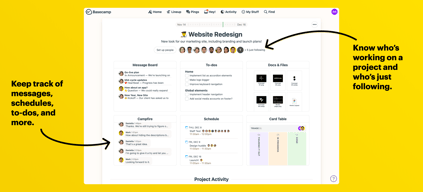
Basecamp has evolved as a project management platform since its launch in 2004 but its mission to help remote teams stay organized, productive, and efficient remains. One new feature that Basecamp recently added is called Basecamp Hill – a visual representation that divides the component of a project into a phase of uncertainty, unknowns, and problem-solving (uphill) and a phase of certainty, confidence, and execution (downhill). This is on top of Basecamp’s core features which include a Message Board, To-dos, Calendar, Documents and Files, Group Chat, and Automated Check-ins. It’s a top-down and bottom-up platform for everyone in a business or organization – from proprietors and C-level executives to project managers and individual team members.





| Capabilities |
API
|
|---|---|
| Segment |
Small Business
Mid Market
Enterprise
|
| Deployment | Cloud / SaaS / Web-Based, Mobile Android, Mobile iPad, Mobile iPhone |
| Support | 24/7 (Live rep), Chat, Email/Help Desk, FAQs/Forum, Knowledge Base, Phone Support |
| Training | Documentation |
| Languages | English |
Basecamp Pros and Cons
- Excellent for schedule and to-do list management
- Automatic check-ins and group chat for remote work
- Helpful message board
- Useful for finding crucial documents
- Easy and customizable environment
- Requires third-party integration for time tracking
- Features need to be a bit more flexible to achieve better functionality

Compare Basecamp with other popular tools in the same category.
Its the best communication tools that i used so far in recent times
Nothing downside found yet from the basecamp
project management and communication between the teammates are best compared to other
I like the way communication can flow across multiple projects and group tasks
I did not set up our basecamp account or anything so I don't have any input on the price, but I don't remember having many complaints while using the program. I was use to asana so the interface took some time to get use to.
It's mostly helpful following up and keeping track of progress for larger projects
Basecamp is very user friendly. I like that our whole team can use this website and communicate with each other efficiently.
There's nothing that stands out that I do not like about Basecamp.
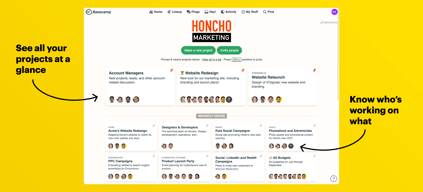
Basecamp has allowed us to organize our projects so we know who is working on what. We are able to communicate back and fourth quickly.

Helps establish clear communication for time-intensive projects when working with third parties.
Navigation within the app can get a tad clustered when trying to learn the layout. Also while email notifications do help, it can go overboard when notifying you on everything.
We used Basecamp to launch a new website while working with a third party website developer.
- easy platform for collaborating with others on design projects
there is nothing that i didn't like, we were using email threads before to approve creative
We have a lot of marketing materials that have to be approved by our clients. Basecamp helps us upload and name all the different versions and allows the client to provide feedback all in the same system.
I like the easy user interface. No matter your experience/comfort level with software, Basecamp is an easy software to use.
I dislike the pricing options. It can be expensive for smaller companies.
I've used Basecamp to organize projects, set deadlines, and be able to communicate with team members for certain projects in one location.

Basecamp keeps everything in one place. It helps my random ideas get traction because I can organize them.
Well, because I'm almost 50 it wasn't fun learning a new platform but once I got it, it was all good!
When I have something to delegate it makes it super easy to assign it to a team member. And the best benefit is I don't lose track of my to-do list.
I love that basecamp is so simple. The platform itself is very easy to understand and helps me streamline my deliverables internal and external in the office every day.
I dislike that if I have a lot of projects going on, the home dashboard can seem a bit overwhelming.
I'm realizing that Basecamp has been able to solve the problem of people losing email threads. Now, everything is held together in one place like a project management platform.
Basecamp and its products are really helpfull towards many applications in real and simulation side
Developement of its apps was very less while compare to other apps
It was very helpfull to making map source of the executed work
I used to multiple reasons. I do webinars so I can record my webinars and save them to upload at BASECAMP so my students can go back and watch again if they missed it
It can glictch sometimes. Have trouble saving sometimes
Very ease to share screen
I’ve used Basecamp for a million projects over the last decade and a half. It's beautiful software that has resisted every wrong trend and stayed true to the things that mattered most.
We've had mire confusion with task responsibilities and deadlines, which has increased
We don't need to spend as much time in meetings now that we use Basecamp
Basecamp is super to easy to use. The alerts via email and by desktop are lifesavers!
I love everything about Basecamp! No complaints here.
I am solving project management issues with Basecamp. It allows me to set my schedule and what I'm working on.
Basecamp makes it super easy to share documents, collaborate and communicate on projects. It works like a combination of Dropbox, Google Docs and Outlook. You can set up projects, invite participants and manage communications. As far as I know there are no limits to the number of separate projects you can manage at one time. Think of it as a lite version of a project manager
This is not a project manager in the way of Microsoft Project or other similar programs. You can't really create complex project steps and automate processes.
This allows my team, which is scattered around the world, to effectively contribute to and work on projects without needing to use email. It also makes sure we all have the same documentation to work from as well as to refer to during calls
The ease of creating new projects and the tasks needed for each and assigning them to team members is awesome. It is a very simple platform which is what I like best. Project Management is hard enough as it is, a project management platform needs to be simple and clean and easy to use and Basecamp provides that.
There is nothing that I strongly dislike about Basecamp, but it would be nice if it included a more visual view option, maybe some sort of map view to see an overview of all the projects and tasks and the progress of each. It would also be nice if you could have the option to make some tasks not available until it's predecessor is completed and if the due dates/goal dates could be automatically delayed if certain tasks are delayed.
It helps myself and the rest of the team stay organized and get stuff done. We have used other project management software in the past but the team has been the most productive with this one.
Very easy to use and useful. Instead of downloading different kinds of apps if you just download this one it will give you access for so many different things. Im not sure if there is anything like this software. Because on this software pretty much you can do so many different stuff. Like chat with co workers make an announcements or view events on calendar etc.
Pricing not going to lie if i can pay $100 monthly like that. My old job had this program and we used free 30 days trial. But at the time it seems pretty cheap because almost everyone used it at work and seems affordable too
For me when we work we use too many apps and we lost ourselves in there. But with this program you can actually easily see everything right in front of you. Time efficient!
Basecamp is a super simple and user friendly platform.
Basecamp is similar to some of our software, so it seems like it is overkill.
Basecamp allows our teams to work together more efficiently. We are able to set up and share items with ease.
Great tool/application to track projects
Updated version would be nice to include
Getting projects out on time
The usability and ease of completing tasks
The little complex way of how the system works
I use basecamp for approving design changes and getting them approved. It has been very easy for approvers to sign off on docs
I appreciate how we can have people in many different locations but ultimately are able to complete things in a timely manner.
I dislike how my notifications sometimes get muted.
We have solved the problem of working around all of each others schedules.
Basecamp offers the flexibility needed for web based project management. You can create to do lists, add meetings and other events to the calendar, upload documents and pictures. Others in the group may comment on a post at anytime and individual users have the option to be notified immediately or in a single email at the end of the day. You can also customize who will receive notices.
There is really nothing that I have found that I dislike.
It's great to organize people that are at different locations.
Setting up projects and tracking them. Knowing when an employee has completed a task. Internal messenger to keep in contact with co workers!
So far it meets all my needs that allows me to get my tasks done.
Helps me keep track of my projects and allows me to report to my boss on what I have completed.
I loved the ability to assign tasks to people on my team from anywhere in the app.
I disliked the amount of clicking I had to do to get from project to project. But this has already improved since I started using the app and will continue to improve, I'm sure.
We solve storing client documents by client, knowing what everyone is spending their time on, tracking tasks we've assigned to others, etc. Project management.
I've used Basecamp with larger organizations of 50+ people and find the most success there. When there are multiple projects going on with multiple team leaders, the constant communication without being overwhelming creates efficient work.
Some coworkers have taken a longer time to adjust to this work flow, but after they commit to using it, they are a fan as well.
The benefits are endless for group work. Having everything in one place to even go back and consult in future projects is helpful.

I love that Basecamp provides an app for mobile devices, so I can track all my projects from my mobile, for me the app is very complete, there is a lot of functions available on the app, like messages, to do list, searching which is really good when you have many projects, you can see your schedule, docs and files, we can follow the latest activity on our projects, as messages, to dos, comments and files added on every project, adding and managing projects is very easy with this software, you can do it from your mobile device or trough your computer, that is something great, there is some other software that does not allow you to add projects from your mobile device, in conclusion this is an easy and affordable project management tool for you and your team, the user interface is so friendly
What I do not like about this software is their export feature, they do not have the option to export the tasks to excel or cvs format, that is a little bit disappointment, another thing to point is the fact that you can not download more then one document at the same time, you need to download each document at the time, sometimes it gets hard to assign tasks to other users, that is all I have to complain about this software
We appreciate this software very much, thanks to the to-dos we are able to accomplish all our tasks in an organized way, managing our projects using basecamp have improved our protuctivity and communication skills, we are able to invite users to an specific project or task
Base camp made communication between multiple contractors and companies a breeze. No need to search for phone numbers or install information. Everyone knew exactly when they were needed.
There was nothing that I did not like about using Basecamp. My experience was great.
Using Basecamp solves a major communication problem I experienced in previous projects. Using Basecamp made communication a breeze.
Simple to setup and use. Pricing is the best out there. Easy to invite and collaborate with others outside your organization.
Having no built in file viewer, it would help to be able to view files without leaving Basecamp.
Collaboration has increased, centralized project management.
The best part of this program is the easy to use interface, the historial of activity and the full compatibility with any platform
Nothing really, the progam covers all your pm needs
It makes easy to cooperate with team mates.
Super easy to communicate with a team of varying roles. Love the notifications and ability to create projects and message boards.
Sometimes not nearly as intuitive as I would want it to be to setup projects.
Keeping a team all on the same page and communicating with everyone important information and brainstorming.
I like that you can structure different goals and delegate certain tasks amongst group members. Assigning tasks helps with accountability in order to make sure that everyone meets their obligations. Having a to-do list also helped us put in place certain goals.
I wonder if it makes sense to have an IM group chat for the people that are online?
We are solving the problem of improper organization. Basecamp has helped us be on the same page with the various projects that we worked on. Everyone knew what their roles and responsibilities were and when it was expected for them to complete whatever the task was. Basecamp also helped us prioritize tasks by importance.

Anyone in the company can and does use it
The only drawback is the app and lack of ability to do certain things through the app
Project management - time management - overall communication has improved