

Unclaimed: Are you working at Bubble?
Bubble Reviews: 4.5/5 — Highly Rated
Bubble is a known leader in the no-code movement that offers a powerful point-and-click web editor and a cloud-hosing platform that lets users create customized web applications and workflows. From prototypes to complex marketplaces, SaaS products, and more, Bubble can help build and launch businesses easily.

| Capabilities |
API
|
|---|---|
| Segment |
Small Business
Mid Market
Enterprise
|
| Deployment | Cloud / SaaS / Web-Based |
| Support | 24/7 (Live rep), Chat, Email/Help Desk, FAQs/Forum, Knowledge Base, Phone Support |
| Training | Documentation |
| Languages | English |







Bubble’s pricing page opens on the Web & Mobile tab and shows Starter at $59 a month. Switch to the Web tab and the same plan is $29. Identical workload units, identical editors, identical everything except the ability to ship a native mobile app. If you are building a web app — which is what most Bubble users build — your entry price is $29 and the number on the page when you land is roughly double it.
- What it is: A visual no-code development platform for building full web and mobile applications with a database, logic, and API layer.
- Best for: Founders and small teams building a real product without engineers, not just a website.
- Pricing: Free, then Starter $29, Growth $119, Team $349 per month (web, billed annually). Add mobile and those become $59, $209, $549. Verified July 2026.
- The honest catch: Starter gives you one app editor. A second person on the project costs $119.
What Is Bubble?
Bubble is not a website builder, and the distinction matters when you are comparing prices. Wix and Webflow produce pages; Bubble produces applications. You get a database, a visual workflow engine for logic, an API connector, user authentication, and version control — the components of a software product rather than a brochure. That is why its costs look high against site builders and reasonable against developer salaries.
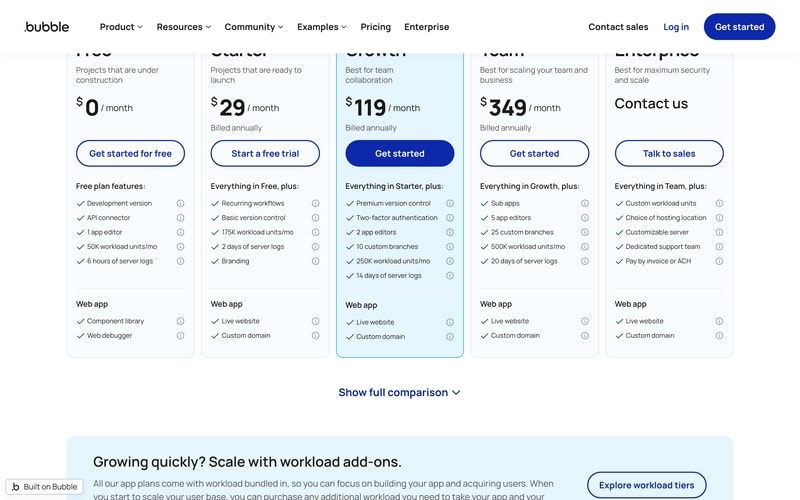
The 2026 product covers both web and native mobile from the same editor, with mobile builds, live app versions, and over-the-air updates managed inside the platform. That capability is the reason the pricing page now has three tabs — Web & Mobile, Web, and Mobile — and the reason the default tab shows the highest figures.
How Bubble Works
- Priced per app, not per seat. One subscription covers the application; editors are capped by tier.
- Workload units are the usage meter. 50K a month free, 175K on Starter, 250K on Growth, 500K on Team.
- Editors are the real gate. 1 on Free and Starter, 2 on Growth, 5 on Team.
- The free plan cannot go live. No custom domain and no live website — it is a development sandbox.
- Server log retention ladders steeply. 6 hours, 2 days, 14 days, then 20 days.
- Extra workload is sold as an add-on rather than forcing a tier upgrade.
Bubble Pricing
Captured from Bubble’s pricing page in July 2026 in US dollars with annual billing selected. Bubble advertises saving up to 20% annually, so monthly billing costs more.
| Plan | Web | Web + mobile | Workload units/mo | App editors |
|---|---|---|---|---|
| Free | $0 | $0 | 50K | 1 |
| Starter | $29 | $59 | 175K | 1 |
| Growth | $119 | $209 | 250K | 2 |
| Team | $349 | $549 | 500K | 5 |
| Enterprise | Quoted | Quoted | Custom | Custom |
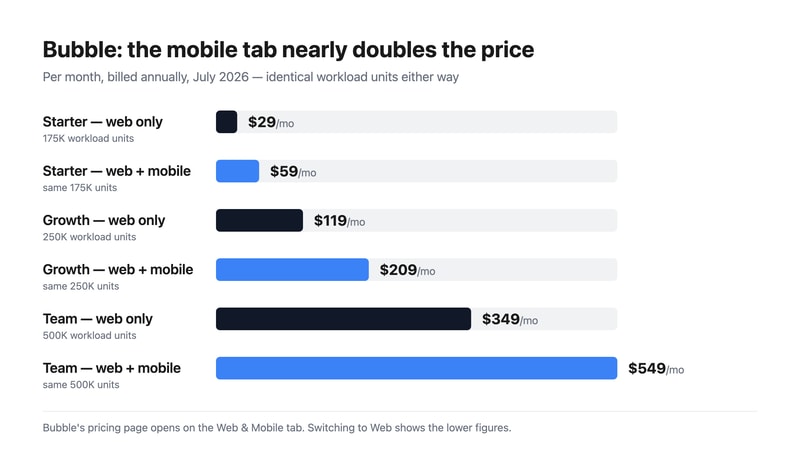
What actually decides your plan:
- Check which tab you are reading. The mobile premium is $30 on Starter, $90 on Growth, and $200 on Team — a 103%, 76%, and 57% increase respectively for capability you may never use. Nothing else changes between the two columns. If your product is a web app, price it from the Web tab and ignore the landing figures entirely.
- The upgrade trigger is a second person, not more traffic. Starter includes one app editor. The moment a co-founder, contractor, or designer needs to open the editor, you are on Growth at $119 — a fourfold jump driven by a seat rather than by usage.
- Capacity gets more expensive as you climb, not cheaper. On the web tab, Starter works out at roughly $17 per 100,000 workload units, Growth at about $48, and Team at about $70. That inversion tells you plainly what the upper tiers sell: version control, branches, two-factor authentication, sub-apps, and collaboration. You are not buying volume, so do not upgrade expecting it.
- Buy workload rather than tiers if usage is the problem. Bubble sells workload add-ons on every plan specifically so you do not have to move up for capacity. Given the per-unit arithmetic above, that is usually the cheaper path.
- The free plan cannot ship. No live website and no custom domain, which makes it a genuine build-and-learn environment but not a soft launch. Your first live deployment costs $29.
- Two days of server logs on Starter is tight. A bug reported on Monday about Friday’s behaviour is already unreachable. Growth’s 14 days is the first realistic debugging window for a live product.
Who Should Use Bubble
- Non-technical founders building a real product. The clearest case, and the one Bubble is genuinely good at — database, logic, auth, and payments without an engineer.
- Teams validating before they hire. Building the first version in Bubble is dramatically cheaper than a development contract, and the result is a working application rather than a prototype.
- Internal tools and marketplaces. Multi-user apps with permissions and workflows sit squarely in Bubble’s strengths.
- Solo builders on a budget. $29 a month for a live, custom-domain web application is difficult to beat.
It fits poorly for simple marketing sites, where Webflow, Framer, or Wix are cheaper and faster; for storefronts, where Shopify does in an afternoon what Bubble takes weeks to approximate; and for anything expected to reach very high traffic, where the workload meter becomes the dominant cost.
Honest Pros and Cons
Strengths
- Genuinely full-stack. Database, workflows, API connector, and authentication in one visual environment.
- Web and native mobile from one editor, with OTA updates handled by the platform.
- A free tier you can actually build in, rather than a two-week trial.
- Workload add-ons exist, so growth does not force a tier jump.
- Large ecosystem. A substantial plugin marketplace, template library, and agency network.
- Real version control — branches and premium version control from Growth.
Limitations
- The default pricing tab overstates the web price. $59 shown against $29 actual.
- One editor on Starter. Collaboration costs $119, a fourfold step.
- Workload units are hard to forecast before you have built and load-tested the app.
- Per-unit capacity worsens with each tier, so upgrades buy governance rather than headroom.
- Two days of log retention on Starter, which is short for a production application.
- Lock-in is total. There is no meaningful export — a Bubble app runs on Bubble permanently.
Bubble Alternatives and How It Compares
- Softr and Glide build apps on top of an existing Airtable or Notion base, far simpler but far less capable.
- FlutterFlow and Adalo are the mobile-first alternatives, with FlutterFlow producing exportable Flutter code — the direct answer to Bubble’s lock-in.
- Retool targets internal tools connected to existing databases rather than greenfield consumer products.
- Webflow and Framer win decisively on marketing sites and lose decisively on application logic.
- Make and Zapier automate between tools rather than building the tool.
For a broader survey, browse our no-code development platforms directory.
The Verdict
Bubble remains the most capable no-code platform for building an actual application, and the gap between it and the app-on-a-spreadsheet tools is wide. A database, a visual logic engine, an API connector, authentication, and native mobile builds in one place is a genuine software stack, and for a founder without engineers it compresses months and tens of thousands of dollars into a subscription. Judged against a development contract rather than against Wix, the pricing is modest.
Read the pricing page carefully, because it does not open on the number most buyers want. The default Web & Mobile tab shows Starter at $59; the Web tab shows the same plan at $29, with identical workload units, identical editors, and identical everything but native app publishing. The mobile premium runs from 57% to 103% depending on tier. If you are building for the browser, switch tabs before you compare Bubble against anything else, because the comparison you make on the landing figures will be wrong by roughly double.
Two things determine what you will actually pay over time. The first is collaboration, not usage: Starter permits one app editor, so the day a second person needs to open the project you are on Growth at $119 — a fourfold increase triggered by a seat. The second is that capacity gets more expensive per unit as you climb, roughly $17 per 100,000 workload units on Starter against $70 on Team, which means upgrading to solve a usage problem is the wrong move. Buy the workload add-on instead, and treat the tier ladder as what it is: a price list for version control, branches, and editors.
The unavoidable trade-off is lock-in. A Bubble application cannot be exported and run anywhere else, so choosing it is a permanent architectural decision, not a starting point you migrate off later. That is a reasonable bet when the alternative is not building the product at all — but if you expect to eventually hand the codebase to engineers, FlutterFlow’s exportable Flutter output is the option that keeps that door open.
FAQ
How much does Bubble cost?
Captured in July 2026 in US dollars with annual billing: on the Web tab, Free $0, Starter $29 per month, Growth $119, and Team $349, with Enterprise quoted. On the Web & Mobile tab the same plans are $59, $209, and $549. Monthly billing costs more — Bubble advertises saving up to 20% annually. Workload allowances are 50K, 175K, 250K, and 500K units per month.
Why does Bubble’s pricing page show $59 for the Starter plan?
Because it opens on the Web & Mobile tab by default. That tier includes native mobile app builds, live app versions, and over-the-air updates. Selecting the Web tab shows Starter at $29 with the same 175,000 workload units, the same single app editor, and the same live website and custom domain. The entire $30 difference is the ability to publish a native mobile app.
What are Bubble’s workload units?
They are Bubble’s usage meter, consumed by the operations your app performs — database reads and writes, workflow steps, API calls, and page loads. Allowances are 50,000 a month on Free, 175,000 on Starter, 250,000 on Growth, and 500,000 on Team. They are difficult to forecast before an app is built, which is why Bubble sells workload add-ons on every plan rather than requiring a tier upgrade for capacity.
How many people can work on a Bubble app?
One app editor on the Free and Starter plans, two on Growth, and five on Team, with custom limits on Enterprise. This is usually the real reason to upgrade: adding a second collaborator moves you from $29 to $119 on the web tab, a fourfold increase driven entirely by a seat rather than by usage or traffic.
Can you export a Bubble app?
No. Bubble applications run on Bubble’s infrastructure and there is no meaningful export to another platform, so the choice is a long-term commitment. If keeping that option open matters, FlutterFlow generates exportable Flutter code, and a conventional development approach obviously preserves full ownership. For many founders the trade is worth it, but it should be a deliberate decision rather than a surprise.

Compare Bubble with other popular tools in the same category.
Having to design with no-code is the future. Easy to use, flexible and affordable. Easy to implement, 24/7 custer service as easy intergartion with already-made APls. I use it frequently, hassle-free and it offers a wide range of feature
Nothing major since my use of the Bubble.io platform
Since l lack necessary code skills to build apps, Bubble.io makes it easy for me to create one
The best thing about Bubble is that it is so polyvalent. I've built landing pages, complex SAAS, Marketplaces, social network etc... Without ever learning how to code. That's why Bubble really is the best nocode platforms. With most of other builders, you quite rapidly hit the limits, but in 2+ years, I haven't found bubble's one yet.
The major issues of Bubble in my opinion are : - It's way of handling SEO. It is quite tricky to make good seo work with Bubble. You can't manager subdirectories, wich prevent you from using third party services to build your blog, and since Bubble's performances are not the best, it really impact your seo. - The learning curve can be quite steep. Due to Bubble being so polyvalent, you'll have to be patient and resilient to really learn and master it. - Sometimes, Bubble hosted apps tend to get slowed down for somes reasons ??
Clearly, Îve always had so much ideas of business like Saas marketplaces etc... but never learned to code because I lacked time. Bubble enabled me to build my own projects, without having to code and without hiring devs and finding a cto to co-found my project
You can really do things with Bubble. The community is very helpful as well
It does have a learning curve, but it's ok
Bubble decreased the upfront investment and operating costs for my software business significantly

Bubble is the best no code app builder. Coming for me back from no coding skills this enabled me to create toppers that I've never otherwise be able to create.
I like everything about bubble. Keep up the good work.
I know zero about coding over enabled me to create software when I would otherwise not be able to this literally saved my life. It enabled me to create software that I would need an entire team to make is anything else thank you bubble.
I know of no other development system with such a large feature set, ease of use and lightning fast development time.
I wish there was a plan that would allow me to keep small side projects running. At $30 per month for the cheapest deployable plan, I can only use Bubble for more serious projects. This would also allow me to replace Wordpress in many projects.
Bubble allows me to create complex web applications in a short time. Especially as a freelancer I can impress my clients with incredibly short development times.
I appreciate Bubble's intuitive platform that empowers users to create diverse web applications without the need for extensive coding knowledge. Its user-friendly interface significantly reduces the development time, allowing for rapid deployment and iterative improvements. This democratizes web app development, making it accessible even to those who haven't spent years learning programming languages.
While Bubble excels in ease of use for building applications, there's room for improvement in managing and maintaining complex applications as they scale. As web apps grow to include more features, pages, and data, the process of managing these elements can become challenging. Enhancing the platform's capabilities for better scalability and maintenance would be highly beneficial. Simplifying the management of larger, feature-rich applications would help ensure that users can continue to efficiently evolve their projects as they grow.
As a solo founder and CEO, time and efficiency are of the essence. Bubble's user-friendly approach to app development aligns perfectly with my need to rapidly iterate and adapt based on user feedback and market demands. It enables me to focus on refining the user experience and business model, rather than getting entangled in the intricacies of coding. This is crucial for a startup like mine, where agility and quick adaptation are key to success.
Velocidade em lançar qualquer produto é incrivel com essa ferramenta
Página para medir o consumo de servidor e logs tem muito a ser melhorada e o suporte em tempo real seria um recurso muito interessante para problemas urgentes, que geralemente leva 2 dias úteis para serem tratados ia e-mail
sistema de gestão para Oficinas mecânicas. Controle financeiro, gestão de Ordens de serviço e conexão com orgãos do governo para emissão de Notas fiscais são alguns de nossas Features
I use Bubble every single day for my work, and my entire business is built around it (I'm a freelance developer). It is my go-to solution and if a client doesn't want to use it, I will generally recommend another agency to work with. Bubble stands above other no-code solutions because of its full stack approach. It has a built-in database with privacy controls, the ability to create your own public APIs, and infinite extensibility through official and community plugins that integrate with 3rd party APIs like Stripe, Twilio, and Google. Testing is extremely easy in Bubble because you can live preview your app with one click at any time during development. The built-in debugger is very useful as well. Once it is time to go live, you click another button and deploy to production. It's so easy to go live it almost feels like cheating. If you have any trouble, the Bubble community forum is an incredible resource. The official support team is helpful as well, but I rarely need to reach out to them because the forum is so good.
There are some quirks to it, like any tool. It would be nice if you could return data from custom workflows and build native mobile apps. However, it just so happens the team is working to ship both of those in the near term. They are constantly building on it.
Bubble is the fastest way to build a Minimum Viable Product (MVP) solution for a startup or app idea you have. Bar none. But it's not just for MVPs. It is scalable and will grow with you all the way up to thousands of users.
Much faster then writing code. Being able to write all the stack, no need of specialized developers for front-end, back-end, deployment or else.
Dependance from platform, possible changes on technical aspects as well as licensing and price. Hard to instantiate multiple sites.
Fast MVP development

Easy to learn and build on. Lots of materials on the web. MVP ready in less then a month.
A few bugs still exist but nothing to dramatic. Some incompatibilities with safari as well.
MVP ready to show clients and raise funding.

Suffice to say, Bubble is powerful in all meanings! There's nothing you can't do with it, and I must say it does what it was made for: it makes it easy to develop ideas and deliver them rapidly! I mean it. Some ideas are delivered in weeks of development after planning, and new features can be added without bugs hither and thither, since they are simple to manage and keep track of. From chatbots to large systems, Bubble is the platform to go with.
I feel like the new features were deployed without much planning or revision, but the last ones were not, so I think they might have had a get-together with a lot of energy (and shouts) and the responsible is more attentive and scared, which plays the role.
It engages a whole lot of people, and for that, nothing else is more powerful than a community which don't cease to propose ideas, discuss solutions and share knowledge. It's so engaging! I believe Bubble is offering much more than development itself. It makes it simple to talk to anyone, from experts to IT iliterates. It's meaningful and it impacts lots and lots of people's lives.

The learning process is very quick. I learned most of it from Bubble manuals and videos plus there is a load of Youtube tutoriasl and a thriving and helpful community ready to give you a hand.
The priving system based on computing and database resources is not easy to understand and normally you will get a grasp of what you need for a live app only when you start using it. That can make the budgeting process prior to presenting a project to a client complicated.
It allows pleopple like me who are not programmers but experts in an specific industry (in my case TV production) to develope directly aplication without the need to go thru explainin a programming company all your needs. It also allow me to build an app for the specific needs of a company and not buyng an of the shelf software where the company needs to adapt to the software

Essentially it's a WYSIWYG code editor. I like the ability to easily place screen widgets where I want, develope fully responsive apps, and that front end back end integration is so seamless. I also like that there is a very active user forum so when I have questions or issues I can look for examples of others who had similar issues and learn from their efforts. I've received enormous help from other members of the forum.
Some features are VERY poorly documented and some aspects of writing plugins (which is necessary when you want to do something above and beyond native Bubble.io) are also very poorly documented. On the plus side, the way server side plugins do async functions is greatly improved now that Bubble has implemented the async/await functiionalty, which is so much more intuitive that the prior use of callbacks.
We've built an app. It's fully responsive. We're continuously enhancing it, and this is fairly easy in Bubble. Once upon a time I envisioned Bubble would be where we protype our app before we rewrite it in a "real" platform, but Bubble IS a real platform.
The ease of making changes; it's as easy making few clicks. the database is also easily manipulated to ensure that you can iterate without hassle. Compared to competitors Bubble offers an amazing front and back end solution
The fact that you cannot use front end loops limits the ability to perform some tasks efficently. For example it is very difficult to manipulate on page data, that can then be processed with backend workflows.
Bubble allows you to launch MVP products in a very short space of time. We have used it in many real life instances, for example we created an occupational Health and Safety application that allows companies to track incidents at work.
Bubble is the most comprehensive no code platform available - if you can think of an app idea, you can most likely build it on Bubble. With the capability to integrate with outside platforms and add custom code, as well, Bubble puts a ton of power at your fingertips.
Because of how much control Bubble gives you over the development and customization of your app, it comes with a learning curve. This isn't a bad thing, but can feel like a negative if you don't anticipate it or don't understand why it's there.
Bubble runs our business, and we also help other folks build businesses using the platform. Personally, Bubble gives us a cost effective way to create completely customized solutions for our internal and external business needs. Professionally, Bubble gives us a great platform with which to help other people launch their own custom businesses.
Bubble.io truly stands out in the vast sea of no-code platforms, and the reason is its unparalleled flexibility. While many platforms lock you into specific templates or workflows, Bubble gives you the freedom to craft web applications tailored to your vision. The drag-and-drop interface is intuitive, but its depth goes beyond the surface. You can customize almost every element, embed third-party integrations, and even get down to granular conditional actions and workflows. It's a game-changer for both beginners and those who have dabbled in code before but want to speed up their development process. In essence, Bubble.io doesn’t just hand you a tool – it hands you an entire toolbox. This flexibility empowers users to build anything from simple landing pages to complex web applications without ever touching a line of code.
Learning Curve: While Bubble.io is designed to be a no-code platform, there's still a learning curve, especially if you're diving into its more advanced features. Some might find it overwhelming initially.
Swift Development Cycle: Without the need to learn coding syntax or troubleshoot minute coding errors, I've been able to bring my ideas to life in a fraction of the time it would take with traditional development. Cost-Efficient: Hiring developers or outsourcing software projects can be quite expensive. With Bubble.io, I've managed to circumvent those hefty fees, crafting solutions at a more affordable rate. Empowerment: One of the most gratifying benefits is the empowerment and independence I've gained. I'm no longer reliant on a developer's schedule or constrained by their vision. I can iterate, adapt, and refine my software as I see fit. Diverse Application Possibilities: From simple landing pages to intricate web applications, the flexibility of Bubble.io means I can address a multitude of needs without seeking separate tools or platforms. Collaboration and Community: Being part of the Bubble community has also been a boon. Whenever I face challenges, there's a vibrant and helpful community ready to assist, share insights, or provide feedback. In essence, Bubble.io has democratized software development for me, removing barriers and opening a world of digital possibilities previously out of reach.

Robust functionality that allows solving almost all tasks.
Bubble doesn't provide access to database. It is a big problem to edit big data.
Earlier, 4-5 years ago, I created only MVPs and tested them. Because Bubble platform had restricted functionality and worked very slowly. Nowadays, I make different web apps for business. Today Bubble is a great tool for nocode development. You can start to make a real web app without coding skills.
The platform enables high-quality web app development with surprisingly sophisticated capabilities. The built-in database makes it quick and easy to get started. Great documentation and an enthusiastic online community of experts with many free tutorials. The Bubble support team is also quick and very helpful.
The sophistication of the platform is excellent but it comes at a small price. It's a very comprehensive interface and takes time to become acquainted with the massive number of features. But, if you are prepared to put in the time, it's well worth the investment as you will be rewarded with extensive capabilities.
Bubble gives you direct hands-on control as you develop your web app. We design in Figma and then translate the designs across into Bubble, and we have a professional, scaleable and sophisticated service. If/when we scale massively we will rethink our tech stack, but for now, as we grow the business and budgets are tight, Bubble will do the job admirably.
Bubble's ease of use is hands down its strongest suite! Ease of use does not mean it's less advanced than any other tools, you can create advanced things with Bubble with just a few clicks!
So far the only thing I do not like is the fact that you cannot use SMTP to send emails via forms. You must use a servive provider that has integration with Bubble, this adds another layer of cost to your application.
For me, the main problem Bubble solves is having to know too many programming languages in order to get the same end result. With bubble, you don't need to learn HTML, CSS, a server-side language, a database language, nor a scripting language like JS to animate. Many of the heavy lifting is already done for you, all you need to do is drag and drop, then connect things via a few clicks, some tpying and boom, you've got a working app! It's truly amazing.
How simple it is to build things on. Obviously there is a learning curve. But it is 100x faster and easier than learning to code.
The only downside to bubble is that you are usually reliant on the community to learn things. Most of the time they are great. But sometimes there are things you need to do, and you can't find anyone who has done them. In thise cases, it can take a lot of trial and error.
I needed to build a platform for my startup. It was either find cofounders, pay people, or do it myself. I stumbled upon bubble and was blown away by how it let me become a technical developer without having any knowledge of code.
Flexibility + The ability to achieve greater things in very less time as compared to coding
Cannot export the code. Animations are not very much feasible. Basic can be done but not advanced animations.
Ability to pivot super fast and try to build whatever ideas that we have in our mind without having to worry about immense time that is needed to be spent on coding
Accessible price in the personal plan, even for people who live in the third world like me Impressive development capabilities: no templates or third-party apps. Design your database, your UI, call the APIs you need. Few plugins are essential. The tasks they make easier, in general, you could do with what Bubble offers by default Unmatched speed of development
The jump in price to be able to go from 1 to 2 editors is quite large. To the point that if you plan to launch multiple small apps, it's MUCH cheaper to just create multiple accounts on the personal plan, rather than upgrade to a larger plan. It's justified, though, if your app has grown enough to require integration with Algolia.
I no longer need a programmer to develope my desings. With the knowledge I gained as a Business Analyst, i can create the apps I want.
I like the support team that are wrapped around Bubble, their developers feel like our extended team and their quality assurance is of a high standard.
No perfect native mobile solution, but absolutely perfect for web based applications that scale.
We are a business software development agency that has allowed us to provide a more well rounded business solution to companies all over the globe. From start up's to the largest enterprises with plus 10,000 employees.

Easy to use and had a lot of functionality. We built an application in a few days
I am struggling to find something I do not like about bubble
I was able to build our app prototype in a few days

Everything is simple and didactic. Very fast learning and excellent performance. The fluidity of things, the simple and powerful database.
The only thing I wish Bubble had is a place to organize custom states, better. In Power apps, for example, there is a variable organization tab.
Bubble is the solution for all spreadsheets. It's ideal for any company and we're happy to be able to help other companies manage their business better.
I am able to tackle business challenges with fast solutions. I am able to do things with Bubble that I never have been able to figure out as a non-coder. It's such a powerful platform, and the learning curve was nothing compared to all the time I've spent over the years trying to learn to code.
I wish the documentation was a little more complete, with deeper insight into the way certain processes are happening and why. It's an area that is getting better, but I still often find myself scouring the forums for clarification and workarounds.
We have built and launched several internal tools to accomplish business functions that were very time intensive before. We have also built a product for clients and it has introduced a significant new revenue stream to our agency offerings. These were issues that were too expensive to solve and maintain with traditional custom development. Bubble has provided a rapid new set of tools to address both the cost and time factors that were preventing significant innovation before.

A way to develop all with no code in faster time
It has no manual that guide you through design tasks
A short time to design, test and release systems.
I am unsure where to start, so let's try it like this: I have not seen/used any no-code tool that is as flexible and powerful as bubble. And more -many of these tools you can build yourself using bubble. 🤯 ✔ You can learn it quickly Do not get me wrong here. Bubble has a learning curve and you can always learn more. It is not "easy", like a simple form builder. This tool can be used for everything. You work with databases and APIs, design the front-end, and you will also use code sooner or later. This is why there is a difference between working with a dev/agency that "knows" bubble and people who "use bubble every day for a couple of years". But the cool thing is, you can already create something very valuable after a couple of hours. So no matter who you are and what your background is, you can start building something that works and provide real value really quickly. ✔️It is very powerful With bubble, you can genuinely create excellent products. You can have whatever background, but you will be able to build a software product on your own. I built tools for internal processes and products for vast numbers of users, from bootstrapped small businesses to venture-backed startups. And all these products work. ✔️Community I use many tools, but I have to say there is no community like this out there. You will truly have a good answer to your questions within minutes. There are many crazy talented people out there building plugins and templates and creating training materials.
Super expensive to host in the EU. Seriously, this is a problem and has to change. Other tools can do this for a fair price 👎👎👎
Problem: I am not a software developer but I want to build scalable software products on my own. A couple of years ago, people would have laughed at me :D.
We could build 3 iterations of our product without being developers ourselves. It gets you from idea to design, then to working product in a matter of days, not months, with traditional software development. Helps manage user signup, login, and complex database objects; if you change one variable name, nothing breaks. It just propagates the change throughout your app. Bubble also eliminates the need for a separate hosting infrastructure to enable your app/website to work.
The database component is relatively basic, and you can't do data visualization and transformation at the level needed for more complex ELT/ETL pipelines. Uploading data in bulk is a significant pain.
We didn't need to hire developers to build the first few versions of our app so we could iterate quickly w/o the cash burn. We edited features quickly and got users to interact with our app much sooner vs traditional methods

Its flexibility. I know I can build practically any app within Bubble. I've built many apps with Bubble and have yet to find a task it can't do.
Performance and rending speeds could be a lot better
Bubble is the whole stack, so I don't have to rely on any other product to build my apps.