

Unclaimed: Are you working at Chatter?






Chatter Reviews: 4.1/5 — Solid Choice
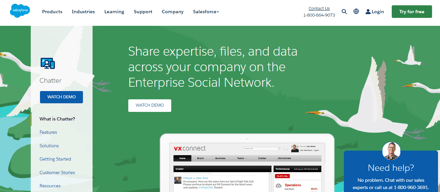
Chatter is live chat solution that connect employees with the files, data, and experts they need at the speed of need, anywhere in the world. The cloud-based platform helps users visualize data and simplifies integration.
| Company | Salesforce |
|---|---|
| Year founded | 1999 |
| Company size | 10,001+ employees |
| Headquarters | San Francisco, California |
| Social Media |





| Capabilities |
API
|
|---|---|
| Segment |
Small Business
Mid Market
Enterprise
|
| Deployment | Cloud / SaaS / Web-Based, Mobile Android, Mobile iPad, Mobile iPhone |
| Support | 24/7 (Live rep), Chat, Email/Help Desk, FAQs/Forum, Knowledge Base, Phone Support |
| Training | Documentation |
| Languages | English |


Compare Chatter with other popular tools in the same category.
I like that I can connect easily with my colleagues while doing work. Not cluttering up my inbox with missed emails is nice
I may miss messages that I need, or feed seems to be busy with non relevant info
Chatter is great in keeping an open line of communication with a large group of people
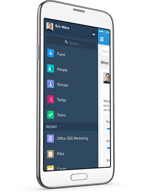
I love that Chatter allows you to post questions and even tag people/ co-workers in the posting. It is similar to Facebook but for work and documents. I enjoy that in my casino industry we can post different tools, documents, contacts, files, and cases. The interface has different groups to choose from, people, opportunities, and even breaks down topics and activities in the sidebar which is helpful for navigation.
The Chatter tool can definitely use a facelift in design for a better user interface that looks better and has a little more organization.
Within the casino and hospitality industry it is helpful to share documents over several businesses and know what promotions are going on. This Chatter tool is great for keeping communication open over a large user-database.
I like that I can either reply in-platform, or just reply via email to someone's Chatter
I don't always know if the recipient got my message--I feel like I have to go back and check in to see if someone has replied.
Chatter makes it easier to hold teammates accountable for note-taking in Salesforce
I love being able to see what everyone on my team is doing with customers and or in everyday sales calls. We post sales sheets, meeting notes, something positive that happened. I love when they even post big sales and the picture of them in the store selling. Great tool for everyday sales team chatter.
Doesn't show up well on the app. Could be more like Facebook platform.
Being able to talk with everyone on the sales team in a positive and creative way. It also makes the daily team meetings fun and interactive.
I like the fact that it's very similar to a Facebook platform which almost everyone is familiar with so there was no need to adjust or learn a new platform.
I am not particularly fond of the information we can post. If we are to post photos, we would have to attach it as a file that other users will have to download before we can see unlike in Facebook that you can immediately view the photo from the post without having to download or add any extra clicks. I also don't like the fact that for us to get notified of new comments on a post, team members would have to "like" a post.
Chatter provides the convenient communication across teams and team members that Facebook achieves in their platform. Because it's separate from Facebook (as opposed to making a Facebook group for the team), there are no distractions and information is secure. At the same time, information is disseminated as quickly and as efficiently.
I like being able to communicate, post, chat, and comment on work related discussions. It really helps when the office and employees are spread across geography regions. It has a nice layout, really similar to Facebook.
Sometime the search function is a bit inaccurate. I think the search function and results could be displayed better. Also, I dislike how the download files option is laid out.
I use Chatter to discuss projects and new developments with colleagues across geographies.
Chatter has allowed us to interact with our peers in a whole new way. Through several initiatives, we have been able to reduce siloing between departments.
It needs to be easier to integrate into our company website.
Chatter has allowed us to engage associates like never before and remove many of the silos that divided our various departments.
What I like best is: - Powerful Collaboration tool - Great for documenting information - Its seamless integration with salesforce
The only thing I dislike is the fact that the communication is not quite real-time but other than that, I really enjoy chatter and find it very useful.
Chatter is a great tool that helps with collaboration within our business users. I used it the most to add all relevant project information and documentation to my different projects. It makes it very convenient and easy to find all relevant information in one central location instead of having to go to multiple places.
Salesforce Chatter is very easy to use - I especially like that you can tag staff members from companies outside of your own (not sure if this applies to other companies outside of Girl Scouts since we have different councils) I also really enjoy the chatter desktop app you can download, but the web platform works just fine as well.
The only thing that I can think of is when you are responding to a comment thread, you have to remember to @ the person you are replying to and include any other names as it will not automatically respond to the original poster.
Inter-departmental communication, as well as communication across councils and the country. It is very easy to use and connect with other Girl Scout staff members through chattter.
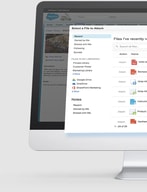
Allows sharing information within team members working together. Employees can share information and updates via chatter about Opportunities, Customers. Contacts or any other business objects. This leads to improved communication between co-workers. It makes it easier for new employees to see history of customers/opportunities/cases etc
Key here is adaption. If a culture can be developed where employees share regular updates, then Chatter is a great tool. At some organizations this is not feasible, so Chatter is not useful for such organizations.
Chatter is a great tool for improving Collaboration between employees
This is a fantastic feature for sales and marketing teams working together. I love posting new content files for use by sales teams.
Not much I dislike about this app. Last time I used it, it was a little hard to add links sometimes.
Definitely helped the sales and marketing teams communicate. Also was great for giving kudos within the sales team.
The ability to communicate and collaborate in context with database records
The inability to tag Chatter records with other database records like Accounts or Opportunities when not in the record feed
Cross divisional and internal collaboration among sales and management teams.
I like the ease of communication, especially on specific records. It's so handy that you can tag Groups and Users in Chatter posts and that (even in Lightning with the next release) you can use hashtags to create Topics. I also really like that when I get an email notification that I've been tagged in a Chatter post I can just reply to the email and my response is posted in Salesforce.
I don't like that I can't control a user's Chatter group notification settings. However, the "Announcement" tool does give me box to check to send it as an email to all group members. I also don't like that there isn't a way to view all groups a User is in from their User record, like you can with public groups. You can see the information from their Chatter profile, though.
I use Chatter mostly for a Help & Training group where I post system information and quick updates/help docs. I encourage users to collaborate on there to help each other solve problems which frankly winds up saving me some time in my day! We also have a Marketing Ideas collaborative group where our various locations can post ideas and things that worked or didn't work for them. My favorite use of the tool is to quickly tag a user from an Opportunity record to ask them a question about it, or to ask that they update it.

- Gets the power of social media to your CRM system. - Simplicity in using. - Features - File sharing, tagging, groups - Ability to create focus communities within the organization - Ability to share SFDC records within the org - Makes CRM more interesting.
Nothing - I basically have not found a thing that makes chatter not interesting. I think chatter is SFDC's answer to the social enterprise. The product has evolved from the time it was first launched.
- Social enterprise. - Sharing records - Opportunities, Leads, Contacts, Information. - A unified CRM and Social platform. - Social selling.
Chatter is very easy and convenient to use. SalesForse integrates its case/contact/account business platform with this tool to use for communication with other's throughout the business. Communications are easily accessible across the entire business.
Not the best communication tool for all types of interactions. Sometimes it is better to email something but Chatter can still be utilized.
It is a very good tool to use for approvals / escalations / communication across a business without losing communications in an email.
Helps take conversations off email and onto a shared workspace where everyone on the team can collaborate. Works great for asking questions and getting feedback from groups of people, posting files, taking polls, and more.
Frequently described as an internal social network and it can be hard to get users to adopt - not the fault of Chatter though. Adoption needs be driven from top down.
Internal collaboration on cases helps keep a record of what was done to solve a case
Chatter is easy to use for anyone who's done anything social. And it layers nicely on top of standard and custom Salesforce objects!
Chatter isn't integrated with every object (come on, Ideas!), but many of its limitations have been addressed or are on roadmaps. For instance, the inability to format posts was a limitation for some time, but Salesforce delivered this change quickly.
We are moving a lot of important conversations out of email and onto Chatter, which is critical for day-to-day collaboration as well as transitions and knowledge management. We are a global organization with offices in a dozen developing countries, so this has made organization-wide engagement and collaboration simple. It's also great that you can respond to posts directly by email.
It makes for easy documentation and communication between myself and my coworkers. I like having everything in one place.
I wish reminder could be sent for chatters that have gone unresponded to after a certain period of time.
Collaboration and communication
Chatter is a great feature in SFDC for collaboration for quick updates on records as well as a historical record on what happened and when. Whether it be a simple question or to announce an achievement to the larger org, its a great tool to make it happen.
I don't like that you can't control where attachments posted via chatter are stored. They are automatically posted to the record where the chatter exists and sometimes, you don't want users adding attachments to a certain record. (ie, contract record)
Team collaboration is number one. If chatter eliminates 10 emails a day, its a good thing. By making the right discussions a little more public within the company, it helps keep the audience at large motivated to a common goal.
Can add chatter to specific records or not.
Searching and tagging is a bit difficult.
Team collaboration and external collaboration.
I like that you can post updates and also store information for clients in the same application. I also like that you can have pop up notifications when someone posts something new to alert you while you are doing other tasks at work.
Nothing in particular - would be nice if this application worked on older software versions of android cell phones because currently the Chatter app is not compatible with my phone/software version.
We use this to get updates about weather conditions (in the winter) or general company updates to everyone. We also use this to see when a new job was sold or a new client has accepted a bid for our company.
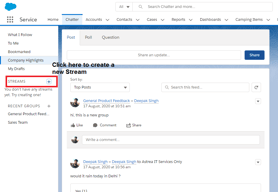
Chatter effectively replaces my inbox, allowing me to keep my emails for client interaction only and avoid losing important messages amid clutter. Using Chatter groups also makes it easy to keep relevant information together, and following certain groups and posts ensures I stay informed on the things I want to. We have a chatter group for each of our products, divisions, and other interesting items
Mentioning a user on a thread will include them on the email alerts for that topic even though they have not really been part of that thread on their own.
Collaboration with teams is much easier than over email, plus with remote employees you do not need to worry about forgetting to add someone to the thread. Chatter also offers links, files, coaching, thanks and many other functions for salesforce that make it more compelling than email in some ways. We also use salesforce for everything, and this continues to keep everything on one place
I love being able to communicate with teammates about my clients and projects directly on the records I am talking about. It is so helpful to see historical conversations about accounts and contacts when I am looking at their records. My email inbox is cleaner, and the communication is where I want it when I need it.
I find that while #topics is a compelling idea, it's difficult to get our whole team to gel around certain core topics.
Seeing historical conversation on Accounts and projects going back years and across staff turnover is so valuable. I love being able to cross reference record data and human conversations/input all on the same page.
Chatter's interface is very clean and acts and feels like any other social media service you might use. The awesome thing about chatter is it makes collaboration on specific records and files so easy. Chatter can be implemented in Salesforce on any object, and you can create groups for specific puroses.
I've seen Chatter be underutilized because it did not have a proper implementation plan. The fact that chatter is on your salesforce record views does not mean users will actually utilze the feature. Chatter implementation requires user training, and a UI rollout with the end-user in mind.
Communicating on certain cases or tickets. Also, Chatter has been very useful when using groups to generate ideas.
- Nothing better than a collaboration tool in a CRM application - Group is just awesome, where your colleague can share, like and comment
Not able to copy paste from HTML at this moment, but recent post allowed formatting is a step forward
Collaboration and transparency. Email will be gone by time and not search-able by other collague
We use Chatter successfully as a support/training resource for the field as well as a means for project teams to collaborate across locations. It's been great. Probably the best benefit of this tool that is not often considered in head to head comparison with other similar tools (ala Yammer) is that Chatter is integrated throughout the Salesforce platform which puts it in a much better position for user adoption. Great tool!
Not much. The mobile app could be better, but with each Salesforce release they seem to add more features that make it better.
Collaboration and knowledge sharing
will get prompt updates. Particular Major Activities it should be really helpful to know status person by others.
don't have specific reasons for dislike as more benefits
Work Track by co-workers
Salesforce provides best chatter to all user for communicate with connection organization. According to the Chatter website, profiles are personal pages for all users in an organization. We can post status updates, files, links and create polls by using chatter. We can be added to groups based on departments, projects and topics. Customers can also be invited to join groups, though their access is limited in comparison to employees this one is best feature of chatter.
Our experience with Chatter is one of frustration as if only a segment of the business use Chatter it effectively becomes obsolete. Messages and information or missed with critical knowledge and events not reaching the relevant audience. Chatter for us just did not work. At the start the team liked the idea and were all active however after a short time and the novelty wore off, it simply was not used.
This Ensure that your organisation is engaged and all are participating. Contribution scoring incentivises employees to join the conversation, while badging and endorsements highlights key contributors.
I like that you can share files and follow specific users, very convenient.
user interface could be improved a little, and email notifications could be less when people don't want to receive too many emails from Chatter.
To collaborate with different team mates from different departments to work on different projects. Communications are so important and Chatter helps us to stay current and on the same page.

Easy way to share , organize, and see what is going on within your organization
Better way to proactively receive information
Bring geographically separate individuals to share information, spread messages, and recognize performance.