

Unclaimed: Are you working at Chatter?






Chatter Reviews: 4.1/5 — Solid Choice
Chatter is live chat solution that connect employees with the files, data, and experts they need at the speed of need, anywhere in the world. The cloud-based platform helps users visualize data and simplifies integration.
| Company | Salesforce |
|---|---|
| Year founded | 1999 |
| Company size | 10,001+ employees |
| Headquarters | San Francisco, California |
| Social Media |





| Capabilities |
API
|
|---|---|
| Segment |
Small Business
Mid Market
Enterprise
|
| Deployment | Cloud / SaaS / Web-Based, Mobile Android, Mobile iPad, Mobile iPhone |
| Support | 24/7 (Live rep), Chat, Email/Help Desk, FAQs/Forum, Knowledge Base, Phone Support |
| Training | Documentation |
| Languages | English |


Compare Chatter with other popular tools in the same category.

end to end Communication gapes filled with chatter, with the hel of salesforce chatter is better way to integrate in our organization
sometimes delay is exhausting to the user that dont needed to customer
We Have Organization in it Company at that for support purpose we have added end to end communication fullfield with the help of chatter.
Chatter is so easy to use and the visibility is unmatched. The tagging feature is perfect for hitting all the right people groups. As our Sales Ops Manager/Salesforce Admin, I contantly preach about using SF CHatter as much as we can because it keeps everyone on our sales team in the loop. We use Chatter frequently and it never dissapoints!
I truly don not see any downsides to using Chatter. Its like a social media timeline for your sales organization. From tagging co-workers to posting screenshots, it's a powerhouse of a tool and should be considered, in some form, by all CRMs.
Keeping everyone in the loop and looking for information was becoming cumbersome with the plethora of communication tools we use. Slack, Zoom, email, texting, hallway conversations... All of these live in seperate places, but how do we combine them all to make them easily digestible? SF Chatter was the answer for us. It's become general practice to post any and all necessary info in Chatter.

Chatter has helped me and my team to not just communicate, as the title implies, but also to grant/request discount approvals, among other helpful aspects of the feature.
There's nothing I dislike about chatter. Slack is a good tool but it's an external app that needs to be integrated. Chatter is already integrated into the salesforce org and with a bit of setup & configuration from the administrator, helps move projects, cases, and work along with ease and quickness.
Chatter helps me and others to collaborate across many different objects for the same account or related cases to resolve issues and keep track of solutions for future use.

What I appreciate most about Chatter is its ability to foster connections and facilitate the sharing of ideas in an informal and relaxed manner. It serves as a valuable platform for me to connect with individuals from various corners of the globe, be it friends, family, or colleagues. By utilizing Chatter, I can effortlessly maintain contact with loved ones and also forge new friendships. Its inclusive nature makes it an excellent medium for expanding my social circle and establishing meaningful connections with people who share common interests and passions.
The digital realm can be quite chaotic and overwhelming at times. The constant influx of posts, comments, and notifications creates a cacophony that can be challenging to navigate. Amidst this digital buzz, it becomes arduous to stay on top of everything and maintain a clear focus.
1. Reducing email clutter: Chatter provides a real-time communication platform that allows users to have conversations without relying on emails. This reduces the volume of emails exchanged within an organization and keeps communication more organized and focused. 2. Eliminating unnecessary meetings: Chatter enables teams to collaborate, share information, and make decisions directly on the platform. This reduces the need for frequent meetings, as discussions and updates can happen in real time, saving time and resources. 3. Improving collaboration across departments: Chatter breaks down communication barriers between departments and teams by providing a centralized platform for collaboration. It facilitates easy communication and information sharing, fostering cross-functional collaboration and improving overall communication within the organization. 4. Facilitating knowledge sharing: Chatter allows users to share their knowledge, expertise, and best practices with others. It creates a valuable repository of information where employees can find answers to questions, access resources, and learn from their colleagues. This promotes a culture of learning and collaboration. 5. Increasing employee engagement and satisfaction: By offering a social networking platform within the work environment, Chatter encourages employees to connect and engage with each other. It creates a sense of community, enables informal communication, and fosters a positive work culture. This, in turn, increases employee satisfaction and engagement. Overall, Chatter addresses these problems by providing a platform that streamlines communication, enhances collaboration, promotes knowledge sharing, and cultivates a more connected and engaged workforce.
If you use Salesforce to already create your purchase orders then why not use Chatter. The integrated messaging tool of Salesforce, Chatter is essential in sending quick updates, notes and data to those who actively uses Salesforce. You are ale to keep track of all activities from on your team and provide messaging for PO or financing queries. Lastly, chatter is mobile-friendly, which enables you to stay updated on all happenings within Salesforce. And if youre like me, often going back to past mesages, Chatter is better at keeping track of conversations
Chatter's usefulness becomes smaller if you use it to communicate to a single approver within your Salesforce system. It is meant for an organization that utilizes all of Salesforce's features and products. If you are part of the team but not on Salesforce, unfortunately, Chatter wouldn't be accessible. Lastly, Chatter is less robust than Slack or other communications messengers organizations typically use. You can tell that Chatter is in the beginning phase and expanding. Unfortunately, that is why we switched to Slack. With Chatter, you have to wait, wait for that email to come back telling you someone responded. Then you go back to the Chatter platform, which was frustrating and felt like too many steps. Chatter is not free; there's no such thing as a trial or free version. As someone who wants to try the software before committing, Chatter doesn't allow for that opportunity.
Chatter is an extension of Salesforce which allows you to seamlessly communicate, collaborate and work with your team, collaborators and peers within the Salesforce platform. If used to its full capability you would essentially be able to offer notes on why a particular PO or Account invoice is necessary so that there is no delay on the approval and processing.

It is an excellent resource for mobile professionals and remote workers because it is easy to use and available on all platforms. It's a User-friendly platform that is easy to learn and use. Smooth integration with another platform
Finding the information you're looking for can be challenging because the Chatter feed can be noisy. This can be hectic, especially if you're rushing to discover something.
Problem-solving. Chatter is used to raise awareness of problems, gather feedback, and brainstorm solutions. This can help to improve the overall problem-solving process within our organization. It also provides the central repository for knowledge sharing. Also benefiting for communication.

Chatter not only creates accountability and tracking but also provides a historical thread for someone else to view if needed.
I am not a fan of chatter "sometimes" updating people who were previously mentioned in a thread.
Chatter helps me link a person to an account when it comes to updating someone about something that changed or needs updating. Our renewals team gets a chatter from a CSM to have an invoice generated :)

Employees can interact, share knowledge, and collaborate in real time with Salesforce Chatter. Within a single interface, users may submit updates, share files, and participate in discussions.
Salesforce Chatter to be confusing and intimidating. UI/UX should engage the visitors, which is not the case with this now.
It will boost productivity, increase team involvement, and keep everyone informed. Employee can access and take part in conversations with its mobile app while on the road. This increases productivity and makes it possible to communicate easily no matter where you are.
Chatter is an excellent tool for remote employees and mobile professionals because it is simple to use and accessible from any device. Smooth Integration with sales force.
It can be overwhelming. Chatter can be a lot to take in, especially if you are new to it. There are a lot of features and options, and it can be difficult to know where to start. It can be noisy. Chatter is a social platform, and that means there is a lot of noise. There are a lot of posts, comments, and notifications, and it can be difficult to keep track of everything.
Collaboration: Chatter makes it easy for team members to collaborate on projects. They can share files, ideas, and feedback, and they can also use Chatter to ask questions and get help from their colleagues. Feedback: Chatter is a great way to get feedback on work. You can post questions, share ideas, and ask for help. This can help you to improve your work and get the most out of your team members. Training: Chatter can be used to provide training and development to employees. You can create and share training materials and use Chatter to hold online discussions and Q&As.

"Crattles have permitted me to continuously realize what is the deal with a particular record for a client. There are in many cases situations where my associates and I should investigate by speaking with one another through the record, so significant for different partners might have a premium in the record to comprehend how we settled an issue. It is far superior to having an email string with just specific gatherings"
"Salesforce is the main CRM framework, and utilized by additional organizations. In light of the undeniably friendly nature of the web and the requirement for coordinated effort, Salesforce has presented a social and cooperative capability for its clients called "Chat." Like a blend of Google Wave, Twitter and Facebook, Prattle permits clients to frame a local area inside their business that can be utilized for secure coordinated effort and information sharing. The application is allowed to individuals who as of now have a Salesforce record, and it is accessible for a $15 per client expense to organizations that don't as of now use Salesforce, but with restricted highlights.
Salesforce has presented a social and cooperative capability for its clients called "Chat." Like a blend of Google Wave, Twitter and Facebook, Prattle permits clients to frame a local area inside their business that can be utilized for secure coordinated effort and information sharing.
Easy to use: Even people unfamiliar with social networking networks can easily use Chatter. Smooth Management: Project management, customer service, and knowledge exchange are just a few of the many uses for Chatter's adaptable platform.
Lack of connectivity with other Salesforce features: Salesforce CRM and Chatter are not entirely integrated. Utilizing Chatter to its greatest potential may be challenging as a result. Spam: Chat can be a target for obnoxious and disruptive spam.
Communication and Ideas: Chatter provides a central place for employees to share information and ideas, and collaborate on projects. This can help to improve communication and reduce the time it takes to get things done. Primarily we use this for formal communication.
It is a fantastic way to keep in touch with coworkers and is easy to use.
It isn't easy to use on mobile devices. The Chatter mobile app is not as user-friendly as the desktop version.
Chatter can be used to spread best practises and knowledge within the organisation. This may shorten the time it takes to onboard new employees and increase employee creativity and productivity. Crowdsourcing problem-solving techniques can be employed in conversation. This may facilitate quicker and more efficient problem identification and resolution.
It’s efficient and easy to use when addressing certain people in your message. You're able to simply use the "@" button and then begin typing the person that you'd like to address. The person is then notified instantly. Great form of communication.
There are no downside that I can think of. If someone Chatter's you in Salesforce several times. It's often hard to keep track of. That would be the only slight con to Chatter.
Chatter allows you to communicate with others in your organization instantly. This is great because you have to give less context about a case since you're able to chatter on specific page related to the customer.

Status Updates , Comments , Groups, Collaboration
Noise and Information Overload, Limited External Collaboration
Collaboration with others

The ability to tag other users in posts on records is extremely helpful. It makes it easy to ping somebody for help or input on an Account or Opportunity. I also love the ability to create groups and post directky into a feed. You can use hashtags to add topics and easily search to find related posts, for example you could use #review to tag records & posts for a weekly sales team review.
Chatter can generate a lot of email notifications, but the good news is that users can control what they're notified on in settings. It might make sense to receive a notification when you're tagged in a post, and a daily digest to review everything else.
Chatter streamlines communication and put updates exactly where they need to be seen in your CRM.
One of the standout features of Salesforce Chatter is its intuitive and user-friendly interface. Navigating through the platform is a breeze, and the familiar social media-like layout encourages active participation and engagement from all team members. Whether it's posting updates, sharing files, or commenting on discussions, the process feels natural and encourages meaningful interactions.
Limited External Collaboration: While Chatter is excellent for internal collaboration, it may not offer the same level of functionality for collaborating with external stakeholders or clients who are not part of the Salesforce ecosystem.
Share ideas, collaborate on projects, and discuss important topics in real time, fostering a culture of collaboration and teamwork.
I am using this chatterbox built-in salesforce lightning. This is best because it offers you many advanced features such as log activity, Email, assign task and tagging contacts.
I faced a challenge in a mobile app where I could not tag the contacts. This challenge comes many times.
Helps manage client relations and service, effective operations, and seamless processes.
I live that it helps me share and request updates with and from my team. We can simply tag each other and then we get a notification that there is an update. It makes it very easy.
I wish that it was a little easier to navigate to the project or opportunity when an update comes through. I am not the best at navigating Salesforce so any shortcuts are greatly appreciated
I use it to manage development projects and provide updates to clients on the progress we have made or ask questions to keep the project moving. I collaborate with our support team as well.
I really love the Quick chat with my team members on the issue related to projects and getting their inputs updated without any hassle of saving it to any "other" place.
Some applications crash when you keep the application open for longer (days) or if the network disconnection occurs. Also, the group chat can be improvised and the most loved feature if it integrates
It helps me to keep track of open issues and follow up regularly. I also benefitted from the quick export to report it to my manager for follow-up or updates. The notification-related email really helps me to act quickly on the tasks..
One of Salesforce's best-selling features is all the integrated apps which improve the user experience. Chatter is no different. I use it every day and highly recommend.
There is nothing that I dislike about chatter; however as with anything if improvements can be made that makes it even more useful or easier... I'm about it! I've been using it for around 1.5 years now!
Chatter is helping to have communication in one simple location (Salesforce) and means that all of the team can be across what's happening all without leaving our CRM platform.
Chatter is an excellent and innovative enterprise social network which connects employees across the whole organisation to provide support for case management, sales opportunities, approvals, etc. It's CRM experience, and the knowledge-sharing solution is next level.
We needed to enable Chatter Plus to avail of many new features in Chatter. It has further increased the pricing per user, increasing our project budget. Maybe Chatter can come up with more long-term plans to meet many requirements.
We used Chatter mainly for our organisational communication and approvals from people. Also, we have used it for knowledge-sharing articles among our developers, consultants, managers and users. Overall experience is excellent and user-friendly.
I like that I can easily access this to view details on different cases within our company. It keeps me organized.
I have experienced issues logging in and resetting my password a few times.
Keeps organization and track of customer cases in one place, making it easy for everyone on the team to be on the same page, avoiding confusion or misinformation.
Receive updates on the progress of any document whether it's a PDF, Word Doc or PowerPoint. We formed a community within the business used for secure collaboration and knowledge-sharing
The app is free if you already have a Salesforce account but If yiu don't it is charged at $15 per user
Collaborating on an upcoming presentation in real time and attributing activity to individual employees.
While working easy to navigate and chat.
slow when internet issues and loads late
not lose track of work
the fact that it is user friendly and easy to work on
constantly getting disconnected while working
chatter allows us to communicate with our customers while providing exceptional service

The Best Feature I liked the most in Chatter Application is its the all-in-one platform for all ticket raising, Can say this is the best Enterprise Social Collaborating Tool.
As a part of the Chatter User, I do not find any flaw in the application to be mentioned here. This product is already on the better path and the improved manner.
Sharing Files, Data, Team Tracking, These are some of the problems/features we used in our organization. The benefit I have realized is it is a very smooth and easy-to-use application.

Chatter is really a good platform which is provided for instant business messaging, team chats , conduct meetings and conference calls ! It also provides functionality to share contents as well. Also provide with comments, confirmation and inline accesses!
Almost all the functionalities in chatter are good enough! It would be better if the user interface would have been created little bit better to improve user engagement
Instant business messaging, content sharing, documentation share, providing secure communications, can schedule meetings and business related calls, background audio filterations
This is the best tool I have used for collaboration with colleges and or with community members.
it is part of Salesforce, and not available as a separate tool or app.
It is been used for collaboration with other experts related to technical help or to provide help to others. very prompt way to discuss with others.
Salesforce Chatter is a place where we can send communication to all members at a place
nothing like disliking in the chatter group, chatter group do the job well
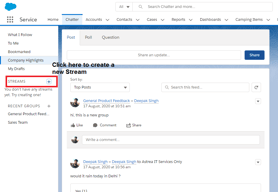
we can have private group, public group, and listed groups

I found the easy interface so helpfull to find all needed info as working on my booking request. The organisation of the tabs and tools very easy to access
The downsides of chatters the reloading issue of each tab
I work as a booking agenet and we use the chatters to receive our booking request from clients so its very helpfull to have all info and communication assorted in the same place