

Unclaimed: Are you working at Copper?






Copper Reviews: 4.5/5 — Highly Rated
Formerly known as ProsperWorks CRM, Copper CRM is a software that’s best known for its ability to seamlessly integrate with Google’s collection of cloud applications. To date, it’s recognized as the only sales automation solution that’s endorsed by Google, which makes the platform a top choice for many businesses whose work systems are already operating using tools in the Google ecosystem. Preferred by small to medium enterprises, Copper CRM also boasts streamlined features with a user-friendly interface.





| Capabilities |
API
|
|---|---|
| Segment |
Small Business
Mid Market
|
| Deployment | Cloud / SaaS / Web-Based, Mobile Android, Mobile iPad, Mobile iPhone |
| Support | 24/7 (Live rep), Chat, Email/Help Desk, FAQs/Forum, Knowledge Base, Phone Support |
| Training | Documentation |
| Languages | English |

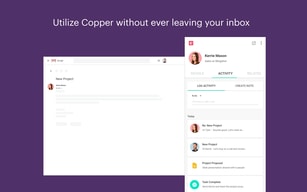
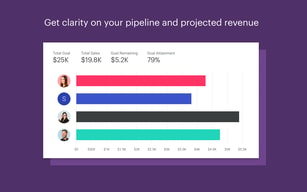
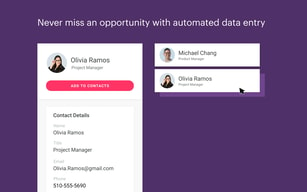
Copper is the CRM for teams who never wanted to leave Gmail. It is built specifically around Google Workspace and carries Google’s “Recommended for Google Workspace” designation, which in practice means contacts, emails and calendar entries sync without you thinking about it and most of the day’s CRM work happens in a sidebar rather than another tab. That focus is the whole proposition, and it also draws the line on who should not buy it. The pricing has one wrinkle worth knowing: the advertised “up to 26% off” annual discount only applies to the most expensive plan.
- What it is: A CRM built around Google Workspace, formerly ProsperWorks.
- Best for: Small and mid-sized teams already living in Gmail, Calendar and Drive.
- Pricing: $23–$99 a seat a month billed annually ($29–$134 monthly). Verified August 2026.
- The honest catch: Contact limits, not features, are what force you up a tier.
What Is Copper?
Copper — which launched as ProsperWorks in 2014 and is now a 51–200 person company in San Francisco — is a relationship-focused CRM that treats Google Workspace as its home, rather than a general CRM with a Gmail plugin bolted on.
The positioning is notably not “sales machine”. Copper leads with client relationships over time — the industries it names first are agencies, consulting, financial advisors, production and creators, all businesses where the same client relationship runs for years. That is a different product from a high-velocity outbound CRM, and the feature set follows it.
Over 30,000 companies use it, and it integrates with roughly 49 tools including Gmail, DocuSign, ActiveCampaign, Chargebee, JustCall and Notion.
How Copper Works
- Lives inside Gmail via the Workspace sidebar — the primary interface for daily use.
- Automatic sync of contacts, email and calendar from Google.
- Contact enrichment fills in records rather than making you type them.
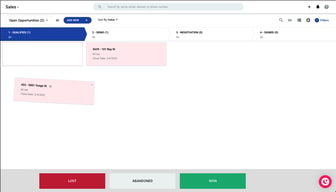
- Pipelines and project management for tracking deals and delivery.
- Task and workflow automation from Professional upward.
- Bulk email and reporting at Professional; custom reports at Business.
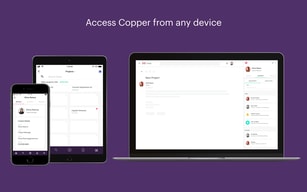
- Mobile apps for iPhone, iPad and Android.
Copper Pricing
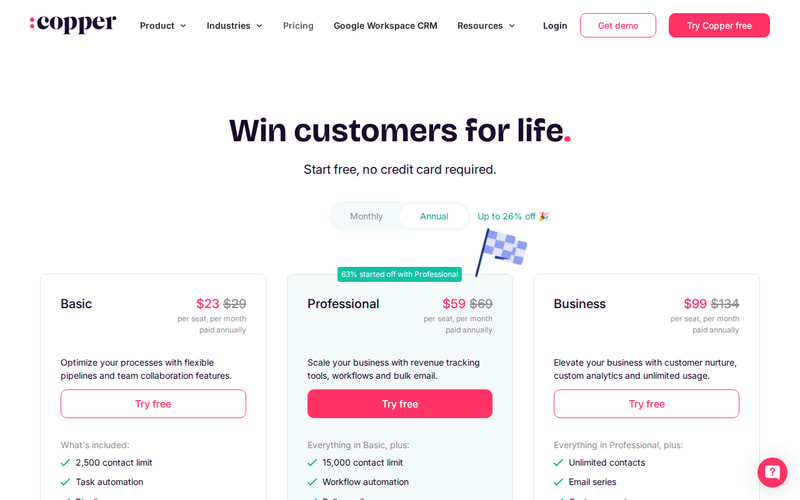
| Plan | Annual | Monthly | Contact limit |
|---|---|---|---|
| Basic | $23/seat/mo | $29 | 2,500 |
| Professional | $59/seat/mo | $69 | 15,000 |
| Business | $99/seat/mo | $134 | Unlimited |
Prices are per seat per month in USD. Copper states that 63% of customers start on Professional, which is a useful signal — Basic’s 2,500-contact ceiling is low for any business with history, and most teams discover that quickly.
The annual discount is where the page is doing some work:
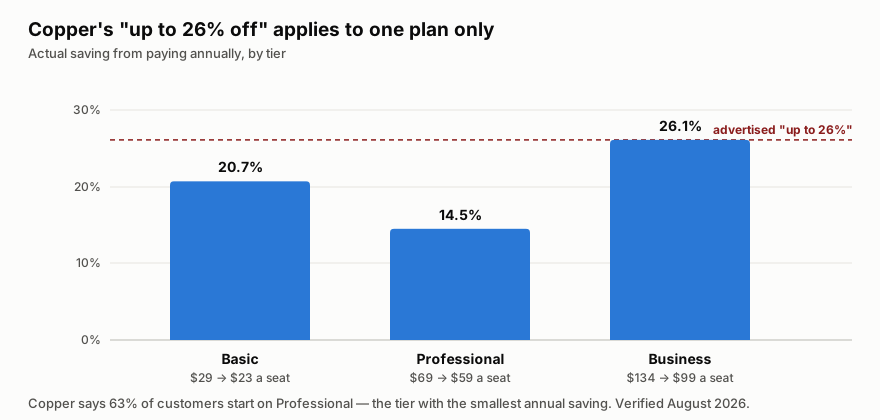
“Up to 26% off” is true only on Business. Professional — the plan most customers actually choose — saves 14.5%, the smallest discount of the three. That is not misleading in the strict sense, but it does mean the headline number is unavailable to the majority of buyers.
The more important pattern is that contact limits, not features, drive the upgrades. Going Basic → Professional multiplies your contact ceiling six-fold and adds workflow automation and bulk email; Professional → Business removes the ceiling entirely. If you are evaluating on feature checklists you will mis-size this; check your contact count first.
Who Should Use Copper
The decision is unusually clean. If your company runs on Google Workspace and your work is relationship-led rather than volume-led, Copper is a strong fit — agencies, consultancies, financial advisors, production companies. The Gmail-native experience removes the single biggest reason CRMs fail, which is that nobody updates them.
If you are on Microsoft 365, this is the wrong tool, and no tier changes that. The entire value proposition is the Google integration.
It is also a poor fit for high-velocity outbound sales teams who need sequencing, dialler-first workflows and heavy pipeline analytics. Copper is built for tending relationships, not for working a list of 3,000 cold leads.
Honest Pros and Cons
Strengths
- The Google integration is the real thing, not a plugin — it carries Google’s “Recommended for Google Workspace” designation.
- Adoption problem largely solved. Living in the Gmail sidebar means the CRM actually gets updated.
- Genuinely simple. Onboarding is fast and the interface does not require training days.
- Contact enrichment reduces manual data entry, which is where CRM hygiene usually dies.
- Good integration breadth at around 49 tools across billing, e-signature, marketing and comms.
- Free trial with no credit card, so evaluation costs nothing.
Limitations
- The headline annual discount is only on the top plan. Professional, which most people buy, saves the least.
- Basic’s 2,500-contact cap is restrictive for any business with history — expect to start on Professional.
- Google Workspace only in practice. On Microsoft 365 the core advantage disappears.
- Not built for outbound volume — sequencing and dialler-led workflows are not its strength.
- Business at $99 a seat is not cheap once you have a team of ten, and unlimited contacts is the main thing it buys.
Copper Alternatives and How It Compares
The natural comparison is HubSpot, which has a genuinely capable free tier and far deeper marketing tooling, but is a bigger system that lives in its own tab. Teams that want a CRM they visit choose HubSpot; teams that want a CRM they never have to visit choose Copper.
Pipedrive is the closer match on price and simplicity and is stronger on pipeline mechanics, but it does not have the Workspace relationship — the difference shows up daily if Gmail is where you work.
For relationship-led firms specifically, Attio is the modern challenger with more flexible data modelling, though it asks more configuration of you up front. Copper’s argument against all three is the same and it is a good one: the CRM that gets used is the one that is already open.
The Verdict
Copper is a focused product that is excellent for a specific setup and irrelevant outside it. Google Workspace plus relationship-led work is the sweet spot, and within it the Gmail-native experience solves the adoption problem that kills most CRM rollouts.
Size it by contacts, not by features — that is what actually moves you between tiers, and Basic’s 2,500 ceiling is why most teams land on Professional. Pay annually if you can, but do not plan around the advertised 26%: on Professional the real saving is 14.5%. And if you are on Microsoft 365, look elsewhere; there is no version of this that works well for you.
FAQ
How much does Copper cost?
Basic is $23 a seat per month billed annually ($29 monthly), Professional $59 ($69) and Business $99 ($134). Prices are in USD excluding tax. There is a free trial with no credit card required. Verified August 2026.
Is Copper’s “up to 26% off” annual discount real?
Yes, but only on Business, where $134 drops to $99. Basic saves 20.7% and Professional — the plan Copper says 63% of customers start on — saves 14.5%, the smallest of the three.
What is the difference between Copper’s plans?
Mostly contact limits. Basic caps you at 2,500 contacts, Professional at 15,000, and Business is unlimited. Professional adds workflow automation, bulk email and reporting; Business adds email series, custom reports and multi-currency.
Does Copper work with Microsoft 365 or Outlook?
Not meaningfully. Copper is built specifically around Google Workspace, and that integration is the entire reason to choose it. On Microsoft 365 you would be paying for the part you cannot use.
Is Copper good for outbound sales?
Not particularly. It is built for tending long-running client relationships — agencies, consultancies, advisors — rather than working high volumes of cold leads. If you need sequencing and dialler-first workflows, a sales-engagement-focused CRM will serve you better.

Compare Copper with other popular tools in the same category.
I love that the mobile version allows me to do everything that I need to do, even when I'm away from my desktop. I never have any issues with it crashing or loading slowly. It's very user friendly and it's easy to do things on the go.
The only thing I disliked for a little while was that the mobile version would not allow me to view emails sent in copper, even if they were emails I had sent myself. It said I didn't have sufficient permission but that has since been resolved.
Copper has been a huge upgrade to me compared to the last software I used at my last job. we use to use Abacus Law, which seemed very outdated and it only allowed us to write notes and have a customer profile. Now that I use copper, I love that I can set tasks, send emails and do so much all in one application. It helps with efficiency for sure!
We use the Project Feature directly linked to a Quote Manager Tool and the information prepopulates for ease of access and not duplicating work. Also that all of the email traffic is at my fingertips from all the Company employees linked. I can access very useful information regarding a Project without having to talk to our Sales Team.
Sometimes it takes the Projects and/or People feature a longer time to load.
Communication, scheduling and tracking projects as well as constant data updates and customer emails being seen by all (if not copied). Biggest benefit is in communication and data being centralized. Very easy to add and/or change data.

The leads section and you can easily convert to customer. Also can put in all opportunities and update accordingly. From the pitch stage to the conversion very easy to use. I also find the inactive days section very useful to make contact with clients more often.
Nothing really. Copper is all user friendly and has helped me a lot
I can put all my leads into copper and then easily change them to customer or potential customer when I get a meeting or some traction.
Seamless integration with G-Suite, you don't have to worry about anything falling through the cracks on the CRM side. Copper can be easily customized to fit your business process, without unnecessary upgrades or costs. If you use G-Suite, start with copper and allow them to prove to you why you shouldn't be a customer. It's that good. They also have some great integrations with other platforms.
The scheduler on copper is a little tough to set up, but once you've gotten used to it, it does the trick.
Easy pipeline management, contact management and greater depth of understanding of my contacts priorities, likes and dislikes.
It is really simple to use because the service that this tool gives me does not need much training. Another important point is that I can keep track of all customer interactions with sales and performance reports at my fingertips. On the other hand, I can enter custom fields to get all I want to know.
If it were not extremely restricted, it would be ideal and improved somewhat with regard to its chrome supplement. It is also important that I can create calendar invitations from the application
We use copper because we can follow our sales and manage our contacts. In addition to developing our own terms and conditions to record data and therefore develop current sales action plans.

The integration of the various mail and information platforms that allow you to add to Copper helps you to quickly manage your communications with customers.
I think the only "Problem" is that sometimes it gets slow and i find it hard to get into some features.
Maintain an order in the development and order of the information i possess from my clients.

I love that this integrates with Google as this is the main program we use.
I have not run across anything yet. Still working on it
CRM
Connects with Google products easily, saving hours of time
Initial setup and transferring data from an existing CRM
not losing customer communication, ie emails and calls automatically logging
The outlook, usability, integrations with G Mail and navigation is fantastic. This was my first time using this CRM under this new role at my new company and I really wish my old company had it. I would assume someone with no technology background or CRM experience would be able to use this straight off the bat, very little training if none is needed which I loved. You can hit the ground running
The search functionality. Sometime you will search for a lead/contact that you know is in the CRM/that you have worked on in the CRM in the past however when you search it, it does not show up. Also, you end up with a lot of duplicate entries due to this, which causes it's own issues.
Controlling and managing content. Connectivity and transparency between departments is also improved as everyone has visibility across all prospection within the company. Cross department/team collaboration is also improved as you can get your colleagues input in comment sections and in the notes. The sales prospection stages is also shortened as you can email directly through the platform. lead generation is also improved.
The integration with G-Suite is such a timesaver. Everything is automated without me even having to do much.
I think it can be more fun to use in terms of interface. Hubspot is a good example.
Having all my leads and customers in one accessible place.
Copper is versatile and easy to use. The platform is user friendly, has advanced features to efficiently organize contacts and automate secondary tasks with little effort.
Nothing disgusts me. However, I think it could add more integrations with third-party tools.
It allows us to improve relations with our customers. Increases productivity of our team and help us win more opportunities.
Cooper provides a modern and intuitive interface. The platform is designed to integrate marketing and sales teams effectively. It reduces the time of registration of information and helps us to consolidate relationships with potential clients. Unify work and make more effective communication with the team and with customers. It provides features to integrate with applications that we use on a daily basis such as email.
The use of this tool has reported good results. Until now, I have not found anything that disgusts me.
It is a necessary tool to improve our business relationships. It allows us to connect with more leads, manage opportunities and set realistic goals and aimed at meeting the needs of our customers. I must emphasize that the automation functions help simplify team collaboration.
Copper ties right into our Goolge enterprise accounts making this CRM seamless to the sales team.
The new logo and name do not seem to have any correlation to the product.
Keeping track of all of our leads and tying the emails and conversations of each step under one thread.
Why reinvent the wheel when you can just upgrade with a great hubcap! LOVE that the AI tracks my activity seamlessly through my Google Suite.
Many of our contacts are international and an API with WhatsApp would be fantasitic.
Tracking activity and outreach
Copper is intuitive and easy to use. Not much setup and you can get started right away. Easy to import contacts and start managing sales teams.
The pricing tiers kinda suck. I would like the email tracking in the lower tier.
We need tools to foster manage customer relationships and close more deals.

The best part about Copper CRM is, hands-down, the support we receive from the team at Copper Inc. From the get-go, we had someone walking us through every single step from on-boarding to setup and making sure we're happy. (Thanks a ton David!). Our team has also met a few people from the team at Copper twice now, and we're on opposite coasts!
There's nothing to dislike about Copper! The only thing I dislike is that every business isn't using them! If you're using any other CRM, you probably aren't happy. It's time you switched to Copper.com.
I love how simple it is to jump and use. I've used CRM on CRM and just never been happy. Finally, I found a CRM that everyone in the company loves with super simple reminder setups and more. It's really relieved a huge headache our company was dealing with - which was that no CRM seemed to ever work for us. We've used everything from the most expensive to even the cheap and the free ones. Copper has also helped our cash-flow since it's so affordable! This is all-around the perfect product / CRM for just about any company, no matter what industry you're in.
The ability to integrate G Suite with Copper is outstanding.
Unfortunately as it is new, there are still bugs. Developers are working hard to nip these as they come.
I’ve been able to integrate my emails with my phone calls, allowing a clear stream of communication.
I like how easy it is to track every sort of interaction I have with prospects.
I dislike that there is not nearly enough reporting functionality and my Customer Success team doesnt have the tools needed to use the software for their purposes. There is no ticketing system.
We are solving the problem of tracking everything that goes on in the sales cycle and have realized how beneficial all of the customizable fields are.
Copper is simple to use and works on all our devices. As you can quickly see every interaction with a person due to it's tight integration with gmail, it compelling and enthusiastically used by all my staff.
There could be a tighter integration between Google Contacts and Copper. You quickly end up with contact information being out of sync and there is no true "on source of truth".
The business problem we have solved is having one place for all interactions with a client. Besides the benefit of speed and accuracy, it has encouraged all staff to use Copper. I've had complex phone calls and have been able to sneak into Copper during the call and find everything I need - this often translates into money,
Copper is great in helping you with less manual data entry. All our systems are pushing and pulling data through the APIs and that saves a lot of time for me to have all data that is needed to make the right decisions.
The inability to change the date of the creation of opportunities.
Saving a lot of time that got lost on manual data entry. The benefits are: More focus on the right leads and opportunities and less time spent with tedious manual entries.
Copper is an Add-on to the Google calendar which means I can see my contacts' details right from within my Inbox. I can add contacts (which are auto-populated by Copper from their email data saving me tons of time in data entry), add opportunities, set tasks and reminders, all from within my Inbox. No swapping over to another tab to add contacts to my CRM anymore. Happy days!
Not really too much I dislike. Copper has made my CRM entries so much easier.
I can easily see what sales opportunities are in my pipeline, and who I need to follow up depending on what stage they're at. I also love that I can add reminders, making sure nothing slips through the cracks. Being able to see the email history from within Copper (without having to do a Google search) makes it easier to get back on track with where you're at with the client communication stream.
I love how easily Copper integrates with Gmail! No extra steps to track interactions with clients and monitor communication with them!
Price jump is considerable from a small team to a medium sized team. A medium sized price range or "lite" version for more users would be helpful.
We have lots of people who email all of our clients. Copper has been amazing to provide our whole team with transparency on all of those conversations so that we can streamline, cross reference, and generally save our clients the pain of unnecessary emails from us!
The system is very efficeient it makes everyones jobs in the office a lot easier. once you have imputted a customer on the system any contact that anyone has is stored on there profile so it makes it easy if someone is off and the customer rings up you can just open there profile and all the information is on there so we can deal with the customer there and then and not at later date when the person who was off returns to work.
I don't think I can find anything that i dislike about this softwear it has made life for the office a lot easier.
It keeps all the information in one place and there is not as much paper work anymore.
Easy to use, seamless and great integration with gmail
Sometimes there are features that we would like added but not always possible to happen
Keeping track of past clients/ projects/ Realized the benefit of following up with them
I like that I can fully organize each and every one of my clients down to the last detail. This includes setting their priorities from low to high, setting call back dates and reminders, updating notes, and seeing where everyone is in my pipeline as to the progress toward the close. Also, whether I abandon, lose or win a customer, all these are automatically kept track of and I can see the statistics of my closing percentage, etc. Very, very useful.
There is only one minor thing that I dislike about this program, and it is that I cannot upload a bulk amount of pictures at once. I am not sure what the cap amount of pictures is for each individual cycle, but that is one thing this desperately needs. I want to be able to drag 50 pictures into 1 folder so they are accessible to anyone in my company who needs to see them. That is all, but everything else is very useful.
The problems I am solving and the benefits I am receiving from Copper is "Organization", plain and simple. I have never had basically everything I need to organize all my clients and call-in in one place before. Switching between the pipeline and list view is extremely useful in accomplishing this.
We love the integration features with gmail which allows client conversations to be captured and stored in their client record without a duplicate entry or second thought. Also, the template tool for quick email sending has saved hours of administrative work. Lastly, the collaboration features in using a platform that is usable by multiple team members with real time updates is a fantastic feature allowing us to stay on the same page when it comes to communication with a client.
We would like to see more customized features with filters and reports particularly with generating close ratio reports for our sales representatives. We would also like the ability to add attachments to our emails instead of having to create a link in dropbox and copy / pasting the link in the body of the email.
With Copper we are solving the gap in communication between team members allowing us to create multiple touch points for our clients. With filters we are able to pull close ratios for our sales reps.
The CRM is fully integrated into our lead channels and automated email sequences are triggered based on lead quality. So much less data entry in comparison to other CRMs.
I don‘t like that the activity report did not match the right amount of actually performed activities.
Focussing on closing the lead instead on clicking around too much.
We are google centric. Copper's integration with google is second to none. We can be communicating with a prospect that has not yet been added to Copper, once added to Copper all of our emails domain wide automatically are added. A client is added to Copper by one of our admin team, give it a few seconds, and the details are in my phones contact list! Copper is very easy to use, I like my tech but I don't need to think hard to get the most out of copper. Not that I have used Pandadocs yet (still reviewing) but the integration looks awesome. The mobile app is ok, it needs some more improvement but for the time being it is fine. The new reporting they have is great to. You can export to google sheets and then design your own.
I feel it is priced a bit high, however not high enough to out way the benefits.... we will continue to use it indefinitely. It would be great to be able to have dynamic fields that only displayed depending on data in other fields. Better integration with MailChimp would be great, specifically being able to sync other fields in the CRM to mailchimp. Also the multiple relationships between entities needs to be improved. They are working on it and we look forward to the improvements.
Keeping track of leads is important, Copper does this very well. Also knowing how many times a client has had contact, and how long from the last contact. We have business partners that we work with, through reporting we have been able to share (through google sheet) key information to them.
We had been looking for a program that would do specific tasks. We tried programs that had to many component that we never used, but had to pay for. Copper gave us everything we needed. We have several employees emails each client. ALL the emails are captured in their file. Copper integrates with several programs. We can go to a client record and see everything that is going on and where they are in our process. Thank you
I would like to see a Map with the calendar that shows all the appointments. I am right now making a map to show all the appointments and Projects currently booked and located.
Copper does most of the work. It send the invoice information to QB, Canvas, Calendar connects the folded to the record. Through automation , when a appointment or project is rescheduled it changes the record to reflect the new date and sends the client an email. Templates, To have everything already typed out. What a time saver.
The simplicity of following the sales process and the effective communication between each of our departments. We are able to track the Sales process for qualified leads, the implementation process for new clients, and the up-selling process to current clients efficiently.
The reporting capabilities need to be more robust and be able to break down more information for data analytics. It also could use an email delay so you can set up emails to be sent out later.
We had an issue with being able to track when clients turnover and who was the new POC. This has helped clear that information. It has also helped us to see who our prospective clients are when we had no way of doing this in the past.