

Unclaimed: Are you working at Elementor?
Elementor Reviews: 4.5/5 — Highly Rated
Elementor is the most popular landing page builder software for the platform that provides full control of every aspect of the landing page design. Numerous templates are available to use or users can create their own from scratch. Users also have the option to integrate third-party tools to get additional functionality. Elementor works with just about any WordPress theme and plugin. Design changes can easily be viewed thanks to the visual builder interface.

| Capabilities |
API
OSS
|
|---|---|
| Segment |
Small Business
Mid Market
Enterprise
|
| Deployment | Cloud / SaaS / Web-Based |
| Support | 24/7 (Live rep), Chat, Email/Help Desk, FAQs/Forum, Knowledge Base, Phone Support |
| Training | Documentation |
| Languages | English |
Elementor Pros and Cons
- You can immediately see the changes you make thanks to the visual builder interface
- You’re working with some of the best design templates available
- It works great with most WordPress themes
- There’s a learning curve when you first use the tool
- There are some issues with their landing page’s mobile responsiveness
- It lacks design flexibility in some areas







Elementor’s two plugin plans include “0 One credits” — and credits are what unlock AI generation, image optimization, site accessibility, cookie consent, and email deliverability. So on Essential at €5 and Advanced Solo at €7, that entire half of the feature list is not gated behind a higher tier; it is simply switched off. Elementor’s pricing page is really two products side by side, and the €5 headline belongs to the smaller one.
- What it is: The most widely used website builder plugin for WordPress, now also sold as a hosted all-in-one platform.
- Best for: WordPress users who want visual design control, and — on the One plans — hosting and optimisation bundled.
- Pricing: Essential €5, Advanced Solo €7, One €15, One Agency €36 per month billed annually. Verified July 2026.
- The honest catch: Custom code and CSS, popups, and eCommerce features are all excluded from the €5 plan.
What Is Elementor?
Elementor is the drag-and-drop editor that made WordPress design accessible without touching a theme file. Its Theme Builder, dynamic content, and form builder let you construct headers, footers, archives, and templates visually, and it has become the default recommendation for anyone who wants design control inside WordPress.
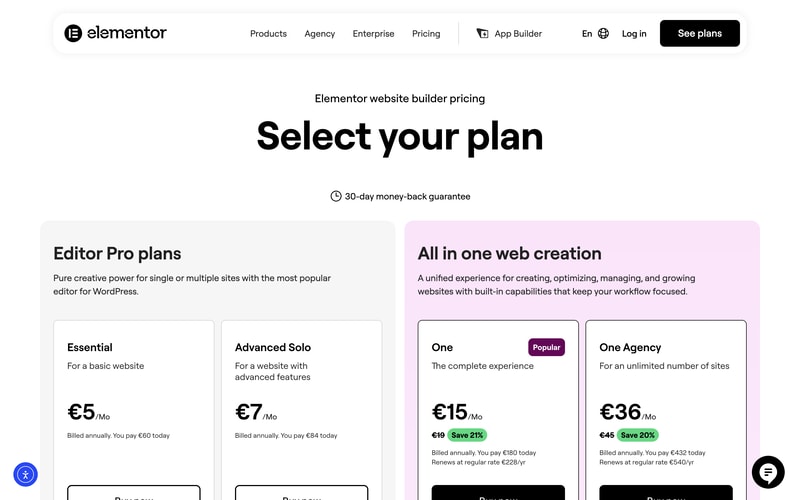
The 2026 page splits into two families. Editor Pro plans are the plugin: you bring your own WordPress hosting and get the editor. All in one web creation bundles hosting, AI generation, image optimization, accessibility tooling, cookie consent, and email deliverability into a single subscription measured in “One credits”.
A 30-day money-back guarantee applies across the range.
How Elementor Works
- Two product families — the plugin, and the hosted all-in-one platform.
- Credits are the third meter — 0 on plugin plans, 25,000 and 350,000 monthly on the One plans.
- Sites ladder — 1 site on Essential and One, options up to 25 on Advanced, unlimited on One Agency.
- Widget counts differ — 57 on Essential, 85 on every plan above.
- The One plans state their renewal price on the card itself.
- A 30-day money-back guarantee on all plans.
Elementor Pricing
Captured from Elementor’s pricing page in July 2026 on the euro price list with annual billing.
| Plan | Year one | Renewal | Sites | Credits/mo | Custom CSS | eCommerce |
|---|---|---|---|---|---|---|
| Essential | €60 (€5/mo) | €60 | 1 | 0 | No | No |
| Advanced Solo | €84 (€7/mo) | €84 | 1 (3 and 25 available) | 0 | Yes | Yes |
| One | €180 (€15/mo) | €228 | 1 | 25,000 | Yes | Yes |
| One Agency | €432 (€36/mo) | €540 | Unlimited | 350,000 | Yes | Yes |
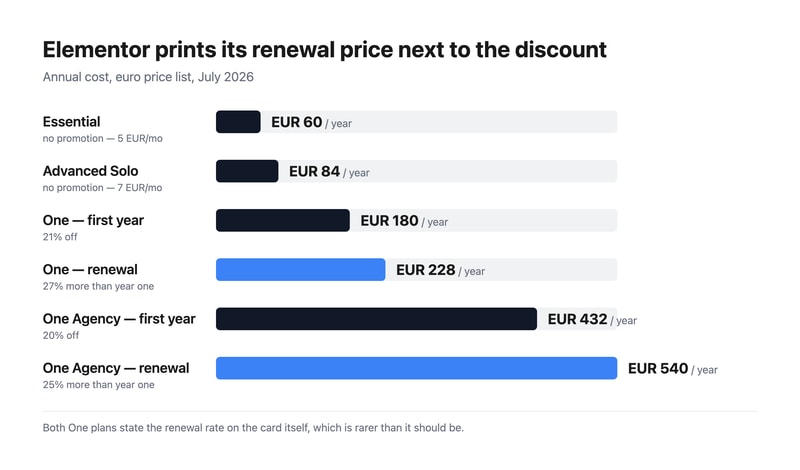
What actually decides your plan:
- Essential cannot do custom code or CSS. For a design plugin aimed at people who want control, that is the most surprising exclusion on the page — along with the Popup Builder and eCommerce features. Essential gives 57 widgets, the Theme Builder, dynamic content, and forms. Anyone who expects to write a line of CSS needs Advanced Solo at €7.
- Zero credits means zero optimisation features. Both plugin plans show “0 One credits”, and Elementor states that credits unlock AI generation, image optimization, site accessibility, cookie consent, and email deliverability. Those are not tier-gated features you could buy up to — without credits they are unavailable, which is what separates the two families.
- Elementor prints the renewal price, and you should read it. One is €180 in year one and €228 a year afterwards; One Agency is €432 then €540. That is 27% and 25% higher respectively. Stating renewal on the card is genuinely uncommon — several vendors in this category advertise a first-year discount and leave you to discover the real rate — so credit where it is due, but budget from €228.
- The two plugin plans have no promotion at all. Essential and Advanced Solo carry no strikethrough, so €60 and €84 are the standing rates rather than introductory ones.
- Elementor values its own bundled components. The One card lists image optimization at €60/yr, site accessibility at €120/yr, and email deliverability at €60/yr — €240 of stated value inside a €228 renewal. That is Elementor’s own valuation rather than an independent one, but it is at least an arithmetic claim you can check against buying those tools separately.
- One Agency is the agency answer. Unlimited sites and 350,000 monthly credits — 14 times One’s allowance for 2.4 times the price. If you build sites for clients, that ratio is the argument.
Who Should Use Elementor
- WordPress users wanting design control. The clearest case, and why Elementor became the category default.
- Agencies building client sites. One Agency’s unlimited sites and large credit pool is priced for exactly that.
- Small businesses wanting one bill. The One plans fold hosting, optimisation, and accessibility into a single subscription.
- Anyone needing accessibility and cookie consent. Both are bundled on One rather than bought as separate plugins.
It fits poorly for non-WordPress projects, where Webflow or Framer are the right tools; for people wanting to write CSS on a budget, given Essential excludes it; and for high-performance hosting needs, where WP Engine is the specialist.
Honest Pros and Cons
Strengths
- Renewal prices printed on the card, which much of this category hides.
- A genuinely cheap entry point at €60 a year for the plugin.
- The most mature WordPress editor, with the largest template and add-on ecosystem.
- Accessibility and cookie consent bundled on the One plans.
- Unlimited sites on One Agency, priced sensibly for agencies.
- A 30-day money-back guarantee across the range.
Limitations
- Essential excludes custom code and CSS, plus popups and eCommerce.
- Plugin plans get zero credits, so the optimisation suite is unavailable.
- One renews 27% higher than its first-year price.
- Two product families on one page makes the €5 headline misleading.
- Only 57 widgets on Essential, against 85 everywhere else.
- You still need WordPress hosting on the Editor Pro plans.
Elementor Alternatives and How It Compares
- WordPress.com hosts WordPress itself, with its own block editor rather than Elementor’s.
- WP Engine is the managed-WordPress host you would pair with an Editor Pro plan.
- Webflow and Framer give designers more control outside the WordPress ecosystem.
- Wix and Squarespace are the all-in-one builders that require no WordPress knowledge at all.
- 10Web and Duda target agencies managing many client sites, 10Web on WordPress specifically.
- Hostinger bundles cheap WordPress hosting with its own builder.
For a broader survey, browse our website builder directory.
The Verdict
Elementor earned its position as WordPress’s default visual editor, and on the design side it deserves it — the Theme Builder alone removes the need to touch theme files for headers, footers, and archive templates. What has changed is that the pricing page is now two products, and reading it as a single ladder from €5 to €36 will lead you to the wrong plan.
The plugin plans include zero One credits, and credits are what run AI generation, image optimization, site accessibility, cookie consent, and email deliverability. Those features are not something Essential has less of; they are something it does not have. And Essential also excludes custom code and CSS, the Popup Builder, and eCommerce features — which for a €5 design plugin is a real constraint, not a nudge. If you want to write CSS, Advanced Solo at €7 is your floor. If you want the optimisation and accessibility layer, One at €15 is.
Then read the renewal line, which Elementor deserves credit for printing. One is €180 in year one and €228 a year thereafter — 27% more — and One Agency goes €432 to €540. Several products in this category advertise a first-year rate and let you find the real one on your second invoice; Elementor puts it on the card. Budget from the renewal figure, note that the two plugin plans carry no promotion at all so €60 and €84 are simply the price, and if you build for clients, compare One Agency’s unlimited sites against per-site licensing before anything else — 350,000 monthly credits for €540 a year is where its economics actually make sense.
FAQ
How much does Elementor cost?
On the euro price list captured July 2026 with annual billing: Essential €5 per month (€60 a year), Advanced Solo €7 (€84), One €15 (€180 in year one, renewing at €228), and One Agency €36 (€432 in year one, renewing at €540). The two Editor Pro plans carry no introductory discount; the two One plans do, and both state their renewal rate on the pricing card.
What is excluded from Elementor’s cheapest plan?
Essential at €5 a month excludes the Popup Builder, custom code and CSS, eCommerce features, AI generation, image optimization, site accessibility, cookie consent, collaborative notes, email deliverability, and site management. It includes 57 widgets, the Theme Builder, dynamic content, the form builder, and 10 cloud templates for one site. Advanced Solo at €7 restores popups, custom CSS, and eCommerce.
What are Elementor’s One credits?
They are the usage meter for the hosted platform’s optimisation features — Elementor states that credits unlock AI generation, image optimization, site accessibility, cookie consent, and email deliverability. The One plan includes 25,000 monthly credits and One Agency 350,000. Both Editor Pro plugin plans include zero credits, which is why those features are unavailable rather than merely limited on them.
Does Elementor’s price go up after the first year?
Yes, on the One plans, and Elementor says so on the card. One costs €180 for the first year and renews at €228 a year — 27% higher — while One Agency costs €432 then renews at €540, 25% higher. The Essential and Advanced Solo plugin plans have no introductory discount, so their €60 and €84 rates are what you pay every year.
Is Elementor better than Wix or Squarespace?
They solve different problems. Elementor is a plugin for WordPress, so you keep WordPress’s flexibility, portability, and plugin ecosystem — and you take on managing hosting unless you buy a One plan. Wix and Squarespace are self-contained platforms that are easier to start with and cannot be moved elsewhere. Choose Elementor if you want WordPress; choose the others if you would rather not think about WordPress at all.

Compare Elementor with other popular tools in the same category.
Easy, easy, easy. Learning steep is absolutely fast and easy to understand. You can make anything you want. You can add thousands of add ons and plugins making elementor the most complete suite in the market to build a webpage, site, landing...whatever
Trying to find anything at this point but nothing is crossing my mind right now.
Any problem related with the creation of a site.
Easy to use, nice functionality, free version available, and many additional plugins (like Crocoblock) that make Elementor much more powerful. I can build almost any type of website and the client has an easy time managing the website.
There is nice WooCommerce compatibility, but it's not as good as it can be. By using Elementor Pro addon plugins, you can manage to build almost any kind of e-commerce website, but not manageable only by using Elementor Pro. Also, the Elementor Pro license has to be renewed every year. There is no one-time payment option to purchase the plugin.
I can build a functional website from almost any website design given to me by a client in Figma, Photoshop, XD... This not only saves time for me as a WordPress website developer but leaves the client with an easily manageable website.
The best of Elementor is that it's effortless to use; I'm a graphic designer, so I don't really know a lot about code, just the basics to understand how a website works, but with Elementor, I don't need to know anything. Once it's installed on your Wordpress, you can start building pages just by dragging and dropping widgets. One important thing to mention, especially for designers, is that you have many tools to edit the look of your page. The problem I had with WordPress without using Elementor was that it was complicated to build a page with a different style from the theme; it was very limited. With Elementor, you can imagine almost anything and make it happen.
I don't think there's anything to dislike about Elementor, I've been using it for three years, and it's been amazing. One thing that is important to clear out is that to have the best experience with Elementor, you definitely have to use Elementor Pro. Without using Pro, you will miss many important features, so I wouldn't recommend it.
Elementor helps designers build websites without the need of a developer; you can skip the process of making the design and having to pass it to another person who has to build it. With Elementor, you create your own pages easily and fast. I would still recommend having support from a developer for different issues with the website but not with the building and designing. The creators of Elementor have thought of everything: design, use of templates, dynamic content, compatibility with WooCommerce, and much more.

It is the best website builder for Wordpress. It is easy and intuitive. Love it!
I wish there was a lifetime offer to be able to use unlimited websites. The monthly and annual payment is quite expensive.
I use other paid plugins like Ultimate addons for elementor and crocoblock which add a lot of options to Elementor

Elementor does what I hoped WordPress would let users do: fully customize my website styling. WordPress struggles where you may not always have a template that meets your needs, Elementor lets you have that accessibility to edit a compatible template to your liking, or create a whole design by yourself. Elementor uses a drag-and-drop system so there is NO pressure to have to understand HTML or CSS (but knowing so only gives you more power to customize). Elementor also provides component templates such as tables, images with captions, testimonial carousels, etc. These components have allowed me to create a very rich website with crucial content necessary for a SaaS website.
While I cannot think of something I dislike with Elementor, customizability is a double-edged sword. While WordPress gives you access to tweak your website to your liking, it may be overwhelming for users who do not have experience with building/coding websites. Fortunately, the internet has a plethora of tutorials on how to use Elementor, making the learning curve less overwhelming and more digestible.
The company I last worked for switched from Wix to WordPress where Elementor gave us agency in how to set up our own brand identity and set up clean task flows from our website's landing page. Elementor has provided a more accessible and intuitive way to edit our multiple web pages via drag-and-drop components.
Usability - this builder is so easy to use. Responsiveness- such a powerful package; allows full mobile, tablet, and desktop responsive Quality- there is nothing better; I have thought about webflow but I need control.
It would be cool if the different menus were able to move around. You have to design everything from the sidebar and I wish I could control it more so I could create a nice workflow for myself.
I am solving quality and saving time. I am building websites that can change their entire look with one click from the backend because of custom functionality only offered by elementor.
Elementor allows me to build and deploy new webpages in a much faster way. There are many extensions available so it fits any website. With Elementor Pro it almost entirely replaces the Wordpress theme. It provides an excellent amount of flexibility.
The site load times are a bit higher than without using the plugin.
The possibilities are endless and is a real problem solver.

The visual feedback one gets, you can see the page "grow" as you drag and drop, and tweak each element on a "live" page. Also, its elementary intuitiveness.
The inability to edit things when in preview mode, tweak columns etc, the inability to switch the widgets not in use off, similar to some of it's third party vendors. This will allow for less "bloat". NO conditional logic on the new form widget, a feature i thought would be priority one when it comes to forms, but alas not, this is apparently in development (I think)
Building websites without code for "entry level" clients, i.e. clients not really needing code specific
Elementor has a lot of easy to edit templates that work well for small clients who hire us to make a website for their business and they can easily edit it if they want to after we deliver the final project because the drag and drop feature makes the editing process super simple, elementor is also great because it doesn't require any coding and their library is very rich with a lot of beautiful templates for different industries.
Elementor is consistently being updated and the support is great, they listen to their customers and there's nothing that i dislike about it!
As a full-service digital marketing agency, we use Elementor for a majority of our clients who need a simple and beautiful website to represent their business, we made a lot of websites for clients using it and we love using it every single time we need to make a website that doesn't require custom coding because elementor allows us to get it ready in a record time using the premade templates.
Elementor baffled me when I tried it for the first time. I had been exposed to more restricted builders such as the very adept for it's time Flatsome UX builder that was within the flatsome woocommerce theme for wordpress. I tried Elementor once and never made a site with a ready made template ever again. I love the versatility and more or less endless possibilities it invites through it's clever drag and drop modular structure. So for me it was a revolution in the way I created website and it changed my workflow for the better. Speed, better structure and a natural workflow stands out. As does templates, elementor canvas and the woocommerce page editor. Now others have come on the scene to challenge Elementor, Oxygen builder is one example that is a worthy challenger. It's a bit more advanced and geared more towards the designer who also knows his way around a bit of css at the very least.
I dislike that they seem to push updates out that are not properly tested that have caused havoc a few times among the elementor community. I would love to see some work done on the speed of the actual builder and customizer but I guess that is more up to the server and the wordpress framework.
I am building websites faster which means more time for other type or work or leisure time. I enjoy working with this more using this tool, a part of the job that is very creative but could be a bore in the past is now fun and engaging in a different more direct way. More joy and time. And good looking usable websites to boot. Total winner.
elementor simple drag and drop page builder and the professional prebuilt templates and blocks makes website creation easy for non techies like me, it allows me to build professional websites for my projects in few minutes.
sometimes it's hard to adjust blocks in order to make them responsive in both mobile and desktop view, i have to spend a lot of time adjusting some settings but i always end up fixing it.
i used to hire freelancers whenever i have a new project that needs a website but now thanks to elementor i can easily make beautiful websites myself just by editing premade templates.

Drag & drop, has templates, very fast and easy to use. On the Elementor Youtube channel ther are several tutorial videos
The Resources are limited in free version
It is possible to create landing pages for your product or MVP, and present it to your customers or investors. It is very easy to use
I like that this tool is easy to implement and install, AND you can customize every single element and page exactly to your liking (all without knowing any code)! There are no limits.
The learning curve to adjust your website from desktop to mobile takes some time and getting used to, but once you figure it out, it is quite easy to navigate.
Web design without having to learn code or hire someone that costs an arm and a leg.
elementor is super easy to use and it has a lot of professional templates that can be modified to make beautiful pages in few minutes.
elementor lack professional templates for some type of pages necessary on a website like faq for example, they offered few templates but i didn’t like them, other than that everything else is perfect.
elementor allows me to create beautiful websites for my projects without coding or hiring a professional to do it for me, it’s easy to use and the provided templates do most of the heavy lifting when it comes to websites creation so i just choose which one i like the most and i build on it.
The drag and drop feature is easy to use.
The options for image size can be limiting. Make sure you have the correct size before uploading.
Web design in minutes.
It is the best drag and drop builder available for website design in WordPress. It has a well-designed User Interface. Anyone can use it easily without having much experience and knowledge of website building. It has a simple drag and drop interface where a lot of website elements are available and can be added to our website. It has a block structure so that we can divide our webpage into different sections and add elements as per our requirement.
There is nothing to dislike in Elememtor. We have been using Elementor from long and we are very satisfied with its features.
We are using Elementor for creating the web and landing pages for the website. We have used Elementor for all the pages on our WordPress site. It is really handy and highly customizable.

The best part of tool is controls integrated with each sections and customizations for different versions(Desktop, Mobile and Tablet). Elementor serves the best of the purpose it is designed for. It helps me create websites from scratch without having knowledge in php and HTML. Elementor is best for starters and I believe it's the future.
Elementor has everything, but still there are bugs in some sections which is developed through plugins such as elementskit. Elementor can't be blamed completely for that. At the same time, the developers of elementor may rectify those bugs. Another thing I hate in elementor is that network utilization and compatibility with browsers in low end computers. It loads bad on low end computers and computers with slow internet connections.
With Elementor I solved my website issues that I faced before with tools. I made my website device and user friendly with the help of cutting edge tools available with elementor. The advanced section helps me lot during adjustments and color corrections. Before switching to elementor I have to depend on a developer to make corrections via CSS.
Elemetor counts with a very wide type of tools that makes easy for rockie users to create website with simple but powerfull designs that makes the custom experience very delightfull. It is made for people who like the best. And the best way to manage your content on your website is with Elementor plus WordPress
Its visual builder tends to be king of messy and you might get lost on the first experiences
Elementor has given me th chance to build powerfull websites that get to load very fast. My clients allways get satisfied with product that I made for them when I use Elemetor
Elementor provides the most flexibility of any WordPress builder that I've used! It is especially useful for easily mobile optimizing each section without need for duplicate sections.
Motion effects on scroll are complicated to understand and control; things that are simple to do in other Wordpress builders such as WP Bakery or themes such as Salient are very complicated here. Custom CSS is also more difficult to access on the free plan. Elementor's annual fee is a huge blocker to wanting to use it regularly; if it had a one time cost I would recommend it more. Yet with a yearly cost to use Elementor Pro I try to get by on free as much as possible or use something else completely.
There are significantly fewer limits to design with Elementor, and mobile optimization is much easier and more effective.
Elementor is the best WordPress website page builder and it'll allow you to make a landing page or create a stunning website using its drag and drop feature. Elementor provides you a library where you can find a lot of landing pages.
You must be very careful before using the number of blocks and widgets. It might slow your website. It can affect your website loading time.
Almost 70% of my WordPress sites are created with elementor. It can ease my life to create an instant landing page along with a creative layout without knowledge. Easily integrate any plugin with elementor for adding the extra features in it. Elementor websites are fast iN SEO.

Elementor is the best Page builder among WordPress. Elementor has the best drag and drop functionality by which the user can drag and drop the multi-features to the website. You don't need any other features plugin if you have an Elementor page builder.
There is no way to dislike Elementor and it's functionalities.
Heading towards the Elementor plugin, this is the best page builder for me. I am using it to create quick pages, quickly adding new features and creating a high converting landing page.
Elementor is a page builder developed for beginners, as it has many features and widgets that ensure that your website is really attractive without the need for coding. It is quite amazing that it can be used for free, considering how many modules it has. Elementor allows the modification of all the styles of the web page, which is very convenient to not make so much use of CSS.
The customization levels for the page styles are only accessible from the professional version, so they cannot be used in the free version.
After trying different page builders, I started using Elementor for most of the websites that I develop for the company I work for. Elementor gives me control over customizing the colors and styles of the pages, which saves me time since I don't have to modify CSS code. It also has widgets that I use frequently on the websites I develop, such as contact forms, image gallery, and more.
The best thing about elementor is how easy it is to use. You don’t have to know a lot about coding, element or makes it as easy as just a few clicks and you’re done.
What I think it could be better, is that it isn’t available to work with all themes on WP
I don’t know much about coding and I wanted to add my personal touch to my website so elementor really helped me to make my own website by my own taste

Easy to use, just install it and start dragging and dropping widgets in your new website
Full of functionalities, but if you want to create complicated websites, you have to install additional plugins, like crocoblocks
I can create a website with granular control over every single aspect of the design
I really like the ability to create you own header and footer templates in Elementor Pro. I generally create a different header for use on the home page than for the other pages so this makes that process very simple. You just add select the conditions of where you want each Header or Footer displayed. Plus you can easily save sections of a page for ease of use on other pages - a real time saver. You can also edit the Header and Footer whilst in individual pages which saves navigating back and forth. The form builder is really easy to use, and integrates seamlessly with MailChimp (and others) without having to load additional plugins. This again helps with speed of the website. There are quite a few pro templates to choose from including pages, sections and blocks. Even if you don't use them, they are a great source of inspiration for design. Elementor is also a great option if you are building for a client who wants to self-manage their content updates, with a bit of training I find clients love it.
The free version is limited, I quickly upgraded to pro which is a bit pricey in US$ as I am working in AUD$.
It's the time saving factor that really helps get a build done a lot quicker. The many features that are packed into Elementor Pro reduce the need for additional plugins resulting in a much faster website loading time.

The UI is great, easy to learn. The integration of diy html and css is amazing.
Sometimes there are version conflicts with plugins and what i most dislike when they offer a discount AFTER you just signed up for a year membership.
Webdesign is so much easier and you can see immediately your own design.

The element is a powerful plugin, easy to use. It has numerous features and allows me to develop a website without having to experience it.
So far I haven't found any functionality that I don't like about the element, it is very useful and makes it a lot easier. I have nothing to complain about.
Being able to layout my own website without needing a developer to program it.

What I like best about the app is the fluidity that it allows you to edit the content on your website...from the product to the site itslef
Dislike would be the learning curve...it could be a bit simplier
It has allowed me to build a more creative site, it brings life to my wordpress site. I like the options it provides in that regard
Elementor is easy to use, flexible and super productive. I mean one just needs to use the imagination, rest all is done by Elementor. Just drag and drop the right section and your website is ready in hours.
Though there are lot of blocks, themes and sections are available but they are not up to date. I mean they are very basic. Elementor should provide good and effective blocks, themes and sections for its users.
I use elementor for creating WordPress websites. Elementor makes the work a lot easier, efficient and productive. There are plenty of features in Elementor with the help of which we can make our websites more beautiful and effective.
Live online editor, saves time and data as you can see the finished design on the go. Light weight and very easy to use. Can be deployed for building product, post or custom pages. Efficient 3rd party theme and plugin integration.
No autosave or auto draft, a lost page is lost forever. Doesn't work efficiently with every theme. Depends on page settings for things like switching breadcrumb or title on or off.
Building modern responsive pages with ease. Setting up pop-ups and landing pages. Converting static pages to responsive designs.