
Unclaimed: Are you working at HubSpot Sales Hub?
HubSpot Sales Hub Reviews: 4.4/5 — Solid Choice
If you want to supercharge your sales process, Hubspot Sales Hub is a powerful and seamless solution that offers sales engagement tools, provides configure-price-quote (CPQ) functionality, and robust sales analytics that is essential for any growing business. Like anything within the Hubspot ecosystem, the platform is rooted in the brand’s powerful and reliable service platform, delivering more in-depth insight, better leads, and better solutions that teams can rely on.

| Capabilities |
AI
API
|
|---|---|
| Segment |
Small Business
Mid Market
Enterprise
|
| Deployment | Cloud / SaaS / Web-Based, Mobile Android, Mobile iPad, Mobile iPhone |
| Support | 24/7 (Live rep), Chat, Email/Help Desk, FAQs/Forum, Knowledge Base, Phone Support |
| Training | Documentation |
| Languages | English |


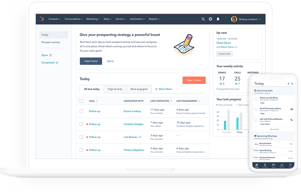
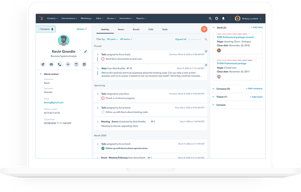


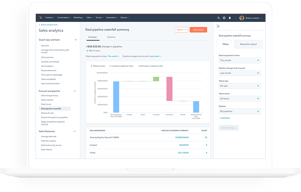






HubSpot Sales Hub has the best free tier in the CRM market and one of the steepest upgrade cliffs, and both facts matter equally when you evaluate it. Getting started costs nothing and the product is genuinely good. The question is not whether you will like it, but what happens to your bill when you outgrow Starter.
- What it is: A sales CRM platform built on HubSpot’s Smart CRM, with pipeline management, calling, sequences, forecasting, and AI agents layered on top.
- Best for: Teams that want a free or cheap start, and mid-market sales organizations that also use HubSpot for marketing and want one connected system.
- Pricing: Free for up to 2 users. Starter from $7/seat/month, Professional from $90/seat/month, Enterprise from $150/seat/month. Verified on HubSpot’s pricing page in July 2026.
- The honest catch: Professional and Enterprise carry mandatory one-time onboarding fees of $1,500 and $3,500 respectively, and Professional requires an annual commitment even if you pay monthly.
What Is HubSpot Sales Hub?

HubSpot began as a marketing software company and built its CRM outward from there. Sales Hub is the sales-facing product in that suite, sharing one contact database, the Smart CRM, with Marketing Hub, Service Hub, Content Hub, and Data Hub. That shared foundation is the strategic argument for HubSpot: if marketing and sales work from the same records, the handoff between them stops being an integration problem.
The free CRM is the reason most people encounter HubSpot at all. It is not a trial and not a crippled demo. Contact management, deal pipelines, email tracking, meeting scheduling, and basic reporting are available at no cost for up to two users, and HubSpot has kept that promise for over a decade. As a growth strategy it works because the free product is good enough to build a business on.
The independent ratings are strong and consistent: roughly 4.4 out of 5 on G2 across more than 12,000 reviews, and about 4.5 out of 5 on Capterra across more than 4,400. Ease of use is the most-cited strength on every platform. Pricing is the most-cited weakness on every platform.
How HubSpot Sales Hub Works
- Smart CRM as the foundation. Contacts, companies, deals, and tickets live in one database shared across every Hub. Buy Marketing Hub later and it reads the same records, with no sync to configure.
- Pipeline and deal management. Customizable pipelines and stages, deal tracking, and task queues. Straightforward and well executed, which is why non-technical teams adopt it quickly.
- Engagement tooling. Email tracking and templates, meeting links, and calling. Sequences for multi-step outreach are the feature most teams eventually need and the one most commonly reported as gated to higher tiers, so confirm its availability on the plan you are pricing.
- AI agents and credits. Breeze Prospecting Agent and Data Agent on Starter, Agent Hub on Professional, and AI transcript enrichment on Enterprise. These run on HubSpot Credits, a consumption currency priced at $9.00 per 1,000 credits on annual billing, with each plan including an allowance of 500, 3,000, or 5,000 credits.
- Analytics and forecasting. Conversation intelligence and forecasting arrive at Professional, alongside the Sales workspace. Deal splits, deal journey analytics, and pipeline approvals are Enterprise features.
The credits model is new enough to deserve attention. Bundled allowances sound generous until agents are used at volume, at which point AI becomes a metered line item on top of per-seat pricing. Ask what your realistic consumption looks like before assuming the included allowance covers it.
HubSpot Sales Hub Pricing
The list prices are only part of the cost. Figures verified in USD on HubSpot’s Sales Hub pricing page in July 2026.

| Plan | Price | Credits included | Mandatory onboarding | Key additions |
|---|---|---|---|---|
| Free | $0 | — | None | Up to 2 users, free marketing, sales, service, content, data and revenue tools |
| Starter | From $7/seat/mo | 500 | None | Calling, Breeze Prospecting Agent, Data Agent, intent signals, task queues |
| Professional | From $90/seat/mo | 3,000 | $1,500 one-time | Agent Hub, conversation intelligence, forecasting, sales workspace |
| Enterprise | From $150/seat/mo | 5,000 | $3,500 one-time | AI transcript enrichment, deal splits, deal journey analytics, lead form routing, pipeline approvals |
The details that decide your real cost:
- The onboarding fees are mandatory, not optional. HubSpot’s own pricing page states that Professional requires a one-time $1,500 onboarding fee and Enterprise requires $3,500. A five-seat Professional deployment is therefore roughly $5,400 in year-one subscription plus $1,500, and no competitor comparison that omits this is honest.
- Professional requires an annual commitment. The billing toggle on Starter offers monthly commitment. On Professional, the monthly option still commits annually. You are signing a year regardless.
- The Starter to Professional jump is more than 12x. From $7 to $90 per seat is the single largest cliff in mainstream CRM pricing. Know which specific feature is forcing the upgrade before you accept it.
- Current prices are discounted. Starter shows $7 struck through from $20 and Professional $90 from $100. Treat the lower numbers as promotional and check what renewal looks like.
- AI is metered separately. Credits at $9.00 per 1,000 on annual billing, on top of seats.
The free tier is genuinely free and genuinely useful, capped at two users. That cap is the real constraint, and it arrives quickly.
Who Should Use HubSpot Sales Hub
- Solo founders and two-person teams. The free plan is the best free CRM available, full stop. There is no reason not to start here.
- Small teams on Starter. At $7 to $20 per seat, Starter is competitive with any entry-level CRM and better connected than most.
- Organizations already running HubSpot Marketing Hub. The shared Smart CRM is a real advantage and the strongest reason to accept Professional pricing.
- Non-technical sales teams. Ease of use is HubSpot’s most consistently praised quality across thousands of reviews, and adoption is usually the hardest part of any CRM rollout.
It is a poor fit for high-volume outbound teams, who report the sequencing and dialing tooling as thinner than purpose-built sales engagement platforms, and for cost-sensitive mid-market teams that need Professional features but not the HubSpot ecosystem. In that second case, Pipedrive or Zoho CRM deliver comparable capability for substantially less.
Honest Pros and Cons
Strengths
- The best free CRM available. Not a trial, not crippled, and sustained for over a decade. For up to two users it is genuinely hard to beat.
- Ease of use. The most-cited positive theme on every review platform, and it translates directly into adoption.
- One shared database across Hubs. If you use HubSpot for marketing, the sales handoff is not an integration problem.
- Strong ecosystem. A large app marketplace, extensive documentation, and a deep pool of agencies and consultants who know the product.
- Starter is well priced. At the current $7 per seat it is competitive with anything in its class.
Limitations
- Mandatory onboarding fees. $1,500 at Professional and $3,500 at Enterprise, disclosed only in footnotes, and frequently omitted from comparison articles.
- The upgrade cliff is severe. More than a twelvefold increase from Starter to Professional, and the most common complaint in independent reviews.
- Annual commitment at Professional. Even the monthly payment option commits you for a year.
- AI costs are metered. Credits at $9.00 per 1,000 are a variable cost layered on top of seats, and consumption is hard to forecast in advance.
- Thin for high-volume outbound. Reviewers scaling SDR teams report limitations in sequencing and dialing that push them to specialist tools.
- Reporting can lag. Dashboard data trailing real-time activity is a recurring complaint, sometimes resolved only by upgrading.
HubSpot Sales Hub Alternatives and How It Compares
- Pipedrive is the strongest value comparison. Purpose-built for sales pipelines, far cheaper at the tier where HubSpot gets expensive, with no onboarding fees. Weaker marketing tooling.
- monday CRM offers more customization for teams whose process does not fit a standard pipeline, with a three-seat minimum to factor in.
- Zoho CRM typically undercuts HubSpot substantially at comparable depth, with a less polished interface and steeper configuration.
- Close and Salesflare are better suited to small outbound teams that need real calling and sequencing rather than a marketing-adjacent CRM.
- Salesforce is the enterprise comparison. More configurable and more expensive, with implementation costs that make HubSpot’s onboarding fee look modest.
For a broader survey see our guides to the best CRM software and the best free CRM software.
The Verdict
HubSpot Sales Hub is two products in commercial terms. Below Professional it is one of the best-value CRMs available, and the free tier is the single strongest starting point for a small team that has never used a CRM. Recommending it at that level is easy.
Above Starter the calculation changes sharply. Professional at $90 per seat plus a mandatory $1,500 onboarding fee, on a compulsory annual commitment, is a serious purchase that deserves a serious comparison. If you also run HubSpot Marketing Hub, the shared database usually justifies it. If you only need sales, Pipedrive or Zoho CRM will deliver most of the same capability for a fraction of the cost, and neither charges you to be onboarded.
The practical advice is to start free, move to Starter when you outgrow two users, and treat the Professional upgrade as a genuine buying decision rather than a natural next step. Identify the one feature forcing the move, then check whether a cheaper specialist tool solves it. And whatever you conclude, factor the onboarding fee into your comparison, because most reviews will not.
FAQ
Is HubSpot Sales Hub really free?
Yes, with a meaningful limit. The free plan supports up to 2 users with no credit card and no time limit, and includes contact and deal management, email tracking, meeting scheduling, and basic reporting. It is a genuine free product rather than a trial. The two-user cap is the constraint most teams hit first.
Does HubSpot charge an onboarding fee?
Yes, on the higher tiers. HubSpot’s pricing page states that Sales Hub Professional requires a one-time onboarding fee of $1,500 and Enterprise requires $3,500. These are mandatory and are additional to the per-seat subscription. Many comparison articles omit them, so factor them into any first-year cost estimate.
How much does HubSpot Sales Hub cost in 2026?
Free for up to 2 users. Starter starts at $7 per seat per month, discounted from a listed $20. Professional starts at $90 per seat per month, discounted from $100, plus the $1,500 onboarding fee. Enterprise starts at $150 per seat per month plus a $3,500 onboarding fee. AI features consume HubSpot Credits, priced at $9.00 per 1,000 on annual billing.
What are HubSpot Credits?
A consumption-based currency that powers HubSpot’s AI agents and features. Starter includes 500 credits, Professional 3,000, and Enterprise 5,000, with additional credits at $9.00 per 1,000 on annual billing. If AI agents are central to your workflow, model your likely usage rather than assuming the bundled allowance is sufficient.
Is HubSpot Sales Hub better than Pipedrive?
For teams that also use HubSpot for marketing, yes, because of the shared database. For teams that only need a sales CRM, Pipedrive is generally the better value: it is purpose-built for pipeline management, substantially cheaper at the tier where HubSpot jumps to $90 per seat, and it charges no onboarding fee.

Compare HubSpot Sales Hub with other popular tools in the same category.

you can track certain items and have them passed along automatically to others. I like having the team on the same page to be able to track our sales pipeline as well. Your emails automatically get inserted into the CRM after you download the plugin on Outlook, etc., making it really easy to understand when you last contacted people, who their main contact is at your company, etc.
there are a few features that don't automate as well as we'd like. the system kind of makes you upgrade to a paid version to get the best experience. We are under the startup discount so we purchased the sales and marketing packages, which have given us more of the experience that we're looking for.
keeping track of the clients. before, we were contacting the same clients and not maintaining a database. now that our whole team is operating on Hubspot and we're all able to be on the same page regarding our client contacts, sales pipleline, tasks and onboarding. We were having trouble with the handoff originally from our sales team to the client success team, tracking individual orders after a successful sale, so the ticket portion of hubspot has by far been the most used feature.
The UI and user experience were too good and options here in Hubspot are very good.
There is nothing to dislike, and there is no bad to say as well.
Sales features that are I used are very user friendly.

The way it tracks the contacts in your email and the method by which you can set up email drip campaigns with surveys and content that relevant to the customer.
I wish I could do more in the kanban layout for prospects and closing deals. For example, labeling could be more automated and intuitive.
Tracking new hires and applicants.
Simple to use, great O365 integration and no cost.
Because it is no cost, it is self-help support. I tried the HubSpot/LinkedIn Sales navigator integration and couldn't get it to work and the community help didn't get it done. So I am living without the Linkedin integration.
I needed a simple to use CRM that had a great integration with O365. I am finally getting my sales and marketing efforts linked up and don't half to guess where I am seeing engagement.
How easy my work became after I started using it.
Maybe it would be better to improve some features. For example, when someone opens an email I sent, it would help to know from what type of device and what location.
No problems. It was much easier to contact all my leads.
I use HubSpot marketing hub and sales hub. I’ve previously used three other marketing automation platforms and HubSpot has quickly become my favorite. It has an intuitive design, powerful features and they’re team is just a chat away with any questions 24 hours a day. They’re extremely easy to work with and their platform is easy to use and works!
The data limits are pretty low. After 1,000 contacts pricing increase. To me that’s a pretty small database and it’s be nice if they allowed more contacts before nickel and dime fees start.
Automated messages, enhanced workflows, behavior tracking are some of the biggest benefits. We also use HubSpot to execute our workflows and lead management.
I love how easy it is to use and teach others. I also love that you can customize it to better suit your company's needs.
One thing I don't like is that some people who don't fully understand it will accidentally merge accounts together. I wish there was a way to make it a little more difficult to merge them.
HubSpot has helped tremendously in terms of communicating with clients. I can set tasks to remind me of when I need to reach out and then forget about it until I'm reminded.

HubSpot sales is really saving you time focusing on qualified leads. It works very well when synchronized with Gmail or Outlook.
There's nothing I dislike about it. HubSpot is adding features all the time. If I had one thing to add, it would be to include sms sales tools to HubSpot. I know we can integrate other sms softwares to HubSpot but would prefer a native solution.
I save time. I'am able to better engage with my leads and delight them.
CRM features, templates, analytics, and ease of operations
Hubspot removed the email automation feature from the starter pack and also no custom reporting available (they should give at least 5 custom reports in the starter pack since it gets difficult to create reports).
I use it for email outreach for me and my team. Described the benefits in one of the above statements.
It helps you track your pipeline, proposals and your entire sales process. It integrates with other parts of Hubspot's data.
There's still too much manual work you need to do to keep it up to date. I struggle with the process of updating my deals enough to create useable reports from Hubspot, but in fairness - I have struggled with this with other tools as well.
I'm trying to keep up with my sales pipeline and know what is working and what doesn't. It tracks my email history.
Task reminders are a MUST and so easy with the auto-generated check boxes on emails or call logs. They're the only way I can be so effective in my follow-ups. Two Words... TIME SAVED!
The mobile app is not as great as the online version but still better than nothing.
Definitely earning more sales on long range/slow buyers. Being able to follow up and check your notes with ease helps close the deal on those buyers who come in today but aren't looking to make a purchase for several months. Just Click-Select date and BAM reminded to check in and close the deal.

Hubspot gives us a great framework to deploy all of our 'top of the funnel' campaigns. We have seen a big jump in conversion. Their team has been incredible.
I have a small issue with the support product, but want to be very clear that Sales Hub is amazing. Our support team does not like the search functionality. We did not acquire Hubspot for support, but it would be nice if it were more robust.
The entire customer acquisition strategy is simply laid out and easily deployed in Sales Hub. Now that we are scaling a larger team, new team members get up to speed fast.
HubSpot Sales Hub has proven to increase my personal productivity as well as my companies. I love the easy to use platform and feel my success streamlines from how organized I stay on a day to day basis using HubSpot. We constantly learn from our daily actions and this allows us to grow and succeed in our lunges. We have intergrated using HubSpot in our day to day and it keeps our sales team on the same page as well ad more efficient.
Since using HB I noticed that the built in side panel within my google email was updated since March 2020 and often time glitches. If I do not add a contact before I email them I am forced to return to the CRM page and go into contacts, type their name, and add the appropriate titles for this lead. Often times leads will add CC'd emails that I do not catch immediately and when sent an email they are saved into the HB sales system and not attributed for in terms of brand and company or status. If an email is sent prior to saving the inbound contact my side bar does not let me go back and insert their information and properly save. Other than that small glitch, I personally have no major dislikes about HubSpot, but I must say it is very important that your entire team/company is well trained and organized so that leads are constantly updated and we as a whole can use the data to our advantage as well as help us understand leads and redefine our outreach based on metrics acquired such as within sequences and overall reply rates.
HubSpot Sales Hub allows me to easily enroll my leads into the appropriate sequences, that automate my follow ups for that lead. On average I send approximately 20 emails daily to new business on editorial opportunities. The sequence function allows me to get ahead of the game by creating a sequence and enrolling multiple leads at once, breaking them up so I can quickly personalize my emails and send immediately. I absolutely love how HB will send my follow up for me if the lead does not respond. It allows me to focus on other more pressing tasks during my workday. I also like to see how my sequences are doing and from that information, I can learn and see what is and what is not working for my outreach.
I love that it's an all in one platform. You can call, email, set follow ups etc all in one place. They have made the platfrom very easy to navigate. The customer service and support team have gone above and beyond helping with any issues we have had in the past.
I wish there was a dialer. Glad all your contacts in and dial away! Also, there used to be a sidebar on the custoemrs website that gave company information, competitors, and the ability to "add to CRM" by clicking one button. I wish you could bring that feature back. It was one of the main reasons we initially signed up for Hubspot.
It has eliminated the need for calendar reminders in my email, notepads on my desk, and the need for a land line phone with the browser calling feature. We have integrated our website using the Hubspot platform as well, and this has helped with adding new contacts and tracking the progress.

Easy to use, easy to manage, easy to include in your daily routine.
I think that Hubspot has to think to include some "basic" automation features (only 3 or 5 for example) of Workflows and Sequences also for clients without "Professional" accounts.
Since I have started to use HubSpot on my sales, the results have growth thanks to all the services and automations. Itìs very easy to use and thanks to the Academy, you could train yourself to improve your performances.
I think the meetings planner is a great toll that helps me book meetings on a daily basis with just a few clicks and it delegates the planning to the customer so I don't have to spend time sending multiple emails trying to figure out a time that works for both parties. I've gotten good feed back from people who have used it as well. Awesome tool!
I have trouble understanding how to create my own dashboards. I do like how they have default ones to use, but it can be a little overwhelming to try and build your own. I think I need some tutorial resources to build my own.
It helps me manage a lot of content and keeps me extremely organized. When clients call in a year later I am able to quickly pull up there contact and pick up where I left of with them as it displays the emails, calls, and notes. I like how the activity feed very simply keeps track of every thing that has happened with the contact to keep me informed when people call in. Very Useful!

The way HubSpot Sales develops into the perfect pipeline system with its easy-to-use features and affordable price. HubSpot eases the training time and offers guides to get started with this software, and the interface is easy to navigate. Feature and functionality-wise, HubSpot Sales uses updated tools that are automated, simple, and fast. The ability in which we can perform and create our very own templates for our customers and clients is amazing, giving us room to evaluate our data and know what will be the next step. It's pretty simple to keep track of customers and use this information to know what kind of products are doing well and which ones are not, and we use these stats to have an idea of important business decisions we should make.
I think HubSpot Sales has worked very well so far, so I can't think of anything negative that I've experienced.
As a manager in the Sales department, it is part of my job to meet all our operations with success and have our own prospects that we can use in the future. HubSpot Sales allows me to accelerate my sales processes and build a reputation for my old customers and new clients. I have been using this software for years now and I can say that its integrated platforms are all very functional and have helped our business get a sense of planning, as well as improving our sales and marketing techniques. And to this day, we still continue to see an increase in our sales every time we implement this software.
Easy to navigate. Keeps track of everything in one place - tasks, calls, emails, notes, etc. The app is especially helpful as you can get notifications directly to your phone, see when clients have opened your emails, dial directly from and log the call easily, etc. Makes my job a lot easier and it's a huge time saver as inputting these things manually can often be a time suck and take away from the business of actually selling and prospecting. The dashboard is also really easy to read and understand - I like seeing where I stand among my peers on the leaderboard when it comes to outbound emails, closed deals, etc.
I really don't see any downsides to using Hubspot. This is my first time using CRM software so I can't really compare it to competitors but I have no complaints. I would recommend maybe including some sales tips, cold call scripts, or template suggestions within the actual software. I receive these via email from HS on occasion and have gotten some valuable information when taking the time to read them, but it would be helpful to maybe have this in a panel somewhere when I'm actually writing emails or placing calls to quickly refer to when I'm stuck and could use a helpful tip or suggestion.
As I mentioned earlier, it's a really efficient tool for keeping track of everything in one place. I can just click and give myself a task and I'll receive a notification on the day that those tasks need to be completed and you can mark them off when they're done. I love that feature. Sequences also are incredible. I can setup 500 emails per day, with followup emails and tasks for each client, and be done with it. Then I just wait for the responses to roll in or dedicate my extra time to sourcing new leads.
The ability to separate leads into automated sequences gives me to ability to stay in touch with those leads while focusing on hotter leads.
The App could use a lot more functionality. I should be able to do everything, or most things, via the app while on the road that I can do via the computer.
No leads fall through the cracks, the speed of templates and sequencing, and a single source to hold my communications and information.
Hubspot Sales Hub CRM has all the bells and whistles of competitor CRMs, but it is extremely user-friendly. It's very easy to create and send templates, set up meetings, build lists, work through tasks, and find intelligence on the engagement of prospects. it's very easy to learn, and the ongoing support and professional development is very strong (and is specific to sales users).
There is not much I dislike about this products. Everything seems to work without a hitch.;
The intelligence of prospects engagement is very easy to understand with HubSpot tools. I can easily build a list for myself in under 30 seconds that then informs by prospecting.
It is extremely versatile and it integrates with many other tools that make the flow of information very natural. Also, team management is great since leaders can see everything that is going on while users can focus on their area with all the right information at hand.
Some integrations with other SAAS do not share a complete set of properties that get updated automatically in real time. For some values we have to be creative by defining them through other automatic properties, plus, sometimes it takes hours for the data to arrive to hubspot and be updated.
We are a SAAS company and offer online demonstrations of our platform, so the meetings tool is an every day must. We have it linked to our web page and interested leads schedule their meeting automatically and sales people just need to watch their calendar for upcoming demonstrations. Also, we keep track of lead statuses in the deals section which is linked to our payment platform, so depending on customer activity, we know exactly where he stands. It's important to mention that the monthly reports export like magic!

The fact that you can use all sorts of tools like notes, emails, messages, tracking, workflows, marketing, you can use workflows and cta for bots. I love the fact that it can be added to your email for templates. You can organic a queue and follow it without any problems
it is slow sometimes and it makes it difficult to work
We use it to send marketing emails,t track information, and assign tasks to our team. It is great for the team members to keep a record of what is happening with the whole team
The most helpful is building out automated sequences. This saves us time and effort essentially lowering our opex of manually sending our content.
I'm not sure there is anything I dislike at this point.
We are working on automating sales (as much as possible) by using a specific tech stack. HubSpot is a huge piece of that equation and has allowed us to properly identify leads.
You get to track your customers from day one and finally convert it into a prospective lead. We can assign tasks any team members within our company and they also get notification in their email which is a really good feature. We have created a pipeline of sales so that we can know at what stage is our customer on. We'll also know why the customer is on different sales stage. Template creation feature has made easier for mass mailing.
There is nothing much to dislike about it. It is really good for companies likes us to track our customers. One thing I dislike is about less contact storage within a paid version. If we use free version we can enter many contact information but when we have purchased sales feature then we are limited to 2000 contact details. Beside this everything is good. I find it a little expensive. It should have been a little cheaper so that even startup or companies in the developing companies could afford it. There are lot of startup companies who wants to use hubspot but due to it's higher price startups can't afford it. So, there should be some kind of offers for the startups. This is the main thing that needs to be improved to support startups and also expand the business of hubspot.
We are tracing our customers and my whole team uses it to track previous conversations with that client. It is lot easier to maintain Facebook message and assign to other team members easily.
I like how well HubSpot integrates with Gmail; the fact contacts are saved and tracked any time an email is sent makes life a lot easier.
I would love if you could enroll an entire list in a sequence.
I would love to be able to edit emails without having to go into a contact, and without the email pop-up form once you're in the contact's page. The benefits are many; scheduling emails is very simple. Maybe include a "folders" option for email templates?
Sales Hub takes som of the "messyness" that can come with Sales. The system is easy to use, and input/store data, which is great for any small business looking for a CRM. My favourite feature so far is the Sales Tasks function and being able to queue my tasks for the day.
To me Sales Hub's Deals function needs more work in terms of useability. It would be helpful if you could click "Associated Deals" on a contact's profile and be brought to the deal page, for example.
While being able to see when your email is opened is great, I've noticed a flaw. Sometimes, when I open the email I just sent a prospect it counts as an open and notifies me "Contact has opened email" - majorly comprising the data (Dashboards/Analytics) that is recorded in HubSpot. I hope this gets fixed soon!
I love that Hubspot can make my life easier by creating lists with particular properties so that I can easily find exactly the group of people that I am looking for and send them marketing and sales emails. I also love that I can link Hubspot to my Gmail to track all emails and help me remember to reach back out.
I dislike that there are so many things that hubspot can really do that I do not even know about yet. It has so many helpful things, but a lot to learn. I am only scratching the surface. I struggled in the beginning to learn about how to put people in different lists with properties versus manually adding them.
Email sequences are amazing!! By creating a list and sending them multiple email sequences makes my life 10x easier. Follow through is so important in sales and I love that Hubspot helps me consistently follow up with clients because of email sequences.
HubSpot Sales makes it easy to manage not only sales leads, but also success. We use it to handle our outreach efforts to high priority customers. We love their meetings capability too and how it integrates with Zoom.
The only thing HubSpot could work on in general is handling contacts who need to be assigned to more than one company. The way it's handled with Related Companies is okay, but it could be improved some. This extends to every piece of the software.
We use HubSpot to manage all our sales outreach and track all of our efforts. We love HubSpot and use it for every part of our business.
Having all contacts in one location and being able to utilize sequences, workflows, meeting links and personalization has made the always hectic workday that much easier. Also, being able to instantly create tasks that could possibly be months or even a year out has streamlined my to-do list and makes sure nothing gets forgotten!
The only downside I see is sometimes the pages cannot be found and can take multiple chances or minutes to reload.
Having tasks and setting reminders has benefited me greatly by not having to have multiple lists or possibly forgetting a list somewhere in the hectic days we call life.
I like the blogs and content on sales strategy. I like the sequences and templates to streamline my outreach
Sometimes it is buggy and doesn't allow me to quickly move through the platform
Reaching out to contacts more quickly with personalized content