

Unclaimed: Are you working at HubSpot Service Hub?
HubSpot Service Hub Reviews: 4.4/5 — Solid Choice
Hubspot, a giant in the digital marketing category, offers a wide range of software solutions with comprehensive free tools. This makes expanding your toolkit across sales, operations, marketing, etc., very easy. Its CRM system is at the heart of HubSpot’s offering. The platform makes it an excellent option for managing customers and progressing them through your funnel. As a result, Hubspot’s Service Hub’s an incredible range of features, including team management tools available via higher plans and real-time reporting.

| Capabilities |
AI
API
|
|---|---|
| Segment |
Small Business
Mid Market
Enterprise
|
| Deployment | Cloud / SaaS / Web-Based, Mobile Android, Mobile iPad, Mobile iPhone |
| Support | 24/7 (Live rep), Chat, Email/Help Desk, FAQs/Forum, Knowledge Base, Phone Support |
| Training | Documentation |
| Languages | English |
HubSpot Service Hub Pros and Cons
- Extendable with a range of other Hubspot tools, many of which are free, including a CRM, as well as operations, marketing, and sales features.
- Hubspot focuses on CRM integration to produce great customer insights.
- You get access to powerful analytics.
- There’s a steep learning curve.
- The complex pricing tiers are challenging to navigate.

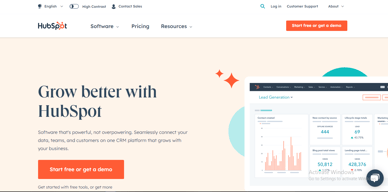

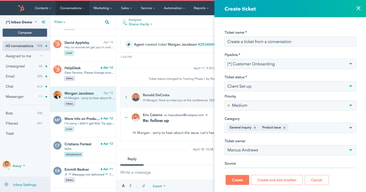
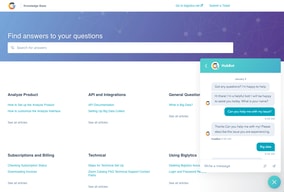
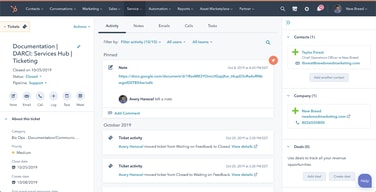





HubSpot Service Hub puts support tickets on the same contact record as marketing and sales, which is its entire reason to exist and a genuinely good one. The pricing needs care, though. At Starter you get ticketing and little else, and reviewers say so directly. The knowledge base, help desk workspace, and customer portal all require Professional at around $90 per seat, which also carries a mandatory onboarding fee.
- What it is: A help desk platform built on HubSpot’s Smart CRM, covering tickets, live chat, calling, knowledge base, and customer portals.
- Best for: Companies already running HubSpot for sales or marketing who want support on the same customer record.
- Pricing: Free for up to 2 users. Starter from $7 per seat, Professional from $90, Enterprise from $150 per month. Verified in July 2026.
- The honest catch: Professional requires a one-time onboarding fee of roughly $1,500, disclosed only in a footnote, and it is the tier where self-service actually begins.
What Is HubSpot Service Hub?

Service Hub is the customer support product in HubSpot’s suite, built on the same Smart CRM that powers Marketing Hub and Sales Hub. A support ticket sits on the same contact record as the marketing emails that person received and the deals they were part of, which is a genuine structural advantage over running a standalone help desk alongside a separate CRM.
The functional scope is conventional: ticket pipelines and routing, live chat, calling, canned snippets, and reporting at the lower tiers, with a knowledge base, help desk workspace, customer portal, and feedback surveys arriving higher up. HubSpot has added AI in the form of Agent Hub and the Breeze Customer Agent at Professional.
The independent rating is respectable on a modest sample: 4.4 out of 5 on Capterra across 190 reviews. The praise is about consolidation and ease of use; the criticism is almost entirely about price and about how little the Starter plan includes.
How HubSpot Service Hub Works
- Tickets on the CRM record. The central idea. Support history, marketing history, and deal history in one place, with no integration to maintain.
- Ticketing and routing. Pipelines, ticket routing, and conversation routing from Starter.
- Live chat and calling. Both included at Starter, where the notable upgrade is removing HubSpot branding from live chat.
- Knowledge base and customer portal. Self-service, arriving at Professional. This is the feature that reduces ticket volume, and therefore the one with the clearest economic case.
- Help Desk Workspace and Agent Hub. A dedicated agent interface plus AI-assisted resolution, also Professional.
- Enterprise controls. Conditional SLAs, skill-based routing, and customer journey analytics at the top tier.
HubSpot Service Hub Pricing
Four tiers, with a large step in the middle. Figures verified on HubSpot’s Service Hub pricing page in July 2026. HubSpot localizes currency, and the euro figures shown to European visitors correspond numerically to its dollar pricing.

| Plan | Per seat/mo | Credits | Mandatory onboarding | Key additions |
|---|---|---|---|---|
| Free | $0 | — | None | Up to 2 users, free service tools alongside marketing, sales, content and data tools |
| Starter | From $7 (list $20) | 500 | None | Ticket pipelines and routing, live chat without HubSpot branding, calling, canned snippets, conversation routing, reporting dashboard |
| Professional | From $90 (list $100) | 3,000 | ~$1,500 one-time | Agent Hub, Breeze Customer Agent, Help Desk Workspace, customer success workspace, knowledge base, customer portal, feedback surveys |
| Enterprise | From $150 | 5,000 | Higher one-time fee | Conditional SLAs, customer journey analytics, skill-based routing, AI transcript enrichment |
The details that decide the real cost:
- Starter is ticketing, and reviewers say so. Capterra reviewers on the Starter plan report that “ticketing was pretty much the only task” available to them. That matches the plan contents exactly: no knowledge base, no customer portal, no help desk workspace.
- Self-service starts at Professional. A knowledge base is the highest-leverage feature in any help desk, because deflected tickets are the cheapest tickets. Putting it at $90 per seat means the tier that actually reduces your support cost is thirteen times the entry price.
- Professional carries a mandatory onboarding fee. HubSpot’s own page footnotes a required one-time fee of roughly $1,500 at Professional, with a higher figure at Enterprise. Any comparison that omits it understates first-year cost.
- The $7 Starter price is promotional. List price is $20 per seat, so model renewals at the higher figure.
- AI runs on credits. 500 at Starter, 3,000 at Professional, 5,000 at Enterprise, metered on top of seats.
- Free live chat carries HubSpot branding. Removing it is one of the headline reasons to move from Free to Starter.
Who Should Use HubSpot Service Hub
- Existing HubSpot customers. The clearest and, honestly, close to the only compelling case. Support on the same record as sales and marketing genuinely removes integration work.
- Small teams needing basic ticketing. Free for two users, or Starter for structured pipelines, is reasonable value if ticketing is all you need.
- Companies where support informs revenue. Seeing a customer’s marketing and deal history while handling their ticket is a real advantage for account management.
- Teams that will use the AI layer. Agent Hub and Breeze at Professional are competitive with what Zendesk offers.
It fits poorly for standalone support teams not otherwise using HubSpot, where Freshdesk and Zoho Desk deliver more help desk for less, for small teams needing a knowledge base, since that alone forces a thirteen-fold price jump, and for cost-sensitive organizations, where the onboarding fee compounds an already high per-seat price.
Honest Pros and Cons
Strengths
- One record across marketing, sales, and support. The genuine architectural advantage, and difficult to replicate by integrating separate tools.
- A free tier that works. Two users with real service tools, no card required.
- Starter is inexpensive for ticketing. At the promotional $7 per seat it is cheaper than most dedicated help desks.
- Easy to adopt. Consistently praised, particularly by teams already on HubSpot.
- Capable AI at Professional. Agent Hub and Breeze Customer Agent are credible against Zendesk’s equivalents.
- Large partner ecosystem. Extensive documentation and a deep pool of implementation help.
Limitations
- Starter is ticketing only. Reviewers state this plainly, and the plan contents confirm it.
- The knowledge base is gated to Professional. The single most consequential gap, since self-service is what reduces support cost.
- A mandatory onboarding fee at Professional. Roughly $1,500, disclosed in a footnote rather than the price.
- A thirteen-fold jump from Starter to Professional. $7 to $90 per seat is among the steepest steps in this category.
- Price is the dominant complaint. Reviewers describe it as high against dedicated chat and help desk tools.
- Dashboard performance. Slow loading is reported by some reviewers.
- A modest review base. 190 Capterra reviews is thin next to Zendesk’s 4,000-plus.
HubSpot Service Hub Alternatives and How It Compares
- Zendesk Support Suite is the enterprise incumbent, with far greater depth and its own gating problem, since chat and knowledge base start at $55 per agent.
- Freshdesk is typically cheaper at comparable capability and offers a free tier for small teams.
- Zoho Desk substantially undercuts both and is the value pick, especially inside the Zoho ecosystem.
- Help Scout suits small teams wanting an email-first, human experience without enterprise complexity.
- Intercom competes on messaging-led support and AI resolution at comparable cost.
For a broader survey see our guide to the best help desk software.
The Verdict
HubSpot Service Hub makes sense as part of a decision you have already made. If your marketing and sales run on HubSpot, putting support on the same contact record is worth real money in avoided integration work and better context for agents, and the 4.4 Capterra rating reflects teams who get that benefit.
As a standalone help desk it is harder to justify. Starter at $7 gives you ticketing and, in reviewers’ own words, little else. The knowledge base, customer portal, and help desk workspace, the features that actually reduce support volume, all require Professional at around $90 per seat plus a mandatory onboarding fee of roughly $1,500. At that point you are comparing against Zendesk, Freshdesk, and Zoho Desk on their terms, and Service Hub is not obviously winning.
The practical test is simple. If you already pay HubSpot, price Service Hub as an addition to a platform you use and it is usually a sound choice. If you do not, price it honestly at Professional including onboarding, compare it against Zoho Desk and Freshdesk, and be prepared for the answer to be no. Either way, note that self-service starts at Professional, because that single fact determines whether the entry price is relevant to you at all.
FAQ
How much does HubSpot Service Hub cost in 2026?
Free for up to 2 users. Starter is promotionally priced from about $7 per seat per month against a $20 list price, Professional from about $90, and Enterprise from about $150. Professional additionally requires a one-time onboarding fee of roughly $1,500, with a higher fee at Enterprise. AI features consume HubSpot Credits, allocated per tier.
Does the Starter plan include a knowledge base?
No. Starter covers ticket pipelines and routing, live chat without HubSpot branding, calling, canned snippets, conversation routing, and a reporting dashboard. The knowledge base, customer portal, help desk workspace, and customer feedback surveys all require the Professional plan. Capterra reviewers on Starter describe ticketing as essentially the only capability available.
Does HubSpot charge an onboarding fee for Service Hub?
Yes, on the higher tiers. HubSpot’s pricing page footnotes a required one-time onboarding fee of roughly $1,500 for Service Hub Professional, with a larger fee at Enterprise. These are mandatory and additional to the per-seat subscription, and they are frequently omitted from comparison articles.
Is HubSpot Service Hub worth it if I do not use HubSpot already?
Usually not. Its main advantage is sharing one customer record with HubSpot’s marketing and sales products, which is irrelevant if you use neither. As a standalone help desk at Professional pricing plus onboarding, Freshdesk and Zoho Desk generally deliver more capability for less money.
What is HubSpot Service Hub best for?
Companies already running HubSpot for marketing or sales that want support tickets on the same customer record, with full history visible to agents. It is strongest as an extension of an existing HubSpot investment rather than as a help desk chosen on its own merits.

Compare HubSpot Service Hub with other popular tools in the same category.
It gives us a complete solution to help support our customers, including a help desk/ticketing system, customer portal to manage their open tickets, and knowledge base. We also use it for surveys.
Nothing, we're satisfied with all the features at this time and are happy to keep using this product. It provides everything we need at this time with more features as we grow.
It allows us to support our customers and their experience on our app. It also allows our users to easily manage their tickets. Having the knowledge base helps ensure our clients can self-serve themselves.
In an ever-changing industry, we must hear what our customers like and dislike about our service. We are consistently improving and modifying our business to fit their needs. Reading positive reviews keeps our team motivated! Our customer care team loves the centralized inbox; we no longer surf through different email addresses and social media platforms.
Regarding CRM, we have a variety of different types of companies. Having the same fields for all companies leaves a lot unused if some are needed for some companies but not others. It would be nice to have multiple company default settings. Allowing us to narrow down the details when trying to sign new contracts for different services. Further customizing the fields that appear for each company would also be helpful.
Currently, they are not helping us solve any problems.
Simple, ease of access and filters are good . Helps me filter out the details I need and has always worked good. I never faced any issues with HubSpot except when There have been descripencies with the network.
It sometimes glitches saying other users cannot access. It has always worked fine for me otherwise. I would suggest to send email notifications when the application is down.
HusbSpot warns saying it could be slow, that way I do not have to worry if it is just for me. I am prepared with those alerts. It helps to know that there has been outage or any network issue so that I do not worry about it.
We don't have to connect between multiple solutions. Everything is connected and in one platform
It is expensive in terms of the features and functionality
We are able to document all the products FAQ's
The ticketing system is outstanding. The integrations you offer with Slack, Savio and Jira are perfect for the team. I believe that your CRM capabilities and top notch.
The Conversations section seems to be redundant next to the Tickets. I prefer Tickets a million times more. I don't like that a contact has to have an owner. It makes it difficult sometimes.
Our ticketing issues are being resolved pretty much by Hubspot. Different types or statuses and timelines allow us to keep track of all our customers.
It is easy to use, quick to get new employees up to speed and offers tremendous out of the box flexibility. Wide open integrations allow us to use what we want to use. Their chat support is incredibly helpful - they take the time to understand the question and provide tailored feedback vs copy/paste generic responses
The mobile app doesn't support the service components so while traveling I cannot review a specific ticket or monitor overall service ticket volumes. However, every other obstacle I've encountered is able to be addressed via some creative combinations of existing functionality.
Centralized workflow, on demand reporting and the ability to capture metrics allows us to quickly determine where we need to devote additional resources.
I’ve tested all the tools on the market and HubSpot is by far superior. Simple to use once you are set up, yet very powerful in terms of customization.
The software does take time to learn. We all can be a little short on time, so that is the biggest pain point in an otherwise terrific experience.
We now have much better insight into our business and our end users, which is helping us grow and expand our product offerings and services.
I like the reports you can put on the dashboards.
Using the search bar doesn't always pull up the information you are looking for.
We can easily run reports with certain data & save the view so it streamlines our processes & is always up to date.
Everything is gathered in the same place, now I can see what I do towards our clients, as well as sales and marketing. Before we had different systems, and we didn't get the full picture of the lifecycle of our clients.
I had a customer success system before and there are a couple of things that I'm used to having that Hubspot doesn't have. For example flexibel segmentations is a bit trickier in Hubspot (segmentation of dates).
Getting the overall picture of the lifecycle of our clients. All colleagues getting the same understanding for our business. Also being able to set permissions for users to only see parts of Hubspot and our clients depending on their role and where in the world they work.
i love the tips and tricks they offer. it keeps me updated on how to get the most out of the product.
i feel like you should be required to do certain tasks to get started, you should be able to jump right in.
i love that i can add the support form, it helps me stay on top of customer requests and the fact that my email is linked makes it even easier to keep in touch
The ticketing system is easy to use and customize for each team within an organization. Particularly the ability to connect conversations with the ticketing system and manage both from either place is very useful for allowing teams to manage tickets for their unique use-cases.
HubSpot Calling lacks the robustness that would make it a truly valuable feature. Having to pull in another VoIP solution to HubSpot as a workaround is somewhat tedious and frustrating. That being said, the depth of the call logging when using the native HubSpot Calling tool is great and very useful.
The Service Hub gives our support teams (technical support, success, and onboarding) the tools they need to manage and track solutions for our customers. It includes an easy-to-manage solution for hosting a knowledge base that our team can handle all in the same system.
I like how it all flows together and can work with many different platforms to make the company run more smooth.
I wish that there was a better way of keeping track of service agreement dates.
N/A
The Pipelines are easy to see, easy to create and customize. The best part are the reports and dashboard that give us a birdseye view of our operations.
Because it is so flexible, it can get confusing to non-tech users or members that are not savvy with CRM. We often create custom field only to find later that an existing field exists. It would be nice if they find a similar field and suggest that before letting us create them.
helping our customiers with problems they have, as well as implementation projects with new clients
The use cases for service hub are turning out to be end less, and with the recently added functionality like customer portals and custom surveys there is a great feedback loop to help automate, streamline, and improve any non revenue driving processes like onboarding, project fulfilment, you name it! pairs with marketing and sales pro like graham crackers, chocolate, and big fluffy marshmallows - you can't go wrong!
nothing comes to mind, anytime I thnk of something they fix it!
handing off customers quickly and efficiently post sale, giving transparency and better communication to where projects are at, easily collecting feedback to continuously improve
I'm a new user, but HubSpot Service Hub is extremely intuitive from the get-go. It's easy to see that as I move forward the platform will be incredibly powerful to move our business to the future.
I haven't found an element that I haven't liked so far. I'm very happy about joining the HubSpot family and look forward to many years of continued development.
Our company is building an internal, centralized service team to receive incoming tickets and deals in order to quickly and efficiently service our members better.
Having all of my customer survey data live natively in my CRM/marketing automation platform allows me to make better business decisions faster.
I don't think there's anything in particular that I don't like.
We used to use tools like SurveyMonkey and Typeform for customer surveys. The problem is that the responses aren't tied to the customer's record in our system, so it became difficult to perform personalized follow up at scale. It also was challenging to pair that qualitative data with the quantitative data living in our CRM.
Having our customer support ticketing system seamlessly integrated with our CRM is invaluable. Allows our whole team to act in lockstep
Haven't found anything yet, have been able to solve for every challenge we've had
We leverage the service hub to manage customer service escalations and internal ticketing systems.
The ease and automation tools make it really easy to set up.
It can be a bit pricey for extra users and enterprise level
Customer service response times and review solutions
Ease of creating workflows. Keep up the hgreat work!!!!
Nothing at all. Thank you for asking. Bye!
New call center

What I like most about HubSpot are its vibrant color schemes and clean interface. It offers a basic plan which is free so you can test its services as well as use them for the initial stage of your business. Actually, the free version Is better than many paid competitors. It allows you to manage your daily business, to do tasks, appointments, schedules, etc. I found it very handy in lead Generation and most importantly it helps me to understand the Customer Journey. I would definitely recommend it as it is cost-effective for me.
If you are a beginner then it takes time to get familiar with the system I think this should be more user-friendly at the beginning stage and should have fewer options available at the start. I get frustrated due to system errors and slow page speed, otherwise, it is perfect when you explore all features.
It helps me in lead generation and helps me understand customer journeys as well as helps me optimize my website for search results. It helps me to track all scheduled appointments. It is very convenient for small business owners, I find it very handy in managing my tasks.
I like that it tracks the email communications and meetings happening within a customer/company
The complexity of learning all of the different things it can do.
How much activity is happening with customers.
All the marketing tools are the best in the market, there's nothing at the same level.
The analytics menu and tools need something more advanced.
Automatize email sending and create dynamic lists.
It's very helpful for our company for the conexion with costumers and with ourselves, it is good to use it when i work because of i can replay mail directly from here
some bugs sometimes and when hubspot is off and also sometimes it logout without my request. Logout without request it's not good when you work with it, could be very bad.
comunications problems, also helping my costumer to comunicate with themselves and replay to mail directly by the app and don't going on mail, also the authomatization of system
Transparency among team member activites. Easy to manage key accounts and maintain a good relationship with customers. Very useful for lead collection aswell
The IOS app is not that great, but still good to use
Good to solve customer problems via support tickets. Good to pick up from where another team member left. Good for autommation processes (emails, replies, etc)
Easy to navigate with concise comprehensive videos.
Wish there was an easier way to filter some content
HubSpot has a lot of features and the Service Hub is great to navigate all of them
The interface is very intuitive, more option
reporting could be more detailed and have more options for team monitoring
tickets are being displayed in 2 manners - conversations and tickets - really useful for us
Hubspot is one of the best CRM , Which provides the unique functionalities as in Automatic reportings ,Dashboard creations as per the Business requirements. Hubspot Academy is one of the best Knowledgeable bse which helps the hubspot users to learn everything. Hubspot pipelines as in Sales ,Deals, Onboarding, Support these are extreme good in order to include the best outputs from hubspot
In the Task window we cannot attach any attachments. I would request hubspot product team to include attachments in the hubspot task window.
Dashboards and Automatic reportinga nd automatic staus changes in Tickets are helping the users a lot in order to get best outcome.
I like the reporting that hubspot provides. The way it breakdowns the data.
There is not much that I dislike regarding Hubspot.
It is allowing our employees to service our merchants faster
I like how it is user-friendly. Our support ticket workflow is very visual using hubspot and this is very helpful for me to identify tickets that are high priority.
Not much, I wish there was a way to see when a client has responded back to a support ticket. Right now I need to click in to see whether they have responded back.
It is helping me quickly respond to my customers and fix their support issues.
I love hubspot usability , the hubspot academy course provided to train users and help him take full advantages of using the service hub, ticket creation is simple , features of integrating inbox to teams email is top notch, service hub allows you to create knowledge base, retrieve reports ,use snippets and template, ticket automation is very useful for service desks.
i wish the starter include knowledge base creation, beside it , I love everything else, the features, the usability, the pipeline ,the properties, good to intake, triage. troubleshoot and resolve your tickets,
It will allow my organization to be able to register tickets , intake tickets , triage troubleshoot and resolve the reports will help a lot in increasing product value and improvement