

Unclaimed: Are you working at HubSpot Service Hub?
HubSpot Service Hub Reviews: 4.4/5 — Solid Choice
Hubspot, a giant in the digital marketing category, offers a wide range of software solutions with comprehensive free tools. This makes expanding your toolkit across sales, operations, marketing, etc., very easy. Its CRM system is at the heart of HubSpot’s offering. The platform makes it an excellent option for managing customers and progressing them through your funnel. As a result, Hubspot’s Service Hub’s an incredible range of features, including team management tools available via higher plans and real-time reporting.

| Capabilities |
AI
API
|
|---|---|
| Segment |
Small Business
Mid Market
Enterprise
|
| Deployment | Cloud / SaaS / Web-Based, Mobile Android, Mobile iPad, Mobile iPhone |
| Support | 24/7 (Live rep), Chat, Email/Help Desk, FAQs/Forum, Knowledge Base, Phone Support |
| Training | Documentation |
| Languages | English |
HubSpot Service Hub Pros and Cons
- Extendable with a range of other Hubspot tools, many of which are free, including a CRM, as well as operations, marketing, and sales features.
- Hubspot focuses on CRM integration to produce great customer insights.
- You get access to powerful analytics.
- There’s a steep learning curve.
- The complex pricing tiers are challenging to navigate.

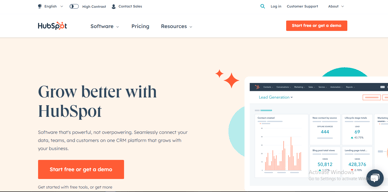

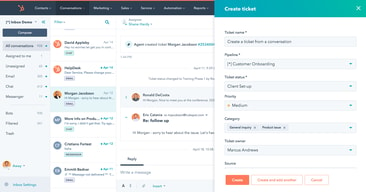
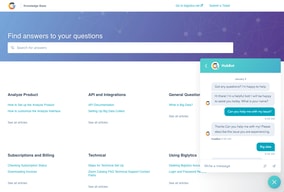
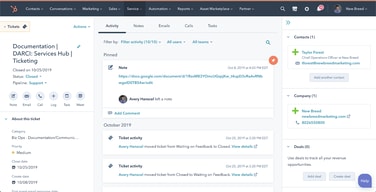






HubSpot Service Hub puts support tickets on the same contact record as marketing and sales, which is its entire reason to exist and a genuinely good one. The pricing needs care, though. At Starter you get ticketing and little else, and reviewers say so directly. The knowledge base, help desk workspace, and customer portal all require Professional at around $90 per seat, which also carries a mandatory onboarding fee.
- What it is: A help desk platform built on HubSpot’s Smart CRM, covering tickets, live chat, calling, knowledge base, and customer portals.
- Best for: Companies already running HubSpot for sales or marketing who want support on the same customer record.
- Pricing: Free for up to 2 users. Starter from $7 per seat, Professional from $90, Enterprise from $150 per month. Verified in July 2026.
- The honest catch: Professional requires a one-time onboarding fee of roughly $1,500, disclosed only in a footnote, and it is the tier where self-service actually begins.
What Is HubSpot Service Hub?

Service Hub is the customer support product in HubSpot’s suite, built on the same Smart CRM that powers Marketing Hub and Sales Hub. A support ticket sits on the same contact record as the marketing emails that person received and the deals they were part of, which is a genuine structural advantage over running a standalone help desk alongside a separate CRM.
The functional scope is conventional: ticket pipelines and routing, live chat, calling, canned snippets, and reporting at the lower tiers, with a knowledge base, help desk workspace, customer portal, and feedback surveys arriving higher up. HubSpot has added AI in the form of Agent Hub and the Breeze Customer Agent at Professional.
The independent rating is respectable on a modest sample: 4.4 out of 5 on Capterra across 190 reviews. The praise is about consolidation and ease of use; the criticism is almost entirely about price and about how little the Starter plan includes.
How HubSpot Service Hub Works
- Tickets on the CRM record. The central idea. Support history, marketing history, and deal history in one place, with no integration to maintain.
- Ticketing and routing. Pipelines, ticket routing, and conversation routing from Starter.
- Live chat and calling. Both included at Starter, where the notable upgrade is removing HubSpot branding from live chat.
- Knowledge base and customer portal. Self-service, arriving at Professional. This is the feature that reduces ticket volume, and therefore the one with the clearest economic case.
- Help Desk Workspace and Agent Hub. A dedicated agent interface plus AI-assisted resolution, also Professional.
- Enterprise controls. Conditional SLAs, skill-based routing, and customer journey analytics at the top tier.
HubSpot Service Hub Pricing
Four tiers, with a large step in the middle. Figures verified on HubSpot’s Service Hub pricing page in July 2026. HubSpot localizes currency, and the euro figures shown to European visitors correspond numerically to its dollar pricing.

| Plan | Per seat/mo | Credits | Mandatory onboarding | Key additions |
|---|---|---|---|---|
| Free | $0 | — | None | Up to 2 users, free service tools alongside marketing, sales, content and data tools |
| Starter | From $7 (list $20) | 500 | None | Ticket pipelines and routing, live chat without HubSpot branding, calling, canned snippets, conversation routing, reporting dashboard |
| Professional | From $90 (list $100) | 3,000 | ~$1,500 one-time | Agent Hub, Breeze Customer Agent, Help Desk Workspace, customer success workspace, knowledge base, customer portal, feedback surveys |
| Enterprise | From $150 | 5,000 | Higher one-time fee | Conditional SLAs, customer journey analytics, skill-based routing, AI transcript enrichment |
The details that decide the real cost:
- Starter is ticketing, and reviewers say so. Capterra reviewers on the Starter plan report that “ticketing was pretty much the only task” available to them. That matches the plan contents exactly: no knowledge base, no customer portal, no help desk workspace.
- Self-service starts at Professional. A knowledge base is the highest-leverage feature in any help desk, because deflected tickets are the cheapest tickets. Putting it at $90 per seat means the tier that actually reduces your support cost is thirteen times the entry price.
- Professional carries a mandatory onboarding fee. HubSpot’s own page footnotes a required one-time fee of roughly $1,500 at Professional, with a higher figure at Enterprise. Any comparison that omits it understates first-year cost.
- The $7 Starter price is promotional. List price is $20 per seat, so model renewals at the higher figure.
- AI runs on credits. 500 at Starter, 3,000 at Professional, 5,000 at Enterprise, metered on top of seats.
- Free live chat carries HubSpot branding. Removing it is one of the headline reasons to move from Free to Starter.
Who Should Use HubSpot Service Hub
- Existing HubSpot customers. The clearest and, honestly, close to the only compelling case. Support on the same record as sales and marketing genuinely removes integration work.
- Small teams needing basic ticketing. Free for two users, or Starter for structured pipelines, is reasonable value if ticketing is all you need.
- Companies where support informs revenue. Seeing a customer’s marketing and deal history while handling their ticket is a real advantage for account management.
- Teams that will use the AI layer. Agent Hub and Breeze at Professional are competitive with what Zendesk offers.
It fits poorly for standalone support teams not otherwise using HubSpot, where Freshdesk and Zoho Desk deliver more help desk for less, for small teams needing a knowledge base, since that alone forces a thirteen-fold price jump, and for cost-sensitive organizations, where the onboarding fee compounds an already high per-seat price.
Honest Pros and Cons
Strengths
- One record across marketing, sales, and support. The genuine architectural advantage, and difficult to replicate by integrating separate tools.
- A free tier that works. Two users with real service tools, no card required.
- Starter is inexpensive for ticketing. At the promotional $7 per seat it is cheaper than most dedicated help desks.
- Easy to adopt. Consistently praised, particularly by teams already on HubSpot.
- Capable AI at Professional. Agent Hub and Breeze Customer Agent are credible against Zendesk’s equivalents.
- Large partner ecosystem. Extensive documentation and a deep pool of implementation help.
Limitations
- Starter is ticketing only. Reviewers state this plainly, and the plan contents confirm it.
- The knowledge base is gated to Professional. The single most consequential gap, since self-service is what reduces support cost.
- A mandatory onboarding fee at Professional. Roughly $1,500, disclosed in a footnote rather than the price.
- A thirteen-fold jump from Starter to Professional. $7 to $90 per seat is among the steepest steps in this category.
- Price is the dominant complaint. Reviewers describe it as high against dedicated chat and help desk tools.
- Dashboard performance. Slow loading is reported by some reviewers.
- A modest review base. 190 Capterra reviews is thin next to Zendesk’s 4,000-plus.
HubSpot Service Hub Alternatives and How It Compares
- Zendesk Support Suite is the enterprise incumbent, with far greater depth and its own gating problem, since chat and knowledge base start at $55 per agent.
- Freshdesk is typically cheaper at comparable capability and offers a free tier for small teams.
- Zoho Desk substantially undercuts both and is the value pick, especially inside the Zoho ecosystem.
- Help Scout suits small teams wanting an email-first, human experience without enterprise complexity.
- Intercom competes on messaging-led support and AI resolution at comparable cost.
For a broader survey see our guide to the best help desk software.
The Verdict
HubSpot Service Hub makes sense as part of a decision you have already made. If your marketing and sales run on HubSpot, putting support on the same contact record is worth real money in avoided integration work and better context for agents, and the 4.4 Capterra rating reflects teams who get that benefit.
As a standalone help desk it is harder to justify. Starter at $7 gives you ticketing and, in reviewers’ own words, little else. The knowledge base, customer portal, and help desk workspace, the features that actually reduce support volume, all require Professional at around $90 per seat plus a mandatory onboarding fee of roughly $1,500. At that point you are comparing against Zendesk, Freshdesk, and Zoho Desk on their terms, and Service Hub is not obviously winning.
The practical test is simple. If you already pay HubSpot, price Service Hub as an addition to a platform you use and it is usually a sound choice. If you do not, price it honestly at Professional including onboarding, compare it against Zoho Desk and Freshdesk, and be prepared for the answer to be no. Either way, note that self-service starts at Professional, because that single fact determines whether the entry price is relevant to you at all.
FAQ
How much does HubSpot Service Hub cost in 2026?
Free for up to 2 users. Starter is promotionally priced from about $7 per seat per month against a $20 list price, Professional from about $90, and Enterprise from about $150. Professional additionally requires a one-time onboarding fee of roughly $1,500, with a higher fee at Enterprise. AI features consume HubSpot Credits, allocated per tier.
Does the Starter plan include a knowledge base?
No. Starter covers ticket pipelines and routing, live chat without HubSpot branding, calling, canned snippets, conversation routing, and a reporting dashboard. The knowledge base, customer portal, help desk workspace, and customer feedback surveys all require the Professional plan. Capterra reviewers on Starter describe ticketing as essentially the only capability available.
Does HubSpot charge an onboarding fee for Service Hub?
Yes, on the higher tiers. HubSpot’s pricing page footnotes a required one-time onboarding fee of roughly $1,500 for Service Hub Professional, with a larger fee at Enterprise. These are mandatory and additional to the per-seat subscription, and they are frequently omitted from comparison articles.
Is HubSpot Service Hub worth it if I do not use HubSpot already?
Usually not. Its main advantage is sharing one customer record with HubSpot’s marketing and sales products, which is irrelevant if you use neither. As a standalone help desk at Professional pricing plus onboarding, Freshdesk and Zoho Desk generally deliver more capability for less money.
What is HubSpot Service Hub best for?
Companies already running HubSpot for marketing or sales that want support tickets on the same customer record, with full history visible to agents. It is strongest as an extension of an existing HubSpot investment rather than as a help desk chosen on its own merits.

Compare HubSpot Service Hub with other popular tools in the same category.
Not only are we able to store client data in one place, but we are also able to integrate HubSpot with several other systems to generate dashboards and reports that help us to level up our client experience.
Not being able to setup Out of Office emails for Pipelines when we are away over the weekend.
We have multiple departments that need access to client info, having everything in 1 place and setting up permissions on who can see what information is excellent. We can have all team members view the needed info without sacrificing the security of sensitive information.
We mostly use it for payroll tickets. The inbox and the fact that we can house all of our Operations in Hubspot is awesome.
There is not anything I dislike other than sometimes it runs a little slow
Any issues we produce to our rep, slowness, adding radio buttons to make it easier to manage the system.
I absolutely love using Hubsport Service Hub as it keeps all of our company's important customer/marketing/survey information in one place. It is very user friendly (I learnt how to use it within a week or so) and helps me keep track of the various contacts we have within the organisation.
There are very few downsides, but if I were to be picky, I would say I dislike that I can't seem to add more than one contact within the same organisation at once.
It solves the problem of not knowing if another person from the organisation has contacted a client about a particular topic. This stops us from doubling up and potentially upsetting our clients.

Customers are the reason companies stay in business so being able to use the service hub to keep a completely transparency customer experience from marketing through service is such a valuable asset.
I wish there were more options for being make to define SLA's. Not being able to use calculated properties on tickets really holds service hub back from its full potential.
A transparent customer experience and the ability to manage the data that is being collected from the time a customer converts through the trends in product issues they experience
The ability to see the all coummincation of a student's account in one spot.
Using tickets views can be overwhelming.
Hubspot has help us manange out coummincations to our Scholars better. Tracking engagement is easyer.
Our person was attentive, and helpful, and provided the guidance we needed to start implementing a process that can work for our team. They provided detailed instructions and took time to explain anything we didn't understand promptly and with ease.
As of right now, I don't have any dissatisfaction with HubSpot Service Hub. They have done such an excellent job solving my issues and even provided a plethora of information to help me and my team.
We wanted to incorporate automation that can help us not miss any inquiries who come in and want to work with us. The automation and workflows help us focus on the relationship with the customer rather than the housekeeping details.
HubSpot is intuitive and easy to use to keep all customer information organized all in one userfriendly place.
I wish the live chat and other alerts were louder.
It is solving so many issues for our department by keeping things more organized and easily accessable to data and notes.

I like the availability of dash boards to monitor the results of work done by individuals and overall. It also has interconnectivity with diferent software like Aloware, Slack and more to make company integration more successful. The ability to add tickets and add diferent information from many areas of the site is amazing. It has very simple to use menus and all kinds of easy to use reports. I also like the fact that you can set diferent user levels.
It sometimes takes a long time for information to be processed from Hubspot into other apps. Although some of the dashboards are nice to use they are still sometime to laggy to load.
We use hubspot for Ticket management and resolution. We get daily and monthly statistics and reports, and dashboards are really simple to use. Recommended for people wanting to share more information within a small or medium size business. It provides easy information management and sharing so that everyone on the site have all they need to get the job done. The shared inbox also provides easy connectivity within email to be able to respond to customers at a fast pace and be able to keep everyone on the wire. The Contacts management feature is also very responsive and easy to use. It helps people get all the information for users connected to the plattform and how to contact customers with ease of use.
The conversations inbox, customer ticketing system, and feedback surveys all help to keep things organized and on track.
Having to purcahse more seats when you have a larger team so everything is located in one platform. Would be great when you purcahse the platform you were not limited to a number of seats.
Making sure our customers are taken care of and it is follow through from beinging to end. Including followups.
Its easy for mailing, extracting report, feed back and more accurately the notes and tasks to follow up is fantastic
The mail doesnt provide a "Draft and Table" creation, which dissapoints me
email distingushing and tracking
The service hub allows you to add all the bells and whistles that you generally get through other platforms (i.e. intercom, etc.), but allows you to keep it centrally located within your CRM.
The UI and interface of the Knowledge Base can be improved to allow for further customizations. Would be great if we can add additional customizations that does not require coding and/or scripts.
Hubspot is giving us all the add-ons that we would generally source elsewhere from varying platforms in one central hub. We can add a Help Desk, Live Chat, etc. without having to worry about additional subscriptions. Again, the Live Chat within hubspot is great as we can put those individuals directly into our CRM and start automated sequences. Huge plus with the CRM integration.
It's a useful way to contact and keep track of customers.
The search bar sometimes does not function.
It helps us keep track of sales funnels! We're able to spot users who need to be contacted. I'd say I'm more productive using hubspot, and our business performance has increased.
I find it very effective and efficient to use, it keeps all of our information organized and allows you to see organize what is happening with pipelines/sales and contact information/history.
Nothing! Hubspot is easy to use and is very organized, a great solution for sales teams that need to organize thier records and information. Being able to see everything, such as email records, is important for a sales team to work togther effectively.
It is solving communication problems for our organization and clients - it allows us as users to communicate directly with customers, keeping records organized and clear.
HubSpot Service Hub is generally user friendly and easy to navigate. There are many short videos and tutorials to assist with questions. These definitely limit time spent going back and forth to a support team. However, the support team is excellent, and on standby whenever you need them. They have far exceeded my expectations.
Some apps do not integrate as well with HS service as others, although, this is not necessarily a HubSpot issue. There is one area (conversations) of the site that does not always sync up with "service/ sales" tickets, but I have been able to workaround.
HubSpot helps analyze important metrics, generate useful workflows and surveys, and filter into an easy to setup dashboard. This helps identify areas of strength, and those in which focus is necessary.

HubSpot Service Hub provides an easy way for our clients to contact us, and report issues they may be having, so we can promptly address their concerns and come up with a quick resolution.
It takes a little while to get the hang of navigating HubSpot Service Hub, but there are tutorials to help you do so, and when you've got it, it's very easy going forward.
HubSpot Service Hub provides a way for us to gather information on client issues, create service tickets, and manage those service tickets in a well laid out and organized pipeline.
It is really easy to use it, it helps a lot in the administrtion of your deals. The tasks and all the properties, are really easy to use and understand. It really great.
Sometimes the platform has some issues. sometimes it does not work and the platform has some errors, sometimes it is not that easy to learn some feautures, but
The main issue that helps solving it is the organization that you can have in all your deals as well as de follow up od the tasks so you can have a better performance
The option to do tasks and schedule them. I also like the way email is built in on to the customer's accounts.
When going to email inbox it is extremely slow.
Order status and sending customers emails. It is almost our all in one tool.
The reporting of the NPS feedbacks. It is super easy to get a clear overview of the customer feedback
Nothing to complain about. Nothing that i dislike in specific
Using the Service Hub from Hubsport helps us to have all interactions with our customers in one place and have these data accessible to everybody. Even the sales persons see in the history of the customer all of these interactions. That helps to have a knowledge and information sharing to everybody that is involved in the customer relation
Really great support for new users with answers to all your questions
emails often filter through to customers' junk mailbox
I am quite new to hubspot so the service hub helps guide me through when I'm not sure how to use it fully
Be able to send quick NPS surveys to get valuable feedback on projects and client experience.
Nothing comes to mind for me............
Customers being able to give quick and easy NPS surveys which gives a snapshot of how the customer is feeling within the project journey :) No direct business increase, but valuable feedback from client is gained
A professional platform in its field Ease of use and handling Amazing results
I think there are no negatives, but I can comment on one thing, which is the somewhat high prices
Good communication with potential clients and what benefits me is the large number of sales

I love that it is so easy to organize and control your workflow. I can manage my tickets with ease, I can follow up on former contacts and can create reports to visualize my performance. I find these reports particularly helpful to track performance.
The customer service can be a bit slow at times, although when they do reach out they are always helpful and kind. Though this is not a common occurance and they are always there to hear out our questions and requests.
It is providing an all in one point of contact with our customers and potential leads as well as allowing us to follow up on our performances. It is removing the need to go between platforms by providing many services in one place.
Very self service, all features and tools are very self service and Don’t require technical input
The reporting and data function needs some work. The AI functionality could be improved
Support for in live orders, managing customer communication
The ability to build your own ticketing dashboard and organise it how you want.
The knowledge base doesn't support sub categories
Provides an easy to use interface and integrates nicely with Jira.

Live Chat is very helpful- knowing that somene is there for you
I don't like auto responses - they never answer the question
setting up specific inframton and reports
I like how Hubspot is so organized and user-friendly. The layout is straightforward and users can easily understand what buttons to click. It also allows users to personalized the layout.
There's not much that I dislike about HubSpot but since it is a web-based system, sometimes it takes a while to load. Overall, I am very much satisfied with the use of the system.
It helps in easily tracking the tickets and deals created per client. It also allows users to send emails and integrate the business email within HubSpot so you can maximize the use of the system.
The Kanban-style board makes it easier for me to assess where troubleshooting issues lie for my customers and ultimately get issues resolved in a timely manner.
Blocking e-mail spam can be a bit annoying and distracting while working out of a swim lane. It doesn't happen often but would like to see a little more improvement in this court.
We are definitely able to let our Customer Success team prioritize customer issues using Hubspot. This saves a lot of time and effort on what next steps look like.
The Knowledge Base and the ability to have multi-brand Knowledge Bases.
Currently lacking the ability to clone or copy a Knowledge Base article from one branded Knowledge Base to another without manually copying and pasting.
It allows us to host all of our help desk assets in one place, including providing insights into which articles are helpful/unhelpful or viewed the most.
I love the simplicity and clearly categorized information Hubspot provides. I can find what I need quickly, including other peers' contact with companies - a must for AR.
It is easy for peers' to create duplicate Hubspot accounts for companies, making it challenging to work around as an AR specialist. There should be some way to find and merge companies without having to do it manually.
It is essential to have a clear understanding of what conversations are taking place between clients and my peers to collect on and set up conferences for outstanding invoices.
My favorite thing about HubSpot is how well integrated the whole system is. You're never more than a click away from accessing different components of the system.
There's a bit of a learning curve to get fully up to speed on all the features but the Academy resources are really helpful.
Automating marketing emails to be able to send contextual content to a growing audience.