

Unclaimed: Are you working at HubSpot Service Hub?
HubSpot Service Hub Reviews: 4.4/5 — Solid Choice
Hubspot, a giant in the digital marketing category, offers a wide range of software solutions with comprehensive free tools. This makes expanding your toolkit across sales, operations, marketing, etc., very easy. Its CRM system is at the heart of HubSpot’s offering. The platform makes it an excellent option for managing customers and progressing them through your funnel. As a result, Hubspot’s Service Hub’s an incredible range of features, including team management tools available via higher plans and real-time reporting.

| Capabilities |
AI
API
|
|---|---|
| Segment |
Small Business
Mid Market
Enterprise
|
| Deployment | Cloud / SaaS / Web-Based, Mobile Android, Mobile iPad, Mobile iPhone |
| Support | 24/7 (Live rep), Chat, Email/Help Desk, FAQs/Forum, Knowledge Base, Phone Support |
| Training | Documentation |
| Languages | English |
HubSpot Service Hub Pros and Cons
- Extendable with a range of other Hubspot tools, many of which are free, including a CRM, as well as operations, marketing, and sales features.
- Hubspot focuses on CRM integration to produce great customer insights.
- You get access to powerful analytics.
- There’s a steep learning curve.
- The complex pricing tiers are challenging to navigate.

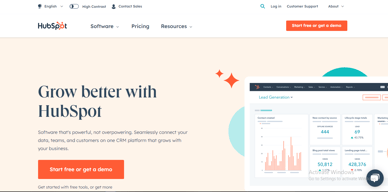

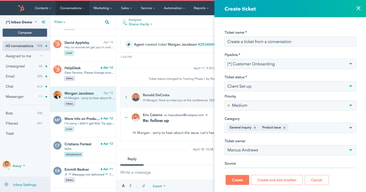
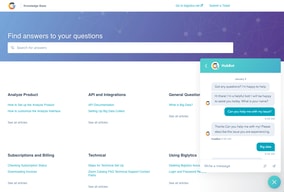
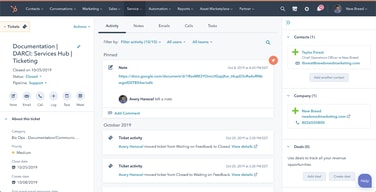





HubSpot Service Hub puts support tickets on the same contact record as marketing and sales, which is its entire reason to exist and a genuinely good one. The pricing needs care, though. At Starter you get ticketing and little else, and reviewers say so directly. The knowledge base, help desk workspace, and customer portal all require Professional at around $90 per seat, which also carries a mandatory onboarding fee.
- What it is: A help desk platform built on HubSpot’s Smart CRM, covering tickets, live chat, calling, knowledge base, and customer portals.
- Best for: Companies already running HubSpot for sales or marketing who want support on the same customer record.
- Pricing: Free for up to 2 users. Starter from $7 per seat, Professional from $90, Enterprise from $150 per month. Verified in July 2026.
- The honest catch: Professional requires a one-time onboarding fee of roughly $1,500, disclosed only in a footnote, and it is the tier where self-service actually begins.
What Is HubSpot Service Hub?

Service Hub is the customer support product in HubSpot’s suite, built on the same Smart CRM that powers Marketing Hub and Sales Hub. A support ticket sits on the same contact record as the marketing emails that person received and the deals they were part of, which is a genuine structural advantage over running a standalone help desk alongside a separate CRM.
The functional scope is conventional: ticket pipelines and routing, live chat, calling, canned snippets, and reporting at the lower tiers, with a knowledge base, help desk workspace, customer portal, and feedback surveys arriving higher up. HubSpot has added AI in the form of Agent Hub and the Breeze Customer Agent at Professional.
The independent rating is respectable on a modest sample: 4.4 out of 5 on Capterra across 190 reviews. The praise is about consolidation and ease of use; the criticism is almost entirely about price and about how little the Starter plan includes.
How HubSpot Service Hub Works
- Tickets on the CRM record. The central idea. Support history, marketing history, and deal history in one place, with no integration to maintain.
- Ticketing and routing. Pipelines, ticket routing, and conversation routing from Starter.
- Live chat and calling. Both included at Starter, where the notable upgrade is removing HubSpot branding from live chat.
- Knowledge base and customer portal. Self-service, arriving at Professional. This is the feature that reduces ticket volume, and therefore the one with the clearest economic case.
- Help Desk Workspace and Agent Hub. A dedicated agent interface plus AI-assisted resolution, also Professional.
- Enterprise controls. Conditional SLAs, skill-based routing, and customer journey analytics at the top tier.
HubSpot Service Hub Pricing
Four tiers, with a large step in the middle. Figures verified on HubSpot’s Service Hub pricing page in July 2026. HubSpot localizes currency, and the euro figures shown to European visitors correspond numerically to its dollar pricing.

| Plan | Per seat/mo | Credits | Mandatory onboarding | Key additions |
|---|---|---|---|---|
| Free | $0 | — | None | Up to 2 users, free service tools alongside marketing, sales, content and data tools |
| Starter | From $7 (list $20) | 500 | None | Ticket pipelines and routing, live chat without HubSpot branding, calling, canned snippets, conversation routing, reporting dashboard |
| Professional | From $90 (list $100) | 3,000 | ~$1,500 one-time | Agent Hub, Breeze Customer Agent, Help Desk Workspace, customer success workspace, knowledge base, customer portal, feedback surveys |
| Enterprise | From $150 | 5,000 | Higher one-time fee | Conditional SLAs, customer journey analytics, skill-based routing, AI transcript enrichment |
The details that decide the real cost:
- Starter is ticketing, and reviewers say so. Capterra reviewers on the Starter plan report that “ticketing was pretty much the only task” available to them. That matches the plan contents exactly: no knowledge base, no customer portal, no help desk workspace.
- Self-service starts at Professional. A knowledge base is the highest-leverage feature in any help desk, because deflected tickets are the cheapest tickets. Putting it at $90 per seat means the tier that actually reduces your support cost is thirteen times the entry price.
- Professional carries a mandatory onboarding fee. HubSpot’s own page footnotes a required one-time fee of roughly $1,500 at Professional, with a higher figure at Enterprise. Any comparison that omits it understates first-year cost.
- The $7 Starter price is promotional. List price is $20 per seat, so model renewals at the higher figure.
- AI runs on credits. 500 at Starter, 3,000 at Professional, 5,000 at Enterprise, metered on top of seats.
- Free live chat carries HubSpot branding. Removing it is one of the headline reasons to move from Free to Starter.
Who Should Use HubSpot Service Hub
- Existing HubSpot customers. The clearest and, honestly, close to the only compelling case. Support on the same record as sales and marketing genuinely removes integration work.
- Small teams needing basic ticketing. Free for two users, or Starter for structured pipelines, is reasonable value if ticketing is all you need.
- Companies where support informs revenue. Seeing a customer’s marketing and deal history while handling their ticket is a real advantage for account management.
- Teams that will use the AI layer. Agent Hub and Breeze at Professional are competitive with what Zendesk offers.
It fits poorly for standalone support teams not otherwise using HubSpot, where Freshdesk and Zoho Desk deliver more help desk for less, for small teams needing a knowledge base, since that alone forces a thirteen-fold price jump, and for cost-sensitive organizations, where the onboarding fee compounds an already high per-seat price.
Honest Pros and Cons
Strengths
- One record across marketing, sales, and support. The genuine architectural advantage, and difficult to replicate by integrating separate tools.
- A free tier that works. Two users with real service tools, no card required.
- Starter is inexpensive for ticketing. At the promotional $7 per seat it is cheaper than most dedicated help desks.
- Easy to adopt. Consistently praised, particularly by teams already on HubSpot.
- Capable AI at Professional. Agent Hub and Breeze Customer Agent are credible against Zendesk’s equivalents.
- Large partner ecosystem. Extensive documentation and a deep pool of implementation help.
Limitations
- Starter is ticketing only. Reviewers state this plainly, and the plan contents confirm it.
- The knowledge base is gated to Professional. The single most consequential gap, since self-service is what reduces support cost.
- A mandatory onboarding fee at Professional. Roughly $1,500, disclosed in a footnote rather than the price.
- A thirteen-fold jump from Starter to Professional. $7 to $90 per seat is among the steepest steps in this category.
- Price is the dominant complaint. Reviewers describe it as high against dedicated chat and help desk tools.
- Dashboard performance. Slow loading is reported by some reviewers.
- A modest review base. 190 Capterra reviews is thin next to Zendesk’s 4,000-plus.
HubSpot Service Hub Alternatives and How It Compares
- Zendesk Support Suite is the enterprise incumbent, with far greater depth and its own gating problem, since chat and knowledge base start at $55 per agent.
- Freshdesk is typically cheaper at comparable capability and offers a free tier for small teams.
- Zoho Desk substantially undercuts both and is the value pick, especially inside the Zoho ecosystem.
- Help Scout suits small teams wanting an email-first, human experience without enterprise complexity.
- Intercom competes on messaging-led support and AI resolution at comparable cost.
For a broader survey see our guide to the best help desk software.
The Verdict
HubSpot Service Hub makes sense as part of a decision you have already made. If your marketing and sales run on HubSpot, putting support on the same contact record is worth real money in avoided integration work and better context for agents, and the 4.4 Capterra rating reflects teams who get that benefit.
As a standalone help desk it is harder to justify. Starter at $7 gives you ticketing and, in reviewers’ own words, little else. The knowledge base, customer portal, and help desk workspace, the features that actually reduce support volume, all require Professional at around $90 per seat plus a mandatory onboarding fee of roughly $1,500. At that point you are comparing against Zendesk, Freshdesk, and Zoho Desk on their terms, and Service Hub is not obviously winning.
The practical test is simple. If you already pay HubSpot, price Service Hub as an addition to a platform you use and it is usually a sound choice. If you do not, price it honestly at Professional including onboarding, compare it against Zoho Desk and Freshdesk, and be prepared for the answer to be no. Either way, note that self-service starts at Professional, because that single fact determines whether the entry price is relevant to you at all.
FAQ
How much does HubSpot Service Hub cost in 2026?
Free for up to 2 users. Starter is promotionally priced from about $7 per seat per month against a $20 list price, Professional from about $90, and Enterprise from about $150. Professional additionally requires a one-time onboarding fee of roughly $1,500, with a higher fee at Enterprise. AI features consume HubSpot Credits, allocated per tier.
Does the Starter plan include a knowledge base?
No. Starter covers ticket pipelines and routing, live chat without HubSpot branding, calling, canned snippets, conversation routing, and a reporting dashboard. The knowledge base, customer portal, help desk workspace, and customer feedback surveys all require the Professional plan. Capterra reviewers on Starter describe ticketing as essentially the only capability available.
Does HubSpot charge an onboarding fee for Service Hub?
Yes, on the higher tiers. HubSpot’s pricing page footnotes a required one-time onboarding fee of roughly $1,500 for Service Hub Professional, with a larger fee at Enterprise. These are mandatory and additional to the per-seat subscription, and they are frequently omitted from comparison articles.
Is HubSpot Service Hub worth it if I do not use HubSpot already?
Usually not. Its main advantage is sharing one customer record with HubSpot’s marketing and sales products, which is irrelevant if you use neither. As a standalone help desk at Professional pricing plus onboarding, Freshdesk and Zoho Desk generally deliver more capability for less money.
What is HubSpot Service Hub best for?
Companies already running HubSpot for marketing or sales that want support tickets on the same customer record, with full history visible to agents. It is strongest as an extension of an existing HubSpot investment rather than as a help desk chosen on its own merits.

Compare HubSpot Service Hub with other popular tools in the same category.
In this tool, I like the live chat, workflow, etc. We can see automatically tickets from the chats. This tool helps to save a lot of time.
We are facing some issues with tickets, It doesn't reopen.
We can create many templates on this tool, This is easy to use a landing page, emailer, etc.
HubSpot allows me to start my day with the scheduled tasks that I deemed important or time-sensitive. This is customizable by myself and when running through the tasks it is simple to get to the next step. All our Clients are also in one place with all relevant history and can be broken out by emails, tasks, notes, calls, etc. Support Tickets are also a breeze, you can create pipelines and edit the properties to identify and track for analytics.
What do I dislike...I haven't found anything yet. Their Support is also a work of art and we refer to it within our company as goals!
We are solving Knowledge Base problems, as we use HubSpot to build our knowledge base from support and assign it to certain categories and tags. The benefits are endless, you can create email templates, snippets to save time for emails and chats. Seriously, its slick!
The amount of information on one ticket. you can also add notes for the next person working on the ticket
sometimes does drop and we can't access information nor email
We are helping customers with refunds, quick and easy to use. all information in one place

Creating a Knowldge base trough Hubspot was very easy and intuitive. Subtitle that offers a short answer to your question is such a clever idea to help your clients find answers and it also helps search engines, which is very useful. Categories and subcategories are also helpful and allows you to better understand which topics are connected while creating your knowledge base. Adding icons to your categories makes user experience better and makes the page personalized.
I don't like the fact that you cannot just delete a category if there are still articles inside, and that the category only shows up when there is an article inside. I understand why is that, since every article needs a category, but sometimes you just want to see all categories laid out on your screen, even though you don't have articles ready for each one.
HubSpot Service Hub helped me set up a knowledge base. At first I thought that it was just going to be a page for clients to find the answers they need, but soon after our team started using it aswell, so our service became more standardized.
The ability to assign the ticket to a team and at the same time keep the ticket owner unchanged. The ability to view tickets according to their status in columns. The ability to create a custom view and get back to general view in just one click.
Indeed, reporting takes a few minutes to reflect what we have done. So I need to wait if there is any change on tickets. It is just this point that I have in my mind.
We handle tickets quickly, increasing customer satisfaction by replying to customers once we receive a ticket. Ticket automation and getting notifications sent to team members for each action on their tickets.
We love the option for an automatic feedback survey
I don't have any particular reason, all good so far
easy-to-use CRM software
Auto Task creation and reminder Email Template Customer support is helpful. David went over and beyond, he knows what hes doing and gave an answer immediately.
non so far, everything is okay. will feedback if encounter a problem
Pricing, and David is so helpful
Without dragging here and there, all the options are easily available on the screen. More options/categories are available Report fetching is much easy
Creating template is sometime a challenge here
We've every detail of the customer on the same screen Communication with customer is pretty simple.
That there are many business tools to keep you and your team organized and it is an easy space with lots of support and training to keep on task and learning.
There are inbox features such as star or mark an email important that is missing.
Our customer flow and support with the use of the conversations and tickets help to keep us organized and knowledgeable.
The capabilities HubSpot has for our business. We use it for nearly everything and are already migrating off other systems to utilize Hubspot for them.
Learning curve of navigation but once you learn it's amazing.
E-mail organization, saving tech resources by not having to build out our own services (live chat, etc.)
Simple...easy to use. Great. So much better than Salesforce
Not much...Hubspot could be cheaper, but it's still cheaper than alternatives
Deal tracking. Service request assignment
The knowledge base is simple editing and publishing and its integration into our website.
The design of the web is old fashion. I would love to see more colors.
Organize and manage the customer's information, communication, and deals.
All in one view of customers, support tickets, invoices and activities.
Flexibility of exporting fields/reports and lack of integration with Microsoft DevOps.
Support ticketing including escalations with other departments to resolve issues quickly and efficiently.
I like the integration between different contact types in a way that is accessible from any screen you're in.
I dislike the search feature - it rarely pulls up exactly what I'm look for or related information.
I solve customer issues mostly. I am able to leave service notes and transfer contacts to team members easily.

The CRM allows my team to use less emails, phone calls and messages to find answers among customers. It is easy to search - much easier than Outlook and the update speed is phenomenal.
The automation can get a little tricky without extensive training. It is easy to get lost in what you are trying to build and if you haven't gone through Onboarding can get very confusing.
One stop answers for our customers. More transparent vision into our customer accounts between CS and Sales. Allowing employees to be out of office with little disruption to the value stream
I love that everything is all in one place and that I dont have to use multiple platforms!
I cant pinpoint a dislike! There really isn't much that I would change!
Having to use multiple platforms whereas everything is all in one place in hubspot!
I love how simple and speedy we can update the status of a ticket.
I wish the knowledge base was more customisable.
We use this to matchmake customers with a network of Mentors and this process has been simplified largely by the ticket pipelines.
If you are trying to improve your company's customer service profile, then HubSpot Service Hub is a great place to start. The knowledge base and feedback survey tools are very organized and easy to use!
Nothing to note! The tools HubSpot has built are amazing and will help you go above and beyond for your customers.
We are a small company with only a few customer service agents. The knowledge base helps us mitigate the call/email/chat volume so we can focus on growing our business.
I like the chat feature to communicate with the support team. They always offer quick and in-depth responses. Not only do they provide answers to your questions but complete solutions, including building workflows, forms, and examples for me.
I don't have any dislikes necessarily - the only downside is when chat is offline, which is very rare.
For us, we use a lot of the features in HubSpot and are learning new features all of the time. We have utilized the support team to assist us in exploring the features and troubleshooting our existing setup.
The automation and ease of implementing quantitative metrics around ticketing, knowledgebase, etc. Hubspot makes it clear how to support my customers and scale my support team.
I find the number of templates for knowledge base articles limited. Ideally, I would like a knowledge base that resembled Hubspot's, with the ability to create dynamic tables of contents.
Before Hubspot, we just used a dedicated support email address. Nothing was really tracked, and support team members often weren't sure whether someone else had already resolved a customer's problem. With hubspot, now it's clear exactly what needs to be done, who's doing it, and how well it's been done. With CSATs implemented, we can understand clearly how our customers value our service.
Hubspot is the best Customer Relationship Management System I've ever known. Being in the industry for years, its features are remarkable. Its customer service function is my favorite feature of Hubspot. The timely and equal assignment of email to numerous team members makes our work efficient and effective. It helps us to focus on all of our emails and to make sure everything is organize. The Templates and Snippets also makes us reply in a faster way. The Tickets functions also helps us know if all of our emails are answered and resolved.
As of now, I don't see anything that I don't like in Hubspot. Everything is working great.
Hubspot is efficient and effective CRM. I did not encounter any problem with Hubspot and the price we pay is worth it. The Analytics Report makes us see how productive we are in solving our clients problems and answering their inquiries.
Hubspot is the perfect CRM in my opinion. Not only is the staff incredible, but the product they offer cannot be compared. Creating a seamless experience for your staff & your customers is a breeze, but to top it off, everything is completely customizable to fit your business perfect. I can't rave about them enough; this is the best decision our business has made.
There isn't much to dislike to be transparent. Probably the only thing I would change is a reduced price. While the product is worth it, it can make it a large expense for a smaller business to take on. Which is a shame, because it is such an amazing thing to have in your arsenal.
Where to begin!? Not only is our record-keeping one trillion times better, but automated nearly everything we do has helped us work smarter & reduce errors. We can communicate with our team & our customers in a more efficient way & improve our customers experience from beginning to end like never before.
HubSpot's live chat messenger, shared inbox, and fantastic Knowledge Base builder makes delivering a great CX easy. The automation via workflows is also invaluable as it saves our team precious time when scheduling meetings and delivering emails (followups and surveys, etc)
There are no downsides as of yet! We're still building out everything that we need and want to allow us to deliver what our customers are asking for - timely and helpful customer support—both preemptive and retroactive.
The platform we used previously had very limited knowledge base building tools and no ticketing system. Both of these issues have been solved by HubSpot and are much more powerful than we'd originally realized.

The HubSpot Knowledge Base Software is an incredible tool for organizing documentation and is effective in eliminating time spent on back-and-forth conversations. There are several useful tools for customization, measuring the impact of the page content, and facilitating in allowing our client service team to spend less time hunting down answers to questions while troubleshooting tickets through our 3 channels of communication.
Nothing was disliked great software and would highly recommend it.
The problem solved is communication and access to information allowing our client service representatives to do their job effectively. The Knowledge-Based Software allows for our support channels to be streamlined adding benefits to efficiency and customer relations.
The NPS survey is what I liked the most! The bucketed responses based on the number scale are way better than guessing which ones are detractors, etc.
I felt like the custom survey feature lacks more "freedom" in basically customizing the survey that one wants. I think adding some more customization elements would give users the freedom that they want in terms of customizing their surveys (Like in the NPS survey, there's a recurring survey send feature that's not in the custom survey)
We love to see our clients give us constructive feedback through the Service Hub, which in the CSAT surveys it seems to have taken effect (Responses went up 10x our previous rate)! We'd love to see the same result (and more!) in the upcoming NPS surveys that we'll launch
I enjoy the Knowledge Base resource because we can write and edit Q&A quickly and easily. Then, we can organize them into categories in a way that makes more sense to our users and customize the template even without a designer to help us.
We should be able to change the text question in the placeholder of the search field. That's the feature I miss the most in the Knowledge Base, so we could customize it even better.
With the Knowledge Base we are giving our customers valuable information, saving time of our operators while helping our customers solve their problems without human interaction.

HubSpot's Service hub is a mind-blowing tool. The best part about HubSpot is how easy it is to use the amazing features. Literally, everything one wishes to achieve with HubSpot can actually be done. That is the level of planning the team has worked through.
At times, when one's slightly stuck with something, immediate assistance would be of great help. However, the chat seems to disabled at times and a response 24 hours later, via email, might not be the best option. Nevertheless, their support team is also excellent!
Currently, we're using the Knowledge Base to address customer queries, proactively. We're also using different workflows to ensure we're on track with all queries and use the Ticketing software to handle user requests more efficiently.
HubSpot Service Hub has made such a large impact on our company that I truly don't know what we did without it. It has everything we need and more! The automation saves so much time and is crucial to our company's growth. HubSpot makes communication with clients and coworkers a breeze and keeps everyone in the company organized and on the same page. Customer service is excellent and is able to answer any question I may have!
Honestly there isn't anything I dislike about HubSpot! The few features that I would look for in the software have already been suggested in the HubSpot community and seem to be in the works.
There are a lot of moving parts in our company and everyone's hands are in everything, so having this software be such a central part of our operation is amazing. I really like the Knowledgebase that HubSpot has built for FAQ's and if the answer isn't there, their customer support is always helpful and has always been great with helping me solve problems.
Hubspot has been adding features and capes over the years. I originally just used them because they were the best free place to dump our Salesforce data when we left them for operational and cost-saving reasons. At that time, Hubspot was good for free. Now, it's great for free, offering you a wide cross-section of role capabilities all in one spot, for free. Did I mention the free part?
At the free level, it's hard to complain. I originally complained here because you could only create a contact that was associated with an email, so if you didn't have a person's email, it was hard to make them a contact. Now this problem is done away with, and you can add a contact without that info and add later.
I use it for reaching out to contacts using templates so they get the same, formatted information quickly (for me). I use it to know when contacts have opened emails I've sent. They have a decent Outlook add-on that can keep track of email opens when you send from Outlook and even add a contact you email from Outlook if you don't already have them in Hubspot
I am responsible for Ticket management, communication with our users. I find good reports, dashboards. Also use knowledg base.
I would not say dislike, but report creation is still a little bit tricky part for me.
easy to commnicate with users, administer the tickets and customer,everything in one place, including Knowledge base