

Unclaimed: Are you working at HubSpot Service Hub?
HubSpot Service Hub Reviews: 4.4/5 — Solid Choice
Hubspot, a giant in the digital marketing category, offers a wide range of software solutions with comprehensive free tools. This makes expanding your toolkit across sales, operations, marketing, etc., very easy. Its CRM system is at the heart of HubSpot’s offering. The platform makes it an excellent option for managing customers and progressing them through your funnel. As a result, Hubspot’s Service Hub’s an incredible range of features, including team management tools available via higher plans and real-time reporting.

| Capabilities |
AI
API
|
|---|---|
| Segment |
Small Business
Mid Market
Enterprise
|
| Deployment | Cloud / SaaS / Web-Based, Mobile Android, Mobile iPad, Mobile iPhone |
| Support | 24/7 (Live rep), Chat, Email/Help Desk, FAQs/Forum, Knowledge Base, Phone Support |
| Training | Documentation |
| Languages | English |
HubSpot Service Hub Pros and Cons
- Extendable with a range of other Hubspot tools, many of which are free, including a CRM, as well as operations, marketing, and sales features.
- Hubspot focuses on CRM integration to produce great customer insights.
- You get access to powerful analytics.
- There’s a steep learning curve.
- The complex pricing tiers are challenging to navigate.

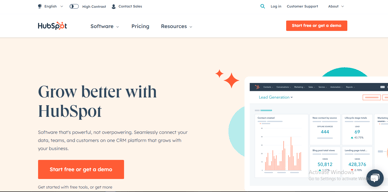

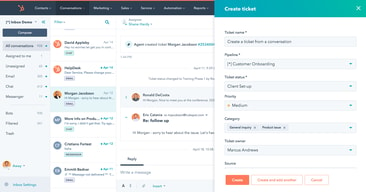
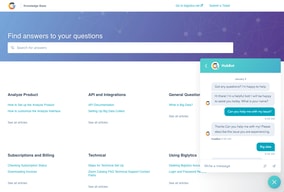
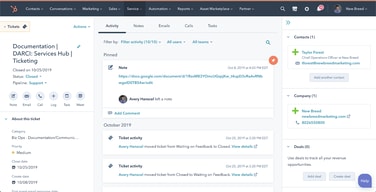






HubSpot Service Hub puts support tickets on the same contact record as marketing and sales, which is its entire reason to exist and a genuinely good one. The pricing needs care, though. At Starter you get ticketing and little else, and reviewers say so directly. The knowledge base, help desk workspace, and customer portal all require Professional at around $90 per seat, which also carries a mandatory onboarding fee.
- What it is: A help desk platform built on HubSpot’s Smart CRM, covering tickets, live chat, calling, knowledge base, and customer portals.
- Best for: Companies already running HubSpot for sales or marketing who want support on the same customer record.
- Pricing: Free for up to 2 users. Starter from $7 per seat, Professional from $90, Enterprise from $150 per month. Verified in July 2026.
- The honest catch: Professional requires a one-time onboarding fee of roughly $1,500, disclosed only in a footnote, and it is the tier where self-service actually begins.
What Is HubSpot Service Hub?

Service Hub is the customer support product in HubSpot’s suite, built on the same Smart CRM that powers Marketing Hub and Sales Hub. A support ticket sits on the same contact record as the marketing emails that person received and the deals they were part of, which is a genuine structural advantage over running a standalone help desk alongside a separate CRM.
The functional scope is conventional: ticket pipelines and routing, live chat, calling, canned snippets, and reporting at the lower tiers, with a knowledge base, help desk workspace, customer portal, and feedback surveys arriving higher up. HubSpot has added AI in the form of Agent Hub and the Breeze Customer Agent at Professional.
The independent rating is respectable on a modest sample: 4.4 out of 5 on Capterra across 190 reviews. The praise is about consolidation and ease of use; the criticism is almost entirely about price and about how little the Starter plan includes.
How HubSpot Service Hub Works
- Tickets on the CRM record. The central idea. Support history, marketing history, and deal history in one place, with no integration to maintain.
- Ticketing and routing. Pipelines, ticket routing, and conversation routing from Starter.
- Live chat and calling. Both included at Starter, where the notable upgrade is removing HubSpot branding from live chat.
- Knowledge base and customer portal. Self-service, arriving at Professional. This is the feature that reduces ticket volume, and therefore the one with the clearest economic case.
- Help Desk Workspace and Agent Hub. A dedicated agent interface plus AI-assisted resolution, also Professional.
- Enterprise controls. Conditional SLAs, skill-based routing, and customer journey analytics at the top tier.
HubSpot Service Hub Pricing
Four tiers, with a large step in the middle. Figures verified on HubSpot’s Service Hub pricing page in July 2026. HubSpot localizes currency, and the euro figures shown to European visitors correspond numerically to its dollar pricing.

| Plan | Per seat/mo | Credits | Mandatory onboarding | Key additions |
|---|---|---|---|---|
| Free | $0 | — | None | Up to 2 users, free service tools alongside marketing, sales, content and data tools |
| Starter | From $7 (list $20) | 500 | None | Ticket pipelines and routing, live chat without HubSpot branding, calling, canned snippets, conversation routing, reporting dashboard |
| Professional | From $90 (list $100) | 3,000 | ~$1,500 one-time | Agent Hub, Breeze Customer Agent, Help Desk Workspace, customer success workspace, knowledge base, customer portal, feedback surveys |
| Enterprise | From $150 | 5,000 | Higher one-time fee | Conditional SLAs, customer journey analytics, skill-based routing, AI transcript enrichment |
The details that decide the real cost:
- Starter is ticketing, and reviewers say so. Capterra reviewers on the Starter plan report that “ticketing was pretty much the only task” available to them. That matches the plan contents exactly: no knowledge base, no customer portal, no help desk workspace.
- Self-service starts at Professional. A knowledge base is the highest-leverage feature in any help desk, because deflected tickets are the cheapest tickets. Putting it at $90 per seat means the tier that actually reduces your support cost is thirteen times the entry price.
- Professional carries a mandatory onboarding fee. HubSpot’s own page footnotes a required one-time fee of roughly $1,500 at Professional, with a higher figure at Enterprise. Any comparison that omits it understates first-year cost.
- The $7 Starter price is promotional. List price is $20 per seat, so model renewals at the higher figure.
- AI runs on credits. 500 at Starter, 3,000 at Professional, 5,000 at Enterprise, metered on top of seats.
- Free live chat carries HubSpot branding. Removing it is one of the headline reasons to move from Free to Starter.
Who Should Use HubSpot Service Hub
- Existing HubSpot customers. The clearest and, honestly, close to the only compelling case. Support on the same record as sales and marketing genuinely removes integration work.
- Small teams needing basic ticketing. Free for two users, or Starter for structured pipelines, is reasonable value if ticketing is all you need.
- Companies where support informs revenue. Seeing a customer’s marketing and deal history while handling their ticket is a real advantage for account management.
- Teams that will use the AI layer. Agent Hub and Breeze at Professional are competitive with what Zendesk offers.
It fits poorly for standalone support teams not otherwise using HubSpot, where Freshdesk and Zoho Desk deliver more help desk for less, for small teams needing a knowledge base, since that alone forces a thirteen-fold price jump, and for cost-sensitive organizations, where the onboarding fee compounds an already high per-seat price.
Honest Pros and Cons
Strengths
- One record across marketing, sales, and support. The genuine architectural advantage, and difficult to replicate by integrating separate tools.
- A free tier that works. Two users with real service tools, no card required.
- Starter is inexpensive for ticketing. At the promotional $7 per seat it is cheaper than most dedicated help desks.
- Easy to adopt. Consistently praised, particularly by teams already on HubSpot.
- Capable AI at Professional. Agent Hub and Breeze Customer Agent are credible against Zendesk’s equivalents.
- Large partner ecosystem. Extensive documentation and a deep pool of implementation help.
Limitations
- Starter is ticketing only. Reviewers state this plainly, and the plan contents confirm it.
- The knowledge base is gated to Professional. The single most consequential gap, since self-service is what reduces support cost.
- A mandatory onboarding fee at Professional. Roughly $1,500, disclosed in a footnote rather than the price.
- A thirteen-fold jump from Starter to Professional. $7 to $90 per seat is among the steepest steps in this category.
- Price is the dominant complaint. Reviewers describe it as high against dedicated chat and help desk tools.
- Dashboard performance. Slow loading is reported by some reviewers.
- A modest review base. 190 Capterra reviews is thin next to Zendesk’s 4,000-plus.
HubSpot Service Hub Alternatives and How It Compares
- Zendesk Support Suite is the enterprise incumbent, with far greater depth and its own gating problem, since chat and knowledge base start at $55 per agent.
- Freshdesk is typically cheaper at comparable capability and offers a free tier for small teams.
- Zoho Desk substantially undercuts both and is the value pick, especially inside the Zoho ecosystem.
- Help Scout suits small teams wanting an email-first, human experience without enterprise complexity.
- Intercom competes on messaging-led support and AI resolution at comparable cost.
For a broader survey see our guide to the best help desk software.
The Verdict
HubSpot Service Hub makes sense as part of a decision you have already made. If your marketing and sales run on HubSpot, putting support on the same contact record is worth real money in avoided integration work and better context for agents, and the 4.4 Capterra rating reflects teams who get that benefit.
As a standalone help desk it is harder to justify. Starter at $7 gives you ticketing and, in reviewers’ own words, little else. The knowledge base, customer portal, and help desk workspace, the features that actually reduce support volume, all require Professional at around $90 per seat plus a mandatory onboarding fee of roughly $1,500. At that point you are comparing against Zendesk, Freshdesk, and Zoho Desk on their terms, and Service Hub is not obviously winning.
The practical test is simple. If you already pay HubSpot, price Service Hub as an addition to a platform you use and it is usually a sound choice. If you do not, price it honestly at Professional including onboarding, compare it against Zoho Desk and Freshdesk, and be prepared for the answer to be no. Either way, note that self-service starts at Professional, because that single fact determines whether the entry price is relevant to you at all.
FAQ
How much does HubSpot Service Hub cost in 2026?
Free for up to 2 users. Starter is promotionally priced from about $7 per seat per month against a $20 list price, Professional from about $90, and Enterprise from about $150. Professional additionally requires a one-time onboarding fee of roughly $1,500, with a higher fee at Enterprise. AI features consume HubSpot Credits, allocated per tier.
Does the Starter plan include a knowledge base?
No. Starter covers ticket pipelines and routing, live chat without HubSpot branding, calling, canned snippets, conversation routing, and a reporting dashboard. The knowledge base, customer portal, help desk workspace, and customer feedback surveys all require the Professional plan. Capterra reviewers on Starter describe ticketing as essentially the only capability available.
Does HubSpot charge an onboarding fee for Service Hub?
Yes, on the higher tiers. HubSpot’s pricing page footnotes a required one-time onboarding fee of roughly $1,500 for Service Hub Professional, with a larger fee at Enterprise. These are mandatory and additional to the per-seat subscription, and they are frequently omitted from comparison articles.
Is HubSpot Service Hub worth it if I do not use HubSpot already?
Usually not. Its main advantage is sharing one customer record with HubSpot’s marketing and sales products, which is irrelevant if you use neither. As a standalone help desk at Professional pricing plus onboarding, Freshdesk and Zoho Desk generally deliver more capability for less money.
What is HubSpot Service Hub best for?
Companies already running HubSpot for marketing or sales that want support tickets on the same customer record, with full history visible to agents. It is strongest as an extension of an existing HubSpot investment rather than as a help desk chosen on its own merits.

Compare HubSpot Service Hub with other popular tools in the same category.

We use the Knowledge Base tool for our website Help Center, and it provides just the right amount of flexibility with linking options, helpful screencaps and article organization.
The Knowledge Base tool, in particular, can feel limiting at times but it's best to keep in mind that those limitations are in place for a reason. You could easily circumnavigate them by using another section of the platform, such as the Marketing Hub, if you're looking for other ways to illustrate your Knowledge Base articles.
It's a great resource, especially with our recent rebrand and platform merger requiring a single Help Center - the ability to illustrate helpful content but organize it appropriately, by platform, has been invaluable.

Servicehub is the same familiar hubspot interface, so the learning curve is basically non-existant. It's super easy to crank out great articles for a knowledgebase.
The ticketing system is a little low frills, but it's nice that it's so integrated into the CRM as a key module. That makes it easy to see a client has open issues, or is having more problems that most.
Our clients need a basic way to submit service tickets and it's nice for our biz dev folks to be able to keep track of their clients and any trouble they're having. So servicehub helps us all stay looped in on how our clients are doing without much additional effort.
I like the tight integration with the CRM. Automation is also very easy in HubSpot.
Supporting multiple brands and products is not as easy as I would like. For example, I would like to have a knowledge base for each product.
We needed an enterprise system to support our customer support and customer success teams
Being able to connect with multiple clients at once using the sequence tool.
I like thought of using the dashboard, but there needs to be further customization with how many tables, charts, etc you can use.
Time management, HubSpot has made me much more efficient in dealing with my day to day work activities.
Hubspot allows us to automate a large portion our business and their customer support team is readily available if ever needed!
At times, there have been feature requests are not fulfilled and there have been bugs in some of the available features.
It's helping to keep our business organized and our customers happy!
Integration with email system and phone system
Does ticket queue does not auto refresh quickly
ticket management and the ability to view emails and text messages all in one place
Automation and ease of use have been the most significant aspects but to have everything centralised was the game changer
At times parts for automation can be a little convoluted but we understand that this is our process as well
It has been a timer saver for our business and enabled us to be more efficient and gain better results in the areas that we excel at
You can do everything in one place and link all aspects of the business together!
SO much to learn that it gets overwhelming sometimes.
Streamlining and centralizing workflows and linking all aspects of the business together (customer lists, social media posts, etc.)
I like the versatility. You can do tons of things using HubSpot!
None so far. I am a happy HubSpot user right now.
It's solving how I create, store and access all of my data.
Hubspot is really easy to use. It's intuitive and I can write content easily with all of the modifications to improve the visuals of my page. I can also schedule social media posts quickly and even track their performances thoroughly.
I wish we could have an export option for social media performances (for both post and page-level)
None so far.
net promoter score, knowledge base, ticket handling and assignment, filters and custom properties, usable with workflows
the are few surveying tools, some limitations in ticket handling
we are helping customer to have every ticket in one place

I love how I can easily link photos, pages, files, etc. within articles with a few clicks of the button. No going between sites looking for the assets. Everything is in one spot, making my life insanely easy.
I feel as if there aren't a ton of options for designing a beautiful user experience.
Our team was notorious for digging through emails trying to find the standard company answer to common questions. With the knowledge base, I can easily create and update content and create efficiencies for my team and a better user experience for our customers.

Really good response and do not hesitate to call if necessary
Could be a little more hands-on with technicall issues
Data and putting together graphs
Tickets has helped us streamline our process and get the data we need to speed it up.
Limitations on ticket properties has held us back a bit.
Visibility and data analysis that have empowered our team to tailor better support materials.
Seeing the details on tickets to determine human error
Data is not always correct, but that is mostly manual errors
Determining major issues with haulers (MPUs, blocks, service interruptions) Helps us see what haulers need to work
Most helpful- Most topics are easily found by going page to page
Key words/terms are not always searchable in that results do not always generate for key words
Troubleshooting how-tos, which make my day to day problem solving much easier
It's very easy to use. I like being able to easily create and publish new articles, and format them in a way that looks great and is most helpful for our users to understand. It has been a huge help in our documentation and user knowledge base efforts. I also love the built-in analytics on user engagement with each post.
I wish there were more options for formatting "code" style text, e.g. javascript, html, etc to make it easier to read for technical users.
It's providing a company branded hub for all of our customers to answer their own questions. It eases the burden of our support team on answering FAQ's and it gives us feedback on which posts are the most read.
I enjoy how smooth and maneuverable HubSpot is and how organized it is.
So far I haven't had many issues with it outside of sometimes being logged out of my account unexpectedly.
HubSpot helps our company stay organized and helps us attend to our customer's issues swiftly.

It has all of the features we need to manage our onboarding process.
Can't really think of anything. We're still finding great features to use.
We're using it for onboarding and it's really helping us keep track of the overall health of all active implementations. We didn't have this kind of clarity prior to using HubSpot.
easy to use and easy to change views for showing productivity.
filters are a little hard to figure out.
keeping all salespeople honest on productivity. Shows how everyone is doing on correspondence.
I like the ease of setting up automated processes to help run our servicing initiatives. Hubspot makes it easy to collect, gather, and interpret feedback of clients
There are a few features that seem to make sense to have for any business that hasn't been implemented yet. I feel that if there was a quicker way to implement what the community is asking for, it would make the product better.
It's solving the problem of having all of our necessary service functions in one central place. It lets us have more accountability for our team and workflows which is greatly appreciated.
I like that I can create my own custom objects and track all related custom objects to the core contacts. I like that I can integrate my data warehouse to perform analytics.
I do not like that the contacts main thread can get long to read and get the highlights of contact engagements.
It is our main CRM platform and contains all of our relevant customer data.
I love this CRM the best out of all the other ones. I've used SalesForce, Zendesk, and many other CRMS in the past but this one is the best! The pipelines are easily distinguishable for different teams at the company.
One of the problems I have is that there's no grammar-check or auto-correct function, which would be very helpful in my everyday tasks.
HubSpot Service Hub continues to make my everyday work experience exquisite, as it makes it easier to be able to reach out to other departments with the palm of my hands.
1. Ticketing System 2. NPS surveys 3. Good collaboration between teams
1. No way for your customer to know when you respond on chat. There is no notification for them 2. Assignment rules need to improve 3. Reporting can improve
We are using it as a unified platform for Sales, Marketing and Customer Support. It helps in keeping customer information in one place for all teams

Having the service tickets linked within the CRM is amazing. One picture of all that is happening all in one place.
Confusing sometimes between the different types of tickets as to how the communication comes in and using SLA's but I trust this will become more clear as the feature grows.
Visibility is what it is solving for me. To see everything in one place and have it linked to different systems etc is very useful.
Again, it's very intuitive. I've never really come across any functionality that I wasn't able to think my way around. I don't believe I've ever reached out to customer support either - which is evidence of how intuitive it is!
Not much to dislike really but if I had to be critical I would say that it is designed with Sales Professionals in mind. There is a commercial aspect in my role (CSM) although I don't work in a sales role per se so I do find it wanting in some of the areas of managing relationships, stakeholder mapping, account planning, etc.
It's providing a service that I need and it benefits me in all of the ways I highlighted above.
Everything is intuitive, everything connects. If you think two parts should work together, or pull data from each other, they do. We've used the service hub for live chat for a year, and like it enough that we're moving email and phones over now.
We had a tough time with our initial integration with Netsuite. On onboarders at webstacks were amazing; our problems had as much to do with our own weird use of Netsuite as anything. That said, it was a problem getting that started, and there was a major repercussion where all of our users got duplicated with no real resolution. We got lost somewhere between Netsuite and Hubspot support.
We needed a live chat solution that worked with the somewhat inflexible SuiteCommerce software, and this fit the bill nicely. We're switching e-commerce platforms, and expect to use even more of Hubspot's features very soon.
It's interactive! We mainly use Hubspot for internal, client and, partner interactions. As a supervisor, it gives all the views that I want to see and it makes me more efficient - I don't have to use different tools to see our partner's information and communicate with them. It's a time saver!
I think it's on me. I haven't explored its analytics and reporting features. I just hope Hubspot can offer free training for some of our employees as most of our clients use Hubspot as their CRM. Could be better: Surveys for the clients - every time a client opts out of the marketing emails, the automatic surveys get blocked too. We'd love to see options to select specific communications that could be filtered on our clients' end.
It prevents us from using different tools to communicate. The ticketing system is also superb. It allows us to see who's accountable per action without the hassle.
I really believe it brings together a lot of information that makes visibility good to work quickly. Being able to rely on Google Chrome extensions also makes it easier for us to work and handle multitasking, like as chat and tickets. It facilitates real-time notifications, I really like it and use the feature every day, because that way you can lower my response SLA to serve my customer faster and have better results within the company. There are not many things to improve I see complete.
I believe that the visualization could be a little cleaner, being able to organize what I need from the client a little better, maybe a search tool with the keyword would make it easier. Sometimes some instabilities with opening tickets hinder us, but this is common in the system, but if there was a simpler way to fill the tickets by sectors and looking for automated information, it would make it easier to use.
As we work with physicians, this audience reaches everyone in the community, and they need rapid productivity with their patients, and being able to organize appointments and keep their records up to date makes it very easy for our care to be first-rate, HubSpot us it helps a lot to perform this task on a daily basis so that we are always ahead of our competitors. All kinds of problems with doctors' systems, many open requests, and with notifications, I can respond quickly without having to search for new requests manually. The benefits are for us in problem-solving and for the end customer who manages to be served quickly. So we are satisfied and customers have their problems solved too! We gained many recognitions for our tasks using the monitoring platform and analysis helps many managers and responsible to see the company's productivity in real time, alert us and always bring better results.
All information needed quickly accessible. Easy to call and emails customers just with one click. I use Customer contact info, call, emails. It is simpler to use
Only one thing - when I try to search for the customer with their contact number the system doesn't bring anything up. Improve contact number identification process.
Various customer queries; Customer identification; Contact customers. I personally do not. I am more productive because it is simple to use. Yes it did increase