

Unclaimed: Are you working at HubSpot Service Hub?
HubSpot Service Hub Reviews: 4.4/5 — Solid Choice
Hubspot, a giant in the digital marketing category, offers a wide range of software solutions with comprehensive free tools. This makes expanding your toolkit across sales, operations, marketing, etc., very easy. Its CRM system is at the heart of HubSpot’s offering. The platform makes it an excellent option for managing customers and progressing them through your funnel. As a result, Hubspot’s Service Hub’s an incredible range of features, including team management tools available via higher plans and real-time reporting.

| Capabilities |
AI
API
|
|---|---|
| Segment |
Small Business
Mid Market
Enterprise
|
| Deployment | Cloud / SaaS / Web-Based, Mobile Android, Mobile iPad, Mobile iPhone |
| Support | 24/7 (Live rep), Chat, Email/Help Desk, FAQs/Forum, Knowledge Base, Phone Support |
| Training | Documentation |
| Languages | English |
HubSpot Service Hub Pros and Cons
- Extendable with a range of other Hubspot tools, many of which are free, including a CRM, as well as operations, marketing, and sales features.
- Hubspot focuses on CRM integration to produce great customer insights.
- You get access to powerful analytics.
- There’s a steep learning curve.
- The complex pricing tiers are challenging to navigate.

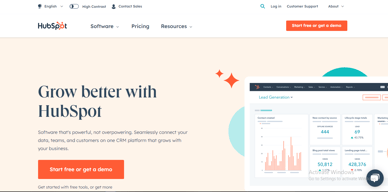

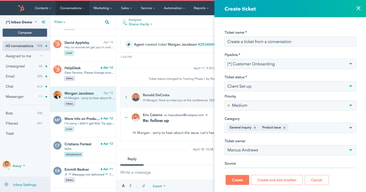
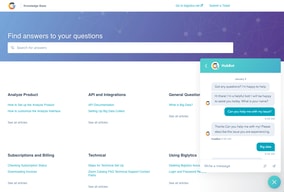
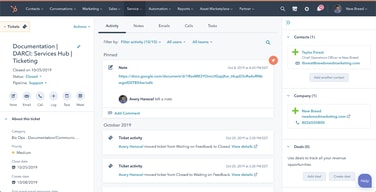





HubSpot Service Hub puts support tickets on the same contact record as marketing and sales, which is its entire reason to exist and a genuinely good one. The pricing needs care, though. At Starter you get ticketing and little else, and reviewers say so directly. The knowledge base, help desk workspace, and customer portal all require Professional at around $90 per seat, which also carries a mandatory onboarding fee.
- What it is: A help desk platform built on HubSpot’s Smart CRM, covering tickets, live chat, calling, knowledge base, and customer portals.
- Best for: Companies already running HubSpot for sales or marketing who want support on the same customer record.
- Pricing: Free for up to 2 users. Starter from $7 per seat, Professional from $90, Enterprise from $150 per month. Verified in July 2026.
- The honest catch: Professional requires a one-time onboarding fee of roughly $1,500, disclosed only in a footnote, and it is the tier where self-service actually begins.
What Is HubSpot Service Hub?

Service Hub is the customer support product in HubSpot’s suite, built on the same Smart CRM that powers Marketing Hub and Sales Hub. A support ticket sits on the same contact record as the marketing emails that person received and the deals they were part of, which is a genuine structural advantage over running a standalone help desk alongside a separate CRM.
The functional scope is conventional: ticket pipelines and routing, live chat, calling, canned snippets, and reporting at the lower tiers, with a knowledge base, help desk workspace, customer portal, and feedback surveys arriving higher up. HubSpot has added AI in the form of Agent Hub and the Breeze Customer Agent at Professional.
The independent rating is respectable on a modest sample: 4.4 out of 5 on Capterra across 190 reviews. The praise is about consolidation and ease of use; the criticism is almost entirely about price and about how little the Starter plan includes.
How HubSpot Service Hub Works
- Tickets on the CRM record. The central idea. Support history, marketing history, and deal history in one place, with no integration to maintain.
- Ticketing and routing. Pipelines, ticket routing, and conversation routing from Starter.
- Live chat and calling. Both included at Starter, where the notable upgrade is removing HubSpot branding from live chat.
- Knowledge base and customer portal. Self-service, arriving at Professional. This is the feature that reduces ticket volume, and therefore the one with the clearest economic case.
- Help Desk Workspace and Agent Hub. A dedicated agent interface plus AI-assisted resolution, also Professional.
- Enterprise controls. Conditional SLAs, skill-based routing, and customer journey analytics at the top tier.
HubSpot Service Hub Pricing
Four tiers, with a large step in the middle. Figures verified on HubSpot’s Service Hub pricing page in July 2026. HubSpot localizes currency, and the euro figures shown to European visitors correspond numerically to its dollar pricing.

| Plan | Per seat/mo | Credits | Mandatory onboarding | Key additions |
|---|---|---|---|---|
| Free | $0 | — | None | Up to 2 users, free service tools alongside marketing, sales, content and data tools |
| Starter | From $7 (list $20) | 500 | None | Ticket pipelines and routing, live chat without HubSpot branding, calling, canned snippets, conversation routing, reporting dashboard |
| Professional | From $90 (list $100) | 3,000 | ~$1,500 one-time | Agent Hub, Breeze Customer Agent, Help Desk Workspace, customer success workspace, knowledge base, customer portal, feedback surveys |
| Enterprise | From $150 | 5,000 | Higher one-time fee | Conditional SLAs, customer journey analytics, skill-based routing, AI transcript enrichment |
The details that decide the real cost:
- Starter is ticketing, and reviewers say so. Capterra reviewers on the Starter plan report that “ticketing was pretty much the only task” available to them. That matches the plan contents exactly: no knowledge base, no customer portal, no help desk workspace.
- Self-service starts at Professional. A knowledge base is the highest-leverage feature in any help desk, because deflected tickets are the cheapest tickets. Putting it at $90 per seat means the tier that actually reduces your support cost is thirteen times the entry price.
- Professional carries a mandatory onboarding fee. HubSpot’s own page footnotes a required one-time fee of roughly $1,500 at Professional, with a higher figure at Enterprise. Any comparison that omits it understates first-year cost.
- The $7 Starter price is promotional. List price is $20 per seat, so model renewals at the higher figure.
- AI runs on credits. 500 at Starter, 3,000 at Professional, 5,000 at Enterprise, metered on top of seats.
- Free live chat carries HubSpot branding. Removing it is one of the headline reasons to move from Free to Starter.
Who Should Use HubSpot Service Hub
- Existing HubSpot customers. The clearest and, honestly, close to the only compelling case. Support on the same record as sales and marketing genuinely removes integration work.
- Small teams needing basic ticketing. Free for two users, or Starter for structured pipelines, is reasonable value if ticketing is all you need.
- Companies where support informs revenue. Seeing a customer’s marketing and deal history while handling their ticket is a real advantage for account management.
- Teams that will use the AI layer. Agent Hub and Breeze at Professional are competitive with what Zendesk offers.
It fits poorly for standalone support teams not otherwise using HubSpot, where Freshdesk and Zoho Desk deliver more help desk for less, for small teams needing a knowledge base, since that alone forces a thirteen-fold price jump, and for cost-sensitive organizations, where the onboarding fee compounds an already high per-seat price.
Honest Pros and Cons
Strengths
- One record across marketing, sales, and support. The genuine architectural advantage, and difficult to replicate by integrating separate tools.
- A free tier that works. Two users with real service tools, no card required.
- Starter is inexpensive for ticketing. At the promotional $7 per seat it is cheaper than most dedicated help desks.
- Easy to adopt. Consistently praised, particularly by teams already on HubSpot.
- Capable AI at Professional. Agent Hub and Breeze Customer Agent are credible against Zendesk’s equivalents.
- Large partner ecosystem. Extensive documentation and a deep pool of implementation help.
Limitations
- Starter is ticketing only. Reviewers state this plainly, and the plan contents confirm it.
- The knowledge base is gated to Professional. The single most consequential gap, since self-service is what reduces support cost.
- A mandatory onboarding fee at Professional. Roughly $1,500, disclosed in a footnote rather than the price.
- A thirteen-fold jump from Starter to Professional. $7 to $90 per seat is among the steepest steps in this category.
- Price is the dominant complaint. Reviewers describe it as high against dedicated chat and help desk tools.
- Dashboard performance. Slow loading is reported by some reviewers.
- A modest review base. 190 Capterra reviews is thin next to Zendesk’s 4,000-plus.
HubSpot Service Hub Alternatives and How It Compares
- Zendesk Support Suite is the enterprise incumbent, with far greater depth and its own gating problem, since chat and knowledge base start at $55 per agent.
- Freshdesk is typically cheaper at comparable capability and offers a free tier for small teams.
- Zoho Desk substantially undercuts both and is the value pick, especially inside the Zoho ecosystem.
- Help Scout suits small teams wanting an email-first, human experience without enterprise complexity.
- Intercom competes on messaging-led support and AI resolution at comparable cost.
For a broader survey see our guide to the best help desk software.
The Verdict
HubSpot Service Hub makes sense as part of a decision you have already made. If your marketing and sales run on HubSpot, putting support on the same contact record is worth real money in avoided integration work and better context for agents, and the 4.4 Capterra rating reflects teams who get that benefit.
As a standalone help desk it is harder to justify. Starter at $7 gives you ticketing and, in reviewers’ own words, little else. The knowledge base, customer portal, and help desk workspace, the features that actually reduce support volume, all require Professional at around $90 per seat plus a mandatory onboarding fee of roughly $1,500. At that point you are comparing against Zendesk, Freshdesk, and Zoho Desk on their terms, and Service Hub is not obviously winning.
The practical test is simple. If you already pay HubSpot, price Service Hub as an addition to a platform you use and it is usually a sound choice. If you do not, price it honestly at Professional including onboarding, compare it against Zoho Desk and Freshdesk, and be prepared for the answer to be no. Either way, note that self-service starts at Professional, because that single fact determines whether the entry price is relevant to you at all.
FAQ
How much does HubSpot Service Hub cost in 2026?
Free for up to 2 users. Starter is promotionally priced from about $7 per seat per month against a $20 list price, Professional from about $90, and Enterprise from about $150. Professional additionally requires a one-time onboarding fee of roughly $1,500, with a higher fee at Enterprise. AI features consume HubSpot Credits, allocated per tier.
Does the Starter plan include a knowledge base?
No. Starter covers ticket pipelines and routing, live chat without HubSpot branding, calling, canned snippets, conversation routing, and a reporting dashboard. The knowledge base, customer portal, help desk workspace, and customer feedback surveys all require the Professional plan. Capterra reviewers on Starter describe ticketing as essentially the only capability available.
Does HubSpot charge an onboarding fee for Service Hub?
Yes, on the higher tiers. HubSpot’s pricing page footnotes a required one-time onboarding fee of roughly $1,500 for Service Hub Professional, with a larger fee at Enterprise. These are mandatory and additional to the per-seat subscription, and they are frequently omitted from comparison articles.
Is HubSpot Service Hub worth it if I do not use HubSpot already?
Usually not. Its main advantage is sharing one customer record with HubSpot’s marketing and sales products, which is irrelevant if you use neither. As a standalone help desk at Professional pricing plus onboarding, Freshdesk and Zoho Desk generally deliver more capability for less money.
What is HubSpot Service Hub best for?
Companies already running HubSpot for marketing or sales that want support tickets on the same customer record, with full history visible to agents. It is strongest as an extension of an existing HubSpot investment rather than as a help desk chosen on its own merits.

Compare HubSpot Service Hub with other popular tools in the same category.
HubSpot has the best customer service - hands down. It is easy to reach them via phone, email, or chat. Their knowledge base is one of the most robust I've seen, yet it is still straightforward to navigate.
There is absolutely nothing I dislike about HubSpot Service Hub!
HubSpot Service Hub makes it extremely easy to get the answers I need when I need them.
The best part is there dashboard and analytics part, we can easy compare our team work in one click.it help us to see productivity level of every employee. The automation level of hubspot is too good as compared to there competitors.
I don't think there is any point to dislike . I don't think there is any point to dislike the hubspot Please increase your security level. The contact page .
To automate the email brust. Simple navigation ui. Easy setup configuration. Dashboard or analytics comparison. Easy deals creation. Easy conversation handling.
I really like the collaborativeness of it and the insight I have to other people working alongside be. Also the user interface is tip top!
So far the only downside really is the reporting, I do not think it as streamlined and accurate as it could be.
Collaborative working and all the information and contacts in one spot. I love that I barely have to use anything else.
I like everything, but especially the tool of being able to create a task and facilitating my work in all its channels
However, the only part I still don't quite understand are the automatic tickets. But not is a big deal
The fact of leaving everything registered, emails and calls, tickets and tasks. Especially for me, who have attention deficit, it helps me immensely.
Everything is very clear and easy to use.
Sometimes if you change a status too quick after a response, the system will change the status back to something else.
Making all jobs easily accessable and we can allocate to where each job needs to be
Affordability and flexibility was important for us. We already used Hubspot for our website and content, so the Service Hub was a no-brainer.
We wish we could have more control over customizing elements. But as it is, it' works fairly well.
We needed a system to host articles that could easily be searched by our customers. The service does the job well.
Since I started using HS, lots of features have been added that have improved the system incredibly!
I feel the Knowledge Base feature is a bit left aside from the rest some times.
Gathering a lot of information from our customers in HS is extremely useful to be organized in CS.
How quick the representative answered all my quetions
nothing specifically. for now it is all good
Learning about different features of the HUB
The most useful thing about hubspot is the calling function. I enjoy calling customers from hubspot because it is tracked on their account meaning my colleagues can track activity between eachother.
I think it would be handy if hubspot offered a site where you could hide functions that weren't necessary for each user. I only use the calls, tickets and live chat and all the marketing stuff sometimes gets caught up in it.
Hubspot is solving all of our communication problems. It has enabled us to go from a all office, all telephone company to a remote, fully online business with the handy features it has. It is great that it is all in the same place.
Data can be saved as well as reminders can be set. A huge platform indeed and all the features are interesting and useful. Thank you for your service! The ability to bulk assign tickets, review them all as well as keep all the pending tickets with a delivery date. Hubspot also provides a feature that can be fed with all the company's details so that one does not have to look for it every time and this is great!
I believe there's a disbalance in the auto-assign encryption that can be fixed. But that's not a big issue.
Tickets management. Time management. Organized tasks.

I like how it's easy to use and that I can generate reports as well as access all kinds of analytical information that wouldn't otherwise be available to me. I can also assess my teams KPIs which is really helpful
Once an email is sent it is a bit tricky to find for example if its a few months old. Besides that I have no trouble whatsaoever. At times it is hard ti manually delete duplicate contacts as wel
We basically didn't have a way to manage and track the teams KPIs. We tried doing so on front but now it is more easier and managable especially with the analytical information mentioned earlier
The reports dashboard to easily monitor team performance
Nothing has popped up yet to dislike about the service
Easily allows clients to contact us with support tickets
I love how user friendly it is and how easy it si to navigate.
Nothing I can think of, I've really been enjoying it thus far.
It's very easy to organize cases and I also love the reminders which remind me to respond to incoming cases. The Live Chat feature is great too because it helps our customers reach us.
I really like all the automation features the platform has, that makes follow-ups and tasks a lot easier
I would like the ticketing service to be more flexible in terms of flows
We can have a better follow-up with clients support, we have a centralized place to have their information as well and feedback
Everything is laid out so neatly and it is so easy to access all of the information you need to work as efficiently as possible, while also allowing you you to easily communicate with your colleagues and customers.
I honestly can't think of any downsides, sometimes things take a minute to load/update, but that's no different than any other platform!
Hubspot allows my team and I to easily communicate with our customers and provide top notch service!
How easy and user-friendly it is to create emails and surveys. I never had to watch tutorials to learn how to use the tools.
At the same time that is easy to design, it is very "squared". I cannot include different graphics or personalize the email too much. It would be helpfull if I could include more organic graphics in the emails.
It is very helpful on creating and filtering recipients lists. Also, the analytics are great.
The ticket and pipeline systems. Being able to monitor each and every individual especially with remote employees
Having to add a ticket owner to each ticket slows down ticket response rate and time
Different pipelines and support channels Tickets
Service Hub is great for having all customer support requests in one place! Team members can see each other's work and step in when needed.
I would like to be able to save email templates in the conversations inbox to reply to commonly asked questions quickly. If this exists, help me find it!
The Knowledge Base has been instrumental in bringing help to our customers. We are empowering them to answer their questions before contacting the support team.
I loved the integration of tickets and being able to see my team members also viewing the different tickets.
I would change how difficult it can be to tell who's working on which ticket. For example,, if someone is typing out an email, it would be great if other people could see them typing out as well.
It is used for our customer service and how well we can help our customers is enhanced by the product.
Lo que mas me gusta es que es una herramienta muy completa tenerla integrada a hub pot nos permite tener toda la información de nuestros clientes concentrada nos ayuda personalizar nuestros servicios y atencion dando un mejor seguimiento mas agil.
al principio me costo configurar las encuestas del servicio porque queria que se enviara a los clientes solicite ayuda y finalmente pude empezar a realizar encuestas a los clientes.
A a brindar una bse de conocimientos a los clientes compartir informacion tecnica y especializada para dar valor a nuestros clietnes por su mantenimiento nos ayuda a generar encuestas de servicio y net promoter score nos ayuda a medir la satisfaccion de nuestros clientes
It's pretty easy to navigate, and I can create and track the properties I need that tie to my clients. It also helps me stay aligned with my teammate
The reporting doesn't always work the way I want it to. Precisely when I have to track my repeat clients visiting my webinars. Hubspot seems to only track it once.
Tracking conversations and progress of our new and ongoing clients. Benefits us by keeping me and my team aligned with our clients' implementation and ongoing processes.
I am a big fan of Hubspot - so much so that I have often thought "I wonder what it is like to be a part of this organization!" I enjoy finding new tools and features or even reports. The service hub does it all! I can't see myself switching to another platform.
Not everything is as intuitive as it could be. I do find myself having to reach out to the support team for clarity. Once I understand a process, I never have an issue. It is almost as if you have to understand the inner workings, rules, and workarounds before you can reap the full benefits of this amazing platform.
Hubspot Service helps us track and measure our success. The dashboard integration meets my reporting needs and captures insights that we had not known was needed!
Allows us to manage out clients communications with ease. Everything is organized and easy to find.
I haven't found anything that has hindered us or not allowed our workflow to run smoothly.
Service Hub is solving our prior workflow issues when it comes to managing client accounts and answering service tickets.
As a solo founder juggling multiple responsibilities, finding the right tools to manage customer relationships and support can be a daunting task. My experience with HubSpot's Service Hub has been overwhelmingly positive, which has been an absolute game-changer for me and my business. HubSpot's Service Hub has become my go-to solution for ensuring that no customer falls through the cracks. The comprehensive suite of features they offer is makes it simple to manage my Customer Success processes. Their universal inbox, live chat, and bots, make it easy for my team members to collaborate with a cohesive voice. It has significantly streamlined my workflow, allowing me to stay organized and respond promptly to every customer query. HubSpot's Service Hub also offers feedback surveys, which have been invaluable in gaining insights into my customers' experiences. The ability to collect feedback directly within the platform allows me to continuously improve my products and services, ensuring I meet and exceed customer expectations. HubSpot's Service Hub has revolutionized the way our team manages customer relationships and support. Their comprehensive set of tools have helped us deliver exceptional service while saving us valuable time. I continue to recommened because they truly exceeded my expectations at an affordable price.
While HubSpot's Service Hub offers powerful features, there are some downsides to customizing it to fit our organizations needs. We always associate tickets with both Contacts and that Contacts associated Company. Being able to accomplish this feat within HubSpot took a lot of finagling with the API. Because we have notifications turned on for basically everything, we get inundated with about 6-8 'pings' with each ticket.
HubSpot's Service Hub has played a crucial role in addressing key problems that our organization was encountering in customer support and relationship management. By consolidating communication channels into a shared inbox, it ensures that all customer messages are efficiently managed and responded to in a timely manner across various platforms. The live chat enables us to provide real-time assistance on our website, resulting in increased customer satisfaction and improved lead conversion rates. Service Hub also streamlines ticket management by centralizing support tickets, allowing for effective prioritization, assignment, and tracking to facilitate faster issue resolution, and measurement of SLAs. The availability of feedback surveys helps us gather valuable insights into our customers' experiences, enabling us to make informed decisions to enhance our offerings and improve the overall customer experience.
The platform is extremely easy to navigate and use. Hubspot customer service is always there and is super friendly and helpful! I love all of the capabilities and functions that hubspot offers!
No downsides in my opinion other than some customizations that could be offered.
n/a
Easy to use and anonymous to the client.
Sometimes the edit message button does not fit in the screen.
I can easily sent instructions or a copy of something I am discussing with the client.
It is intuitive for our small but growing team - we value efficiency and simplicity and this provides both!
There could be a few more instructional videos or an easier "onboarding wizard" to help people who are new to the team.
It makes it easier for us to answer client questions in a timely manner - I like that it allows us to quickly respond to tickets and see reporting easily.
Using it to host our knowledge base and has been great so far! Makes it easy to set up. Also great compatibility with Vitally! Seems to be great for our sales team and finance team too.
There is a big learning curve as HubSpot is hugely complex because it is highly customizable. Knowledge Base is also new so for now limited but cant wait for new features to be implemented.
Implemented a self-service knowledge base and customer portal so our team can move away from corresponsive emails to a ticket tracking system for issues from customers.
I like the ability to see the tickets come in and close them. It's easy to respond, insert meeting links and track customer satisfaction
I dislike the fact that I don't get notified of a ticket reply unless I go in manually and assign myself the owner of the conversation. If you are dealing with hundreds of tickets this is a lot of work and it should automatically give me a notification of a client reply with closed tickets and reopen them without me manually searching
creating tickets and allowing us to respond and assign tickets to any team members easier. The reporting feature is also really nice.
Very useful tool to find informatiion I need about communications with our cleints. Quick and easy.
Sometimes it is a little difficult to find information within all the different areas of a clients profile.
For my role specifically I intake feedback and am able to check to see if a user has had any other internal communications before I reach out.