

Unclaimed: Are you working at HubSpot Service Hub?
HubSpot Service Hub Reviews: 4.4/5 — Solid Choice
Hubspot, a giant in the digital marketing category, offers a wide range of software solutions with comprehensive free tools. This makes expanding your toolkit across sales, operations, marketing, etc., very easy. Its CRM system is at the heart of HubSpot’s offering. The platform makes it an excellent option for managing customers and progressing them through your funnel. As a result, Hubspot’s Service Hub’s an incredible range of features, including team management tools available via higher plans and real-time reporting.

| Capabilities |
AI
API
|
|---|---|
| Segment |
Small Business
Mid Market
Enterprise
|
| Deployment | Cloud / SaaS / Web-Based, Mobile Android, Mobile iPad, Mobile iPhone |
| Support | 24/7 (Live rep), Chat, Email/Help Desk, FAQs/Forum, Knowledge Base, Phone Support |
| Training | Documentation |
| Languages | English |
HubSpot Service Hub Pros and Cons
- Extendable with a range of other Hubspot tools, many of which are free, including a CRM, as well as operations, marketing, and sales features.
- Hubspot focuses on CRM integration to produce great customer insights.
- You get access to powerful analytics.
- There’s a steep learning curve.
- The complex pricing tiers are challenging to navigate.

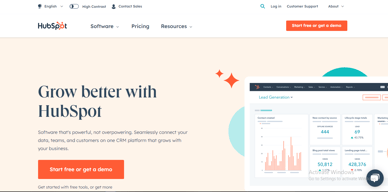

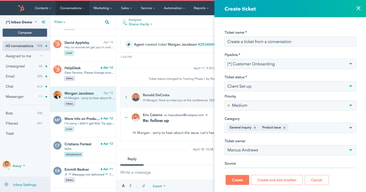
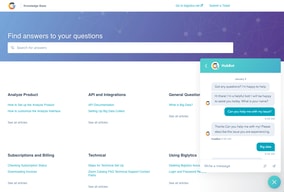
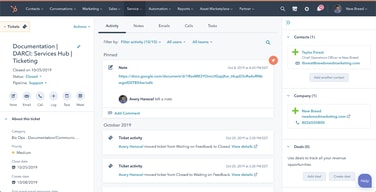





HubSpot Service Hub puts support tickets on the same contact record as marketing and sales, which is its entire reason to exist and a genuinely good one. The pricing needs care, though. At Starter you get ticketing and little else, and reviewers say so directly. The knowledge base, help desk workspace, and customer portal all require Professional at around $90 per seat, which also carries a mandatory onboarding fee.
- What it is: A help desk platform built on HubSpot’s Smart CRM, covering tickets, live chat, calling, knowledge base, and customer portals.
- Best for: Companies already running HubSpot for sales or marketing who want support on the same customer record.
- Pricing: Free for up to 2 users. Starter from $7 per seat, Professional from $90, Enterprise from $150 per month. Verified in July 2026.
- The honest catch: Professional requires a one-time onboarding fee of roughly $1,500, disclosed only in a footnote, and it is the tier where self-service actually begins.
What Is HubSpot Service Hub?

Service Hub is the customer support product in HubSpot’s suite, built on the same Smart CRM that powers Marketing Hub and Sales Hub. A support ticket sits on the same contact record as the marketing emails that person received and the deals they were part of, which is a genuine structural advantage over running a standalone help desk alongside a separate CRM.
The functional scope is conventional: ticket pipelines and routing, live chat, calling, canned snippets, and reporting at the lower tiers, with a knowledge base, help desk workspace, customer portal, and feedback surveys arriving higher up. HubSpot has added AI in the form of Agent Hub and the Breeze Customer Agent at Professional.
The independent rating is respectable on a modest sample: 4.4 out of 5 on Capterra across 190 reviews. The praise is about consolidation and ease of use; the criticism is almost entirely about price and about how little the Starter plan includes.
How HubSpot Service Hub Works
- Tickets on the CRM record. The central idea. Support history, marketing history, and deal history in one place, with no integration to maintain.
- Ticketing and routing. Pipelines, ticket routing, and conversation routing from Starter.
- Live chat and calling. Both included at Starter, where the notable upgrade is removing HubSpot branding from live chat.
- Knowledge base and customer portal. Self-service, arriving at Professional. This is the feature that reduces ticket volume, and therefore the one with the clearest economic case.
- Help Desk Workspace and Agent Hub. A dedicated agent interface plus AI-assisted resolution, also Professional.
- Enterprise controls. Conditional SLAs, skill-based routing, and customer journey analytics at the top tier.
HubSpot Service Hub Pricing
Four tiers, with a large step in the middle. Figures verified on HubSpot’s Service Hub pricing page in July 2026. HubSpot localizes currency, and the euro figures shown to European visitors correspond numerically to its dollar pricing.

| Plan | Per seat/mo | Credits | Mandatory onboarding | Key additions |
|---|---|---|---|---|
| Free | $0 | — | None | Up to 2 users, free service tools alongside marketing, sales, content and data tools |
| Starter | From $7 (list $20) | 500 | None | Ticket pipelines and routing, live chat without HubSpot branding, calling, canned snippets, conversation routing, reporting dashboard |
| Professional | From $90 (list $100) | 3,000 | ~$1,500 one-time | Agent Hub, Breeze Customer Agent, Help Desk Workspace, customer success workspace, knowledge base, customer portal, feedback surveys |
| Enterprise | From $150 | 5,000 | Higher one-time fee | Conditional SLAs, customer journey analytics, skill-based routing, AI transcript enrichment |
The details that decide the real cost:
- Starter is ticketing, and reviewers say so. Capterra reviewers on the Starter plan report that “ticketing was pretty much the only task” available to them. That matches the plan contents exactly: no knowledge base, no customer portal, no help desk workspace.
- Self-service starts at Professional. A knowledge base is the highest-leverage feature in any help desk, because deflected tickets are the cheapest tickets. Putting it at $90 per seat means the tier that actually reduces your support cost is thirteen times the entry price.
- Professional carries a mandatory onboarding fee. HubSpot’s own page footnotes a required one-time fee of roughly $1,500 at Professional, with a higher figure at Enterprise. Any comparison that omits it understates first-year cost.
- The $7 Starter price is promotional. List price is $20 per seat, so model renewals at the higher figure.
- AI runs on credits. 500 at Starter, 3,000 at Professional, 5,000 at Enterprise, metered on top of seats.
- Free live chat carries HubSpot branding. Removing it is one of the headline reasons to move from Free to Starter.
Who Should Use HubSpot Service Hub
- Existing HubSpot customers. The clearest and, honestly, close to the only compelling case. Support on the same record as sales and marketing genuinely removes integration work.
- Small teams needing basic ticketing. Free for two users, or Starter for structured pipelines, is reasonable value if ticketing is all you need.
- Companies where support informs revenue. Seeing a customer’s marketing and deal history while handling their ticket is a real advantage for account management.
- Teams that will use the AI layer. Agent Hub and Breeze at Professional are competitive with what Zendesk offers.
It fits poorly for standalone support teams not otherwise using HubSpot, where Freshdesk and Zoho Desk deliver more help desk for less, for small teams needing a knowledge base, since that alone forces a thirteen-fold price jump, and for cost-sensitive organizations, where the onboarding fee compounds an already high per-seat price.
Honest Pros and Cons
Strengths
- One record across marketing, sales, and support. The genuine architectural advantage, and difficult to replicate by integrating separate tools.
- A free tier that works. Two users with real service tools, no card required.
- Starter is inexpensive for ticketing. At the promotional $7 per seat it is cheaper than most dedicated help desks.
- Easy to adopt. Consistently praised, particularly by teams already on HubSpot.
- Capable AI at Professional. Agent Hub and Breeze Customer Agent are credible against Zendesk’s equivalents.
- Large partner ecosystem. Extensive documentation and a deep pool of implementation help.
Limitations
- Starter is ticketing only. Reviewers state this plainly, and the plan contents confirm it.
- The knowledge base is gated to Professional. The single most consequential gap, since self-service is what reduces support cost.
- A mandatory onboarding fee at Professional. Roughly $1,500, disclosed in a footnote rather than the price.
- A thirteen-fold jump from Starter to Professional. $7 to $90 per seat is among the steepest steps in this category.
- Price is the dominant complaint. Reviewers describe it as high against dedicated chat and help desk tools.
- Dashboard performance. Slow loading is reported by some reviewers.
- A modest review base. 190 Capterra reviews is thin next to Zendesk’s 4,000-plus.
HubSpot Service Hub Alternatives and How It Compares
- Zendesk Support Suite is the enterprise incumbent, with far greater depth and its own gating problem, since chat and knowledge base start at $55 per agent.
- Freshdesk is typically cheaper at comparable capability and offers a free tier for small teams.
- Zoho Desk substantially undercuts both and is the value pick, especially inside the Zoho ecosystem.
- Help Scout suits small teams wanting an email-first, human experience without enterprise complexity.
- Intercom competes on messaging-led support and AI resolution at comparable cost.
For a broader survey see our guide to the best help desk software.
The Verdict
HubSpot Service Hub makes sense as part of a decision you have already made. If your marketing and sales run on HubSpot, putting support on the same contact record is worth real money in avoided integration work and better context for agents, and the 4.4 Capterra rating reflects teams who get that benefit.
As a standalone help desk it is harder to justify. Starter at $7 gives you ticketing and, in reviewers’ own words, little else. The knowledge base, customer portal, and help desk workspace, the features that actually reduce support volume, all require Professional at around $90 per seat plus a mandatory onboarding fee of roughly $1,500. At that point you are comparing against Zendesk, Freshdesk, and Zoho Desk on their terms, and Service Hub is not obviously winning.
The practical test is simple. If you already pay HubSpot, price Service Hub as an addition to a platform you use and it is usually a sound choice. If you do not, price it honestly at Professional including onboarding, compare it against Zoho Desk and Freshdesk, and be prepared for the answer to be no. Either way, note that self-service starts at Professional, because that single fact determines whether the entry price is relevant to you at all.
FAQ
How much does HubSpot Service Hub cost in 2026?
Free for up to 2 users. Starter is promotionally priced from about $7 per seat per month against a $20 list price, Professional from about $90, and Enterprise from about $150. Professional additionally requires a one-time onboarding fee of roughly $1,500, with a higher fee at Enterprise. AI features consume HubSpot Credits, allocated per tier.
Does the Starter plan include a knowledge base?
No. Starter covers ticket pipelines and routing, live chat without HubSpot branding, calling, canned snippets, conversation routing, and a reporting dashboard. The knowledge base, customer portal, help desk workspace, and customer feedback surveys all require the Professional plan. Capterra reviewers on Starter describe ticketing as essentially the only capability available.
Does HubSpot charge an onboarding fee for Service Hub?
Yes, on the higher tiers. HubSpot’s pricing page footnotes a required one-time onboarding fee of roughly $1,500 for Service Hub Professional, with a larger fee at Enterprise. These are mandatory and additional to the per-seat subscription, and they are frequently omitted from comparison articles.
Is HubSpot Service Hub worth it if I do not use HubSpot already?
Usually not. Its main advantage is sharing one customer record with HubSpot’s marketing and sales products, which is irrelevant if you use neither. As a standalone help desk at Professional pricing plus onboarding, Freshdesk and Zoho Desk generally deliver more capability for less money.
What is HubSpot Service Hub best for?
Companies already running HubSpot for marketing or sales that want support tickets on the same customer record, with full history visible to agents. It is strongest as an extension of an existing HubSpot investment rather than as a help desk chosen on its own merits.

Compare HubSpot Service Hub with other popular tools in the same category.

The ease of use is huge! I love how easy it is to provide great support to our customers through the inbox and knowledge center. Hubspot is a huge part of our business and teams across the board, but my team uses it daily!
Nothing really comes to mind. Everything is pretty self-explanatory and has the features we're looking for.
We need a way to provide hands-on email support to our customers and the inbox helps us accomplish this with ease as it ties all of the company information into one place letting us all see what's going at a high-level.
I like most that it is organized and user friendly
I don't like how sometimes during chats, it can take 5-10 minutes to see a response from someone. I can see the thumbnail in the preview of the chat on the left hand side but not the actual response.
They are solving most issues that I bring to them. Especially chats not popping up in a fair amount of time. I can only see the preview on the left section but not in the actual chat.
This product is extremely easy to use, and creating workflows to make your day-to-day easier makes a world of differenece.
I have yet to come across something that I dislike.
None at the moment. We are using it for Feedback from our customers.
it is a smooth platform to use. Everything is right at the fingertips to find and making changes to the current process' are easy to do.
I would like a dark mode. I find the screen quite bright and having dark mode helps me stay focused throughout my work day
It keeps all of our client info in 1 spot and allows us to track all of our feature requests to see trends and potential pain points with our customers
The HubSpot Service Hub allows all departments to have access to what is going on within the organization. Sales, Client Success, Service Delivery, and the Product team all have access to the customers in our database, as well as any project updates, integrations, and more. It allows us to more easily see how things are going on an operational level, as well as with a more granular view on an account level. The automation has made our workflows nearly seamless.
There are a few tweaks I would make in regard to fields that may or may not be editible. I have found sometimes I need to flip back and forth between a company record and a task to get all of the information I need, which can be frustrating. We are in the process of building out a variety of dashboards to help with specific views and data we'd like to see in one place, so this is very helpful.
We are a fully remote team, and so being able to keep everyone accountable as well as informed has been a game changer. The automations and workflows we have been able to build in HubSpot is the most advanced I have ever seen. We have been able to almostly completely move away from spreadsheets and manual data entry, so our information is more accurate and timely.
We have been using it for ticket support and sequences a lot. It saves so much time and we can easily keep track of everything. We also use surveys and have been collecting information we didn't have before. We now have accurate reports of the overall customer support experience and know the areas we need to improve.
Contact selection and actualization have been a pain. We have over 40 contacts per company and different departments that work with each. Our main issue has been separating and updating these contacts per department so we can create different sequences. It often seems to be all of nothing when it comes to contacts.
We wanted to improve our overall customer experience, so with the conversational support and the way we can classify the tickets and create reports, we have been able to build words and focus on the areas of our customer service and our product that we need to change.
Ease of use and quick respopnse from support staff. Lots of training and materials to make it easy to use!
The cost breakdown and modular charges for each module in HubSpot
Customer Support and Sales Engagement
Makes it very easy for me to stay organized with my daily tasks. Very simple to navigate and the search feature makes everything quickly accessible. It has made it very easy for our support and sales teams to keep eachother up to date on both existing client accounts and new deals in the pipeline.
Not having the ablility to save multiple email signatures. For example, if i'm emailing a client from inside their company profile it will only populate my personal email signature even if i am sending the email from our support address. The only way to get the Support signature is to generate the email out of the conversation inbox. It would be nice if the signature was pulled into an email based on the "FROM" box in the email so when i select support it puts the support signature and when i select my personal inbox it puts my personal signature.
We are no longer duplicating efforts when dealing with a customer inquiry via a shared email inbox. We used to work out of Outlook so there was no way to know who was working which email request. Hubspot allows us to assign emails in the conversation inbox so we know exactly who is working on what. It also allows our staff to take days off without stressing about customer followup. As long as they leave notes on the conversation in the inbox someone will follow up on their behalf when they are away from the office. It has also streamlined the way we pass customers over to our sales team. We can now turn the logging of a simple phone call into a lead on the sales pipelines.
The ease of use and how easy it is to teach others how to use it.
Sometimes the surveys can be inconvenient to maneuver.
Being able to help customers faster and being able to give helpful resources to internal staff.
Fast and easy to use, is tailored to the user's needs
sometimes crashes and sometimes it can be slow
We manage internal company incidents, and guarantee a good service to complete efficient deliveries to our customers.
It’s a powerful all-in-one business solution with hubs and tickets to control about sales, marketing, and customer service
Some errors in e-mail survey control, but the support team always help
Everything I need in one place. Connects simultaneously with the other programs used, such as calling software, customer surveys, task to do and internal intercommunication, tracking functionalities, and others.
Integrates all company needs and easy way to keep track of customers for everyone to have access.
Sometimes it's hard to learn new features/integrations.
Customer updates. All team members can track meetings, updates, email all in the same place. FAQ and support. Knowledge base and support inbox
Easy to use and customize for our purposes
Some features like tagging aren't yet available
Centralized communication tracking. Making cross functional work much easier
Their ticket organization for following up on inquiries, along with their exceptional customer service, helps users maximize the tool's potential.
No dislikes; it efficiently gets the job done.
Tracking the number of customer inquiries.
It's very user friendly specially customization options are amazing. Simple yet effective. Customer support team team is very good and integration part is very easy
The ticket form submission email is sent as a marketing email that is bit odd it should be in service hub to avoid the situation where contact needs to be a marketing contact to send email with work flow
We were facing issues in customer support. We were looking for a platform for ticket management and customer portal.
HubSpot is extremely user friendly and very easy to navigate. Their customer service is very responsive and quick.
There isn't anything that I dislike about Hubspot
Hubspot makes it very easy to store and use our data and the tasks feature is very helpful
We use tickets for our support team. It has been seamless. The set up was easy. The team learned it very well. We create many tickets per day and the entire team has mentioned how easily it was to integrate to their previous method.
The only downside is we didn't set up with Ring Central yet. We may do that to make the process even faster.
It was impossible to track conversations with our clients and support. Now, everything is all in one place and we can see who has called in and received help from support at a monents notice.
UX it is easy to use and the knowledge library provides awesome resources.
Lack of 1:1 customer support. Sometimes getting an answer or implementing something new takes longer than we'd like because scheduling time to meet with HubSpot CSM is not easy.
Helping us track the lifecycle of our clients.
What I like the best is the fact that it's so easy to view and go through tickets.
I don't really find any downsides... Just maybe when pasting inside an email; it always copies the original formatting but we usually want to keep the destination formatting.
We are able to reply promptly to our consumers' inquiries.
The practicality of it. I like how you can see what mails are unassigned and what needs your attention.
the layout can be confusing at times but it is a great platform
Nothing
Toda la información está centralizada, toda la información de los usuarios en un solo lugar, además puedo realizar llamadas, programar reuniones, etc. Todo en un mismo lugar
El responsive no me parece tan amigable y fácil de utilizar, la app puede tener más funciones que sean de utilidad para todos los que la utilizamos. No se me ocurre nada más.
Puedo tener un chat en vivo así como manejar varios pipelines de acuerdo a la ubicación geográfica de los usuarios, crear campañas, automatizar procesos, ver reportes, etc

My team used to use Outlook as our group inbox solution, and have recently switched to Conversations Inbox and Tickets in Hubspot. This has been a huge help for our organization as the way to track what team members are working on is significantly better than Outlook, but it has the added benefit of being our entire CRM for the context of each ticket, which we don't have if we were to use a separate ticketing system.
There are a couple ways in which the CRM aspect of Hubspot and the ticketing aspect of Hubspot don't seem to interact, for example being able to assign conversations immediately based on contact and company records, or the ability to have manual views that aren't purely based on conversation properties.
Hubspot's service hub has helped our teams work more efficiently by more clearly identfying who is working on what and not having to work out of two systems for CRM and client context and ticketing closure.
It is super easy to use and easy to onboard new service team members.
I actually don't have any complaints about Service Hub! I love it!
HubSpot Service Hub allows us to set up an easy service portal for customers.
Connect with another systems, allowing proactivity and
I dont like costs involved. I dont like suport fo training teams and when a cant connections
Eu acho que deveria ser mais acessivel e os treinamentos mais faceis
The ability to have a one stop shop from the sales process
Still need some training. We purchased the full suite so post implentation we still have some needs.
It is allowing us to optimize our chat to generate more leads.
It integrates extremely well with everything we are trying to achieve and making changes is easy.
There are no down sides to using Service Hub.
It helps us track and time our engineering tickets and ensure they are being addressed in a timely manner.

Fast and easy use, integrates seamlessly with Hubspot CRM
There is no app for your cell phone. It would be better if you could submit a ticket from your phone.
I was losing track of open customer issues. I now have a dashboard that shows me open tickets, and now I can't lose visibility of open problems. I'm can also check for issues seen across multiple customers.
HubSpot has been a game changer for us. It has allowed us to be more efficietnly and more effective externally. Our Customers are kept more informed and weare able to measure, track and analyase how effective our responses to their needs are.
UI could be a little bit sleaker. Otherwise, not much else to report as "disliking"
Constent communcation with customers and managing of support ticket workflows.
Service hub helps eliminate friction with customers!
The ticket time tracking is not allways relevant
When leads have issues with their services they create a ticket and we help resolve the system

Service Hub is both very user friendly and extremely customizable. We've been able to use this tool for our unique use case of assisting students through their academic enrollment journey.
One of the biggest limitations we've found with Service Hub is the limited capability of ticket workflows. We have had to develop some workarounds with contact properties and workflows to achieve some of the things that we need to do.
HubSpot Service Hub helps us more efficiently track and assist students through their academic enrollment journey with us. Our student-facing teams have been able to serve more students as a result of the efficiencies created from automating this process.