

Unclaimed: Are you working at HubSpot Service Hub?
HubSpot Service Hub Reviews: 4.4/5 — Solid Choice
Hubspot, a giant in the digital marketing category, offers a wide range of software solutions with comprehensive free tools. This makes expanding your toolkit across sales, operations, marketing, etc., very easy. Its CRM system is at the heart of HubSpot’s offering. The platform makes it an excellent option for managing customers and progressing them through your funnel. As a result, Hubspot’s Service Hub’s an incredible range of features, including team management tools available via higher plans and real-time reporting.

| Capabilities |
AI
API
|
|---|---|
| Segment |
Small Business
Mid Market
Enterprise
|
| Deployment | Cloud / SaaS / Web-Based, Mobile Android, Mobile iPad, Mobile iPhone |
| Support | 24/7 (Live rep), Chat, Email/Help Desk, FAQs/Forum, Knowledge Base, Phone Support |
| Training | Documentation |
| Languages | English |
HubSpot Service Hub Pros and Cons
- Extendable with a range of other Hubspot tools, many of which are free, including a CRM, as well as operations, marketing, and sales features.
- Hubspot focuses on CRM integration to produce great customer insights.
- You get access to powerful analytics.
- There’s a steep learning curve.
- The complex pricing tiers are challenging to navigate.

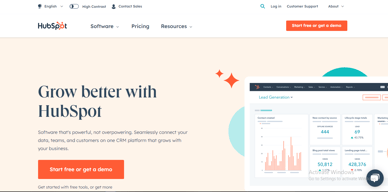

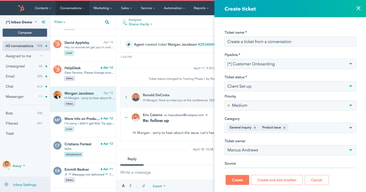
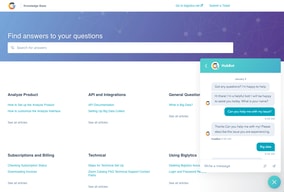
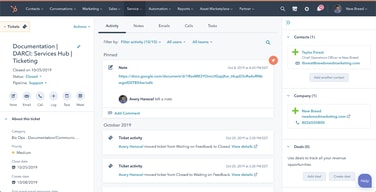





HubSpot Service Hub puts support tickets on the same contact record as marketing and sales, which is its entire reason to exist and a genuinely good one. The pricing needs care, though. At Starter you get ticketing and little else, and reviewers say so directly. The knowledge base, help desk workspace, and customer portal all require Professional at around $90 per seat, which also carries a mandatory onboarding fee.
- What it is: A help desk platform built on HubSpot’s Smart CRM, covering tickets, live chat, calling, knowledge base, and customer portals.
- Best for: Companies already running HubSpot for sales or marketing who want support on the same customer record.
- Pricing: Free for up to 2 users. Starter from $7 per seat, Professional from $90, Enterprise from $150 per month. Verified in July 2026.
- The honest catch: Professional requires a one-time onboarding fee of roughly $1,500, disclosed only in a footnote, and it is the tier where self-service actually begins.
What Is HubSpot Service Hub?

Service Hub is the customer support product in HubSpot’s suite, built on the same Smart CRM that powers Marketing Hub and Sales Hub. A support ticket sits on the same contact record as the marketing emails that person received and the deals they were part of, which is a genuine structural advantage over running a standalone help desk alongside a separate CRM.
The functional scope is conventional: ticket pipelines and routing, live chat, calling, canned snippets, and reporting at the lower tiers, with a knowledge base, help desk workspace, customer portal, and feedback surveys arriving higher up. HubSpot has added AI in the form of Agent Hub and the Breeze Customer Agent at Professional.
The independent rating is respectable on a modest sample: 4.4 out of 5 on Capterra across 190 reviews. The praise is about consolidation and ease of use; the criticism is almost entirely about price and about how little the Starter plan includes.
How HubSpot Service Hub Works
- Tickets on the CRM record. The central idea. Support history, marketing history, and deal history in one place, with no integration to maintain.
- Ticketing and routing. Pipelines, ticket routing, and conversation routing from Starter.
- Live chat and calling. Both included at Starter, where the notable upgrade is removing HubSpot branding from live chat.
- Knowledge base and customer portal. Self-service, arriving at Professional. This is the feature that reduces ticket volume, and therefore the one with the clearest economic case.
- Help Desk Workspace and Agent Hub. A dedicated agent interface plus AI-assisted resolution, also Professional.
- Enterprise controls. Conditional SLAs, skill-based routing, and customer journey analytics at the top tier.
HubSpot Service Hub Pricing
Four tiers, with a large step in the middle. Figures verified on HubSpot’s Service Hub pricing page in July 2026. HubSpot localizes currency, and the euro figures shown to European visitors correspond numerically to its dollar pricing.

| Plan | Per seat/mo | Credits | Mandatory onboarding | Key additions |
|---|---|---|---|---|
| Free | $0 | — | None | Up to 2 users, free service tools alongside marketing, sales, content and data tools |
| Starter | From $7 (list $20) | 500 | None | Ticket pipelines and routing, live chat without HubSpot branding, calling, canned snippets, conversation routing, reporting dashboard |
| Professional | From $90 (list $100) | 3,000 | ~$1,500 one-time | Agent Hub, Breeze Customer Agent, Help Desk Workspace, customer success workspace, knowledge base, customer portal, feedback surveys |
| Enterprise | From $150 | 5,000 | Higher one-time fee | Conditional SLAs, customer journey analytics, skill-based routing, AI transcript enrichment |
The details that decide the real cost:
- Starter is ticketing, and reviewers say so. Capterra reviewers on the Starter plan report that “ticketing was pretty much the only task” available to them. That matches the plan contents exactly: no knowledge base, no customer portal, no help desk workspace.
- Self-service starts at Professional. A knowledge base is the highest-leverage feature in any help desk, because deflected tickets are the cheapest tickets. Putting it at $90 per seat means the tier that actually reduces your support cost is thirteen times the entry price.
- Professional carries a mandatory onboarding fee. HubSpot’s own page footnotes a required one-time fee of roughly $1,500 at Professional, with a higher figure at Enterprise. Any comparison that omits it understates first-year cost.
- The $7 Starter price is promotional. List price is $20 per seat, so model renewals at the higher figure.
- AI runs on credits. 500 at Starter, 3,000 at Professional, 5,000 at Enterprise, metered on top of seats.
- Free live chat carries HubSpot branding. Removing it is one of the headline reasons to move from Free to Starter.
Who Should Use HubSpot Service Hub
- Existing HubSpot customers. The clearest and, honestly, close to the only compelling case. Support on the same record as sales and marketing genuinely removes integration work.
- Small teams needing basic ticketing. Free for two users, or Starter for structured pipelines, is reasonable value if ticketing is all you need.
- Companies where support informs revenue. Seeing a customer’s marketing and deal history while handling their ticket is a real advantage for account management.
- Teams that will use the AI layer. Agent Hub and Breeze at Professional are competitive with what Zendesk offers.
It fits poorly for standalone support teams not otherwise using HubSpot, where Freshdesk and Zoho Desk deliver more help desk for less, for small teams needing a knowledge base, since that alone forces a thirteen-fold price jump, and for cost-sensitive organizations, where the onboarding fee compounds an already high per-seat price.
Honest Pros and Cons
Strengths
- One record across marketing, sales, and support. The genuine architectural advantage, and difficult to replicate by integrating separate tools.
- A free tier that works. Two users with real service tools, no card required.
- Starter is inexpensive for ticketing. At the promotional $7 per seat it is cheaper than most dedicated help desks.
- Easy to adopt. Consistently praised, particularly by teams already on HubSpot.
- Capable AI at Professional. Agent Hub and Breeze Customer Agent are credible against Zendesk’s equivalents.
- Large partner ecosystem. Extensive documentation and a deep pool of implementation help.
Limitations
- Starter is ticketing only. Reviewers state this plainly, and the plan contents confirm it.
- The knowledge base is gated to Professional. The single most consequential gap, since self-service is what reduces support cost.
- A mandatory onboarding fee at Professional. Roughly $1,500, disclosed in a footnote rather than the price.
- A thirteen-fold jump from Starter to Professional. $7 to $90 per seat is among the steepest steps in this category.
- Price is the dominant complaint. Reviewers describe it as high against dedicated chat and help desk tools.
- Dashboard performance. Slow loading is reported by some reviewers.
- A modest review base. 190 Capterra reviews is thin next to Zendesk’s 4,000-plus.
HubSpot Service Hub Alternatives and How It Compares
- Zendesk Support Suite is the enterprise incumbent, with far greater depth and its own gating problem, since chat and knowledge base start at $55 per agent.
- Freshdesk is typically cheaper at comparable capability and offers a free tier for small teams.
- Zoho Desk substantially undercuts both and is the value pick, especially inside the Zoho ecosystem.
- Help Scout suits small teams wanting an email-first, human experience without enterprise complexity.
- Intercom competes on messaging-led support and AI resolution at comparable cost.
For a broader survey see our guide to the best help desk software.
The Verdict
HubSpot Service Hub makes sense as part of a decision you have already made. If your marketing and sales run on HubSpot, putting support on the same contact record is worth real money in avoided integration work and better context for agents, and the 4.4 Capterra rating reflects teams who get that benefit.
As a standalone help desk it is harder to justify. Starter at $7 gives you ticketing and, in reviewers’ own words, little else. The knowledge base, customer portal, and help desk workspace, the features that actually reduce support volume, all require Professional at around $90 per seat plus a mandatory onboarding fee of roughly $1,500. At that point you are comparing against Zendesk, Freshdesk, and Zoho Desk on their terms, and Service Hub is not obviously winning.
The practical test is simple. If you already pay HubSpot, price Service Hub as an addition to a platform you use and it is usually a sound choice. If you do not, price it honestly at Professional including onboarding, compare it against Zoho Desk and Freshdesk, and be prepared for the answer to be no. Either way, note that self-service starts at Professional, because that single fact determines whether the entry price is relevant to you at all.
FAQ
How much does HubSpot Service Hub cost in 2026?
Free for up to 2 users. Starter is promotionally priced from about $7 per seat per month against a $20 list price, Professional from about $90, and Enterprise from about $150. Professional additionally requires a one-time onboarding fee of roughly $1,500, with a higher fee at Enterprise. AI features consume HubSpot Credits, allocated per tier.
Does the Starter plan include a knowledge base?
No. Starter covers ticket pipelines and routing, live chat without HubSpot branding, calling, canned snippets, conversation routing, and a reporting dashboard. The knowledge base, customer portal, help desk workspace, and customer feedback surveys all require the Professional plan. Capterra reviewers on Starter describe ticketing as essentially the only capability available.
Does HubSpot charge an onboarding fee for Service Hub?
Yes, on the higher tiers. HubSpot’s pricing page footnotes a required one-time onboarding fee of roughly $1,500 for Service Hub Professional, with a larger fee at Enterprise. These are mandatory and additional to the per-seat subscription, and they are frequently omitted from comparison articles.
Is HubSpot Service Hub worth it if I do not use HubSpot already?
Usually not. Its main advantage is sharing one customer record with HubSpot’s marketing and sales products, which is irrelevant if you use neither. As a standalone help desk at Professional pricing plus onboarding, Freshdesk and Zoho Desk generally deliver more capability for less money.
What is HubSpot Service Hub best for?
Companies already running HubSpot for marketing or sales that want support tickets on the same customer record, with full history visible to agents. It is strongest as an extension of an existing HubSpot investment rather than as a help desk chosen on its own merits.

Compare HubSpot Service Hub with other popular tools in the same category.
I like all the options that are included in HubSpot. It is a great CRM that offers so many different tools within.
I wish the upload limit was bigger. We upload a lot of GIFs and I know they take up so much space, I wish the upload process for them was faster and the limit was larger.
HubSpot is helping us solve the problem of user activity. We were able to create a form using the landing pages and monitor the usage of our pages that way.
The integrations within make it easy to find everything you need in one place.
I wish the reporting was a little better for the sales side of BDR roles
It helps us solve our customer success process and automating that to stay in youch with more clients.
Service Hub makes managing and tracking your clients' entire lifecycle simple and reliable. Service Hub works smoothly with HubSpot's sales and marketing offerings to ensure that all client interactions are tracked and managed through their lifecycle.
The only downside to Service Hub is that there is not a simple, native way to migrate ticket history from other services (ex. Zendesk) and associate them with clients. For the best experience with Service Hub for ticket management, start with Service Hub from the start of your process development.
Service Hub solves the problem of needing to store client requests, training, issues, and communications all in one place. Additionally, our entire ICS team can access the client records and history, making handoffs seamless and pain free.
How easy it is to jump in and start using Service Hub - configuring the inbox is quick and easy, automating tickets to route to the inbox keeps things organized and lets you manage your service team easily!
There's no mark read/unread feature for the conversations inbox, some of the features in the Service Hub Pro subscription should really be available in Service Hub Starter, even if they have limits.
manage customer service and support, provide a comprehensive knowledge base, and gain insights from feedback surveys

I like that it is so easy to use and is very easy to find any information you are looking for and they have a very good customer service system as well
I have not found anything that I do not like in my endeavors.
It makes it very easy for me to communicate with customers and resolve their issues as well as log my emails all in one easy place.
The API is very useful for my role but having the ability for everyone in the company collaborate is wonderful.
Merging tickets could be easier if it just showed the tickets for the contact you are viewing
Providing history on the tickets gives a quick method of been able to identify the issues when reaching out to customers.
EASE OF USE! I really enjoy getting work done efficiently and hubspot helps me attain all of my goals at work. 10/10 stars!
payments system can be kind of wonky! it is important to have a good accessible payments system for support people.
billing, troubleshooting. The benefits are that Hubspot makes it pretty easy to figure out and their support is responsive.
Me encanta que hubspot pueda programar reuniones y poder tener conversaciones vía chat, correos y llamadas. Una funcionaldiad que aprecio son los fragmentos personalizados ya que me ayudan a responder de forma estandarizada y con mejores tiempo de respuesta.
A veces en ocasiones en el chat de hubspot se "envian mensajes", luego de que se refresca la página en realidad dicho mensaje nunca se envió. Esto no es muy recurrente pero si sucede en algunas ocasiones.
Actualmente la empresa Soluciones Alegra brinda un software de contabilidad y facturación, por ende, es necesario brindar soporte de como utilizar el software y brindar ayuda con los errores, hubspot nos da las herramientas para brindar dicho soporte.
Very straightforward and easy to use. We use the inbox for emails, sales leads, and the knowledge base. I have enjoyed using it for our team!
nothing! Maybe if the knowledge base could more advanced functionality that would be great!
Solving a shared dashboard for all incoming messages - able to assign owners, comprehensive knowledge base, a database for sales leads and contracts!
we use it for helping and controlling our clients
we can make all the integrations we will like to
help to keep in contact with our clients
This hub is most useful in customer review system
Interactive email support for surveys email
Surveys and engagement with audience
The Service Desk Academy helped me get up to speed and set everything up myself. I loved that it is self-serve onboarding. The ability to create customised properties and workflows is excellent. It gives me great visibility of our support work and makes the team's work easier.
The only downside I have found is the limitation on what you can change in some of the default properties. For instance, Priority - we have four levels, but by default, there are only 3 in HubSpot, and you can't change it. It is a tiny thing; otherwise, I love it.
We've brought our support out of email and into a single system that has dramatically improved visibility. We have also started using the customer feedback capability, which is a first for us, and it's great to hear from our customers how we are performing. We also wanted to ensure visibility for all teams of our customer journey - having our marketing, sales and CS teams all working on the same customer records in HubSpot means we have a complete view of the customer in one place.
Me gusta mucho la facilidad y optimización para la comunicación con el usuario, además de sus integraciones hacen que todo sea más amigable manteniendo así una fácil trazabilidad.
En ocasiones que hemos requerido soporte siempre llega a ser un poco demorado, pero aún así garantiza respuesta. Otra cosa es que la integración con cloudtalk siempre es demorado las llamadas
Un problema que ha resuelto es la trazabilidad tanto de los agents y medir el flujo, observar si el usuario nos brinda respuesta, ha visto el correo en su defecto y lo mejor de todo es sin dar correo corporativo.
Workflows and reporting have created significant efficiencies for our team. I love the automated meeting scheduler too.
I wish there was a more robust integration with Jira
360 view of the client. Automation. Reporting.
The automation system that can give you the possibility to accellerate the process
some bugs on opening pages that came sometimes
NO ONE
The HubSpot Service Center is very intuitive and user-friendly. HubSpot makes it easy to create articles in the Knowledge Center. It is much easier than using other platforms to post resources for our members to access.
The only downside of using the Hubspot Service Hub is with the ticketing feature. While I love the ticketing feature, it is not always easy to see who the ticket is from. It would be helpful if the reply could contain the original email.
HubSpot allows us to better manage the high volume of inquiries we receive. It is easy to see, at a glance, which customers have been serviced and which ones still need assistance.
I love how customizable is, you can always change the order of how you see properties and filters.
Sometimes it's hard to know who was the last that contacted a client, because the last contact date on filters doesn't shows this information.
The management of thousands of clients at a time.
How easy it is to use. You are able to gain knowledge from the videos and run the system with a breeze.
I wish we had a better approach to email subscriptions. These are difficult to use and set up. It can be done just clunky imo.
It is helping us service all inbound issues happening within the platform from a chat bot so we can be quick with response and fixes
What I like the best is the accessibility to have a report to check what you might have missed on a ticket. It gives me a sense of security that I am completing my work and providing essential information to my organization.
I have realized with Hubspot that it doesn't recognize duplicate emails(tickets) that have the same or partially matching subject lines to alert us of possible duplicates. This would be very helpful to a user!
They have been helpful with keeping our knowledge base and reports up to speed for what we need the answers to help our customers and be more proficient in our service.
That all the company can work with it and create all tasks. Moreover is posible to track who works more.
Reporting is not perfect, there should be more ways of reporting in hubspot. As for example who moves tickets and avg time tickets in each stage.
Right now there is no problems that are beeing solved

I'm impressed with how HubSpot can efficiently organize contact and company information, and it offers exceptional customization to cater to various business needs. As someone who has worked with numerous CRM platforms, I can confidently say that HubSpot is well-designed and has surpassed my expectations.
Currently, we don't need anything additional as HubSpot provides everything necessary for us to effectively manage our client relationships and stay organized.
HubSpot is an exceptional all-in-one tool that enables us to provide top-notch customer support to our clients. HubSpot enables us to build a robust customer base and help articles. We particularly appreciate how easy and efficient it is to communicate with all clients.
How easy it is to navigate. Great place to keep all your contacts in one place and helpful when managing large operations. It is many times easier than other sites ives used
I wish i could reassign customer warranties to myself if they are already assigned to my coworker because sometimes people will submit multiple requests and it gets split up between us when it would be easier to search their name and assign all of them to one person
It helps us keep track of all our customer service requests and warranties which helps our customers have a better experience all around. Very helpful! i highly recommend it

-Task management -Organizing tickets (tracking their progress) -Email merging -Email automation -Call recording
-Unsending emails -Missing accurate search filters
Helps with organizing contacts, communications and automations.
We have a lot of employees that need access to the same customer information. It is nice to have it all organized in one place so that our customer service team, our finance team, our IT department, etc...can review customer information in one spot.
When our SIS program was linked to HubSpot, there were multiple merges done to accounts in HubSpot that we are trying to correct. I don't know if that was on our end or HubSpot's end, but it has been tiring to unmerge them.
We used to have issues knowing who had talked to customers and what was suggested. Now all departments have access to the information sent in communication in or out of the company. We now have a sales department that relies heavily on HubSpot based on information received.
The feedback surveys in Service Hub are incredibly helpful to me. I've used HubSpot for years and this feature is one of my faves. It's a great way to keep our product user-centric and remain on our mission of creating the best B2B fintech software!
I wish the feedback survey emails were kept in the service hub instead of the email marketing folder so that I could keep the teams' metrics better separated.
We needed a better way to hear customer feedback promptly and regularly and HubSpot has delivered. These surveys make me more productive and help our platform team prioritize the right enhancements.

Super easy to set up and has a simple interface which helps with training when we bring on new employees. The customer portal helps us track tickets and make sure we are staying on top and resolving issues that our customers report. Helps standardize our emails and chats which gives our customers more confidence in our business. It provides a complete solution that helps us support our customers through the help desk, ticketing, chats and knowledge base!
Nothing at this time to dislike. The software works great and as intended.
Works great for chatting with customers when they are experiencing issues so we can quickly help them and keep them happy! Our customers love this feature!
Service Hub allows our team to collaborate and deliver better business results, creating a better customer experience for our clients and streamlining our internal business processes.
As a small team, we use the HubSpot Service Hub Professional package which meets our needs today. There are some Enterprise features which could fit our business needs, however, price is prohibitive.
We're able to better manage our customer onboarding/handoff from sales, and triage customer queries in a timely and coordinated manner. We're easily able to communicate with our customers where they are, and when and where it is best for them. In addition, we can capture customer survey feedback at the right time in their journey.
You are able to track EVERYthing in HubSpot. Phone calls, emails, chat convos, deals, and it integrates with multiple programs to make it so seamless across the board.
Sometimes the amount of information HubSpot can hold can feel like a little too much. But once you start learning the ways to organize it, you can make it so very powerful.
Anyone can log into a customer account and see the conversations being had, when the last time they used our website, who they call internally the most. I can also create lists based on roles, regions, deal stages and more.
Transitioning to HubSpot Service Hub brought together our CRM (already in HubSpot) and ticketing/KB service (previously managed elsewhere). Accessing general customer information, tracking previous ticket resolutions, and maintaining a clean CRM have been made a breeze.
There are no real detractors. The only area needing a rework is where customer support access the tickets to respond. There is a "Service" tab where you can access the general ticketing/KB/Service tools, but the ticket conversations live under the "Conversations" tab - unifying the experience under the "Service" tab would be helpful.
1. Service Hub allows us to easily access and track customer information when handling incoming tickets, ensuring a quick response rate and reference point for future client connections. 2. The Knowledge Base allows us to develop, organize, and monitor help desk articles for customers to utilize. 3. The ticketing system is easily accessible for administrators and support staff, with ticket delegation/routing possible. Overall, our goal is to empower our users through articles and first-rate support, which Service Hub is enabling us to do.
Hubspot makes it so easy to serve our clients well. The ticketing system and automations are so helpful. Cannot recommend it more.
There is a learning curve for sure. However, the customer service at hubspot is the best I have ever experienced.
Overall, the organization it provides alone is beneficial. The ticketing system has gotten client emails out of my inbox and to a very easy visual within the software. I am able to respond and solve customer issues so much faster.