
Unclaimed: Are you working at iContact?
iContact Reviews: 4.1/5 — Solid Choice
iContact delivers professional email marketing features to ensure that it provides extensive features and tools across different stages and sizes to get real results for your campaigns. The platform is ideal for small businesses to want to leverage better campaigns with high-volume senders and subscribers.

| Capabilities |
API
|
|---|---|
| Segment |
Small Business
Mid Market
|
| Deployment | Cloud / SaaS / Web-Based |
| Support | 24/7 (Live rep), Chat, Email/Help Desk, FAQs/Forum, Knowledge Base, Phone Support |
| Training | Documentation |
| Languages | English |

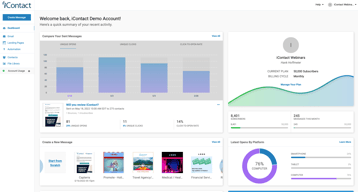
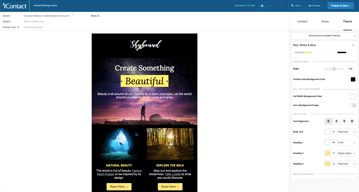






iContact puts automation on its $9 entry plan, which is where most of this category’s money is made. Constant Contact charges $35 for the tier that unlocks automation and segmentation; iContact includes automations, landing pages, and templates at $9 for 500 contacts. That single decision is the strongest argument for it, and it is easy to miss because the product markets itself on being cheap rather than on being ungated.
- What it is: An established email marketing platform with templates, landing pages, automation, and social posting.
- Best for: Small businesses that want automation without paying for a mid-tier plan to get it.
- Pricing: Standard $9, Premium $16, Ultimate $24 per month at 500 contacts. Verified July 2026.
- The honest catch: Unlimited users arrive at Premium, so Standard is not a team plan.
What Is iContact?
iContact is one of the longer-established email marketing platforms, and its positioning is straightforward: competent email marketing at a price well below the category’s better-known names. The pricing page leads with “Easy and Affordable” and a 30-day free trial, which is longer than the 14 days most competitors offer.

What distinguishes it in practice is what sits on the entry tier. Standard at $9 includes pre-designed email templates, a drag-and-drop editor, landing page templates, and — unusually — automations. In a category where the standard commercial move is to gate automation one or two tiers above the advertised price, including it at the bottom is a genuine differentiator rather than a marketing claim.
Pricing scales with contact count via a selector on the pricing page, so the figures below describe a 500-contact list and rise from there.
How iContact Works
- Priced by contact count. A dropdown sets your list size; the tier prices move with it.
- Automations on every tier, including the $9 Standard plan.
- Landing pages included from Standard, which several competitors charge extra for.
- Users are the Premium upgrade. Unlimited users arrive at $16, not at $9.
- AI assistance ladders up. Content assistant at Premium, AI templates and images at Ultimate.
- Custom plans for larger lists, quoted rather than published.
iContact Pricing
Captured from iContact’s pricing page in July 2026 in US dollars at the 500-contact setting.
| Plan | At 500 contacts | Key additions |
|---|---|---|
| Standard | $9/month | Templates, drag-and-drop editor, landing pages, automations |
| Premium | $16/month | Unlimited users, social media posting, AI content assistant |
| Ultimate | $24/month | Email verification, dynamic content, AI templates and images |
| Custom | Quoted | Larger lists, higher volume, premium support |

What actually decides your tier:
- Automation at $9 is the headline, and it is real. Constant Contact’s Lite plan at a reported $12 does not include automation or segmentation — those start at $35. Getting automations on iContact’s cheapest tier changes the comparison substantially for a small business that wants welcome sequences and follow-ups without a mid-tier subscription.
- Standard is not a team plan. Unlimited users is a Premium feature at $16. If more than one person needs access, that is your entry price, not $9.
- The 30-day trial is unusually long. Most competitors offer 14 days. A month is enough to build a list, run a real campaign, and judge deliverability rather than just the interface.
- Prices rise with contacts. The $9, $16, and $24 figures apply at 500 contacts. Set the selector to your actual list size before comparing against anything, because the curve above that is what you will actually pay.
- Email verification is an Ultimate feature. At $24 — worth knowing if list hygiene matters to you, since verification directly affects deliverability.
- Larger lists are quoted. The published tiers stop before enterprise volume.
Who Should Use iContact
- Small businesses wanting automation cheaply. The clearest case, and where the $9 tier genuinely undercuts the category.
- Solo operators. Standard’s single-user limitation is irrelevant if you are the only user.
- Anyone evaluating carefully. The 30-day trial is long enough to test properly rather than superficially.
- Businesses that want landing pages included. Bundled from the entry tier rather than sold separately.
It fits poorly for teams, where unlimited users requires Premium; for creators selling to an audience, where Kit is free to 10,000 subscribers with commerce built in; and for large infrequently-mailed lists, where Brevo’s send-based pricing is structurally cheaper.
Honest Pros and Cons
Strengths
- Automation on the entry plan. The genuine differentiator against most of the category.
- Very low entry price. $9 at 500 contacts undercuts most mainstream competitors.
- A 30-day free trial. More than twice the category norm.
- Landing pages included from Standard.
- Established platform. Long operating history and mature deliverability.
- Clear tier logic. Each step adds something identifiable rather than reshuffling limits.
Limitations
- Single user on Standard. Unlimited users starts at Premium.
- Prices scale with contacts. The headline describes a 500-contact list.
- Email verification is top-tier only. At $24, despite affecting deliverability.
- No free tier. A generous trial, but nothing permanent.
- Less modern than newer rivals. The interface and templates show their age against MailerLite.
- Enterprise pricing is quoted. No published figures for large lists.
iContact Alternatives and How It Compares
- Constant Contact is better known and considerably more expensive, gating automation and segmentation to its $35 tier.
- MailerLite has a more modern editor and a free tier, at somewhat higher paid prices.
- Zoho Campaigns is cheaper still and offers unlimited sending on paid plans.
- Brevo prices by emails sent rather than contacts stored, which suits large, rarely-mailed lists.
- Kit is the creator-focused option, free to 10,000 subscribers.
- AWeber and GetResponse occupy similar small-business ground with their own free or low-cost entry points.
- Mailchimp is the best-known alternative, with steeper escalation as lists grow.
For a broader survey, browse our email marketing directory.
The Verdict
iContact’s case rests on one decision that is easy to overlook: automation is on the cheapest plan. Across this category the standard commercial pattern is to advertise a low entry price and place automation, segmentation, or send volume one or two tiers above it — Constant Contact puts automation at $35 against a $12 entry, and Kit’s free plan permits a single automation. iContact includes automations, landing pages, and templates at $9 for 500 contacts, which means the advertised price is closer to the useful price than it usually is here.
Check two things before treating $9 as your number. Unlimited users is a Premium feature at $16, so if anyone else needs access that is the real entry point. And the $9 describes a 500-contact list — set the pricing selector to your actual list size before comparing, because contact-scaled pricing is where the meaningful differences between platforms appear and a headline at 500 contacts tells you little about 10,000.
The 30-day trial deserves a mention because it is genuinely useful rather than generous-sounding. Two weeks is enough to judge an interface; a month is enough to build a list, send several campaigns, and see how deliverability actually behaves — which is the thing that matters and the thing you cannot assess from a feature table. Use it properly, and compare against Zoho Campaigns and MailerLite at your real list size while you do.
FAQ
How much does iContact cost?
At 500 contacts, captured July 2026: Standard $9 per month, Premium $16, and Ultimate $24. Prices rise with contact count via a selector on the pricing page, and larger lists are quoted through a custom plan. A 30-day free trial is available, which is longer than the 14 days most competitors offer.
Does iContact include automation on the cheapest plan?
Yes, and this is its most distinctive feature. The $9 Standard plan includes automations along with pre-designed templates, a drag-and-drop editor, and landing page templates. Most competitors gate automation to a mid-tier plan — Constant Contact places it at $35 against a $12 entry price — so iContact’s advertised price is closer to the genuinely useful price than is typical in this category.
How many users does iContact allow?
Unlimited users are included from the Premium plan at $16 per month. The $9 Standard plan does not include unlimited users, so any team needing shared access should treat Premium as the entry point. For a solo operator the distinction is irrelevant and Standard remains the better value.
Is there a free plan?
No. iContact offers a 30-day free trial, which is unusually long, but no permanent free tier. Kit is free to 10,000 subscribers, and MailerLite and Brevo both offer free plans, so if starting at zero cost matters those are the better entry points. iContact’s trial is nonetheless long enough to evaluate deliverability properly rather than just the interface.
What is iContact best for?
Small businesses and solo operators who want email automation without paying for a mid-tier plan to unlock it. Its $9 entry plan includes automations and landing pages that competitors charge considerably more for. It is a weaker fit for teams, since unlimited users requires Premium, and for large lists mailed infrequently, where send-based pricing from Brevo is structurally cheaper.

Compare iContact with other popular tools in the same category.
For me, the best part is seeing who clicks, who opens, who shares---and who unsubscribes so I can find out why. It's an incredible marketing tool.
I've been using it for 9 years, so I think I've worked out most of my own bugs over time. I like it just the way it is--it doesn't need to be new or improved constantly. The basics work very well.
I am able to get out new information to my sphere very quickly, it's been highly beneficial to my business. I also like reviewing my growth patterns year over year.
The tools iContact offers are intuitive and easy to use. The cost is reasonable.
Occasionally a parent accidentally unsubscribes, and the parent must contact iContact Deliverability Dept. to get back on the list.
We are a school district with eight schools, and each of our schools use iContact to send e-newsletters to families. We are able to track the success of our messages immediately.
Its ease of use, the email design features are veru complete and let you make professional looking emails fast and easy
Its way of handling bounces, but you would encounter that on any mass email platform.
My communication with customers, sending offers and keeping in my customers minds
easy to update contact lists, export when needed. like the ability to add contacts one at a time when needed, or can upload an entire list at once and add them to multiple contact lists at the same time for more targeted emails. Easy to schedule, change or update emails as needed. Once templates are created, it's easy to re-use and update those templates to send re-occurring emails monthly and weekly.
Templates to create within Icontact can be tricky, either way too many graphics or very plain. When I have chosen pre-made versions within IContact, those never seem to send correctly and you cannot see much of the background pictures or graphics, so I have had to alter them quite a bit to make them look normal when sending. Also have had issues with templates showing different than in the previews for different types of screens, like mobile it seems to show very different than it shows in the preview window before it is scheduled. Recently updated some of our templates and there was a glitch that it would not let me type out the HEX color code. I found a way around it by clicking on another section that used that color, then it pops up in the previously used.
Benefits realized would be having separate send lists, and being able to export the lists to update them every few months. Not any problems, but did make it easier for re-occuring emails that can be customized to come from certain team members for their specific areas, no make the emails more custom, and then I don't have to have them coded.
I like how easy it is to create, edit and schedule my emails out to my followers. From start to finish I can get a quality email out in five-ten minutes. The analytics that are provided help me personalize how I communicate with my community. I don't use the templates as much, but scanning them gives me ideas. I have used iContact for over 10 years. I started when I only had about 50 people on my list. Now my list is over 8,000. My followers have consistency and creativity with my message. My brand is stronger because of iContact.
Overall, not too much. Anything I want to do I have to take the time to learn how to do it. I wish I just knew, but I don't. Tons of tutorials. It is a benefit that I do not have too much to say for this part. Keep doing what you are doing and others will start moving your way. Maybe it takes me a while to go through the tutorials in order to learn the next new thing. Isn't that what everyone has to do? It is what it is.
Keeping my followers up to date with what my business is doing and how I can best serve them. Providing consistency and automation of my message so I can do it once and not worry about it ever again. Learning how to become a better communicator and using words that connect best with my community.
I love how easy it is to update contacts! We have a lot of turnover in our department, so being able to update names and contact information easily is so necessary. I also love that it's easy to import photos and edit them, so the images can really pop in my emails. I also really appreciate how I get warnings when links aren't working, so I can prevent any issues with the users' being unable to access our content.
I'd say formatting can be tricky in the actual composition blocks. It's hard to copy/paste and expect the formatting to stay the same, so better features in the writing blocks would be fantastic! And more templates to choose from would be amazing. I also wish that there were more features for graphics and video embedding. It would be great to have lots of options for visuals in my email blasts.
Outreach has been a challenge for us, so getting to know what the clicks are, what is being responded to, and what people are enjoying from our mailings has been a good way into the mind of our userbase. The biggest benefit is getting to see the effects of our emails in numbers (click-throughs, opened emails, bouncing, etc.) It's really important for us to know what's happening with our communication, so I appreciate seeing the exhaustive charts and figures over time.
Managing lists of emails is easy and intuitive, and the automatic payment system and the price for the service is affordable.
When creating an email "from scratch," the tabs are counterintuitive-- I have to first pick a Row, then Content, but Content is the default first tab. All too frequently I forget this and try to start with content instead of making "rows". I also wish it were easier to embed a picture within the text of the email created.
I no longer have to worry about my email system accusing me of spamming people because I have too many recipients.
Responsiveness to questions or technical issues.
We build emails in Salesforce, so I would like the builder to be more user friendly but am guessing it's because we're not building them directly in iContact.
Lead generation and ongoing nurturing programs - iContact is our link to our database.
The simplicity of editing and being able to export bounced contacts for later research
It's seems that their customer service department is always on vacation
Emailing a massive contact list with various categories. Our open and click-through rates have gone up
Easy to create an email with what I need
I currently do not dislike anything with it
Being able to reach out to customers that do not have social media.
Great platform and easy to use with lots of tools
Have not really had any dislikes honestly.
Mass marketing for our new business at scale
Very helpful with sending out emails to mass amounts of people.
The confirmation to send emails can take awhile sometimes.
Very helpful, user-friendly, and simple.
Seamlessly integrates into my company's Salesforce instance without having to upload and download email campaign lists to another program outside Salesforce (unlike other email marketing tools). Also allows us to see click through rates in real time, including by individual contact. Their customer service is available 5 days a week during East Coast business hours, they are always fast with response and will have someone on the phone walking me through fixing any issue. Really great product!
Few downsides that I have dealt with in using the email marketing tool.
Able to see individual email open and clicks in real-time!
Great designer that can be used instead of the native salesforce email designer. I like the features that they add to salesforce campaignes such as retargeting tracking links, very powerful and the fact that all my salesforce license users can see that data without having to use that old HTMl report which only the sender of bulk email when using the bulk email send through salesforce classic. I also like that it provides open rates, click rates, etc. My most favorite feature is that I can send the email from anyone in my company very valuable.
not really a negative but I wish they would add more features and keep developing on it.
sending bulk emails without a marketing platform and providing some great simple data on the success of an email. Great if you are not looking to get too deep.
Seamless integration with Salesforce campaigns and mail templates - makes it very easy to get communications out there and get selling
Sometimes need to reconnect it and it's not always clear when the API link is down, maybe need a status "light" - also the ability to map more user fields over from SF would be great
Sending marcomms mails to our contacts weekly, as we can use native SF email templates and integrate with campaigns is very easy

I have used iContact for over 10 years now, alongside other programs. They are continually developing new features, and offer wonderful discounts to nonprofits. Their message builder is easy to use, and managing contacts is simple and straightforward. Their theming is also very easy to customize and use for future messages.
Their builder used to be hard and difficult to use, but it updated a few years back and is much, much better now. I'm hoping more drag and drop functionality will come soon. When they changed the "Unsubscribe" default to "Manage Subscription" we had to contact support to figure out how to change it back, and it annoyed our customers. We had tried to use a copy and paste hack, but that didn't work very well. It important to have one click unsubscribe as the default.
I manage multiple email lists for clients, and the ability to easily create and save templates without a complicated interface (see MailChimp) has been great to teach others who need to use it. We have been able to keep our communities connected to upcoming events, auditions, and jobs, through TriangleSings. Other nonprofits have been able to send out stories and fundraising emails and greatly increase their engagement with their base.
The flexibility & options available for emails
I have not grasped the segmenting of emails.
The variety of templates has made communication with donors so much easier & faster for me.
We integrate iContact with Salesforce and do it with ease. I use it to send mass emails to doctors, and it s wonderful.
icontact for salesforce is not the same as just icontact alone, which is difficult because I feel some of the site coding does not transfer correctly.
sending mass emails to large lists of customers!
We like that you can send either html formatted emails of plain text emails.
We wish that there were more email templates.
Managing email distribution.
All of my contact emails are stored in one place and I can send a private, personal message to all of my contacts with the click of a button.
The only thing I don't like is when you delete someone's email permanently, they can never ever receive an email again.
Having all of my contact emails in one place is very convenient.
That it is offered to me free through my university
Some of the automation can be tricky to initially set up but works great after. Sometimes our research participants get the emails sent to junk
The tech support had been very responsive and helpful. They helped identify a big that was making our automation tricky.
Easy to use. Great Template choices. Takes very little effort to get a campaign going.
Nothing really to dislike. The service works as promised.
iContact allows you to stay in touch with your existing clients building relationships. It also allows you to market to new prospective markets.
I love that Icontact has customer service available by phone, email and chat. If I ever encounter a problem, someone has always been there to help me .
I wish there were more automatic features, like building a branded newsletter off a website scan. I also wish I could download analytic reports for the emails I send.
I run multiple campaigns for a lot of clients. iContact keeps these organized and I really like the analytics I receive.
I like that I can schedule several emails at a time. I also like that I can use past emails and modify them for my current needs.
I have been using this for so long, there is really nothing that I don’t like. Customer support has always been great at figuring out how I can do but I want to do.
We have a very small staff so we need to work effectively to schedule several months of emails at one time. iContact allows us to do that.
I love all of the the different themes, formats and the ease of use of the program! Uploading my own pics has been super easy!
I can't find much to dislike. I would maybe say I still can not figure out how to customize my own themes.
I am reaching my entire list for education and marketing. I have gotten leads and even a client using the iCOntact platform.
Definitely what I like most about iContact is that its interface is incredibly attractive to the eye, which makes it an application not only well designed but also functional.
So far I have not been able to see any discomfort when using iContact, it really is a software that was very well thought out.
Keeping my calendar organized and having the option of being able to list each of my contacts and in this way create groups of dissemination respectively, whether for work, academic or personal purposes has really helped me to carry out some routine work in a much more organized and efficient way.

This is an extraordinary promoting computerization framework. The highlights of iContact Pro are splendid. IContact Pro is anything but difficult to oversee. I like the polished skill of the staff individuals from iContact Pro. Easy to understand to utilize iContact Pro. I like its natural interface. IContact Pro makes advertising simple.
I can't dislike iContact Pro because it's easy to manage. IContact Pro has no errors. It is a flexible software to use.
iContact Pro is valuable since it takes care of our issues. iContact Pro has incredible highlights. I like the polished skill of iContact Pro. The best instruments for advertising mechanization.

One of the best software to send bulk emails for marketing campaigns. It also provides a statistics dashboard for insights. The interface is easy to use. The best part is that it has hundreds of email templates.
Deleting the contacts is sometimes a headache. The more the contact list the more is the price. Hey
Sending out bulk emails for marketing purposes. It is a great way to notify employees of any announcements.
Creation of intuitive personalized emails for marketing is the thing that vibes in our veins.
Now that the new update of iContact is easy to copy and paste info from outside i got no issues.
We are now spending thousands outbound emails to prospects in the cloud.
Super easy to use. They work with you to create templates and you simply plug in the information you need.
The ease to create templates yourself which are custom for your brand would be nice.
Thru remarketing emails we are able to expand our reach and increase our open and click rate.