
Unclaimed: Are you working at iContact?
iContact Reviews: 4.1/5 — Solid Choice
iContact delivers professional email marketing features to ensure that it provides extensive features and tools across different stages and sizes to get real results for your campaigns. The platform is ideal for small businesses to want to leverage better campaigns with high-volume senders and subscribers.

| Capabilities |
API
|
|---|---|
| Segment |
Small Business
Mid Market
|
| Deployment | Cloud / SaaS / Web-Based |
| Support | 24/7 (Live rep), Chat, Email/Help Desk, FAQs/Forum, Knowledge Base, Phone Support |
| Training | Documentation |
| Languages | English |

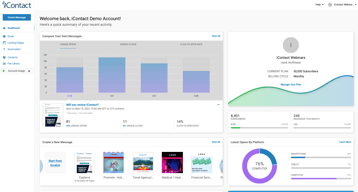
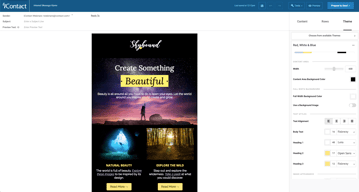






iContact puts automation on its $9 entry plan, which is where most of this category’s money is made. Constant Contact charges $35 for the tier that unlocks automation and segmentation; iContact includes automations, landing pages, and templates at $9 for 500 contacts. That single decision is the strongest argument for it, and it is easy to miss because the product markets itself on being cheap rather than on being ungated.
- What it is: An established email marketing platform with templates, landing pages, automation, and social posting.
- Best for: Small businesses that want automation without paying for a mid-tier plan to get it.
- Pricing: Standard $9, Premium $16, Ultimate $24 per month at 500 contacts. Verified July 2026.
- The honest catch: Unlimited users arrive at Premium, so Standard is not a team plan.
What Is iContact?
iContact is one of the longer-established email marketing platforms, and its positioning is straightforward: competent email marketing at a price well below the category’s better-known names. The pricing page leads with “Easy and Affordable” and a 30-day free trial, which is longer than the 14 days most competitors offer.

What distinguishes it in practice is what sits on the entry tier. Standard at $9 includes pre-designed email templates, a drag-and-drop editor, landing page templates, and — unusually — automations. In a category where the standard commercial move is to gate automation one or two tiers above the advertised price, including it at the bottom is a genuine differentiator rather than a marketing claim.
Pricing scales with contact count via a selector on the pricing page, so the figures below describe a 500-contact list and rise from there.
How iContact Works
- Priced by contact count. A dropdown sets your list size; the tier prices move with it.
- Automations on every tier, including the $9 Standard plan.
- Landing pages included from Standard, which several competitors charge extra for.
- Users are the Premium upgrade. Unlimited users arrive at $16, not at $9.
- AI assistance ladders up. Content assistant at Premium, AI templates and images at Ultimate.
- Custom plans for larger lists, quoted rather than published.
iContact Pricing
Captured from iContact’s pricing page in July 2026 in US dollars at the 500-contact setting.
| Plan | At 500 contacts | Key additions |
|---|---|---|
| Standard | $9/month | Templates, drag-and-drop editor, landing pages, automations |
| Premium | $16/month | Unlimited users, social media posting, AI content assistant |
| Ultimate | $24/month | Email verification, dynamic content, AI templates and images |
| Custom | Quoted | Larger lists, higher volume, premium support |

What actually decides your tier:
- Automation at $9 is the headline, and it is real. Constant Contact’s Lite plan at a reported $12 does not include automation or segmentation — those start at $35. Getting automations on iContact’s cheapest tier changes the comparison substantially for a small business that wants welcome sequences and follow-ups without a mid-tier subscription.
- Standard is not a team plan. Unlimited users is a Premium feature at $16. If more than one person needs access, that is your entry price, not $9.
- The 30-day trial is unusually long. Most competitors offer 14 days. A month is enough to build a list, run a real campaign, and judge deliverability rather than just the interface.
- Prices rise with contacts. The $9, $16, and $24 figures apply at 500 contacts. Set the selector to your actual list size before comparing against anything, because the curve above that is what you will actually pay.
- Email verification is an Ultimate feature. At $24 — worth knowing if list hygiene matters to you, since verification directly affects deliverability.
- Larger lists are quoted. The published tiers stop before enterprise volume.
Who Should Use iContact
- Small businesses wanting automation cheaply. The clearest case, and where the $9 tier genuinely undercuts the category.
- Solo operators. Standard’s single-user limitation is irrelevant if you are the only user.
- Anyone evaluating carefully. The 30-day trial is long enough to test properly rather than superficially.
- Businesses that want landing pages included. Bundled from the entry tier rather than sold separately.
It fits poorly for teams, where unlimited users requires Premium; for creators selling to an audience, where Kit is free to 10,000 subscribers with commerce built in; and for large infrequently-mailed lists, where Brevo’s send-based pricing is structurally cheaper.
Honest Pros and Cons
Strengths
- Automation on the entry plan. The genuine differentiator against most of the category.
- Very low entry price. $9 at 500 contacts undercuts most mainstream competitors.
- A 30-day free trial. More than twice the category norm.
- Landing pages included from Standard.
- Established platform. Long operating history and mature deliverability.
- Clear tier logic. Each step adds something identifiable rather than reshuffling limits.
Limitations
- Single user on Standard. Unlimited users starts at Premium.
- Prices scale with contacts. The headline describes a 500-contact list.
- Email verification is top-tier only. At $24, despite affecting deliverability.
- No free tier. A generous trial, but nothing permanent.
- Less modern than newer rivals. The interface and templates show their age against MailerLite.
- Enterprise pricing is quoted. No published figures for large lists.
iContact Alternatives and How It Compares
- Constant Contact is better known and considerably more expensive, gating automation and segmentation to its $35 tier.
- MailerLite has a more modern editor and a free tier, at somewhat higher paid prices.
- Zoho Campaigns is cheaper still and offers unlimited sending on paid plans.
- Brevo prices by emails sent rather than contacts stored, which suits large, rarely-mailed lists.
- Kit is the creator-focused option, free to 10,000 subscribers.
- AWeber and GetResponse occupy similar small-business ground with their own free or low-cost entry points.
- Mailchimp is the best-known alternative, with steeper escalation as lists grow.
For a broader survey, browse our email marketing directory.
The Verdict
iContact’s case rests on one decision that is easy to overlook: automation is on the cheapest plan. Across this category the standard commercial pattern is to advertise a low entry price and place automation, segmentation, or send volume one or two tiers above it — Constant Contact puts automation at $35 against a $12 entry, and Kit’s free plan permits a single automation. iContact includes automations, landing pages, and templates at $9 for 500 contacts, which means the advertised price is closer to the useful price than it usually is here.
Check two things before treating $9 as your number. Unlimited users is a Premium feature at $16, so if anyone else needs access that is the real entry point. And the $9 describes a 500-contact list — set the pricing selector to your actual list size before comparing, because contact-scaled pricing is where the meaningful differences between platforms appear and a headline at 500 contacts tells you little about 10,000.
The 30-day trial deserves a mention because it is genuinely useful rather than generous-sounding. Two weeks is enough to judge an interface; a month is enough to build a list, send several campaigns, and see how deliverability actually behaves — which is the thing that matters and the thing you cannot assess from a feature table. Use it properly, and compare against Zoho Campaigns and MailerLite at your real list size while you do.
FAQ
How much does iContact cost?
At 500 contacts, captured July 2026: Standard $9 per month, Premium $16, and Ultimate $24. Prices rise with contact count via a selector on the pricing page, and larger lists are quoted through a custom plan. A 30-day free trial is available, which is longer than the 14 days most competitors offer.
Does iContact include automation on the cheapest plan?
Yes, and this is its most distinctive feature. The $9 Standard plan includes automations along with pre-designed templates, a drag-and-drop editor, and landing page templates. Most competitors gate automation to a mid-tier plan — Constant Contact places it at $35 against a $12 entry price — so iContact’s advertised price is closer to the genuinely useful price than is typical in this category.
How many users does iContact allow?
Unlimited users are included from the Premium plan at $16 per month. The $9 Standard plan does not include unlimited users, so any team needing shared access should treat Premium as the entry point. For a solo operator the distinction is irrelevant and Standard remains the better value.
Is there a free plan?
No. iContact offers a 30-day free trial, which is unusually long, but no permanent free tier. Kit is free to 10,000 subscribers, and MailerLite and Brevo both offer free plans, so if starting at zero cost matters those are the better entry points. iContact’s trial is nonetheless long enough to evaluate deliverability properly rather than just the interface.
What is iContact best for?
Small businesses and solo operators who want email automation without paying for a mid-tier plan to unlock it. Its $9 entry plan includes automations and landing pages that competitors charge considerably more for. It is a weaker fit for teams, since unlimited users requires Premium, and for large lists mailed infrequently, where send-based pricing from Brevo is structurally cheaper.

Compare iContact with other popular tools in the same category.
The support for those of us who are non-techies is very important. The support I've received from iContact has always been excellent.
A large percentage of my emails are not delivered.
Client contact on a regular basis.
I love how user friendly this user this program is. It’s simple to use, effective and it has good features.
I dislike that the pictures you can import have to be so small. I don’t like how when a contact is bounced, it’s hard to get them reinstated and there isn’t a mass option to reinstate groups as you try to clean up your list.
We are solving massive communication issues. We can notify large groups of folks easily which is perfect for our church. It’s a great way to track and reach folks

Easy to use interface and built in abilities allow fast creation and testing of emails. Reporting is great. Helpful staff and support. Our monthly calls really helped us stay on top of email trends and keep on track towards improving our open rates and click rates. Love the scheduling ability. Love the A/B testing abilities the platform has. Multiple folders makes for easy breakout of work between employees at the company. List management features are easy to use and manage. Support is responsive and helpful - helped with issues right away and that is always a very good thing, especially when we are pushed for a deadline.
Would like a little more flexibility with the interface, and more built in features with customization options. Would like ability to edit the footer on the emails within the platform - currently we can edit this only if we speak with our iContact adviser. Overall, a superior email marketing platform.
We have been working with iContact for the past couple years to improve our email marketing campaigns and sender reputation. Our iContact advisers have helped us improve our open rates, inbox placement, email design, and more over these years. The iContact advisers have always been very knowledgeable about email trends, best practices and inbox placement. We felt like we were in good hands with the company.
The new "build a message" feature that makes it easier than ever to compose messages in a format that works best for our company and our customers.
The inability for the software to accurately track the open-rate/clicks for the majority of our customer sample as a whole (e.g. No info for most emails sent).
Email blasts with product knowledge & company updates to over 1,000 of our customers.
iContact continues to improve its product and offers an easy-to-use interface.
The cost is greater than I would like it to be.
Generating new sales leads and keeping our name in front of existing customers in a cost-effective way.
I like that you can use this system to broaden your business platform. It seems emails out to potential sponsors or whatever your person or business that your trying to reach out to. It helos with Salesforce, as well as email tracking.
There is nothing currently disliked about this brand. It has some good perks.
We are using it to send out our emails in regards to marketing out business, it creates a emailing campaign for us.
iContact is simple to use. I use it for all my clients and personal needs. I have had to use ConstantContact and MailChimp for certain clients and that is why I only use and suggest iContact as a mailing program. With iContact you can click all your mailing lists and send one email out to all and it won't dup the email. With MailChimp you can only send to one mailing list at a time, so if customers overlap you are going to send duplicates which cause people to unsubscribe. Customer service is excellent. I just call them with any questions. I have certain clients who are very illiterate on the computer, but they are able to figure it out.
Of course it would be nice if it were free like MailChimp but that is just a silly dislike I am writing because this says I must write something that I dislike. MailChimp does offer an automatic re-sizing of photos instead of having to size them small before uploading. That would be nice.
Before using iContact I tried to send emails to large numbers of people. Using iContact has allowed me to send millions of emails over the past 10? years. I tell all my clients to use iContact in order to take care of their marketing needs. It has made me look good to the clients that I have sent to iContact.
I have been using iContact for a number of years now. As I am not trained in computer design I needed a program that was relatively easy to work with. iContact has provided this for me, and I am pleased to say, from customer feed back the regular e mails I send are well received and admired. The recent revisions to the design platform have made a marked improvement in the finished look and have made it so much easier to work with. The functionality of the list management and data collection has enabled our business to continue with steady growth. I have recommended iContact to a number of fellow business owners and will continue to do so. Thanks, Bernie. Print Decor, Australia
Like all computerised software sometimes they don't always function as planned. On occasion I see a message "something went wrong" and the and progress is halted for a short time.
Regular promotion to our customer base, resulting in a regular steady flow of walk in and on line customer purchases.

I chose iContact first because they are local to my home office . I have stayed with them because of their excellent customer service. Every question I have related to my email marketing is always answered thoroughly and politely. I appreciate the time they have taken to troubleshoot minor technical issues. Continued training for small business owners is alway a huge plus when working with iContact. I have attended classes in person ( big plus for being local) and online which have helped me as a sole entrepreneur.
I wish that iContact could be linked to some of my other platforms, such as my CRM and events platforms.
I use iContact in three main ways- iContact has helped me stay in touch with current customers with promotions and up to date information. iContact has helped me build a community of people interested in wellness topics, providing health tips and notifications of local events iContact has allowed me to set up autoresponders that guide my customers through paid lifestyle programs.
Templates are aesthetically pleasing and easy to use.
There isn't anything I dislike about the product thus far.
Staying in communication with our customers.
My reason for loving iContact is that it is very user friendly, and whenever I have an issue staff are always on hand to help me solve the issue in a very fast and efficient way
I would like to be able to carry my cost from one month to the next, as some months we have heavy usage and some months very little
Our business relies heavily on eblasts and that is our main way of advertising our auctions, and iContact is very effective and a very easy way to reach out to our customers
Favorite thing is ease of use and ability to customize. Liberal content guidelines allows much more freedom than "stricter" systems with overbearing restrictions. I have been using this product for 10+ years any although it keeps improving it never gets over re-vamped to the point where I have to re-learn the system.
Tracking sometimes inaccurately shows inordinate amounts of opens from an individual recipient
I can't imagine how I could stay "top of mind" as effectively as I do without this sysytem
There are many features that are useful while still simple-to-use. For example, it is easy to organize contacts and to have multiple lists. Likewise, the creation of an e-mail for distribution allows for many advanced features like pictures, multiple fonts and colors, various links, etc. while still being straight-forward. Also, very importantly, the iContact service people are easy to reach if I have questions. I can count on hearing from them within one day, and they are very knowledgeable.
What's to dislike? I don't have anything to say about this product that is negative.
I can reach thousands of contacts with one distribution. This level of mass e-mails is not allowed with ordinary e-mail systems, not to mention the contact organization lists and the professional e-mail creation tools that iContact provides.
Ease of use, organization, timeliness, speed, analytics
I can't think of anything. Maybe having multiple users to each account will be helpful.
Inability of existing marketing platform to handle all email demands
iContact has great customer service. The option to talk to a live human being and have a dedicated account manager really helps iContact stand out!
The web interface does have the ability to notify users when someone else is logged into your account at the same time and changes sometimes are overridden.
We send out our customer newsletter through iContact. We're able to quickly pull together a newsletter and track open/click results within minutes of sending.
I really like the personalization, the segments you can create, the friendly use of the tools and the support i received from my contact person. I strongly would recommend this to my partners.
I would like to have more templates with fresh and different designs, also if we can have more fonts, and shapes and figures to create different content.
I need more people to register to our events
Having our own Strategic Adviser on hand to answer any questions.
I really disliked the html based email templates as they were difficult to format correctly. But recently we have moved over to a new template which is built using blocks and is much easier to format and less room for errors.
Regular contact with customers using a standardised global template that all of our offices can use.
Truthfully, a few things: the customer support and the account executive that works directly with me; the online chat support when I need immediate assistance; the easy-breezy drop and drag, customizable templates.
The database management, which is still great, but there are a few things I would change. However, because the database isn't exactly how I want it, my account executive works with me to make sure it does what I need it to do.
Reaching the maximum number of subscribers on our email lists.
Honestly, the Account Strategists and the Tech Support Staff are above wonderful. They are patient, resourceful and they care about not only the success of my business but they also have great ideas about small changes that create big results. They keep our email fresh and I never have to worry about doing anything that might get us tagged as spam or worse. They monitor everything so I have time for other channels that need more babysitting. Our next step is auto-responders and list segmentation and they have made this process easy and stressless.
There are so many good ideas, we have to really decide what is next, what priorities are and how to move towards those goals. This isn't a bad thing just lots of options.
We have a large UN-engaged list but we're learning how to engage and what to do for more clicks. We want to stay in front of our customer without being "~another~ email" in the inbox.
I have found that the platform is easy to use and it does the job I intend for it to do. My needs are fairly simple and straightforward so I don't do a lot of complex things.
There are some minor kinks in the new message creator that are a little awkward.
I use it to send out newsletters and it accomplishes that task for me.
what you see is usually what you get. only in some cases there is too little or too much space between paragraphs or photos but I can usually figure it out.
When preparing to send sometimes it will tell me that I have no contacts selected but it shows they are clicked on. so I sometimes have to close out the program and restart to schedule send time.
solving who gets messages and who doesn't. benefits are seeing how many opens and clicks. the reports are awesome.
Easy to use, reliable and trusted by our customer base
Not able to clean out contacts as easily and accurately as we prefer
We have been able to provide valuable info and opportunities to our global contacts through iContact
With a wide selection of inviting layouts incorporating bold and colorful graphics, iContact is a great way to reach our readership and subscribers with ads and marketing alerts. We use multiple user alerts, which are easy to manage and maintain. I also applaud iContact's user friendly interface
I regret that we're no longer able to use Imgur for newsletter graphics. Using iContact's image library is more than adequate, but there are a few more hoops to jump through to make sure graphics adhere to iContact's file size limits
iContact is a fun and effective way to reach out to our readership, a great way to remind them that we're their source for arts, entertainment and happenings in town
It's easy to use and provides great functionality. I recommend it to all my friends and colleagues over the other products on the market. I have tried using MailChimp and Constant Contact and I prefer iContact hands down. Thanks iContact for making it easier to do business!
Some of the templates are a little difficult to work with and not very intuitive.
I send out my newsletter each month and it's easy to do with the template I use. I love being able to copy and reuse a previous newsletter and just make the edits - it saves me lots of time.
There are a lot of of e-mail marketing platforms (and I've used most of them). Hands down, iContact provides the best value, functionality and most importantly, great service for their users. Whatever your industry category, organization size or target audience, the iContact platform can deliver.
I do wish there were more pre-designed templates to choose from. The new message builder is really great and the templates are increasing, but a focus on increasing the number of high-quality, well-designed templates for users would be greatly appreciated.
At the base-level, provides robust e-mail marketing services to reach our various target audiences. Great deliverability and reporting. One of the best benefits has been how we've been able to setup multiple departments with their own folders and accounts, but still have top-level view into all activities across the organization.
Ease of use is one of the reasons that I truly enjoy working with iContact. Prior to using this software, we were using Publisher to build our newsletters. iContact allows us to send out professional looking emails within minutes. The Live Chat for any issues have been very satisfactory and the IT employees extremely professional
Since the update there is not much to complain about. At one point, I did try to make an appointment to meet virtually with our Customer Success Manager and we were not able to connect due to tech issues. I was disappointed that after this event, he did not attempt to reach out to me again to resolve the issues that we were having and to walk us through the new features of the software. However, I was able to resolve our issues through the Live Chat, which I have used quite a few times very successfully. Another small issue I have found is being able to download contact lists to Excel. It is one of the few non-user friendly aspects to iContact as it seems to be quite hidden. A more obvious download button would be greatly appreciated.
Ability to keep in contact with our membership lists and provide up to date information. The newer updates to iContact have allowed us to add buttons for members to register easily for conferences and other meetings. Since our members are spread over 2 states, one the major benefits is the ability to easily disseminate information. In addition,
I found it Best Value for Money. Other Email Providers were expensive.
nothing at the moment..I feel dislike as..
Email Marketing made easy
I’ve used iContact for about 5 years now. Recent updates to their platform in the last year have vastly improved the user experience as well as look and function of templates.
I used to not like iContact much- I had to use it because that is what my client wanted. After thei changes they have made I have become a big fan. There is always room for improvement and innovation, but iContact has come so far that it’s hard to complain now.
We’ve used iContact for customer relations and promotions. Lately, the dashboard has been very benificial and easy to review success of email blasts.

iContact is is to learn and provides lots of templates that make putting together emails for mass distribution easy.
When building an email, changing the fonts is kind of tedious, as well as adding space between the next row or item.
I needed to find a CRM that was affordable. I also liked that you could pay for different levels depending on the number of contacts. I don't have a lot of e-mail addresses, so it's fairly inexpensive. We pay about $36/5,000 contacts.
The templates for emails and being able to make multiple groups. This makes sending emails easier when they are broken up by category!
I don’t dislike much, sometimes the formatting frustrates me. However, I believe most of that is user error.
We need to communicate with a large number of people in a short amount of time.