
Unclaimed: Are you working at iContact?
iContact Reviews: 4.1/5 — Solid Choice
iContact delivers professional email marketing features to ensure that it provides extensive features and tools across different stages and sizes to get real results for your campaigns. The platform is ideal for small businesses to want to leverage better campaigns with high-volume senders and subscribers.

| Capabilities |
API
|
|---|---|
| Segment |
Small Business
Mid Market
|
| Deployment | Cloud / SaaS / Web-Based |
| Support | 24/7 (Live rep), Chat, Email/Help Desk, FAQs/Forum, Knowledge Base, Phone Support |
| Training | Documentation |
| Languages | English |

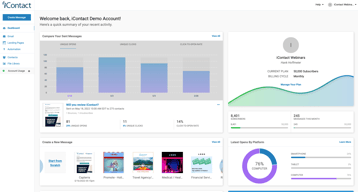
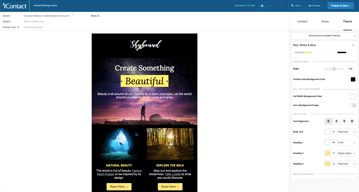





iContact puts automation on its $9 entry plan, which is where most of this category’s money is made. Constant Contact charges $35 for the tier that unlocks automation and segmentation; iContact includes automations, landing pages, and templates at $9 for 500 contacts. That single decision is the strongest argument for it, and it is easy to miss because the product markets itself on being cheap rather than on being ungated.
- What it is: An established email marketing platform with templates, landing pages, automation, and social posting.
- Best for: Small businesses that want automation without paying for a mid-tier plan to get it.
- Pricing: Standard $9, Premium $16, Ultimate $24 per month at 500 contacts. Verified July 2026.
- The honest catch: Unlimited users arrive at Premium, so Standard is not a team plan.
What Is iContact?
iContact is one of the longer-established email marketing platforms, and its positioning is straightforward: competent email marketing at a price well below the category’s better-known names. The pricing page leads with “Easy and Affordable” and a 30-day free trial, which is longer than the 14 days most competitors offer.

What distinguishes it in practice is what sits on the entry tier. Standard at $9 includes pre-designed email templates, a drag-and-drop editor, landing page templates, and — unusually — automations. In a category where the standard commercial move is to gate automation one or two tiers above the advertised price, including it at the bottom is a genuine differentiator rather than a marketing claim.
Pricing scales with contact count via a selector on the pricing page, so the figures below describe a 500-contact list and rise from there.
How iContact Works
- Priced by contact count. A dropdown sets your list size; the tier prices move with it.
- Automations on every tier, including the $9 Standard plan.
- Landing pages included from Standard, which several competitors charge extra for.
- Users are the Premium upgrade. Unlimited users arrive at $16, not at $9.
- AI assistance ladders up. Content assistant at Premium, AI templates and images at Ultimate.
- Custom plans for larger lists, quoted rather than published.
iContact Pricing
Captured from iContact’s pricing page in July 2026 in US dollars at the 500-contact setting.
| Plan | At 500 contacts | Key additions |
|---|---|---|
| Standard | $9/month | Templates, drag-and-drop editor, landing pages, automations |
| Premium | $16/month | Unlimited users, social media posting, AI content assistant |
| Ultimate | $24/month | Email verification, dynamic content, AI templates and images |
| Custom | Quoted | Larger lists, higher volume, premium support |

What actually decides your tier:
- Automation at $9 is the headline, and it is real. Constant Contact’s Lite plan at a reported $12 does not include automation or segmentation — those start at $35. Getting automations on iContact’s cheapest tier changes the comparison substantially for a small business that wants welcome sequences and follow-ups without a mid-tier subscription.
- Standard is not a team plan. Unlimited users is a Premium feature at $16. If more than one person needs access, that is your entry price, not $9.
- The 30-day trial is unusually long. Most competitors offer 14 days. A month is enough to build a list, run a real campaign, and judge deliverability rather than just the interface.
- Prices rise with contacts. The $9, $16, and $24 figures apply at 500 contacts. Set the selector to your actual list size before comparing against anything, because the curve above that is what you will actually pay.
- Email verification is an Ultimate feature. At $24 — worth knowing if list hygiene matters to you, since verification directly affects deliverability.
- Larger lists are quoted. The published tiers stop before enterprise volume.
Who Should Use iContact
- Small businesses wanting automation cheaply. The clearest case, and where the $9 tier genuinely undercuts the category.
- Solo operators. Standard’s single-user limitation is irrelevant if you are the only user.
- Anyone evaluating carefully. The 30-day trial is long enough to test properly rather than superficially.
- Businesses that want landing pages included. Bundled from the entry tier rather than sold separately.
It fits poorly for teams, where unlimited users requires Premium; for creators selling to an audience, where Kit is free to 10,000 subscribers with commerce built in; and for large infrequently-mailed lists, where Brevo’s send-based pricing is structurally cheaper.
Honest Pros and Cons
Strengths
- Automation on the entry plan. The genuine differentiator against most of the category.
- Very low entry price. $9 at 500 contacts undercuts most mainstream competitors.
- A 30-day free trial. More than twice the category norm.
- Landing pages included from Standard.
- Established platform. Long operating history and mature deliverability.
- Clear tier logic. Each step adds something identifiable rather than reshuffling limits.
Limitations
- Single user on Standard. Unlimited users starts at Premium.
- Prices scale with contacts. The headline describes a 500-contact list.
- Email verification is top-tier only. At $24, despite affecting deliverability.
- No free tier. A generous trial, but nothing permanent.
- Less modern than newer rivals. The interface and templates show their age against MailerLite.
- Enterprise pricing is quoted. No published figures for large lists.
iContact Alternatives and How It Compares
- Constant Contact is better known and considerably more expensive, gating automation and segmentation to its $35 tier.
- MailerLite has a more modern editor and a free tier, at somewhat higher paid prices.
- Zoho Campaigns is cheaper still and offers unlimited sending on paid plans.
- Brevo prices by emails sent rather than contacts stored, which suits large, rarely-mailed lists.
- Kit is the creator-focused option, free to 10,000 subscribers.
- AWeber and GetResponse occupy similar small-business ground with their own free or low-cost entry points.
- Mailchimp is the best-known alternative, with steeper escalation as lists grow.
For a broader survey, browse our email marketing directory.
The Verdict
iContact’s case rests on one decision that is easy to overlook: automation is on the cheapest plan. Across this category the standard commercial pattern is to advertise a low entry price and place automation, segmentation, or send volume one or two tiers above it — Constant Contact puts automation at $35 against a $12 entry, and Kit’s free plan permits a single automation. iContact includes automations, landing pages, and templates at $9 for 500 contacts, which means the advertised price is closer to the useful price than it usually is here.
Check two things before treating $9 as your number. Unlimited users is a Premium feature at $16, so if anyone else needs access that is the real entry point. And the $9 describes a 500-contact list — set the pricing selector to your actual list size before comparing, because contact-scaled pricing is where the meaningful differences between platforms appear and a headline at 500 contacts tells you little about 10,000.
The 30-day trial deserves a mention because it is genuinely useful rather than generous-sounding. Two weeks is enough to judge an interface; a month is enough to build a list, send several campaigns, and see how deliverability actually behaves — which is the thing that matters and the thing you cannot assess from a feature table. Use it properly, and compare against Zoho Campaigns and MailerLite at your real list size while you do.
FAQ
How much does iContact cost?
At 500 contacts, captured July 2026: Standard $9 per month, Premium $16, and Ultimate $24. Prices rise with contact count via a selector on the pricing page, and larger lists are quoted through a custom plan. A 30-day free trial is available, which is longer than the 14 days most competitors offer.
Does iContact include automation on the cheapest plan?
Yes, and this is its most distinctive feature. The $9 Standard plan includes automations along with pre-designed templates, a drag-and-drop editor, and landing page templates. Most competitors gate automation to a mid-tier plan — Constant Contact places it at $35 against a $12 entry price — so iContact’s advertised price is closer to the genuinely useful price than is typical in this category.
How many users does iContact allow?
Unlimited users are included from the Premium plan at $16 per month. The $9 Standard plan does not include unlimited users, so any team needing shared access should treat Premium as the entry point. For a solo operator the distinction is irrelevant and Standard remains the better value.
Is there a free plan?
No. iContact offers a 30-day free trial, which is unusually long, but no permanent free tier. Kit is free to 10,000 subscribers, and MailerLite and Brevo both offer free plans, so if starting at zero cost matters those are the better entry points. iContact’s trial is nonetheless long enough to evaluate deliverability properly rather than just the interface.
What is iContact best for?
Small businesses and solo operators who want email automation without paying for a mid-tier plan to unlock it. Its $9 entry plan includes automations and landing pages that competitors charge considerably more for. It is a weaker fit for teams, since unlimited users requires Premium, and for large lists mailed infrequently, where send-based pricing from Brevo is structurally cheaper.

Compare iContact with other popular tools in the same category.
I love that you can stay on ONE phone call through your phone as you go through a list of separate calls. You don't have to reconnect to your phone over and over.
There are many glitches. IF you try to reconnect to your phone too quickly, it connects poorly and delays.
IT helps eliminate time between calls.
Vocus (PRWeb) is good at Press Release distribution services on the web. It was our first technology for emailing campaigns
Email Marketing with iContact does not meet our expectations. The basic Marketing Plans allows only 1 user and offers only basic segmentation, tracking and analytic tools, does not integrate with our CRM and consulting is limited to kick-off only. Compared to alternatives for Marketing Automation, iContact is focused on email marketing, with limited functionality fer everything else. Did not integrate with our CRM system, so it was time consuming to transfer data between both systems.
We subscribed to a Basic Package at $3600/year or $300/month for emailing, 2 press releases per month and social media tools. Press Release distribution works well, but I wish it had better integrated marketing automation platform at lower cost. We did use it for about a year until we got an approval budget to use Act-on marketing automation technology. We stilluse Vocus for our PR distribution.
The documentation is very well written and clean design
The documentation on creating an API is not as helpful
I am working on integrating a signup form with icontact for Polynesia.com. Because icontact does not provide much pre validation logic to their forms I have created the form to validate according to Polynesia.com specs and from there opt to use icontact api service to submit data
It made it easier to keep track or and send out our emails.
Eventually, it stopped delivering some of the emails and cost of thousands.
We've stopped using this software and are doing much better. We are relying more on content marketing and ads now.
We used iContact for preparing and distributing client newsletters and a few other email campaigns. iContact is an inexpensive email marketing service.
We experienced slow website loading, long wait times for support assistance with inexperienced staff.
We didn't find iContact to be robust enough for handling our various lead nurturing campaigns - no longer using iContact.
With iContact, we are able to collaborate on tasks via communication channels.
I barely encounter issues while using iContact on my end.
Task management and file sharing.
Although simple to use, it is ineffective. It is not a reliable tool.
Worst customer service and too expensive in comparison to other tools and features.
It used to solve problems, but after a while, it began to cause new ones.
The finished product looks OK, not any better than Mailchimp or Constant Contact.
The program is clunky and there's a known glitch that keeps the emails from going to social media, especially Facebook, which makes the emails much less effective. It takes a ridiculous amount of time for customer service to get back to you. I don't mean an hour. I mean days or weeks. Apparently they don't understand that these emails are time sensitive. They also send the response in a "noreply" email so you can't have a dialogue. I gave it three tries. They struck out.
More bounces than other programs. Hard to understand their reports, not enough information and I'm going back to Mailchimp
The gallery of premade templates were about the only good thing I experienced with iContact.
The system is very buggy. Not great for automation either.
Abandoned the platform due to it's bad user experience. Automation portion did not perform as expected. Many other better platforms out there in the same price range.
Comparable to other mailsending platforms.
Not very "on the ball" when it comes to new trends (like responsiveness). Very customer-unfriendly. Will let the renewal date pass without notice (even if your account has been inactive for 6 months) and will bill your VISA for over 900 dollars. Don't give your credit card number to these people!
Sending newsletters for clients (I am the administrator).
Easy user experience its very friendly to navigate
UI Design is not very modern and not in terms with the market
Simple, affordable email marketing can be easily done
iContact always has great customer service and I have always been able to chat a representative no matter the time of day. I like being able to see how many contacts opened our emails.
iContact is very surface level. It isn't possible to do simple things, like drag a graphic to where you want it to be, or to wrap text around a photo, and text formatting options are very limited. It is also very difficult to add contacts to certain lists. There are lots of limitations to things that I believe should be simple and automatic, and I feel as if I am constantly jumping through hoops to achieve simple tasks.
We have been able to send mass emails to our whole contact list with one click which is helpful. It is also nice to see what percentage of our recipient list is even opening the message.
The functionality was serviceable at best, but their billing and customer service department is trained to not communicate with you personally on billing disputes. They have one employee who handles that for them but you can only contact her by email. Unethical
I told their billing team that we only wanted the service for one month of campaigns for a event we were hosting, but they did not cancel our service and continued to charge us for the year or so that we did not even know we had. Tried to put the blame on us for not canceling ourselves, and they essentially refused to reimburse us for the monthly charges that they were auto charging to the card on file. They said that they did not have any record of the request so they could not do anything about it. There was not activity on the account from when I told them to cancel the service. After multiple calls and a month or two of back and forth within their team, they finally credited back 2 months which was insulting to say the least. No recorded calls, no ownership, and zero empathy to someone in my situation. Don't go here for email marketing! There are plenty of services that are way better than them. RUN!!
We had a loss of a few hundred dollars while working with them. worst experience ever
i guess that it did indeed send emails to people.
the interface is clunky and hard to use. customization options are very limited
email marketing
Very helpful in constructing a marketing email template
Once you have invested hours in creating the perfect campaign, then the reveal. It costs you almost a dollar per each to send out.
Direct email marketing
The ease of searching historical campaigns
Not user friendly, poor design, bad design options
Monthly marketing
I like the ability to send mass information out to my contacts. It is nice to be able to import an entire spreadsheet of contacts and send out advertisements and upcoming events to my entire list of customers.
The user interface is very clunky and hard to use. It is also difficult with limited customization. There are some templates but I never feel like I have the freedom to truly customize everything I want to. The designs are hard to look at and tough to use.
It is beneficial because I am able to take my entire list of contacts and send events and information directly in their inbox to inform them of what is coming up. It makes advertising a little more personal and allows us to reach them directly.
This is a very basic editor and more suited for someone with little to no marketing/media/design skills. If you're just looking for an easy to use platform for basic email messaging, you'll like iContact.
I was continually frustrated with the ability to create well-designed emails and manage lists or A/B testing and automated emails. The drag and drop editor lacked a lot of customization abilities, and the templates left something to be desired.
We switched to a new platform after our contract ended and did not re-sign with iContact.
I contact is good for small businesses looking to track their subscribers.
It's not user friendly at all! So hard to design things and doesn't open properly on outlook.
I am solving communications problems. We use it to get information out to our subscribers.
I like that I can share e-mails to social media. I can schedule posts out for the coming year.
Here we go! We were promised that when we upgraded, we would have a dedicated rep that we could call and talk to, someone who could advise on how to make the most of our marketing efforts. Instead, we got someone we can talk to once a month for 30 minutes. We were promised more room for e-mails, but did not get the promised amount. Half of our subscribers disappeared without explanation; they didn't unsubscribe, they were simply gone. I do the marketing for three businesses, and we were told they could merge each separate account into just one for me to manage. This still hasn't happened. Social Media-wise, you can schedule posts, but you can't post them altogether. You have to create and schedule a post for each post, so if you have a lot of social media, it will take quite a bit of time. If you make a mistake, you can't just edit it. You have to move it to drafts, which unschedules it, go to drafts, make the edit, then reschedule it.
Very poor customer service. A benefit has been we can see who unsubscribed. Since iContact insists that people sign up to be on a list, it seems weird that they would unsubscribe. We can then contact them to find out why and address the issue.

I'm glad that they recently redesigned their Message Builder. It's much easier to use than it was before.
I still don't think their interface is as easy to use as MailChimp's or Constant Contact's, even with the recent updates.
I use this for a client who sends out regular e-blasts to their customers. I only use this because it's what the client had purchased before I started working with them. I would switch to Constant Contact or MailChimp if I could.
I like the friendly customer service and personal touch and help that I get from iContact employees.
I dislike the user experience of the overall platform. It is slow, hard to navigate, and isn't as powerful as others that I have used
We have alot of inactive users in our email list that iContact has helped us figure out who is worth keeping in our subscriber list and who is not.
I like that it is a Salesforce.com product and syncs very easily with our Salesforce contacts to easily send out eblasts
I dislike the formatting issues. How emails will look differently on the preview screen and again in google and again in outlook and again in mobile.
We use it to eblast all of our customers and it helps drive people to our website
iContact is the inexpensive option for e-blast communication but in my experience, the positivity stops there.
Unable to customize templates. Far from user-friendly. Terrible customer service experience.
iContact provided a newsletter and global communication strategy when our business was first starting out. However; our company quickly outgrew the software and limited offerings they provided.
Relatively easy to build and send emails
Only relevant for organisations with extremely simplistic CRMs, can't be used by anyone who has internal validation rules they need to apply to data. Also FYI once a list has been removed their system does not allow people to unsubscribe.
N/A
It sends emails when you tell it to. That's about all I can say for benefits.
The platform is incredibly buggy. There's no responsive email options in the templates so you're stuck having to build you're own, then figure out workarounds to make the responsive coding work since iContact tries to override it. I think this platform would work well for a small nonprofit that wants to send a basic email to stakeholders but does not have the level of polished platform needed for a larger organization.
Contacting our various stakeholders around the world. iContact gets the job done even if it's not the easiest platform to deal with.
It's inexpensive. If you want to send out an email using a template, it's easy.
Not user friendly. The wysiwyg interface does not accurately show how the email will look. The templates are very restrictive, and if you change them, you are now working in HTML (see previous complaint). You cannot modify the view modes of anything. The support staff is east coast based, and leaves at 6pm, so if you are on the west coast, forget about any support after 3pm.
The only problem it solves is sending out eblasts. Our benefit is we can send out eblasts.
iContact responded quick after my initial inquiry
Very poor delivery on promised timeline. The out of the box solution was very helpful but I was promised to have a designer help get a campaign off the ground and that did not happen.
At the time I needed to build a few email templates to guide new members through the sign up process
It integrated with SalesForce fairly decently and was a great starting point for email marketing at the right price point. When we were using iContact, we were not very experienced email marketers so this was a fairly straighforward platform to start with.
Did not seem to offer much flexibility with the use, granted we used it through salesforce, so that could have been the problem. We have since moved to marketing automation software for email marketing, which has been a much more flexible process.
We were solving the problem of sending emails to prospective clients. Icontact was a great starting point as we figured out how we wanted to use emails to best engage current and prospective clients.
It can send emails and connect with salesforce for tracking
The user experience is klunky and dated and the templates are not mobile friendly
None - more trouble than it's worth