
Unclaimed: Are you working at iContact?
iContact Reviews: 4.1/5 — Solid Choice
iContact delivers professional email marketing features to ensure that it provides extensive features and tools across different stages and sizes to get real results for your campaigns. The platform is ideal for small businesses to want to leverage better campaigns with high-volume senders and subscribers.

| Capabilities |
API
|
|---|---|
| Segment |
Small Business
Mid Market
|
| Deployment | Cloud / SaaS / Web-Based |
| Support | 24/7 (Live rep), Chat, Email/Help Desk, FAQs/Forum, Knowledge Base, Phone Support |
| Training | Documentation |
| Languages | English |

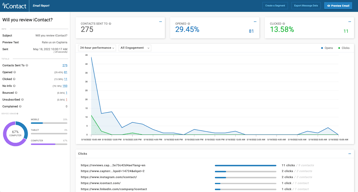
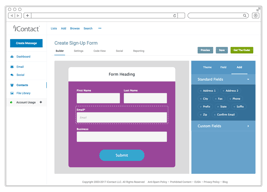
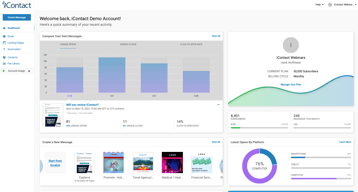
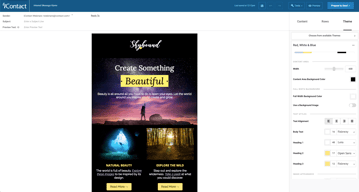





iContact puts automation on its $9 entry plan, which is where most of this category’s money is made. Constant Contact charges $35 for the tier that unlocks automation and segmentation; iContact includes automations, landing pages, and templates at $9 for 500 contacts. That single decision is the strongest argument for it, and it is easy to miss because the product markets itself on being cheap rather than on being ungated.
- What it is: An established email marketing platform with templates, landing pages, automation, and social posting.
- Best for: Small businesses that want automation without paying for a mid-tier plan to get it.
- Pricing: Standard $9, Premium $16, Ultimate $24 per month at 500 contacts. Verified July 2026.
- The honest catch: Unlimited users arrive at Premium, so Standard is not a team plan.
What Is iContact?
iContact is one of the longer-established email marketing platforms, and its positioning is straightforward: competent email marketing at a price well below the category’s better-known names. The pricing page leads with “Easy and Affordable” and a 30-day free trial, which is longer than the 14 days most competitors offer.

What distinguishes it in practice is what sits on the entry tier. Standard at $9 includes pre-designed email templates, a drag-and-drop editor, landing page templates, and — unusually — automations. In a category where the standard commercial move is to gate automation one or two tiers above the advertised price, including it at the bottom is a genuine differentiator rather than a marketing claim.
Pricing scales with contact count via a selector on the pricing page, so the figures below describe a 500-contact list and rise from there.
How iContact Works
- Priced by contact count. A dropdown sets your list size; the tier prices move with it.
- Automations on every tier, including the $9 Standard plan.
- Landing pages included from Standard, which several competitors charge extra for.
- Users are the Premium upgrade. Unlimited users arrive at $16, not at $9.
- AI assistance ladders up. Content assistant at Premium, AI templates and images at Ultimate.
- Custom plans for larger lists, quoted rather than published.
iContact Pricing
Captured from iContact’s pricing page in July 2026 in US dollars at the 500-contact setting.
| Plan | At 500 contacts | Key additions |
|---|---|---|
| Standard | $9/month | Templates, drag-and-drop editor, landing pages, automations |
| Premium | $16/month | Unlimited users, social media posting, AI content assistant |
| Ultimate | $24/month | Email verification, dynamic content, AI templates and images |
| Custom | Quoted | Larger lists, higher volume, premium support |

What actually decides your tier:
- Automation at $9 is the headline, and it is real. Constant Contact’s Lite plan at a reported $12 does not include automation or segmentation — those start at $35. Getting automations on iContact’s cheapest tier changes the comparison substantially for a small business that wants welcome sequences and follow-ups without a mid-tier subscription.
- Standard is not a team plan. Unlimited users is a Premium feature at $16. If more than one person needs access, that is your entry price, not $9.
- The 30-day trial is unusually long. Most competitors offer 14 days. A month is enough to build a list, run a real campaign, and judge deliverability rather than just the interface.
- Prices rise with contacts. The $9, $16, and $24 figures apply at 500 contacts. Set the selector to your actual list size before comparing against anything, because the curve above that is what you will actually pay.
- Email verification is an Ultimate feature. At $24 — worth knowing if list hygiene matters to you, since verification directly affects deliverability.
- Larger lists are quoted. The published tiers stop before enterprise volume.
Who Should Use iContact
- Small businesses wanting automation cheaply. The clearest case, and where the $9 tier genuinely undercuts the category.
- Solo operators. Standard’s single-user limitation is irrelevant if you are the only user.
- Anyone evaluating carefully. The 30-day trial is long enough to test properly rather than superficially.
- Businesses that want landing pages included. Bundled from the entry tier rather than sold separately.
It fits poorly for teams, where unlimited users requires Premium; for creators selling to an audience, where Kit is free to 10,000 subscribers with commerce built in; and for large infrequently-mailed lists, where Brevo’s send-based pricing is structurally cheaper.
Honest Pros and Cons
Strengths
- Automation on the entry plan. The genuine differentiator against most of the category.
- Very low entry price. $9 at 500 contacts undercuts most mainstream competitors.
- A 30-day free trial. More than twice the category norm.
- Landing pages included from Standard.
- Established platform. Long operating history and mature deliverability.
- Clear tier logic. Each step adds something identifiable rather than reshuffling limits.
Limitations
- Single user on Standard. Unlimited users starts at Premium.
- Prices scale with contacts. The headline describes a 500-contact list.
- Email verification is top-tier only. At $24, despite affecting deliverability.
- No free tier. A generous trial, but nothing permanent.
- Less modern than newer rivals. The interface and templates show their age against MailerLite.
- Enterprise pricing is quoted. No published figures for large lists.
iContact Alternatives and How It Compares
- Constant Contact is better known and considerably more expensive, gating automation and segmentation to its $35 tier.
- MailerLite has a more modern editor and a free tier, at somewhat higher paid prices.
- Zoho Campaigns is cheaper still and offers unlimited sending on paid plans.
- Brevo prices by emails sent rather than contacts stored, which suits large, rarely-mailed lists.
- Kit is the creator-focused option, free to 10,000 subscribers.
- AWeber and GetResponse occupy similar small-business ground with their own free or low-cost entry points.
- Mailchimp is the best-known alternative, with steeper escalation as lists grow.
For a broader survey, browse our email marketing directory.
The Verdict
iContact’s case rests on one decision that is easy to overlook: automation is on the cheapest plan. Across this category the standard commercial pattern is to advertise a low entry price and place automation, segmentation, or send volume one or two tiers above it — Constant Contact puts automation at $35 against a $12 entry, and Kit’s free plan permits a single automation. iContact includes automations, landing pages, and templates at $9 for 500 contacts, which means the advertised price is closer to the useful price than it usually is here.
Check two things before treating $9 as your number. Unlimited users is a Premium feature at $16, so if anyone else needs access that is the real entry point. And the $9 describes a 500-contact list — set the pricing selector to your actual list size before comparing, because contact-scaled pricing is where the meaningful differences between platforms appear and a headline at 500 contacts tells you little about 10,000.
The 30-day trial deserves a mention because it is genuinely useful rather than generous-sounding. Two weeks is enough to judge an interface; a month is enough to build a list, send several campaigns, and see how deliverability actually behaves — which is the thing that matters and the thing you cannot assess from a feature table. Use it properly, and compare against Zoho Campaigns and MailerLite at your real list size while you do.
FAQ
How much does iContact cost?
At 500 contacts, captured July 2026: Standard $9 per month, Premium $16, and Ultimate $24. Prices rise with contact count via a selector on the pricing page, and larger lists are quoted through a custom plan. A 30-day free trial is available, which is longer than the 14 days most competitors offer.
Does iContact include automation on the cheapest plan?
Yes, and this is its most distinctive feature. The $9 Standard plan includes automations along with pre-designed templates, a drag-and-drop editor, and landing page templates. Most competitors gate automation to a mid-tier plan — Constant Contact places it at $35 against a $12 entry price — so iContact’s advertised price is closer to the genuinely useful price than is typical in this category.
How many users does iContact allow?
Unlimited users are included from the Premium plan at $16 per month. The $9 Standard plan does not include unlimited users, so any team needing shared access should treat Premium as the entry point. For a solo operator the distinction is irrelevant and Standard remains the better value.
Is there a free plan?
No. iContact offers a 30-day free trial, which is unusually long, but no permanent free tier. Kit is free to 10,000 subscribers, and MailerLite and Brevo both offer free plans, so if starting at zero cost matters those are the better entry points. iContact’s trial is nonetheless long enough to evaluate deliverability properly rather than just the interface.
What is iContact best for?
Small businesses and solo operators who want email automation without paying for a mid-tier plan to unlock it. Its $9 entry plan includes automations and landing pages that competitors charge considerably more for. It is a weaker fit for teams, since unlimited users requires Premium, and for large lists mailed infrequently, where send-based pricing from Brevo is structurally cheaper.

Compare iContact with other popular tools in the same category.

The email and social media design features are simple to use for the beginner and sophisticated enough for the experienced designer.
I would like to have easy access to the date that contacts unsubscribe or click "do not contact."
I am able to see who clicks on marketing links inside of an email and tie that to website visits.
I really like that I am able to upload all of our images and edit them inside the template. I LOVE LOVE LOVE the drag and drop feature and how I am able to customize the templates with colors, fonts and images!
My only wish was with borders being able to be added to individual text blocks to add an extra POP! of color or personality.
We realized that we are able to use the data for sales leads, areas of interest from our student engagement and what we should be focusing on for our future schedule!
Their A/B testing feature is easier to use than other platforms.
Their Marketing Automation tool is outdated.
Keeping new and existing customers engage with our website. Getting feedback from our customers and using that to make our site better and more engaging to those that use it.
I appreciate iContact’s user interface. It’s easy to understand which helps my experience to navigate efficiently.
I wish it was more mobile-friendly for setting up templates on the go.
My mailing lists were insegmented prior to introducing iContact to my workflow. Now, I can really target my marketing in a way that makes sense.
I receive prompt response and support to any question I may have concerning the program.
Nothing to dislike. The program is great. Highly recommend it!
I get access to tonnes of emails through my website. Icontact allows me to quickly archive and manage these emails to re-target my customer base.
iContact is a top level email mailing company. They have excellent personal service and have really help in our understanding of good emailing practices.
The prices are higher than we like. As a result we have had to cut back on our level of service
Has help greatly with our list hygiene
The customer support is truly amazing been with iContact since 2007.
That there is only a 98% delivery rate..LOL
We enable our clients to motivated there contacts to purchase, stay in touch and continue to support brand awareness.
iContact has all of the automation features we were looking for, integrates with our CRM, Salesforce,, and provides all of the metrics we need to report on. Customer support and consultation has been far and above that of most of our vendors.
Not entirely intuitive to use but questions are always responded to quickly.
More visibility to the response to our marketing efforts has given us valuable insight we are using to hone not just our messaging and audience for emails but also web presence.
IContact is very easy to use. Uploading contacts to your lists is very easy. I like to design ads that match what time of year you are sending and the type of people who you are sending to. It is nice to see the open rates, click rates and unsubscribes so you can tell how each ad did. Also it is very good to have a Strategic Advisor to help you when you have questions. They help you send better ads and answer any problems that you may have. Love the idea that you can resend the same ad out a week later. Any recent ads that were sent out, are easy to find so you can reuse them quickly. Great mass emailing company to use. With all the competitors our there, Icontact is easy to use and very helpful.
Would like more background options. It would be helpful when uploading a photo to be able to edit it. Would like to be able to align my logo with text next to it.
We are a specialized business. We upload those contacts who would benefit on getting an ad from us. We are able to send a confirm letter to new contacts to make sure they are interested in getting ads from us. I just learned that I can use google analytics to help with clicks on our website.
I love my strategic advisor, who is always there to answer any of my questions.
Sometimes the template set-up is less than intuitive, but I always figure it out.
I'm solving member engagement issues especially through the use of the data and analytics my strategic advisor is able to share
iContact is very user friendly and their customer service is amazing. As a premium client they have a lot of features and services that they offer us.
The only thing I wish we could work on would be incorporating iContact with our shopping cart API; but the cart API is not user friendly.
iContact lets us reach our customers and brings them back for repeat business. The ROI is measurable and positive.
The customer service is unparalleled. No endless wait times, always a helpful person on the other side. (Emily is THE best!)
That more of our vendors are like iContact
Quality of inbound leads, traffic
The assistance from my account representative and the support team.
I wish I could see deliverability stats for specific email providers within I-Contact.
Communication with our customers. We have improved out engagement with customers.
The ease with which we can contact a large group of people - with proven results!
Nothing. The product is great.I would say they should upgrade their DO not contact rules. We should have a change, in our business, to mark a company that we are emailing, out of business before we are marked, "Do not contact" in the file.
I can send mass emails out to a group of people without server problems, being black balled on the internet and can contact a large group of people in a individualized way and it gets the job done quicker.
That it helps us best stay in contact with carriers and helps us book our freight
I have no concerns as this helps me with booking freight
That it helps us best stay in contact with carriers and helps us book our freight
Our strategy manager, Emily Collins. It is so wonderful to have someone that cares about your success!
There is really nothing I don't like. I think the price might be a little high, but worth it for the personal attention that you get!
The best benefit of this company is that they assign you a real person who works with you to guide you in the right direction! Emily Collins is so helpful and a wonderful person to work with!
Customer Service is easy to contact and very helpful, Its nice to have an account manager that you can email or call at anytime and they check in on you each month
I would like to see more fonts and sizes and a better way to increase and reduce the line spacing.
Our company was able to clean up our list and target certain audiences. We are now able to focus on more targeted groups.
The best part of iConact for me is the continued support in the growth of my business.
Ha ha.. well, paying for it? Kidding. I can't really say I dislike anything about the product itself.
As our mailing list grows, we have been able to segment, unlist and grow our database with real users that are engaging in our sends.
The best part about iContact is working with a strategist and the option to execute smaller design projects.
What I dislike is the lack of flexibility switching between HTML and the builder for templates.
Staying autonomous and not having to rely on corporate marketing team to help with the campaigns and inability to download the analytic charts and graphs.
The support offered when I need it and the improvements they make to better the tool.
When building larger automation workflows, the system responds and updates slowly.
Reaching our customers and informing them of programs and services that we provide. Easily directing them to our web resources to learn more or enroll without being too intrusive.
I love the templates provided by iContact to design personalized and creative emails. I also appreciate the stats that are available tp measure the open rates and overall success of every single email!
I don't like that in order for an unsubscriber to subscribe again, they must send an email to be shared with an iContact strategic advisor. This is sometimes complicating for users who unsubscribe by mistake
Our event attendance has increased since we better utilize iContact. Being able to host reengagement campaigns in iContact is also golden! This is a benefit because it helps clean up all of our lists.
Curated social media postings, discrete folders enabling us to hold similar lists for different purposes.
There is nothing I dislike about iContact. They have stepped up the level of service dramatically in the past year. We are very satisfied.
iContact curates social media posts for us, a big time-saver and sales tool. We mail to lists with many of the same recipients and don't want an opt-out from one list to affect the others. iContact has a folder option that solves this problem.
Working with Rebecca has been great and the workflow we set up works perfectly.
At this point I have not complaints about the system.
Successfully targeting guests. Using iContact is easy and very reliable.
I use iContact quite often and enjoy the interface and the ease of use.
I wish there were more templates to choose from and the ability to easily customize existing templates.
I've found this is a great way to reach people and drive results.
The Icontact team from Sales staff to content and strategy advisors are very helpful for business owners who are not savvy at the email marketing game both helping with content and techniques to improve performance of my company
While the lot of automation is great, sometimes like in my instance it improperly classifies an error as a malicious move
Being a small business that operates all over the world and having very few employees we utilize IContact to continue to touch customers that we can’t be in front of on a consistent basis.
iContact makes it possible to create beautiful looking emails and reuseable templates that are easy to use once you're familiar with the capability. I like the ability to reuse content as well, it speeds up the process of creating new templates and individual emails every week.
While it's a fantastic tool, I do feel that the wide variety of capabilities give it a bit of a learning curve. That makes it difficult to train others on how to be my backup. There are a lot of tools in there that I haven't even started using!
iContact allows us to put consistent branding in all of our messaging, and easily send recurring messages. Our account advisor has been a HUGE help to us in educating us on best practices, understanding the metrics and setting up design projects for us. We wouldn't be putting out such successful email campaigns without her fantastic recommendations and support!
iContact has an easy to use platform for creating great looking mass communications. The Customer Service I get with iContact is amazing! My CSRs have always been incredibly responsive. We are a small nonprofit and many of us are doing double duty. iContact is perfect for us to create polished pieces in a short timeframe.
There are some little bugs that we wish were easier to fix, but as I understand, this the case with many other products. For instance, we don't always love the way our emails look in Outlook but that appears to be an Outlook issue.
We have increased our use of iContact for marketing publications and have seen an overall increase in sales.
We had used I-Contact in the past for about 10 years with great success and satisfaction when our company in 2013 decided to change over to another provider. We have given this provider a chance, but a variety of issues, poor support and ineffective training have resulted in us moving back to I-contact since the beginning of 2016. And what a pleasure this has been. We receive Account Management support on a monthly basis, we can submit design projects and we are being listened to and given sound advice. I for one am very pleased with being back at I-contact and I look forward to working with them for many years to come!
Really based on my experience with I-contact there is nothing I dislike about the program, or the approach from the I-contact team.
We are trying to run a variety of email marketing campaigns and by using I-contact we get expert advice on the creation of templates, sign up forms and other useful tips and hints.
Salesforce Integration and Easy Segmentation
Required some reconfiguration of fields
We were looking for a cost effective solution with Salesforce integration for graduate student recruitment. The product has allowed us to leverage our existing systems and significantly improve the quality and quantity of our communications at a fraction of the cost of other systems.
I've been using iContact for the past 4 years. During that time I've test other services but always come back. In my opinion, it is the easiest to use, has great list management, and produces great, quality emails.
I wish you could customize the bottom email footer within the software. iContact will do it for you but I wish you had that control.
Emailing, Contact form on website.