QuickBooks Desktop Pro background blur-sm
QuickBooks Desktop Pro Accounting Software logo
QuickBooks Desktop Pro
Effortless Accounting Solutions
4.3
Why Findstack is free?
Findstack is free for users because vendors pay us when they receive web traffic and sales opportunities. Findstack directories list all vendors — not just those that pay us so that you can make the best-informed purchase decision possible.
Advertising disclosure: Findstack offers objective, editorially independent comparisons to help you find the best software. Some links on this page are affiliate links — we may earn a commission when you visit a vendor through our links, at no additional cost to you. Affiliate relationships never influence our ratings, rankings, or reviews. Disclosure policy | Methodology

QuickBooks Desktop Pro Reviews: 4.3/5 — Solid Choice

QuickBooks Desktop Pro Overview
What is QuickBooks Desktop Pro?

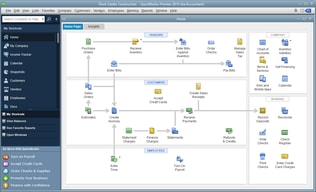
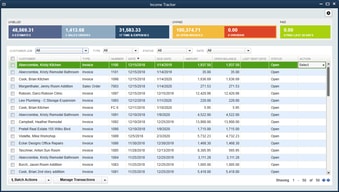
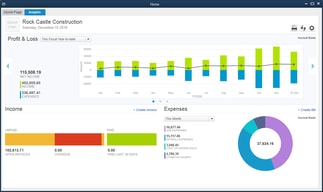
QuickBooks Desktop Pro is a platform that lets users automate key processes in the accounting system, including billing and invoicing. With Desktop Pro, users have the option to link bank accounts, define workflows, and make automated payments for efficiency. This solution also lets users manage employee payrolls via a single application. Other key features include business expense tracking, report generation, and time tracking.

Company Intuit Inc.
Year founded 1983
Company size 10,001+ employees
Headquarters Mountain View, California, United States
Social Media
QuickBooks Desktop Pro Categories on Findstack
Crevio E-Commerce Platforms logo
Crevio
Sponsored
5.0
(1)
Free plan available
Crevio is an AI-powered platform that runs your business while you sleep. Describe what you want to se... Learn more about Crevio
Ask Questions about QuickBooks Desktop Pro
What QuickBooks Desktop Pro is best for?
How does QuickBooks Desktop Pro compare to QuickBooks Online?
What are the pros and cons of QuickBooks Desktop Pro?
QuickBooks Desktop Pro Product Details
Capabilities
API
Segment
Small Business
Mid Market
Enterprise
Deployment Cloud / SaaS / Web-Based, Desktop Windows, On-Premise Windows
Support 24/7 (Live rep), Chat, Email/Help Desk, FAQs/Forum, Knowledge Base, Phone Support
Training Documentation
Languages English
QuickBooks Desktop Pro Features
Accounts Payable
Accounts Receivable
Audit Trail
Automated Reminders
Bank Reconciliation
Billing & Invoicing
Budgeting & Forecasting
Compliance management
Customer Management
Customizable Reports
Dashboards & Analytics
Data Import/Export
Expense Tracking
Financial Reporting
Fixed Asset Management
General Ledger
Integration with Third-Party Apps
Inventory Management
Mobile Access
Multi-Company
Multi-currency
Payroll Management
Project Accounting
Purchase Orders
Recurring Billing
Revenue Recognition
Sales Orders
Tax Management
Time & Expense Tracking
Vendor Management
QuickBooks Desktop Pro Media
QuickBooks Desktop Pro video thumbnail
QuickBooks Desktop Pro 0
QuickBooks Desktop Pro 1
QuickBooks Desktop Pro 2
QuickBooks Desktop Pro 3
QuickBooks Desktop Pro 4
QuickBooks Desktop Pro Screenshots
QuickBooks Desktop Pro screenshot 1
QuickBooks Desktop Pro screenshot 2
QuickBooks Desktop Pro screenshot 3
QuickBooks Desktop Pro screenshot 4
QuickBooks Desktop Pro screenshot 5
Disclaimer
Our research is curated from diverse authoritative sources and meant to offer general advice. We don’t guarantee that our suggestions will work best for each use-case, so consider your unique needs when choosing products and services. Feel free to share your feedback.
Last updated: June 27, 2026
QuickBooks Desktop Pro Accounting Software logo
1,707 QuickBooks Desktop Pro Reviews
4.3 out of 5
Small Business (50 or fewer emp.)
Aug 17, 2020
 Source
Overall Rating:
5.0
AG
Verified Reviewer
Founder
Share
"Go To Accounting Sofware"
What do you like best about QuickBooks Desktop Pro?

Powerful and intuitive to use. Go to accounting software for all business sizes.

What do you dislike about QuickBooks Desktop Pro?

Feature updates don't happen too often, so don't expect a lot of changes.

What problems is QuickBooks Desktop Pro solving and how is that benefiting you?

Managing books and accounting department.

Small Business (50 or fewer emp.)
Aug 12, 2020
 Source
Overall Rating:
5.0
Terri K. avatar
Terri K.
Office Administrator
Share
"Love working in QB's"
What do you like best about QuickBooks Desktop Pro?

QB's makes my job so much easier. I'm able to enter and pay invoices quickly. Reports are extremely helpful for following a/p's and a/r's.

What do you dislike about QuickBooks Desktop Pro?

Support for QB's isn't the best. I've attempted researching/contacting without great results.

What problems is QuickBooks Desktop Pro solving and how is that benefiting you?

I use QB's daily at work. It makes my job so much easier. There are four different business within QB's that I manage.

Small Business (50 or fewer emp.)
Jul 28, 2020
 Source
Overall Rating:
5.0
AG
Verified Reviewer
Founder
Share
"Complete Bookkeeping Software - Great Product"
What do you like best about QuickBooks Desktop Pro?

I have used it for 20 years and the program is updated but does not lose its familiarity.

What do you dislike about QuickBooks Desktop Pro?

Wish the online version was a little less pricey.

What problems is QuickBooks Desktop Pro solving and how is that benefiting you?

I have multiple businesses I manage in QuickBooks and it keeps everything organized easily and efficiently.

Mid Market (51-1000 emp.)
Jul 28, 2020
 Source
Overall Rating:
5.0
Mark H. avatar
Mark H.
Ceo/Coo For Hire, C Suite Advisor, Speaker
Share
"QuickPro rocks"
What do you like best about QuickBooks Desktop Pro?

It’s inexpensive and excellent to track expenses & p&l and easy to use & very intuitive. It is great also when sourcing out your books.

What do you dislike about QuickBooks Desktop Pro?

You can make changes sometimes with out it saving original. You can make up numbers & change last minute.

What problems is QuickBooks Desktop Pro solving and how is that benefiting you?

It allows organizations to scale their business very quickly & you can use whether you are a small or mid or large organization.

Small Business (50 or fewer emp.)
Jul 27, 2020
 Source
Overall Rating:
5.0
AG
Verified Reviewer
Founder
Share
"Great desktop option for small business"
What do you like best about QuickBooks Desktop Pro?

QB desktop pro is easy to use and a great option for clients who want to use a non on-line solution,

What do you dislike about QuickBooks Desktop Pro?

The ease of sharing files is a bit clunky, and can be problematic at times. A good file sharing program is a great option for a solution to this.

What problems is QuickBooks Desktop Pro solving and how is that benefiting you?

I am solving the problem of a client paying too much for an online program. The benefit is the cost for someone who doesn't need the online option.

Small Business (50 or fewer emp.)
Jul 21, 2020
 Source
Overall Rating:
5.0
Silvia B. avatar
Silvia B.
Information Technology Project Manager
Share
"Silvia's Quickbooks Pro"
What do you like best about QuickBooks Desktop Pro?

I ran my business in QB Pro. Easy to create reports, asset tracking, payroll.

What do you dislike about QuickBooks Desktop Pro?

somewhat confusing setting up cost of goods

What problems is QuickBooks Desktop Pro solving and how is that benefiting you?

I track all my business in QB Pro. Accounts payable, receivable, payroll, inventory

Small Business (50 or fewer emp.)
Jul 16, 2020
 Source
Overall Rating:
5.0
Olivia P. avatar
Olivia P.
Marketing Manager
Share
"Literally a Lift Saver!"
What do you like best about QuickBooks Desktop Pro?

I love that with QuickBooks I can pretty much do ALL of my ap/ar within the one platform

What do you dislike about QuickBooks Desktop Pro?

In our company it's hard to get an accurate measure of supply so sometimes our numbers are skewed within QB. That could be specific to just our industry, so I'm not sure if it would be across the board.

What problems is QuickBooks Desktop Pro solving and how is that benefiting you?

We have someone using QuickBooks right now who has almost no accounting experience other than going to business school, and she's more than capable of using it. The tasks we use QB for are simple enough that anyone who understands the interface could be good at it.

Small Business (50 or fewer emp.)
Jun 28, 2020
 Source
Overall Rating:
5.0
AG
Verified Reviewer
Founder
Share
"Intuitive and Well organized tool for anyone"
What do you like best about QuickBooks Desktop Pro?

I love how intuitive it is for everyone to use regardless of your experiences are prior to using it. It has everything you would ever need

What do you dislike about QuickBooks Desktop Pro?

It can be a bit basic but it covers the majority of my needs

What problems is QuickBooks Desktop Pro solving and how is that benefiting you?

It’s helped me organize the accounting and financial aspects of the family-owned business I work for, without needing an advanced degree in accounting

Small Business (50 or fewer emp.)
Jun 26, 2020
 Source
Overall Rating:
5.0
AG
Verified Reviewer
Founder
Share
"Reliable Software"
What do you like best about QuickBooks Desktop Pro?

Ease of use. With no prior knowledge I was able to get comfortable with the program within a couple of days. I also think it is easier to use than Quickbooks online, which I tried after getting familiar with Quickbooks Desktop Pro.

What do you dislike about QuickBooks Desktop Pro?

Downloading transactions and unmatching many individual transactions can become time consuming.

What problems is QuickBooks Desktop Pro solving and how is that benefiting you?

Track cashflow, run reports easily, run financials easily.

Small Business (50 or fewer emp.)
Jun 05, 2020
 Source
Overall Rating:
5.0
AG
Verified Reviewer
Founder
Share
"Quickbooks"
What do you like best about QuickBooks Desktop Pro?

It is easy to use. You don't need to be an accountant to use it.

What do you dislike about QuickBooks Desktop Pro?

Voiding checks is an issue. It voids it based on the month that the check was written

What problems is QuickBooks Desktop Pro solving and how is that benefiting you?

Ability to close my books faster. Ability to save my backups within the app and keeping copies of bills and documentation with the entries.