
Unclaimed: Are you working at QuickBooks Online?
QuickBooks Online Reviews: 4.1/5 — Solid Choice
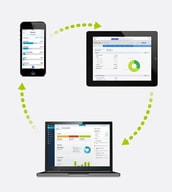
As one of the best known accounting and financial software companies today, Quickbooks offers a combination of reliable payroll tools, HR solutions, and automated tracking features. Quickbooks also include access to benefits, project management, inventory, and contractor options. One of the biggest benefits of Quickbooks is its flexibility. Quickbooks integrates with Square, Shopify, PayPal, and a host of other well-known tools. Finally, Quickbooks also provides access to expert accountants and tax professionals.
| Company | Intuit Inc. |
|---|---|
| Year founded | 1983 |
| Company size | 10,001+ employees |
| Headquarters | Mountain View, California, United States |
| Social Media |

| Capabilities |
AI
API
|
|---|---|
| Segment |
Small Business
Mid Market
Enterprise
|
| Deployment | Cloud / SaaS / Web-Based, Mobile Android, Mobile iPad, Mobile iPhone |
| Support | 24/7 (Live rep), Chat, Email/Help Desk, FAQs/Forum, Knowledge Base, Phone Support |
| Training | Documentation |
| Languages | English |
QuickBooks Online Pros and Cons
- Great onboarding process
- Can integrate with third-party apps
- There is a mobile app available
- Introductory price doubles after three months




Compare QuickBooks Online with other popular tools in the same category.
I like that if I get confused or need help with something that I can go to the help section and there is video tutorials for many specific problems. I have used these videos to help me with reconciling. I have no prior experience for using this or for any book keeping and it is VERY helpful. I have our book keeper come in and show me basics once a month or so and then I try to keep up with it on my own and use videos when necessary.
I dislike that it won't connect to square for payments. While there are other types of credit card apps we could use we have been using square for a few years and all of our past transactions are saved there. There is also an issue with payments being received and then it being linked to the bank account so it shows we received twice as much money as we actually did but I think that it is me not being used to doing it yet.
I used to have to spend hours trying to read my husbands handwriting to type out invoices and then accept payments, entering inventory. Quick books online is AMAZING because now my husband can do all of that while he is standing right in the customers house. He types up what he would have written, receives the payment and finish it all himself and I don't have to waste countless hours trying to figure it all out.
It has many tutorials for the learners or new users making it easy to learn. It has great features and tools that helps in tracking expenses, create and sending business forms like professional invoices, sales receipts and even estimates in minutes.
It has so many features and advanced tools which can take a lot of time trying to learn how to use all of them and this can be a learning curve and process. If someone puts in a small error, it could be very difficult to correct later especially when documents are fed in so fast.
It's helping us in saving time, due to its fastness and efficiency. Accounting in our department has become enjoyable, and we have a lot of time beating the deadlines in the most efficient and secure application.
I like that the app is fully reflected in the online software, and it's really easy to use, with helpful vids all over the place.
The basic version is pretty...basic. It still does a ton, but for a small biz you'll probably need to upgrade a bit.
I'm keeping organized! I can even integrate my credit cards to QB to track expenses!

The way organize all entries, payments and bills in one place.
Should have more explanatory folders. Sometimes it takes a while to find some more specific ones.
Accounts are more organized in one place
We can access it anywhere that has internet. Don't have to pay for software updates. There aren't any storage limits.
More expensive than the desktop version.
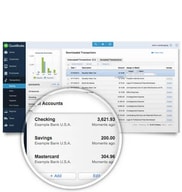
bank transactions download automatically

user friendliness is awesome. any one can use this software without having knowledge about accounting
i did't catch any week points of this product yet
easy to make accounts. can access from any where. user friendly. can customize how we want it
I like that it is easy to invoice via email and they can simply click the link and pay.
Often times the emails will go to spam.
Getting money faster by receiving payments via the link/card instead of in the mail.

I love that i can enter bills, pay bills, keep track of my open invoices and my customers. I also like the project feature. We do a lot of projects for clients so this is a great way for us to keep track of open projects as well as cogs and invoices for each project. It's a great way to make sure we're not losing money and that are margins are good. I like that I can set up recurring invoices, sales receipts, checks, etc.
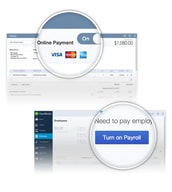
I had a very hard time with the payroll feature for a while. It seems to have gotten better. Every so often there are bugs and it takes a while for qbo to fix them. I also dislike that our taxes are paid semi monthly but that option is not given. I dislike that E-Checks take upwards of 7 days to settle in our account.
The greatest problem we had with desktop was entering recurring echecks twice a month for our customers. There was a lot of room for user error. With recurring transactions, I can set up to automatically draft my customers echecks each month with no worries.
This Quickbooks online software and user interface are so intuitive and useful that it makes it easy to use the software and teach others to use the software even if they have little or no accounting experience. When we set up QuickBooks for use in our small business, I was immediately concerned with teaching inexperienced employees to do bookkeeping. However, using QuickBooks,we were able to quickly train in and get our staff operating independently with minimal review. Additionally, I like the feature to attach journal entry support. It's very helpful in review of journal entries to be able to agree the entry back to supporting documentation in one click.
Many of my clients are in more rural areas with reliable, but slower internet. I use a higher speed DSL at my office, but still find the response time both to launch and use the online product agonizingly slow. I have a better experience running a VPN session to a client's Great Plains product. In addition, the graphics intensive front-end also causes system crawl. The re-design of the interface would have been better had it tried to approximate the desktop product.
QuickBooks can do pretty much everything your small business needs. It even has different types of ways to perform payroll. Reports are fairly customizable.
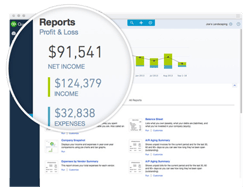
QuickBooks is user friendly and has great financial reports. It is easy to learn, navigate and reconcile.
The only thing that is an issue at all is if you need customer service. You can be on hold for a long time.
QuickBooks has awesome reports, and I love that my CPA can just sign in when he is ready to file our taxes. I don't need to give him any reports, as he has access to everything. When he is done with the taxes, I just remove the authorization for him to have access until the next year.
Quickbooks online is open and accessible anywhere.The best piece of QuickBooks Online is that it is accessible anyplace that you have web access.Last month I handled installments and workers finance while out on yearly leave so as to hit a required accommodation date and this QuickBooks online makes that easy.Quickbooks online has exceptionally Strong Security-quickbooks Intuit has a thorough arrangement of security approaches and methodology set up to ensure organization's information.
I have noticed that ordinary updates change the item making it hard to re-learn and re-instruct procedures.since it totally changes.
Flexible anyplace at anytime. Quickbooks online permits whenever/anyplace access with Internet.these has helped such a great amount since work proceeds regardless of whether am not in the workplace causing high productivity.I can get to quickbooks anyplace inasmuch as I have internet.Last month I handled installments and representatives finance while out on yearly leave so as to hit a required accommodation date.
I love the easy access to all my clients' records
Small business clients sometimes hesitate signing on due to monthly price commitment
As an accountant I need to be able to access my clients records for review. QBO Accountant makes it simple to access all my clients' records in one convenient location.
Quickbooks online came at a time when customers were asking for an accounting software tailored to the needs of small business owners. Softwares which were at the market, were currently underperforming with a not so great user interface. But since the emergence of quickbooks online majority of small businesses can now keep their books in order.
My only dislike is that they only have a cloud based version for the software. There is need to create a desktop version of the software since not everyone has access to the internet.
One of the major benefits of quickbooks online is that it has made accounting easier because of its friendly interface which makes it to use and they also allow the user to monitor the performance of the company realtime. The cool feature about quickbooks online is that you can take pictures of purchase receipts through the software and use them later for AP reconciliations. Quickbooks has also gone further to allow the user to customize the invoice to user preference unlike other versions which limit these features.
I like the ease with which I can fill the Timesheets and how easily I can see the reports of my past timesheets.
I don't like the reporting part alot and I think that can improve making the UI better to select the timeperiod I want to select
I am personally using it for timesheets but my company is using it for accounting purposes and estimate the hours works by the employees to calculate the total cost and revenue.
Definitely makes accounting tasks easier and less stressful. Helps to streamline the process and integrate data in an efficient way which saves me time.
I sometimes wish I could customize the appearance of the data on the monitor so I can make it a little easier to identify certain financial markers I use frequently.
Business problems solved include primarily giving me more time to devote my energies to other work. Helps me keep accounting functions up to date.
I love how quick it is to learn this program
I dislike the fact that it needs WiFi to work
It is keeping us organized and clear about our financial status
I like how easy it is to use, very intuitive, clean interface, multiple security settings for various levels of employee access.
Wish you could search for a customer right from the dashboard.
Invoicing out of state customers is quick and easy. Love that it saves product info so I don't have to enter it every time, easy to update customer info.
They made QBO so that all you do is think 'What activity am I doing?' you click on a + sign and select the activity, fill in a few details and it does the rest.
The chart of accounts takes a bit getting used to if you are not an accountant. I am a small business owner so it took me a bit to understand. They do have FREE training and certification.
Maintaining my books and being able to take checks and credit cards inexpensively.

I love having the option to keep everything in one place electronically that can be accessed from anywhere.
There isn’t anything that comes immediately to mind, but I’m sure they’re working to continue making integration better.
Helps us keep track of business expenses by using the mobile app so we can snap in our recipes right after a purchase
From my experience, the system is very easy to use especially when you connect it to your business bank account. The original set up process guided me with the creation of my chart of accounts which is really important and made it so that I could easily keep track of all of our expenses and income. Our business is small yet mighty, its always great looking back and seeing how much you have grown over the year, the report makes this easy.
Quickbooks online relies on the Internet so if my network is down for a second, I'm struggling with it a lot. Second of all, I wish that you could customize invoices more, the customization seems fairly limited. Also, I am unable to connect to one of our bank accounts as that bank uses multi factor authentication, and that is really frustrating as most of our transactions flow through that particular bank account.
Since we have Quickbooks online, we can send invoices to customers instantly and keep track all the business transaction from our inland freight services.
A great, cost-effective way to tracking all of your income and expenses for your business. You can even provide access to a CPA who can then download your financial statements.
There is some setup required on the front-end to make sure everything is working.
Quicker financial statements, more coordination with other advisors
QuickBooks accounting software has all you need to keep your books accurate and up to date, automatically. Explore features like invoicing, cashflow, expense tracking and more.QuickBooks is a game-changer for any small business.
I use this program for a lot of time, but I have not found flaws
Work with this program is very convenient.
I like the features that I can add different users and so that there is no need to pass the files back and forth. It definitely saves our time and money. Second good point of Quickbooks online is that we can log in anywhere. I feel very comfortable doing my job while traveling.
The only thing that I dislike is all about user error and personal lack of Quickbooks software and accounting.
Quickbooks online helps me stop spending money on marketing or any unnecessary advertising. Second of all, Quickbooks online can make a very professional invoices which can make our clients feel secure about our accounting system.

Love that the bank accounts auto link and are on constant update.
Not much user help when learning in software itself.
Knowing when and amount of upcoming sales for forecasting and budgeting. Invoicing directly from the software makes the entire transaction cleaner and smooth.

I enjoy the ease of use, speed, reliability and cloud features of QuickBooks. I have been using it for my business for years and it has never let me down. Now with the online version I don't need to store anything locally or download software and I have the same experience. It allows me to manage my entire payroll and expenses from any computer, phone, or laptop with a few clicks of my email and password. I have tried the competition and they are all more expensive as well as worse. Highly recommended A+.
There are some features missing that are available in more advanced software, but they are only useful for larger companies. I only have a few employees and it seems to do everything I need
I am managing my payroll, expenses, and direct deposits with Quick Books. I have been using it for a long time and the online version is just as good and easily accessible.
I like the convenience of being able to log on to quickbooks online.
There is nothing that I currently dislike about Quickbooks online.
We are able to keep all of our finances in order as well as print checks
I like that the program is simple to use. We are a small firm and don’t need anything too complicated. I enjoy the graphics and layout of the site.
The only thing that I wish was available is a function that saves the information from your last check to a specific vendor and auto populates it on the new check. This function is available for bills, but not checks.
We use QuickBooks for all of our expenses and cash record keeping. It has allowed us to keep our accounts reconciled and makes for easy tax preparation in the Spring.
The QuickBooks Online solution puts small businesses in complete control of their accounting and provides free online support, from setup to support.
understanding sub tasks can be difficult
The online login portal, with custom feeds and charts, custom invoice creation, customer 'Pay Now' button, mobile website allows photographic references and all with auto-synchronization.
Very easy to use. I can create estimates, invoices, receipts, bills, etc. It is a great source for keeping track of money both coming in and going out.
The only thing I wish was different was that it said "Quote" rather than "Estimate."
As a business, we have to keep track of our income as well as our expenses. QuickBooks allows us to do just that. It sends all of our invoices and also keeps track of our employees' pay.
My favorite thing about using quickbooks is the resources it has for all users to access when they aren’t sure what to do with different aspects of their accounting. They really cater to the user, even ones without accounting experience.
I don’t have much I dislike about Quickbooks. Sometimes it takes me a little bit to find the information I’m trying to find, but that’s more just me getting used to where the subcategories are on the sidebar.
I’m not really solving any problems, just using it for general accounting purposes. It’s nice because it creates all the reports and everything you need to pull based on the information you’ve inputted.