

Reply Reviews: 4.6/5 — Highly Rated











Reply.io has a support team that is responsive in under 10 minutes, sometimes they respond in 2 minutes, so any concerns you have are resolved in a timely fashion. The tool itself is very user-friendly and easy to use. This is a recommended email outreach tool for first-timers.
It is a little difficult to manage the contacts, and see the history at a glance, but this is to be expected since Reply.io is more of an email outreach tool than a CRM so it is best that you connect Reply.io to your main CRM.
The need to schedule emails and tasks accordingly. It is easy to build a campaign in Reply.io and you have many possible activities to choose from to set as tasks.
Reply.io stands out in the crowded space of sales engagement software. The best thing for me is the neat UI that allows me to navigate fast and find information quickly. It's is the best tool to reach out to your target customers in a well-defined omnichannel way. If you're in B2B sales, do take Reply.io for a spin.
Its not the tool but the email add-on which lacks the feature to be able upload lists you want emails for. For some startups it would be great to have all features without having to commit annually.
Using Reply.io I can automate my sales outreach and test multiple messaging at scale. I have seen a considerable uptick in the number of meetings my team and I have been able to book. Saves you a lot of time so you can focus on closing sales.
Sequences for sure! Also, excellent analytics to get actionable insights. The free trial give you a window of 14 days which is very appropriate to fully learn about the system before making the purchase.
The extension pops out as a separate window, unlike Salesloft, which lets you work inside Gmail or Salesforce tab. However, having the Reply's extension's window opened regardless of the tab you have opened, gives you more context.
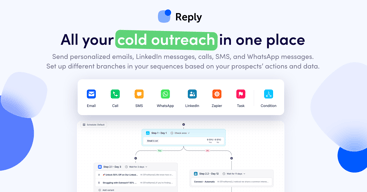
Outbound outreaching, prospecting, and qualifying leads! I think reply has everything an Account Executive needs to work with. I love the text and WhatsApp feature, which has impressive utility. It lets you engage with prospects outside their email inbox and enables you to leave an impact. Most importantly, it saves a lot of time and reduces cognitive load by automating cadence steps.
Having used other email tools like Outreach, I was impressed by the simple and intuitive interface. Reply.io has all of the important core functionality of any good email tool while also adding a few bonuses that I haven't seen elsewhere that adds to its usability (built-in email validation and message scoring).
Integration was a bit tricky if you are trying to set up anything beyond the default email providers. While the customer success team is supportive, the self-help documentation can be a bit sparse for troubleshooting.
Reply's features work well with outbound campaigns and made them a breeze.
Ability to generate leads and manage all contacts in one place
Better management of multiple emails being imported to prevent conflicts
reach out to new business partners

Email marketing is definitely a niche marketing activity, but an important one. I've found that there are generally unspoken minefields out there when running email campaigns. The Reply platform accounts for those. And folks like Stephanie explain them for you.
They're meeting my expectations. Nothing.
Reaching prospects and developing a relationship with them through the Reply platform.
I like how easy it is to send emails and the customer support is incredible and quick.
Occasionally I have had emails send to people who have replied
Saving time- not sending individual emails but making them feel personalized has saved me hours of work.
The functionality & UI is great! Would highly recommend this.
Not too much - the customer service is great & they really seem like they want to help you succeed!
Customer engagement, sequencing.
Customer service (I had the pleasure of talking with Diana, Max, and Tanya - at least those are their chat names) is super responsive, well educated, and they are keen on resolving any challenges that users might have. I am more than ready to turn a blind eye to some of the disadvantages of the product because I know if I need anything, cs will be there to help! Great job on hiring such cs agents!
Overall, so far, the product is what I expected. Setting up an account and ''sequence'' (Reply.io wording for "campaign") is a bit confusing, even though you can notice they are trying to explain all the details. I do not like that it isn't like some other options on the market, "set it and forget it" type of solution. However, I am sure over time, and they will be more user-friendly. I am looking forward to many more months of cooperation.
Time-management Multiple account usage Multiple sequences (campaigns) available per each account
Reply.io has help cured our email issues and enabled tracking that wasn't possible previously
The only thing I didn't like was the unintuitive procedure around halting specific campaigns when a pre-set field was set in a certain email template; however, this was solved by messing around with the UI for 5-10 mins.
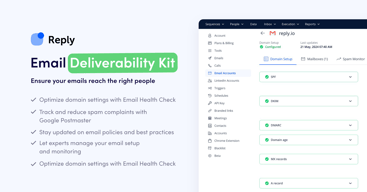
email spam, randomizing of emails to mimic a real cold email campaign fro mgmail and the ability to detect unsubscribes as well as a very nice UI interface. The support team is helpful as well, which is something I didn't have when using the freshsales email sequences I sued previously

I like the nice interface that is easy to work with and the insights you get when writing each email on how it might perform (tracking spam words etc)
Not that I dislike I think it's a bit more expensive than the competitors but with the high performance I got from using it didn't really care about price
Bringing more leads for businesses. The benefits are in the ease of use and high performance for me
new functionalities are often added, A/B testing for email campaigns, work with any email account (SMTP/IMAP/POP) not only gmail or office 365
customer service is a bit disorganized, which is frustrating when you have an issue
email campaigns
Connecting email with LinkedIn & WhatsApp
Some features need to be polished and fixed
Outreaching prospects in my industry
I have been testing diferent sales automation tools and Reply is the one that has fit most with my needs, due to: it's user-friendly and it is very flexible when developing a mail campaign.
By the moment all what I need is supported by the software!
Sending emails with an autopilot.
Very user friendly in comparison to other tools out there. You can create sequences very simply, and they're easily customizable. Its also perfect for simple outreach, where all other platforms I've experiences are meant for very sales-ey types of outreach.
the validation is not as accurate as i would like it to be. Also my emails tend to go into spam a lot. I would love it if "prepping" my email would be built in so I wouldn't have to do it manually.
Before reply I was manually emailing leads, and I wasn't able to get even a fraction of outreach that I am now. I also had to schedule follow-ups and do them manually. The sequence now runs itself and i don't have to worry about it.
automation techniques make our campaigns much more streamlined.
I sometimes have to restart campaigns because of bounces
I have realized that we can automate all cold outreach to drive warm leads

The tools is super easy to use and quite powerful. The team supporting Reply is great--they are very accessible and super helpful. They really know how to drive engagement via email and other channels and have a lot of guidance for new users. I also like that I can upload my own target lists and then build sequences.
The tool is pretty easy so not much to really dislike - the only thing that is slow is their chrome extension that pulls in LinkedIn profile data.
We are trying to drive new leads via email and this tool has helped us find leads and then build sequences to drive engagement.
Love the ability to automate many steps and channels of our SDR Sequence, as well as manage tasks. We won't have to go back and forth between multiple platforms because we have it all in one spot. Also love the email analyzer that helps you understand if your template is too long, has spammy words, or might not get opened.
The set up in not 100% intuitive, but our sales rep really was able to answer our questions quickly to help us get up and running.
Automating a multi-touch, multi-day SDR outreach cadence. It is taking a lot of manual work out of the process
Accurate stats. Support team helped when needed.
Status changes for specific individuals could be easier to change.
Automated outreach. As a freelancer, it's great help to have a system working for you behind the scenes.
You can tailor each message and select timings so that campaigns run automatically so you can concentrate on other key activities. The system automatically highlights and removes respondents The metrics/analytics provided are extremely useful for evaluating your hit rates.
Not being able to include the same addresses in different campaigns
It has greatly increased our capacity to reach our audience without needing to increase headcount whilst generating some positive discussion on our products and services for us to engage and follow up with.
I like the A/B testing feature. I didn't have this with a previous product and it's a complete game changer and time saver. I also like the ease of creation! It's so simple to create templates, move emails within a sequence, and make changes on the fly.
It has an integration with Hubspot, but it's not super intuitive (yet?). Not sure if there are plans to beef it up, but it would be great if the integration was deeper and easier to set up.
We were trying to find a smarter and more intuitive tool for email sequencing. The previous tool had basic sequencing capabilities, but Reply.io saves time with it's built in AI, contact labeling, reporting, and A/B testing. It makes it really easy to collaborate as a sales team.
Reply.io is a great platform that keeps me up to date with my outbound efforts
overall really good but dislike having to pay more for more emails to send (small business on a budget) - still a good deal for what you get
Allowing a one person outbound team to send emails and stay on top of the sales funnel
Great value for the price. I've used the product at my last two companies and have been very happy with the experience.
Advanced customization around email campaigns could be more straightforward.
Sales outreach

Reply has great functionality with a robust feature set. So I mainly like that I do not have to supplement my sales outreach with other tools. As a startup, this is very important. We have limited bandwidth and even more limited funds. Reply helps us optimize both time and funds. Additionally, I like the consulting/counseling services they offer for making sure the outreach is as well written as possible and that your sequences are as effective as can be. This is especially helpful for a small startup team that doesn't have many people to proof read the messages.
This was difficult to do as I like most everything about Reply. However I would say the UI is a little bland. Don't mistake this for bad. It's simple and straightforward which can be appreciated. However, I think a little jolt of design and it would be amazing.
We are maximizing our outreach and effectives with one tool. It's incredible. The data insights are awesome and crucial to our outreach funnel.

As a member of the sales team, I find the good email automation tool is crucial for the IT sales cycle. I’ve been using reply less than a year. Main things that I like: User-friendly and intuitive interface. Easy way to export and import contacts that is important for me, because I need to update our CRM after each email campaign. Ability to schedule when my emails being sent and create my own schedules. I find this feature very helpful, because I work with several markets and it’s great that prospects receive emails according to their time zones. And another good thing is ability to change a schedule when sequence has already been started. Email validation feature
Two main things that I dislike and would be appreciated if there’re fixed. Archive feature. I’m not able to start sequence with contacts that are already in another sequence. That’s why I need to achieve first one. When a sequence is achieved, it’s impossible to check dashboards and the info. Limitation of sending emails per day. For now, it works for us, but our base extends every day and I think in the future we’ll face some difficulties with sending emails on time.
Reply is a great email automation tool that helps us to send messages for our prospects and validate our base at the same time.

- The service runs quickly, allowing to send up to 1200 letters per account. - Placeholders are highly customizable, as well as chains of messages over campaigns. - Service allows to track replies of customers and get in touch via internal mailing system. - Tech support operates quickly, questions are usually precessed during 5-10 minutes.
- The system doesnt support Umlauts. - It's difficult sometimes to upload and process leads using such CRMs as ZOHO.
It helps to send massive bulks of letters, imitating that a living person writes them, reaching out to potentional customersin target locations.

Reply.io is a fantastic tool that has helped both automate and personalize the outbound sales and marketing process. As someone who has full responsibility over the sales cycle, my role depends highly on email automation. I find that Reply.io was perfect for the tasks. It's extremely user friendly with an excellent product support team. The integrations are also very helpful to facilitate better workflows.
In general, I've had only positive experience with Reply.io. Perhaps I haven't used the entire range of features that it offers, so I can't fully comment on any dislikes that I have.
Reply.io has helped us save countless hours by simplifying and scaling our automated sales outreach.
Takes the hassle out of removing replies, opt outs and bounces. Easy to filter you emails (far easier than Salesforce in my experience) Customer service always reply on chat within 10 minutes if there's anything you don't know how to do.
No complaints, so far so good. Would recommend.
People generally don't get a second outreach email once they've replied or asked not to be contacted (Reply seems to recognise the text when they ask not to be contacted and moves them to opted out). This saves a huge amount of time and anxiety.
- Simple and intuitive interface - Ability to send up to 400 email messages per day from one email address - Their support team is excellent. They quickly answer questions about the issues - Multi-platform sequences: Linkedin, phone, email - Excellent statistics (sent campaigns)
- No integration with Zoho CRM directly, only with Zapier plugin - Three emails addresses per one account - Sometimes the platform gets buggy, but the support team always to supports me
- Great way to reach decision-makers via email - Unlimited follow-ups - Email Tracking
It's been very easy to use and has all the features I was looking for.
Haven't encountered anything of note, to my knowledge.
Being able to send sequences of emails to lists of customers, and seeing the opens/not, and tracking results.