

Unclaimed: Are you working at Smartsheet?
Smartsheet Reviews: 4.4/5 — Solid Choice
Priding itself as the trusted work management platform of over 90% of Fortune 100 companies, Smartsheet is a modern work management software that enables businesses to manage projects, automate processes and workflows, and scale up to enterprise-level portfolios and programs. It offers a robust set of views, dashboards, reports, and workflows to track and capture project plans, schedules, and resources. Smartsheet easily integrates with a number of third-party apps and software to allow teams to integrate the platform into their current way of working. Enterprise-grade, it’s one of the most secure work management software in the marketplace, giving managers and IT teams visibility and granular control over data and access.

| Capabilities |
API
|
|---|---|
| Segment |
Small Business
Mid Market
Enterprise
|
| Deployment | Cloud / SaaS / Web-Based, Mobile Android, Mobile iPad, Mobile iPhone |
| Support | 24/7 (Live rep), Chat, Email/Help Desk, FAQs/Forum, Knowledge Base, Phone Support |
| Training | Documentation |
| Languages | English |
Smartsheet Pros and Cons
- Data-driven automation for more efficient workflows
- Easily customizable platform
- A highly visual solution makes task tracking easier
- Critical task management features help drive productivity at scale
- Reliable automation of critical business processes for team and projects
- No time tracking feature
- Doesn’t offer an auto-save option
- Limited calendar view
- No time tracking feature








Compare Smartsheet with other popular tools in the same category.
Ease of Implementation, ease of use and high prmpt
Limites lines accept and controlled formulae
its a great tool to operate in project management
Very well designed product. All data analytics tools are there in the platform
UI is good Features are great Data management feature is also good
Data management

Beautiful tool, wonderful project management
Cumbersome formulae application. Its not easy to apply formulae
Project and Task Management. It saves me nnumber of man hours using the report builder feature
Automation, ease of use, ease of impletmentation, customer support
Pivot is not avaliable, Dashborad,Formula not user friendly
Smart sheet is every useful tracking Project management & task Management. Team Collaboration
Smartsheet's design allows for using it in many ways, which makes it a frequently used software in our environment. It is easy to use and develop for a wide variety of projects. The support is fantastic.
I would like to have the ability to work with times in the sheets. This functionality is lacking now and hopefully will be addressed in the future.
Smartsheet has allowed us to build a job tracking tool and dashboard that makes it easy to input, track, and report on jobs as they are opened and closed.
Its data management feature that allows clients to use my data
Its liecnse fee and limit of users under business license.
Client data management and communication

I love that it helps me in keeping track of my project tasks and deadlines. Also its an effective tool to represent the numerical figures in a graphical manner. I can easily plan my resiurces with help of this.
I wish if we could also get the flowchart feature in this tool
Overall, Smartsheet enabls me to collaborate the data more effectively. It has user friendly interface, great features like graphs etc make it a great tool to enhance productivity of me and my team.
The way we can list down all our task and create an hierarchical structure out of it to maintain our to dos is awesome
Individual commenting on the cell is not available
We are able to list down the end to end project delivery scenarios and maintain them by dates and hierarchies which are helping us clear our to do charters
The best thing about SmartSheet is it's easy to use and helps teams work together smoothly. It is also good for tracking tasks and sharing updates with everyone.
Smartsheet can be a little challenging to understand for some people. And not have the latest features found in other tools. Sometimes, it might hang when handling heavy data.
Smartsheet helps us to keep our work organized and make it easy for everyone to work together.
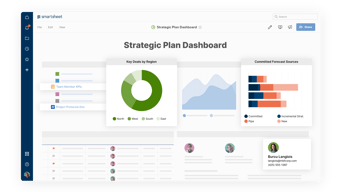
The Dashboards! They are simply the best thing about smartsheets. They make the data visually appealing. The ease with which you can convert your smartsheets data into pie charts and diagrams is commendable. Data keeps on updating when it is formula driven making sure that the data available in the dashboard is up to date and giving an accurate picture.
Some of the functionalities that google sheets had.
Data Tracking & Presentation A broader picture is available to the top management for quick review
It's my six years in total experience using a smart sheet for managing my work. Easily implemented and daily used it. During the implementation they helped me over the integration. Support agent answer my query ASAP. It's one of the useful applications that I am using to record and analyze the data in all prospects. It's a user-friendly application.
So far, I don't have anything special to mention here.
Maintaining a record of work.
I like the ease of which I can customize my sheets and adjust the conditional formatting.
Because I am not a project manager by trade there is a large learning curve for pulling data from a sheet to a dashboard. They have a lot of tutorial videos but I spend a lot of time watching a video for 30 seconds of information I need. Again I am a novice trying to use a professional program. Who knows, maybe I'll be adding project manager to my creditials.
Organizing mutliple events and planning for the year.

It's very easy to use without a ton of training.
I haven't found anything yet that I don't like.
As a project manager, keeping on top of projects and keeping the project team informed of what they should be working on.

User friendly interface and great to showcase when it comes to Data and graphic representation of data.
At times it creates hurdles when applying excel formals in the sheets and then it also at times create difficulties while we have to create monthly dashboards using the same template and Data driven graphs.
Instead of make different excel sheets, smartest offers us to save the data and from the same sheets we can show highlights to the management simply. Also we can share these files easily over emails or teams so it's kinda user friendly.
Automation, Dashboard, UI, record keeping, Data integration, and it is very easy to use
I can't add multiple tabs to one single sheet
It helps me to keep and rrecordof everything and also keeps on reminding me what task is due. Additional I just love the lock column feature which allows me to make sure that the data is not disturbed if shared with multiple users
Smartsheet is very useful for managing all our projects across all countries we work in tracking their progress and generating reports.
We work worldwide and have so many projects across the countries we operate in and sometimes due to the limited number of cells, rows, and columns we have had to record details of a country in 2 or 3 different sheets.
Project Management from Initiation to Closure.
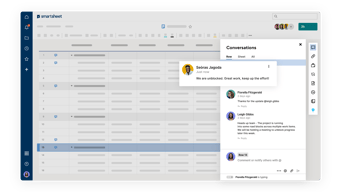
I like that we can collaborate with the team easily and the data is not lost. I also like the fact that we can add attachments and notes in each line. The feature of importing the data makes a lot of things easier and we can track the progress as well.
I would like for it to be more detailed for new users so that they can learn all the features properly.
Smartsheet solves my problem of doing all the work on different different tools and managing space on my system. It is online and does not get corrupt or the data is not changed. It ensures privacy as well because we decide who can have access to the file.

Smarsheet gives us a platform to create and maintain data for our day to day tasks and allows us to represent the same in graphs & charts form to show the zest & highlights to the management real time.
Not a dislikie but a suggestion if this tool can also be used to prepare the flowchart diagrams. It will help more people.
We can connect Smartsheet with other tools like Microsoft Office 365, Google Workspace etc to create a unified system to share our day to day files and data. Along with this it is great to generate insightful reports and dashboards to track progress, identify bottlenecks, and make data-driven decisions.
UI is awesome. Functionalities are also great
License fee is too much and aometimes it is pain.
Workflow management

Smarsheet is incredibly user friendly and enables me to collect data points from multiple users. I use Smartsheet on a daily basis for multiple different accounts. It was incredibly easy to implement within my organization.
That the training classes cost so much money.
Pulling multiple and diverse data points from multiple customers.
I think it's easy to use and great for project management which is what I do in my role. I like that templates are provided and that you can share your sheets across the company.
Sometimes it feels like some of the features are limited when compared to Excel.
I think it's keeping me on track with all my tasks and notifies me when tasks aren't completed by the deadline.
From storing the files to presenting the data via dashboard you can do anything with smartsheet
Lags in switching to different sheets while working for long hours
Better managing of data
The fact that is collaborative. The fact that it's mixing solutions (excel and Microsoft project)
The lack of formulas (the number of formulas available is really limited)
Providing collaborative project management tools
The user interface is great and allows multiple users to collaborate very easily on many documents. Implementation is very well made and there is a very well presented way to manipulate the users and their permissions within the system and the projects that they can work on. It's easy to use and very intuitive.
In our company we didn't find any negative sides of the SmartSheet product.
We had to use SmartSheet when we moved our production warehouse from one place to another. It helped a lot of people do their job much easily than with other alternatives.
The biggest upside for me with smartsheet is all the possibilities it has to offer. You can start from scratch or start from a template and create from there. It has allowed me to implement easy procedures across multiple platforms at work. The overall system of smartsheet is easy to teach, this allows others who are not "computer" people to use more often. It was simple to start using from someone who used excel more often in the past. I use it every day, and now use it as part of my standard work.
I wish there were not tiers to memebership because I use the system more than others at work, i am at a disadvantage that i dont have the capital to hold an account with all the features.
organization and project management. It helps me keep everything in order and then i can use the automation functions to help me plan things that are coming in the future.
Intuitive design for auotmating tedious tasks and ensuring data integrity across documents
Would like more granular user access levels to manage who can do what in each file.
Cross functional collaboration for project management
The aesthetic of it, it is visually kind on the eye with all different layouts and colour options while also presenting data in a sufficient way.
That you can not create indents in forms.
Organising assets and who is in charge of each one, able to track and make comments. Able to send off a form to someone for them to fill out, saving time having to chase people and manually enter the information
User friendly and reliable on deleivery of reputable presentation
SImple customer support is not readily available and tyring to get help on a few minot questions
Quick and easy scheduling process
Simple UI, and built in features. Easy to manage projects
Can we more advanced in w.r.t to formaule
Project Management, gives a simple view of all the tasks involved
Smartsheet helped us create an effective intake form to kick off our team's process in a consistent way, while meeting internal SLAs and providing a more strategic launch to each new project.
Formulas aren't intuitive (wish they aligned with Excel for exports); help desk is difficult to schedule time with.
Before Smartsheet, our team didn't have an intake process. As such, there was no transparency into what each person was working on at any given time, nor any standards to determine levels/type of support.