

Unclaimed: Are you working at Trello?
Trello Reviews: 4.4/5 — Solid Choice
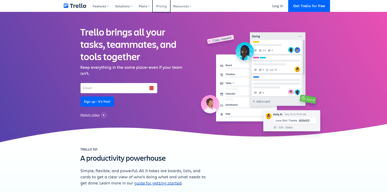
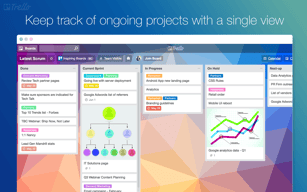
As one of the pioneering Kanban web-based project management platforms, more than 2 million teams are now using Trello worldwide since its launch in 2011. Trello is best known for its simple visual interface, with cards that can be moved across different columns. Each card holds all the information teams and assignees need to deliver on projects and execute tasks efficiently. Over the years, Trello has introduced robust improvements to its systems, which include a proprietary built-in and no-code automation feature called Butler. There are also add-ons called Power-Ups that allow teams to link your most-used productivity and business tools with Trello plugins.

| Capabilities |
API
|
|---|---|
| Segment |
Small Business
Mid Market
Enterprise
|
| Deployment | Cloud / SaaS / Web-Based, Mobile Android, Mobile iPad, Mobile iPhone |
| Support | 24/7 (Live rep), Chat, Email/Help Desk, FAQs/Forum, Knowledge Base, Phone Support |
| Training | Documentation |
| Languages | English |
Trello Pros and Cons
- Timelines and productivity metrics in one place
- Convenient Kanban-based boards for ease of use
- No-code automation features
- Lots of integrations with leading tools
- Convenient pricing packages for all companies
- No inventory and budget tracking
- No invoicing features
- Not suitable for more complex task planning that involves multiple segments and moving parts
- No Gantt chart feature
- May be too basic for complex task tracking for enterprise teams







Compare Trello with other popular tools in the same category.

Trello is the best project management software. One of the best thing in this software is that it allows to intuitively manage the tasks and projects in a more efficient way. By using this efficient software, we can easily upload anything like photos, videos, documents and much more easily and effectively. The best thing I like is to maintain the projects and you can easily assign to many users and give the tasks according to the projects requirement.
This software does not allow to create the lists of tasks and projects. For the beginners, it is so difficult to work with multiple cards and tasks. The one thing that I did not like about Trello is that it is a little bit difficult to understand for the new users. All of its features are very outstanding but images editing features are not easy. But to conclude that it is the best organizing tasks and project management software.
Trello is so easy to use and great software for everyone. It is the best software for every kind of business companies. I recommend this software for everyone because it is fully customizable software. I always recommend this software to our colleagues and collaborators because this software has helped me in a more efficient way.

For what I do, I have lists to keep my work flow organized. What I need to do for today, what I've done, and what needs to be reviewed. It's a simple way to see your tasks at hand versus looking at the mass of sticky notes around you. Plus, you can share boards with your team members and see what they're doing.
There's times when you upload a lot of files, it can run slow. You just need to be smart on uploading smaller file sizes.
It's an amazing change. I used to write down all my tasks and scratch them off one by one. Now, it's all in one space, plus I can see what my team members are doing and if we need to switch tasks. It's about organizing yourself and your work team.

The ability to move around tabs throughout the screen for easy organization. App and widget features are great to add to your board, even in the free option.
The lack of a free calendar that can add dates and reminders (only has deadlines). Only one power up in free version.
Setting deadlines has never been easier. Also have multiple boards allows you to organize different projects and tasks easier. I’m able easily separate my work tasks form my school and personal life to dos.
Labeling my tasks to a respective group, enabling me to be orderly!
GUI can be very packed, especially as more tasks are added in, so it can be daunting.
It’s impacted that amount of work I do for the better. It truly helps me to list my tasks for the week, group them, and then simply plug and chug according to priority, enabling me to get work done faster and effectively.
I love the way it allows you to organize your projects and tasks all in one place. Its super easy to visualize what you have on your plate and work each item accordingly. The amount of detail available into each card is also incredible to find the correct work item, as we use similar names for multiple parts of the project. The ability to display and hide your cards is also amazing.Lastly the amount of connectivity that can be added into the tool is amazing as well.
The only thing I would say I dislike is that due to my work computer being over loaded, the program does slow down when I have a lot of cards on at once. I also wish there were additional themes available as I like to personalize my Trello.
Project management and time management. Organization of everything in one centralized location.
Easy to move tasks between categories and easily manage workload
Boards can look a bit bare when starting for first time
Helped improve management of tasks, assigning responsibilities and more

Trello helps me in getting cards on time which contains requests like feature, also has added features like uploading file attachments, issue screenshots and proper labelling which helps us in quick timely actions and resolving issues of clients and trial customers also getting them satisfied with the product.
there should be a feature of mandatory issue labelling and pre-set templates should be there as we receive many requests for more than one time so people should have an option to see if the same issue has been answered before.
Timely answering to clients, Proper feature requests also get new development ideas.
I love how easy it is to add individual tasks to my list, and have separate cards for each group of tasks.
I don't like how many steps it takes to move a task from one group to another, I wish there was a way to just click a check mark that says done when I finish a task.
I am solving the problem of having a million different things that I have to keep in mind for both my home and my business, Trello helps me keep it all in one place. the main benefit has been reducing my stress levels and anxiety about getting things done.

Trello keeps you organized whether working individually or in teams.
Premium features do come with a cost, some as simple as a background or color change are simplistic enough they should be under the free model.
I'm using Trello combined with Zapier and Google Sheets to automate workflow. Work requests go from a quick Google Forms survey right to my board
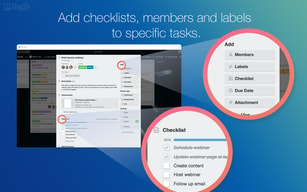
I love that I can customize my board and make check lists within each topic.
If I share a board the other person can see everything
Organization

This is one of the best application available in the professional field. It's cheap and it has lanes in fun. Trello is incredibly easy to use. This is a perfect solution for all the departments of the company. Trello is simple but powerful and easy to share files instantly. Trello is best application there is for development planning and organizing. Trello is amazing for organizations and people. The periodic tips emails are also very interesting. Trello is the best and free application and It's easy to adapt to a company. The email notifications of updates to tasks is good too and it's also easy to upload items to each card. Easy to use and deploy among different teams of people. Create as many lists as you want and serve for different purposes. This is an amazing application for building teams and sharing information. Trello is a great application that can use a little improvement. I can use markdown to style my cards description. we can fully collaborate and assign people to tasks.
The colors are not really new. Trello is hard to use for my interns. It didn't work for all my projects. Sometimes notes get buried and hard to find. There are no real reporting applications. Notifications are not deleted. Sometimes the cards look a little time. I haven't quite figured out how to have my team involved in Trello.
Trello makes it easy to visualize priorities and pending tasks. Everything has been useful in working on projects. I have had no trouble navigating the features and learning by doing. Trello application has helped in project management and helped in carrying out all tasks at work. Trello is a great application for small business. Trello is super intuitive and convenient. Trello application is very easy to jump in to see the project updates. The application is very helpful for a large scale project. The best and most beautiful application on my phone.
The way I can organize all my responsibilities
Wish there was a way to see all my boards when I have multiples of them. They go off the screen and I have to scroll back and forth
- Scheduling - Time management - Prioritizing

It is an excellent tool that helps us all keep up with customer projects and allows us to copy and paste images into a tab and add documents. The integration process and its interface is simple when it comes to panels and the list is useful for working and collaborating as a team. One feature that I like is that I can add wallpapers defines the personal seal of the organization. It allows me to set the deadline to start working on the project, so that teamwork is more organized and efficient. Trello is useful for any type of profession.
It is an easy to use and extremely useful tool, sincerely I have no complaints of its functionality.
Everything is now where it should be. Well organized and there is excellent monitoring of project management.
Ease of use, very easy to get a grasp of where everything is and easy to get a handle of the different project trees.
I have no dislikes on the product, it's been wonderful this far.
Trello has made our project management so much better that I can't even begin to quantify it.
What I like most about this app besides having a great tool. It is the fact that it is easy to use and has safety and quality. It's the best project management application I've ever used to date. It has a great way of operation and there is a Free option (free with subscription option for access to advanced features).
So far I have not witnessed any flaws that made me dislike this application. On the contrary, increasingly enchanted by him.
We had great difficulty organizing and managing our projects. And with the use of this app has been very useful.
Working from a remote position, it is awesome to catch up on my teams progress via trello.
I dislike that I am unable to move or copy an image from one card to another.
Again, trello works great for a company that works remotely.
I worked as a legal assistant, and this helped me prioritize my work during the week
Not great app mobility on the board part. It’d be nice to have more arrangement of the task option bars.
Time management!! I love Trello so much!
I love being able to assign specific tasks to my team with detailed instructions right in the card. We're able to collaborate and ask questions back and forth by commenting on the cards.
It's a little tricky to get the hang of because it has the ability to be such a detailed application.
It's much easier for our team to be efficient because we don't have to call or email everyone to pass information, all the answered questions are already on the card for the team to see.
an be grouped by several people, and provide labels according to the state of the project uploaded on the card
we must first invite a member before inserting it into the card
the problem I solved with Trello was the division of groups in making project analyzes and interacting with each othe
Trello is a fantastic application for project management. It is very user friendly with a simple interface. I find it helpful to organize our team to do list, doing, and what has been done. I can see team progress without verbally asking where each team member is on a project.
I wish it was easier to apply stickers to the background of the application. Much like a desktop.
It is a lot easier for me to understand as a project manager where team members are on each project. I can track performance and timing of project items.

I like that the card system where you create a card and then drag and drop it in the section that the card relates to.
Could look a little bit better visually. Maybe with some themes or something.
We use it to handle managing of our projects. Breaking down tasks and what not.
It helps keep you organized and on top of things. I love the workflow of it
It can be a little confusing at times could use a couple more tools to keep you organized
Staying organized

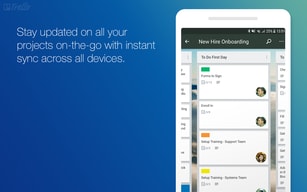
What I like most about this tool is that I can provide more collaboration to each person on my team to keep up with customer projects. With this tool we can assign jobs, set deadlines, share opinions about our activities. Simply seeing Trello's cards tells us how far or near we are from a certain project and the tasks that require more attention. I like that I can also access Trello on the mobile device from where I am.
I like everything in this tool, no complaints
All organized and now it is easier to track tasks. Customers satisfied because they are served on time with greater efficiency.
I work with a team of people in different offices and it’s nice to get insight on what projects they are working on and how we can work on it together.
The UI could be updated. It seems outdated and could use a new look.
Being able to communicate with people in other countries easily. Staying organz
Trello is the best way to organize both your personal and professional life. I don’t know what I’d do without it.
I wish there was a view that listed out all tasks assigned to you, across all boards.
Project management
The format of Trello is perfect for our company. We originally were using pipedrive to keep track of where our clients were in a project and Trello has made our lives so much easier. We easily integrated it with Acuity Scheduling and all of our salesman love it's easy to use features. The checklists are a lifesaver.
Honestly the only thing I do not like about Trello is it's lack of an undo button. Other than that it is an excellent program.
Tracking clients, tracking projects, and managing our sales team was made so much easier by using Trello. The checklists and format of the app allow us to do everything we need for tracking projects.
Trello is a great project management tool that is free and easy to use.
It is hard to find archived cards, you can not download material from the cards or update them to collaborate. (PowerPoints)
Keeping a team on the same track allowing all to have access to the boards. You can also tag users so they are actively notified to a card change.

I like that Trello is really easy to use. You can start working with him in a very intuitive way. I love that it is aesthetically pleasing and easy to use and the ease of creating a fast workflow is useful. I currently use several boards to separate different aspects of my business.
Maybe some improvements in the design to make it look newer, but otherwise its pear is pectative.
thanks to Trello my productivity has increased and has led to a better use of time, I was able to organize all the things that I need to do in my work and control the tasks of my work team.
Able to share my progress with other members of the team and execute management. I can also set due dates and create separate categories per action items.
I don't like that I don't receive email notifications of upcoming due dates on given action items.
I am able to keep track of needed action items to execute a clinical project and customer support content effectively.
You can sign tasks to yourself or others. See what others are doing and how packed their schedule is. I love changing the themes. They are so beautiful.
Absolutely nothing. It's my favourite software for job assignment.
We have a complete visibility of what each team member is doing. Has enhanced the transparency in working.