

Unclaimed: Are are working at Trello ?
Trello Reviews: 4.4/5 — Solid Choice
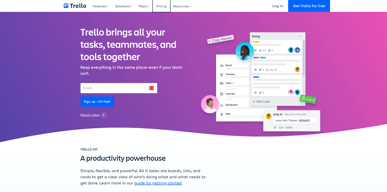
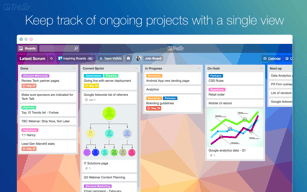
As one of the pioneering Kanban web-based project management platforms, more than 2 million teams are now using Trello worldwide since its launch in 2011. Trello is best known for its simple visual interface, with cards that can be moved across different columns. Each card holds all the information teams and assignees need to deliver on projects and execute tasks efficiently. Over the years, Trello has introduced robust improvements to its systems, which include a proprietary built-in and no-code automation feature called Butler. There are also add-ons called Power-Ups that allow teams to link your most-used productivity and business tools with Trello plugins.

| Capabilities |
API
|
|---|---|
| Segment |
Small Business
Mid Market
Enterprise
|
| Deployment | Cloud / SaaS / Web-Based, Mobile Android, Mobile iPad, Mobile iPhone |
| Support | 24/7 (Live rep), Chat, Email/Help Desk, FAQs/Forum, Knowledge Base, Phone Support |
| Training | Documentation |
| Languages | English |
Trello Pros and Cons
- Timelines and productivity metrics in one place
- Convenient Kanban-based boards for ease of use
- No-code automation features
- Lots of integrations with leading tools
- Convenient pricing packages for all companies
- No inventory and budget tracking
- No invoicing features
- Not suitable for more complex task planning that involves multiple segments and moving parts
- No Gantt chart feature
- May be too basic for complex task tracking for enterprise teams







Compare Trello with other popular tools in the same category.
User interface is excellent...easy to use ...easy to implement...seamless integrations
nothing actually i love using Trello it is awesome
it is helping me a lot in managing my operations
Ease of use and ability to customize and adapt to business needs
More reporting features would be beneficial
Tracking of ticket progress Assignment Visibility
Trello is the best collaboration tool that can be used across an organization. It gives a complete visibility on everyones task. We use it extensively during scrums.
One can get too caught in just updating the cards. Having to update every card, is time consuming. In case there is no project manager present, individual team's bandwidth is spent on managing the board.
As a team lead, trello gives me a complete visibility on what my team members are doing. I can get a full understanding, on the sprint, any spillovers etc. This can save a lot of time for the lead.

The ease of seeing a process from start to finish is a game changer. Whether for personal projects or team collaboration, Trello has changed our entire work structure. We have boards for a return process, pricing requests, phone calls, and individual project boards. The automation and rules allow us to streamline our processes and efficiently layout precisely what needs to be done and timeframes. I cannot say enough about how good Trello is for everything that we do.
There is not much we can put as a downside. Some of the automations are made by a third party so you have to pay for them on top of what you pay Trello, but they are worth it.
We cut our time on projects in half when we started using Trello. We now have an actual process for doing order returns and shipping claims when we had to remember each step manually before. We have seen our entire team's efficeiency and energy go up thanks to Trello creating task lists tat now get done rather than a single team lead trying to facilitate.

I have been using trello since last 2 years to manage my company's project and assigning task to different teams. We as a team uses trello on daily basis to manage our daya to day tasks and project. It help us to keep everyone informed and aligned.
Everything is wonderful and the interface is really user friendly. I really don't dislike anything in trello. It is easy to use and simple tool. Nothing I would suggest to remove or improve.
Being in a diverse team, everyone works in a different region and time zone. It really helps to keep everyone up to date on each and every projects task and agenda. It keeps notifying about the timelines which is also a great feature.
Trello is one of the other brands but it has good features like a butler, the creation of cards, automating and scheduling the cards with a expiry. Archiving data but not deleting it.
Trello has everything so far I am using it for 1.5 years and till now there is no inclusion where themes make more appearance wiser to make it worthwhile. Sometimes cards make work easier to counter things.
Trello reminds the work schedules. Trello cards represent way of work which has to be assigned to teams. Trello has it unique human friendly vision where anyone can make use of it.

Easy to start and use. No difficult in user onboard or start to use
There should be some validation for the junk story and task creations
Managing multi-project task management and all the status in one page
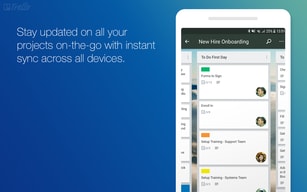
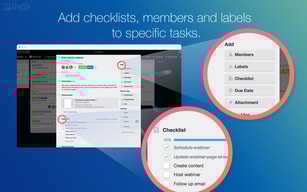
sers to create lists and cards to represent tasks, projects, or workflows. The visual layout makes it easy to see the big picture and the progress of different items at a glance. Collaboration and teamwork: Trello is designed to facilitate collaboration among team members. Users can invite others to boards, assign tasks, and leave comments on cards. This promotes transparency, communication, and coordination within teams. Customizability: Trello provides various customization options to adapt to different workflows and preferences. Users can create their own board templates, define labels and tags, set due dates, attach files, and integrate with other tools through power-ups and integrations. Workflow automation: Trello offers features like Butler, a built-in automation tool. Butler enables users to automate repetitive tasks, set up rules, and create powerful workflows, saving time and effort. Automation can streamline processes and ensure consistency. Cross-platform accessibility: Trello is available on multiple platforms, including web browsers, desktop applications, and mobile devices. This accessibility allows users to access their boards and collaborate with team members from anywhere, enhancing productivity and flexibility. Integration ecosystem: Trello integrates with a wide range of third-party tools and services such as Google Drive, Slack, Jira, and more. These integrations allow users to connect Trello with their existing workflow, sync data, and enhance productivity by bringing multiple tools together. Ease of use: Trello is known for its user-friendly interface and simplicity. The drag-and-drop functionality, straightforward navigation, and minimal learning curve make it easy for individuals and teams to get started quickly.
Complexity for larger projects: While Trello's simplicity is often praised, it can become challenging to manage complex and extensive projects. Some users find it difficult to scale Trello effectively when dealing with a high volume of cards, lists, or boards. Lack of built-in time tracking: Trello does not have a built-in time tracking feature, which may be a drawback for users who require detailed time management or need to track billable hours for projects. However, there are third-party integrations available to add time tracking functionality.
Organization and visibility: Trello provides a visual platform where users can organize and track tasks, projects, and workflows. It helps users overcome the challenge of managing multiple tasks and projects simultaneously by providing a clear overview of work in progress, upcoming tasks, and completed work. This enhances organization, reduces confusion, and improves productivity.
Super easy to use with a rich graphics interface. Lots of ongoing updates as well.
The dates on a card are a bit limited. I'd rather see that functionality improve.
Trello keeps me organized and provides reminders of task deadelines.
With Trello you can organize many different things well without losing track. I particularly like the clear structure of Trello.
The automations only work to a limited extent. For example, we use an automation where the card is copied from one board to the other. However, we change the titles of our lists regularly, which causes problems.
It used to be difficult to manage your own team. This works very well with Trello


