

Unclaimed: Are you working at Trello?
Trello Reviews: 4.4/5 — Solid Choice
As one of the pioneering Kanban web-based project management platforms, more than 2 million teams are now using Trello worldwide since its launch in 2011. Trello is best known for its simple visual interface, with cards that can be moved across different columns. Each card holds all the information teams and assignees need to deliver on projects and execute tasks efficiently. Over the years, Trello has introduced robust improvements to its systems, which include a proprietary built-in and no-code automation feature called Butler. There are also add-ons called Power-Ups that allow teams to link your most-used productivity and business tools with Trello plugins.

| Capabilities |
API
|
|---|---|
| Segment |
Small Business
Mid Market
Enterprise
|
| Deployment | Cloud / SaaS / Web-Based, Mobile Android, Mobile iPad, Mobile iPhone |
| Support | 24/7 (Live rep), Chat, Email/Help Desk, FAQs/Forum, Knowledge Base, Phone Support |
| Training | Documentation |
| Languages | English |
Trello Pros and Cons
- Timelines and productivity metrics in one place
- Convenient Kanban-based boards for ease of use
- No-code automation features
- Lots of integrations with leading tools
- Convenient pricing packages for all companies
- No inventory and budget tracking
- No invoicing features
- Not suitable for more complex task planning that involves multiple segments and moving parts
- No Gantt chart feature
- May be too basic for complex task tracking for enterprise teams







Compare Trello with other popular tools in the same category.

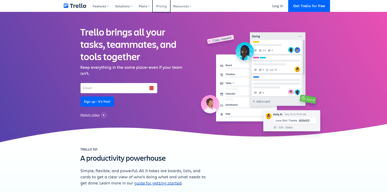
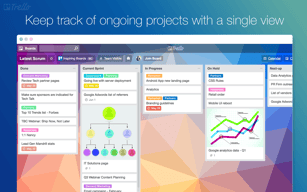
Trello is the most intuitive virtual board for managing tasks you'll find anywhere. It's free to use and its implementation is relatively simple, allowing you to create your board instantly. You can choose the template you want for your board depending on your needs and what you'll be using it for. For projects and daily work tasks, the default template will suffice. You're assigned three lists for your workspace: To Do, Doing, and Done. Under these three lists or columns, you can add cards, where you can add the title of what the task is and further details on what this task is supposed to accomplish. The cards are movable by dragging and dropping, so you can share the progress of your work by moving a card from To Do to Doing or Doing to Done effectively. This is essential when you're working on projects collaboratively with other people, where each person has their set of individual tasks. They can move the cards of the tasks they're assigned to the respective column to share their progress with the rest of the team to improve coordination, especially in instances where certain tasks rely on the completion of another. Trello also allows you to leave remarks under each card, where you can keep notes and reminders similar to sticky notes for everyone to see. Trello is pretty customizable, allowing you to create such lists and rename them to your preference. For every workspace or board you create, you can invite all members of your team to collaborate with you and manage the board and your projects better. There's no limit to how many workspaces you can create, so if you're working with more than one team or dividing your team into smaller units for specific areas of work, you can use multiple workspaces to avoid clutter. To make your work easier, Trello supports Power-Ups, where you can integrate and add additional features to your boards such as Google Drive and Dropbox for file management. Trello can also be integrated with Zoom, where you can access your board and screen share it during your meetings. Additionally, Trello has built-in automation enabled for all users to access. You can create rules that can automatically respond to deadlines and specific actions set by you. If you're working with a deadline or you're required to submit reports for the progress of your projects, you can use Trello's automation to set up email reports. Trello will send weekly summaries of all the cards and which ones were moved to give you a summarized report on how the project is going along.
Trello isn't as user-friendly as it would seem. It takes a bit of time to get used to it, so it's not ideal for someone who wants to get started with their projects immediately using boards. But aside from the learning curve, Trello is excellent and there aren't any issues that I find with it.
Trello is our go-to task management platform due to its simplicity and ease of tracking. We've been using it for years and during the pandemic, it's been an excellent medium for us to use our workspace to manage and carry out our project work remotely. We've added everyone from our team to our workspace and each card has a small note with their name, making it easier for us to know which task is picked up by who. We've sorted our work into lists of to-do, doing, and done to know where we are in terms of progress concerning our deadlines. It allows collaboration to be done easier and any authorized member can update the board to move the tasks to a different list to provide updates. There's also a small chat space that we can use to leave messages and reminders concerning our work. Trello's automation is time-saving when creating smart buttons and generating reports based on the changes made to the board. It automatically encapsulates all the card movements that we do to update the progress and summarizes them into a report that we can send to the higher-ups or clients to provide information on how far into the project we are to completion. The Power-Ups make it convenient for us to manage our Trello board from other applications such as Zoom and also connect cloud hosting apps like Dropbox to save our boards on the cloud and move files.
It can be an easily manageable and well-maintained system for project management. We can easily assign tasks to develop and track them properly. easy to sync it with Git and push the code on daily basis. able to track time for each task.
The pricing structure is higher than asana and other tools.
As Project Coordinator, I used Trello for the last 3 years to manage the project properly and my all problems were solved by it.

Clear and very easy user interface no training needed to start the work on trello. Any new user can start the work on this plateform. I also like the custome category and tags functionality.
I think trello is best for the simple task management purpose but in case of large project and resources management its not enough, need to work on that platform to improve for large projects.
I resolved the task management and reporting issues. Now i am having the details of every task with time taken to complete the perticular task. So i can plan the work accordingly.
Trello is a wonderful management tool to help you organize your work and it's easy to use.
It's hard to dislike Trello because the setup of the app makes it easier for first-time users and it's user-friendly.
I am using Trello to help me organize my files.
The thing that I like the most with Trello is that the tasks in the form of cards are really easy to manage. It has also an option for a checklist too!
There is actually none that I dislike in Trello.
Problems that were solved was the disorganized assigning of work. Benefits would include that your workspace can be shared to your members and that they too can add stuff there.

first of all, I like it because it's free. Second, it provides lots of features that you can easily manage a scrum/kanban agile teams. Third, allows having multiple workspaces, ie.
It takes too long to see new features in Trello. I understand that it might not bring a lot of revenue to the companies directly, but I see the hook. When people or teams start to need more features they go for Jira. So, yap. worthy to invest a bit in Trello.
Multiple things, such as my domestic chores, things to buy, bought. Trips, places I wanna visit. On a professional level, I always start a new company using Trello for task management.
I absolutely love how fast and easy it is to create a plan of the steps needed for a certain project, especially the little checkboxes you can include inside of each task because it allows you to have more traction on what you have been completing. It's super easy to share boards between my team members and it's great to assign tasks to certain teammates to facilitate and make everything smooth and scalable.
This is a very complete tool to be honest. The only thing that it ca take some time to make an existing board a template for the team, but I know that it's a good investment of time because on the long term it will save much more time.
- Share and re-assign tasks between teammates - Keep track of my progress on different tasks - Save time
It is a software that is easy to use, it is what I like the most, it is very useful for organizing tasks, whether at home or professionally at work, it is very intuitive, which allows and helps the user to have a really good experience, I can create tasks and subtasks, I can also add to-do lists, images, files and due dates to my tasks, it is easy to share them either with team members or with family, creating categories is really easy, it has many templates Very useful clip art to better organize tasks, I really like the appearance and design of the software, it is really nice and striking.
I had no problem working with this software, I found no faults.
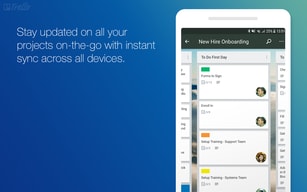
I love that it is very practical, I can save a lot of time and manage it in a better way, I love its tools such as due dates and checklists, I love that it can be synchronized between the PC and the devices, it is very easy to create tasks and sharing them, really enhances teamwork, I also like that it is very easy to insert documents or images to the tasks, it has many templates, tasks can be shared in groups or with a specific partner, it is very visual, I love it that I can see the status of the task in real-time, it is very dynamic and very useful for any type of user.

Ease of use, flexibility and speed in managing products and services
Ability to work on massive scale teams in large organizations
Product management for various products
My favorite thing about Trello is that it's highly intuitive to use. This means it is easy to pull someone onto your project and you don't have to teach them how to use Trello to get started. Just about anybody can be added to a board and start using it. It's easy to create new boards, edit them, delete old ones as needed, and so on.
The one thing I dislike about Trello is that there aren't (to my knowledge) different formats for displaying the boards. While you can change the background and overall aesthetics of the board, you can't change the pattern or direction of the boards (for example, to create a spiderweb formation).
Trello enables me to complete my tasks with ease and see what my supervisor has added to my plate for the week. I don't have to spend as much time going back and forth via email. I just log into Trello, and all of my tasks are centralized there. It's very useful.
I love that you can have multiple boards for each project or team. I like that you can color tag things so it helps you prioritize. You can also easily drag and drop things from one board to the other. You can have a checklist and timeline inside each card which makes it super easy to stay on task with each project. It gives you an amazingly high-level overview of all the things you're managing while also letting you get to the details of each project. I enjoy that different team members can comment or post updates on each card. There are so many amazing things about this program- the free version gives you everything you need and more. It easily merges with so many other programs, it's a time saver and a digital planner among so many other things. Highly recommend!
I cant think of anything for this program. There are widgets and power ups that have been so useful in automating and streamlining tasks.
I manage multiple projects with different teams so I needed a channel to keep me organized, to have all the information in one place, while also allowing me to communicate with my team. Trello fixed the problem I was having with letting small details slip through the cracks, now I have a beard for each project with timelines that ensure im on track with my goals.
It helps to change status for each milestones and set status for each if the status completed. We tend to use it to make several requests around the workers and other help.
Not sure about this as I haven't experienced as such as of now. It has been working fine till now and I believe I will again review to provide feedback if I see anything.
Trello is allowing me to request the required number of workers as and when required. This allow us to set and change the status at each milestone which makes it easier.

Trello is my absolute favorite software for managing projects, keeping track of notes, communicating with colleagues and clients, and so much more. I love that they have a free feature and even their pricing is reasonable. I don't think I will ever use anything else, Trello has never done me wrong.
I can't think of one thing I dislike. All their features are useful for me.
I am solving managing projects, communicating with clients (not trying to keep track in my email all the time), and just having a place to brain dump.

Trello is easy to use, and the boards of working tasks are well-displayed. I can you keyboard shortcuts to save clicking time. It is more user-friendly than Airtable which I used to use before
I find it hard to access the working board when I access Trello's homepage. It takes me a while to find where my boards are, which is a waste of time. I think Trello should redesign their homepage.
I can assign task to members in my team and track their working progress easily. It helps increase our working productivity. Trello help my business can be operated more effectively

Best UI/UX by far!!! it may appear as a simple line but I mean it. From my experience, I have worked on many alternatives but none even comes closer to getting both the things right. I mean some do have even better UI than Trello but their UX is just, you get it. Trello provides that peace of mind. i personally like how it single-handedly manages the whole workflow and boosts efficiency.
for a small team with an average number of projects, Trello works just fine, however, if you plan to scale your team or number of projects, this might not be the most efficient way to go forward.
no doubt there is no worthy alternative on the market, it is just, that they're behind a big paywall. I think this is the problem that Trello solves Headon. Trello provides a whole suite of utilities that the average team might ever need. so you're just fine without the premium version

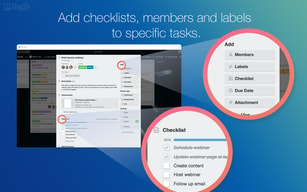
Trello makes managing and assigning work tasks easier. You can add due dates, labels and checklist to your card. Trello gives you a reminder before the task is due which is great!
The notification via mail should be more quick.
Communicating with clients and team regarding tasks and their updates.

The existing templates to setup workflow
nothing to dislike about this app really!
Keeping track of the tasks and projects
Easy way to organize plans, quick/efficient integrations with other products
At first there was a learning curve to overcome the software format, but after a few days of use it became second nature
High-level view of my plans and ability to collaborate on plans of others
The simplicity of UI; Templates; customizations
can't think of anything - it's an excellent product. So much better than Jira (for small teams)
Coding project management. Save time - always knowing what to do next

I can have multiple tabs where I move cards through. Has a lot of customization and personalized options e.g color coding.
It needs to have alarms that send notifications to my email or phone directly.
Organization of my daily tasks has never been easier. I can now see what items are pending and what needs to be ticked off the list.
The best thing is that it is very simple to use, it is very easy to start using it and start a project, the user adapts to its tools in a very short time, I really liked the tools it offers for collaboration, it is very easy to assign tasks or items to other users, it's also easy to share and transfer files, I like its tracking and checklist features, I love it because it's very flexible to customize it as much as you want, I love that I can know what each user is doing, it has a very simple interface which helps anyone to learn, it integrates very well with Jira, Google Drive or Slack.
I have no negative comments on this platform, I had no problems using it.
The biggest benefit is that it is ideal for teamwork, it has the best tracking functions, it also has the drag and drop very dynamic function, create boards and classify them, it is very easy to add attachments, it can also be customized, adding images to card covers, I like the effectiveness of features like due dates, checklists and I love the labeling feature, the learning curve is fast.
I love Trello's integrations with Jira, Google Drive, and Slack. I wish my entire company would adopt Trello and drop Jira, as there are so many issues with Jira (i.e. building out card templates). The card templates are one of my favorite features because it creates a streamlined process/standard for incoming requests from internal stakeholders. Trello makes it easy to move cards between columns, attach cards to other cards, comment, etc. I am a huge fan of Trello
There is nothing I outwardly dislike about Trello. I would like to see some UI innovations within boards and cards, but that is it. Everything else they are doing fits into my work life perfectly.
Project Management is the main problem I am solving with Trello, as well as inbound requests from internal teams, where tasks need to be completed by my team. It is used by an entire marketing organization, spanning technical marketing as well as creative marketing.
management and tracking of the assigned tasks with different stakeholders seem very comfortable on this
task list view is missing which will be additional help
managing tech and product-related tasks with timelines which i don't want to remember and do follow ups daily

Trello is incredibly helpful if you know what you want out of a project management software. Using cards as tasks and moving them down the boards helps visualize your project pipeline.
Trello does not offer very complex functionality, which is fine for my needs, but may not cover enterprise teams as well.
Trello keeps me organized and orderly. I use it to track my projects and process on a daily basis, keeping myself and my team informed of progress and productivity for the department.

I like the card system and dragging tasks to my completed column.
There's nothing to dislike. Trello works great. I guess some people may prefer a different system, but Trello is effective.
Big projects are much easier when broken down into small steps. Trello helps visualize what is needed and eliminate sticking points.

Easy to deploy, multiple templates, multiple users free and a well know software
the pro plans for teams are not cheap. The power tools need to be at separate prices
Is the best visual task solver. You can see fast what task remain, what is more, important and move to differents phases easy
Ability to add people and keep them involved in all aspects of group projects. Easy to organize and assign people to specific roles and smaller teams.
Not as interconnected to other software and apps.
We were able to keep our organization connected to plan for events that occurred weekly.
Easy to learn how to use and easy to seperate projects
Not enough background options for boards
No problems thus far
Trello is user-friendly and collaborative. I like how it allows us to have several projects that we can monitor and be updated anytime and anywhere.
I have never encountered anything that I do not like about Trello.
It's easy to track each department's progress which make it more efficient for everyone. We're definitely more productive.
What I like the most is that we can collaborate in real-time, I really liked the ease of use and the intuitiveness of its interface, the notification system is charming, I love it because it is really instantaneous, I can configure and create as many boards as I want, simply and moderately, the design of the software and each tool helps its easy handling, it is very easy to add any teammate to the project, also the control panel is very friendly and pleasant to use, I love it because the software is very customizable and integrates very well with other platforms, I love their Kanban-style boards and I really like the drag and drop feature.
My experience was totally good, had no problems with this system.
The easy setup is an advantage and a great benefit, the ease of creating and managing the boards is excellent, plus I like every aspect of the project management, being able to have a truly complete follow-up, saving a lot of time, the notifications are optimal, the software has a lovely look, it integrates very well with google drive, google calendar, Zapier, projects can be shared with colleagues, and it has functions such as due dates, checklists and others that are useful to have a total organization.