

Unclaimed: Are you working at Trello?
Trello Reviews: 4.4/5 — Solid Choice
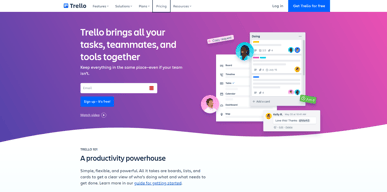
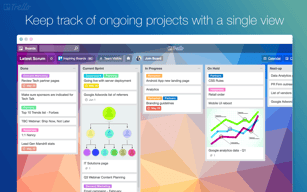
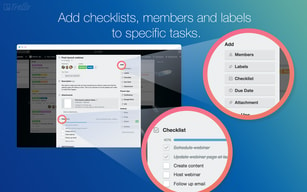
As one of the pioneering Kanban web-based project management platforms, more than 2 million teams are now using Trello worldwide since its launch in 2011. Trello is best known for its simple visual interface, with cards that can be moved across different columns. Each card holds all the information teams and assignees need to deliver on projects and execute tasks efficiently. Over the years, Trello has introduced robust improvements to its systems, which include a proprietary built-in and no-code automation feature called Butler. There are also add-ons called Power-Ups that allow teams to link your most-used productivity and business tools with Trello plugins.

| Capabilities |
API
|
|---|---|
| Segment |
Small Business
Mid Market
Enterprise
|
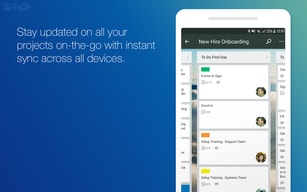
| Deployment | Cloud / SaaS / Web-Based, Mobile Android, Mobile iPad, Mobile iPhone |
| Support | 24/7 (Live rep), Chat, Email/Help Desk, FAQs/Forum, Knowledge Base, Phone Support |
| Training | Documentation |
| Languages | English |
Trello Pros and Cons
- Timelines and productivity metrics in one place
- Convenient Kanban-based boards for ease of use
- No-code automation features
- Lots of integrations with leading tools
- Convenient pricing packages for all companies
- No inventory and budget tracking
- No invoicing features
- Not suitable for more complex task planning that involves multiple segments and moving parts
- No Gantt chart feature
- May be too basic for complex task tracking for enterprise teams






Compare Trello with other popular tools in the same category.
The readability and usability of this software is excellent. Extremely useful in collaboration across multiple teams and works very well. Helps to keep track of progress and manage workflows of our projects.
Personally I have no drawbacks to this software. It's serves us very well.
Trello is the simplest application to use for project management. Affordable and and have a great payment plan. Helps to track progress of each project and aslo on collaboration of various projects.

This is my first time using a software like Trello to manage my tasks and I am absolutely delighted by how it works.The fact that i have a way to view all my assignments and updates about them in one place is mind-blowing for me
I love everything guys.No dislikes at all
-Less unnecessary emails -All team resources and assigments in one place -Real time updates
I love Trello for managing all of my projects. I use it to manage my tasks and keep track of everything that needs to get done. It's a great tool if you want to be able to organize your work, plan, and stay on top of things. Trello is straightforward to use and has a beautiful design.
Trello is not ideal for larger teams with complex projects and many workflows. Plus, it has limited integrations. It would be better if they made it easier to integrate into other apps.
Trello solves project and task management issues. It helps me know the pending, in progress, and completed tasks. It has helped me improve my performance as I can quickly learn the projects that are still incomplete and work on them ASAP and in the correct order.
Easy and intuitive interface to get started, integration with other commonly used tools (e.g. Slack)
Pricing can be expensive when we need to add multiple boards for people in the organisation to view but not necessarily engage with
Trello has helped me better manage complex project timelines and communicate these with other functions / stakeholders

Trello is very versatile in its logic and design to cover a great variety of use cases within creative teams, startups and other organizations. The use of columns and cards, as well as the calendar view, offers great flexibility for mostly creative, brainstorming and moodboard/resources review.
Power-ups and third-party widgets are a great way to boost Trello's functionality, however there is a certain rigidity to the general layout of an opened card when you add custom fields and widgets that makes reading the information in a card a bit complex. So basically, certain use cases benefit more from a flexible database-style setup than a kanban style platform such as Trello.
Trello helped me organize our development and bug-fixing sprints by providing a visual way to organize, prioritize and track what was currently being developed.
Trello is a complete package tool for project management. Variety of templates available and can be easily be customized to fit into your projects needs. Great pricing strategy which is aslo very fair.
Trello has been a reliable tool for our projects management. We have no dislike at the moment.
Trello continue to improve and they are adding new great features. Very affordable and easy to use. Great for team collaboration and aslo it's can be easily be customized to fit into different projects.
Kanban-style organization. Moving a task along a visible process line from the origin of the task to various status points. This provides both a thirty thousand foot view and an on the ground view.
It is difficult to hide finished 'boards' or projects from view, this can make for a cluttered Trello dashboard.
I use Trello for both business and personal uses. For business, it helps me see what tasks I have for a given project an overview of how how much progress I have made. Personal use, it's like a card catalog of all the recipes, cool sites, gift lists, and so much more info that I will not need right away, but I will certainly need access to in the future.
Trello can be accessed anywhere and I can share boards with customers, colleagues, and advisors. It helps keep me on track and makes sure I can see the whole scope of my projects.
There isn't a lot to dislike... it took a while to learn how to use Trello and cater it to meet my needs, but other than that, it has been a great tool to help me remain productive!
I wanted a way, other than email and Word documents, to be able to keep track of my projects and also have an interactive way of keeping track of my to-do lists and my progress.
It's a great experience using Trello because of the task sharing and updates about others' task monitoring.
There is nothing till now I've found which is not helpful in trello
We can up to date with all the department's tasks.also, we create cards for any task to be completed, It's helping to our company a lot.
How user friendly the software is and easy to create and organize the boards.
Sometimes when we had too many cards it would be slow or say it wasn't working right now and to check back later.
It helped us keep our business organized
Trello est une application gratuite qui aide les équipes a avancer dans leur travail et projets. Il aide a la gestion de projets et trèes utile pour les gens en télétravail
le visuel n'est pas 100% encore selon moi. Il pourra avoir des amélioration sur l'ensemble de l'esthétique, mais en general, le logiciel est très ''User friendly''
On peut avec cet outil lancer des tableaux, des listes, des ''Cartes trello'' Avec ces outils on peut mieux gérer des projets et etre bien organisés dans des taches quotidiennes
The I like most about Trello its project management stages and altogether with all your team In, which o improve team performance and make everyone know about your team work.
its task is divided part only into two parts processes are complete. I think it should be included in other stages such as half, quarterly target.
I think it should be included in other stages such as half, quarterly target.
Tello is easy one of the most practical tools to define a workflow, invite teammates, and create and organize tasks, it's super comprehensive to get up to speed in minutes.
The text editor is extremely basic, and the admin panel isn't as intuitive a one could expect, most of the time I need to read all the labels to find what am looking for.
For projects, and team organization, transparency, and inspection of tasks and their progress, it'd be nice to have some type of dashboard that one can get up to speed rapidly.
It's straightforward to use . The best part is that you can customise it according to your requirement & we can manage our task in a different section like first is to do then review section work in progress 7 done. We can create a separate workspace.
The main problem is that when management creates a task, another user can edit any job that Idon't like.
With Tello, it is straightforward to manage my project and my team.

Its very powerful and is very useful for project management because of all the features
There are some features that it lacks for collaboration
Trello helps Project management be easier with the features is has
Trello is very simple and straightforward. I loved being able to organize my client's work into different workspaces.
The automations are not as smooth as other programs. It doesn't have the ability to set up email outreach.
I use it with clients as project management. We are able to work their their coaching program using their unique board.

Trello just works. It's intuitive for anyone to use without training or IT savvy, it's a breeze to customize to suite your unique needs, and the addons/powerups unlock a whole new world.
Trello is create at managing projects or processes with defined stages and work to be managed, for example, customer onboarding, approvals, hiring pipeline, sales. I've found that Trello isn't the best tool for the job when the projects are complex and you need to plan resources in formats such as sprints. For that reason, I like that Trello now sits under Atlassian, as that's where Jira takes over.
Trello help us set up processes to that can scale with our company as we grow, allowing team members to maximise how efficient they are with their time.
Easy to organize information, completely user-friendly interface, millions of organization possibilities, easy integration with other software, automation system, and there are always suggestions for improvements in your workflow.
The new payment system to unlock new tools got in the way a lot. Previously, on a board that I own, I could make a payment/subscription where only I would unlock the tools and other people would have access to the board without those tools. Currently, if you invite other people to your board and want to use the paid tools, all members must make the payment.
It helped me with task organization among my team, dividing the work equally and keeping an eye on the dates. Furthermore, I have greater control of my workflow and task management and can speed up my work by integrating with other software.
Being able to have boards for each staff member, customzing the task at hand and it being able to talk to our systems. Love the option of adding power-ups.
I don't dislike anything. Everything is great!
Organizing tasks, lists and jobs that need to get completed for staff members.
I appreciate it's simplicity and it requires very minimal training in order to use the application. It's perfect tool for personal and business project tracking. Collaboration with team mates is super smooth and I like the reporting part of this application.
No major difficulties experienced since deployment. The one we have encountered have been sorted out by the customer support team.
Trello makes it easier in managing complex projects. We are able to see each status of the multiple projects we are handling. Trello is aslo easy to customize to fit in our different projects.
I love the ease of organization and collaboration. We have multiple colleagues and clients all seamlessly working together on content.
I can't really think of something to complain about. If I had to nitpick, I would prefer if the "watch" feature was something that had to be deselected as opposed to something I have to click every time--but that's a personal preference.
We use Trello to plan social content and meetings regarding social content.
It's great for organizing day to day operations.
When you first start using it it can get overwhelming very easily
Organizing my daily tasks in order of priortity
This is the most user-friendly project management platform I have ever seen, the least complicated, and I not only have organized several of my businesses, my clients' projects and my entire personal life too, but I started getting my clients to use it and now I c(and they) can't live without it! And, what's best, my clients are very non-tech savvy and can easily understand how to use Trello and its power within minutes! BEST OF ALL, it takes me off text thread and email communication and puts each type of communication about a project IN THAT PROJECT ONLY so our threads of conversation happen simultaneously without being integrated and confused!
Are you kidding? There is SO NOT ANYTHING TO DISLIKE? What's not to like about gaining back your sanity, removing confusion on your own projects and cleaning up all your team communication? This is thing just keeps getting more awesome!
I really answered this in my review. Mostly it's breaking down projects into checklists and adding team members to each and only communicating with select team members on the projects applicable to them. I can tag certain team members in the communications just as simple as on Facebook and manage unlimited threads without it getting confusing or attachments and messages getting lost!
Trello task tracking, dashboard and project development activities features are well designed and works very well .It's provides a wonderful team collaboration experience and accurate reports. It's aslo a fairly affordable tool supported by a great technical support team.
Trello has offered us very great and exceptional services . Nothing to dislike so far. It's has been great.
Trello user interface is very great and natural. It's very affordable for small and medium size companies. It's easy to use and highly customizable to fit into your business needs.

Overall, Trello has been fantastic for me! It is a really adaptable and user-friendly application that has assisted me in remaining structured and on track with both professional and personal undertakings. I wholeheartedly endorse it to anyone searching for a straightforward yet efficient method of managing their activities and to-dos.
So far, I don't have any problems with Trello. It's all going smoothly.
Trello's basic and uncomplicated design is its most appealing feature. The functions are neatly organized and the UI is simple to use. Trello allows users to completely customize the program to meet their unique requirements.

Trello is an easy-to-use project management solution. Everyone on your team can easily use drag-and-drop Kanban boards to manage tasks and visualize progress throughout the workflow.
While the software is very easy to use and has an excellent free plan, for me it lacks some advanced features needed for complex projects only available in pro plan
We were managing tasks in excel sheets, we needed software for keeping an eye on the schedule, we were not looking for time-based software but an activities tracker. After we found Trello, It saved time on task management and we can focus on productivity.
Trello helps alot in organizing and keeping track of each project. Easy to customize to fit into our different projects needs. It's enables us to effectively collaborate with teams and clients when working on a particular project. I like aslo the notification feature which alert us when something important happens.
I guarantee Trello is the best project management tool inthe market. It's easy to use and fairly affordable.I highly recommend it to other users.
Trello helps alot in collaboration with teams and clients. It's easy to configure and use. I like the notification feature which alerts us when something important has happen. Trello customer support is aslo amazing.

I used Trello software and this was a real-life saver with all the constant reminders and notifications. Now I could easily check my tasks on timely basis, take follow ups and complete them accordingly.
Nothing at all. The software was good and easy to use. I just wish if we could have a better export file feature in Trello for easy purposes or if we can delete some tasks in bulk if we needed to.
Time management Flexibility Time-saver Easy to use access

Any one can work in trello because of it's ease of use. Iam working in agile environment and it is very useful to me. I recommend everyone to just try using free trial account.. then you will be surprised.
Not much, it is really good. Only one suggestion is that lack of themes and customisation.
In project management
What I love about this tool is that it helps me and my team be more organized in terms of our workflow, tasks, and progress. Plus it's easy to use and has a lot of functions!
I have nothing to complain about. I currently use the free version and is good enough for my team. Maybe I'll be able to explore it more if I upgrade/subscribe.
My team and I have been trying to organize our workflow and track the progress, we keep on emailing, sending documents, and or texting the teammate just to check our submission. Gladly we decided to improve and selected Trello, our workflow became easier and feasible, we easily get notified, and even can check it anywhere thru its App version!