

Unclaimed: Are you working at Webex Webinars?






Webex Webinars Reviews: 4.5/5 — Highly Rated
Formerly Webex Events, Cisco Webex Webinars is a virtual event and webinar tool capable of hosting up to 3000 participants into a single meeting platform. This makes it a very reliable option for large-scale corporate events. Webex Webinars also has recording capabilities, ideal for training purposes and a lot of customizable options that can help tailor events to brands. Additional features include multiple presenters, robust security features, interactive tools, automated email invitations, option to send reminders, and attendance management.






| Capabilities |
AI
API
|
|---|---|
| Segment |
Small Business
Mid Market
Enterprise
|
| Deployment | Cloud / SaaS / Web-Based, Desktop Mac, Desktop Windows, Mobile Android, Mobile iPad, Mobile iPhone |
| Support | 24/7 (Live rep), Chat, Email/Help Desk, FAQs/Forum, Knowledge Base, Phone Support |
| Training | Documentation |
| Languages | English |
Webex Webinars Pros and Cons
- Professional-grade conference features that can host up to 40,000 attendees
- Provides real-time translation and closed captions for over 100 languages
- Support integrations with major marketing platforms
- Suitable only for in-house team collaborations with minimal features for consumer virtual events
- System menu and user interface is complicated




Compare Webex Webinars with other popular tools in the same category.
The program was easy to run on my computer for the webinar
You had to add information and email again even though a webinar was done previously
The benefit is to be able to see the webinar via WebEx from April 19th and April 26, 2018.
I like that registration can be offered and customized
The system for managing registrations is tedious to get to and I have not been able to record or receive support for recording.
Meeting with potential students virtually
This program makes it very easy to host and share webinars, even with people in different geographical locations.
Sometimes it is hard to get properly set up if there is not a fast enough internet connection.
We use the Webinar to attend SQA-hosted events remotely so that we are staying up to date on current regulations and events without having to travel to meetings.
The screen sharing feature is excellent for hosting remote meetings.
The call quality isn't the greatest. Could be louder and clearer.
This program allows HR to on board new employees much easier.
works well for online training for staff
connectivity issues arise at times but not often
online training
Easy to use on pc and during travel with minimal set up.
Occasional difficulties connecting on phones
Remote employee workforce helps us to collaborate easier than email only
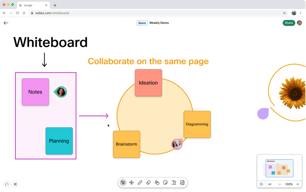
Allows exchange via voice, Video and white board
Time to load. Maximum numbers of users are restricted.
It hangs at times
Easy to get multiple people on one call and talk thru something, share a screen, dial in together and just meet in general. It links in to your email provide and with one click, you can add your webex to your meeting invite.
It can be hard to find your meeting number and call in number if you want to add someone later once the meeting has started. Or if someone can't find the call in number and they say, "send me the dial in", you are left looking for it.
The business problem is an easy way to meet with co-workers who are not in the same office. Webex does offer a solution that is fairly easy to use. The screen sharing is very simple and it's easy to attach a webex to a meeting invite.
Sharing screens is easy within a webex and there are multiple options for a participant to join a call
sometimes it freezes when initiating the meeting, sometimes setting up a webex is not always available within Outlook Calendar even though the extension has been downloaded
Online and remote telecommunications and collaboration
The best feature is to engage a wide level of audience. No restriction in adding the members
The attendees dont have access to transfer of files which is not good for such a good product
When we were in need of hosting a more number of users who reside in different locations. Our company prefers webex more than zoom and we are more delighted/ surprised on how this product surpasses

Webex has several more options to facilitate collaboration than software like Zoom. It's like a few useful remote collab tools combined.
It does essentially fill the role of several softwares my company already has, so it's just another software to learn and keep up with.
I have been able to take part in several webinars, which sometimes require different softwares. That benefits me by providing opportunity to attend these webinars.
I did enjoy how simple it was to join meetings compared to Teams.
Downsides of Webex are bandwith. If too many people join the call, it starts to get spotty and laggy.
Or company geared away from using webex due to the size of the business. We found that Teams is more productive for our group calls.
The best platform to host virtual boardroom meetings. The features are user-friendly and highly interactive, essential for increasing client engagement.
The only feature and the main component that disappoints me is the cost. Not a competitive price. Even with scaleup features, it is still cost-intensive for SMEs.
Hosting boardroom meetings to market our client's products became easier with interactive features. No workflow disruption was reported while using this platform.

It was very good about protecting valuable information and making sure that everything was incredibly secure and safe so no information could be lost or obtained by non-intended participants.
I didn't like the interface of the webinar, it was very hard to look at and it seemed much harder to navigate than other competitors such as Zoom or Microsoft Teams.
It was used to have seminars about benefits that were offered in the company I was working in. We learned a lot about 401k packages, health and dental packages, and discussed sensitive matters that were important to keep private.
I like the features that Webex has, such as polling options, which makes video meetings more interactive and engaging. It's an easy platform to use and is very user friendly.
I find that Webex tends to have more technical difficulties than other platforms. Audio or video will drop for no discernible reason mid-call, or will work fine for one meeting and not work at all for a meeting later in the day.
I can use this for video meetings with many people, and everyone can engage in several ways. Polling makes it easy to quickly get information from a large number of participants.
I like the smoothness and ease of use of the webex webinar and it can accomadate 1 lakh participants at a time and real time translation is also there in 100 languages.
i dislike and complain about the audio quality, the lack of interactive features, These are some of the common issues that users may face when using webex webinar software. the interface should be like google meet visual should be there to make more cool.
The webex is solving the people to accomadate in one place that is more than 1 lakh people can accomadate in it which is good for to use and interact with people and i am using it to take university classes and government meeting frequently.
Webex is a very properly designed software to chat and schedule meetings in the place of business. Companies with a large number of workers can also use this to connect and collaborate, which will provide a commercial enterprise solution. I, for my part, use Webex for chatting and scheduling conferences. It is very helpful in preserving the tune of your time table and, for this reason, helps in conditions in which one assembly is overlapping with another. One feature which I like the most is sharing display characteristics. As we had a decentralised group, we get problems and those are discussed on Webex. Whenever we can manage our display, it is going to be handled easily.
There is not a lot to dislike, but still, there are some connection issues some days. The member search feature does not always produce the desired results. There are problems like getting numerous screens if we are part of the equal assembly twice. It hanged and we needed to restart the internet.
I was part of an organisation that has a completely large body of workers, so we needed to attach each day. We needed software that helps us with this. Webex fulfils this very maturely. It permits us to chat, to create organisation chats, and to schedule meetings. We frequently require white boards to display information, and this feature is also very useful when using Webex. We work on an agile platform, so for us, conferences and scrum calls are very vital. Webex is a lifeline for people who live in different parts of the world.
It delivers the webinars and events very well - including recordings and landing pages. Overall - it does what it should.
The user interface is very dated and the admin setup is very tough to navigate. I often get lost between functions and finding what you are looking for, it is often necessary to google a solution.
We needed to host webinars. It fulfilled this and delivered successful engaging webinars
The modern design is clean and appealing to use.
Adding people to a call is sometimes tricky and time consuming to add people to call.
Data Analytics
We use it as clients for the venodor meetings and it's an easy app to use with straight forward interface. Not bad for a conference app.
Mobile ui can be improved. Sometimes it has issues with connectivity when trying to join in, might take a bit of time and not instant.
We use it as clients, so we don't have a choice of app when we get webinar links to join. But it's not a bad app.
It is a mostly reliable tool for virtual meetings/presentations/gatherings/etc. for teams in multiple locations.
While it serves its purpose, Webex has been outclassed by other tools that crash less, are not as choppy and are better on mobile.
It helps our in-office employees stay connecected with remote workers and those in other offices. It can be used with multiple browswers and has devent quality.
It works well for clients that have high security compliance needs
The UI is not as intuitive as other call products
Working with clients that can't use Zoom or Gsuite because of their internal compliance.
Being able to have multiple ppl on the screen and sound and video had no issues
Doesnt have all the emotions and effects for raising your hand or clapping which makes it easier when there is multiple ppl that want to talk
Webex webinars benefit our team during weekly meetings and not having to be in the office, face to face

Assets can be loaded with no worry about file size, the caps are favorable.
Data and registrant engagement are clunky. It didn't integrate with HubSpot and Salesforce field mapping was challenging, even with the declared names triple-checked. The viewers had issues logging in, native access drivers and browser-based views were delayed or completely froze up their machines - Mac and PC
It's another platform to host webinars, but not my preference. I had to use it because of the company where I worked. I far prefer another brand, but I muddled through and made the best of it for the benefit of the campaign and message.
It is nice the presentor has a lot of control.
It does not seem to run as smooth as Zoom
It was nice for workshops
I like that I can send calls/webexes via email. I like the mobile app and the outlook add on.
I don't like the phone line because it's often down, busy or has connectivity issues.
Customer demonstrations, meetings
I lecture in a large computer lab where not everyone can see common screens. So, we use Webex so everyone can see the lecture on their screen. It is great that wherever you are, someone can see the lecture. I LOVE the pause feature. I can show students a problem, pause the screen while I work it out, and then resume when I am ready for them to see the content again. I LOVE LOVE this feature. It is so convenient. Also, if a student comes up to me and I need to check their grade, I can pause the screen so everyone doesn't see their information.
When you are sharing your screen, I do not like that you can't move the task bar (with stop sharing, pause, annotate, etc options) to the SIDE of your screen. This task bar takes up a lot of valuable real estate on my screen and I wish it was more compact or could at least be moved to the bottom or side. All you can do is slide it across the top.
We are solving so many lecture problems. We are able to lecture to 115 students and be able for them to all see the notes!
It's a platform that you can use from external providers
About half the time it doesn't load with audio, so you have to log out and back in. It is cumbersome and very slow to load (even when I'm not on vpn). It is a lacking format in comparison to other similar formats like Teams.
It allows me to work with vendors that I might not normally.
WebEx is for sure reliable and it has been around for much longer than competition. WebEx is more focused on business a d professional use
WebEx is a heavy software compared to others similar function. Kinda takes longe to start meetings Also, the UI is not very friendly. So when you're screen sharing, it's really hard to find the chat feature for example.
Virtual meetings , webinars and collaborations with colleagues, with support whether to give or to get support...etc. It is pretty efficient
It's an easy system to log in. It allows a large group to participate at the same time. It allows you to set up multiple chat rooms within the same session so you can have break out groups.
The sound quality is terrible if you try to listen to any type of music. It has feeback, volume issues if someone speaks and takes the base out if someone starts talking. It has high pithced tones which made me turn the volume really low in order for it to not hurt my ears. In addition, others outside of the 1 person presenting has to have their mic on mute as this will also affect sound quality. It's hard to go back and forth between screens ( viewing participants, seeing the presenter, opening the chat). It seems a bit unorganized. I'm not sure if this is due to the host set up or the product in general. This was my 1st time on the platform. If we use it again, I'll update the review.
We have ben working remotely since 3/23/20 and have been trying multiple platforms for video confrencing.