

Unclaimed: Are you working at Zoho Desk?
Zoho Desk Reviews: 4.4/5 — Solid Choice
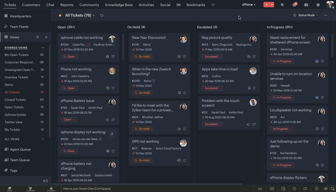
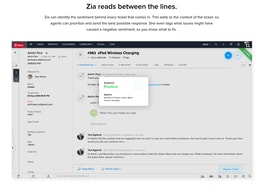
Zoho Desk is a longstanding name in its category that offers feature rich automation tools that help make your agents job easier and more efficient. One of their most lauded features includes an AI assistant that can identity repeated keywords and opinions in customers’ text to analyze customer mood and sentiment. Such smart solutions are coupled with auto-tags for tickets. You can also send automated notifications concerning ticket progress, assign tickets to specific agents, and update records via the platform.
| Company | Zoho Corporation |
|---|---|
| Year founded | 2000 |
| Company size | 10,001+ employees |
| Headquarters | Chennai, Tamil Nadu |
| Social Media |

| Capabilities |
AI
API
|
|---|---|
| Segment |
Small Business
Mid Market
Enterprise
|
| Deployment | Cloud / SaaS / Web-Based, Mobile Android, Mobile iPad, Mobile iPhone |
| Support | 24/7 (Live rep), Chat, Email/Help Desk, FAQs/Forum, Knowledge Base, Phone Support |
| Training | Documentation |
| Languages | English |
Zoho Desk Pros and Cons
- There are plenty of reporting features that provide customer insights and agent performance data
- A range of templates are available to help you respond to customers quickly and effectively
- You get real-time insights into support operations
- There’s a good free plan for new users
- The wealth of features on offer can make it harder for beginners to pick up the software.







Compare Zoho Desk with other popular tools in the same category.
Representation of details on Log entries for each ticket is fabulous. Train of log and sub log maintained perfectly.
not encountered yet as things checked till now is working smoothly and still under exploring more on the app.
Ease of generating ticket and records of communication maintained well with attractive UI and navigation.
There are a lot of things to like about this software. It's easy to use, intuitive and has most of the common core features built right in.
I'd like to see more customization options. Some of their templates are a bit bland and not terribly exciting.
Helpdesk/customer support for an app. The ability to turn an an email interaction into an FAQ item is handy and helpful to have.
The workflow built into the system makes it easy to get started.
I would like to have Zapier integrations for large 3rd party connectivity without developer time needed.
Email and phone support.
We are all floored by its ease of use. We like the agent and lite-agent concept. We liked the fact that we could imort all the contacts from the old ticketing system with very little effort. We could setup our users swiftly and route tickets to them. Also we like the setting up of Macro to route the tickets.
The screens are very inornate. We are using it for ticketing. We needed client ids to show up alongside the names and it was unable to do so. Also we had to same user for multiple accounts. It has monochrome UI, would like to see may add some colour.
1. We are implementing the ticketing system. We need to implement Watson AI and manage the replies and route mails received.
Easy to setup with good customer support. Web portal is great and prebuilt HTML email template is a nice touch to support emails.
Email ticketing does not support DKIM or SPF records so sometimes our support emails end up in clients junk mail. Integration with Twilio to support SMS ticketing would be great. Would like to see an integration with Xero as well.
Ticketing system to track customer requests.
Easy integration of webform into my website is a snap.
Challenge to figure out domain mapping for the Help Center
Great for responding to tech support questions.
It is very easy to create a support ticket, and at the same time create new customers.
It is not possible to sort the data the way we want. As in example, we cannot sort by Category A, then Category B, then Category C.
As an IT person, every day we solve a lot of issues, small ones and not so small ones. Zoho desk allows me to prioritize the problems to be solved.
Number of customization's allowed under free use. Ability to see tickets on the phone and iPad is invaluable for small business owner.
Not very intuitive. Takes time to learn. Some of my clients (business owners) like to have more control over seeing the issues that their employee face in real time. I did not find a way to have real time view for the specific people only. it only allows me to create administrators, but this is to convoluted for Business Owners to see. Reporting helps, but you cannot automate that in Free version.
Need a simple solution for client personal to submit issues. Need a simple solution for client personal to get documented responses to their issues. Business owner have a need to see what kind of IT problems is most common to address the downtime and improve employee performance. Customized interface per client requirements to make simple interface for not technically savvy personal. Allow personal to submit their tickets from any device while they are in the office or in the field. Business owner would like to receive Daily/weekly/monthly consolidated reports in Excel to sort issues by: type (network issue, hardware issue, phone system issue... ), date (occurred, solved...), response time, affected user or users. As administrator i like to see daily reports for all issues submitted and: open, closed or pending resolution statuses.
The application has a lot of features and it is very user friendly. We have tried it with a few users and it went ok
Some users have a little dificult to mange the user interface, but after a little while they got it.
We are dealing with our customers issues. With Zoho Desk we intend to speed up the issue resolution time
Features of ticketing system and knowledge are two of the best features
Email responses are very slow. Sometime work got stuck
Added ticketing system in my website to solve customer issue
The PPX system integration is very helpfull to make the information management more efficient making my team support more productive.
The lack of video tutorials about the Zoho programming code. The software is very usefull but to get better automation results, i would need more information about how to build rules using codes in Zoho Desk.
Zoho desk is helping me to mensure my team productivity and it's making my business process more efficient and functional.
Ease of use Agents management, Ticketing system, Account management Contact management Agentwise monitoring
Report generation is a big issue. Exporting the report will give you a maximum limit of 3000 entries.
Our ticketing system got streamlined. The escalation handling was improved leaps and bounds.
We have liked the system for its built in features. The Context view is great.
The Reporting is still not upto mark. Advanced SLA tracking - client wises sla, ticket wise sla is still not available.
Advanced visibility on SLA metrics, Engineer Ticket Queues for faster responses
Great workflow and notifications; easy to set these up
Mapping of fields between CRM and Desk should be more flexible (they are both Zoho products..)
Help desk ticket management and helping sales stay in the loop.

It is great tool for implementing ITIL compliant service delivery process
Still running on trial, to elaborate or be critical but the bootstrap process is cumbersome.
We are IT support organization and also a WISP, FTTH company. We are looking at integrated service delivery process
It's cost effective for a small organization and integrates with numerous CRMs.
Lack of support is my only issue with Zoho's suite of tools.
I am trying to get everything we do as a business integrated into our CRM, which is currently Zoho CRM.

Very intuitive graphical user interface, good flow control of actions
Even though product allows customized features but using these custom features are not straight forward
We need a quick way to resolve all requests and services for internal company customer. This product provides the solution.
System is relatively easy to use, simple navigation.
Setup can be a little overwhelming. Once its done the system is easy to use.
streamlining customer support
Its user friendly interface and well organized settings and custumization options
The terminology and what each setting does within Zoho.
Ticketing System
Es visualmente agradable,intenta simplificar los apartados.Muy potente servicio.
Puede resultar un poco tedioso al momento de comprender el flujo de cada sección y cómo activar cada función. Al finalizar el periodo de prueba no hay alerta que advierta que aspectos como la creación de un contacto sigue funcionando correctamente sólo que no se muestra por una cuestión de la expiración de la cuenta gratuita.
tickets for every thing we need .
omnichannel support self-service tools Ease of Implementation Customer Support
Difficult to integrate Zoho desk with Zoho CRM.
Zoho Desk helps simplify customer service operations, improve agent productivity, and deliver ongoing customer experiences.
it is a basic ticketing system which lacks some of the major basic settings.
you can't add mutliple company within one profile you only delete 50 max tickects at a time
it allows to communcate with customers
Easy to use interface, handy email notifications, case management overall is very easy to use. Customer Support is great
Default email templates look very spammy with ### signs There is no enough documentation around how to configure email system
Tracking Helpdesk requests
User interface is easy. Integration with other Zoho products is the key.
Higher plans price is tooo much for basic features.
We are still exploring
Clear overview of all tickets in the queue.
Possibility to have an advanced it asset management system.
A global system for managing tickets & to be able to see who's working in the tickets.
The thing I like about zoho desk is that it's quite simple to integrate and use in your website for having a chat option with customers and solving any queries or information they require. You get a code snippet that you put in your website page and the chat app will popup in your website.
There is some connection issue that I faced while chatting with customers. And also there is a limit to how may devices you can operate the software simultaneously to administer the operations going on. They should increase the device limit.
Zoho desk is solving the online on spot service and help for company business products. It makes customers more interested in getting the service or purchasing the products from the comapny who is actively communicating with customers.
Zoho desk allows us to clearly track every support ticket that comes into our inbox which has allowed us to stay on top of our support issues and improve response time.
I found setting up the forwarding function from our email to our inbox was a little overly complicated.
We run support for our system and Zoho desk is allowing us to clearly see which issues are still live and which issues have been resolved.
Its easy to use, user friendly. its respoding fast.
Lots of fearutes are available which we dont need.
Ticketing system
Zoho Desk , has agood UI and field customisation module is very intuituve and helpful in setting up desired data structures
Unable to figure out how to set up autmatic reports. mapping of contacts with the account should be auctomatic based on the email address domain
we have a lot of customers using our digital products and we use zoho desk to provide customer support and transaction support. it is helping us in managing the services provided to those customers and keep track of the requests
The Interface is really intuitive and user friendly
So far not much, it would be interesting to see its functionality when we move to a larger amount of agents
Keeping all email threads in one place