

Unclaimed: Are you working at Zoho Desk?
Zoho Desk Reviews: 4.4/5 — Solid Choice
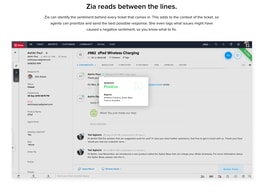
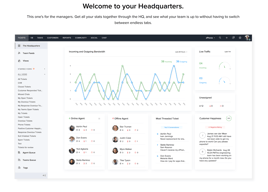
Zoho Desk is a longstanding name in its category that offers feature rich automation tools that help make your agents job easier and more efficient. One of their most lauded features includes an AI assistant that can identity repeated keywords and opinions in customers’ text to analyze customer mood and sentiment. Such smart solutions are coupled with auto-tags for tickets. You can also send automated notifications concerning ticket progress, assign tickets to specific agents, and update records via the platform.
| Company | Zoho Corporation |
|---|---|
| Year founded | 2000 |
| Company size | 10,001+ employees |
| Headquarters | Chennai, Tamil Nadu |
| Social Media |

| Capabilities |
AI
API
|
|---|---|
| Segment |
Small Business
Mid Market
Enterprise
|
| Deployment | Cloud / SaaS / Web-Based, Mobile Android, Mobile iPad, Mobile iPhone |
| Support | 24/7 (Live rep), Chat, Email/Help Desk, FAQs/Forum, Knowledge Base, Phone Support |
| Training | Documentation |
| Languages | English |
Zoho Desk Pros and Cons
- There are plenty of reporting features that provide customer insights and agent performance data
- A range of templates are available to help you respond to customers quickly and effectively
- You get real-time insights into support operations
- There’s a good free plan for new users
- The wealth of features on offer can make it harder for beginners to pick up the software.

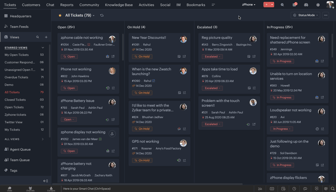






Compare Zoho Desk with other popular tools in the same category.

Zoho desk helped us in created virtual booths or desk in our virtual event. They are so easy to reach by customers, as well as easy for agents to revert.
Nothing as such, its features are amazing and simple to use.
It helped us in solving realtime queries of audience coming to our virtual events
Es facil de manipular y muy intuitiva. Eficiente para eliminar los procesos manueales
Es un poco caro al contar con muchos colaboradores, se aumenta el precio
El reparto de actividades y poder llevar un servicio digital
Build quality is much higher then other platforms in the market.
Feel pressure to use their other applications
help desk tickets with customers to record history
Todos los canales de comunicacion que tiene para poder atender, la integracion de sus herramientas en otras plataformas, muy buena personalizacion y las distintas variantes de atencion que puedes dar a traves de una correcta implementacion
al estar demasiado estructurada el momento de implementacion se vuelve un poco complicado y tienes que correr con el proveedor por ayuda ya que de igual forma no hay tanta informacion el internet
mejora la gestion de los procesos y automatiza tareas, tambien puede entregar metricas y dar a los usuarios mas canales de comunicacion o incluso diversificar la atencion
the way that is configured, really easy and so many configurations
I'd like to find in a easy way in the help center more help.
we need a new platform to have solutions for our customers
Easy to use and implement. Great pricing. Easy to understand
Sometimes runs a little slow. Integrations can be improved.
Help organize our customer inquires and enables our team to respond fast!
La usabilidad que tiene, lo intuitivo para poder utilizarla como agente, buenas notificaciones, Dashboard bien explicado, Es una herramienta que facilita la gestión de incidencias pudiendo tener una seie de configuraciones de muy buen nivel.
Se podría mejorar en la aplicación las configuraciones, ya que no son tan intuitivas. Además, la traducción al español le falta harto para poder llegar y utilizar una persona que no habla ni escribe ingles.
Resuelve problemas asociado al orden de la incidencias, es decir, ordena visualmente y de forma metodologíca las consultas y solicitudes realizadas por los clientes.
Zoho desk in combination with BigIN ensures that our sales can have access to our customer information and the conversations that may have happened before the sales call.
It is very complex and requires a good overview to set up correctly.
I have yet to experience any issues with Zoho Desk
We find Zoho really fits our needs, and this is after a huge search and trial of dozens of chat systems. Our biggest hurdle is integrating an AI knowledge base allowing us to assist our clients quickly and more efficiently.
Nothing quite yet. We do need to still put in a lot of work to fully integrate the system but that is more on us and the time needed.
Live chat, help desk, tech membership questions.
Automatic ticket tracking . communication with customers through multiple channels
nothing to dislike on zoho desk . its a great tool
helping to raise the tickets and solving by the end users and also helps to communicate
O Zoho Desk se mostrou uma ferramenta muito intuitiva e fácil de configurar para o uso inicial, colocamos de forma transparente aos nossos demandates.
Como sugestão de melhoria, permitir ocultar campos no formulário de tickets para facilitar o preencimento. Permitir cadastrar um catalogo de serviços.
Nosso problema inicial erra saber quantos tickets estavam sendo atendidos e por quem, e isto foi completamente atendido pela Zoho Desk
Seamless connections, great overall support and solid UX.
Nothing in particular. Integrations have been great.
We're able to connect customer service across the organization.
Zoho One provides a cost-effective solution compared to purchasing individual applications from different vendors. With a single subscription fee, businesses gain access to a comprehensive suite of tools, enabling them to save costs on software licenses and integration efforts.
Providing more comprehensive training and onboarding resources for users would help them make the most of the features and capabilities offered by Zoho One. Detailed tutorials, video guides, and interactive training materials would assist users in getting up to speed quickly and maximizing their productivity.
We are using it to provide a central user Interface for our employees, one can come here and get all the information about the organisation and another peer. it is quite user friendly.
Simple set up procedure is the main essence of comfort that I felt.
So far I didn't find anything concerning. Will surely edit this field in the future if required.
Our main purpose was to introduce a ticketing system for the help center. Zoho desk has filled the gap and worked quite well for us. We're still in testing phase and hopefully looking forward to see smooth transition.
Very user-friendly and easy to set up. Visibility on agent productivity is very good and will be easy to identify agents who may need additional support.
No canned responses outside of the IM function. Would be incredibly useful to have a dropdown or something similar in ticket conversations just to save time.
Replacing a shared internal mailbox to ensure customers have faster responses and to give more visibility on agent productivity. We haven't implemented it company-wide yet but it seems it does everything we will need it to for the most part.
For the price, ZoHo Desk offers more features and ease of use than giants such as ZenDesk and FreshDesk!
The UI could be slightly cleaner. It is currently easy to use, but could look better, and offer even more ease of use for speed.
Ticket tracking system as well as a connection with customers.
An excellent experience in general on zoho desk with a great support and a good software. Zoho Desk is very complete, the application allows the installation of many different extensions to diversify significantly the CRM
The biggest problem is the short CRM test time and some issues installing different extensions.
Zoho has allowed me to have a full ticketing service with a history and customer file feedback during calls
The easy way of setting up the product, and the processes within.
Customer not being able to see all the tickets from within their company.
It helps me keeping track of services that is being delivered to cleints, and the productivity of my employees
As an employee, we must report to our HR for leaves and salary, but Zoho allows me to access everything on my laptop screen. I can easily add leaves and attendance and see my payroll information in Zoho. This software's Interface is reliable and straightforward overall and provides a good user experience.
There are no or fewer flaws in Zoho. Sometimes I have faced connectivity issues with the internet, but that's temporary and tolerable; overall good experience with Zoho.
It is helping me by providing an interface where I can easily add my attendance, see my payroll information, and apply for leaves from anywhere.
It seems to do all that you'd want for a ticketing portal. I have to dig a bit deeper to know for sure, but so far it seems intuitive and feature rich. Made our short list.
Switching between zoho apps could be a bit more seamless I suppose.
Organization and accountability
Zoho Help desk is one of the best as it had helped me to attend to the customer's queries on a real-time basis and keeps my records updated.
The tickets use to take a lot of time to load, which gets irritating at times. Rest everything is good.
Zoho One helped my organization to solve the issue of ticketing system and maintain the data of the customers who are facing technical or non technical issues.
It offers a robust ticketing system that allows businesses to organize and manage customer inquiries efficiently. It enables support teams to track, prioritize, and assign tickets, ensuring no customer query goes unaddressed.
While Zoho Desk offers some customization options, the flexibility to customize the user interface extensively may be limited. Businesses seeking a highly tailored and branded user interface may find these limitations restrictive.
The software provides automation features to streamline repetitive tasks, such as ticket assignment, categorization, and notifications. Additionally, it allows the customization of ticket fields, workflows, and customer portals to align with specific business requirements.
Zoho is very user-friendly. Even if I am not a highly technical person, I could navigate and configure the Zoho Desk setup. I also like that you can customize the Zoho apps that you need so you will only pay for apps that you're using. Integrating other apps in zoho was also made easy.
There are some features that I wish were made available (e.g. customizing the customer happiness questionnaire in the Zoho desk). But that is very minimal compared to the things I liked about Zoho.
Ticket management, monitoring of agent productivity and training of agent

The tool is easy to set up, UI is clean and straightforward. There are inbuilt functionalities for client and customer interactions, and I believe it would be a good tool for Omni Channel service desk.
The Sales team of Zoho is non responsive and do not provide a lot of information when talked to. They would redirect you to the manuals/ web pages. Apart from this some of the web integrations are difficult to understand and configure.
The tool helps manage the service desk workflow by creating tickets, auto-updating them and providing overall visibility on open tickets and issues. The UI is simple and I save on training costs.
Zoho is the best crm handler in the market and cloud platform
Zoho need to improve api and can be more customize.
Time management
I like how ZoHo Desk is laid out. It makes finding your tickets and updating them very easy. I moved from Spiceworks to ZoHo Desk and have been very happy. The limitations from Spiceworks were killing us.
So far, I can't find any true dislikes for Zoho Desk.
I've been using ZoHo Invoice for a very long time so moving away from Spiceworks to ZoHo Desk is making thing much more streamlined and easier for everyone in my company.

1. Es una herramienta intuitiva. 2.Facilidad de configuración. 3. Comunidad de usuarios finales. 4. Multiples herramientas para mejorar el proceso de soporte de nuestros usuarios y clientes. 5. Integraciones y automatizaciones. 6. Apps y Portales.
1. Siento la falta de doble factor de autenticación al momento de envio de correos a la dirección de correo del soporte. 2. Falta Integración con Dynamics 365. 3. Integración con WhatsApps y Telegram.
Somos una empresa de consultoria SAP y requerimos de una plataforma para soporte interno y de nuestros clientes durante la ejecucion de los proyectos y contratos de soporte funcional y técnico.
Wir erhalten sehr viele E-Mails und da ist es für uns sehr wichtig, dass wir Prioritäten (Anfragen durch Mitglider) setzen können, um möglichst zeitnah zu handeln. Das spart nicht nur Zeit, sondern fördert die Zufriedenheit der Mitglieder. Wir denken, dass wir mit ZOHO Desk die passende Lösung finden werden. Schliesslich ist der Weg das Ziel, nicht nur beim Wandern und Fahrradfahren, sondern auch in der Administration.
ZOHO Desk ist eine sehr mächtig Lösung, mit unglaublich vielen Einstellungsmöglichkeiten, was einerseits eine sehr grosse Aufmerksamkeit erfordert und vor allem viel Geduld. Aus unserer Sicht dürfte beim Setup die einzelnen Schritte mit etwas mehr Farbe von einander abgegrenzt sein - von der Optik her gesehen wirkt es etwas zu technisch. Ansonsten gibt es nichts negatives zu berichten.
Verwalten von Anfragen über E-Mail und das priorisieren der Anfragen. Zu einem späteren Zeitpunkt möchten wir auch das CRM von ZOHO noch mit der ZOHO Desk koppeln.
Intuitive User Interface: Zoho Desk boasts a user-friendly interface that is not only aesthetically pleasing but also easy to understand. Even for new users, navigating through the various features and tools is straightforward and intuitive. This significantly reduces the learning curve and increases the efficiency of handling customer service tasks. Feature-rich: Zoho Desk is loaded with a plethora of useful features that cater to a wide range of customer service needs. Its multi-channel support, ticket management, and automation capabilities are some of the highlights that simplify and streamline the customer service process. Strong Integration Capabilities: Zoho Desk seamlessly integrates with other Zoho products and external applications, including CRM systems, social media platforms, and email services. This compatibility enhances its functionality, allowing for a unified and holistic approach to customer service.
Occasional Performance Issues: Some engineers have reported occasional lagging and performance glitches, especially with high volume usage. This can sometimes impact the smooth operation of customer service tasks. Complex Pricing Structure: The pricing structure of Zoho Desk can be somewhat confusing, with different tiers and options. While the platform offers a range of packages, understanding which one best suits a particular business can be challenging. Customer Support: Although Zoho Desk is designed to aid customer support, some engineers have reported that Zoho's own customer service can be slow to respond or resolve issues.
After evaluating Zoho Desk, I've found it to be a generally solid tool with a fair share of strengths and weaknesses. Its ability to centralize customer interactions from various platforms into one dashboard will certainly simplify our workflows, although there was a bit of a learning curve at the start. The ticket management system is useful but does require some getting used to, especially when it comes to prioritizing and assigning requests. The analytics tools provide some helpful insights, but they can be a bit overwhelming due to the amount of data presented. I also appreciate the platform's automation capabilities, even though setting up the automation rules was more complex than I'd expected. As for team collaboration, it's been a hit and miss - while it's useful to have everyone on the same page, some team members found the interface less intuitive. All in all, Zoho Desk has been a mixed bag - it has potential, but there's definitely room for improvement in terms of user-friendliness and simplicity.
In our organization, we use Zoho one for more than 2 years and it is a really good software to handle tasks, projects, and timesheets. Admin can view the additional overdue task also
It is very hard to understand when you are using 1st time zoho projects. apart from that there is no complain regarding the zoho
As a Zoho user I can understand how much time I spend on each task and if any task is overdue then I can manage it. Our client can also see the track of the task and time spend on the task.