

Unclaimed: Are you working at Zoho Desk?
Zoho Desk Reviews: 4.4/5 — Solid Choice
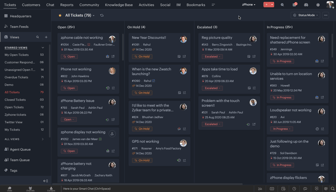
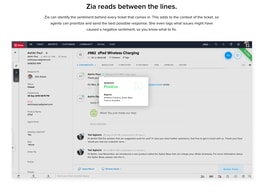
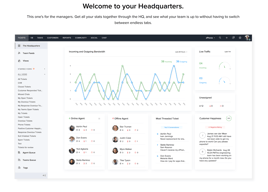
Zoho Desk is a longstanding name in its category that offers feature rich automation tools that help make your agents job easier and more efficient. One of their most lauded features includes an AI assistant that can identity repeated keywords and opinions in customers’ text to analyze customer mood and sentiment. Such smart solutions are coupled with auto-tags for tickets. You can also send automated notifications concerning ticket progress, assign tickets to specific agents, and update records via the platform.
| Company | Zoho Corporation |
|---|---|
| Year founded | 2000 |
| Company size | 10,001+ employees |
| Headquarters | Chennai, Tamil Nadu |
| Social Media |

| Capabilities |
AI
API
|
|---|---|
| Segment |
Small Business
Mid Market
Enterprise
|
| Deployment | Cloud / SaaS / Web-Based, Mobile Android, Mobile iPad, Mobile iPhone |
| Support | 24/7 (Live rep), Chat, Email/Help Desk, FAQs/Forum, Knowledge Base, Phone Support |
| Training | Documentation |
| Languages | English |
Zoho Desk Pros and Cons
- There are plenty of reporting features that provide customer insights and agent performance data
- A range of templates are available to help you respond to customers quickly and effectively
- You get real-time insights into support operations
- There’s a good free plan for new users
- The wealth of features on offer can make it harder for beginners to pick up the software.







Compare Zoho Desk with other popular tools in the same category.
There are many options to customise just about everything; and the ability to connect many different features.
Too many options, and a bit of a lack of documentation
Automated Workflows
We were looking around at alternatives to the excessively priced Zendesk as they were deprecating our features unless we paid double. After researching we tried out ZohoDesk and it has all the features that you would want in a helpdesk and more. The UI is so intuitive compared to Zendesk which confused me, an expert IT user and developer, and everything is extremely polished. Knowledgebase is amazing, admin tools are great, chat is included, and it answered all I needed.
The amount of products that Zoho offers is great, however, the products tend to overlap into each others interfaces to the point that within a few days of activation I had inadvertently signed up for 3 other trials that I didn't intend on to the point where I was scared to click on anything because I wasn't sure which tools/features are going to charge me or which are included in ZohoDesk. I expressed this concern and they indicate you'll never be charged without agreeing and you can turn the cross-product integrations off but they are on by default.
Internal and external knowledge base, intuitive easy-to-use interface, chat with users, helpdesk that can be tailored for various department use-cases, great pricing.
Friendly interface, integrations from the market
no light users which can respond to the tickets
Ticketing system for our users, integration with jira, notifcations, SLA
Integration, easy of use. Mobile app. Features are amazing. covers most of the requirements for most organizations.
too many plans, should provide more features in lower plans, such as ticket merging and integration with other zoho apps.
Mainting support tickets, follow up, service department performance and KPIs, support team member performance and KPIs
easy access and understanding of users. also its integrations with the entire zoho suite
The cost should be lowered a little more for several agents, however the characteristics are enjoyable
I have several companies where I give consultancy and help desk, it makes it easier for me to access support tickets and to maintain control
Very easy to use as we can get all the manu in same place
Trial time it's must allow 30 days. We need to setup and make test with user which need some time as organization user or power user . so batter we should get enough time for this.
we use zoho desk for support our client
The automatic process management for the tickets
It is difficult for a new user to understand the system properly if they try to start the management as an administrator.
The task administration from different departments
Great team management ticketing system Excellent search function in both Greek & English Great merging splitting ticket function
Hard to configure notifications on ticket creation
Its an excellent solution to support our clients tickets and answer to their requests
The best tool for ITS with great features and support. Support is very responsive.
I don't think there is something, I can dislike now.
IT Service desk tool, which have imprived my users communication to IT Team.
It's easy to set up and work with. Add new customers and send a mail directly to our workers so they can respond to a ticket generated by an agent. Dashboard is great to keep up with the work.
Only think missing is an implementation of a public dashboard. So one can share a "status page" with limited info to share with other people (CEO, bosses, etc), that don't need a full access as user, just a quick look.
Keep up with maintenance jobs that customers asks via email for the products we offer. Give a formal registry of the work done, and be able to review that the work is getting done by our workers.
The UI handling and the way things are properly organized.
Speed can be enhanced though it's ok for small user base.
Handling tickets related to orders and providing solutions for user.
User Friendly Interface , multiple integrations possible.
There is nothing to dislike so far. Everything works flawlessly.
Systematizing our customer communication.
Their customer support is very good, i also like the good integration and ecosystem zoho has built with the chat app, voice app..
Maybe the design, even though they improved it over the past years, but it's still not that modern.
Organizing tickets, serving customers the best way possible.
Ticket Sistemi , Destek Raporları , SalesIQ kullanım kolaylığı
Bazı özellikleri bulmak zor . Arama zorluğu
destek masası personel sayısını minimize ediyor .
Tracking Support Desk time. Catch Repeating Errors.
Takes time to get into it. Very clunky GUI.
IT Support Tickets -- Report and Follow Up
Their sales and support team are excellent. The product has a vast feature set for the cost and offers great value for money. It appears to scale well and integrates with our existing solutions and systems.
Giving that there is a huge amount of freatures there is a large learning curve. However its not insurmountable. detailed knowledge of you existing systems is required to enable some integrations
We're primarily switching to using Zoho Desk to offload the overhead of maintaining our open source solution. This frees up our admins to support the helpdesk and give faster responses to our staff
Zoho desk is a very friendly service desk app well integrated to the zoho suite
It would be nice to have more integrations to automation systems like make.com to be able to get it working along side with other tools and suites chosen by our company
Zoho desk help us to manage all the clients requests for support, regarding our products, when something is broken and so.
We are a new IT department for a growing law firm with multiple offices across the states and have been looking at different soultions. we are currently running on the free version of zoho, while we get everything setup and running. we find that havinga decent free option which can track tickets, email intergration and build a knowledgebase from our tickets is great.
the biggest issue I have with zohos free version at the moment is that the Office intergation does not work without a subsucrption. which is a pain as alot of our users use teams to reach out to us for issues.
Zoho is solving problems for us like, not having a email chain of tons of issues as how this was desk was being handled before i came on board It is also helping us keep track of soultions and issues that are commonplace here.
We offer several formulas, so we can easily adapt our formula to meet new needs. There are a multitude of add-on modules, and just like the formulas, we can easily access new modules as we grow.
Our relationship with our customers requires us to use Skype. Zoho no longer updates its skype connector. We have to use an external connection to Zoho. Too bad !
Zoho enables us to centralise customer requests from our various communication channels. it allows us to track the progress of tickets and carry out analyses on them
It has a good interface, it is intuitive and quickly.
Have a lot of options and some times you don't know where are the options you need.
We can control in a best way our tickets of the office and also we could use automatication tools.
Easy setup. Easy rule setup and custom fields.
Not much. Everything works the way it should, and I can find things easily.
Help desk ticketing and reporting system.
Zoho CRM has all the likely features to support running a business. I can easily track the sales, the upcoming forecast of revenues, bill receivables, outstanding etc. It gives me the whole outlook of the overall business of the financial year.
Zoho CRM reports when exported don't give a good preview. I am looking forward to new features in Zoho CRM. As such they have a very good build up.
Zoho One gives an overall view of the business regarding the pipeline, customer requirements, directory, customer problems, billables, etc. Switching from Excel and maintaining data on google sheets, we are much further and in a way it has really improved our productivity by about 50%. My people and I focused more on improvisation than finding the data.
great help desk service. It will certainly help us to better manage our customer service
little customization on some widgets and better organization of settings
better organization of requests from customers
the practicality and automation of entries, ease and organization of layers.
Difficulty in finding functions, and lack of easy-to-find documentation
I'm looking to centralize all tickets from various forms of entry, centralizing to help resolve.
Integration with Zoho CRM is very helpful, and allows us to track service tickets in one place. No more cc'ing each other and copy and pasting forever! We have used Asana for this in the past, but there was too much copy and pasting required.
There is a bit of a learning curve, and understanding exactly which features we are getting at which plan level is difficult. Sure, there's a list and comparison, but it's not quite clear!
Keeping tracking of service tickets. This allows us to manage service tickets across multiple team members, without having to constantly ask "have you spoken to x client?"
Interface is extremely user friendly and easy to integrate
Sales assistance could have been better.
Integrating all customer service queries at one desk instead of using multiple tools
Integration with Salesiq, makes our agents fully context-aware while communicating with users, Embeddable self-service & Replya assistance are other features we found value in
The chat bot of Zoho desk could be made as powerful as Salesiq as we see some redundancy between the two
Customer tickets & collaboration among internal teams (enabled through light agents) that work together to resolve queries.
It very goof software to manage the daily task
As of now I am satisfied with the software
It's easy to manage the daily task and pending work
The integration between contacts, tickets and kb is great. Really appreciate having a ticket history tied to a contact.
The one and only issue we have had is migrating old tickets from another software into Zoho. After some trial and error we were able to figure it out.
Zoho is giving us a solid integrated platform for all channels of customer requests.
Zoho Desk includes a lot of great features bundled into even their basic plan. The ability to pull up KB articles while looking at tickets or having suggested articles with customers are filling out tickets has been a huge help.
Overall I've been very happy with Zoho Desk, the biggest challenge we've seen when comparing to other help desk solutions is the setup and integrations can be a bit challenging at times with the vast number of menu options.
Tracking and providing self-service solutions for customers