

Unclaimed: Are you working at Zoho Desk?
Zoho Desk Reviews: 4.4/5 — Solid Choice
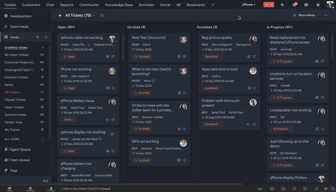
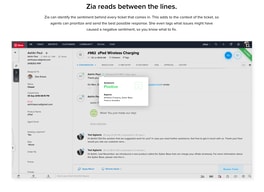
Zoho Desk is a longstanding name in its category that offers feature rich automation tools that help make your agents job easier and more efficient. One of their most lauded features includes an AI assistant that can identity repeated keywords and opinions in customers’ text to analyze customer mood and sentiment. Such smart solutions are coupled with auto-tags for tickets. You can also send automated notifications concerning ticket progress, assign tickets to specific agents, and update records via the platform.
| Company | Zoho Corporation |
|---|---|
| Year founded | 2000 |
| Company size | 10,001+ employees |
| Headquarters | Chennai, Tamil Nadu |
| Social Media |

| Capabilities |
AI
API
|
|---|---|
| Segment |
Small Business
Mid Market
Enterprise
|
| Deployment | Cloud / SaaS / Web-Based, Mobile Android, Mobile iPad, Mobile iPhone |
| Support | 24/7 (Live rep), Chat, Email/Help Desk, FAQs/Forum, Knowledge Base, Phone Support |
| Training | Documentation |
| Languages | English |
Zoho Desk Pros and Cons
- There are plenty of reporting features that provide customer insights and agent performance data
- A range of templates are available to help you respond to customers quickly and effectively
- You get real-time insights into support operations
- There’s a good free plan for new users
- The wealth of features on offer can make it harder for beginners to pick up the software.







Compare Zoho Desk with other popular tools in the same category.
Zoho desk is a fantastic option for anyone looking for a free solution. Anyone looking for a quick and easy way to get their ticketing off the ground should seriously consider zoho as an option.
Configuration can be a bit confusing at first, however support has been very helpful. The knowledge base was also chock-full of information.
Zoho Desk has been the middle man for all ticketing needs. It has allowed us to stay in contact with customers and avoid downtime.
aparencia da ferramenta e funcionalidades
ainda não identifiquei nada que não gostei
atendimento aos clientes em varios canais
lien avec zoho project donc unicité de notre outil
pas encore testé donc ne peut donner un avis correct
possibilité de travail de groupe et de cohésion des informations
features and options available to the user
Slow, poor support, seems to take a very long time to get a response, and slow loading times of ticket pages
Streamile client support enquiries into a single platform
integration of the portal with the possibility to interface with zoho crm
difficult integration I need to extend trial period
test
Zoho Desk seems to be a comprehensive ticketing platform that has a lot of features and can support a wide range of needs. After comparing the platform to others like it (Zendesk & Freshdesk) they seemed to have had a more complete solution (for our needs anyway). Easy to navigate, clean layout, many features, and cost-effective.
They offer an API with a lot of options, but it's a little buggy and some things that really should be there are not. One example of something that is missing is being able to specify which agent is modifying a ticket or task. This seems pretty trivial and they allow it when this is done in the portal on a browser, but it is not currently supported in the API for some reason. When you modify a ticket or task via API it defaults to the user who created the API Key. I submitted a ticket/feature request and they suggested to just create an API Key for each agent which is tedious and a security risk.
Our company provides an online platform for dealers and wholesalers to auction off their wholesale vehicles. Tracking requests, issues, and complaints.
We like the simple end user interface .
Setup appears to be complex. Need a "How to Configure Zoho Desk for Dummies" with examples
Need a Help Desk application that is easy to implement.
So far I like the extent to which it is configurable. Nice interface. The back-end for the agents is important but the front-end for the users is equally, if not more important. Its nice that I can make it match our brand. This is a huge plus.
Nothing to dislike yet. Like I said I'm in the trial stage. I do have an open question on minor functionality with respect to accounts and contacts. I have not received a response yet, but I'm hopeful that there will be a resolution.
Giving my clients a way to communicate issues and get those issues resolved. Happy, productive customers are what I'm after.
One think I like you can integrated with Teams.
The support is not that great. It's hard to get help
Been able to assign tickets using teams. It allows us to have more control over the tickets we received.

easy to see all needed information and integration is great.
There are not many downsides need more time to see what is required.
I am hoping it will make communication easier with my other apps.
Overall, admin seems pretty straightforward for a technical user.
No dislikes identified while evaluating the solution.
Better tracking of customer order processing and fulfillment issues
the ability to maniputlate the ticket fields to suit your individual business
the number of users in the free trial hjkhk
tracking response times to queries by our staff, tracking types of queries by our customesrs

so far I like the way it looks. it it appears to be easy to navigate.
I couldnt tell if there is a place to log time for tickets. In addition from some companies the domain was blocked.
TRying to replace Fresh Desk
Good user interface and feel using it.
Lack of security features. We need a way to make internal knowledge base secure from public
provide helpdesk to external customers and internal staff
Not sure yet, still trialing it. I guess I can update when i am finished.
Not sure yet, still trialing it. I guess I can update when i am finished.
General helpdesk.
knowledge base is handy and helpful for a start up.
UI interface is not easy to follow. There are products (modules) scattered on different portals.
support team
is easy to use and works good. For the agents is easy to usea and for IT the same.
the network falls of zoho that yo cant do anthing about it.
the ticketing and the benefits of control the agents and the state of the ticket itself
Seems simple enough to set up.It was quick to get going.
Graphically not the best. The support pages are a little "basic". Maybe this is something we can change later.
Customer support
Connect Microsoft team. ใช้งานได้ดี GUIสวย เข้าใจง่าย
slow. หน้าSetup ตัวเลือกค่อนข้างเยอะ ทำให้งงในการเข้าไปเลือกใช้งาน
Open tickets
This software is very user-friendly and my employees are adapted very quickly to its features
The Pricing structure is a little bit confusing I wish the app had more control
The problem that we're solving our company is having the team deal with customers all in one place

General ease of use. Great communication with the tech support team.
Lack of customization possibilities. Also only browser version.
The main benefit is the view of how many tickets each agent has - great for all of the agents.
if your ticketing system can improve that would be great. you can put more option for integration
your method of providing support. we feel there are not enough people with knowledge to support our requirement
we wanted CRM soultion
There are a lot of customisation options available allowing for full control over the system.
Haven't come across anything that I dislike as of yet.
There are more reporting options There are more custom setups available Generally there are more tools to help get the most out of managing service desk tickets
The very intuitive UX / UI Analytics functionality
No being able to snooze a ticket if i wait for 3rd parties
Bundling internal and external communication
Ease of using the tool. So far we are trying to perform customization in the SLA and Templates
The tickets are not categorized as incident/change, etc. So you don't get to see the type of ticket based on the ticket number.
We are still evaluating the tool and checking if it is fit for purpose

The tight integration with the rest of the Zoho suite makes it a good user experience as well for maintenance.
The UI of the product is pretty basic and falls short of other comparable products.
We used to manage the seller prospects list of an e-commerce marketplace to control the on-boarding process
I'd need a bit more time to rate this properly. I haven't used it yet.
can't really rate it as I haven't used it yet. would like to get more use out of it as we are busy trialing other helpdesk logging tools as well
not by much yet - need more time to evaluate
Zoho its a simple helpdesk system and for its price it has some neat features
so far i couldnt find anything bad but we are still looking into it
We have the incoming email active directory integration reports and charts
The UI and ability to modify flows, are helpful.
The rate limit on the API calls is a problem for execution / processing of data per day may be problematic.
Simplifying our environment and documentation.
I appreciate the ambitiousness of the product to meet a large number of customer needs with one product (or product suite), but it's better to do one thing extremely well than several things poorly.
When we tested Zoho Desk, none of the features we needed seemed to be fully flushed out and ready for prime time. There were limits and restrictions on many of the features we needed to customize. The user interface was poor and not intuitive.
We were comparing Zoho Desk with Freshdesk and Zendesk. Zoho Desk was dropped from our evaluations quickly. And customer service was extremely poor; either they didn't know the product well enough to service it and answer our fairly basic questions, or it took forever for our queries to get to the correct person. This experience did not give us the reassurances we needed that the support would be there when we went live.