

Unclaimed: Are you working at Zoho Desk?
Zoho Desk Reviews: 4.4/5 — Solid Choice
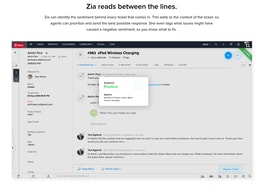
Zoho Desk is a longstanding name in its category that offers feature rich automation tools that help make your agents job easier and more efficient. One of their most lauded features includes an AI assistant that can identity repeated keywords and opinions in customers’ text to analyze customer mood and sentiment. Such smart solutions are coupled with auto-tags for tickets. You can also send automated notifications concerning ticket progress, assign tickets to specific agents, and update records via the platform.
| Company | Zoho Corporation |
|---|---|
| Year founded | 2000 |
| Company size | 10,001+ employees |
| Headquarters | Chennai, Tamil Nadu |
| Social Media |

| Capabilities |
AI
API
|
|---|---|
| Segment |
Small Business
Mid Market
Enterprise
|
| Deployment | Cloud / SaaS / Web-Based, Mobile Android, Mobile iPad, Mobile iPhone |
| Support | 24/7 (Live rep), Chat, Email/Help Desk, FAQs/Forum, Knowledge Base, Phone Support |
| Training | Documentation |
| Languages | English |
Zoho Desk Pros and Cons
- There are plenty of reporting features that provide customer insights and agent performance data
- A range of templates are available to help you respond to customers quickly and effectively
- You get real-time insights into support operations
- There’s a good free plan for new users
- The wealth of features on offer can make it harder for beginners to pick up the software.







Compare Zoho Desk with other popular tools in the same category.
Zoho is one of the best systems out there, very easy to use. Especially the mobile app that you can download so you can time everything you are doing while you are doing it.
The trial for Zoho I don't think is long enough.
I'm generally solving IT issues
Simple to configure and full of nice-to-have included to provide a great experience for our internal clients
Translation not complete - some work has to be done to provide a full french exprience.
Centalized HelpDesk services for multiple depts.
Excelente herramienta de tickets con muchas funcionalidades
La configuaración del correo de recepción de tickets fue un poco complicada
Atención rápida con los clientes de la empresa
I like the idea that every customer have its own card and its easy to redirect emails to the system
there is no convenient filter by tag, the tags won't work smoothly (when I'm creating a new tag I want it to save further on, so next time tag can be selected from a droplist combo). there is no option to recognize keywords on emails from clients
customer service
We currently use a host of Zoho products, We are familiar with their function
We found the application very generic and more suited to online support rather than field service
We abandon the product when it was clear it would not work in our area.
the simplicity of the UI and it has all features that we need for it and we can say that all information is available on the spot. it makes everything all right that it shows all helpful option to show what do new and all information at once
some information to get help like, how to or where to find
it made everything simpler
We are trialing the product and the staff at Zoho have been excellent during the process.
Input lag can be a little high on certain screens. Written instructions for configuration could be more clear (don't always have time for a webinar).
Centralizing existing systems for managing customer interaction

I like the ease of transferring tickets to other users, I also like how simple the status changes are. It's simple to have conversations within a ticket with just a few people of your choice instead of everyone who has access to a ticket which allows for helpful communication on the team.
It's a bit difficult to sort your ticket view, there are a lot of options when it comes to viewing tickets, but sometimes it's difficult to find the view you want. For example, when I just want to see my open tickets, it's sometimes difficult to find that sort view.
Zoho Desk has certainly helped ease bottlenecks and helped people have an easy way to see when tickets are due and to communicate within tickets. I've realized that our workflow has been more efficient since using Zoho Desk.

It does exactly what I need it to do with support ticketing for a large portfolio of client websites I have. Allows me to easily delegate support tickets across my team and automate processes. Haven't run into any major blockages that would make me look for something else at this point.
Could have better documentation and direction on setting up automated tasks.
We are more efficiently managing support tickets for a large portfolio of client websites. It helps make sure things don't fall through the cracks and we are able to see which clients are taking up a large part of our time and make proactive features.
Gives me a clean crisp interface to use as well as providing me and my user base access to who is available to assist them.
I wish there was more flexibility in the pricing plans.
Support ticket tracking and better visibility to issues.
UX is pretty easy to navigate which makes finding what you want easy.
Some of the required fields cannot be made non-mandatory, such as last name.
Managing backlog of requests using a sprint mentality.

Zoho Desk is an effective way of keeping track of cases and tasks. For the great price and easy setup, we would recommend it. We just modified our procedures around how we bill things out and it should work great for us. It also ties in to Zoho books!
They billing functionality and billing reporting etc is a little on the weaker side. Getting the links to zoho books was a little quirky at first but once you figure it out it does the job!
We are hoping that it solves our lost revenue in time tracking weaknesses. We will be billing on a case per case basis which will hopefully be rid of the massive days worth of billing at the end of each month. It should also keep our cash flow a bit more consistent.
Pricing is really good compared to others in the same league
I wish zoho assist was free and not a separate product
Higher ed ticketing
It's very simple to learn and use, and makes faster our job.
The live chat is only in Enterprise pack
It makes very easy the job of our customer care, and the telephone integration is really useful.
Zoho is super easy to use and input info into. It works super well with our other projects system and looking up info is also super easy. Always works fast and well
Sometimes refining results is a bit hard, like I want things sorted by a person or need to find it in a date and its not super intuitive how to do that.
It helps us keep track of business opportunities and it is helping us streamline our whole process for event adding and even to end of business transactions.
The way the app interacts with the user...
Some aspects of the site are not well implemented
I don't know
The pre-canned dashboards are quite handy, however I would like to see more 'quick change' options and the ability to embed a set dashboard into another site for executive consumption. While it's early days, it looks like there are plenty of automation tools that we can leverage to minimize the time that Tech Support people spend on 'paperwork' related to tickets. We are just exploring the use of the KB to add to replies to customers to help them self serve.
In reports, it is difficult to set a standardized report that collects multiple points of data. For example, I would like to create a standing weekly report that shows all of the tickets opened and closed in the week as well as all remaining open tickets.
We are trying to track product issues as a means of understanding where we need to make changes/improvements to our products. We are trying to understand the flow of tickets that come into Tech Support so that we can manage our people better. It's far too early to report on benefits.
It is a very flexible product. There's a lot you can easily automate without coding experience.
The interface can be a bit clunky sometimes.
We needed a help desk system and our previous product just wasn't working as well.
The price was very low in comparison to other tools
Reporting was weak the tickets and info was there but it was weak in the ability to use it
Tracking customer tickets in something that integrated with our CRM
The wizard when you first get started is helpful. The functionality appears to be just what we need. The navigation is user friendly.
I didn't have an email address set up for forwarding to Zoho for ticket creation during my initial set up. It was difficult to figure out how to get that to work after the fact.
Customer Service
The ticketing system and the interface is nice.
The customer service. I tried to contact them several times so they can help me extend the trial and get a discount. They replied to me in a rude manner. I tried to be patient as I understood they have a business too, but I was only using desk and I didn't want to pay for Zoho One. I hope they are more flexible in the future
Tech Support
Overall great functionality to kick start with. It does what it is meant for but needs some work on UI. APIs are good though.
Integration with many commonly used apps are missing.
Ticket and IM.
It was easy to set up. No issues with basic configuration.
Could not get mail relay working. As well it could not ingest emails.
Stream line requests.
Zoho Desk does what it needs to do, and that is ticketing. It does a good job at accepting incoming email tickets and allowing back and forth communication. The knowledge base is a good addition.
The customer portal is very minimal and does not add a lot of value to the end user. As well, the work flow is not well defined. The ui is clunky and sometimes unresponsive. I frequently get stuck in a ticket and have to reload the browser to go back to the list.
Zoho Desk has allowed me to start down the path of implementing a ticketing system.
Overall this system seems to work well, it is easy to setup and they make migrating from Freshdesk easy.
There are a few places during setup that the number of clicks could be reduced and I don't like that the free version is limited to only one department.
Trying to find a replacement for Freshdesk as it appears that they may soon eliminate their free tier and their paid tier would be expensive for us.
If you are already using Zoho for your business expenses or even CRM, then it would make more financial sense to utilize Zoho Desk as it is integrated into all your other work applications. It offers tons of shortcuts such as being able to create custom responses so that you do not have to repeatedly type out messages that you would normally send out. There is also an option to organize solutions that can be used internally for reference.
The mobile application doesn't work as fluid as it should. Sometimes the tickets do not appear as they should and notifications get disorganized. Viewing tickets between departments gets tricky as you have to be viewing in a specific department in order to know that a ticket was assigned to you.
Zoho Desk allows the business to flow better. Having a ticketing system that automatically detects what client is sending in their requests helps us be able to accelerate our responses to the clients.
La possibilité de travailler en équipe a travers l'équipe
Cela ne semble pas être facile a apprendre, mais on va voir\
La gestion de problèmes et situations par plusieurs agentes
- Simply - Friendly use - Not vey cost - Design
- Price ... - Not template - Difficult to add out app
Nothing
Best value that I could find for small business.
Some limitations for integrating telephone providers.
Managing incoming customer requests with multiple staff.
IT INTEGRATES TELEPHONY. CHAT AND QUEING
IT'S NOT USER FRIENDLY WHEN COMBINED WITH OTHER ACCOUNTS
TELECALLING