

Unclaimed: Are you working at Zoho Meeting?
Zoho Meeting Reviews: 4.5/5 — Highly Rated
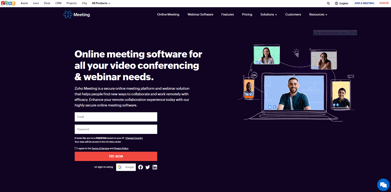
Zoho Meeting is the web conferencing platform under the Zoho ecosystem that offers comprehensive features for webinars and online meetings. The platform is completely browser-based, which means users aren’t required to download any application to attend a meeting or webinar. Recognized as one of the most easy-to-use and affordable web conferencing tools, Zoho Meetings can be used to host sales presentations, product launches, feature demonstrations, in addition to online meetings and webinars.
| Company | Zoho Corporation |
|---|---|
| Year founded | 2000 |
| Company size | 10,001+ employees |
| Headquarters | Chennai, Tamil Nadu |
| Social Media |

| Capabilities |
API
|
|---|---|
| Segment |
Small Business
Mid Market
Enterprise
|
| Deployment | Cloud / SaaS / Web-Based, Desktop Chromebook, Desktop Mac, Desktop Windows, Mobile Android, Mobile iPad, Mobile iPhone |
| Support | 24/7 (Live rep), Chat, Email/Help Desk, FAQs/Forum, Knowledge Base, Phone Support |
| Training | Documentation |
| Languages | English |
Zoho Meeting Pros and Cons
- Offers browser-based access
- No-cut off times
- Interactive video conferencing feed
- Comprehensive solutions under one roof
- Limited advanced customizations
- No HD audio, and on-demand webcasting for the webinar feature
- No technical support hotline





Compare Zoho Meeting with other popular tools in the same category.
Affordability, and that we can connect it to the Zoho CRM.
We do not dislike anything. No apparent downsides.
Ease of access to affordable webinar solution.
Its sound is totally crisp, has great scheduling facility, RSVP and good screen sharing allows us to make recordings. Our marketing has been able to get webinar meetings. Our sales teams have been able to capture leads through our webinars, zoho has reminders for participants, direct links. Zoho meeting allows us to easily design in visual panels, the platform it has allows us to comment and collaborate on our work.
It has some mobile applications that can be improved, the user interface is not very optimal, does not have customization of the management of boards, does not have many tools for error elimination, could have the ability to work with other task management systems , when sending mails or sharing assignments does not allow to set a template as the tasks appear when sharing.
Zoho Meeting is a platform that helped us to increase connectivity with our medical teams, since being a platform so easy to use and so easy to access gives us full comfort. It should be noted that being so low cost makes it totally profitable for our team, Zoho has really been a solution of full efficiency as it adapts to all our needs of use.

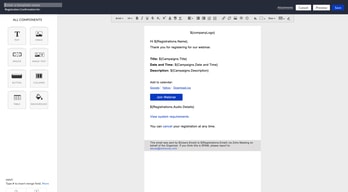
I choosed it because of I'was already using Zoho CRM Plus and I think that data integration between different platformo is foundamental. I can create a Registration form that feeds automatically my CRM and keeps always updated every record about lead I invited to the webinar.
Form registration customization is not so flexible and lack of a complete integration with outlook (no calendar automatically sended for registration on outlook)
Before using Zoho meeting for webinars I had to use a lot of different tool in order to manage invitation, registration, streaming and follow up. With this tool each fases is managed by specific features.
Not the easiest, or hardest. Zoho can be confusing, not a lot of support. Nothing really the "best" ok on the scheduling part and notifications
lack of support and help features, lack of instructions
no problems solved, just allowed for online meetings.
Not being apart of big tech, zoho has been a relief.
It's not exactly as easy to use as some of the feature rich applications but it's getting there
The ability to have live meetings with colleagues and guests

It is the application I'm using daily in my work, I like its screen sharing feature, password protected meetings, giving access of the machine over the meeting
Noise cancellation is the only thing which can be better, rest of the things are working as expected.
it is the major thing in solving the WFH problems, we conduct meetings, one on one sessions through zoho meeting
The integrations to Zoho CRM and campaigns
A live chat during Webinars would be great
connect with potential customers and holding webinars
The integration between CRM and meetings
Lack of noise reduction feature is a pain point
1> Pricing is Cheap 2> Integration with CRM
user friendly and intuitive. easy to invite other co-sharing hosts
some of the reminders didn't go out as expected and we couldn't find a way to teste before. Could be good to have an evaluation form immediately after the end of the webinar
being able to do webinars for several people.
Webinars are easy to set up. There is an integration with ZoHo CRM.
At the moment I have no points for improvement (yet)
We can no longer organize informational events for our customers so we do it online now.
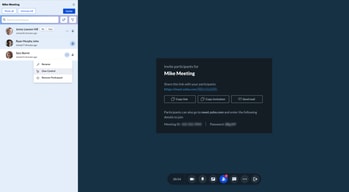
Zoho Meeting has a feature that notifies participants about meetings through email invitations and follow-up reminders. Additionally, it is possible to integrate with Zoho Bookings to book online meeting appointments at participants' convenience.
The video recording feature is only accessible through its premium plans. Also, the number of participants who can join a single meeting or webinar depends upon the plan that the user has bought.
Zoho Meeting has become a quick solution for conducting a virtual meeting with our customers rather than meeting them in person during this global pandemic situation.
Ease of use within zoho platform. Visually simple.
Just getting used to a new platform is always clunky
Streamlining platforms
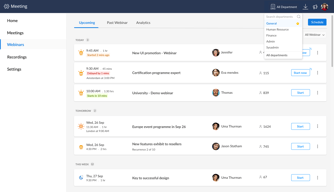
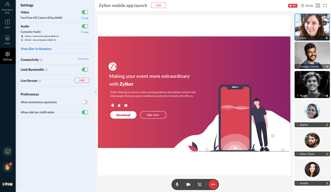
The most terrific features that I realized while using Zoho Meeting are that it has two distinctive features that allow a user to join or create a meeting or webinar right through its dashboard. Other than this, it is possible to record the entire meeting/webinar session and can be accessed later through its recording tab.
Whichever plan a user goes for, there is always a limitation on the number of participants allowed to join any meeting or conference. Also, the user interface is a bit chunky and old fashioned.
I mostly prefer using Zoho Meeting for an internal team meeting and quickly conduct one-on-one meetup with any of our clients. The cross-platform availability of this application has made it a versatile and mobile online meeting application.
The support staff and chat responded quickly
Could not transfer ownership of account to another email
Hosting a webinar for a smaller audience. Other webinar platforms are costly with an excessive amount of unused features. Zoho had what we needed for this webinar.
Pricing options with the features as it provides great features at best rates. The recording is pretty good too.
Nothing much as such. It is a good basic tool to use. It could have better features like room break out and all like zoom, but it is still doable.
We are helping students connect with Industry

The features are all up to the mark, video quality is good and we can host webinars with ease
Pricing, most video conferencing providers are giving free access to many number of participants while zoho free version only allows 3 including host
Mainly meeting people online

I liked how user-friendly the product is. I like the fact that attendees do not need to download additional software to join the meeting. Also, their sales team are quick with responses.
I will have a better view of this after I have spent more time using the product.
It helps me having meetings with my team members who are located in different parts of the country. It is early days but I hope to use it to host free events for law students and members of the community, that help raise awareness and offer support during these difficult times.
Simplicity and ease of use...especially features such as Polls
Takes a while to set up and ensure attendees, this may be as it is the free version.
Current streaming software has been removed.
Ease of use and integration into our other Zoho suite of products like CRM and Bookings
Some issues when several presenters are in at the same time generates some audio problems.
Since we use zoho crm and other products from Zoho we can easily create the meetings and start them up very quickly.
It is very easy to join meetings. Easily sharable
The presenter cant be changed and thus access control is an issue
Presenting screen is much easier
Simple & clean to use while doing daily work
UI/UX could have been better...sometimes too many features confuse me and it doesn't get sync with mail
meeting with internal & external team
We like the function and ease of use of the software
We dislike the setup up and input of data
We are solving the working for home issues and able to collaborate across teams
the price and service are very good and meet the needs of those who need a meeting with good quality
the interface, navigation and sounds are a bit confusing compared to those of your competitors.
Meeting with a good number of people
Its a good and economical tool for meetings
nothing that comes to mind right away wrt dislike
we are using zoho ecosystem and its tight integration with other apps will help us in seamless working.
Zoho Meeting is very useful for meetings and conferences, as it can support a large capacity of participants. The audio and video quality is very good. Screen sharing is possible, which is very convenient for troubleshooting other computers. Meetings can be recorded, which is essential if you are running online classes or holding important meetings.
The cost for small companies is very high, taking into account that it is the same cost for large companies, so I suggest a more accessible cost for companies that hold meetings with few participants.
We can plan our weekly activities and avoid having to meet at the organization's offices, where there is currently a maximum limit of people per room due to Covid.
Features & Pricing than rest of the competitors
Storage of Just 10 recordings. Can be increased.
Team and client meetings.

It's already integrated into the zoho systems that we currently use including already existing user db.
On the opposite scale, more freedom for users not integrated with the Mail aspect of Zoho, as that we do maintain with MS Office.
Affordable meetings at scale on the fly, with important user admin.
Zoho is a perfect tool for organizing webinar. The web interface, desktop app, and mobile app are all user friendly. I organized webinar with peers at the other end of the world, and everything went perfectly. I recommend
Desktop app has a lot of features, and a few of them are not available in the web interface, like taking over controlling on participant's microphone.
Much better price than the famous apps around. And Zoho interface is nicer and is more adapted to startups and smal businesses needs
Zoho Meeting is a software that I like because it is cross-platform. It is easy to use and it is also easy to share the meeting link. Audio in video conferencing is very well optimized so it is heard very clearly. It has a very useful meeting reminder tool. Also, it also has a tool to make polls.
I dislike that only a maximum of 10 recordings can be stored per account because the additional storage is very expensive.
Since we have been using this application, we can hold business meetings online frequently. One of its greatest benefits is that its cost per month is very affordable, so compared to the operating expenses of a physical meeting room we save large amounts of money.

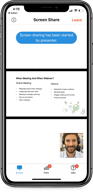
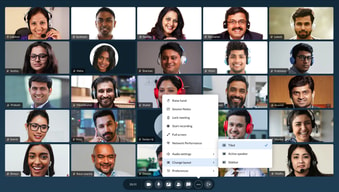
Zoho Meeting gives the presenter control with everything related to the guest. It is possible to mute all participants, show the screen and also record the meeting. I also like that it is possible to send reminders to pre-meeting participants. It has a clean and intuitive interface, which greatly facilitates its use.
The only thing that disgusts me about Zoho Meeting is that it is mandatory to install a software that is downloaded when trying to enter a meeting, since sometimes the antivirus alerts you as a virus and does not allow its installation, and therefore cannot join the meeting.
This software has certainly helped the various members of my team to meet remotely while our city is quarantined due to Covid-19. We can also meet with our clients and update them on the progress of our most recent projects as well as developments.